AI-Generated Results
Finding matches…
Recoveryfix CSV Splitter is a specialized software application designed to divide large CSV files into smaller, more manageable segments. This utility is particularly useful when dealing with massive datasets that are difficult to open, process, or share due to their size.
Key Features:
Split by rows: Divide CSV files based on a specified number of rows per file
Split by file size: Break down large CSV files into smaller files of a defined size
Maintains data integrity: Preserves the original data structure and formatting during the splitting process
Header preservation: Automatically includes column headers in each split file for easy identification
User-friendly interface: Simple and intuitive design that requires minimal technical expertise
Batch processing: Handle multiple CSV files simultaneously for improved efficiency
Not seeing what you're looking for?
Dive deeper into "UFile" on G2 AI

PloViewAuto reads a lot of HPGL/Vector/Image files continuously, and converts it into format files often used, such as PDF, TIFF, DXF, and IGES, at high speed automatically. 1. File format which PloViewAuto handles is as follows. (1) Output 1 * Input HPGL,HP-GL/2,HP RTL,PDF,DXF,DWG,GERBER,NC-Drill,IGES,SXF,EMF,TIFF,JPEG,Bitmap,PCX,FPX,GIF,PNG * Output PDF,HP-GL/2,EMF,TIFF,DXF,DWG,JPEG,Bitmap,IGES,SXF, PCX,FPX,GIF,PNG,,CMT,HPGL/Printer (2) Output 2 * Input PDF * Output WMF, EMF, PS, EPS, SVG, XPS, HPGL, PCL 2. Output mode has the two following modes. (1) Standby output mode The same input file as specified input file name with wild card is looked for, if it is, it will output, and input file is automatically deleted after output. When there is no input file , it waits until file comes. (2) Batch Output mode Plural input files described in specified output list file are outputted continuously. 3. This program is the automatic output special edition version PloView and set. This program generates command line which starts the automatic output special edition version PloView, and has function to start PloView. Example of PDF output command line of PloView : PloView.exe /p abc.hgl abc.pdf.

Cigati OneDrive Duplicate Finder and Remover is a reliable utility designed to detect and remove duplicate files from your OneDrive cloud storage quickly and safely. Over time, duplicate photos, documents, videos, and other files can accumulate due to repeated uploads or syncing, consuming valuable storage space and making file management difficult. This software scans your entire OneDrive account and accurately identifies identical files so users can easily clean up unnecessary duplicates.
The tool uses advanced algorithms to detect duplicate files based on attributes such as file name, size, and other parameters, ensuring precise results without affecting original data. It provides a preview option that allows users to review duplicate items before deletion, giving full control over which files should be removed.
With its intuitive interface, even non-technical users can scan and remove duplicate files in just a few clicks. The software helps reclaim storage space, keep OneDrive organised, and improve overall file management. It supports various file types and works smoothly on major Windows versions, making it suitable for both individual users and organisations that rely on cloud storage for collaboration.
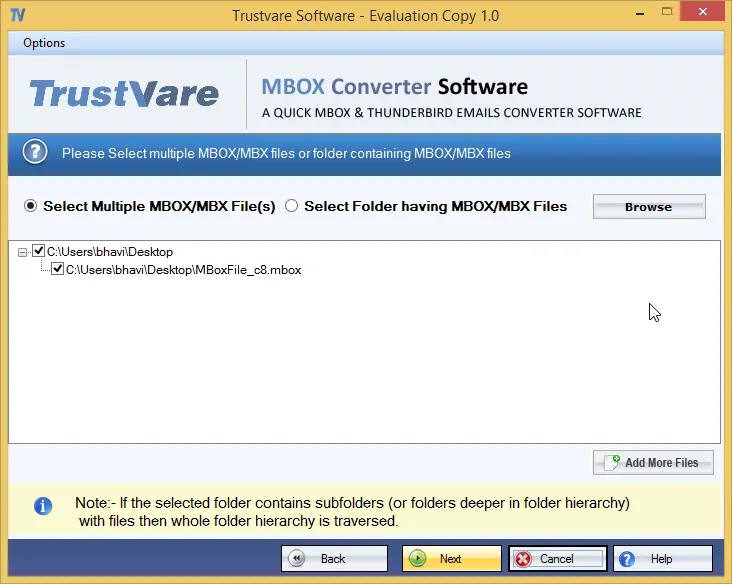
With the TrustVare MBOX to PST Converter Software, users can convert limitless MBOX files to PST for Outlook. No data is lost throughout the process. It is safe to use this program for exporting MBOX files to PST format in bulk. It is possible to combine several MBOX files into a single PST file with this tool. With this feature, users can also make distinct PST files for each MBOX file. The TrustVare MBOX to PST converter makes it easy to move various MBOX files to PST format. The software works with all major email programs that use MBOX files, such as Apple Mail, Thunderbird, Power Mail, Eudora, Poco Mail, SeaMonkey, and more. Any version of MS Outlook can be used with this program, including 2021, 2019, 2016, 2013, 2010, 2007, 2003, etc. Because of these features, the user's job is easy, safe, and done correctly every time. Users can easily add one or more MBOX files into Outlook at the same time, which gives you a number of ways to save your files. When it comes to Windows, this app works with Windows 11, 10, 8.1, 8, 7, and previous versions.
Outlook PST Converter tool is a migration tool that helps users to migrate their Outlook PST file into other file formats like MBOX, EML, MSG, and DBX. The tool performs the process of migration effectively and efficiently. The time for all the processes of conversion is less just because of the tool’s highly optimized algorithm which performs the conversion in a fraction of time. The data of the Outlook PST file remains the same or intact during all the conversion processes. The tool is equipped with a lot of salient features which makes it convenient for the users to use. The PST converter offers the following features to its users: Convert Outlook PST to EML or MSG, Converts Corrupt or Inaccessible PST Files, Converts Encrypted Outlook PST file, Multiple File Naming Convention, Smart Preview of Recovered PST Files, PST File converter Snapshots, etc. The tool offers a simple and highly user-friendly Graphic User Interface that is easy to handle and self-descriptive. Even a newbie can easily convert PST files using this tool. That means you don’t need to be technically savvy to handle this tool. The tool is widely compatible with all the Windows OS and can convert PST files, created by any version of MS Outlook.

PloCompAuto is a program that automatically and continuously converts files with the following formats. When there are a large number of drawing files, multiple drawings can be overlapped to form a single drawing. When the difference between two drawings is color-coded or the change area is calculated, it is very efficient. [Outline] *Output 1 Input:HPGL, HP-GL/2, HP RTL, PDF, DXF, DWG, GERBER, NC-drill,IGES, SXF, TIFF, JPEG, Bitmap, PCX, FPX, PNG, GIF, EMF, CMT Output:PDF, TIFF, DXF, DWG, JPEG, BITMAP, IGES, SXF, EMF, XPS,PCL, WMF,PS, EPS, SVG, GIF, PNG, PCX, FPX, CMT,HPGL/Printer, PloComp screen Compare the drawings of the two input files, add the changed area, and output. *Output 2 Input: PDF Output: WMF, EMF, PS, EPS, SVG, XPS, HPGL, PCL [Output mode] (1) Standby output mode The specified folder is monitored and output when an input file arrives. The input file is automatically deleted after output. If there is no input file, wait until the file arrives. It also supports drawing comparison. When an input file is received, (3) Drawing comparison between folders is started. (2) Batch file output mode Multiple input files listed in the specified output list file are output continuously. Also supports drawing comparison. You can open multiple input files at the same time. When the output is on screen, start PloComp and display it on the screen. When you exit PloComp, PloComp starts again and displays the following screen. (3) Inter-folder drawing comparison The input files with the same file names in the two specified folders are continuously compared, and the changed area is added and output. PloCompAuto is a set with automatic output special specification version PloComp (hereinafter referred to as PloComp). PloCompAuto generates a command line to start PloComp and has a function to start PloComp. You can also start and convert PloComp from your application. PloComp HPGL input, PDF output command line example: PloComp.exe /p ab1.hgl /oab.pdf
MSG to PST Converter Software for Outlook is a Windows msg to pst converter for anyone sitting on a folder of single Outlook messages that were dragged out to the desktop over the years. The program goes through those MSG files on your own PC and builds one Unicode PST archive, which you then attach in Outlook like any data file. Outlook can stay closed, or be missing from the machine entirely, and no mail is sent to a web service along the way.
🛠️ How to use
1. Start the msg to pst converter and drop the MSG files onto its window, or use Add File to select the folder that contains them.
2. Choose PST as the target format. Everything in the list is written into a single archive.
3. Press Start and let the run finish. Your source files are not changed.
4. Attach the new archive in Outlook through File, Open, Outlook Data File.
💼 Why IT and office teams pick it
Each MSG file is a small OLE container with Outlook's MAPI properties and its attachments packed inside. The tool reads those properties directly and moves them over: subject, HTML or plain text body, sender, to and cc recipients, dates, plus whether a message was read. Every attachment stays with its parent message in the archive. Subjects and names written in Cyrillic or another non-Latin script come through readable, so a mixed-language mailbox stays searchable. The whole MSG to PST job happens offline, so client correspondence never touches someone else's server.
👥 Who uses it
Office staff with years of project mail sitting in desktop folders who want to search it from Outlook again.
Support and records desks that file ticket replies and case notes one message at a time and need a single archive per client.
People switching to a new computer with a stack of messages copied from the old one, before an Outlook profile is even configured.
IT admins asked to collect what a departing employee saved locally and hand it over as one file.
❓ FAQ
Do I need Outlook installed to read MSG files?
No. The msg to pst converter has its own reader, so the PC does not need Outlook. The output PST can be opened in Outlook later or simply kept as an archive.
What is the difference between an MSG file and a PST?
An MSG file carries one message. A PST stores many messages in folders inside one file, and this tool builds that archive out of your loose messages.
Can I add a large batch of files in one go?
Yes. When you convert msg to pst here, every file you add lands in the same PST during a single run, so there is no need to split the work.
Does it work with EML, MBOX or OST files?
No. This program reads MSG files only, and it does not connect to a live mailbox or an Exchange or IMAP server. Separate SoftOrbits tools handle EML, MBOX and OST conversion to PST.
✅ Free trial for Windows 10 and 11 with no sign-up. The finished PST opens in Outlook 2016 and later.

Raimist Software is a certified FileNet Partner specializing in FileNet Content Management Solutions. Raimist Software specializes in building secure enterprise document management systems for the the Federal Government, Healthcare Systems, and large Insurance Companies. We help organizations make their confidential and classified documents accessible worldwide under the protection of the most advanced security controls.
This DataVare OFT to MSG Converter Software application enables users to effortlessly convert a large number of OFT files to MSG file format for all versions of Outlook, including 2021, 2019, 2016, 2013, and 2010. This application maintains the email properties (cc, bcc, to, header, from, etc.) and the data layout format throughout the conversion procedure. Additionally, this application is advantageous for users who lack technological proficiency. Additionally, this sophisticated application is compatible with all versions of the Windows operating system. If one wishes to export a few Outlook file templates OFT files to MSG files in Outlook, a free trial is available.
Procedures for Converting Outlook Template OFT File to MSG -
- Initially, obtain and execute the application on your Windows operating system.
- Subsequently, examine the OFT file or folder.
- It examines and displays a live preview of the selected OFT files in both vertical and horizontal orientations.
- Next, select MSG from the export options.
- Choose the destination path for the MSG files created as a result. - Finally, click the "Convert Now" tab to initiate the OFT to MSG converting process.

BitVare has launched the PST Converter that can simply export Outlook PST Files without missing any details. The PST migration tool can export all PST files to other saving file formats & webmail apps. The BitVare PST Converter has advanced solution for Windows & Mac OS that can effortlessly import PST files to MBOX, PDF, EML, Gmail, Office 365, Exchange Server, Hosted Exchange Server, Yahoo Mail, DOC, RTF, etc. The best BitVare PST converter is designed with all developed function to provide safe & simple PST file migration. The program supports advanced PST migration process. It allows exporting 25 emails from each selected PST file to MBOX, PDF, Gmail, Office 365, at free of cost. The BitVare PST Converter program is rapid program that smoothly add PDF files to other saving option. The program support ensured processing for getting PST files in other file & webmail application.

PNG to Favicon Converter is a browser-based tool that converts image files into favicon packages compatible with web standards. It supports PNG, JPG, SVG, WEBP, and GIF files up to 5MB, using HTML5 Canvas technology to ensure file privacy by processing entirely within the browser. The tool generates a complete favicon package, including favicon.ico with multiple sizes, PNG files at 16x16 and 32x32 pixels, Apple Touch Icons at 180x180 pixels, Android Chrome icons at 192x192 and 512x512 pixels, and a site.webmanifest file for Progressive Web Apps. Users can customize background colors, rounded corners, and output sizes. The tool employs the browser's HTML5 FileReader API and offscreen Canvas elements with bilinear interpolation for high-quality scaling. It compiles multi-size .ico files and packages all outputs into a ZIP archive using JSZip. Additionally, it provides HTML code snippets for implementation and preview images of the generated favicons before download.

PloCon is program which carries out continuation output of the drawing of PDF/HPGL/image file at Windows printer, and there are the following functions. It does not give displaying.
(1) Paper and output scale - Specify fixed form paper, and carry out automatic scaling so that paper size may be matched. - Specify fixed form paper and output with designation scale. - Select fixed form paper automatically with designation scale. It is automatic selection about fixed form paper and direction of the optimal printer matched with drawing size which applied scale to drawing area.
(2) Output from interactive output and other applications.
(3) Color and width change of line, whole drawing black and white / color change, background color change, pen ON/OFF
(4) Vector font / TrueType font change of character font
(5) Multi-page correspondence
(6) Support to many input file formats PDF,HPGL,HP-GL/2,HP RTL,DXF,DWG,IGES,GERBER,NC-Drill,EMF,TIFF,JPEG,Bitmap,PCX,FPX,PNG
(7) Output mode
Mode 1: Automatic output mode It will output, if specified output folder is supervised and PDF/HPGL/Image file enters in output folder, and PDF/HPGL/Image file after output is deleted automatically. When there is no drawing file, it waits until file comes.
Mode 2 : Continuation output mode Plural drawing files described in specified output list file are outputted continuously.
Mode 3 : Step output mode One file in plural drawing files described in specified output list file is outputted, and it waits for the next output directions.

SysInfo Add Outlook PST Tool is a simple and efficient software designed to help you add multiple PST files to your Microsoft Outlook profile quickly and securely. With this tool, you can easily import PST files of any size into Outlook without altering the data or structure. Whether you're working with ANSI or UNICODE PST files, SysInfo makes it easy to manage them all at once. This tool is perfect for anyone looking to import or open PST files in Outlook, especially if you have multiple files to add. It allows you to add files simultaneously, saving you valuable time. Plus, the advanced search feature helps you find PST files on your system with ease. The Add Outlook PST Tool ensures that your data remains intact throughout the process, and it supports all versions of Microsoft Outlook. Whether you need to import emails, contacts, calendars, or other Outlook items, this tool offers a fast and hassle-free way to manage your PST files. It is compatible with all versions of Windows and is easy to use, with no technical knowledge required. With a free version that allows you to add up to 10 MB of PST files, you can try the tool before upgrading to the full version for unlimited file size support. Whether you're handling a few or many PST files, SysInfo Add Outlook PST Tool is your go-to solution for managing your Outlook data efficiently.
Softaken PSD Recovery Software is intended to assist users in recovering lost, damaged, or accidently deleted PSD (Photoshop Document) files. The app has a simple and easy layout. So users don't have to be a tech expert to utilize it. Before restoring the PSD files, the application allows users to preview them foe ensuring that they recover the accurate files they wanted to be recovered. The tool safeguards the security of the restored files. It will not replace the current data and will restore the files without causing additional damage. This utility can handle huge files and many file recovery at the same time without imposing any limitations, saving significant time when dealing with enormous amounts of data.
Key features:
- It is compatible with all versions of the Windows operating system, including Windows 11, 10, 8.1, 8, 7, Vista, and XP.
- This enables users to specify a destination path for storing the recovered PSD files to their local PCs.
- It automatically restores all color palettes from the PSD file, including CMYK, grayscale, RGB, and others.
- The software is suitable with all Adobe Photoshop versions, including CS5, CS4, CS3, CS2, and CS1.
- With its excellent features, users can quickly retrieve the data from PSD files.
- Users can also download a free trial version of this utility to evaluate its functionality and recover some PSD data.
- Users can upgrade to the licensed edition of this software in order to restore PSD files without any restrictions.

Export OLM to Outlook PST using OLM converter software from MsOutlookHelp. It is a convenient tool that effectively migrates OLM files from Mac Outlook to PST in Windows Outlook. It performs successful OLM conversion of all the emails and other mailbox data files such as contacts, events, notes, calendars, journals, etc. There is also an option to save the output files to different file formats apart from Outlook PST such as MSG, EML, and MBOX. If you want to export a particular OLM file but are not able to locate that, this tool will help you in that. It is featured with an Auto search option to find out a specific file for facilitating the users. A preview option is also available to preview all the mailbox contents before final saving. One of the most important features of this OLM to PST Converter software is that it supports both normal as well as corrupted OLM files for exporting it to Outlook. This software creates an LOG file that contains entire conversion process info i.e. scanning, recovery, conversion, etc. and this file is automatically stored at a user-defined location in HTML format. You can also choose only selected emails and other files for conversion by putting a Date range filter. Users do not have to think for compatibility and support. It supports OLM files generated by any version of Mac and can convert it to any version of MS Outlook. Also, it is compatible with all the versions of Windows Operating system. The interface of the software is so user-friendly that it can easily be operated by any type of user irrespective of their technical knowledge.

Secured Ultra Defrag on Windows 2016, offered by Cognosys Inc., is a repackaged version of the UltraDefrag software, designed to enhance disk performance on Windows Server 2016 environments. This solution aims to optimize file placement and improve system responsiveness by efficiently defragmenting files, including those typically locked by the operating system.
Key Features and Functionality:
- Comprehensive Defragmentation: Capable of defragmenting all files, including system files like the Master File Table , paging files, and hibernation files, by operating during the Windows boot process.
- Boot-Time Defragmentation: Executes defragmentation before the operating system fully loads, ensuring that even locked system files are optimized.
- Graphical User Interface : Provides a user-friendly interface to monitor and manage the defragmentation process visually.
- Console Interface: Offers a command-line interface for batch processing and scheduling defragmentation tasks.
- Explorer Integration: Allows users to defragment individual files, folders, or entire drives directly from the Windows Explorer context menu.
Primary Value and User Benefits:
By deploying Secured Ultra Defrag on Windows Server 2016, users can significantly enhance system performance and responsiveness. The software addresses the common issue of file fragmentation, which can lead to slower system operations and increased load times. Its ability to defragment locked system files during the boot process ensures comprehensive optimization, leading to faster data access and improved overall efficiency. Additionally, the inclusion of both GUI and console interfaces provides flexibility for users to manage defragmentation tasks according to their preferences, whether through a visual interface or automated scripts.

To export Outlook MSG files to MBOX format users can use this MailVita MSG to MBOX Converter program. An easy-to-manage tool that helps make easy export of Outlook MSG files in MBOX format. For more accurate users, the app performs the extraction function. The immediate effect is given to the application using this tool. Safe and secure users are able to transfer Outlook MSG files in MBOX format. The application manages file integrity and helps maintain file authenticity. One or more Outlook MSG files can be transferred by the program. Using this application any user can follow the uninstall function. Apart from it, with many advanced features, any user can send Outlook MSG files to MBOX. Users need to export Outlook MSG files in MBOX format as Outlook MSG format supports one file and MBOX format supports multiple files. The app can work on any application. In a few simple steps, users are able to follow the conversion process easily and simply. This MSG to MBOX Converter tool can be easily and effectively used on any Mac Operating System from an older version to a newer version. Users should try the free demo version of the app to get more details about the app. If the user is not satisfied with this free demo version then they can purchase the licensed version of the tool. You are using which users can convert any number of MSG files into MBOX format. Moreover, this app is tested by several well-qualified professionals.

WarpSend is a high-speed file transfer platform built for teams that need to move, share, and synchronize large files directly from computers, servers, and NAS devices.
WarpSend works with files where they are already stored. Teams can connect supported NAS environments and transfer files directly without first uploading them to a separate cloud storage platform, copying them to a local computer, or changing their existing storage workflow.
Key features include:
* **NAS compatibility:** Access and transfer files directly from connected NAS storage, making WarpSend suitable for teams with centralized media libraries, project archives, shared folders, and on-premises storage.
* **WarpDirect:** Transfer large files and folders directly between connected devices and storage locations at full available network speed.
* **WarpShare:** Upload once and create a secure download link that can be shared with multiple recipients without requiring an account or app.
* **WarpSync:** Synchronize files across team members, offices, computers, and NAS locations.
* **Background transfers:** The WarpSend Agent manages transfers independently from the browser.
* **Reliable delivery:** Interrupted transfers can resume without restarting from the beginning.
* **Secure transfers:** Files are encrypted during transfer, with encryption keys remaining on the connected endpoints.
* **Large-file support:** Transfer individual large files or folders containing thousands of smaller assets without traditional file-size restrictions.
WarpSend is designed for media, creative, engineering, and distributed teams that rely on NAS storage and need a faster, simpler, and more reliable way to move files between people, devices, and locations.

Kalima is AI transcription software for meetings, sales and support calls, interviews, lectures, podcasts and any other conversation. It records the audio right on your computer, so no bot joins the call.
Who uses Kalima
- Teams and companies: meetings, remote teams, sales and customer support
- Education: lectures, seminars and training, with live translation for students
- Research and product teams: interviews you can quote exactly
- Healthcare teams: handovers, coordination and training across languages (not a clinical documentation system)
- Events and conferences: the audience reads the live transcript on their phones
- Podcasters and creators: transcripts, show notes and subtitles
Transcription and AI
- Live transcription with automatic speaker labels and timestamps
- Live translation into 60+ languages, original and translation side by side, even when someone switches language mid-sentence
- Upload audio and video (MP3, WAV, M4A, MP4, MOV and more), up to 10 files at once
- Playback with word-by-word highlighting and chapters; click any word to jump there
- AI Studio: summaries, tasks and decisions, plus a chat that answers questions from the transcript
- Search across all sessions
- Export as PDF, TXT, JSON, SRT, VTT or a Markdown summary
Collaboration
- Live sharing: others read along while you record. Open it to anyone with the link or only to chosen people, teams and organizations, with password, expiry and viewer rights
- Workspaces and projects keep clients and topics apart
Desktop app for Windows, macOS and Linux
- Meeting detection offers to record when a call starts, with optional auto-start and auto-stop
- Records your computer's audio and microphone, so it works with Zoom, Microsoft Teams, Google Meet, Webex, Slack huddles, Discord and any app that plays sound
- Privacy mode keeps the Kalima window out of screen shares and screenshots
- Screen recording, picture-in-picture, tray and shortcuts
- Browser extension for Chrome, Edge and Brave notices Meet, Zoom, Teams, Webex, Jitsi and Whereby calls in a tab
Integrations
- MCP server for Claude, ChatGPT, Cursor and VS Code: your assistant searches your transcripts and names the meeting and moment behind each answer
- 9,000+ apps through Zapier, 3,500+ through Make and 2,000+ through n8n, with ready-made setups for Notion, HubSpot, Slack and Asana
- REST API
Platforms
Web app in any modern browser, desktop app for Windows, macOS (Apple silicon) and Linux, Android app on Google Play. On iPhone and iPad, Kalima runs in the browser.
Privacy and security
Kalima is a German company based in Düsseldorf. Recordings and transcripts are stored in Germany, encrypted at rest and in transit, and never used to train AI. A GDPR data processing agreement is included.
Free plan available, no credit card required. Some features, such as screen recording, the REST API and automation integrations, require a paid plan.

vCard Duplicate Remover is a fully automated and leading solution to remove similar contacts from multiple VCF files. This tool features an interactive and user-friendly GUI, making it effortless to remove duplicate contacts. Additionally, the software offers users exclusive features. Users have the feature to apply duplicate filters based on Phone Number, First Name, Last Name, and Email Address. This comprehensive software enables users to merge multiple VCF files into a single VCF file. The VCF Duplicate Remover includes a feature that allows users to save contacts based on First Name, Last Name, Email Address, and Phone Number, or save contacts using the name of the vCard file. Furthermore, users can define the paths for Log, Temp, and File according to their preferences. The tool is designed to be compatible with all vCard file versions and Windows operating systems. Additionally, a demo version of the tool is available, allowing users to add up to 10 VCF files and save 25 unique contacts. To access all the features, simply download the vCard Duplicate Remover Tool. Run the VCF Duplicate Remover as an administrator. Upon launching the tool, you will have the choice of two options: Add Files or Add Folder. Click Add files and browse the VCF files and click Open. Once the software wizard displays the added files, proceed to click on the Filter Panel option. This will direct you to the filter section, where you can select your preferred duplicate filters. Additionally, users have the option to add saving filters and define the file-saving path. After configuring your preferences, click on Next to initiate the Duplicate Removal process. Users can easily use this tool without any prior knowledge, thanks to its interactive GUI. Additionally, a software guide is provided to assist users in understanding the working procedure.