AI-Generated Results
Finding matches…
Cigati PST to Office 365 Migrator Tool is one of the most prominent software which can convert the Outlook PST files into the Office 365 email client without causing any kind of hindrance. It also migrates the PST files into the Live Exchange Server. This software offers to choose or select Multiple PST files at a time to convert the files. This software is equipped with several advanced features that make the process of migration of PST files into Office 365 easy. One of the basic features is that this software helps to convert the files in bulk. This software also has the feature of previewing the files while continuing the process of conversion. Users can view the contents of the Outlook PST files before starting the process of migration and select the files according to the needs of the users and also users can view the attachments of the PST files in the same way accordingly. Cigati PST to Office 365 Migrator Tool has a very excellent feature where users can assign Impersonation Rights Attribute is the most important aspect in transferring the PST files into Office 365. This feature can help the users to check and include the sub-accounts in the migration process. Users can see all the child accounts and can select that users can wish to include it in the process of migration. One of the most advanced features of this utility is that it has a Mail filter Option, where users can mark the dates range from start to end to migrate the emails accordingly. In this feature, users can select the files for migration in between the start and the end dates which users want to convert. This software has a separate feature where users need not think about where to save the files after exporting the files, It saves the files into the default folders. This software also removes duplicate emails. Users can erase the emails from the conversion which are already migrated.
Not seeing what you're looking for?
Dive deeper into "UFile" on G2 AI

BitCopy is a file copy program for Windows. Create copy sets (jobs) to copy files between any local or remote directories. Select files to copy at each level of a directory hierarchy using a filter expression involving file name/path/date/size. Use AND/OR/NOT to build filters of arbitrary complexity. Use different filters for different subdirectories. Build and test filters interactively. Efficient and robust design can handle millions of files and terabytes of data in a single copy set. Overwrite only changed files, or always overwrite files, or never overwrite files in the target directory.
Stella exchange email recovery software is useful tool for recover exchange edb file data in to pst file. stella exchange email recovery software support all the version of the exchange edb file. stella exchange email recovery software recover unmounted edb file data in to pst file. stella exchange email recovery software recover 32bit and 64bit edb file data. Stella exchange email recovery software recover corrupted edb file data into pst file. for more info visit this link https://www.stelladatarecovery.com/exchange-edb-recovery.html

AI Finder is an AI-powered file management agent designed exclusively for macOS, enabling users to locate files and folders effortlessly through natural-language queries. By simply describing the desired file or its content, AI Finder swiftly identifies and retrieves the relevant documents, eliminating the need to recall specific file names or locations.
Key Features and Functionality:
- Natural-Language File Search: Utilize conversational language to search for files based on content, creation or modification dates, specific keywords, duplicate files, and more.
- PDF Interaction: Engage with PDF documents by asking questions, summarizing content, and extracting key insights without reading the entire document.
- Privacy and Security: All file analysis is conducted locally on your device, ensuring that no content is uploaded to the cloud. AI Finder adheres to your system's privacy and permission settings.
- Sandboxed Environment: Operates within a sandboxed environment, requiring users to create a Workspace that includes the files and folders they want AI Finder to access, thereby maintaining system security.
Primary Value and User Solutions:
AI Finder streamlines the file retrieval process by allowing users to search using natural language, significantly reducing the time and effort required to locate specific documents. Its advanced search capabilities, including content-based queries and PDF interaction, cater to professionals, researchers, and students who manage extensive digital files. By performing all analyses locally, AI Finder ensures user data remains private and secure, addressing concerns about cloud-based file management solutions.

Aryson OLM PST Converter tool permits to save all mailboxes from the Mac Outlook OLM file to Windows Outlook PST file format. The software could be used when users want to switch from Mac Outlook to Windows Outlook. OLM Converter software allows you to export emails from OLM file to Windows Live Mail, Thunderbird, Zimbra, MS Outlook, and Exchange Server successfully. It enables us to transport OLM file emails along with its attachments into EML, MSG, MBOX, and PST file format. The software supports any size of the OLM file and exports them into the Windows Outlook mailbox. OLM PST Converter software supports all version of MS Outlook such as Outlook 2016, 2019, 2013 and below versions, therefore, it can save OLM files as PST file of any version of MS Outlook. The software successfully installs and runs on all versions of Windows platforms and export OLM file into Outlook PST file with all email properties.
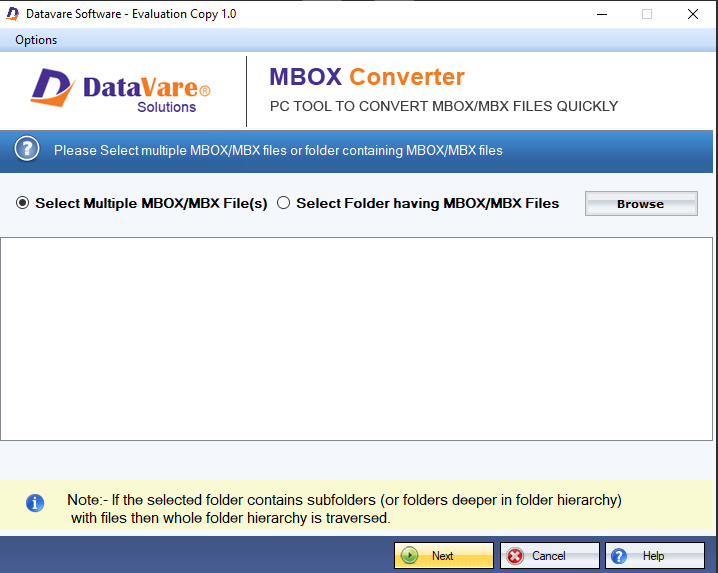
Move all MBOX files to the TGZ format with the DataVare MBOX to TGZ Converter Expert tool. Users can save emails from MBOX files to TGZ files without worrying about how big the MBOX file is. Not losing data is not a problem when transferring MBOX files to TGZ files. It supports all mbox compatible email clients such as - Mozilla Thunderbird, AppleMail, Eudora, Entourage, etc. Users can get a comprehensive view of the loaded MBOX files before they migrate to the TGZ file format. The folder layout is also kept the same during the conversion. All of the information about the migration process is saved in a log file that is made automatically when the process is over. When you convert MBOX files to TGZ format, the Zimbra email client can easily and without any problems read them. Using the free trial version of the program, users could convert the first 25 things in each folder to see how it works.

Datavare OLM to PST Converter is developed to smartly convert Mac Outlook OLM file to PST file format. It helps users to smoothly convert Mac Outlook files to Windows Outlook PST file format. To use this program, no additional program installation is required. Users can comfortably convert all large OLM file to Outlook PST file format without restricting file size.

Delimit is a powerful Windows-based software designed to efficiently manage and manipulate large delimited data files, such as CSV, TAB, and fixed-width formats. Capable of handling files up to 2 billion rows and 2 million columns, Delimit offers a robust solution for users dealing with massive datasets that traditional spreadsheet applications cannot accommodate. Its intuitive interface and high-performance processing enable users to open, edit, convert, and analyze extensive data files with ease.
Key Features and Functionality:
- Open Large Files: Quickly open delimited data files that are several gigabytes in size, surpassing the limitations of standard spreadsheet programs.
- Edit and Manipulate Data: Edit individual cells, find and replace data, and clear contents across entire files or within specific columns and rows.
- Convert Delimiters: Easily convert files from one delimiter to another (e.g., CSV to TAB and adjust line endings between Windows (CRLF and Unix/Linux (LF formats.
- Split and Join Files: Divide large files into smaller parts of equal size or based on column values, and merge multiple files into a single dataset.
- Reorder and Extract Data: Rearrange columns, extract data based on filters or other files, and perform systematic or random sampling of rows.
- Sort and Deduplicate: Sort data based on cell content, randomize row order, and remove duplicate rows based on specified columns or external files.
- Advanced Navigation: Jump to any cell, bookmark cells for quick access, and manage multiple files simultaneously with tabbed viewing and customizable layouts.
Primary Value and User Solutions:
Delimit addresses the challenges associated with handling exceptionally large delimited data files that exceed the capabilities of conventional spreadsheet applications. By providing a high-performance platform for opening, editing, converting, and analyzing massive datasets, Delimit empowers users to efficiently manage their data without the risk of crashes or slowdowns. Its comprehensive suite of features streamlines data manipulation tasks, saving time and enhancing productivity for professionals dealing with extensive data files.
Cigati PST to NSF Converter tool is the most comprehensive software which can convert Outlook PST files into HCL notes NSF files. This software also converts the PST files into different various file formats like NSF, OST, PDF, MBOX, EML, EMLX, MSG, CSV, HTML, TXT, DOC, DOCX, DOCM, PNG, JPG. and also it converts the PST files into various email clients like AOL, Gmail, Yahoo mail, Office 365, Thunderbird, Opera Mail, Live Exchange, Hotmail, Icloud, Godaddy Mail, HostGator, Zoho Mail, Yandex Mail, Amazon Webmail, etc. Its smooth and simple Graphical User interface makes the work easy for both technical and non-technical users. Users can also export or migrate as many PST files once at a time because this software has a feature of selecting the Multiples files all at a time users do not need to convert each file individually, It saves lots of time for the users. This software also has the feature of previewing the file contents. It displays the mailboxes items available in the PST files and users can also check the email message content easily after clicking on the emails. Cigati PST to NSF Converter tool has a feature of removing the duplicate emails through which users can migrate or export only one email removing its duplicate emails while converting the files. This software removes the duplicate mails and leaves the other mails into the box. From this software, users can save the files into their offline storage. Its Mail Filter and Task Filter features help to convert the files from a particular date range and can also migrate only specific mailbox items from the file and leave the rest. Through this tool, users can also create a custom folder and custom name where users can save the file according to their desired location and with the desired name. It has wide compatibility and runs on all kinds of Windows OS.

Attach2Dynamics
Attach2Dynamics integrates with multiple cloud storages like SharePoint, Dropbox and Azure Blob Storage to provide seamless attachment management from within Dynamics 365 CRM. With its user-friendly UI, users can perform multiple actions such drag & drop files/folders, upload/download files/folder, create, email, delete, preview files/folders, etc. with ease. It enables easy storage and management of attachments in a cloud storage of your choice. With bulk migration of Email/Notes/Sales Literature to cloud storages the issue of running out of disk space in CRM is now virtually non-existent.
Attach2Dynamics is available for all deployment models beginning Dynamics 365 8.2 and Dataverse (Power Apps).
Features
• Drag and Drop: Drag and drop files/folders to Dropbox, SharePoint, and Azure Blob Storage
• File Management: Upload/ Download multiple files or folder to all three cloud storages with ease.
• Create Folders: Create folders as per requirement on cloud storages
• Anonymous Link: Generate anonymous link of files and folders to share multiple files/attachments from Dynamics 365 CRM
• Search: Deep Search files in the current and child folders to easily find a specific file
• Email: Directly attach files or link of file(s) from cloud storages to a Dynamics 365 CRM email
• Copy/Move Attachments: Copy/Move Notes, Email, and Sales Literature Attachments to cloud storage systems
• Bulk Move Attachments: Move history Notes/Email/Sales Literature attachments in bulk to cloud storages
• Access Control of Actions: Supervise user actions on use of various features of Attach2Dynamics such as Upload, Download, Email, etc. with Security Templates
• Delete: Delete unwanted files from all three cloud storages
• View Files: Preview files before downloading or sharing them
• Single Sign-on: Perform all actions in the context of logged-in user
• Open Folder: Open folders present on SharePoint Site directly using Attach2Dynamics UI
Outlook PST to EML Converter is a utility software that helps users to migrate their Outlook PST file into the EML file format of Windows Live Mail. The tool performs the process of migration effectively and efficiently. The time for all the processes of conversion is really less just because of the tool’s highly optimized algorithm which performs the conversion just in a fraction of time. The data of the Outlook PST file remains the same or intact during all the conversion processes. This means no data gets changed or modified during the conversion process. The tool is equipped with a lot of features which makes it convenient for the users to use. The PST converter offers the following features to its users: Convert Outlook PST to EML, Converts Corrupt or Inaccessible PST Files, Converts Encrypted Outlook PST file, Multiple File Naming Convention, Smart Preview of Recovered PST Files, PST File converter Snapshots, etc. The tool offers a simple and highly user-friendly Graphic User Interface that is easy to handle and self-descriptive in nature. Even a newbie can easily convert a PST file into an EML file using this tool. That means you don’t need to be technically savvy to operate this tool. The tool is widely compatible with all the Windows OS and can convert PST files, created by any version of MS Outlook.

Users can save recovered email items in a variety of file formats, including PST, MBOX, MSG, EML, HTML, and Archive. After file recovery, the Outlook recovery software will save the original format of all items. The PST data recovery tool helps you to repair PST files of any size. The application repairs both ANSI and UNICODE PST files. This tool is extremely user-friendly and straightforward to use. It provides a step-by-step guide during the recovery procedure. Additionally, the advanced tool recovers password-protected PST files. The application was developed in response to user feedback. The graphical user interface has been built in such a way that both technical and non-technical users can use it easily. The installation takes less than a minute. we provide a free demo version, which enables you to evaluate the full editions. It repairs corrupted PST files for all MS Outlook 2016 and all versions. It is completely free for 25 items/folder. The outlook Recovery tool is a multi-functional application that specializes in resolving corruption difficulties. By exporting corrupted data from an inaccessible PST file into a new healthy PST file, the software excels in recovering emails, contacts, and calendars from an inaccessible PST file. Additionally, it allows effective administration for huge PST files by including a split PST file option.

Aryson EML Converter tool is the most exclusive Windows Mail Converter application, it helps to export emails from Windows Live Mail EML file to different file formats and Web-based email clients. The EML File Converter design based on the latest technique therefore easily export mailboxes from EML file to PST, PDF, MSG, UNICODE MSG, MBOX, TXT, HTML, and EMLX file format. The software allows us to select single to multiple EML files at a time and export them directly into Gmail, Yahoo, Thunderbird, IMAP, and Outlook.com web-based email clients. It also maintains the hierarchy of the email folder after the conversion of the EML file. You can also save emails from Windows Live Mail as a PDF file using this software. This software upload all single or multiple EML files into Gmail, Yahoo, Outlook, and Thunderbird with all email properties. It supports to easily save EML file emails into email clients like Windows Live Mail, eM Client, Outlook Express, Zoho Mail, Zarafa, DreamMail, etc. This software allows exporting EML file messages according to date range. Demo Version of Aryson EML Converter software works like the full version but export up to 25 email items per folder for free.
The ViceVersa NSF to EML & EML to NSF Switcher is the expert way for switching NSF files to EML files and EML files to NSF files with attachments and no data loss-free. WLM, Apple Mail, SeaMonkey, eM Client, and other email clients are supported by the EML file format. First users must have the Lotus Note email client installed on their computer to use this software and switch NSF files to EML files and EML files to NSF files. All users can use this tool without any difficulties thanks to its user-friendly interface. It supports all versions of Windows OS such as 11, 10, 8, 7, XP, etc. It is lightweight, users can install this application with ease and also try the free demo version and analyze the tool's features. EML files can be converted to any Lotus Notes version, including 6, 6.0.1, 6.5.5, 7, 7.0.2, 7.0.3, 8, 8.0.1, and so forth. It is simple to switch multiple NSF data to EML format and EML data to NSF format without any hassle.

Your One-stop files & folders renaming tool
Simple, fast, and precise for efficient file management!
1. One-click batch rename for files and folders
2. Freely replace text or words in file names
3. Remove numbers, symbols, or unnecessary characters
4. Add numbering for a more organized file order
5. Batch create folders for quick file structuring
[b]Privacy First[/b]
Local file processing ensures
data security.
[b]Works with Any File[/b]
Compatible with various file types
for different scenarios
[b]No Learning Curve[/b]
Simple and user-friendly,
no learning curve
[b]Custom Rules[/b]
Tailor renaming to your personalized
needs
[b]Live Preview[/b]
Preview before renaming for clear
comparison and zero mistakes
[b]Free Lifetime Updates[/b]
Free lifetime upgrades with
continuous feature additions

As an online free PDF converter, you can convert PDF files anytime, anywhere and on any device as long as your device can connect to the Internet and open the PDF converter page successfully.
This powerful converter can output high-quality PDF files that meet your needs in seconds and supports almost all popular file formats, including Excel, PowerPoint, Word, JPG, PNG, etc.
In addition to converting PDF files, PDF Converter also provides many PDF file editing features, such as merging multiple PDF files into one PDF, extracting specific pages from PDF files, and reducing the size of PDF files without affecting the quality.
At the same time, this PDF converter is also popular for its intuitive page design and simple operation. Even if you are a beginner, you can quickly complete the conversion of PDF files by following the guide.
Recoveryfix Excel Splitter is a powerful software utility designed to divide large Excel workbooks and worksheets into smaller, more manageable files. This tool helps users overcome file size limitations and improve performance when working with extensive Excel datasets.
Key Features:
Multiple splitting modes: Split by number of rows, file size, or worksheets
Worksheet-based splitting: Separate individual worksheets into standalone Excel files
Row-based division: Break large worksheets into multiple files with specified row counts
Size-based splitting: Divide files based on desired file size limits
Preserves formatting: Maintains original cell formatting, formulas, and styles
Header retention: Automatically includes column headers in each split file
Batch processing: Split multiple Excel files simultaneously for efficiency
Compatible formats: Supports various Excel formats including XLS, XLSX, and XLSM
Kernel PST Converter Pro is an efficient solution to export PST files to MSG, EML, HTML, and other file formats. You can also use it to extract email addresses and attachments from the source PST file. The tool is integrated with a smart search feature to scan the local storage and detect the location of PST files to locate the stored files automatically.
The PST converter software supports batch and bulk PST file conversion irrespective of file size. It provides a clear preview of all the mailboxes before converting them to allow easy data selection for the process. Data filters like date range and file filter help in extracting relevant data only. After the process completion, the tool also generates a detailed log report containing information about failed data items, and you can save it to your PC in a TXT file.
For more: https://www.nucleustechnologies.com/pst-converter/pro/

WriteText.ai, developed by 1902 Software, is a sophisticated AI-powered solution that streamlines content generation and bolsters SEO for WooCommerce. It fully automates the creation of key content elements, including meta titles, meta descriptions, product descriptions, category write-ups, Open Graph text, and image alt text, effectively resolving content blockages with complete automation. Key features of WriteText.ai: - Category text generation: Crafts SEO-friendly category descriptions that perfectly align with the products in the category. - Product text generation: Produces SEO-optimized product descriptions, meta titles, meta descriptions, Open Graph text, and image alt text to boost visibility and engagement. - Keyword optimization pipeline: Advances content automatically from less competitive keywords to high-demand, competitive terms via strategic keyword targeting. - Localization: Automatically takes into account competitors, cultural nuances, and local market conditions when pinpointing keywords. - Content that evolves with you: Meta tags and product descriptions are automatically refreshed as your rankings and SEO demands shift. - Readability checks: Guarantees content clarity and engagement, retrying generation when standards fall short to maintain a comprehensive understanding of your products. - Competitor insights: Performs data-driven competitor analysis to uncover actionable keyword opportunities and enhance your strategy. - AI-powered image analysis: Produces enriched content by evaluating product images for superior descriptions, customized to suit cultural context. - Multi-language support and market localization: Automatically crafts culturally-relevant content in Danish, Swedish, Norwegian, German, French, Portuguese, Spanish, Catalan, Dutch, Italian, and English, tackling market-specific content requisites. - API Integration: Integrate WriteText.ai with your proprietary e-commerce platform, PIM, or ERP to automate content generation. Extract data from inventory systems or customer databases to tailor product descriptions—ideal for B2B enterprises. The difference between WriteText.ai’s Single and Bulk modes: WriteText.ai provides two separate modes to suit diverse content creation requirements: Single Mode and Bulk Mode. Single Mode is perfect for in-depth, product-tailored content, offering complete control over tone, style, and attributes, along with sophisticated keyword analysis and customizable audience targeting. It ensures precision by allowing manual review and adjustments after content creation. Conversely, Bulk Mode is crafted for speed and scalability, facilitating batch content generation for extensive product catalogs with uniform tone and style. It expedites the process with global settings for consistent output, making it ideal for efficiently optimizing vast inventories. Additional Features: - Connection to an unlimited number of ecommerce sites and user accounts. - Chrome extension for content management and tagging for reviews or rewrites. - Automatic keyword analysis to track product page standings. - AI recommendations for target markets and personalization options to define your audience. - Insights into search intent and market-specific keyword optimization for boosted performance. - Keyword density monitoring for improved SEO alignment. - Reference product feature for uniform tone and style across content. - Review ranking history. - Advanced product grid with traffic potential indicators to pinpoint high-value keywords and optimization status filters to trace products ready for or already optimized. - Email notifications for significant updates, including description progress in the pipeline and completion of bulk keyword analysis or generation. - Allows user feedback on generated text to refine WriteText.ai’s capabilities. - Export all generated content as a CSV file directly from the backend for effortless management and integration. Why Choose WriteText.ai? WriteText.ai adapts to the distinct demands of your ecommerce enterprise, providing: - Effortless integration with WooCommerce. - Multi-store and multi-user support at no extra expense. WriteText.ai empowers businesses to concentrate on growth while automating the intricacies of SEO and content creation. Whether optimizing a single product or managing a multitude, WriteText.ai offers customized solutions with accuracy and efficiency. #WriteYourTextWithAI Disclaimer: WriteText.ai is an independent tool developed to work with WooCommerce. It is not affiliated with or endorsed by WooCommerce.

PST To NSF Converter Tool is an innovative software program that performs quick and safe PST to NSF conversion. It converts files without having any alterations or data loss to the original PST files. It Converts almost all the Outlook PST files like Mail, Contact, calendar, Notes, Tasks, and Journal to IBM Lotus Notes application. It Contains all meta-properties correlated with emails like Internet headers, attachments, meta-properties, etc. with ease. The feature-rich tool comes with an advanced feature that allows users to save the Outlook PST file data with a date range. It means users can import their Outlook PST files with their choice of filter and save only the required email items. PST to NSF Converter Tool is an interactive and user-friendly interface that makes the entire conversion process easy to understand. The tool comes with a step-by-step GUI that does not require any technical expertise for both technical and newbies users. It allows users to convert multiple PST files at a time and simplifying their tasks and minimize the time of conversion. The auto-detect feature of the Export PST to NSF Converter tool helps the user to automatically detect the detail of selected MS Outlook PST file. The Tool includes all the file type, file name, path, file size, and total emails. MailConverterTools PST to NSF tool allows users to create a completely new NSF database file at a user-specific location. It helps the users to save all mailbox data of selected PST files into an existing NSF database file on PC. The PST to NSF Software saves selected mailbox folders from the tree view and users can easily maintain and preserve the folder hierarchy. It means that the handling of emails in NSF files will remain effortless. Outlook PST to NSF Converter software is compatible with the major version of Windows operating systems. It also supports all the popular versions of MS Outlook 2016 and all its below version.