AI-Generated Results
Finding matches…
Xtract is Acefone's Conversation Intelligence Software for businesses running human agents, AI voice agents, either, or both. Most contact centers QA-score a small sample of calls by hand. Manual QA typically covers 2-5% of calls, so compliance gaps and coaching needs hide in the rest. Voice AI adds a second blind spot, since a voice agent never corrects its own script. Xtract is Acefone's conversational AI analytics software, built to close both gaps.
Xtract transcribes, summarizes, and scores every voice agent and human agent call against the same criteria. Each call gets keyword and intent tags, a call quality checklist, and an agent score. Discussion points and action items are extracted automatically. Emotions are detected and marked as moments within the call.
Compliance checks flag missed disclosures and non-compliant phrases on human and AI calls alike. Churn language, cancellation intent, and competitor mentions are tagged for follow-up. High-intent calls get pushed to the sales queue before the lead goes cold.
One dashboard serves CX leaders, contact center managers, and agents. Managers get coaching queues without listening to recordings one by one. Xtract supports 99+ languages, including Hindi, Hinglish, Marathi, Bengali, Tamil, and Telugu. Scores and tags sync to leading CRMs like Salesforce, HubSpot, Zoho, and Freshdesk.
Not seeing what you're looking for?
Dive deeper into "Alice" on G2 AI

ShareTheBoard (STB) is a software solution designed to transform traditional writing surfaces like whiteboards, flipcharts and others, into fully interactive, legible tools for both in-person and remote participants.
Built for business and education environments alike, STB provides seamless integration with existing hardware - it works with any camera - eliminating the need for costly equipment upgrades.
For schools, STB enhances the classroom experience by improving visibility for all students, including those seated at the back of the room or joining remotely. Its Board Memory feature automatically saves all whiteboard content, making it accessible for later review, aiding in study sessions and ensuring that no one misses vital information. STB also delivers an accessibility boost, especially for students with learning disabilities such as dyslexia or visual impairments.
In business settings, STB makes whiteboard collaboration easy during hybrid meetings, allowing remote team members to engage and interact as if they were in the same room. The platform supports features like intelligent transcription, which digitizes handwritten notes, charts, and diagrams in real time, enhancing productivity and post-meeting follow-up. Additionally, STB ensures that content is not only stored but also encrypted in real time, reducing data security and compliance risks for businesses.
Overall, STB bridges the gap between the physical and digital worlds, enhancing collaboration and engagement for all users.

I’m excited to share something that could revolutionize the way your team collaborates. If you’re looking for a tool that combines project management, task tracking, and OKR management all in one platform, let me introduce you to WhatsSaaS – the software designed to help teams work smarter and more efficiently.
What is WhatsSaaS?
In today’s world, keeping your team aligned and productive is crucial. WhatsSaaS combines all the essential tools your team needs – from project management to file sharing, to workflow automation – into one easy-to-use platform. It's everything you need to help your team stay organized, productive, and in sync.
Key Features:
Project Management:
Organize your projects, assign tasks, and track progress all in one place. Say goodbye to confusion about who’s doing what! With real-time communication, sharing files and documents becomes easy, and everyone will know what’s expected of them.
Enterprise File Management:
Keep your files secure and organized with the enterprise-grade file management system. Create folders, assign access permissions, and share documents with ease – all with lightning-fast upload and download speeds.
Customizable Workflow Approval:
With WhatsSaaS, you can easily design custom workflow approval processes that meet your business needs. The drag-and-drop interface makes it simple, and you’ll stay fully compliant with business regulations.
Private Deployment:
One of WhatsSaaS’s standout features is its ability to operate on your own intranet, keeping your data safe from public networks. Plus, you can run it on your own servers for complete control and enhanced security.
Why Choose WhatsSaaS?
Boost Team Collaboration & Productivity: WhatsSaaS helps your team communicate better, share files easily, and stay on top of tasks.
Affordable & Easy to Use: It’s cost-effective, simple to get started with, and powerful enough to meet your business needs.
Top-Notch Security: With private deployment, your data stays secure, and you’re in full control of your information.
Pricing
Free Version: Includes the deployment files and a free 2-member license.
Extend Member Active License: Additional members can be added for just $6 per member per year!
What’s Next?
I encourage you to check out WhatsSaaS and see how it can transform your team’s workflows. You can sign up for a free trial and experience everything it has to offer.
Feel free to drop any questions or feedback here – I’m happy to help! I’m excited to hear your thoughts as we continue to improve the platform to make team collaboration easier for everyone.
Thanks for reading, and here’s to working smarter, not harder! 😎

ROBAR is an enterprise labeling and regulatory data management system built for life sciences manufacturers working under FDA and EU regulation. Innovatum has focused on regulated labeling for over 25 years, and ROBAR brings enterprise labeling, regulatory and product master data management, regulatory data submissions, and quality assurance together in one integrated product family rather than a set of partner-built integrations.
Label content lives in a completely configurable database with column-level attributes and security, where subject matter experts can add data columns as new regulatory mandates require. Variable data merges with approved templates at print time, so one template format can serve up to 30,000 SKUs, and ROBAR natively supports 6,000+ printers. Average first label out is 3-10 seconds.
ROBAR covers the full label lifecycle. Design and review are browser-based, with side-by-side redlining, comment tracking, and version control and locking on both templates and data. Approvals route sequentially or in parallel with notifications. Production includes automated 100% label inspection, mass template and content changes, and a complete audit log with reprint capabilities. Decades of labeling data stay instantly available without a need to manage and search archives.
ROBAR submits directly to the FDA GUDID through the electronic submission gateway and connects to EUDAMED and GDSN, with capabilities spanning UDI, MDR, IVDR, and EUDAMED requirements. It handles MDR implant card printing, eIFU and eIFP, destination labeling with a web-based translation dictionary and approvals, IFU and Certificate of Analysis printing, and medical device and pharmaceutical serialization. The system is completely 21 CFR and Annex 11 capable with reporting, including electronic signatures, audit trails, and granular function-level security with Active Directory integration. A complete validation package is included.
ROBAR interfaces with ERP, PLM, QMS, and MES systems, including SAP and Oracle/JDE, using SOAP, web services, XML, AS2, HL-7, and ODBC, with multiple ERP systems supported simultaneously in one implementation. Hosted and SaaS deployments are always single-tenant on dedicated servers, available on Azure, AWS, or Oracle, with on-premises also supported. Redundant servers with fail-over allow for 99.99% uptime. Licensing is browser-based with unlimited access licensing for the complete supply chain.
Innovatum enhances its base software following GAMP 5 rather than producing customer-specific customizations. Support runs 24/7 across all time zones: phones are answered by people, all support is tier one from the project managers who implement the product, and problem resolutions come in minutes instead of days.
The same software runs at companies with 25 employees and at companies with 250,000. Customers include Zimmer Biomet, Stryker, Bristol Myers Squibb, AstraZeneca, Sanofi, Smith+Nephew, and Gilead.

AccBrain is a mobile companion for businesses that keep their books in TallyPrime or Tally.ERP A Windows agent on the accounting computer reads the company and keeps a secure cloud copy current, so ledgers, vouchers, stock and reports open on an Android phone — and can be questioned in plain language.
ASK YOUR BOOKS
Type "who owes me the most?", "how were sales last quarter?" or "what is sitting in dead stock?" and get a table, chart or short answer back, with follow-up pills that open the screen the answer came from, already filtered. The assistant does not do the arithmetic — it selects a registered report tool, and that tool returns the same figure the report on screen shows, so an answer and a report cannot disagree. Tools cover receivables, cash position, profit and loss, balance sheet, tax summary, stock, profitability, cost centres, compliance, anomalies and cash forecast. Conversations and the narration search index stay on the device. A monthly question allowance is included, with top-ups.
REPORTING AND ANALYSIS
Profit and loss, balance sheet, tax summary by rate and by HSN/HS code, receivables and payables aging, profitability by item, customer or stock group, cost-centre performance, stock intelligence covering dead stock, ABC contribution, FSN class and velocity, financial ratios compared with a year earlier, an exceptions audit that scans for probable errors, and regional compliance reporting. Most export to PDF and Excel. Every figure is computed on the phone from a local mirror, so reports open offline.
RECEIVABLES AND COLLECTIONS
Bill-wise outstanding and aging buckets of 0-30, 31-60, 61-90 and 90+ days, on both sides of the ledger. AccBrain writes each reminder bill by bill — every open bill with its age, the total due and the overdue portion — and opens your own WhatsApp or SMS composer, so the message goes out from your number. Batch chase works the overdue list one party at a time. A payment QR renders your own UPI ID. Overdue nudges run daily, weekly, monthly or off.
ENTRY AND WRITE-BACK
Raise a sales invoice with items, quantities, rates, tax legs and storage location, or a receipt, payment or expense. The phone queues the entry and the desktop agent posts it into Tally in your own voucher numbering series. A sent-entries list shows each one as pending, posted or failed with the reason. Tally stays the single source of truth; nothing is written without your action.
DASHBOARD AND SEARCH
Cash and bank, receivables, payables and month sales with trend sparklines, a health score with explainable factors, a cash-flow waterfall and a 13-week cash forecast. One search box spans parties, vouchers and stock. Owner, accountant and manager modes reorder the app around each role.
Licensing is a one-time one, three or five-year term rather than an auto-renewing subscription, after a seven-day trial. One licence covers one desktop computer and any number of phones.
IMAP to IMAP Email Migration Tool is an IMAP migration tool for Windows that moves mail from an old mailbox into a new one, folder by folder. Each message keeps the date it was received, its flags and whether it was read. Mail travels through your own PC and no SoftOrbits server sits in the middle. A journal of copied mail lets a stopped run pick up later without creating duplicates.
🔰 How to use the IMAP migration tool
1. Install the program on a 64-bit Windows 10 or 11 computer.
2. Type the old address on the left side. For Gmail, Outlook.com, Yahoo and iCloud the server and port are set for you. Any other host is entered by hand with its port and encryption.
3. Press Test. The program checks that the server answers, that sign-in works and that folders can be listed, and it says in plain words which step broke.
4. Connect the new account on the right side.
5. Tick folders, limit the copy to a date range or a recent year if you like, then press Start.
👍 Why IT and office teams pick this IMAP migration tool
- Folders are paired by purpose. Sent mail goes to the sent folder of the new provider, and folders the destination lacks are marked before copying begins.
- Every message goes across unchanged, attachments included. Our hash comparison of twenty test messages found no difference, the largest close to 14 MB.
- The old mailbox is opened without marking anything as read.
- Dropped connections are retried up to 5 times. When a server asks for a slower pace, the program waits and resends.
- Microsoft sign-in happens on Microsoft's own page. Passwords are never written to disk.
- A table shows Moved, Already there and Errors for every folder.
✅ Who uses it
- Small offices bringing mail history from a hosting server into Microsoft 365, one person at a time.
- Households whose internet provider is closing its mailboxes.
- Anyone who wants to migrate IMAP to IMAP and finally stop checking an old Yahoo address.
- Freelancers who need an email migration tool on their own PC rather than a web service.
❓ FAQ
How do I migrate my IMAP email to a new server? Add the old server as the source and the new one as the destination, then copy the folders. Try one small folder before you tick the whole tree.
How long does IMAP migration take? Mailbox size and server limits matter more than your line speed. For several gigabytes, plan on more than a day and move recent mail first.
Can I convert my Gmail account to Outlook? The mail can move, and Gmail labels become folders. Contacts and calendars need a separate export, since the protocol only handles messages.
ℹ️ Free trial: the IMAP migration tool transfers up to 25 recent messages per folder, and a license key moves everything else without repeats. Lifetime, yearly, monthly and business licenses are offered. Requires Windows 10 or 11, 64-bit.

Lapsewise is a modern renewal and expiry management platform for small and mid-sized teams. It replaces the spreadsheet, the calendar reminders, and the "it's in someone's head" approach with one calm dashboard that tracks every date-driven renewal in a business and warns you before anything lapses.
The problem it solves
Businesses rarely lose money on the big, obvious things. They lose it on the small dates nobody was watching: a safety certificate that quietly expired, a software contract that auto-renewed at a higher rate, a grant report due last Tuesday, a subcontractor's insurance that lapsed mid-project, an equipment warranty that ran out a week before the breakdown. Each looks tiny until it isn't.
One engine, seven record types
Lapsewise is built on a single reusable model: record → date → document → reminder → dashboard. The same engine powers seven modules, each in its own colour: Certifications, Contracts, Grants, Licenses, Insurance, Warranties, and Memberships. Switch on the ones you need. Everything lands on one runway sorted by what's due next, plus a drag-and-drop status board (Active, Expiring soon, Action needed, Renewed).
Reminders that actually work
Add a date and set a lead time, and Lapsewise sends an automatic email reminder before it lapses, at 8am in each person's own timezone, so a teammate in another country is nudged at the right local hour. Contracts and memberships are notice-period aware: the reminder fires before the cancellation window closes, not after it's too late. Pro adds SMS reminders.
Document drop + private storage
Attach the certificate, policy, or contract to its record by dropping a PDF. Documents live in private, tenant-scoped storage, so the proof is one click away in an audit, a claim, or a renewal.
AI document parsing
Upload a source PDF and Lapsewise reads the issuer, reference number, dates, and value, then pre-fills the record for you. Less typing, fewer transcription errors.
Analytics + branded reporting
A dedicated analytics dashboard shows renewal cost by month broken out by module, an upcoming-cost forecast for the next 30/60/90 days, renewal-volume timelines, and spend-by-module and status breakdowns. Export a polished, logo-branded PDF report or a CSV for your own spreadsheet or BI tool.
Built for the real world
Construction and trades (safety certs, equipment inspections, subcontractor COIs), healthcare and care providers (staff licenses, training, calibrations), nonprofits and research (grant deadlines, reporting milestones, funder contracts), and any ops team drowning in renewal dates.
Honest pricing
No per-vendor fees, no success fees, no enterprise minimums. Free (1 user, 5 records). Starter $19/mo (unlimited records, CSV import). Pro $49/mo (AI parsing, SMS, analytics, branded export). Enterprise custom. Annual billing = 2 months free.
Built on Next.js, Supabase, and Vercel (EU region). Timezone-aware reminder engine; private per-tenant document storage.

Time Squeeze is an advanced time-tracking application designed to monitor and consolidate your computer activities down to the second. It automatically records time spent on websites, applications, individual files, and even periods away from your PC, eliminating the need for manual timers. By providing detailed insights into your daily activities, Time Squeeze enhances productivity, simplifies billing processes, and offers valuable data for cost accounting. All tracked data is stored locally on your computer, ensuring privacy and security.
Key Features and Functionality:
- Automatic Time Tracking & Consolidation: Records all computer activities lasting 15 seconds or longer, including websites visited (with URLs), applications used, and documents or files opened.
- Automatic Session Grouping and Look-Back: Activities are automatically grouped into sessions, allowing users to review and analyze their work at any point in time.
- Simple Session Tagging and Categorization: Sessions can be tagged and categorized based on client and project, with options to add notes, change session names, and mark activities as 'not billable.'
- Flexible Search: Enables searching for activities by client, project, keyword, date, application, billable status, website, and filename, with sorting options by name, date, duration, etc.
- Easy Reporting and Export: Allows exporting of selected and filtered activities, consolidating work by client, project, date, or application, supporting Excel, CSV, and JSON file formats.
- Time Squeeze Portal: Facilitates easy installation or deployment for individuals or organizations, with a portal to manage licenses, devices, and access invoices.
- Easy Installation & Deployment: Available for installation directly from the Microsoft Store, through Winget, or deployable using Intune, with automatic updates via the Microsoft Store.
- File and Website Breakdown: Tracks time spent on specific websites or individual files, providing detailed insights into usage patterns.
- AFK (Away From PC) Notifications: Notifies users upon return from inactivity, detailing the duration away and offering the option to save this period as a new session.
- Manual Session Creation: Allows adding sessions for untracked time, such as phone calls or meetings, ensuring comprehensive time accounting.
- Notification (System Tray) Icon: Provides quick access to tracking options, including ending or switching sessions, adding details and tags, or pausing/resuming tracking.
- Tag Manager & Tag Overrides: Manages client and project tags, applying them to work sessions or individual activities through overrides.
- Offline Tracking: Operates without an internet connection, requiring connectivity only for initial registration and periodic license verification.
Primary Value and User Solutions:
Time Squeeze addresses the challenges of accurate time tracking and billing by automating the process, reducing end-of-period guesswork, and eliminating the need for manual timers. It provides detailed insights into how time is spent, aiding in better cost accounting and productivity analysis. By storing all data locally, it ensures user privacy and security. Its ease of installation and deployment makes it suitable for both individual users and large organizations, streamlining time management and billing processes effectively.

Description
FlexiPay Gateway for WooCommerce is a flexible payment gateway plugin that allows WooCommerce store owners to create and manage custom offline payment methods directly from the WordPress dashboard.
Create multiple custom payment gateways with your own payment instructions, payment details, QR codes, and checkout display settings without requiring a separate payment gateway integration.
FlexiPay is ideal for businesses accepting manual or custom payment methods such as bank transfers, UPI payments, direct deposits, cash payments, payment by invoice, and other offline payment workflows.
Key Features
Custom Offline Payment Gateways — Create and manage custom payment methods from WooCommerce.
Multiple Gateway Support — Create multiple gateways based on your subscription plan.
Custom Payment Instructions — Add gateway-specific payment details and instructions.
UPI QR Code Support — Display UPI QR codes during checkout.
Custom QR Code Uploads — Upload your own QR code for individual gateways.
Automatic QR Generation — Generate UPI QR codes for supported configurations.
Gateway-Specific Instructions — Show different payment information for each payment method.
WooCommerce Checkout Integration — Display custom gateways directly at checkout.
Email Notifications — Include relevant payment gateway information in WooCommerce communications.
Gateway Management — Create, edit, enable, disable, and configure gateways from the WordPress dashboard.
Real-Time License Synchronization — Manage subscriptions, domain activations, and premium licenses from your account.
Free vs Pro
FlexiPay uses a subscription-based gateway limit:
Free: Up to 2 custom payment gateways
Pro: Up to 7 custom payment gateways
Agency: Up to 10 custom payment gateways
Custom Payment Methods
Create payment methods such as:
Bank Transfer
UPI Payment
Direct Deposit
Manual Payment
Cash Payment
Payment by Invoice
Custom Business Payment
Each gateway can have its own name, description, payment instructions, account details, and QR code.
UPI & QR Payments
FlexiPay makes manual UPI payments easier by displaying payment instructions and QR codes during checkout. Store owners can generate a UPI QR code or upload a custom QR image and provide the required payment information.
How It Works
Install and activate FlexiPay.
Open FlexiPay settings in WordPress.
Create a custom payment gateway.
Add payment details, instructions, and QR code if required.
Enable the gateway.
Customers select the payment method at checkout.
The configured instructions are displayed and the selected gateway is associated with the WooCommerce order.
Perfect For
FlexiPay is useful for WooCommerce stores accepting bank transfers, UPI payments, direct deposits, manual payments, custom offline payment methods, or businesses that need multiple payment options without developing separate gateway integrations.
PST and OST Viewer for Outlook opens Outlook data files on a Windows PC and shows what is inside them, with no Outlook installed. Point it at a .pst or .ost file, including an orphaned .ost left behind after the mailbox was deleted on the server. The folder tree builds on the left with a message count beside each folder. Pick a folder, filter it by subject, sender, recipient, body text or a date range, and click a message to read it across the full window with its headers, formatting, tables and inline images in place.
The file is opened for reading only. Nothing in it is rewritten, re-indexed or marked as read, and no mail profile gets created. The program runs offline and sends nothing over the network, which matters when the archive belongs to a former employee or sits in the middle of an HR or legal review.
Orphaned OST files open like any other file. Microsoft describes the .ost as a cache that Outlook rebuilds from the server and that cannot be moved between computers, so a copied .ost or one left over from a deleted account is a dead end in Outlook itself. This viewer reads the file from disk whichever profile created it, with no relinking and no sign-in.
Large archives stay usable: a big mailbox shows its folders before the whole file is read, and a folder with thousands of items scrolls without freezing.
Who uses it:
- IT admins who need to look through a leftover mailbox after offboarding before deciding what to keep, convert or delete.
- Helpdesk staff asked to find one message by sender and date, print it or attach it to a ticket.
- Legal, HR and compliance teams that review mail on a local machine and cannot upload it to a cloud service.
- Anyone checking a migration or a backup job: open the resulting .pst and confirm the folders and messages landed in it.
- People with an old .pst from a retired computer and no Office license on the new one.
What you can do with the message in front of you: save it as PDF, HTML, EML or MSG, send it to the printer through the standard Windows print dialog, or save its attachments to a folder with their original names. Work goes one message at a time on purpose. For a whole folder or archive in one run, SoftOrbits makes a separate PST to PDF Converter.
What it does not do: it does not repair damaged files and does not open password-protected ones. A file Outlook calls damaged needs a PST repair tool first, and a locked one needs the password removed.
How to start: click Open, choose a .pst or .ost file from your disk, a network share or a restored backup, then pick a folder, narrow the list with the filters and click a message.
The trial shows every folder in the file but only the first 20 messages of each one, while the folder tree and the counters still report how much is really there. A license removes that cap and changes nothing else. Runs on Windows 10 and 11, with 16 interface languages.
PDF Unlocker - PDF Password Remover Software is a PDF unlocker for Windows 10 and 11 that works on documents you own or are authorized to open. One Start button covers two jobs. It lifts print, copy and edit restrictions from a file, and it recovers an open password you once set yourself and later forgot. Processing stays on your PC, and no document is uploaded.
🔰 How to use the PDF unlocker
1. Install and launch the app. The interface is available in English and Russian.
2. Drag protected .pdf files into the window, or click Add Files or Add Folder to queue a batch.
3. Press Start. The built-in qpdf engine first clears owner restrictions and known passwords, which takes seconds.
4. If a file will not open without its password, recovery begins with a wordlist and continues with character masks.
5. Follow the per-file status. Each document is marked simple (restrictions only) or hard (encrypted).
6. Pick an output folder and save the unlocked copy.
👍 Why IT and office teams pick this PDF unlocker
- Files stay on the machine. A contract or a tax return is processed locally, which an upload site cannot promise.
- Batch runs. Dozens of locked PDFs, or a whole folder, are handled one after another while you do other work.
- GPU support. A graphics card makes password recovery much faster, and without one the CPU still tries dictionary passwords and shows a time estimate.
- Original layout. The file is not rebuilt, so text remains selectable and fonts and images look as before.
- No account to create and no watermark on your pages. A lifetime license is one payment, with yearly and monthly plans for short jobs.
✅ Who uses it
- Office and admin staff who must print or copy company documents they are allowed to handle.
- Freelancers who clear locks on their own exported reports and invoices before filing them.
- People who protected a personal PDF, such as a bank statement or a scanned form, and lost the password.
- Anyone who knows the password but wants to remove the PDF password from a copy so it opens without typing it every time.
❓ FAQ
How do I open a PDF file if I forgot my password? Add the file and press Start. On older RC4 or AES-128 files, common and human passwords come back fast. A long random password on AES-256 is out of reach, and the app says so.
Can I unlock a PDF without a password? For print, copy and edit locks, yes, because the qpdf engine removes them with no password. An open password still has to be recovered.
Can I permanently unlock a PDF? Yes. The saved copy carries no password and no restrictions, so it opens normally from then on.
ℹ️ Free trial: the whole job runs, a preview of the unlocked pages appears in a popup and the recovered password is shown masked. A license reveals it and enables saving. Windows 10 or 11, 4 GB RAM, graphics card optional.

AI Video Redaction Software - Blur Faces in Video is a Windows desktop program that finds heads in body cam, dashcam and CCTV recordings and covers them before a file leaves your office. Detection runs on the PC itself, so nothing is uploaded. When you need to blur faces in video for a FOIA or DSAR response, you load the files, pick what to hide and start one batch.
🔰 How to use the face blur software
1. Drag your files into the window or click Add Files.
2. Tick what to detect: Heads, Full body, License plates, or Custom for an area you draw yourself.
3. Pick a hide style: Smooth blur, Pixelation or Black square.
4. Scrub the timeline. Blue boxes mark each detection and the cover is already visible under them.
5. Adjust Face confidence and Detection frequency if a head is missed or a bright round object gets covered by mistake.
6. Add audio intervals to Mute or Beep when a name or an address is spoken.
7. Choose the destination folder and press Start.
👍 Why records and IT teams pick it
- Offline by design. Frames, sound and metadata stay on the machine, which suits units that cannot send evidence to a cloud service.
- Heads, not only frontal faces. Profiles, the back of a head, helmets, hoods and hats are covered, with any number of people per frame.
- Manual areas for what the detector does not know: a logo, a house number, a tattoo, a screen.
- Batch work on all CPU cores with no cap on the number of files.
- Sound is handled in the same pass, so you do not need a second program to silence a spoken name.
✅ Who uses it
- Police records units that redact body cam footage and interview room recordings before release.
- Compliance and legal staff answering access requests who must blur faces in footage of clients, employees or witnesses.
- Security teams that hand CCTV clips from a parking lot or a store to an insurer.
- Journalists and creators who blur bystander faces in a clip before publishing.
❓ FAQ
Does the software work fully offline? Yes. Detection and rendering happen locally, and the program needs no connection to process a file.
Does it preserve the original video quality? Resolution, bitrate and frame rate are kept. Only the covered regions change, and the result is saved as MP4 with H.264 video and AAC audio by default.
Is a GPU required? No. This video blur software runs on the CPU. Speed depends on resolution and on how often detection runs, and every second or third frame is enough for most material.
Can it hide license plates? A plate detector with a separate confidence slider is included, but it misses some plates. Check the preview and draw a manual area where needed.
ℹ️ Free trial: the trial version processes any number of files and adds no watermark, but it shortens the output. As a video redaction tool it helps you prepare recordings for release and does not certify legal compliance. Requirements: a Windows PC, no graphics card needed.
Convert OST to PST Software is a Windows desktop tool for one job: convert OST to PST when Outlook can no longer open the offline cache. It reads the .ost file directly, including an orphaned one whose profile or mail account no longer exists, and saves a Unicode .pst that repeats the original folder tree. Reading and writing both happen on the PC, so the mailbox is never uploaded.
🔰 How to use the program
1. Copy the .ost from the old PC or a backup to a local disk.
2. Open the file in the program. No Outlook profile or server connection is involved.
3. Check the folder tree to confirm that Inbox, Sent Items and the subfolders are all there.
4. Choose the folder where the new .pst should be saved.
5. Start the export and watch the message counter. The source .ost is left unchanged.
6. In Outlook, attach the result from the File menu, under Open, as an Outlook Data File.
👍 Why IT and office teams pick it to convert OST to PST
- Outlook imports .pst archives and nothing else, so a leftover cache needs a converter before anyone can read it.
- It works with no Outlook on the machine, which suits a helpdesk bench PC that has no Office license.
- An OST to PST converter that runs offline keeps a confidential mailbox out of web upload forms.
- The output is not a flat dump. Nested folders land where they were in the source.
- Each message arrives with its sender, subject and dates, both the plain text and the HTML body, its attachments and its read state.
- Empty system folders such as Search Root are left out, so the archive opens clean.
- Outlook 2016 and later versions open the finished archive like any other data file.
✅ Who uses it
- IT admins who receive a returned laptop with a cached mailbox and a deleted account.
- Help desks rebuilding a PC whose Exchange cache lost its profile.
- Former employees and contractors who kept nothing but the cache from their own computer.
- Records and compliance staff who must keep a departed colleague's correspondence as a portable archive.
- Small offices that find old caches on retired machines after a server was shut down.
❓ FAQ
Is Outlook needed to read an OST? Not here. The program parses the file itself and saves a .pst, so the PC needs no Outlook.
What does orphaned mean for an OST? The profile or the mail account behind the cache was removed. Outlook will not reattach it, yet the messages are still inside and you can convert OST to PST from it.
How do OST and PST differ? An .ost is a synced copy tied to one profile and one account. A .pst stands alone, and any Outlook can open it.
Does it handle password-protected files? No. An encrypted or password-protected .ost is reported as an error.
ℹ️ Free trial: download it with no sign-up. Lifetime, yearly, monthly and business licenses are offered. OST to PST conversion needs Windows 10 or 11. A Mac version, a command line mode and a link to live Exchange or IMAP are not part of the product.

EML to PDF Converter Software turns saved .eml messages into PDF, HTML or plain text files on a Windows PC. Add a folder of exported mail, pick the format and get one document per email or a single merged file for the whole queue. EML to PDF conversion runs locally, so the mail never leaves the computer.
🔰 How to use the converter
1. Click Add files or Add folder, or drag .eml files into the window.
2. Click a message in the list to read it in the built-in preview before converting.
3. Choose the output: PDF for print and archive, HTML for a browser, TXT for text only.
4. Pick one file per message, or combine the queue into one PDF in list order.
5. Switch Include images on to keep inline pictures, or off for lighter printouts.
6. Set the destination folder and start. Messages are processed one after another.
👍 Why IT and office teams pick this EML to PDF tool
- Mail stays on the workstation. There is no upload step and no account to create.
- Neither Outlook nor Thunderbird has to be installed, because the program reads the saved files directly.
- An export of hundreds or thousands of messages goes through in one run, with no cap on the number of files in the licensed version.
- HTML layout, fonts, colors and tables survive, and links stay clickable in the PDF.
- Each document starts with From, Date, To and Subject. The date is printed as the sender wrote it, time offset included.
- Messages in KOI8-R, Windows-1251 and Unicode come out readable.
- It doubles as a simple EML viewer when someone only needs to read a message.
✅ Who uses it
- Legal and HR staff who file correspondence as PDF and share it with people who have no mail client.
- IT admins who inherited folders of exports from Thunderbird or Outlook "Save as" and must make them readable.
- Accountants and office managers keeping receipts and supplier mail as documents.
- Tenants and freelancers who store agreements made by email next to their contracts.
- Anyone building an offline backup of important threads in one merged file.
❓ FAQ
How can I open an EML file without a mail client? Add it to the list and click it. The preview shows the headers and the formatted body, and a PDF copy is one click away.
Can I combine many emails into one PDF? Yes. Choose the combine option and the messages are written to a single document in the order of the list, with a separator between them.
Is my mail sent to a server during conversion? No. Parsing and rendering happen on the PC and the program works offline.
Does it convert MSG, MBOX or PST files? No. This EML to PDF converter handles .eml only, and file attachments are not embedded in the PDF.
ℹ️ Free trial: three emails per day can be converted, enough to check how your own messages look. Lifetime, business, one-year and monthly licenses are available. EML to PDF Converter Software runs on Windows 10 and 11.
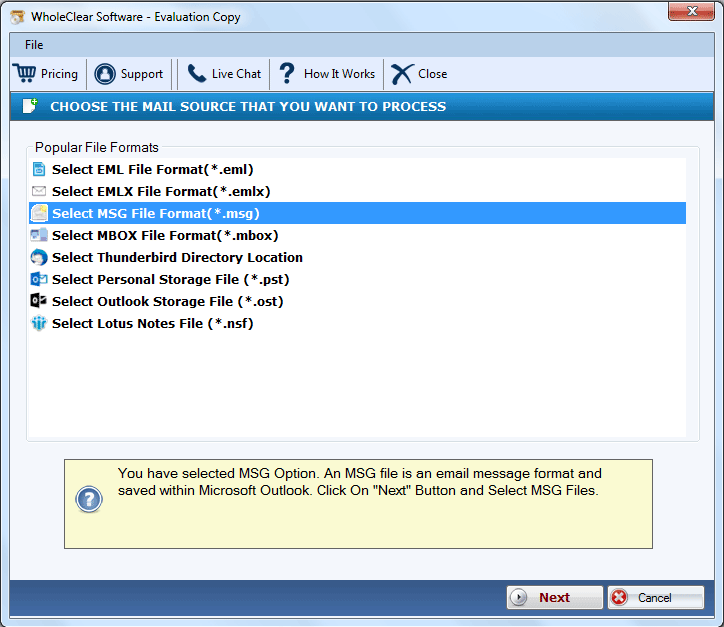
The WholeClear MSG to HTML Converter is an outstanding tool that is employed to convert Outlook files to the HTML file format. With the entire metadata, this application can migrate the Outlook file without affecting it. Users have the ability to select the location for the output HTML file on their devices. It offers a variety of advanced features that can facilitate the migration of the files in a speedy manner. The complete preview of the Outlook MSG file is provided by this software prior to the migration method. It does not need the installation of any other application for functioning and completing the conversion process. The migration process of the files can be finished in just three to four simple steps. It can run flawlessly on any Windows OS version, including Windows 11, 10, 8.1, 8, 7, Vista, and XP. With no technical expertise, this software can be handled simply by any user because of its GUI. The free trial is also provided to the users for examining the features before switching to the licensed edition.

Cloudbric Managed Rules for AWS WAF - Anonymous IP Protection was created to protect the websites and web applications against the threats from Anonymous IPs originating from various sources such as VPNs, Data Centers, DNS Proxies, Tor Networks, Relays, P2P Networks, etc.
Anonymous IP Protection utilizes the Anonymous IP List, managed and updated by Cloudbric Labs, to detect and respond to Anonymous IPs that can easily be exploited for malicious purposes and prevent threats such as geo-location based fraud, DDoS or license and copyright infringement caused by hackers.
Cloudbric Managed Rules for AWS WAF is created based on the security technologies and expertise of WAPPLES which has protected the web services for enterprises since 2005 and has recently been validated by a third-party testing firm to have a top-tier detection rate. Cloudbric Managed Rules for AWS WAF utilizes Penta Security's own Cyber Threat intelligence (CTI), Cloudbric Labs, to provide a safer online environment.
SVG.now is a comprehensive platform offering a vast collection of high-quality, free Scalable Vector Graphics (SVGs) tailored for designers, developers, and creators. Our mission is to make top-notch design assets accessible to everyone, everywhere, empowering users to bring their ideas to life effortlessly.
Key Features and Functionality:
- Extensive SVG Library: Access a diverse range of categories, including social, business, technology, entertainment, healthcare, nature, cultural, food, home, and design, ensuring resources for various projects.
- User-Friendly Interface: Navigate and search for specific graphics with ease, enhancing the design process.
- Regular Updates: Benefit from a continuously expanding library that adapts to the evolving needs of the creative community.
Primary Value and Solutions:
SVG.now addresses the challenge of sourcing high-quality, scalable graphics by providing a centralized, free resource. This enables users to enhance their projects without the constraints of licensing fees or limited availability, fostering creativity and innovation across various fields.
Cogniwerk is an AI-powered platform that allows users to create high-quality, brand-specific visuals without any coding required. It offers features such as custom model training, pixel-level editing, and a user-friendly interface, ensuring full control and ownership of the generated images. The platform is designed for compliance with GDPR and other regulations, making it suitable for professionals seeking creative freedom while maintaining data security.
Train Brand-Specific Models: Build consistent characters and styles unique to your brand.
Zonal prompting: Promptzone allows creatives to direct their prompting towards specific, selected areas of a canvas as opposed to the entire image. It gives direct control over image composition without the guess work.
Zero-Code Simplicity: All features are accessible without any technical setup required.
Transparent Licensing: Users own their models and outputs, ensuring full IP ownership.
GDPR Compliance: The application is fully compliant with GDPR and EU AI regulations, ensuring data security and privacy.

StagePro is an AI virtual staging and interior design platform built for real estate agents, interior designers, architects, and property developers.
Upload a photo of any room and transform it into a professionally staged space in seconds. Choose from 100+ design styles including Modern, Scandinavian, Industrial, Coastal, and more.
Key capabilities:
Virtual Staging — Stage vacant properties instantly instead of spending $2,000-5,000 on physical staging
Interior Redesign — Restyle existing rooms with any design aesthetic
Sketch to Photorealistic — Convert rough sketches and floor plans into photorealistic renders
Garden & Outdoor Design — AI-powered landscape visualization
AI Video Walkthroughs — Generate animated video tours from static images
Batch Processing — Stage multiple rooms simultaneously
StagePro delivers Ultra HD/4K photorealistic output with commercial licensing included. No design skills or 3D modeling experience required.

Saeree ERP is a specialized Enterprise Resource Planning system designed for Thai government agencies and budget-based organizations. Developed by Grand Linux Solution Co., Ltd. (est. 2002), it provides over 24 years of proven deployment experience serving leading Thai government agencies including MHESI, TGO (14+ years), NSM, and NVI.
Key differentiators: (1) Purpose-built for Thai government procurement regulations and multi-source budget management, (2) Unlimited users with no per-seat licensing, (3) Revenue Department certified accounting since 2009, (4) ISO/IEC 29110 certified for 10+ consecutive years, (5) Modern tech stack (Angular 20+, PrimeNG, Jersey Java REST API, PostgreSQL).
Modules: Budget Management, Procurement, Finance/Accounting (AP/AR/GL), HR/Payroll, Inventory, Fixed Assets, Executive Dashboard, e-Tax Invoice, Digital Signature, Payment Gateway, and Document Approval Workflow. Supports both Cloud and On-premise deployment.