AI-Generated Results
Finding matches…
Sheet-Chat, powered by Sally Suite, is an AI-driven productivity platform designed to serve as a copilot across various office applications, including Microsoft Office, Google Workspace, and WPS Office. It seamlessly integrates with tools like Excel, Google Sheets, Docs, Slides, Word, and Outlook, enabling users to generate functions, perform data analysis, create visualizations, compose content, and manage emails through intuitive AI prompts and automation.
Key Features and Functionality:
- AI-Powered Assistance: Leverages advanced language models such as GPT-4 and Claude to provide intelligent support across multiple applications.
- Comprehensive Integration: Compatible with Microsoft Office (Word, Excel, PowerPoint, Outlook), Google Workspace (Docs, Sheets, Slides), and WPS Office, ensuring a unified experience across platforms.
- Customizable AI Models: Offers flexibility to integrate user-preferred large language models (LLMs) like GPT-4, Claude, or DeepSeek by adding an API key for private use.
- Advanced Analytics: Incorporates Python and Jupyter Engine support for sophisticated data analysis and visualization tasks.
- Browser-Wide Access: Provides a Chrome extension and browser-based plugin for seamless AI assistance during web-based tasks.
Primary Value and User Solutions:
Sheet-Chat streamlines office workflows by consolidating multiple tools into a single, integrated AI solution. It enhances productivity by automating routine tasks, facilitating complex data analyses, and assisting in content creation, thereby reducing the time and effort required for manual processes. The platform's flexibility in supporting various AI models and its compatibility with multiple office suites make it a versatile tool for professionals seeking to optimize their work efficiency.
Not seeing what you're looking for?
Dive deeper into "Google Sheets" on G2 AI

PDF AI Sheet is a Google Sheets add-on designed to streamline the extraction of information from multiple PDF documents directly within a spreadsheet. By integrating this tool, users can efficiently interact with and analyze data from numerous PDFs without leaving the Google Sheets environment.
Key Features and Functionality:
- Bulk PDF Interaction: Utilize the `=ai_pdf(prompt, PDF_ID)` function to pose questions to specific PDFs, enabling batch processing of multiple documents simultaneously.
- Reference Page Numbers: Enhance data traceability by appending '1' to the formula, which includes the reference page number in the output.
- Seamless Integration: Easily install and activate the add-on through the "Extensions" menu in Google Sheets, ensuring a smooth setup process.
Primary Value and User Solutions:
PDF AI Sheet addresses the challenge of manually extracting and analyzing data from numerous PDF files by automating the process within Google Sheets. This integration saves time, reduces errors, and enhances productivity for users who frequently work with large volumes of PDF documents.
The Most Popular and Secure Bridge between WordPress and Google Sheets. GSheetConnector is a powerful WordPress add-on plugin for Contact Forms, Page Builders, and WooCommerce that enables users to connect and send submissions to Google Sheets in real-time. Leveraging the Google Sheets API, GSheetConnector seamlessly reads, writes, and manipulates data, integrating effortlessly with your WordPress site.

Docsium is an AI-powered add-on designed to enhance productivity within Google Sheets, Docs, and Slides by integrating ChatGPT capabilities directly into these platforms. It enables users to generate, summarize, rewrite, and discover new data effortlessly, streamlining various tasks and improving workflow efficiency.
Key Features and Functionality:
- Google Sheets Integration: Allows users to input prompts into cells and execute commands such as data extraction, item categorization, data cleansing, and completion of addresses and public information.
- Google Docs Integration: Facilitates content creation by enabling users to generate blog posts, bullet points, meeting notes from bullet points, and summarize existing content through simple prompts.
- Google Slides Integration: Assists in slide content development by auto-generating slide titles, creating bullet points, summarizing content, and formatting text based on user prompts.
Primary Value and User Solutions:
Docsium addresses the need for efficient content generation and data management within Google's suite of productivity tools. By embedding AI functionalities directly into Sheets, Docs, and Slides, it eliminates the need for external applications, thereby saving time and reducing workflow disruptions. Users can perform complex tasks such as data extraction, content creation, and summarization with minimal effort, enhancing overall productivity and allowing for more focus on strategic activities.

Combine Sheets is a powerful add-on for Google Sheets designed to streamline the process of merging data from multiple spreadsheets into a single, cohesive sheet. It intelligently aligns data based on column headers, ensuring accurate consolidation even when source sheets have varying formats, column orders, or content. With just a few simple steps, users can select the sheets and columns to combine, decide on formatting preferences, and specify the destination for the merged data. Additionally, Combine Sheets offers the option to generate a formula-based result that dynamically updates in sync with the source sheets, providing real-time data integration.
Key Features and Functionality:
- Merge Multiple Sheets: Combine data from as many Google Sheets as needed, up to the platform's limit of 10 million cells.
- Intelligent Column Matching: Automatically align and merge data based on common column headers, regardless of their order in the source sheets.
- Selective Column Combination: Choose to combine all columns or only specific ones from the original tables.
- Flexible Range Selection: Opt to merge entire sheets or specify particular ranges manually.
- Google Drive Integration: Quickly import data from other Google Sheets without opening them, using a built-in search feature.
- Incremental Data Addition: Easily add new sheets to an existing combined result without starting the process over.
- Dynamic Updates: Utilize formulas to ensure the combined data updates automatically with changes in the source sheets.
- Source Identification: Label each dataset with its source sheet name for clear data provenance.
- Customizable Output Location: Place the resulting table in a new spreadsheet, an additional sheet, or a specified range within an existing sheet.
- Formatting Preservation: Retain the original formatting of the data when merging sheets.
Primary Value and User Benefits:
Combine Sheets addresses the common challenge of consolidating data from multiple Google Sheets efficiently and accurately. By automating the merging process and ensuring data integrity through intelligent column matching, it eliminates the need for manual copy-pasting and reduces the risk of errors. The add-on's ability to create dynamic, formula-based results ensures that users always have access to the most up-to-date information, enhancing decision-making processes. Its user-friendly interface and integration with Google Drive further streamline workflows, making it an invaluable tool for professionals who regularly work with large datasets across multiple spreadsheets.

SheetXAI is an advanced AI-powered assistant designed to enhance productivity within Excel and Google Sheets. By enabling users to perform complex tasks through simple natural language commands, SheetXAI eliminates the need for intricate formulas and manual data manipulation. Whether it's cleaning data, generating reports, conducting company research, or creating content, SheetXAI streamlines these processes directly within your spreadsheet environment.
Key Features and Functionality:
- Spreadsheet Automation: Execute tasks like matching customer emails across sheets or creating sales charts by simply instructing SheetXAI in plain English, bypassing the complexity of traditional formulas.
- AI Content Generation: Automatically generate professional descriptions from product photos, or populate company news and funding information by entering company names, facilitating efficient content creation.
- Business Integrations: Seamlessly connect with various business tools such as Instantly, Emailable, and WooCommerce, transforming your spreadsheet into a centralized hub for business operations.
- Data Extraction: Convert unstructured data from PDFs, images, or handwritten forms into organized spreadsheet tables, enabling easy analysis and reporting.
Primary Value and User Solutions:
SheetXAI addresses the challenges of complex spreadsheet tasks by allowing users to interact with their data using natural language, significantly reducing the learning curve associated with advanced spreadsheet functions. It automates repetitive tasks, enhances data accuracy, and integrates with essential business tools, thereby saving time and improving overall efficiency for professionals across various industries.

Mage is an AI-powered add-on for Google Sheets designed to automate and enhance various spreadsheet tasks, enabling users to save significant time on repetitive activities. By integrating advanced AI capabilities directly into Google Sheets, Mage allows users to perform tasks such as data extraction, categorization, text generation, and data cleaning with ease.
Key Features and Functionality:
- Digital Marketing Support: Mage assists in generating AdWords keywords, ad copy, Facebook campaign structures, ad titles, and SEO content, streamlining the creation and organization of digital marketing campaigns.
- Text Processing: The add-on excels at summarizing, rewriting, and extracting content from large bodies of text, such as articles, user surveys, or social media content. It can also classify content into categories and clean messy user input, ensuring data consistency and accuracy.
- AI Prototyping and Collaboration: Mage provides a structured environment within spreadsheets to test and collaborate on AI prototypes, combining the power of AI with the familiarity of Google Sheets for effective teamwork.
- Content Ideation and Creation: Users can generate topic ideas and create content based on those topics directly within Google Sheets, facilitating efficient content development processes.
Primary Value and User Solutions:
Mage addresses the challenge of time-consuming and repetitive spreadsheet tasks by automating processes through AI integration. This automation reduces manual effort, minimizes errors, and enhances productivity, allowing users to focus on more strategic activities. By embedding AI capabilities into Google Sheets, Mage empowers users to leverage advanced data processing and content generation tools without leaving their familiar spreadsheet environment.

The only task tracking tool you'll ever need.
NativeTasks helps streamline projects, sprints, tasks, and bug tracking. It’s built for high-performance teams that value simplicity & effectiveness.
NativeTasks is a simple tool for helping you manage your tasks in an easy way. You can simply add your project and build folders & tasks around it. Invite your colleagues and manage your projects like a pro!
Few possible uses of NativeTasks:
- Tasks management
- Bug tracking
- Users feedback tracking
- Features request tracking
- Software project management
- Notepad
- School project management
What features do we provide?
- Dashboard & Admin Panel
- Fully customisable tasks structure
- Unlimited users
- Email notifications
- Secure File Upload
- Reports section
- Google Sheet integration
- Slack, Discord, Google Analytics & Facebook Pixel integrations
- Export data to .CSV
- Tutorials and templates
Task management is key to success for every product / team. Advanced tracking tool helps you in the process of improving your service or product. If you value simplicity & effectiveness then NativeTasks was created for you.

FlexSync is a Shopify inventory and product synchronization app that connects Shopify with Google Sheets for two-way, real-time data sync.
It allows merchants to export their Shopify products and inventory to Google Sheets, then manage inventory, product details, pricing, SKUs, variants, metafields, and other store data directly from their spreadsheet.
With bulk updates, automated synchronization, filters, and Google Sheets formula support, FlexSync helps Shopify merchants reduce manual work, maintain accurate product data, and streamline their ecommerce operations.

Better Sheets is a membership for people who use Google Sheets every day. It has 600+ video tutorials, 10+ courses, downloadable templates, and Google Sheets add-ons and automation tools like formula, QUERY and regex generators and a way to publish a website from a sheet. Lessons cover formulas, dashboards, Apps Script automation and Google Forms, plus how to package and sell your own sheets. Andrew Kamphey builds it and answers member questions himself.

ReceiptToSheet is a receipt scanning tool built for people who track expenses in Google Sheets. Take a photo of any receipt — paper, digital, or printed — and AI extracts the merchant name, date, total amount, and
expense category. Within 10 seconds, a new row appears in the Google Sheet you selected. No manual data entry. No CSV to import. No middleware to configure.
Unlike receipt apps that store images in Google Drive or require a Zapier connection to reach Sheets, ReceiptToSheet writes extracted data directly to your spreadsheet via native Google OAuth. You review the extracted
fields before confirming, so nothing lands in your Sheet without your approval.
ReceiptToSheet is a Progressive Web App — it runs in any mobile browser on iPhone or Android with no App Store install required. Add it to your home screen and it works like a native app.
Plans start free (10 scans/month, CSV export). The Starter plan ($20/month) unlocks native Google Sheets sync, column mapping, and tab selection for 50 scans per month. The Pro plan ($40/month) covers 200 scans.
Built for small business owners, contractors, and anyone whose expense workflow already lives in Google Sheets.

DriverGest is a cloud-based software platform built for chauffeur and private hire (NCC) companies of any size. It centralizes booking management, driver assignment, fleet tracking, and invoicing in a single dashboard accessible from any device, with no installation required.
Admins can create, edit, and assign bookings in real time, while drivers use their own dedicated web app to view assigned trips and digital service sheets, automatically linked to the vehicle's license plate. Every booking flows directly into automated quotes and invoices, eliminating manual double-entry between operations and accounting.
The platform includes role-based access for admins and drivers, an interactive analytics dashboard for tracking revenue, expenses, and fleet performance, Google Calendar and Apple Calendar sync, and one-click sharing of service sheets via WhatsApp and email.
DriverGest offers a free plan with unlimited users, drivers, and vehicles for up to 100 total services, no credit card required, and applies 0% commission on every booking managed through the platform.
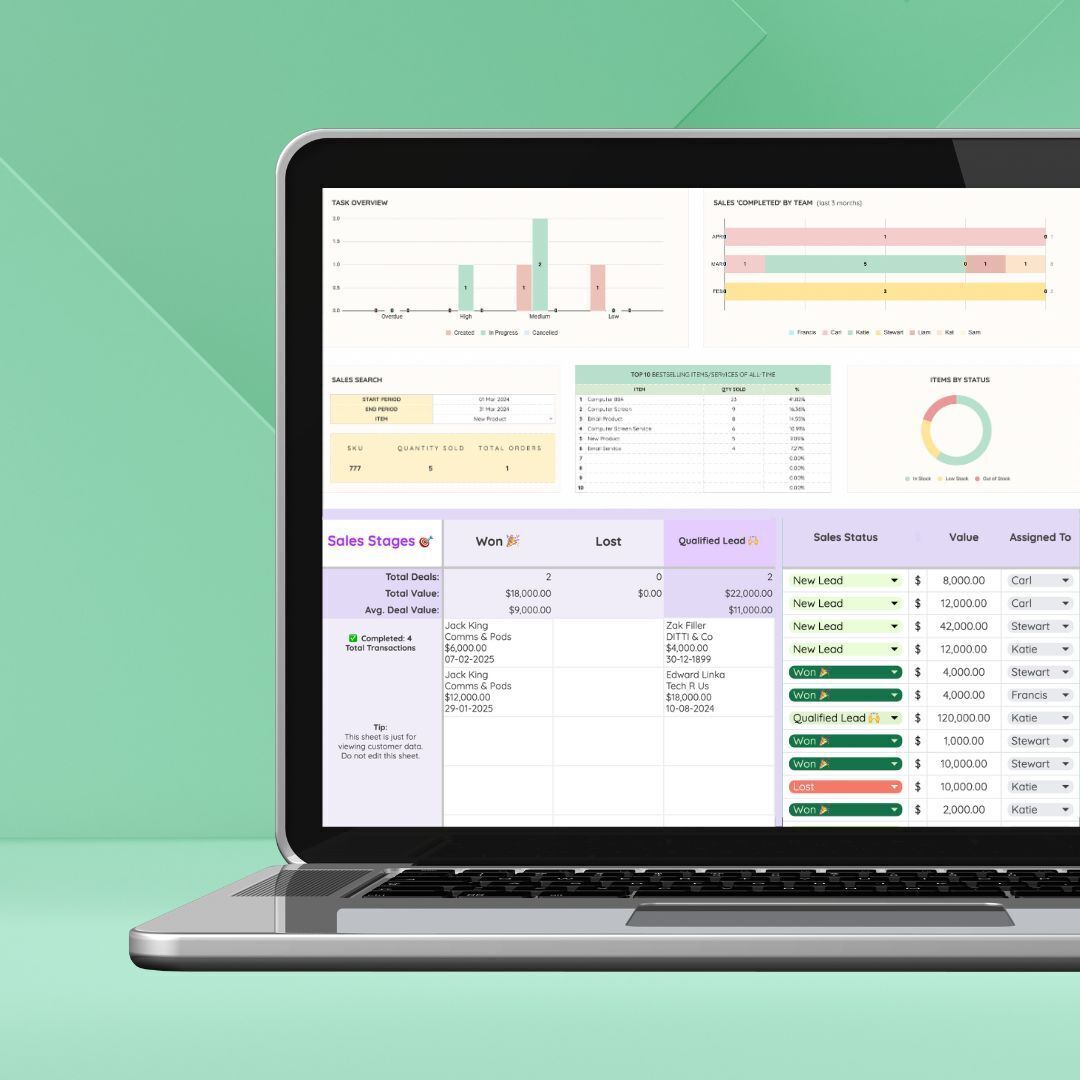
If you're like us, you hate paying monthly subscriptions for dozens of business software…
So, we made Sheetify a one-time payment for lifetime access, lifetime updates, customer tracking, sales pipeline tools, task and inventory management, bulk email marketing features, instant messages and calls and more!
This all-in-one Google Sheets CRM template allows business owners to manage their CRM-related activities on one platform, eliminating the need for dozens of expensive tools.

Asana to Sheets is a Google Workspace add-on that syncs your Asana projects into Google Sheets. Pick a team and a project, choose what to include, and your tasks land in your spreadsheet, one row per task.
Key Features
• Project sync and filtered sync (by section, assignee, completion or due date) into Google Sheets
• Task fields: name, link, section, completed, assignee, followers, tags, start and due dates, creator, created, updated and completed dates
• Subtasks with their parent task, plus subtask progress ("2/6 done")
• Custom fields: text, number, currency, percentage, single-select, multi-select, date and people
• Field ID mapping: renaming a field in Asana does not break your sync
• Manual or scheduled sync: refresh on demand or automatically every 3 hours
• Two-way sync (Business plan): edit in Google Sheets and push changes back to Asana
• Live sync (Business plan): updates through Asana webhooks
• Time entries (Pro and Business, needs Asana Advanced or higher): date and duration per entry
Plans
All plans include a 7-day free trial with no credit card required.
• Starter, $9/month: up to 3 syncs, manual sync
• Pro, $19/month: unlimited projects, scheduled sync (every 3h), time entries, users, reports
• Business, $39/month: all Pro features plus two-way sync and live sync
Yearly billing available (save 2 months). 30-day money-back guarantee.
Who is this for?
• Project managers who need Asana data in spreadsheets for reporting
• Operations teams feeding Google Sheets dashboards with Asana data
• Finance teams tracking budgets and time from Asana projects
• Anyone tired of exporting CSVs from Asana every week
Privacy
Manual and scheduled syncs run in your own Google account: Asana data goes from the Asana API straight to your Google Sheets spreadsheet and does not pass through our servers. Live sync is the exception: Asana sends change events to our backend, which keeps the IDs of changed tasks, short-lived copies of values you wrote from the sheet (so the sync does not echo them back), and your encrypted Asana and Google sign-ins. We do not sell your data or use it for advertising. Website analytics use Umami (cookie-free).

Typefully is a comprehensive content creation and scheduling platform designed to enhance your presence on social media platforms like X (formerly Twitter), LinkedIn, Bluesky, and Threads. Trusted by over 220,000 creators and companies, Typefully offers a suite of tools to streamline your content strategy and boost audience engagement.
Key Features and Functionality:
- AI-Powered Content Enhancement: Leverage Typefully AI, powered by GPT-4o, to rewrite and improve your content, ensuring clarity and impact.
- Cross-Platform Scheduling: Effortlessly schedule and publish posts across multiple platforms, including X and LinkedIn, from a single interface.
- Realistic Previews: Utilize the Realistic Preview feature to see how your posts will appear on different platforms, ensuring optimal presentation.
- Team Collaboration: Enhance teamwork with features like draft locking and improved collaboration tools, preventing editing conflicts and facilitating seamless content creation.
- Automated Direct Messaging: Engage your audience by setting up Auto-DM campaigns that send direct messages to users who interact with your posts.
- Integration with Zapier: Automate workflows by connecting Typefully with thousands of apps via Zapier, enabling actions like creating drafts from Google Sheets or sending notifications to Slack.
- LinkedIn PDF Carousels: Create and schedule LinkedIn PDF carousels directly within Typefully, transforming presentations or guides into engaging, swipe-friendly formats.
Primary Value and User Solutions:
Typefully addresses the challenges of maintaining a consistent and engaging social media presence by providing a centralized platform for content creation, scheduling, and analysis. Its AI-driven tools assist in crafting compelling posts, while cross-platform capabilities ensure efficient management of multiple accounts. The platform's collaboration features support team-based content strategies, and automation integrations streamline workflows, saving time and enhancing productivity. By offering these comprehensive solutions, Typefully empowers creators and businesses to grow their audience and achieve their social media goals effectively.

Google Sheets tool, Excel, Google Forms tool, Salesforce, and any database – we connect them all. Data Everywhere enables users to share between Excel, local databases, Salesforce, and Google Sheets, manage their data without importing or exporting. We build add-ons that will bring your data in and out of Sheets from Excel, Salesforce, or your local MySQL, SQL Server.
Database Browser add-on, revolutionizes the way you interact with your database. Whether you're working with RDBMS systems such as MySQL, Oracle, MS SQL Server, or noSQL services like mLab - MongoDB, this tool enhances your Google Sheets experience.
With Database Browser, you can seamlessly connect to your database, access table listings, and effortlessly query table records, all within Google Sheets, thanks to its user-friendly and dynamic graphical user interface. This integration transforms Google Sheets into a powerful and versatile tool for database management, allowing you to not only retrieve and edit data but also automate tasks. It's a refreshing approach to database interaction.

Navigate, click buttons and dictate text inside the browser using only your voice. Great for Gmail, Google Docs & Sheets, Facebook, YouTube, etc. Input data at 160wpm with cutting-edge speech recognition.

Axial Shift is the go-to operations platform for restaurant operators, offering real-time sales contests, comprehensive KPI tracking for managers, and clear sales reporting dashboards—all accessible through our mobile app. Our dynamic scheduler provides Google Sheets-like editing permissions, making it simple to create and publish schedules efficiently.
Improve performance and streamline operations with Axial Shift.

Stop exporting CSVs from Airtable. Airtable to Sheets syncs your Airtable records into Google Sheets and keeps them up to date. Pick a base, table, or view, and the records land in your sheet. On Business, changes in Airtable reach the sheet within seconds, and edits you make in the sheet go back to Airtable.
Set up in 3 steps
1. Install Airtable to Sheets from the Marketplace
2. Connect your Airtable account with one-click OAuth
3. Pick a base, table, or view and run your first sync
Key features
• Sync any base, table, or view. Pick the fields you want, or sync a filtered view instead of the whole table.
• Two-way sync (Business). Edit a cell in Google Sheets and push the change back to Airtable. 17 field types write back. Formulas, rollups and lookups stay read-only, like they are in Airtable.
• Live sync (Business). Change a record in Airtable and the sheet catches up within seconds. No 3-hour wait.
• Every field type comes across. Text, numbers, dates, checkboxes, single and multiple select, linked records, attachments, collaborators, formulas, rollups and lookups.
• Field renames don't break the sync. Airtable field IDs live in a protected row, so the sync keeps finding the field after you rename it.
• Scheduled syncs every 3 hours on Pro and Business, with no one opening the sheet.
• Your formulas survive. Add your own columns next to the synced data and they stay put through every sync.
• No record cap and no per-user fee. One flat price per account.
Plans
• Starter ($9/month): manual sync, up to 3 tables or views
• Pro ($19/month): unlimited tables and scheduled syncs every 3 hours, plus priority support
• Business ($39/month): everything in Pro, plus two-way sync and live sync
All plans include a 7-day free trial with no credit card required.
Teams using it
• Teams that build reports, pivot tables or Looker Studio dashboards on Airtable data
• Anyone sharing Airtable data with clients or coworkers who don't have an Airtable seat
• Finance and ops teams who need Airtable records next to the rest of their spreadsheets
• Anyone tired of exporting CSVs from Airtable every week
Privacy & Security
• Manual, scheduled and two-way syncs run directly between Airtable and Google Sheets through their official APIs. Your records don't pass through our servers.
• Live sync relays each change through our server on its way to your sheet. Nothing is kept beyond the record IDs it needs and a short-lived copy that stops your own edits from bouncing back.
• OAuth tokens are stored in Google's encrypted PropertiesService. Live sync also keeps encrypted copies of your Airtable and Google sign-ins on our server, so it can update the sheet while it's closed.
• The add-on requests only the Airtable scopes it uses: record read and write, schema read, and webhook management
Support
Questions? Visit our support center or email hello@airtabletosheets.com.
We typically respond within 24 hours.