


2026 Best Software Awards are here!See the list

IntelliJ IDEA Reviews & Product Details

Pricing

Pricing provided by IntelliJ IDEA.

For Individual Use

$19.90
Per Month

IntelliJ IDEA Media

IntelliJ IDEA Demo - IntelliJ IDEA interface
IntelliJ IDEA interface overview: the Project tool window (left) outlines the code structure and the Editor (right) is used to read, write, and explore the source code.
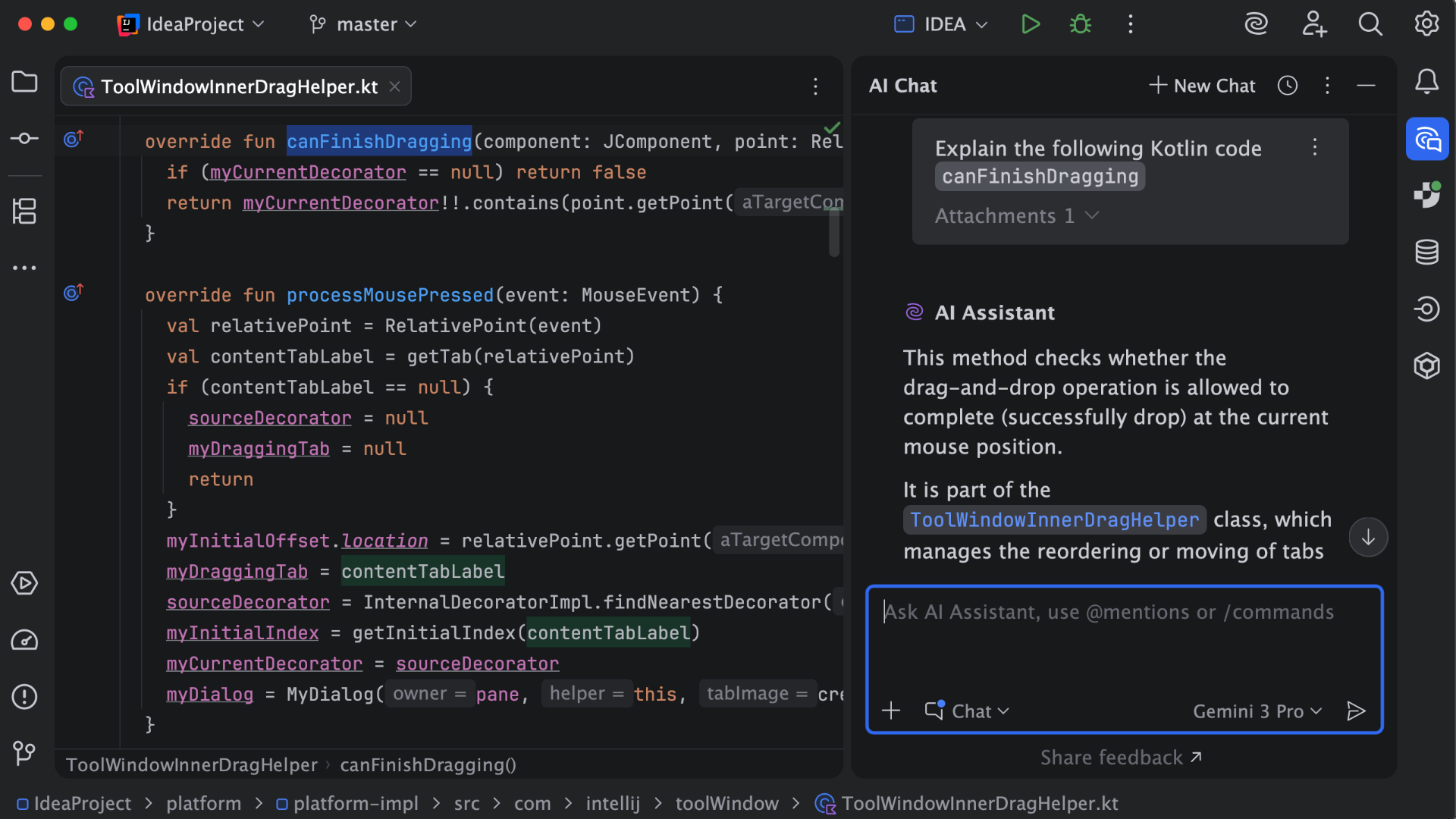
IntelliJ IDEA Demo - AI Assistant
AI Assistant provides AI-powered features for software development. It can explain code, answer questions about code fragments, provide code suggestions, generate documentation, commit messages, and much more.
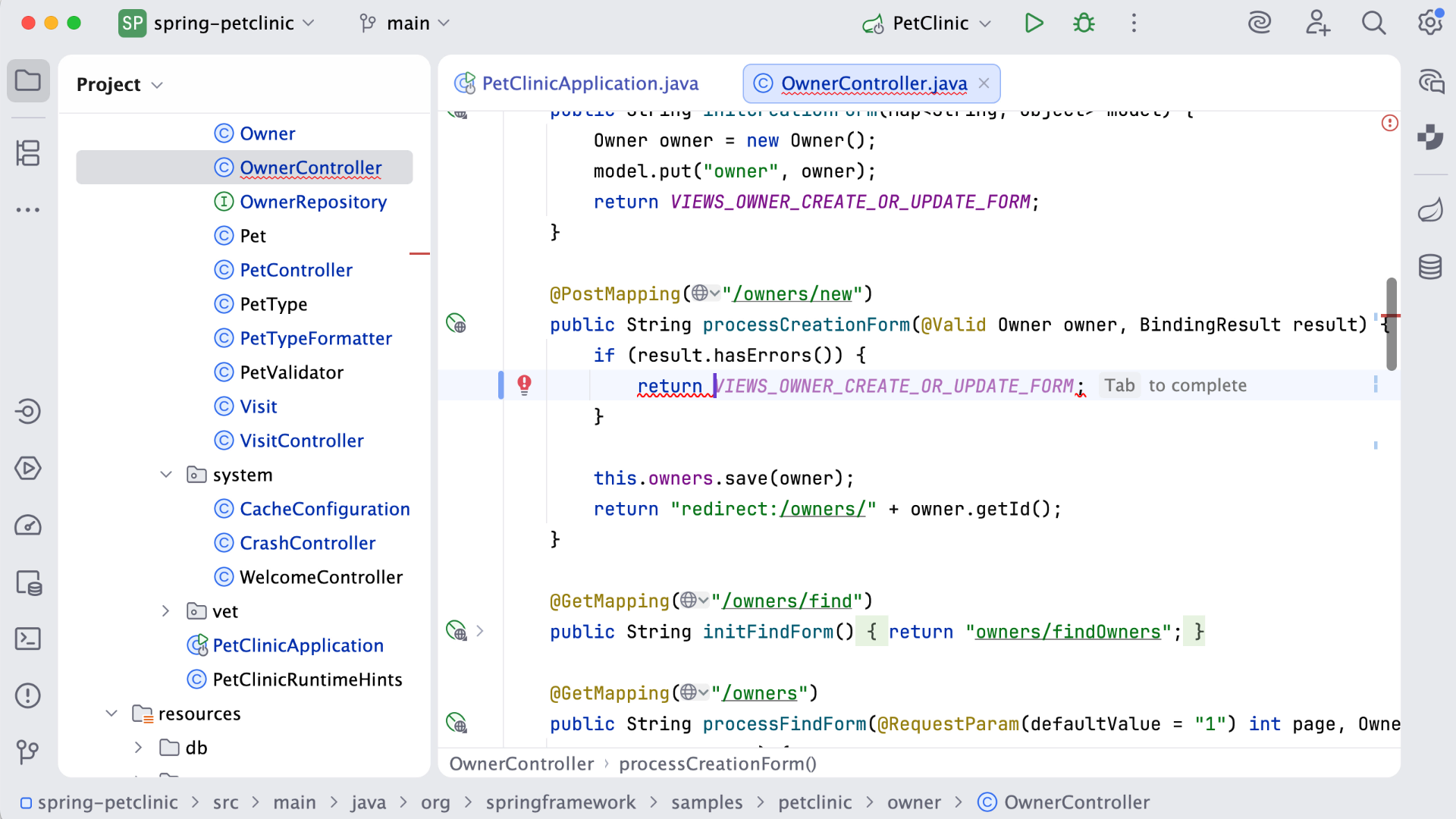
IntelliJ IDEA Demo - Code completion
IntelliJ IDEA analyzes the context and suggests the most applicable and relevant code.
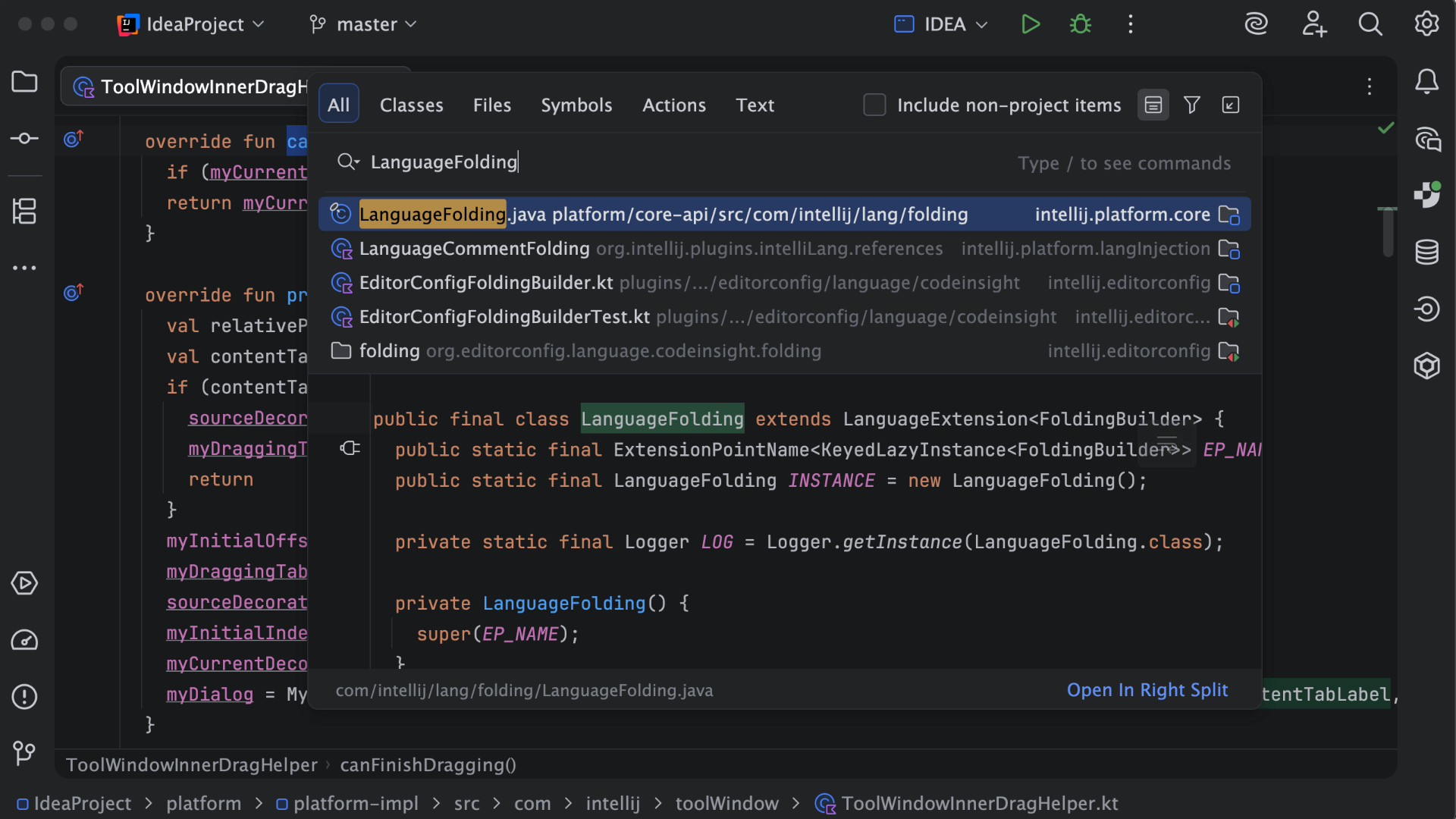
IntelliJ IDEA Demo - Search Everywhere
In the Search Everywhere window, you can search for files, actions, classes, symbols, settings, UI elements, and anything in Git, all from a single entry point.
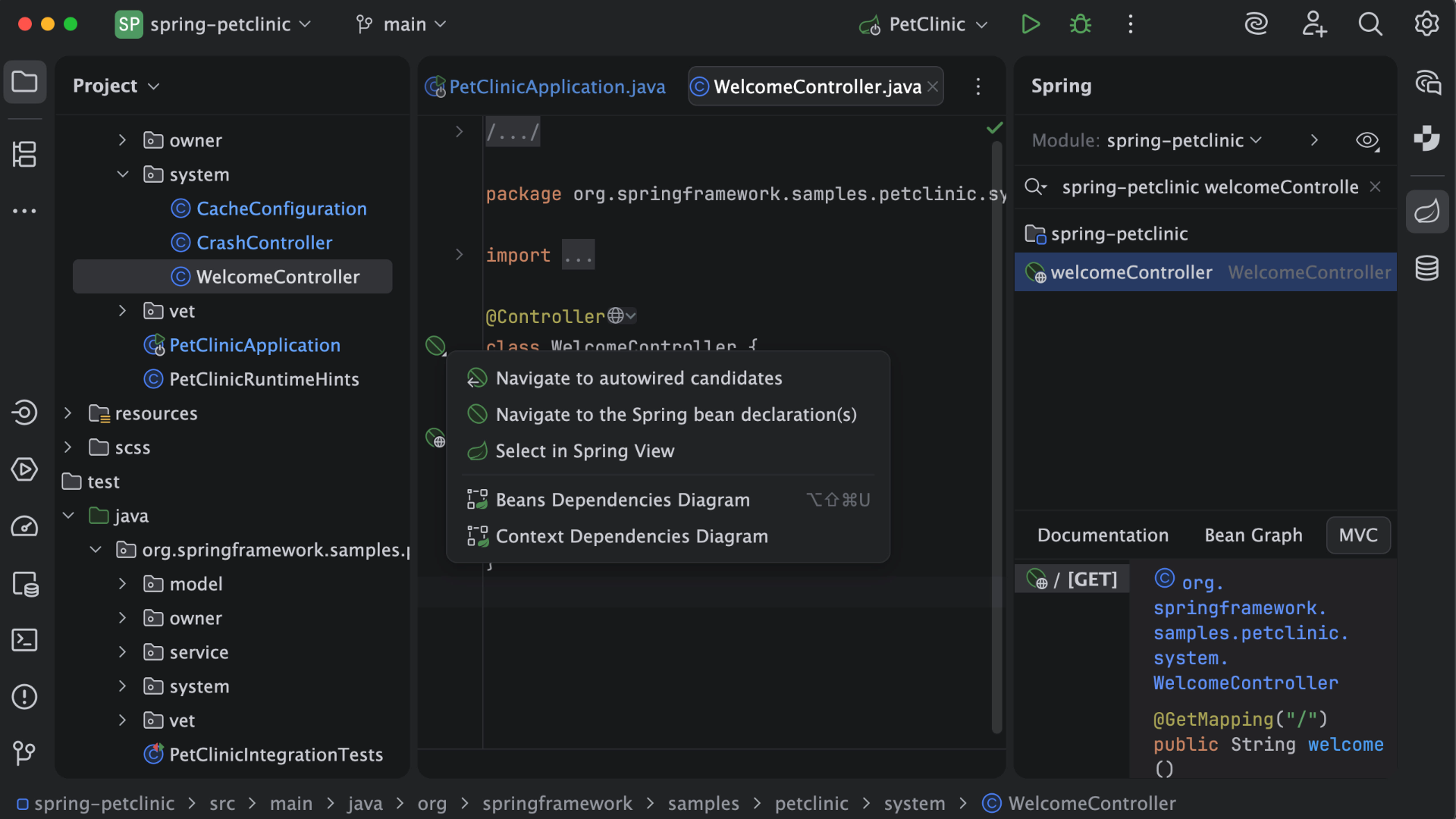
IntelliJ IDEA Demo - Frameworks
IntelliJ IDEA provides first-class support for leading frameworks with dedicated assistance for Spring and Spring Boot, Jakarta EE, JPA, Reactor, and other popular frameworks.
Play IntelliJ IDEA Video
Product Avatar Image

Have you used IntelliJ IDEA before?

Answer a few questions to help the IntelliJ IDEA community

IntelliJ IDEA Reviews (2,296)

View 8 Video Reviews
Reviews

IntelliJ IDEA Reviews (2,296)

View 8 Video Reviews
4.6
2,297 reviews

Review Summary

Generated using AI from real user reviews
Users consistently praise the intelligent code assistance and powerful debugging tools of IntelliJ IDEA, which significantly enhance productivity and streamline the coding process. The IDE's ability to provide context-aware suggestions and seamless integration with version control makes it a favorite among developers. However, many note that it can be resource-intensive, particularly on lower-end machines.

Pros & Cons

Generated from real user reviews
View All Pros and Cons
Search reviews
Filter Reviews
Clear Results
G2 reviews are authentic and verified.
SS
Software Developer
Small-Business (50 or fewer emp.)
"IntelliJ IDEA: Smart Refactoring and Quick Fixes That Save Time"
What do you like best about IntelliJ IDEA?

I use IntelliJ IDEA daily for Java and Spring Boot development, along with occasional work on microservices and REST APIs. It’s my primary IDE for writing, debugging, and refactoring code, as well as managing Maven/Gradle projects. I think the best part of using this software is how intelligent and developer-friendly the IDE feels during daily use. The smart suggestions, quick fixes, and refactoring options are extremely accurate and save a lot of manual effort. Review collected by and hosted on G2.com.

What do you dislike about IntelliJ IDEA?

A area that could be improved is the learning curve. With so many powerful features available, new users may feel overwhelmed and may not fully utilize the IDE at first. To improve this, better performance optimization for large projects and low-spec machines would be helpful. Review collected by and hosted on G2.com.

Teboho P.
TP
Backend Engineer
Broadcast Media
Enterprise (> 1000 emp.)
"Takes the Mental Load Off: Smart Completion, Refactoring, and Error Detection"
What do you like best about IntelliJ IDEA?

IntelliJ IDEA’s biggest strength is how much it takes off your mental load. Smart code completion, deep refactoring, and instant error detection let you focus on logic instead of syntax. It understands the codebase, not just the file you’re in, which makes navigating, debugging, and maintaining large projects faster and less error-prone. Review collected by and hosted on G2.com.

What do you dislike about IntelliJ IDEA?

The main downside is how resource-heavy it can be. On large projects it consumes a lot of memory and CPU, which can slow things down on weaker machines. Startup time can also be noticeable, and some advanced features feel overkill when you just want to make a quick, lightweight change. Review collected by and hosted on G2.com.

Siddhant J.
SJ
Software engineer
Enterprise (> 1000 emp.)
"IntelliJ IDEA: Smart Code Completion and Rock-Solid Refactoring for Complex Projects"
What do you like best about IntelliJ IDEA?

IntelliJ IDEA stands out thanks to its smart code completion and deep understanding of code structure. It often anticipates what I’m about to write, flags potential issues in real time, and suggests quick fixes that genuinely save time. The refactoring tools feel extremely reliable, even when working on large, complex projects. On top of that, the built-in integrations for Git, Maven, and Gradle help keep day-to-day development smooth and efficient. Review collected by and hosted on G2.com.

What do you dislike about IntelliJ IDEA?

It can be fairly resource-heavy, especially on systems with limited RAM. The initial startup time can also feel slow, and the Ultimate version is quite costly for individual developers or beginners. Review collected by and hosted on G2.com.

SS
software engineer
Small-Business (50 or fewer emp.)
"IntelliJ IDEA Makes Java Development Smooth with Smart Autocomplete and Debugging"
What do you like best about IntelliJ IDEA?

IntelliJ IDEA is one of the best IDEs on the market for Java development. It’s built to help developers focus on writing code rather than spending time configuring settings in the IDE. I have been using IntelliJ IDEA for the last two years, and I’m really loving it.

Some features, like code suggestions, autocomplete, running servers, and debugging, are amazing and make day-to-day development smoother. Syntax checking is also an important feature in my book. The built-in store for plugins is very helpful as well, since it makes it easy to add new capabilities to IntelliJ IDEA.

Overall, I like the UI: things are placed where they should be, and the color scheme is nice and helps me identify things quickly. Review collected by and hosted on G2.com.

What do you dislike about IntelliJ IDEA?

I feel that IntelliJ IDEA is starting to fall behind in the AI race compared with the competition. At the moment, it doesn’t seem to offer any free AI code assistance, even with usage limits, while other tools do. Review collected by and hosted on G2.com.

Surya Prasad R.
SR
Junior Software Engineer Intern
Enterprise (> 1000 emp.)
"Intelligent Coding Assistant That Supercharges Productivity"
What do you like best about IntelliJ IDEA?

What I like most about IntelliJ IDEA is its intelligent coding assistant and the productivity boost it gives me. It feels like IntelliJ understands what’s happening in the backend of the code and instantly provides suggestions, whether that’s for code completion or JavaDocs to help fill in documentation. This is really helpful in real-life scenarios when I’m building more complex code, and it also makes it easier to organize and structure the code using OOP principles. Review collected by and hosted on G2.com.

What do you dislike about IntelliJ IDEA?

The main thing I dislike about IntelliJ IDEA is its high power consumption, especially for students with less RAM and low-end graphics in their laptops. The startup time, indexing, and background processes can sometimes use a significant amount of memory, particularly during launch. Review collected by and hosted on G2.com.

Sai Sathwik B.
SB
Student
Higher Education
Small-Business (50 or fewer emp.)
"Makes coding faster and less stressful"
What do you like best about IntelliJ IDEA?

IntelliJ IDEA makes coding faster and easier with some quite impressive features, like auto-completing the code when it understands the intention of the code I am typing, reducing the time in coding. It clearly highlights the errors in the code while typing or any other syntax errors. Debugging and running programs is simple and easy, and everything is available in one place. Review collected by and hosted on G2.com.

What do you dislike about IntelliJ IDEA?

IntelliJ IDEA needs to work on the system resource allocation, as it uses a lot of system memory and feels slow on low end laptops. While working on big projects, it takes lot of time to load the code, and the laptop heats up significantly. Some features must be purchased to use and for beginners it is not so easy to use. Review collected by and hosted on G2.com.

SR
System Analyst
Enterprise (> 1000 emp.)
"Powerful IntelliJ Intelligence Boosts Java & Spring Boot Developer Productivity"
What do you like best about IntelliJ IDEA?

Its powerful intelligence and developer productivity features.

Excellent code completion, refactoring, and static code analysis that catch issues early.

Deep understanding of Java, Spring Boot, and frameworks, making navigation and debugging very efficient.

Built-in tools for Git, testing, profiling, and database access reduce the need for external plugins.

Smart suggestions and inspections help write clean, maintainable code faster. Review collected by and hosted on G2.com.

What do you dislike about IntelliJ IDEA?

It can be resource-heavy, consuming significant memory and CPU on large projects.

Some advanced features are locked behind the paid (Ultimate) edition, which can be costly. Review collected by and hosted on G2.com.

Edwin V.
EV
Desarrollador de Software
Computer Software
Small-Business (50 or fewer emp.)
"The gold standard for Java and beyond"
What do you like best about IntelliJ IDEA?

It’s my daily driver for Java and more. The plugin ecosystem is outstanding, and its seamless integration with a wide range of technologies lets me spin up complex environments quickly. I also appreciate how it brings support for so many different frameworks together in one place, which makes it easier to stay productive without constantly switching tools. Review collected by and hosted on G2.com.

What do you dislike about IntelliJ IDEA?

It can be fairly resource-heavy, particularly in terms of memory usage and the time it takes to index when opening large projects. To run smoothly, it really requires a powerful machine. Review collected by and hosted on G2.com.

Sebastian P.
SP
QA Engineer Lead
Marketing and Advertising
Enterprise (> 1000 emp.)
"Outstanding Code Completion and All-in-One QA Automation Solution"
What do you like best about IntelliJ IDEA?

The intelligent code completion and refactoring features in IntelliJ IDEA are truly impressive. The IDE seems to anticipate my intentions, providing context-aware suggestions that greatly accelerate the development process. Its built-in tools for debugging, version control integration with Git, and smooth support for testing frameworks such as TestNG and JUnit make it a comprehensive solution for QA automation tasks. Furthermore, the extensive plugin ecosystem enables us to tailor the IDE to our particular requirements, including integrations with Maven, Gradle, and various CI/CD tools. Review collected by and hosted on G2.com.

What do you dislike about IntelliJ IDEA?

IntelliJ IDEA tends to be resource-intensive and can become sluggish, particularly when handling large projects or running on computers with limited RAM. The initial indexing phase often requires a substantial amount of time, which can hinder productivity when starting new projects. Furthermore, the licensing cost for the Ultimate edition is quite high, especially for larger teams. The sheer number of features available may also be daunting for newcomers, resulting in a steeper learning curve compared to more lightweight IDEs such as VS Code. Review collected by and hosted on G2.com.

Bava K.
BK
Chief Executive Officer
Small-Business (50 or fewer emp.)
"Powerful Java Support with Heavyweight Trade-Off"
What do you like best about IntelliJ IDEA?

I like IntelliJ IDEA because it automatically detects Spring configurations and provides smart suggestions for annotations. I find the running and testing of APIs directly inside the IDE very helpful. The built-in debugger and API testing tools are features I really appreciate, and it reduces the manual configurations, making configurations easy. The support for Java projects, especially for Spring, is much better compared to what I used before. Review collected by and hosted on G2.com.

What do you dislike about IntelliJ IDEA?

I feel it's a bit heavyweight, sometimes lags my system a bit. High memory cost and startup time. Review collected by and hosted on G2.com.

Pricing Options

Pricing provided by IntelliJ IDEA.

For Individual Use

$19.90
Per Month

All Products Pack for Individuals

$29.90
Per Month

For Organizations

$71.90
1 User Per Month
IntelliJ IDEA Comparisons
Product Avatar Image
Visual Studio
Compare Now
Product Avatar Image
Visual Studio Code
Compare Now
Product Avatar Image
Eclipse
Compare Now
Product Avatar Image
IntelliJ IDEA