Top Free Virtual Desktop Infrastructure (VDI) Software

How Many Virtual Desktop Infrastructure (VDI) Software Products Does G2 Track?

Total Products under this Category: 81

Category Stats (Sep 2026)

  • Average Rating: 4.39/5 (↓0.02 vs Aug 2026) The average rating of products in this category, based on all submitted ratings

Last updated: September 15, 2026

How Does G2 Rank Virtual Desktop Infrastructure (VDI) Software Products?

Why You Can Trust G2's Software Rankings:

  • 30 Analysts and Data Experts
  • 2,300+ Authentic Reviews
  • 81+ Products
  • Unbiased Rankings

G2's software rankings are built on verified user reviews, rigorous moderation, and a consistent research methodology maintained by a team of analysts and data experts. Each product is measured using the same transparent criteria, with no paid placement or vendor influence. While reviews reflect real user experiences, which can be subjective, they offer valuable insight into how software performs in the hands of professionals. Together, these inputs power the G2 Score, a standardized way to compare tools within every category.

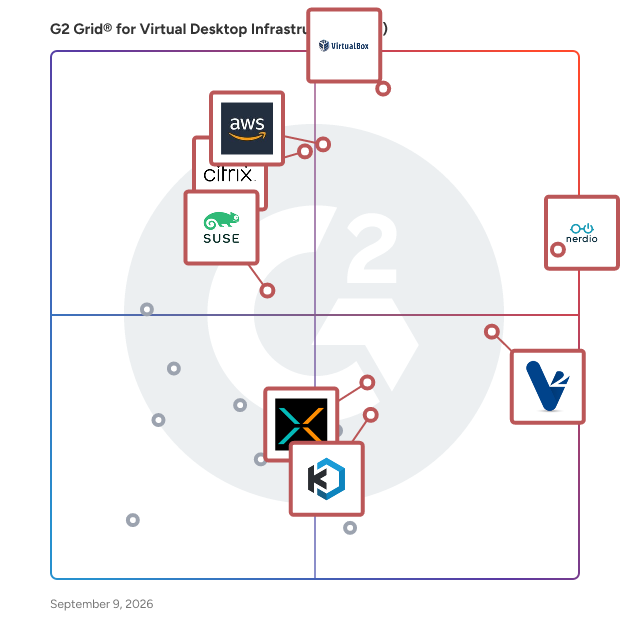
G2 Grid® for Virtual Desktop Infrastructure (VDI) Software

G2 Grid® for Virtual Desktop Infrastructure (VDI) Software plotting products by satisfaction and market presence

Highlighted products: Nerdio Manager, VirtualBox, Amazon WorkSpaces, Citrix DaaS, V2 Cloud, XTIUM Desktop as a Service, SUSE Linux Enterprise Desktop, and Kasm Workspaces.

Underlying data: [Grid® JSON](https://www.g2.com/categories/virtual-desktop-infrastructure-vdi/grids.json?focus%5B%5D=nerdio-manager&focus%5B%5D=virtualbox&focus%5B%5D=amazon-workspaces&focus%5B%5D=citrix-citrix-daas&focus%5B%5D=v2-cloud&focus%5B%5D=xtium-desktop-as-a-service&focus%5B%5D=suse-linux-enterprise-desktop&focus%5B%5D=kasm-workspaces)

Nerdio Manager

Nerdio Manager is an Azure-native management platform designed to help IT teams deploy, manage, and optimize Microsoft cloud desktops and endpoints at scale. This solution operates entirely within a customer’s Azure tenant, adhering to Microsoft best practices, and enhances the native capabilities of Azure Virtual Desktop (AVD), Windows 365 Cloud PCs, Microsoft 365, and Microsoft Intune. With built-in automation, cost optimization, security controls, and migration tooling, Nerdio Manager addresses the complexities of managing cloud environments. As organizations increasingly adopt hybrid and remote work models, the responsibility of IT teams has expanded to ensure secure and high-performance access to corporate resources across both cloud and physical environments. While Microsoft technologies like AVD, Windows 365, and Intune provide essential building blocks for modern endpoint strategies, managing these platforms through native tools can lead to operational challenges. Nerdio Manager fills this gap by offering a unified management layer that simplifies administration and centralizes control across these services, thereby reducing the manual effort and cost challenges often encountered at scale. Key features of Nerdio Manager include intelligent automation and autoscaling capabilities, which help decrease infrastructure and operational costs while ensuring users have timely access to necessary resources. The platform offers centralized policy management and role-based controls, allowing IT teams to enforce consistent security and compliance standards across diverse environments. Additionally, built-in monitoring and insights provide near real-time visibility into endpoint performance, usage, and capacity, empowering IT teams to make informed decisions. Moreover, Nerdio Manager includes migration tools that facilitate the transition from legacy Virtual Desktop Infrastructure (VDI) platforms and on-premises environments to Microsoft cloud desktops with minimal disruption. This capability is particularly beneficial for organizations looking to modernize their digital workspace without incurring significant downtime or operational hiccups. In essence, Nerdio Manager serves as the operational control plane for Microsoft cloud desktops and endpoint management. It enables organizations to modernize their digital workspace environments while effectively managing costs, simplifying daily operations, and retaining full ownership and control over their infrastructure. By transforming powerful but fragmented tools into a cohesive and manageable platform, Nerdio Manager maximizes the value of Microsoft Cloud investments, making it a vital asset for IT teams navigating the complexities of modern endpoint management.

Average Rating: 4.7/5.0

Total Reviews: 230

How Do G2 Users Rate Nerdio Manager?

  • Desktop Virtualization: 9.4/10 (Category avg: 9.0/10)
  • Access Controls and Permissions: 8.8/10 (Category avg: 9.0/10)
  • Has the product been a good partner in doing business?: 9.4/10 (Category avg: 9.0/10)
  • Application Virtualization: 8.7/10 (Category avg: 8.8/10)

Who Is the Company Behind Nerdio Manager?

  • Seller: Nerdio
  • Company Website:
  • Year Founded: 2016
  • HQ Location: Chicago, IL
  • Twitter: @GetNerdio
    2,103 Twitter followers
  • LinkedIn® Page: www.linkedin.com
    450 employees on LinkedIn®

Who Uses This Product?

  • Who Uses This: President
  • Top Industries: Information Technology and Services, Computer & Network Security
  • Company Size: 47% Small, 29% Medium

What Do G2 Reviewers Say About Nerdio Manager?

AI-generated summary from verified user reviews

Pros
  • Users value the ease of use of Nerdio Manager, making workspace creation and IT management straightforward.
  • Users appreciate the automation features of Nerdio Manager, significantly reducing manual effort and enhancing control over Azure management.
  • Users appreciate the cost efficiency of Nerdio Manager, benefiting from automated scaling and optimized resource management.
  • Users value the time-saving automation of Nerdio Manager, significantly reducing manual effort in Azure management tasks.
  • Users value the automation efficiency of Nerdio Manager, significantly reducing operational overhead and simplifying workflows.
Cons
  • Users note a steep learning curve with Nerdio Manager, as the interface can initially feel overwhelming and less intuitive.
  • Users express concern over missing features, particularly the lack of support for GCC 365 tenants.
  • Users find the complex setup of Nerdio Manager challenging, often leading to frustration and unclear functionality.
  • Users find the difficult setup process of Nerdio Manager challenging due to its self-hosted Azure instance requirements.
  • Users find the cost of Nerdio Manager to be a primary drawback, particularly for smaller organizations.

What Are Recent G2 Reviews of Nerdio Manager?

What Are G2 Users Discussing About Nerdio Manager?

Kasm Workspaces

The Next-Generation Workspace: Web-Native. Zero-Trust. Hyperconverged. Kasm provides capabilities not possible with your legacy workspace provider: a modern foundation for integrations, devops-enabled automation for deployment speed, data-loss-prevention controls for cybersecurity, and freedom of choice across cloud/hypervisor/infrastructure to escape vendor-lock. Kasm is changing the way that businesses deliver digital workspaces using our open-source web-native container streaming technology to establish a modern devops delivery of Desktop as a Service (DaaS), application streaming, and browser isolation. Provide your workforce on-demand, high-performance, and automatically updated desktop workspaces, with secure DLP-controlled access to their data, regardless of location or device. Kasm is the future of digital workplaces, offering secure, efficient and scalable Windows, Linux and MacOS desktops...along with secure remote access, application streaming and open-source intelligence (OSINT) research environments. Trusted to run the most critical enterprise workloads, aligned with your business/mission needs, at a price you can afford. There is a better way...and Kasm is your partner for getting there.

Average Rating: 4.7/5.0

Total Reviews: 49

How Do G2 Users Rate Kasm Workspaces?

  • Desktop Virtualization: 9.8/10 (Category avg: 9.0/10)
  • Access Controls and Permissions: 9.5/10 (Category avg: 9.0/10)
  • Has the product been a good partner in doing business?: 9.6/10 (Category avg: 9.0/10)
  • Application Virtualization: 10.0/10 (Category avg: 8.8/10)

Who Is the Company Behind Kasm Workspaces?

  • Seller: Kasm Technologies Inc
  • Company Website:
  • Year Founded: 2017
  • HQ Location: McLean, Virginia
  • Twitter: @kasmweb
    619 Twitter followers
  • LinkedIn® Page: www.linkedin.com
    49 employees on LinkedIn®

Who Uses This Product?

  • Top Industries: Information Technology and Services, Computer & Network Security
  • Company Size: 112% Small, 14% Medium

What Do G2 Reviewers Say About Kasm Workspaces?

AI-generated summary from verified user reviews

Pros
  • Users value the affordability of Kasm Workspaces, enjoying efficient remote access without the burden of traditional VMs.
  • Users praise the swift and helpful customer support of Kasm Workspaces, enhancing the overall user experience.
  • Users find Kasm Workspaces to be incredibly easy to set up and use, enhancing their overall experience significantly.
  • Users find Kasm Workspaces to be exceptionally user-friendly, simplifying setup and minimizing helpdesk support needs.
  • Users highlight the easy deployment of Kasm Workspaces, streamlining setup and minimizing rollout time for updates.
Cons
  • Users experience system instability issues due to browser dependency and performance limitations for demanding tasks.
  • Users often face connection issues due to browser dependency, affecting responsiveness and compatibility during use.
  • Users experience feature limitations with Kasm Workspaces, especially in performance and browser compatibility issues.
  • Users experience slow performance with Kasm Workspaces during resource-intensive tasks, impacting productivity and efficiency.
  • Users experience technical issues with responsiveness and performance, especially for resource-intensive tasks in Kasm Workspaces.

What Are Recent G2 Reviews of Kasm Workspaces?

What Are G2 Users Discussing About Kasm Workspaces?

Workspot - Enterprise Desktop Cloud

Workspot is a SaaS platform that delivers enterprise-proven, cloud PCs, cloud workstations and virtualized applications from the public cloud. Workspot's ground-breaking, cloud-native architecture for desktop-as-a-service (DaaS) is completely transforming end user computing. This innovative service lets IT easily and quickly provision cloud PCs - and securely deliver exactly the right compute capabilities for every end user, on any device. The Workspot Enterprise Desktop Cloud platform also gives IT the ability to scale their cloud PC footprint across multiple cloud regions globally - in minutes - to accommodate dynamic business demands. Workspot's flexible cloud PC pricing options make it possible to fine-tune computing costs by use case. Included in your Workspot cloud PC subscription pricing is our Go- Live Services Program, which is led by our customer success team working side-by-side with your IT organization to optimize the platform for your specific needs. Ongoing support, training, service optimization, and new features all add up to your success. Workspot differentiators include: GLOBAL Workspot’s groundbreaking Desktop Control Fabric Architecture makes it possible to deploy cloud PCs in any Azure and Google Cloud region from a single console and place them close to each end user for unparalleled performance. OPERATIONAL SIMPLICITY Workspot’s SaaS platform wraps the complex network of tools and services needed to deploy cloud PCs and workstations into an easy-to-manage SaaS solution. Flat rate pricing includes the cost of cloud, networking and other services, so customers gain budget predictability. ENTERPRISE-PROVEN Enterprises need choices in order to support complex requirements. Workspot is the cloud PC of choice; you can deliver fully custom enterprise images, and our solution integrates with your choice of management tools, your MFA, your security stack, and your existing IT processes. ZERO-TRUST SECURITY Users gain Zero-trust access from any device. Compliance is streamlined since Workspot never has visibility into your corporate data. INDUSTRY-LEADING 99.95% AVAILABILITY Workspot Watch is our big data collection and correlation engine that powers our Network Operations Center 24x7x365. Powerful monitoring, analysis and trending capabilities that span public cloud regions provide the big picture that can help you stay in front of potential risks that could impact uptime for your end users. The business benefits organizations experience with Workspot include: GREATER BUSINESS AGILITY Flexibility to grow/shrink end user computing quickly to support business needs and today's work-from-anywhere requirements. BETTER END USER PRODUCTIVITY Workspot places cloud PCs and workstations at the cloud edge nearest each user for extraordinary performance. REDUCED IT COMPLEXITY Simplify hardware refresh, free up IT resources, reduce end user computing costs. STRONGER SECURITY Workspot helps reduce the overall attack surface by keeping all desktop data and apps secure in the cloud. Enforce your Zero-Trust Security policy with Workspot cloud PCs. IMPROVED BUSINESS CONTINUITY End users simply select their device of choice for the task at hand and connect to their Workspot cloud PCs from wherever they happen to be working. Unique, multi-region resiliency allows cloud PCs to failover to another cloud region in the event of a cloud outage, protecting your business from disruption.

Average Rating: 4.8/5.0

Total Reviews: 17

How Do G2 Users Rate Workspot - Enterprise Desktop Cloud?

  • Desktop Virtualization: 10.0/10 (Category avg: 9.0/10)
  • Access Controls and Permissions: 10.0/10 (Category avg: 9.0/10)
  • Has the product been a good partner in doing business?: 9.7/10 (Category avg: 9.0/10)
  • Application Virtualization: 10.0/10 (Category avg: 8.8/10)

Who Is the Company Behind Workspot - Enterprise Desktop Cloud?

  • Seller: Workspot
  • Year Founded: 2012
  • HQ Location: Campbell, CA
  • Twitter: @Workspot
    1,745 Twitter followers
  • LinkedIn® Page: www.linkedin.com
    122 employees on LinkedIn®

Who Uses This Product?

  • Top Industries: Civil Engineering
  • Company Size: 79% Medium, 16% Large

What Are Recent G2 Reviews of Workspot - Enterprise Desktop Cloud?

What Are G2 Users Discussing About Workspot - Enterprise Desktop Cloud?

10ZiG Manager Thin & Zero Client Management Software

10ZiG Technology is a world-market leader in VDI endpoint device software and hardware. The 10ZiG Manager™ endpoint management software remotely controls any endpoint running on a 10ZiG OS via one centrally-managed and easy-to-use platform. IT Administrators can easily configure, deploy and manage large volumes of VDI endpoints located in multiple cities across the world – regardless of where that Admin is located. Equipped with features including Cloud enablement, power management, task-scheduling, automatic configuration, distributed firmware versioning, role-based access, reporting, shadowing, and more, The 10ZiG Manager is always FREE – with an unlimited number of users or licenses.

Average Rating: 4.7/5.0

Total Reviews: 15

How Do G2 Users Rate 10ZiG Manager Thin & Zero Client Management Software?

  • Desktop Virtualization: 9.2/10 (Category avg: 9.0/10)
  • Access Controls and Permissions: 9.2/10 (Category avg: 9.0/10)
  • Has the product been a good partner in doing business?: 9.7/10 (Category avg: 9.0/10)
  • Application Virtualization: 10.0/10 (Category avg: 8.8/10)

Who Is the Company Behind 10ZiG Manager Thin & Zero Client Management Software?

  • Seller: 10ZiG Technology
  • Year Founded: 2003
  • HQ Location: Phoenix, Arizona
  • Twitter: @10ZiGTechnology
    1,851 Twitter followers
  • LinkedIn® Page: www.linkedin.com
    59 employees on LinkedIn®

Who Uses This Product?

  • Company Size: 73% Medium, 20% Small

What Are Recent G2 Reviews of 10ZiG Manager Thin & Zero Client Management Software?

What Are G2 Users Discussing About 10ZiG Manager Thin & Zero Client Management Software?

Inuvika OVD Enterprise

Migrating from Citrix or VMware Horizon (Omnissa) could not be easier. Inuvika OVD Enterprise is a secure and cost-effective alternative that reduces your TCO by over 60%. More users on a server, fewer Windows server licenses, no SQL server license, built in secure gateway, concurrent user subscriptions and 2FA will all lower your costs substantially. Inuvika OVD Enterprise is an efficient, desktop virtualization solution that delivers Windows and Linux virtual apps and virtual desktops to any device. It deploys on any hypervisor (KVM, vSphere, ProxmoxVE, Nutanix AHV, Verge.OS, etc) and can be installed on-premise, on public or private clouds, and can also be purchased as a Desktop as a Service (DaaS) from our hosting partners around the world. The on-premises version of the product is available starting with 20 concurrent users. DaaS is available starting at 10 concurrent users. Inuvika OVD Enterprise offers an easy-to-use admin console, a fast user experience, and requires less infrastructure overhead compared to traditional virtual desktop solutions. OVD Enterprise serves enterprise, financial, healthcare, education and government organizations and we are happy to work with SMEs who are struggling with price increases at Citrix and vendor lock-in at VMware/Omnissa. Inuvika also has its own thin client software called ResoluteOS that allows you to repurpose existing hardware to extend the life of it and securely access Inuvika OVD Enterprise. Available in over 60 countries.

Average Rating: 4.7/5.0

Total Reviews: 19

How Do G2 Users Rate Inuvika OVD Enterprise?

  • Desktop Virtualization: 9.7/10 (Category avg: 9.0/10)
  • Access Controls and Permissions: 9.7/10 (Category avg: 9.0/10)
  • Has the product been a good partner in doing business?: 9.8/10 (Category avg: 9.0/10)
  • Application Virtualization: 9.3/10 (Category avg: 8.8/10)

Who Is the Company Behind Inuvika OVD Enterprise?

  • Seller: Inuvika
  • Year Founded: 2014
  • HQ Location: Toronto, Canada
  • Twitter: @InuvikaInc
    311 Twitter followers
  • LinkedIn® Page: www.linkedin.com
    17 employees on LinkedIn®

Who Uses This Product?

  • Top Industries: Information Technology and Services
  • Company Size: 53% Small, 47% Medium

What Are Recent G2 Reviews of Inuvika OVD Enterprise?

Cameyo

Cameyo’s Virtual App Delivery (VAD) platform provides an ultra-secure, simple, and cost-effective cloud desktop solution for enabling you to deliver all your apps – legacy Windows, internal web, and SaaS – to any device without the need for legacy virtual desktops or VPNs. Unlike traditional VDI and DaaS solutions, Cameyo is the only cloud-native virtualization solution that delivers any application to any device without delivering the Windows OS. Cameyo’s cloud desktop solution dramatically reduces cost & complexity while increasing security and providing a more seamless user experience. Cameyo is one of three Chrome Enterprise Recommended virtualization solutions globally, and hundreds of enterprises and organizations across all industries utilize Cameyo to deliver business-critical applications to hundreds of thousands of users worldwide. As of August 2022, Cameyo has a Net Promoter Score (NPS) of +83 with zero detractors – 100% of responding customers would recommend Cameyo to their peers. To learn more, visit cameyo.com.

Average Rating: 4.7/5.0

Total Reviews: 31

How Do G2 Users Rate Cameyo?

  • Desktop Virtualization: 8.5/10 (Category avg: 9.0/10)
  • Access Controls and Permissions: 9.2/10 (Category avg: 9.0/10)
  • Has the product been a good partner in doing business?: 9.8/10 (Category avg: 9.0/10)
  • Application Virtualization: 9.3/10 (Category avg: 8.8/10)

Who Is the Company Behind Cameyo?

  • Seller: Cameyo
  • Year Founded: 2018
  • HQ Location: Cary, NC
  • Twitter: @cameyoco
    614 Twitter followers
  • LinkedIn® Page: www.linkedin.com
    4 employees on LinkedIn®

Who Uses This Product?

  • Top Industries: Computer Software
  • Company Size: 45% Small, 32% Large

What Do G2 Reviewers Say About Cameyo?

AI-generated summary from verified user reviews

Pros
  • Users appreciate the excellent customer support of Cameyo, enhancing their overall experience and satisfaction.
  • Users find the ease of use in Cameyo complemented by excellent support and seamless ChromeOS integration.
  • Users highlight the seamless integration with ChromeOS, enhancing their experience with ease and excellent support.
Cons
  • Users express concern over removed features without notice, lack of communication, and additional costs for support.
  • Users are frustrated by the poor customer support, including unexpected feature removals and lack of communication.

What Are Recent G2 Reviews of Cameyo?

What Are G2 Users Discussing About Cameyo?

Neverinstall

We built Neverinstall to be your modern VDI Platform, eliminating the problems associated with traditional virtualization. Neverinstall is browser first. Stream desktop applications, development environments and heavy applications like AutoCAD, Rhino and Revit directly from the cloud. Our streaming protocols have been written grounds-up to optimize for low bandwidth (think 3G) networks. Teams now have access to powerful computing resources from any device without installing software or being constrained by local hardware performance. Neverinstall is - -Fast. Automated deployment in hours and days, not weeks. -Flexible. Deploy on any Cloud. -Secure. ISO27001, SOC2, GDPR. -Scalable. From small teams to thousands of users. -Multi-Platform. Natively supports Windows & Linux. -Affordable. Flexible pay-as-you-go pricing & lower TCO.

Average Rating: 4.4/5.0

Total Reviews: 37

How Do G2 Users Rate Neverinstall?

  • Has the product been a good partner in doing business?: 8.5/10 (Category avg: 9.0/10)

Who Is the Company Behind Neverinstall?

  • Seller: Neverinstall
  • Year Founded: 2019
  • HQ Location: Bengaluru, IN
  • Twitter: @neverinstall
    894 Twitter followers
  • LinkedIn® Page: www.linkedin.com
    34 employees on LinkedIn®

Who Uses This Product?

  • Who Uses This: Student
  • Top Industries: Computer Software, Information Technology and Services
  • Company Size: 74% Small, 24% Medium

What Do G2 Reviewers Say About Neverinstall?

AI-generated summary from verified user reviews

Pros
  • Users enjoy the ease of use of Neverinstall, simplifying access across multiple devices without downloads.
  • Users value the seamless cloud management of Neverinstall, enhancing productivity with quick access to resource-intensive IDEs.
  • Users value the fast and reliable servers of Neverinstall, enabling quick setup and smooth performance for all.
  • Users love the fast performance of Neverinstall, enjoying a smooth and efficient experience while exploring the platform.
  • Users appreciate the affordability of Neverinstall, benefiting from instant access without complicated sign-ups.
Cons
  • Users find the service sluggish and slow, especially with limited internet speed, impacting their overall experience.
  • Users express frustration with access restrictions, as limited storage and freemium services hinder app downloads and usability.
  • Users find the limited app availability a drawback, especially missing more Windows applications for diverse use cases.
  • Users find pricing issues with Neverinstall disappointing, as free access is limited and paid plans are necessary for more work.
  • Users face technical difficulties with Neverinstall, including scrolling issues and frequent page refreshes due to hangs.

What Are Recent G2 Reviews of Neverinstall?

What Are G2 Users Discussing About Neverinstall?

ASTER

ASTER is a multiseat software for Windows 7/8/10/11, Windows Server 2016/2019/2022 and Linux. ASTER allows several users to work simultaneously on the same PC, thus significantly reducing hardware and power costs. ASTER is a zero-client software - it creates virtual desktop clients without thin client hardware. To create multiple workplaces - simply connect multiple monitors, keyboards and mice to one computer. ASTER is ideal solution for cost-effective computerization in homes, schools, companies, factories, and government organizations - more than 100,000 customers in 140 countries can attest to this.

Average Rating: 4.8/5.0

Total Reviews: 13

How Do G2 Users Rate ASTER?

  • Desktop Virtualization: 10.0/10 (Category avg: 9.0/10)
  • Access Controls and Permissions: 10.0/10 (Category avg: 9.0/10)
  • Has the product been a good partner in doing business?: 10.0/10 (Category avg: 9.0/10)
  • Application Virtualization: 8.3/10 (Category avg: 8.8/10)

Who Is the Company Behind ASTER?

Who Uses This Product?

  • Company Size: 77% Small

What Are Recent G2 Reviews of ASTER?

Dizzion DaaS

Dizzion DaaS is a flexible, enterprise-ready Desktop as a Service (DaaS) platform that gives IT teams full control over how virtual desktops and applications are delivered, managed, and secured across public, private, or hybrid cloud environments. It supports both persistent and non-persistent desktop models and enables organizations to scale desktop infrastructure globally without the cost or complexity of traditional VDI. Designed for a myriad of use cases, Dizzion DaaS allows organizations to bring their own cloud, extend to multi-region deployments, and integrate with existing identity, security, and infrastructure tools. The platform supports deployments across AWS, Azure, Google Cloud, IBM Cloud VPC, and Nutanix on-prem. Dizzion DaaS enables organizations to: - Deploy persistent or non-persistent virtual desktops based on user roles and use cases - Deliver secure application access alongside full desktop environments - Maintain infrastructure flexibility through true cloud choice - Scale quickly across geographies without hardware bottlenecks - Support secure access for contractors, call centers, offshore teams, and mobile workforces - Reduce management overhead compared to legacy VDI solutions Key features include: - Centralized control for desktop and app delivery - Role-based access policies and identity integration - Built-in telemetry for performance, session health, and user experience - Compatibility with regulated environments (HIPAA, SOC 2, PCI, GDPR) - Integration with tools like Dizzion Overwatch (monitoring) and Security Pulse (risk detection) Whether you're replacing legacy VDI, expanding to a new region, or enabling temporary workers, Dizzion DaaS helps you deliver desktops at scale: securely, consistently, and on your terms. Your Desktop. Your Cloud. Your Way.

Average Rating: 4.4/5.0

Total Reviews: 15

How Do G2 Users Rate Dizzion DaaS?

  • Desktop Virtualization: 7.5/10 (Category avg: 9.0/10)
  • Access Controls and Permissions: 8.3/10 (Category avg: 9.0/10)
  • Has the product been a good partner in doing business?: 9.4/10 (Category avg: 9.0/10)
  • Application Virtualization: 9.2/10 (Category avg: 8.8/10)

Who Is the Company Behind Dizzion DaaS?

  • Seller: Dizzion
  • Company Website:
  • Year Founded: 2011
  • HQ Location: San Antonio, TX
  • Twitter: @Dizzion
    896 Twitter followers
  • LinkedIn® Page: www.linkedin.com
    54 employees on LinkedIn®

Who Uses This Product?

  • Company Size: 65% Medium, 18% Large

What Are Recent G2 Reviews of Dizzion DaaS?

What Are G2 Users Discussing About Dizzion DaaS?

Login VSI

Control Your EUC Workspace. Validate Every Change. Login VSI helps enterprise IT teams run and validate digital workspace environments at scale. Hydra is how Windows in the Cloud should be run, across Azure Virtual Desktop (AVD), Windows 365, and hybrid deployments. Built for administrators and MSPs alike, Hydra restores a familiar and streamlined way to transition to and manage modern virtual desktops, without the unnecessary cost, complexity, or operational tradeoffs of native or traditional third-party tooling. Login Enterprise continuously validates mission-critical enterprise performance across applications, infrastructure, and user workflows before and after every change. It catches regressions before rollout, detects drift after go-live, and protects user experience across every environment.

Average Rating: 4.5/5.0

Total Reviews: 3

How Do G2 Users Rate Login VSI?

  • Desktop Virtualization: 9.4/10 (Category avg: 9.0/10)
  • Access Controls and Permissions: 8.9/10 (Category avg: 9.0/10)
  • Application Virtualization: 8.3/10 (Category avg: 8.8/10)

Who Is the Company Behind Login VSI?

  • Seller: Login VSI
  • Year Founded: 2012
  • HQ Location: Boston, US
  • Twitter: @LoginVSI
    5,557 Twitter followers
  • LinkedIn® Page: www.linkedin.com
    72 employees on LinkedIn®

Who Uses This Product?

  • Company Size: 67% Small, 33% Medium

What Do G2 Reviewers Say About Login VSI?

AI-generated summary from verified user reviews

Pros
  • Users appreciate the seamless interface and excellent customer support provided by Login VSI across major VDI platforms.
  • Users value the customer understanding of Login VSI, benefiting from excellent support and comprehensive platform compatibility.
  • Users appreciate the user-friendly interface of Login VSI, making it easy to test system performance and find issues.
  • Users value the easy integrations of Login VSI with various services, enhancing overall usability and automation.
  • Users appreciate the advanced issue detection and automation features of Login VSI, enhancing performance and usability.
Cons
  • Users find the cost of Login VSI to be prohibitively high, especially for smaller organizations with limited budgets.
  • Users find the complex setup process of Login VSI challenging, especially those lacking knowledge in virtual environments.
  • Users find the initial integration process challenging, making it less user-friendly for newcomers and small organizations.
  • Users find poor customer support frustrating, making initial integration and configuration more challenging and resource-intensive.

What Are Recent G2 Reviews of Login VSI?

Stratodesk NoTouch

Stratodesk is the leading innovator of an ultra-secure endpoint OS engineered with precision to meet the unique demands of modern enterprises. With zero-trust principles embedded in its core, NoTouch OS is the market-leading endpoint OS for VDI, DaaS, SaaS, and Secure Browsing as well as IIoT and Automation use cases. NoTouch OS delivers CAPEX and OPEX savings by simplifying IT processes and endpoint management, advances sustainability goals through hardware life cycle extension, and revolutionizes user experience and productivity, while ensuring comprehensive endpoint security on any device and in any location.

Average Rating: 4.3/5.0

Total Reviews: 8

How Do G2 Users Rate Stratodesk NoTouch?

  • Desktop Virtualization: 10.0/10 (Category avg: 9.0/10)
  • Access Controls and Permissions: 10.0/10 (Category avg: 9.0/10)
  • Has the product been a good partner in doing business?: 7.9/10 (Category avg: 9.0/10)
  • Application Virtualization: 10.0/10 (Category avg: 8.8/10)

Who Is the Company Behind Stratodesk NoTouch?

  • Seller: Stratodesk
  • Year Founded: 2010
  • HQ Location: San Francisco, US
  • Twitter: @stratodesk
    18,496 Twitter followers
  • LinkedIn® Page: www.linkedin.com
    8 employees on LinkedIn®

Who Uses This Product?

  • Company Size: 50% Medium, 38% Large

What Do G2 Reviewers Say About Stratodesk NoTouch?

AI-generated summary from verified user reviews

Pros
  • Users praise the ease of use of Stratodesk NoTouch, highlighting its intuitive setup and management for all users.
  • Users value the security of Stratodesk NoTouch, highlighting its stable, locked-down OS that enhances safety.
  • Users value the time-saving features of Stratodesk NoTouch, facilitating quick deployments and efficient management of devices.
  • Users appreciate the centralized management of Stratodesk NoTouch, enabling easy deployment, updates, and monitoring of devices.
  • Users value the easy implementation of Stratodesk NoTouch, appreciating the quick setup and efficient device management.
Cons
  • Users experienced initial app incompatibility with Stratodesk NoTouch, though improvements have been noted with VDI infrastructure.
  • Users face driver issues with Stratodesk NoTouch, including slow access to new drivers and limited customization options.
  • Users note a lack of customization in Stratodesk NoTouch, impacting flexibility and user experience.
  • Users find the learning curve steep, struggling with advanced configurations and limited customization options in Stratodesk NoTouch.
  • Users find the limited customization in Stratodesk NoTouch compared to full desktop OSes restrictive for their needs.

What Are Recent G2 Reviews of Stratodesk NoTouch?

Surf Security Zero Trust Enterprise Browser

Founded in London, UK in 2022, SURF Security is an endpoint protection Browser-SASE (secure access service edge) cybersecurity company that has created the world’s first enterprise zero-trust browser and extension with security at its core. These two products capitalise on the rise of both the working-from-home phenomenon, and ‘software as a service’ or SaaS platforms that are used through a browser. SURF secures the browser itself, either replacing or augmenting consumer browsers such as Chrome, Edge, or Safari. This approach helps ensure compliance, defends organisations from breaches and protects users from social engineering attacks such as phishing—all on the user’s device.

Average Rating: 4.9/5.0

Total Reviews: 5

How Do G2 Users Rate Surf Security Zero Trust Enterprise Browser?

  • Desktop Virtualization: 0.0/10 (Category avg: 9.0/10)
  • Has the product been a good partner in doing business?: 10.0/10 (Category avg: 9.0/10)
  • Application Virtualization: 0.0/10 (Category avg: 8.8/10)

Who Is the Company Behind Surf Security Zero Trust Enterprise Browser?

Who Uses This Product?

  • Company Size: 40% Large, 40% Small

What Do G2 Reviewers Say About Surf Security Zero Trust Enterprise Browser?

AI-generated summary from verified user reviews

Pros
  • Users value the granular access control offered by Surf Security, enhancing productivity while ensuring strict security measures.
  • Users commend the ease of use of Surf Security Zero Trust Enterprise Browser, highlighting its intuitive and seamless functionality.
  • Users value the password management features of Surf Security, enhancing security without compromising browsing experience.
  • Users enjoy the seamless performance of Surf Security's browser, enhancing productivity without sacrificing security measures.
  • Users praise the robust security and seamless experience of Surf Security's Enterprise Zero Trust Browser, ensuring data safety.
Cons
  • Users find the complex configuration challenging, suggesting more pre-made templates for quicker setup would be beneficial.
  • Users find the difficult configuration process of Surf Security Zero Trust Enterprise Browser could benefit from more predefined options.
  • Users find the onboarding process challenging, requiring careful planning and consideration for effective implementation.
  • Users feel thelimited customization options hinder initial setup, wishing for more tailored templates to enhance the experience.
  • Users find onboarding difficulties with Surf Security Zero Trust Browser, requiring careful planning and thought for effective setup.

What Are Recent G2 Reviews of Surf Security Zero Trust Enterprise Browser?

Thinfinity Workspace

Thinfinity® Workspace 7 is a comprehensive, secure platform that offers a zero-trust approach, enabling secure and contextual access to corporate virtual desktops, virtual applications, internal web apps, SaaS, and files, whether they are on Windows, Linux, or mainframes. It supports various deployment models, including cloud, on-premise, and hybrid settings, and can be deployed on any cloud provider of your choice. With its proprietary reverse gateway technology, Thinfinity® Remote Workspace 7 ensures secure reverse connections over SSL with TLS 1.3 encryption. This robust approach doesn't require client-side installations, firewall modifications, or the opening of inbound ports on your network, thereby enhancing the security infrastructure of your business. The platform ensures all browser-based connections are secured over HTTPS, offering a wide variety of authentication options, from straightforward User/Password to sophisticated Active Directory authentication. Moreover, it seamlessly integrates with any identity provider, such as Okta, DUO, or Azure AD, employing standard security protocols like SAML, OAuth, and Radius for enhanced security and flexibility. The solution protects users, applications, and corporate data against internet web threats and data exfiltration, providing advanced security controls for managed, unmanaged, and BYO devices. With its Role-Based Permissions and native two-factor authentication with Microsoft or Google Authenticator, Thinfinity® Remote Workspace 7 offers an extensive security approach based on zero-trust principles. In addition to its robust security features, Thinfinity® Remote Workspace 7 also delivers an efficient and streamlined remote working experience. Its user-centric interface, combined with advanced features like user analytics and resource reservation views, allows for effective management of remote resources. With its flexible pricing models and an array of advanced features, Thinfinity® Remote Workspace 7 is an optimal solution for organizations aiming to maximize the potential of a virtual workspace. Regardless of your team's size or nature of business, Thinfinity provides a secure, efficient, and tailored solution for your remote access requirements.

Average Rating: 4.1/5.0

Total Reviews: 4

How Do G2 Users Rate Thinfinity Workspace?

  • Desktop Virtualization: 10.0/10 (Category avg: 9.0/10)
  • Access Controls and Permissions: 6.7/10 (Category avg: 9.0/10)
  • Has the product been a good partner in doing business?: 10.0/10 (Category avg: 9.0/10)
  • Application Virtualization: 10.0/10 (Category avg: 8.8/10)

Who Is the Company Behind Thinfinity Workspace?

Who Uses This Product?

  • Company Size: 75% Medium, 25% Large

What Are Recent G2 Reviews of Thinfinity Workspace?

What Are G2 Users Discussing About Thinfinity Workspace?

Leostream

The Leostream Remote Desktop Access Platform embodies over 20 years of Leostream research and development in supporting customers with hosted desktop environments, including VDI, hybrid cloud, and high-performance display protocols. It provides the world’s most robust desktop connection management and remote access feature set, allowing today’s enterprises to choose the best-of-breed components to satisfy their complex security, cost, and flexibility needs while working with them as they evolve into tomorrow.

Average Rating: 5.0/5.0

Total Reviews: 1

How Do G2 Users Rate Leostream?

  • Desktop Virtualization: 10.0/10 (Category avg: 9.0/10)
  • Access Controls and Permissions: 10.0/10 (Category avg: 9.0/10)
  • Application Virtualization: 10.0/10 (Category avg: 8.8/10)

Who Is the Company Behind Leostream?

Who Uses This Product?

  • Company Size: 100% Large

What Are Recent G2 Reviews of Leostream?

What Are G2 Users Discussing About Leostream?

Sonet.io

Sonet.io is a cloud-native workspace solution for IT leaders that don’t want the cost and frustration of traditional VDIs, DaaS or VPNs. Sonet.io makes it easy for remote workers to access web apps, desktop apps and desktops from any device or browser, while implementing fine-grain security and visibility. Deployment is simple, and can be done in under one hour - no rack and stack, no shipping devices, no device deployments. And you can leverage elastic scaling when you need it.

Average Rating: 4.8/5.0

Total Reviews: 2

How Do G2 Users Rate Sonet.io?

  • Desktop Virtualization: 10.0/10 (Category avg: 9.0/10)
  • Access Controls and Permissions: 10.0/10 (Category avg: 9.0/10)
  • Application Virtualization: 10.0/10 (Category avg: 8.8/10)

Who Is the Company Behind Sonet.io?

Who Uses This Product?

  • Company Size: 100% Large

What Are Recent G2 Reviews of Sonet.io?

Shalaka Joshi
SJ
Researched and written by Shalaka Joshi
Updated October 3, 2024