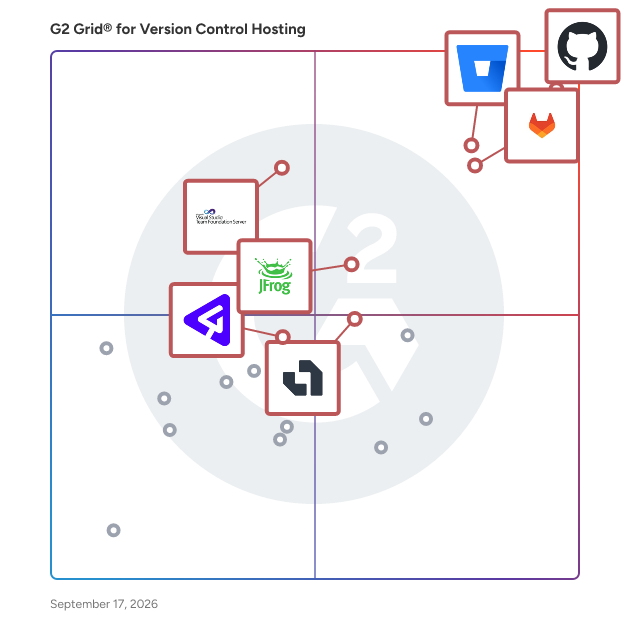
  # Best Enterprise Version Control Hosting Software

  *By [Adam Crivello](https://research.g2.com/insights/author/adam-crivello)*

   Products classified in the overall Version Control Hosting category are similar in many regards and help companies of all sizes solve their business problems. However, enterprise business features, pricing, setup, and installation differ from businesses of other sizes, which is why we match buyers to the right Enterprise Business Version Control Hosting to fit their needs. Compare product ratings based on reviews from enterprise users or connect with one of G2&#39;s buying advisors to find the right solutions within the Enterprise Business Version Control Hosting category.

In addition to qualifying for inclusion in the Version Control Hosting Software category, to qualify for inclusion in the Enterprise Business Version Control Hosting Software category, a product must have at least 10 reviews left by a reviewer from an enterprise business.


## How Many Version Control Hosting Software Products Does G2 Track?
**Total Products under this Category:** 32

### Category Stats (May 2026)
- **Average Rating**: 4.33/5
- **New Reviews This Quarter**: 71
- **Buyer Segments**: Small-Business 49% │ Mid-Market 34% │ Enterprise 17%
- **Top Trending Product**: Gitea (+0.021)
*Last updated: May 18, 2026*

  
## How Does G2 Rank Version Control Hosting Software Products?

**Why You Can Trust G2's Software Rankings:**

- 30 Analysts and Data Experts
- 5,700+ Authentic Reviews
- 32+ Products
- Unbiased Rankings

G2's software rankings are built on verified user reviews, rigorous moderation, and a consistent research methodology maintained by a team of analysts and data experts. Each product is measured using the same transparent criteria, with no paid placement or vendor influence. While reviews reflect real user experiences, which can be subjective, they offer valuable insight into how software performs in the hands of professionals. Together, these inputs power the G2 Score, a standardized way to compare tools within every category.


---

**Sponsored**

### Redgate Flyway

Redgate Flyway enables teams to deploy stable, secure database changes with confidence. With Flyway’s best-in-class technology and market-leading flexibility, teams have all they need for strong database governance, reliable deployments and the freedom to innovate faster. Redgate’s portfolio of solutions, including Flyway, help organizations reliably solve the complex challenges of database change management across the Database DevOps lifecycle. We make life easier for IT leaders, development and operations teams, increasing efficiency, reducing errors and protecting business-critical data. More than 200,000 data professionals across the globe, including 92% of the Fortune 100, rely on Redgate’s solutions to enable automation, resilience and efficiency throughout the database lifecycle, ensuring they get the most value out of their databases.


[Visit website](https://www.g2.com/external_clickthroughs/record?secure%5Bad_program%5D=ppc&amp;secure%5Bad_slot%5D=category_product_list&amp;secure%5Bcategory_id%5D=658&amp;secure%5Bdisplayable_resource_id%5D=1003605&amp;secure%5Bdisplayable_resource_type%5D=Category&amp;secure%5Bmedium%5D=sponsored&amp;secure%5Bplacement_reason%5D=neighbor_category&amp;secure%5Bplacement_resource_ids%5D%5B%5D=536&amp;secure%5Bprioritized%5D=false&amp;secure%5Bproduct_id%5D=78698&amp;secure%5Bresource_id%5D=658&amp;secure%5Bresource_type%5D=Category&amp;secure%5Bsource_type%5D=category_page&amp;secure%5Bsource_url%5D=https%3A%2F%2Fwww.g2.com%2Fcategories%2Fversion-control-hosting%2Fenterprise&amp;secure%5Btoken%5D=35deeb0649f29da6b3b583ad6c2cf230be050fcdcb0170979280e022e172f638&amp;secure%5Burl%5D=https%3A%2F%2Fwww.red-gate.com%2Fproducts%2Fflyway%2Fenterprise%2F%3Futm_source%3Dg2%26utm_medium%3Dcpc%26utm_campaign%3Dmc-202603-flyway-g2-clicks-gm-all&amp;secure%5Burl_type%5D=free_trial)

---

  ## What Are the Top-Rated Version Control Hosting Software Products in 2026?
### 1. [GitHub](https://www.g2.com/products/github/reviews)
  GitHub is where the world builds software. Millions of individuals, organizations and businesses around the world use GitHub to discover, share, and contribute software. Developers at startups to Fortune 50 companies use GitHub, every step of the way.


  **Average Rating:** 4.7/5.0
  **Total Reviews:** 2,289
**How Do G2 Users Rate GitHub?**

- **Quality of Support:** 8.7/10 (Category avg: 8.3/10)

**Who Is the Company Behind GitHub?**

- **Seller:** [GitHub](https://www.g2.com/sellers/github)
- **Year Founded:** 2008
- **HQ Location:** San Francisco, CA
- **Twitter:** @github (2,667,432 Twitter followers)
- **LinkedIn® Page:** https://www.linkedin.com/company/1418841/ (6,106 employees on LinkedIn®)

**Who Uses This Product?**
  - **Who Uses This:** Software Engineer, Senior Software Engineer
  - **Top Industries:** Computer Software, Information Technology and Services
  - **Company Size:** 46% Small-Business, 31% Mid-Market


#### What Are GitHub's Pros and Cons?

**Pros:**

- Features (113 reviews)
- Ease of Use (102 reviews)
- Team Collaboration (102 reviews)
- Collaboration (97 reviews)
- Version Control (97 reviews)

**Cons:**

- Complexity (45 reviews)
- Learning Curve (42 reviews)
- Difficulty for Beginners (40 reviews)
- Learning Difficulty (38 reviews)
- Steep Learning Curve (34 reviews)

### 2. [Bitbucket](https://www.g2.com/products/bitbucket/reviews)
  Bitbucket is the Git solution for professional teams. It provides collaboration and code management around the versioning of your codebase. Every piece of core functionality has been built to help software teams work better together. This ranges from collaboration to integrations &amp; extensibility, security, and scalability. Bitbucket allows software teams to collaborate around their source code, secure their code base, enforce development workflows, and scale as their team grows. It integrates with JIRA Software for traceability from feature ideation through deployment. Bitbucket provides a platform for developers to discuss code changes, a window into development progress for development managers, and a performant version control system for system admins.


  **Average Rating:** 4.4/5.0
  **Total Reviews:** 987
**How Do G2 Users Rate Bitbucket?**

- **Quality of Support:** 8.5/10 (Category avg: 8.3/10)

**Who Is the Company Behind Bitbucket?**

- **Seller:** [Atlassian](https://www.g2.com/sellers/atlassian)
- **Year Founded:** 2002
- **HQ Location:** Sydney and San Francisco
- **Twitter:** @Atlassian (106,351 Twitter followers)
- **LinkedIn® Page:** https://www.linkedin.com/company/atlassian (21,334 employees on LinkedIn®)
- **Ownership:** NASDAQ:TEAM

**Who Uses This Product?**
  - **Who Uses This:** Software Engineer, Senior Software Engineer
  - **Top Industries:** Computer Software, Information Technology and Services
  - **Company Size:** 40% Small-Business, 32% Mid-Market


#### What Are Bitbucket's Pros and Cons?

**Pros:**

- Jira Integration (21 reviews)
- Code Review (14 reviews)
- CD Integration (11 reviews)
- CI (11 reviews)
- Git Integration (11 reviews)

**Cons:**

- Slow Speed (14 reviews)
- Lack of Features (7 reviews)
- Slow Performance (7 reviews)
- UX Improvement (7 reviews)
- Confusing Interface (6 reviews)

### 3. [GitLab](https://www.g2.com/products/gitlab/reviews)
  GitLab is the most comprehensive AI-Powered DevSecOps platform that enables software innovation by empowering development, security, and operations teams to build better software, faster. With GitLab, teams can create, deliver, and manage code quickly and continuously instead of managing disparate tools and scripts. GitLab helps your teams across the complete DevSecOps lifecycle, from developing, securing, and deploying software. What makes us truly different? - Flexibility: Consume as a service or manage your own deployment - Cloud-Agnostic: Deploy anywhere with no vendor lock-in - No rip and replace: Scale to a platform approach at your own pace


  **Average Rating:** 4.5/5.0
  **Total Reviews:** 875
**How Do G2 Users Rate GitLab?**

- **Quality of Support:** 8.5/10 (Category avg: 8.3/10)

**Who Is the Company Behind GitLab?**

- **Seller:** [GitLab Inc.](https://www.g2.com/sellers/gitlab-inc)
- **Company Website:** https://about.gitlab.com/
- **Year Founded:** 2014
- **HQ Location:** San Francisco, California
- **Twitter:** @gitlab (171,245 Twitter followers)
- **LinkedIn® Page:** https://www.linkedin.com/company/5101804/ (3,357 employees on LinkedIn®)

**Who Uses This Product?**
  - **Who Uses This:** Software Engineer, Senior Software Engineer
  - **Top Industries:** Computer Software, Information Technology and Services
  - **Company Size:** 37% Mid-Market, 37% Small-Business


#### What Are GitLab's Pros and Cons?

**Pros:**

- Ease of Use (40 reviews)
- Features (39 reviews)
- CI (33 reviews)
- Integrations (32 reviews)
- CD Integration (31 reviews)

**Cons:**

- Complexity (20 reviews)
- Difficult Learning (19 reviews)
- Confusing Interface (15 reviews)
- Complex User Interface (14 reviews)
- Learning Curve (13 reviews)

### 4. [Azure DevOps Server](https://www.g2.com/products/azure-devops-server/reviews)
  Azure DevOps Server, formerly known as Team Foundation Server (TFS), is a comprehensive on-premises solution developed by Microsoft for managing the entire application lifecycle. It integrates version control, project management, build automation, testing, and release management into a unified platform, facilitating collaboration among development teams. Designed to support both agile and waterfall methodologies, Azure DevOps Server enables organizations to plan, develop, test, and deliver software efficiently within their own infrastructure. Key Features and Functionality: - Version Control: Offers robust source code management through Team Foundation Version Control (TFVC) and Git, allowing teams to choose between centralized or distributed version control systems. - Project Management: Provides agile planning tools, including configurable Kanban boards and backlogs, to plan, track, and discuss work across teams. - Build Automation: Enables continuous integration and continuous delivery (CI/CD) pipelines to build, test, and deploy applications across various platforms and environments. - Testing: Includes manual and exploratory testing tools to ensure code quality and support the entire testing lifecycle. - Release Management: Facilitates controlled and automated deployment of applications to different environments, ensuring consistent and reliable releases. - Extensibility: Supports integration with various development environments, including Microsoft Visual Studio and Eclipse, and offers APIs for custom extensions. Primary Value and User Benefits: Azure DevOps Server addresses the challenges of managing complex software development projects by providing a centralized platform that enhances collaboration, streamlines workflows, and improves code quality. By integrating various development tools and processes, it reduces the overhead associated with managing multiple disparate systems. Organizations benefit from increased transparency, better project tracking, and faster delivery times, all while maintaining control over their data within their own infrastructure. This makes Azure DevOps Server particularly valuable for enterprises with strict compliance requirements or those operating in environments where cloud-based solutions are not feasible.


  **Average Rating:** 4.2/5.0
  **Total Reviews:** 192
**How Do G2 Users Rate Azure DevOps Server?**

- **Quality of Support:** 8.2/10 (Category avg: 8.3/10)

**Who Is the Company Behind Azure DevOps Server?**

- **Seller:** [Microsoft](https://www.g2.com/sellers/microsoft)
- **Year Founded:** 1975
- **HQ Location:** Redmond, Washington
- **Twitter:** @microsoft (13,101,622 Twitter followers)
- **LinkedIn® Page:** https://www.linkedin.com/company/microsoft/ (227,697 employees on LinkedIn®)
- **Ownership:** MSFT

**Who Uses This Product?**
  - **Who Uses This:** Software Engineer, Senior Software Engineer
  - **Top Industries:** Information Technology and Services, Computer Software
  - **Company Size:** 40% Enterprise, 39% Mid-Market


#### What Are Azure DevOps Server's Pros and Cons?

**Pros:**

- Automation (2 reviews)
- Collaboration (2 reviews)
- Convenience (2 reviews)
- Customer Support (2 reviews)
- Deployment (2 reviews)

**Cons:**

- Complex Setup (2 reviews)
- Difficulty (2 reviews)
- Complexity (1 reviews)
- Complex Management (1 reviews)
- Difficult Configuration (1 reviews)

### 5. [JFrog](https://www.g2.com/products/jfrog-2024-03-28/reviews)
  JFrog Ltd. (Nasdaq: FROG), the creators of the unified DevOps, DevSecOps, DevGovOps and MLOps platform, is on a mission to create a world of software delivered without friction from development to production. Driven by a “Liquid Software” vision, the JFrog Platform is a software supply chain system of record that is designed to power organizations as they build, manage, and distribute secure software with speed and scale. Holistic security features help identify, protect, and remediate against threats and vulnerabilities. The universal, hybrid, multi-cloud JFrog Platform is available as both SaaS services across major cloud service providers and self-hosted. Millions of users and approximately 6,600 organizations worldwide, including a majority of the Fortune 100, depend on JFrog solutions to securely embrace digital transformation in the AI era. Learn more at www.jfrog.com or follow us on X @JFrog.


  **Average Rating:** 4.2/5.0
  **Total Reviews:** 117
**How Do G2 Users Rate JFrog?**

- **Quality of Support:** 8.4/10 (Category avg: 8.3/10)

**Who Is the Company Behind JFrog?**

- **Seller:** [JFrog Ltd](https://www.g2.com/sellers/jfrog-ltd)
- **Company Website:** https://jfrog.com
- **Year Founded:** 2008
- **HQ Location:** Sunnyvale, CA
- **Twitter:** @jfrog (23,175 Twitter followers)
- **LinkedIn® Page:** https://www.linkedin.com/company/jfrog-ltd/ (2,292 employees on LinkedIn®)

**Who Uses This Product?**
  - **Who Uses This:** Software Engineer, DevOps Engineer
  - **Top Industries:** Information Technology and Services, Computer Software
  - **Company Size:** 51% Enterprise, 31% Mid-Market


#### What Are JFrog's Pros and Cons?

**Pros:**

- Features (18 reviews)
- Repository Management (14 reviews)
- Deployment (13 reviews)
- Integrations (12 reviews)
- Easy Integrations (11 reviews)

**Cons:**

- Complexity (9 reviews)
- Expensive (8 reviews)
- Learning Curve (8 reviews)
- Difficult Learning (7 reviews)
- Learning Difficulty (7 reviews)

### 6. [P4](https://www.g2.com/products/p4/reviews)
  P4 (formerly Helix Core) is enterprise-class version control for faster, more collaborative development for teams of any size. With P4, developers can use their preferred tools — like Git and Visual Studio — while enjoying lightning-fast workflows, support for all file types, and faster builds from a single source of truth. Organizations around the globe rely on Helix Core to build and deliver complex digital products faster and with higher quality. P4 is trusted by the world’s most innovative brands, including Pixar, NVIDIA, Scania, EA, Ubisoft, and VMware.


  **Average Rating:** 4.2/5.0
  **Total Reviews:** 93
**How Do G2 Users Rate P4?**

- **Quality of Support:** 8.8/10 (Category avg: 8.3/10)

**Who Is the Company Behind P4?**

- **Seller:** [Perforce](https://www.g2.com/sellers/perforce)
- **Year Founded:** 1995
- **HQ Location:** Minneapolis, MN
- **Twitter:** @perforce (5,092 Twitter followers)
- **LinkedIn® Page:** https://www.linkedin.com/company/perforce/ (2,032 employees on LinkedIn®)

**Who Uses This Product?**
  - **Who Uses This:** Principal Software Engineer
  - **Top Industries:** Computer Games, Computer Software
  - **Company Size:** 39% Enterprise, 36% Mid-Market


### 7. [Assembla](https://www.g2.com/products/assembla/reviews)
  Assembla is the most secure version control and project collaboration platform in the world. We provide secure cloud hosting for Subversion, Perforce and Git repositories with integrated project management for more than 5,500 customers around the globe. Assembla helps development teams meet and even exceed HIPAA, SOC 2, PCI and GDPR compliance standards with our best practice VCS. Embrace agile, meet compliance, and stay innovative while managing all of your projects and source code from a central control point with industry-leading compliance and security.


  **Average Rating:** 4.1/5.0
  **Total Reviews:** 125
**How Do G2 Users Rate Assembla?**

- **Quality of Support:** 8.2/10 (Category avg: 8.3/10)

**Who Is the Company Behind Assembla?**

- **Seller:** [Assembla](https://www.g2.com/sellers/assembla)
- **Year Founded:** 2005
- **HQ Location:** San Antonio, TX
- **Twitter:** @assembla (3,822 Twitter followers)
- **LinkedIn® Page:** https://www.linkedin.com/company/339775/ (20 employees on LinkedIn®)

**Who Uses This Product?**
  - **Who Uses This:** Software Engineer
  - **Top Industries:** Computer Software, Information Technology and Services
  - **Company Size:** 47% Small-Business, 43% Mid-Market


    ## What Is Version Control Hosting Software?
  [Source Code Management Software](https://www.g2.com/categories/source-code-management)
  ## What Software Categories Are Similar to Version Control Hosting Software?
    - [Continuous Integration Tools](https://www.g2.com/categories/continuous-integration)
    - [Continuous Delivery Tools](https://www.g2.com/categories/continuous-delivery-tools)
    - [Peer Code Review Software](https://www.g2.com/categories/peer-code-review)

  
---

## How Do You Choose the Right Version Control Hosting Software?

### What You Should Know About Version Control Hosting Software

### What is Version Control Hosting Software?

Version control hosting software hosts multiple code repositories in the cloud, allowing developers to seamlessly collaborate on source code. This also helps them manage a master repository so they can easily merge code changes and continuously update code versions to local computers.

Version control hosting solutions are crucial for software development collaboration—they host tools and systems that enable developers to simultaneously make code changes without causing major problems to a project. This parallel development is accomplished via branching. Branching is the process of duplicating source code and making changes or additions to an isolated section of copy, which is then re-merged with the original source code to update the master repository upon completion. With version control hosting software, multiple developers can work on modifications along multiple branches before merging each branch to the master repository.

Version control hosting software gives businesses an access control list. This allows companies to manage the source code and branch permissions for every developer. For example, a company might want to make all their branches visible to the entire team, but only grant editing permissions to relevant parties. This setup allows teams to remain on the same page by viewing each other’s projects without accidentally making unwanted changes to different projects. Developers can avoid confusion by referring to the cloud-hosted master repository, which serves as the absolute source to determine the true current state of many projects. Once changes are made to a branch, that branch can merge with the master repository to reflect those changes. Version control hosting software saves version history, meaning the master repository can be reverted to previous versions if any code changes need to be reversed.

Key Benefits of Version Control Hosting Software

- Allow developers to seamlessly collaborate on projects
- Create an organized environment for developers to differentiate between projects
- Increase efficiency of a company
- Enable a transparent view of all the projects in-progress at an organization

### Why Use Version Control Hosting Software?

Version control hosting software handles the essential version control systems that protect developers from making irreversible errors and promote ideal collaboration. There are a handful of reasons to use version control hosting software, may are essentials for the modern developer.

**Parallel development —** Software development teams rely on version control hosting software to simultaneously change and manage cloud-hosted code repositories. Without version control hosting software, teams would have an extremely difficult time managing code conflicts. There would be many more conflicts due to a lack of visibility, including the inability to stay on the same page.

**Preserving good code —** Both solo developers and teams benefit from the ability to work on code changes without running the risk of breaking a functioning build. Because developers can make changes to duplicate versions of the master repository, the master repository itself is preserved until changes are finalized. This functionality is akin to an author creating a duplicate document to make edits on—if things go wrong and important work is overwritten, the original copy is unaffected.

**Maintaining version history —** Version control hosting software maintains a history of each version of the master repository. Each time a branch is merged with the master repository, the previous version is maintained in case developers need to revert to prior builds. This protects teams from making irreversible mistakes in the form of bad code or merge conflicts.

### Who Uses Version Control Hosting Software?

Version control hosting software presents clear benefits for development teams of all sizes thanks to the collaborative functionality achieved through its use. However, even solo developers find themselves relying on software to host version control systems and make development more foolproof.

**Software development teams —** Software development teams use version control hosting software to organize collaboration and allow parallel development via branching. With version control hosting software, team members can work on separate tasks simultaneously while keeping the master repository intact.

**Solo developers —** The benefits of version control hosting software extend beyond team collaboration. Solo developers rely on version control hosting to safely make changes to their projects without breaking their builds. If a branch merge ruins their project, solo developers can easily revert to a prior version to preserve their overall progress.

### Version Control Hosting Software Features

**Version control system integration —** Version control hosting software must integrate with at least one version control system to function, but some can integrate with multiple systems to accommodate different types of projects.

**Multiple repository hosting —** Version control hosting software allows development teams to host multiple repositories that help facilitate multiple projects. Some version control hosting software even offers unlimited repositories.

**Hosting flexibility —** Some version control hosting software allows teams to host their repositories and branches anywhere. This could include cloud-based repositories as well as on-premises ones. This flexibility gives development teams more control over their projects.

**Transparent changelists —** Because version control hosting software maintains comprehensive and detailed version history, users are able to see every change that occurs over the lifetime of their projects. Beyond the ability to roll back to functional versions if a build is flawed, version history logs often enable developers to see exactly what changes were made between versions, as well as the context for those changes. Access to the full context of each change to a repository gives development teams a better understanding of their progress and allows teams to stay on the same page.

### Software and Services Related to Version Control Hosting Software

[**Version control systems**](https://www.g2.com/categories/version-control-systems) **—** Version control systems help track changes to software development projects, and allow team members to change and collaborate on the same files. This is accomplished using version history, branching, and managed repositories. Version control systems provide the meat of version control functionality hosted by version control hosting software.

[**Version control clients**](https://www.g2.com/categories/version-control-clients) **—** Version control clients are software tools that developers use on their computers to interact with version control systems. Version control clients enhance the features of version control systems by keeping track of multiple projects, providing a graphical user interface (GUI) for easier control, and allowing development integration to move faster. These tools integrate with version control hosting software to provide a comprehensive version control framework.

[**Static code analysis**](https://www.g2.com/categories/static-code-analysis) **—** Static code analysis is the analysis of computer software performed without actually executing the code. Static code analysis software scan all code in a project and seeks out vulnerabilities, validate code against industry best practices, and some software tools validate against company-specific project specifications. Static code analysis software coexists with version control frameworks to give developers a complete tool kit for transparent, flexible source code management.


