Best Statistical Analysis Software - Page 3

How Many Statistical Analysis Software Products Does G2 Track?

Total Products under this Category: 114

Category Stats (Oct 2026)

  • Average Rating: 4.25/5 The average rating of products in this category, based on all submitted ratings
  • Top Trending Product: Rapidminer SLC (+0.61%) - Among all products in this category, Rapidminer SLC recorded the largest rating increase compared to last month

Last updated: October 19, 2026

How Does G2 Rank Statistical Analysis Software Products?

Why You Can Trust G2's Software Rankings:

  • 30 Analysts and Data Experts
  • 8,000+ Authentic Reviews
  • 114+ Products
  • Unbiased Rankings

G2's software rankings are built on verified user reviews, rigorous moderation, and a consistent research methodology maintained by a team of analysts and data experts. Each product is measured using the same transparent criteria, with no paid placement or vendor influence. While reviews reflect real user experiences, which can be subjective, they offer valuable insight into how software performs in the hands of professionals. Together, these inputs power the G2 Score, a standardized way to compare tools within every category.

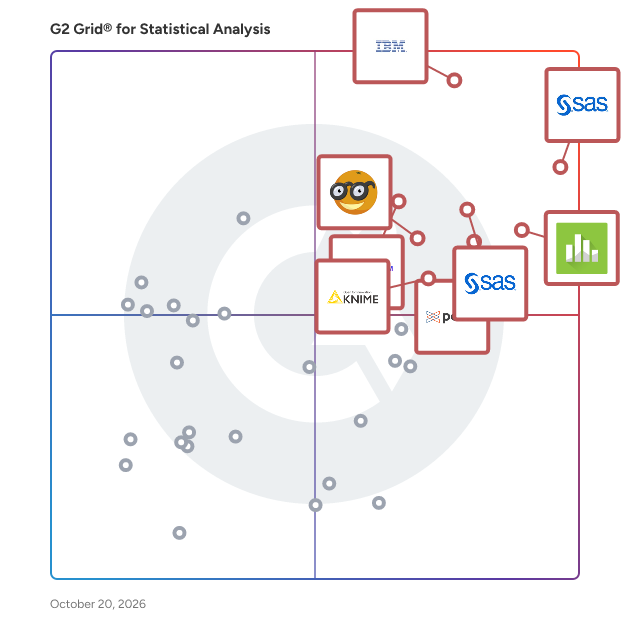
G2 Grid® for Statistical Analysis Software

G2 Grid® for Statistical Analysis Software plotting products by satisfaction and market presence

Highlighted products: SAS Viya, IBM SPSS Statistics, Minitab Statistical Software, Base SAS, Posit Team, Qualtrics Market Research, Orange, and KNIME.

Underlying data: [Grid® JSON](https://www.g2.com/categories/statistical-analysis/grids.json?focus%5B%5D=sas-sas-viya&focus%5B%5D=ibm-spss-statistics&focus%5B%5D=minitab-statistical-software&focus%5B%5D=base-sas&focus%5B%5D=posit-team&focus%5B%5D=qualtrics-market-research&focus%5B%5D=orange&focus%5B%5D=knime-analytics-platform)

SigmaPlot

SigmaPlot is a comprehensive scientific software designed to meet the needs of scientists, professional researchers, and engineers by facilitating advanced data analysis and visualization. Its award-winning interface and intuitive wizard technology guide users step-by-step through graph creation and data analysis, enabling the production of high-quality graphs and statistical analyses that surpass the capabilities of standard spreadsheet software. Key Features and Functionality: - Extensive Graphing Options: Offers over 100 types of 2-D and 3-D technical graphs, including scatter plots, contour plots, radar plots, and dot density plots, allowing users to select the most appropriate visual representation for their data. - Advanced Curve Fitting: Provides powerful curve-fitting capabilities with 155 built-in functions, including non-linear, dynamic, and global fitting options, enabling precise modeling of complex data sets. - Comprehensive Statistical Analysis: Includes more than 50 statistical tests, such as t-tests, ANOVA, and regression analysis, with features like Welch’s t-test and frequency tables, ensuring robust data analysis. - Large Data Handling: Supports worksheets with up to 32 million rows and 32,000 columns, accommodating extensive data sets for in-depth analysis. - User-Friendly Interface: Features a customizable ribbon interface, interactive graph wizards, and a notebook manager for efficient organization and editing of worksheets and graphs. - Seamless Integration: Offers compatibility with Microsoft Office, allowing easy import and export of data between SigmaPlot and Excel, as well as integration with PowerPoint for presentations. Primary Value and User Solutions: SigmaPlot addresses the challenges faced by professionals requiring precise and effective data visualization and analysis. By offering a wide array of graphing options, advanced curve-fitting techniques, and comprehensive statistical tools, it enables users to transform complex data into clear, publication-quality graphs and reports. This capability enhances the communication of research findings, supports informed decision-making, and streamlines the workflow of scientists and engineers across various disciplines.

Average Rating: 4.3/5.0

Total Reviews: 23

How Do G2 Users Rate SigmaPlot?

  • Quality Control: 8.9/10 (Category avg: 8.3/10)
  • Has the product been a good partner in doing business?: 8.3/10 (Category avg: 8.7/10)
  • Survival Analysis: 9.4/10 (Category avg: 8.4/10)
  • Data Sampling: 10.0/10 (Category avg: 8.6/10)

Who Is the Company Behind SigmaPlot?

  • Seller: Systat Software
  • HQ Location: BANGALORE, Karnataka
  • Twitter: @systatsoftware
    58 Twitter followers
  • LinkedIn® Page: www.linkedin.com
    4 employees on LinkedIn®

Who Uses This Product?

  • Top Industries: Research
  • Company Size: 58% Small, 29% Medium

What Do G2 Reviewers Say About SigmaPlot?

AI-generated summary from verified user reviews

Pros
  • Users appreciate the customizable graphical visualization in SigmaPlot, enabling tailored plots with specific equations.
  • Users love the customizable visual design of SigmaPlot, allowing them to create tailored plots effortlessly.

What Are Recent G2 Reviews of SigmaPlot?

TIMi

TIMi is the most efficient Data Science and Data Processing Platform. Since 2007, we have been creating and improving the most powerful framework to push the barriers of analytics, predictive analytics, AI and Big Data, while offering a helpful, fast and friendly environment. The TIMi Suite consists of four tools: 1. Anatella (Analytical ETL, Data Prep & Big Data), 2. Modeler (Auto-ML / Automated Predictive Modelling / Automated-AI), 3. StarDust (3D Segmentation) 4. Kibella (BI Dashboarding solution). TIMi dominates the Data Science market: In the "Summer 2022 - Momentum Report” from G2, in the “Data Science” category, TIMi has the #1 rank: TIMi is the Data Science solution with both the highest market growth and the highest customer-satisfaction! More about this subject here: https://timi.eu/blog/timi-the-number-one-data-science-platform/

Average Rating: 4.8/5.0

Total Reviews: 50

How Do G2 Users Rate TIMi?

  • Quality Control: 9.1/10 (Category avg: 8.3/10)
  • Has the product been a good partner in doing business?: 9.1/10 (Category avg: 8.7/10)
  • Survival Analysis: 8.3/10 (Category avg: 8.4/10)
  • Data Sampling: 8.5/10 (Category avg: 8.6/10)

Who Is the Company Behind TIMi?

  • Seller: TIMi SPRL
  • Year Founded: 2007
  • HQ Location: Brussels
  • Twitter: @TIMiSuite
    3,532 Twitter followers
  • LinkedIn® Page: www.linkedin.com
    86 employees on LinkedIn®

Who Uses This Product?

  • Top Industries: Information Technology and Services, Banking
  • Company Size: 40% Small, 32% Large

What Do G2 Reviewers Say About TIMi?

AI-generated summary from verified user reviews

Pros
  • Users highlight the exceptional customer support from the TIMi team, noting their quick response times and helpfulness.
  • Users find TIMi easy to use, thanks to its intuitive design and quick learning curve.
  • Users appreciate TIMi's user-friendly interface and exceptional support, making data transformation quick and efficient.
  • Users value the fast and intuitive automation capabilities of TIMi, streamlining data transformations and analyses effectively.
  • Users value the intuitive charting features of TIMi, enabling efficient data visualization and analysis.

What Are Recent G2 Reviews of TIMi?

What Are G2 Users Discussing About TIMi?

Mnova MS

Provides a common interface for different vendor data and automates all functionality such as data importing and display, integration, background subtraction, display of extracted mass chromatograms, molecule match, enumeration of molecular formulae, etc.

Average Rating: 4.3/5.0

Total Reviews: 10

How Do G2 Users Rate Mnova MS?

  • Quality Control: 7.9/10 (Category avg: 8.3/10)
  • Survival Analysis: 9.0/10 (Category avg: 8.4/10)
  • Data Sampling: 9.2/10 (Category avg: 8.6/10)

Who Is the Company Behind Mnova MS?

  • Seller: Mestrelab
  • Year Founded: 2005
  • HQ Location: Santiago de Compostela, ES
  • Twitter: @Mestrelab
    1,841 Twitter followers
  • LinkedIn® Page: www.linkedin.com
    68 employees on LinkedIn®

Who Uses This Product?

  • Company Size: 40% Medium, 40% Small

What Are Recent G2 Reviews of Mnova MS?

What Are G2 Users Discussing About Mnova MS?

AI can help you find the answers. G2 helps you trust them.

Connect G2 to Claude or ChatGPT for answers grounded in G2's trusted reviews, comparisons, and pricing from real user insights.

How it works

Igor Pro

Scientific and engineering data analysis solution that automates creation of graphs, image and data processing.

Average Rating: 4.3/5.0

Total Reviews: 20

How Do G2 Users Rate Igor Pro?

  • Quality Control: 7.4/10 (Category avg: 8.3/10)
  • Has the product been a good partner in doing business?: 8.3/10 (Category avg: 8.7/10)
  • Survival Analysis: 8.8/10 (Category avg: 8.4/10)
  • Data Sampling: 8.6/10 (Category avg: 8.6/10)

Who Is the Company Behind Igor Pro?

  • Seller: WaveMetrics
  • HQ Location: PORTLAND, Oregon
  • Twitter: @WaveMetrics
    217 Twitter followers
  • LinkedIn® Page: www.linkedin.com
    3 employees on LinkedIn®

Who Uses This Product?

  • Top Industries: Research
  • Company Size: 67% Small, 24% Large

What Are Recent G2 Reviews of Igor Pro?

What Are G2 Users Discussing About Igor Pro?

Analyse-it

Analyse-it is statistical analysis and method validation software for Microsoft Excel. One add-in, five editions: for general statistics, for quality control, for biomedical research and for analytical and diagnostic method validation with CLSI protocols, or all of them in Ultimate. ANOVA, regression, control charts, ROC curves, survival analysis and method comparison, all inside Excel. Analyse-it runs in Excel 365 and Excel 2016 onwards, on Windows. Your data stays in the workbook it is already in, and every analysis is written back to the workbook as an ordinary worksheet, so you can share it with colleagues, submit it, archive it for audit and open it on any PC with Excel. Every calculation is performed by Analyse-it, not by Excel formulas, and every release is tested against the NIST Statistical Reference Datasets, published datasets and thousands of internal test cases. The Method Validation edition implements eleven CLSI evaluation protocols. IVD manufacturers file it with 510(k) submissions, clinical laboratories show it to CAP inspectors and ISO 15189 auditors, and researchers have cited it in thousands of peer-reviewed papers. Trusted for nearly 30 years by 75,000 scientists in research, quality control and clinical laboratories, including 8 of the top 10 IVD manufacturers. Developed and supported by its founders since 1997. Free 15-day trial.

Average Rating: 3.8/5.0

Total Reviews: 40

How Do G2 Users Rate Analyse-it?

  • Quality Control: 10.0/10 (Category avg: 8.3/10)
  • Has the product been a good partner in doing business?: 6.7/10 (Category avg: 8.7/10)
  • Survival Analysis: 8.3/10 (Category avg: 8.4/10)
  • Data Sampling: 10.0/10 (Category avg: 8.6/10)

Who Is the Company Behind Analyse-it?

  • Seller: Analyse-it Software
  • Year Founded: 1997
  • HQ Location: Leeds, England
  • Twitter: @Analyse_it
    216 Twitter followers
  • LinkedIn® Page: www.linkedin.com
    1 employees on LinkedIn®

Who Uses This Product?

  • Who Uses This: data analizer
  • Top Industries: Education Management, Construction
  • Company Size: 71% Large, 19% Small

What Are Recent G2 Reviews of Analyse-it?

DataMelt

DataMelt is a computational environment that allows you to perform data analysis, mathematical and statistical calculations using scripting languages (Python/Jython, BeanShell, Groovy, JRuby, Matlab/Octave) on the Java and Android platforms.

Average Rating: 4.4/5.0

Total Reviews: 10

How Do G2 Users Rate DataMelt?

  • Quality Control: 9.2/10 (Category avg: 8.3/10)
  • Survival Analysis: 8.6/10 (Category avg: 8.4/10)
  • Data Sampling: 8.8/10 (Category avg: 8.6/10)

Who Is the Company Behind DataMelt?

Who Uses This Product?

  • Company Size: 60% Small, 20% Large

What Are Recent G2 Reviews of DataMelt?

What Are G2 Users Discussing About DataMelt?

SPC for Excel

SPC for Excel is professional statistical process control (SPC) software designed for quality improvement professionals, manufacturers, engineers, and regulated industries that need reliable process monitoring and data analysis directly within Microsoft Excel. Built specifically for real-world quality applications, SPC for Excel helps organizations create control charts, analyze process variation, monitor process capability, and support continuous improvement initiatives without requiring users to learn a separate statistical software platform. The software integrates seamlessly with Excel, making it accessible for teams already using Excel for reporting, manufacturing data analysis, quality management, and process improvement. SPC for Excel is widely used by quality engineers, Lean Six Sigma practitioners, manufacturing managers, and compliance-focused organizations to simplify statistical analysis while maintaining confidence in the accuracy and integrity of their SPC methods. The software supports a broad range of control charts, capability analysis tools, Pareto charts, histograms, gage R&R studies, and other essential quality improvement techniques used in manufacturing, healthcare, medical devices, aerospace, automotive, food production, and other regulated environments. Unlike generic analytics tools, SPC for Excel focuses specifically on statistical process control and practical quality improvement workflows. Users benefit from automated chart creation, built-in interpretation guidance, and extensive educational resources that help teams apply SPC principles correctly and consistently. The software is designed to reduce the time required to perform SPC analysis while improving visibility into process performance and variation. SPC for Excel is also recognized for its customer support, practical training materials, and educational content that help organizations successfully implement SPC and process improvement programs. Companies use SPC for Excel to support ISO compliance initiatives, improve manufacturing quality, reduce process variation, increase operational efficiency, and drive data-based decision-making across their operations. Whether organizations are beginning their SPC journey or supporting advanced quality improvement programs, SPC for Excel delivers a practical, professional solution for statistical analysis and process control within the familiar Excel environment.

Average Rating: 3.8/5.0

Total Reviews: 9

How Do G2 Users Rate SPC for Excel?

  • Quality Control: 7.6/10 (Category avg: 8.3/10)
  • Survival Analysis: 8.0/10 (Category avg: 8.4/10)
  • Data Sampling: 8.0/10 (Category avg: 8.6/10)

Who Is the Company Behind SPC for Excel?

  • Seller: SPC for Excel
  • Year Founded: 1995
  • HQ Location: Oklahoma City, US
  • Twitter: @SPCforExcel
    57 Twitter followers
  • LinkedIn® Page: www.linkedin.com
    2 employees on LinkedIn®
  • Ownership: BPI Consulting, LLC

Who Uses This Product?

  • Company Size: 44% Small, 33% Medium

What Are Recent G2 Reviews of SPC for Excel?

R Server for HDInsight

By combining enterprise-scale R analytics software with the power of Apache Hadoop and Apache Spark, Microsoft R Server for HDInsight gives you the scale and performance you need. Multi-threaded math libraries and transparent parallelization in R Server handle up to 1000x more data and up to 50x faster speeds than open-source R, which helps you to train more accurate models for better predictions. R Server works with the open-source R language, so all of your R scripts run without changes.

Average Rating: 3.8/5.0

Total Reviews: 8

How Do G2 Users Rate R Server for HDInsight?

  • Quality Control: 10.0/10 (Category avg: 8.3/10)
  • Has the product been a good partner in doing business?: 8.3/10 (Category avg: 8.7/10)
  • Survival Analysis: 10.0/10 (Category avg: 8.4/10)
  • Data Sampling: 10.0/10 (Category avg: 8.6/10)

Who Is the Company Behind R Server for HDInsight?

  • Seller: Microsoft
  • Year Founded: 1975
  • HQ Location: Redmond, Washington
  • Twitter: @microsoft
    13,091,739 Twitter followers
  • LinkedIn® Page: www.linkedin.com
    232,750 employees on LinkedIn®
  • Ownership: MSFT

Who Uses This Product?

  • Company Size: 60% Small, 20% Medium

What Are Recent G2 Reviews of R Server for HDInsight?

What Are G2 Users Discussing About R Server for HDInsight?

EspressChart

EspressChart is a comprehensive Java-based charting solution designed to empower developers and organizations to create dynamic, interactive charts for web and desktop applications. With its robust API and intuitive Chart Designer interface, users can effortlessly generate highly customizable 2D and 3D charts, enhancing data visualization and analysis capabilities. Key Features and Functionality: - Versatile Chart Types: Supports a wide array of 2D and 3D chart formats, including line, bar, pie, and Gantt charts, catering to diverse data representation needs. - Interactive Chart Designer: Provides a visual design tool that allows users to create and edit charts without extensive programming knowledge. - Robust Java API: Offers a comprehensive API for seamless integration into Java applications, applets, servlets, and JSPs. - Platform Independence: Being pure Java, EspressChart operates across various platforms supporting Java, ensuring broad compatibility. - Advanced Statistical Features: Includes options for trend lines, gradients, and Top N/Bottom N data display, enhancing analytical capabilities. - Data Integration: Facilitates connection to JDBC/ODBC data sources, enabling dynamic data retrieval and real-time chart updates. Primary Value and User Solutions: EspressChart addresses the need for effective data visualization by providing a powerful yet user-friendly toolkit for creating interactive charts. It simplifies the process of integrating dynamic charts into applications, reducing development time and effort. By offering a wide range of customizable chart types and advanced features, EspressChart enables users to present complex data in an accessible and visually appealing manner, thereby enhancing decision-making processes and business intelligence initiatives.

Average Rating: 4.4/5.0

Total Reviews: 12

How Do G2 Users Rate EspressChart?

  • Quality Control: 9.7/10 (Category avg: 8.3/10)
  • Has the product been a good partner in doing business?: 9.4/10 (Category avg: 8.7/10)
  • Survival Analysis: 9.2/10 (Category avg: 8.4/10)
  • Data Sampling: 9.3/10 (Category avg: 8.6/10)

Who Is the Company Behind EspressChart?

  • Seller: Quadbase Systems
  • Year Founded: 1988
  • HQ Location: Santa Clara
  • Twitter: @quadbase
    11 Twitter followers
  • LinkedIn® Page: www.linkedin.com
    6 employees on LinkedIn®

Who Uses This Product?

  • Company Size: 58% Small, 25% Large

What Are Recent G2 Reviews of EspressChart?

Q Research Software by Displayr

Q by Displayr is data analysis and reporting software. It's designed to make survey analysis & reporting faster and easier. It performs all aspects of the analysis and reporting, from data cleaning and coding through to creating tables and advanced analyses. It's also tightly integrated with Displayr and PowerPowerpoint for seamless reporting.

Average Rating: 4.7/5.0

Total Reviews: 33

How Do G2 Users Rate Q Research Software by Displayr?

  • Has the product been a good partner in doing business?: 9.9/10 (Category avg: 8.7/10)

Who Is the Company Behind Q Research Software by Displayr?

  • Seller: Displayr
  • HQ Location: Pyrmont, New South Wales
  • Twitter: @Displayrr
    499 Twitter followers
  • LinkedIn® Page: www.linkedin.com
    92 employees on LinkedIn®

Who Uses This Product?

  • Top Industries: Market Research
  • Company Size: 67% Small, 24% Medium

What Are Recent G2 Reviews of Q Research Software by Displayr?

What Are G2 Users Discussing About Q Research Software by Displayr?

Easystat

Uncertain about which statistical method to use? Easystat uses statistical expert knowledge and artificial intelligence to select the best statistical method for you. Forgot how to interpret odds ratios or pvalues? Easystat explains all regression results using plain English. We even write you an automated report explaining your results. Are you tired of coding? Easystat does all the coding for you. We also automatically uses the correct type of chart to vizualize your pivot tables.

Average Rating: 3.8/5.0

Total Reviews: 6

How Do G2 Users Rate Easystat?

  • Quality Control: 8.1/10 (Category avg: 8.3/10)
  • Survival Analysis: 7.2/10 (Category avg: 8.4/10)
  • Data Sampling: 7.5/10 (Category avg: 8.6/10)

Who Is the Company Behind Easystat?

Who Uses This Product?

  • Company Size: 50% Medium, 33% Small

What Do G2 Reviewers Say About Easystat?

AI-generated summary from verified user reviews

Pros
  • Users appreciate the ease of use in data analysis with Easystat, making complex tasks accessible and efficient.
  • Users value the seamless data import process in Easystat, enhancing their overall experience and efficiency.
  • Users appreciate the ease of use of Easystat, making complex data analysis accessible and efficient for everyone.
Cons
  • Users find Easystat has limited analysis capability, wishing for more features to manage complex data effectively.
  • Users find Easystat to have limited features, lacking the complexity needed for more advanced data analysis tasks.

What Are Recent G2 Reviews of Easystat?

Number Analytics

Number Analytics is a customer analytics software integrating survey, web and behavioral data. Currently customer analytics tools are focusing either survey, web, or behavioral data and integrating multiple data sources are quite challenging. The biggest hurdle is data cleaning and data merging due to different data formats collected from different data platforms. We are collecting data directly and analyze the data in the same platform so that you do not need to download and convert data to the right formats and analyze data in different software. It supports PC, Mac, Linux, iOS, and Android.

Average Rating: 4.3/5.0

Total Reviews: 5

How Do G2 Users Rate Number Analytics?

  • Quality Control: 7.8/10 (Category avg: 8.3/10)
  • Has the product been a good partner in doing business?: 8.3/10 (Category avg: 8.7/10)
  • Survival Analysis: 8.3/10 (Category avg: 8.4/10)
  • Data Sampling: 7.5/10 (Category avg: 8.6/10)

Who Is the Company Behind Number Analytics?

Who Uses This Product?

  • Company Size: 60% Medium, 40% Small

What Do G2 Reviewers Say About Number Analytics?

AI-generated summary from verified user reviews

Pros
  • Users find the insightful and user-friendly dashboards of Number Analytics extremely beneficial for their analysis needs.
  • Users appreciate the insightful and user-friendly dashboards of Number Analytics for an enhanced data experience.
Cons
  • Users find the limited options for bulk data upload in Number Analytics frustrating and limiting for their needs.

What Are Recent G2 Reviews of Number Analytics?

What Are G2 Users Discussing About Number Analytics?

Aqua Data Studio

Aqua Data Studio is a universal integrated development environment (IDE) for databases and visual analytics. It enables database developers, database administrators, and data and business analysts to handle their multi-platform databases and the data contained therein. Develop, manage, and administer databases; access, manage, and visually analyze data; and connect to a large range of relational, cloud, and NoSQL database platforms.

Average Rating: 3.6/5.0

Total Reviews: 6

How Do G2 Users Rate Aqua Data Studio?

  • Quality Control: 8.3/10 (Category avg: 8.3/10)
  • Has the product been a good partner in doing business?: 9.2/10 (Category avg: 8.7/10)
  • Survival Analysis: 4.2/10 (Category avg: 8.4/10)
  • Data Sampling: 8.3/10 (Category avg: 8.6/10)

Who Is the Company Behind Aqua Data Studio?

  • Seller: Idera, Inc.
  • Company Website:
  • Year Founded: 2007
  • HQ Location: Austin, US
  • Twitter: @MigrationWiz
    482 Twitter followers
  • LinkedIn® Page: www.linkedin.com
    285 employees on LinkedIn®

Who Uses This Product?

  • Company Size: 50% Large, 33% Small

What Do G2 Reviewers Say About Aqua Data Studio?

AI-generated summary from verified user reviews

Pros
  • Users highly value the versatile functionality of Aqua Data Studio, appreciating its support for multiple database platforms.
  • Users value the versatile database management features of Aqua Data Studio, enhancing their efficiency across various platforms.
  • Users value the easy integrations of Aqua Data Studio, highlighting its versatility across multiple database platforms.
  • Users appreciate the intuitive user interface of Aqua Data Studio, enhancing their experience across multiple databases.
  • Users value the excellent query building and data visualization capabilities of Aqua Data Studio for effective analysis.
Cons
  • Users experience complex configuration issues with Aqua Data Studio due to lack of native M-series processor support.
  • Users face persistent connection issues with Aqua Data Studio, leading some to switch to alternative applications.
  • Users find a big learning curve with Aqua Data Studio and note insufficient documentation to ease the process.
  • Users struggle with a big learning curve and find the documentation lacking for Aqua Data Studio.
  • Users face significant migration difficulties due to lack of native support for M-series processors, causing slow performance.

What Are Recent G2 Reviews of Aqua Data Studio?

What Are G2 Users Discussing About Aqua Data Studio?

FittingKVdm

Simple to use iterative regression program. Unique: multidirectional fitting, which produces much better results for invertible model functions. (E.g. it finally demonstrates that the Body Mass Index = m/h³, not m/h².) Realistic parameter confidence estimation based on x and y data precision and error propagation through the model function. Version 1 features 16 common models with real life examples from different sciences, but more will be added upon request. Also good for education because of the visualisation of the fitting process.

Average Rating: 4.6/5.0

Total Reviews: 4

How Do G2 Users Rate FittingKVdm?

  • Quality Control: 7.8/10 (Category avg: 8.3/10)
  • Has the product been a good partner in doing business?: 9.2/10 (Category avg: 8.7/10)
  • Survival Analysis: 8.9/10 (Category avg: 8.4/10)
  • Data Sampling: 8.8/10 (Category avg: 8.6/10)

Who Is the Company Behind FittingKVdm?

Who Uses This Product?

  • Company Size: 100% Small

What Do G2 Reviewers Say About FittingKVdm?

AI-generated summary from verified user reviews

Pros
  • Users find the data analysis process in FittingKVdm to be straightforward and efficient for implementation.
  • Users find the ease of use in FittingKVdm enhances their analytics and implementation experience significantly.

What Are Recent G2 Reviews of FittingKVdm?

Toluna Start

Toluna Start is an end-to-end consumer intelligence platform and with a single login. Conduct quantitative and qualitative research – either through self-service solutions or through custom research programs built with the help of research and service experts. Access a wide range of automated insights solutions covering survey design, integrated survey respondents, and reporting dashboards including insights and recommendations. It’s all built in-house and integrates Harris Interactive methodologies. You can self-serve or we can help. Launch your survey in just minutes and see results populate in real-time.

Average Rating: 4.2/5.0

Total Reviews: 30

How Do G2 Users Rate Toluna Start?

  • Has the product been a good partner in doing business?: 9.2/10 (Category avg: 8.7/10)

Who Is the Company Behind Toluna Start?

  • Seller: Toluna
  • Year Founded: 2000
  • HQ Location: Norwalk, CT
  • Twitter: @TolunaCorporate
    6,087 Twitter followers
  • LinkedIn® Page: www.linkedin.com
    3,221 employees on LinkedIn®

Who Uses This Product?

  • Company Size: 47% Small, 44% Medium

What Are Recent G2 Reviews of Toluna Start?

What Are G2 Users Discussing About Toluna Start?

Bijou Barry
BB
Researched and written by Bijou Barry
Updated March 3, 2025