# Best Password Managers

  *By [Brandon Summers-Miller](https://research.g2.com/insights/author/brandon-summers-miller)*

   Password manager software stores and controls user passwords through an encrypted vault, accessible via desktop, mobile, or browser extensions, allowing users to create strong, unique passwords for every account without needing to memorize them, while enabling businesses to securely share, monitor, and manage credentials at scale. The [best password managers](https://learn.g2.com/best-password-manager) help protect personal data by securing and strengthening passwords across every website and application.

### Core Capabilities of Password Manager Software

To qualify for inclusion in the Password Manager category, a product must:

- Store and save passwords for websites and applications
- Automate the filling of password forms or logins
- Provide tools for securely sharing credentials
- Integrate with browsers or function atop applications
- Allow users to create, change, or randomize passwords

### Common Use Cases for Password Manager Software

Password managers are used by individuals and organizations to strengthen credential security and reduce the risk of breaches. Common use cases include:

- Securing and centralizing employee credentials across business applications
- Enforcing strong password policies and randomized password changes
- Sharing credentials securely across teams without exposing plain-text passwords

### How Password Manager Software Differs from Other Tools

Password managers are a focused subset of [identity management software](https://www.g2.com/categories/identity-management), providing essential credential storage and autofill capabilities. However, they typically offer less advanced functionality than [identity and access management (IAM) software](https://www.g2.com/categories/identity-and-access-management-iam), [single sign-on (SSO) solutions](https://www.g2.com/categories/single-sign-on-sso), and [user provisioning and governance tools](https://www.g2.com/categories/user-provisioning-and-governance-tools), which provide broader access control and lifecycle management.

### Insights from G2 on Password Manager Software

Based on category trends on G2, browser integration and secure credential sharing stand out as the most valued features. Improved security posture and reduced password-related support tickets stand out as primary outcomes of adoption.


## Category Overview

**Total Products under this Category:** 96


## Trust & Credibility Stats

**Why You Can Trust G2's Software Rankings:**

- 30 Analysts and Data Experts
- 11,800+ Authentic Reviews
- 96+ Products
- Unbiased Rankings

G2's software rankings are built on verified user reviews, rigorous moderation, and a consistent research methodology maintained by a team of analysts and data experts. Each product is measured using the same transparent criteria, with no paid placement or vendor influence. While reviews reflect real user experiences, which can be subjective, they offer valuable insight into how software performs in the hands of professionals. Together, these inputs power the G2 Score, a standardized way to compare tools within every category.
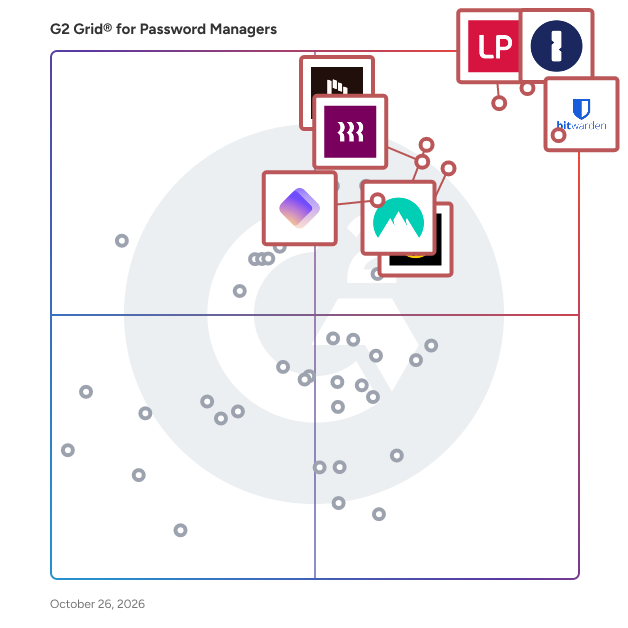

## Best Password Managers At A Glance

- **Leader:** [1Password](https://www.g2.com/products/1password/reviews)
- **Highest Performer:** [Hudu](https://www.g2.com/products/hudu/reviews)
- **Easiest to Use:** [heylogin](https://www.g2.com/products/heylogin/reviews)
- **Top Trending:** [Rippling IT](https://www.g2.com/products/rippling-it/reviews)
- **Best Free Software:** [LastPass](https://www.g2.com/products/lastpass/reviews)


---

**Sponsored**

### Bitwarden

Bitwarden is an open source password manager for individuals, teams, and enterprise organizations. Ranked first in Enterprise User Satisfaction on the G2 Enterprise Grid for eleven consecutive quarters, Bitwarden stores, generates, autofills, and shares credentials and passkeys using end-to-end AES-256 bit encryption. Bitwarden is a zero-knowledge encryption solution, meaning only the user can access vault data. The Bitwarden source code is publicly available on GitHub and undergoes regular third-party security audits, covering penetration testing, cryptographic analysis, and source code review. Bitwarden is SOC 2 Type II, GDPR, CCPA, HIPAA, and Data Privacy Framework (DPF) compliant. Manage passwords and passkeys - Generate and store strong, unique passwords and passkeys, saved securely across unlimited devices. - Access credentials from anywhere, on any device - Bitwarden offers multiple client options including desktop, mobile, browser, web, and command-line interface (CLI). - Autofill makes it fast and secure to seamlessly log in to websites and apps across devices. Monitor and reduce credential risk - Real-time vault health alerts surface weak, reused, or exposed passwords - Bitwarden Access Intelligence identifies shadow IT and at-risk credentials across an organization, with guided remediation workflows at scale. - Turn on multifactor authentication (MFA) for vault login using a time-based one-time password (TOTP) app or security key. The standalone Bitwarden Authenticator app also generates TOTP codes for any account or service that supports authenticator-based two-factor authentication (2FA). - Exportable event logs provide transparency into user activity around sensitive data within an organization vault. Enterprise integrations and deployment - Bitwarden deploys in both cloud-based and on-premises environments, including self-hosted options for full data sovereignty. - Directory Connector and System for Cross-domain Identity Management (SCIM) integration streamline user and group onboarding with automatic account provisioning and deprovisioning across Microsoft Entra ID, Okta, Google Workspace, and LDAP-based directories. - Bitwarden connects to existing tech stacks with single sign-on (SSO), APIs, and CLI automations, and feeds event logs directly into security operations platforms including Splunk, Microsoft Sentinel, Rapid7, and Elastic. Share encrypted information at scale - Use organization collections to share credentials securely. - Vault items are owned by the organization, not individual employees, enabling full credential lifecycle management. - Transmit encrypted information, text, and attachments to anyone via a secure, randomly generated link through Bitwarden Send.


[Visit website](https://www.g2.com/external_clickthroughs/record?secure%5Bad_program%5D=paid_promo&amp;secure%5Bad_slot%5D=category_product_list&amp;secure%5Bcategory_id%5D=593&amp;secure%5Bmedium%5D=sponsored&amp;secure%5Bprioritized%5D=false&amp;secure%5Bproduct_id%5D=41107&amp;secure%5Bresource_id%5D=593&amp;secure%5Bresource_type%5D=Category&amp;secure%5Bsource_type%5D=category_page&amp;secure%5Bsource_url%5D=https%3A%2F%2Fwww.g2.com%2Fcategories%2Fpassword-managers%3Fpage%3D7&amp;secure%5Btoken%5D=80012b022fa5b143eb8a8a4199c30532e17d2d4175d6c0c6abe7a283edd349da&amp;secure%5Burl%5D=https%3A%2F%2Fbitwarden.com%2Fproducts%2Fbusiness%2F&amp;secure%5Burl_type%5D=paid_promos)

---

## Top-Rated Products (Ranked by G2 Score)
### 1. [1Password](https://www.g2.com/products/1password/reviews)
  The Most Used Enterprise Password Manager, trusted by over 180,00 businesses, 1Password helps improve security, visibility and control over how their passwords and company data are protected. Secure every sign-in by integrating 1Password with your existing IAM infrastructure. Enforce strong, integrated security policies at scale, be proactive about cybersecurity threats to reduce risk, and quickly and easily generate detailed reports on password security posture.


  **Average Rating:** 4.6/5.0
  **Total Reviews:** 1,745

**User Satisfaction Scores:**

- **Has the product been a good partner in doing business?:** 9.3/10 (Category avg: 9.0/10)
- **Admin Management:** 8.9/10 (Category avg: 9.0/10)
- **Quick Login:** 9.2/10 (Category avg: 9.1/10)
- **Two-Factor Authentication:** 9.2/10 (Category avg: 9.0/10)


**Seller Details:**

- **Seller:** [1Password](https://www.g2.com/sellers/1password)
- **Company Website:** https://1password.com/
- **Year Founded:** 2005
- **HQ Location:** Ontario
- **Twitter:** @1Password (139,662 Twitter followers)
- **LinkedIn® Page:** https://www.linkedin.com/company/1password/ (2,911 employees on LinkedIn®)

**Reviewer Demographics:**
  - **Who Uses This:** Software Engineer, CEO
  - **Top Industries:** Computer Software, Information Technology and Services
  - **Company Size:** 54% Small-Business, 32% Mid-Market


#### Pros & Cons

**Pros:**

- Ease of Use (333 reviews)
- Security (271 reviews)
- Password Management (182 reviews)
- Intuitive (144 reviews)
- Easy Access (134 reviews)

**Cons:**

- Password Management (95 reviews)
- Expensive (91 reviews)
- Login Issues (69 reviews)
- Autofill Issues (64 reviews)
- Cost (60 reviews)

### 2. [LastPass](https://www.g2.com/products/lastpass/reviews)
  LastPass delivers Secure Access Essentials, helping individuals and organizations manage and protect access to AI, applications, and credentials straight from the browser. Trusted by more than 100,000 businesses and millions of users worldwide, LastPass combines strong security with everyday simplicity. For individuals, LastPass makes online life easier by securely storing credentials, generating strong passwords, and autofilling logins when needed. That means less friction, fewer resets, and safer access wherever work and life happens. For businesses, LastPass helps lean IT teams secure AI‑driven work by reducing risk by controlling access to unapproved apps, while storing and managing employee credentials and integrating with identity providers to fill gaps left by SSO. It’s simpler access, better visibility, and stronger security without added complexity.


  **Average Rating:** 4.5/5.0
  **Total Reviews:** 2,007

**User Satisfaction Scores:**

- **Has the product been a good partner in doing business?:** 8.6/10 (Category avg: 9.0/10)
- **Admin Management:** 8.4/10 (Category avg: 9.0/10)
- **Quick Login:** 8.9/10 (Category avg: 9.1/10)
- **Two-Factor Authentication:** 8.9/10 (Category avg: 9.0/10)


**Seller Details:**

- **Seller:** [LastPass](https://www.g2.com/sellers/lastpass)
- **Company Website:** https://www.lastpass.com/
- **Year Founded:** 2008
- **HQ Location:** Boston, Massachusetts
- **Twitter:** @LastPass (46,029 Twitter followers)
- **LinkedIn® Page:** https://www.linkedin.com/company/lastpass/ (772 employees on LinkedIn®)

**Reviewer Demographics:**
  - **Who Uses This:** Owner, CEO
  - **Top Industries:** Information Technology and Services, Computer Software
  - **Company Size:** 63% Small-Business, 25% Mid-Market


#### Pros & Cons

**Pros:**

- Ease of Use (227 reviews)
- Password Management (170 reviews)
- Security (155 reviews)
- Autofill Feature (107 reviews)
- Password Security (99 reviews)

**Cons:**

- Autofill Issues (83 reviews)
- Password Management (78 reviews)
- Login Issues (66 reviews)
- Password Issues (44 reviews)
- Browser Extension Issues (43 reviews)

### 3. [Bitwarden](https://www.g2.com/products/bitwarden/reviews)
  Bitwarden is an open source password manager for individuals, teams, and enterprise organizations. Ranked first in Enterprise User Satisfaction on the G2 Enterprise Grid for eleven consecutive quarters, Bitwarden stores, generates, autofills, and shares credentials and passkeys using end-to-end AES-256 bit encryption. Bitwarden is a zero-knowledge encryption solution, meaning only the user can access vault data. The Bitwarden source code is publicly available on GitHub and undergoes regular third-party security audits, covering penetration testing, cryptographic analysis, and source code review. Bitwarden is SOC 2 Type II, GDPR, CCPA, HIPAA, and Data Privacy Framework (DPF) compliant. Manage passwords and passkeys - Generate and store strong, unique passwords and passkeys, saved securely across unlimited devices. - Access credentials from anywhere, on any device - Bitwarden offers multiple client options including desktop, mobile, browser, web, and command-line interface (CLI). - Autofill makes it fast and secure to seamlessly log in to websites and apps across devices. Monitor and reduce credential risk - Real-time vault health alerts surface weak, reused, or exposed passwords - Bitwarden Access Intelligence identifies shadow IT and at-risk credentials across an organization, with guided remediation workflows at scale. - Turn on multifactor authentication (MFA) for vault login using a time-based one-time password (TOTP) app or security key. The standalone Bitwarden Authenticator app also generates TOTP codes for any account or service that supports authenticator-based two-factor authentication (2FA). - Exportable event logs provide transparency into user activity around sensitive data within an organization vault. Enterprise integrations and deployment - Bitwarden deploys in both cloud-based and on-premises environments, including self-hosted options for full data sovereignty. - Directory Connector and System for Cross-domain Identity Management (SCIM) integration streamline user and group onboarding with automatic account provisioning and deprovisioning across Microsoft Entra ID, Okta, Google Workspace, and LDAP-based directories. - Bitwarden connects to existing tech stacks with single sign-on (SSO), APIs, and CLI automations, and feeds event logs directly into security operations platforms including Splunk, Microsoft Sentinel, Rapid7, and Elastic. Share encrypted information at scale - Use organization collections to share credentials securely. - Vault items are owned by the organization, not individual employees, enabling full credential lifecycle management. - Transmit encrypted information, text, and attachments to anyone via a secure, randomly generated link through Bitwarden Send.


  **Average Rating:** 4.7/5.0
  **Total Reviews:** 1,163

**User Satisfaction Scores:**

- **Has the product been a good partner in doing business?:** 9.4/10 (Category avg: 9.0/10)
- **Admin Management:** 8.8/10 (Category avg: 9.0/10)
- **Quick Login:** 9.0/10 (Category avg: 9.1/10)
- **Two-Factor Authentication:** 9.1/10 (Category avg: 9.0/10)


**Seller Details:**

- **Seller:** [Bitwarden](https://www.g2.com/sellers/bitwarden)
- **Company Website:** https://bitwarden.com
- **Year Founded:** 2015
- **HQ Location:** Santa Barbara, CA
- **Twitter:** @Bitwarden (128,106 Twitter followers)
- **LinkedIn® Page:** https://www.linkedin.com/company/24776937/ (254 employees on LinkedIn®)

**Reviewer Demographics:**
  - **Who Uses This:** Software Engineer, IT Manager
  - **Top Industries:** Information Technology and Services, Computer Software
  - **Company Size:** 58% Small-Business, 29% Mid-Market


#### Pros & Cons

**Pros:**

- Ease of Use (134 reviews)
- Security (87 reviews)
- Password Management (54 reviews)
- Easy Setup (46 reviews)
- Cross-platform Compatibility (43 reviews)

**Cons:**

- Autofill Issues (31 reviews)
- Poor UI (29 reviews)
- Process Complexity (16 reviews)
- Missing Features (15 reviews)
- Learning Curve (14 reviews)

### 4. [NordPass Business](https://www.g2.com/products/nordpass-business/reviews)
  Trusted by more than 9,000 businesses worldwide, NordPass is a password management tool that upholds the finest privacy and security standards for businesses. Unlock the ease of cybersecurity and bring peace to your team&#39;s digital world. Its intuitive interface ensures seamless adoption for your teams. Optimize daily operations by enabling straightforward account access, secure password sharing, and setting company-wide password policies. Encrypted with the industry-leading XChaCha20 algorithm, NordPass allows companies to manage and monitor access to the company&#39;s resources and prevent unwanted credential exposure. In case of an issue, best-in-class 24/7 tech support is always available, with no hidden costs. \_\_\_\_\_\_\_\_\_\_\_\_\_ Start your NordPass Business Free Trial The 14-day free trial gives you full access to all NordPass features. No credit card required. https://nordpass.com/business-free-trial/


  **Average Rating:** 4.5/5.0
  **Total Reviews:** 640

**User Satisfaction Scores:**

- **Has the product been a good partner in doing business?:** 9.0/10 (Category avg: 9.0/10)
- **Admin Management:** 8.6/10 (Category avg: 9.0/10)
- **Quick Login:** 8.6/10 (Category avg: 9.1/10)
- **Two-Factor Authentication:** 8.6/10 (Category avg: 9.0/10)


**Seller Details:**

- **Seller:** [Nord Security](https://www.g2.com/sellers/nord-security)
- **Company Website:** https://nordsecurity.com/
- **Year Founded:** 2012
- **HQ Location:** Global
- **Twitter:** @NordPass (9,502 Twitter followers)
- **LinkedIn® Page:** https://www.linkedin.com/company/nordsecurity/ (1,883 employees on LinkedIn®)

**Reviewer Demographics:**
  - **Who Uses This:** CEO, CTO
  - **Top Industries:** Information Technology and Services, Marketing and Advertising
  - **Company Size:** 72% Small-Business, 25% Mid-Market


#### Pros & Cons

**Pros:**

- Ease of Use (198 reviews)
- Security (158 reviews)
- Password Management (131 reviews)
- Intuitive (121 reviews)
- Sharing Ease (118 reviews)

**Cons:**

- Password Management (92 reviews)
- Password Issues (68 reviews)
- Login Issues (55 reviews)
- Autofill Issues (50 reviews)
- Browser Extension Issues (44 reviews)

### 5. [Dashlane Password Manager](https://www.g2.com/products/dashlane-password-manager/reviews)
  Dashlane provides complete credential security, protecting businesses against the threat of human risk. Our intelligent Omnix™ platform unifies credential protection and password management, equipping security teams with proactive intelligence, real-time response, and protected access to secure every employee. Over 25,000 brands worldwide trust Dashlane for industry-leading innovations, patented zero-knowledge security, and an unmatched user experience. What are the features of Dashlane Password Manager? - Passkeys, passwords, and payment storage - Admin Console - Granular sharing controls and security policies - Proactive Credential Risk Detection - Smart, in-context employee alerts - Integration with communication tools, such as Slack - AI phishing alerts - SIEM integration - SCIM integration - Password Health score - Activity Logs - Dark Web Monitoring &amp; Insights - VPN for Wi-Fi protection - Zero-knowledge security architecture


  **Average Rating:** 4.5/5.0
  **Total Reviews:** 619

**User Satisfaction Scores:**

- **Has the product been a good partner in doing business?:** 8.8/10 (Category avg: 9.0/10)
- **Admin Management:** 8.5/10 (Category avg: 9.0/10)
- **Quick Login:** 9.1/10 (Category avg: 9.1/10)
- **Two-Factor Authentication:** 8.8/10 (Category avg: 9.0/10)


**Seller Details:**

- **Seller:** [Dashlane](https://www.g2.com/sellers/dashlane)
- **Company Website:** https://www.dashlane.com
- **Year Founded:** 2009
- **HQ Location:** New York
- **Twitter:** @dashlane (28,367 Twitter followers)
- **LinkedIn® Page:** https://www.linkedin.com/company/2049626/ (305 employees on LinkedIn®)

**Reviewer Demographics:**
  - **Who Uses This:** CEO, Owner
  - **Top Industries:** Information Technology and Services, Computer Software
  - **Company Size:** 64% Small-Business, 32% Mid-Market


#### Pros & Cons

**Pros:**

- Ease of Use (126 reviews)
- Security (96 reviews)
- Sharing Ease (92 reviews)
- Intuitive (74 reviews)
- Secure Storage (71 reviews)

**Cons:**

- Autofill Issues (59 reviews)
- Password Issues (57 reviews)
- Login Issues (46 reviews)
- Password Management (29 reviews)
- Expensive (23 reviews)

### 6. [Keeper Password Manager](https://www.g2.com/products/keeper-password-manager/reviews)
  Keeper Security is transforming cybersecurity for millions of individuals and thousands of organizations globally. Built with end-to-end encryption, Keeper&#39;s intuitive cybersecurity platform is trusted by Fortune 100 companies to protect every user, on every device, in every location. Our patented zero-trust and zero-knowledge privileged access management solution unifies enterprise password, secrets and connections management with zero-trust network access and endpoint privilege mangement. By combining these critical identity and access management components into a single cloud-based solution, Keeper delivers unparalleled visibility, security and control while ensuring compliance and audit requirements are met. Learn how Keeper can defend your organization against today’s cyber threats at KeeperSecurity.com.


  **Average Rating:** 4.6/5.0
  **Total Reviews:** 1,184

**User Satisfaction Scores:**

- **Has the product been a good partner in doing business?:** 9.0/10 (Category avg: 9.0/10)
- **Admin Management:** 8.8/10 (Category avg: 9.0/10)
- **Quick Login:** 9.0/10 (Category avg: 9.1/10)
- **Two-Factor Authentication:** 9.2/10 (Category avg: 9.0/10)


**Seller Details:**

- **Seller:** [Keeper Security](https://www.g2.com/sellers/keeper-security)
- **Company Website:** https://www.keepersecurity.com/
- **Year Founded:** 2011
- **HQ Location:** Chicago, IL
- **Twitter:** @keepersecurity (18,946 Twitter followers)
- **LinkedIn® Page:** https://www.linkedin.com/company/3554342/ (756 employees on LinkedIn®)

**Reviewer Demographics:**
  - **Who Uses This:** IT Manager, Owner
  - **Top Industries:** Information Technology and Services, Financial Services
  - **Company Size:** 42% Small-Business, 42% Mid-Market


#### Pros & Cons

**Pros:**

- Ease of Use (168 reviews)
- Security (128 reviews)
- Secure Sharing (88 reviews)
- Password Management (87 reviews)
- Features (74 reviews)

**Cons:**

- Password Management (71 reviews)
- Autofill Issues (49 reviews)
- Login Issues (39 reviews)
- Password Issues (34 reviews)
- Learning Curve (33 reviews)

### 7. [Rippling IT](https://www.g2.com/products/rippling-it/reviews)
  Transform your organization’s IT operations with Rippling’s unified platform for identity, device, access, and security management. Centralize every IT workflow, from provisioning apps and laptops to enforcing security policies, in a single dashboard. Seamlessly manage the entire employee lifecycle, automatically granting and revoking app access, configuring devices, and maintaining least-privilege controls. Enforce compliance with real-time monitoring, automated patching, and integrated endpoint protection. Streamline offboarding with instant lockouts and secure device recovery. Gain full visibility across hardware, software, and user risk without the complexity of multiple tools. Rippling helps your business cut costs, eliminate manual work, and strengthen security, so your team can move faster. Experience the power of unified IT management with Rippling today.


  **Average Rating:** 4.7/5.0
  **Total Reviews:** 1,007

**User Satisfaction Scores:**

- **Has the product been a good partner in doing business?:** 8.9/10 (Category avg: 9.0/10)
- **Admin Management:** 9.4/10 (Category avg: 9.0/10)
- **Quick Login:** 9.3/10 (Category avg: 9.1/10)
- **Two-Factor Authentication:** 9.5/10 (Category avg: 9.0/10)


**Seller Details:**

- **Seller:** [Rippling](https://www.g2.com/sellers/rippling)
- **Company Website:** https://www.rippling.com
- **Year Founded:** 2016
- **HQ Location:** San Francisco, CA
- **Twitter:** @Rippling (12,082 Twitter followers)
- **LinkedIn® Page:** https://www.linkedin.com/company/17988315/ (6,941 employees on LinkedIn®)

**Reviewer Demographics:**
  - **Who Uses This:** Software Engineer, CEO
  - **Top Industries:** Computer Software, Information Technology and Services
  - **Company Size:** 60% Mid-Market, 27% Small-Business


#### Pros & Cons

**Pros:**

- Ease of Use (670 reviews)
- Intuitive (467 reviews)
- Simple (413 reviews)
- Easy Access (374 reviews)
- User Interface (361 reviews)

**Cons:**

- Missing Features (165 reviews)
- Limited Features (112 reviews)
- Improvement Needed (89 reviews)
- Learning Curve (75 reviews)
- Poor Customer Support (73 reviews)

### 8. [IT Glue](https://www.g2.com/products/it-glue/reviews)
  IT Glue is the first documentation platform specifically built for the needs of IT professionals. With IT Glue, your team will have IT asset, vendor and software information, along with passwords, contacts and SOPs, all in a single pane of glass. Documentation can be linked to the others, making for a seamless experience, where your team has everything, they need at their fingertips, without having to toggle between applications. IT Glue is trusted by IT teams in over 16,000 organizations across 70+ countries. IT Glue makes documentation easy by consolidating and integrating with the monitoring, ticketing and Microsoft tools techs use every day. Hundreds of out-of-the-box documentation templates ensure you get started with ease, your team creates documentation in a consistent format, and our deep search makes everything easy to find. IT Glue is SOC 2, Type II certified, and comes with a wealth of security features, including host-proof password hosting, granular security permissions at both the group and individual levels, version control, an immutable audit trail and more. With IT Glue, users can: • Organize and manage IT assets • Formalize IT processes and practices • Create editable SOPs and Knowledge Base articles • Define relationships between assets, licensing, vendors, passwords and more • Create checklists for high-level, repeatable processes and procedures • Upload or attach various file types, such as audio and video files, images, and external links • Securely share credentials • Automate the filling of password forms or logins


  **Average Rating:** 4.7/5.0
  **Total Reviews:** 669

**User Satisfaction Scores:**

- **Has the product been a good partner in doing business?:** 9.0/10 (Category avg: 9.0/10)
- **Admin Management:** 9.0/10 (Category avg: 9.0/10)
- **Quick Login:** 8.9/10 (Category avg: 9.1/10)
- **Two-Factor Authentication:** 9.3/10 (Category avg: 9.0/10)


**Seller Details:**

- **Seller:** [Kaseya](https://www.g2.com/sellers/kaseya)
- **Company Website:** https://www.kaseya.com/
- **Year Founded:** 2000
- **HQ Location:** Miami, FL
- **Twitter:** @KaseyaCorp (17,431 Twitter followers)
- **LinkedIn® Page:** https://www.linkedin.com/company/kaseya/ (5,512 employees on LinkedIn®)

**Reviewer Demographics:**
  - **Who Uses This:** Owner, President
  - **Top Industries:** Information Technology and Services, Computer &amp; Network Security
  - **Company Size:** 69% Small-Business, 27% Mid-Market


#### Pros & Cons

**Pros:**

- Ease of Use (98 reviews)
- Document Management (63 reviews)
- Integrations (57 reviews)
- Organization (43 reviews)
- Easy Integrations (41 reviews)

**Cons:**

- Slow Performance (22 reviews)
- Missing Features (20 reviews)
- Search Functionality (18 reviews)
- Learning Curve (17 reviews)
- Search Limitations (14 reviews)

### 9. [Zoho Vault](https://www.g2.com/products/zoho-vault/reviews)
  Zoho Vault is an online password manager for teams. It helps securely store, share, and manage your passwords from anywhere. With Zoho Vault, you stay organized while your passwords remain secure. Say goodbye to storing your important passwords on spreadsheets or post-it notes. Features Securely store: Securely store all your passwords and organize them for easy access and management. Passwords are encrypted with the strongest encryption standard (AES-256). Safely share: Safely share common passwords among members of your work group by granting different access privileges. Directly log in: Directly connect to websites and applications without having to manually enter login credentials. Control access: Easily provide passwords to users and groups in bulk. Instantly deny access when a user is removed. Track actions: Track user actions and maintain complete records of team members&#39; password activity with timestamps. Gain visibility: With in-depth reports, keep track of which users have access to various passwords.


  **Average Rating:** 4.4/5.0
  **Total Reviews:** 73

**User Satisfaction Scores:**

- **Has the product been a good partner in doing business?:** 8.8/10 (Category avg: 9.0/10)
- **Admin Management:** 9.2/10 (Category avg: 9.0/10)
- **Quick Login:** 8.8/10 (Category avg: 9.1/10)
- **Two-Factor Authentication:** 9.2/10 (Category avg: 9.0/10)


**Seller Details:**

- **Seller:** [Zoho](https://www.g2.com/sellers/zoho-b00ca9d5-bca8-41b5-a8ad-275480841704)
- **Year Founded:** 1996
- **HQ Location:** Austin, TX
- **Twitter:** @Zoho (137,251 Twitter followers)
- **LinkedIn® Page:** https://www.linkedin.com/company/38373/ (30,531 employees on LinkedIn®)
- **Phone:** +1 (888) 900-9646 

**Reviewer Demographics:**
  - **Top Industries:** Information Technology and Services, Computer Software
  - **Company Size:** 57% Small-Business, 39% Mid-Market


#### Pros & Cons

**Pros:**

- Ease of Use (6 reviews)
- Implementation Ease (3 reviews)
- Organization (3 reviews)
- Password Sharing (3 reviews)
- Sharing (3 reviews)

**Cons:**

- Poor UI (3 reviews)
- Login Issues (2 reviews)
- Slow Performance (2 reviews)
- UI Issues (2 reviews)
- Autofill Issues (1 reviews)

### 10. [RoboForm](https://www.g2.com/products/roboform/reviews)
  RoboForm for Business: A Secure and Scalable Password Management Solution RoboForm is a business-focused password management solution designed to eliminate weak, reused, and forgotten passwords—common vulnerabilities that lead to security breaches. By streamlining how credentials are stored, shared, and managed, RoboForm strengthens organizational security while reducing the productivity loss and IT costs associated with frequent password resets. Designed for organizations of all sizes, RoboForm for Business serves both IT administrators and end users. It is especially valuable for companies prioritizing regulatory compliance and strong internal security policies. With the growing frequency of cyberattacks and data breaches, businesses increasingly require scalable password solutions that can align with internal controls and evolving industry standards. RoboForm addresses this demand through a highly configurable platform built to support diverse compliance requirements. A standout feature is the intuitive Admin Console, which simplifies onboarding, user provisioning, and security policy enforcement from a centralized interface. Admins can assign roles, enforce access controls, and monitor activity across all users and devices—saving time and ensuring policy compliance. Cross-platform compatibility ensures secure access to credentials from any device, enabling productivity without compromising security. RoboForm’s core functionality includes generating and storing strong, unique passwords, automatically saving and filling credentials, and enabling seamless access with its best-in-class One Click Login. Passwords are protected using advanced encryption standards within secure individual vaults. RoboForm also supports secure, role-based credential sharing to facilitate collaboration without compromising security. These capabilities are backed by robust audit trails, real-time activity monitoring, and detailed reporting—giving organizations full visibility into password usage, policy compliance, and potential security risks. By integrating RoboForm into their IT security stack, businesses can enhance their overall cyber resilience while promoting a culture of secure behavior among employees. Its balance of usability, policy control, and administrative oversight makes RoboForm a strategic tool for any organization aiming to mature its identity and access management posture.


  **Average Rating:** 4.6/5.0
  **Total Reviews:** 742

**User Satisfaction Scores:**

- **Has the product been a good partner in doing business?:** 9.1/10 (Category avg: 9.0/10)
- **Admin Management:** 8.9/10 (Category avg: 9.0/10)
- **Quick Login:** 9.3/10 (Category avg: 9.1/10)
- **Two-Factor Authentication:** 8.9/10 (Category avg: 9.0/10)


**Seller Details:**

- **Seller:** [Siber Systems](https://www.g2.com/sellers/siber-systems)
- **Company Website:** https://www.roboform.com/
- **Year Founded:** 1995
- **HQ Location:** Fairfax, VA
- **Twitter:** @roboform (19,896 Twitter followers)
- **LinkedIn® Page:** https://www.linkedin.com/company/1036826/ (69 employees on LinkedIn®)

**Reviewer Demographics:**
  - **Who Uses This:** President, CEO
  - **Top Industries:** Insurance, Information Technology and Services
  - **Company Size:** 75% Small-Business, 21% Mid-Market


#### Pros & Cons

**Pros:**

- Ease of Use (30 reviews)
- Cross-platform Compatibility (14 reviews)
- Easy Setup (14 reviews)
- Secure Storage (13 reviews)
- Convenience (12 reviews)

**Cons:**

- Poor UI (9 reviews)
- Password Management (8 reviews)
- Autofill Issues (7 reviews)
- Login Issues (5 reviews)
- Duplication Issues (4 reviews)

### 11. [Hudu](https://www.g2.com/products/hudu/reviews)
  Hudu is a comprehensive IT documentation platform designed to help organizations streamline their operations and improve team efficiency. It provides a centralized hub for storing critical documentation—covering everything from systems, processes, and policies to credentials, SOPs, and asset records. With Hudu, teams can ensure that important information is always organized, easy to access, and kept up to date, making day-to-day work smoother and decision-making faster. While originally built for internal IT departments and MSPs, Hudu is flexible enough to support a wide range of industries, including finance, healthcare, education, and construction. Its structure can be tailored to fit the needs of any organization, whether you&#39;re managing internal infrastructure, supporting clients, or coordinating distributed teams. Teams can build custom asset layouts to track hardware, software, or industry-specific data. Knowledge base articles and SOPs support rich formatting, embedded content, and reusable templates to keep documentation consistent and easy to follow. Passwords and OTPs are stored securely with full access controls and history tracking for auditability and compliance. Hudu supports detailed permission management, so teams can control access at a granular level across departments, roles, or clients. It integrates with popular tools like Microsoft 365, ConnectWise, HaloPSA, NinjaOne, N-able, and many more to automatically sync key data and reduce manual entry. A browser extension and mobile app make it easy to access or update documentation on the go, whether in the office or the field. For more advanced workflows, Hudu offers a powerful API, allowing teams to automate documentation or integrate with internal systems. Organizations with strict security requirements can also choose to deploy Hudu on-premises with full control over their environment. With Hudu, teams can reduce onboarding time, cut down on repetitive questions, and ensure processes are followed consistently. It replaces scattered documentation with a centralized source of truth that’s easy to manage and scale. If your team depends on shared knowledge to operate efficiently, Hudu helps you keep it organized, accessible, and secure—no matter your industry or size.


  **Average Rating:** 4.7/5.0
  **Total Reviews:** 351

**User Satisfaction Scores:**

- **Has the product been a good partner in doing business?:** 9.5/10 (Category avg: 9.0/10)
- **Admin Management:** 9.2/10 (Category avg: 9.0/10)
- **Quick Login:** 9.3/10 (Category avg: 9.1/10)
- **Two-Factor Authentication:** 9.5/10 (Category avg: 9.0/10)


**Seller Details:**

- **Seller:** [Hudu](https://www.g2.com/sellers/hudu)
- **Company Website:** https://hudu.com/
- **Year Founded:** 2018
- **HQ Location:** Fort Collins, Colorado
- **Twitter:** @HuduHQ (500 Twitter followers)
- **LinkedIn® Page:** https://www.linkedin.com/company/hudu-technologies/ (30 employees on LinkedIn®)

**Reviewer Demographics:**
  - **Who Uses This:** Owner, Director
  - **Top Industries:** Information Technology and Services, Computer &amp; Network Security
  - **Company Size:** 70% Small-Business, 12% Mid-Market


#### Pros & Cons

**Pros:**

- Ease of Use (207 reviews)
- Features (111 reviews)
- Integrations (103 reviews)
- Easy Setup (95 reviews)
- Simple (85 reviews)

**Cons:**

- Missing Features (75 reviews)
- Poor Integration (43 reviews)
- UX Improvement (41 reviews)
- Limited Features (38 reviews)
- Integration Issues (36 reviews)

### 12. [ManageEngine Password Manager Pro](https://www.g2.com/products/manageengine-password-manager-pro/reviews)
  Password Manager Pro offers a complete solution to control, manage, monitor, and audit the entire life-cycle of privileged access. In a single package, it offers four solutions - privileged account management, remote access management, privileged session management, and SSL certificate management. Password Manager Pro basically consolidates all your privileged accounts in a centralized vault in fully encrypted form. It enforces password management best practices and secures the privileged accounts, the keys to your kingdom. It helps mitigate security risks related to privileged access and preempt security breaches and compliance issues. Privileged Account Management: Adopt a best practice approach for effective management of privileged accounts that form the security perimeter around mission-critical data servers and other IT assets in your environment—whether they use password or key-based authentication, including those of operating systems, databases, servers, applications, cloud platforms, and networking devices. Remote Access Management: Establish centralized control on access pathways and define how users connect to target systems. Ensure ultimate security in all privileged connections with one-click login capabilities instead of sharing credentials in cleartext. Tunnel connections through an encrypted channel gateway, requiring no direct connectivity between the user device and remote host. Privileged Session Management: Stay aware of what your users are doing with their privileged access and prevent misuse. Facilitate advanced monitoring to check whether users—employees and third parties alike, stay within their provisioned scope. Readily answer questions regarding the ‘who’, ‘what’ and ‘when’ of privileged access. SSL Certificate Management: Gain complete visibility and control over your SSL environment. Stay away from risks of certificate expiration oversights, obsolete hashing algorithms and weak cipher suites that cost you your customers’ trust. Experience seamless, end-to-end management of certificate life cycles.


  **Average Rating:** 3.9/5.0
  **Total Reviews:** 35

**User Satisfaction Scores:**

- **Has the product been a good partner in doing business?:** 8.5/10 (Category avg: 9.0/10)
- **Admin Management:** 7.9/10 (Category avg: 9.0/10)
- **Quick Login:** 9.2/10 (Category avg: 9.1/10)
- **Two-Factor Authentication:** 8.3/10 (Category avg: 9.0/10)


**Seller Details:**

- **Seller:** [Zoho](https://www.g2.com/sellers/zoho-b00ca9d5-bca8-41b5-a8ad-275480841704)
- **Year Founded:** 1996
- **HQ Location:** Austin, TX
- **Twitter:** @Zoho (137,251 Twitter followers)
- **LinkedIn® Page:** https://www.linkedin.com/company/38373/ (30,531 employees on LinkedIn®)
- **Phone:** +1 (888) 900-9646 

**Reviewer Demographics:**
  - **Company Size:** 43% Enterprise, 40% Mid-Market


#### Pros & Cons

**Pros:**

- Deployment Ease (1 reviews)
- Easy Integrations (1 reviews)
- Efficiency (1 reviews)
- Implementation Ease (1 reviews)
- Monitoring (1 reviews)


### 13. [heylogin](https://www.g2.com/products/heylogin/reviews)
  heylogin is the first password manager with full hardware-based end-to-end encryption. 2-factor secure by default, developed and hosted in Germany.


  **Average Rating:** 4.6/5.0
  **Total Reviews:** 109

**User Satisfaction Scores:**

- **Has the product been a good partner in doing business?:** 9.5/10 (Category avg: 9.0/10)
- **Admin Management:** 9.7/10 (Category avg: 9.0/10)
- **Quick Login:** 9.6/10 (Category avg: 9.1/10)
- **Two-Factor Authentication:** 9.4/10 (Category avg: 9.0/10)


**Seller Details:**

- **Seller:** [heylogin](https://www.g2.com/sellers/heylogin)
- **Year Founded:** 2020
- **HQ Location:** Braunschweig, DE
- **LinkedIn® Page:** https://www.linkedin.com/company/heylogin/ (15 employees on LinkedIn®)

**Reviewer Demographics:**
  - **Who Uses This:** Founder, CEO
  - **Top Industries:** Marketing and Advertising, Information Technology and Services
  - **Company Size:** 44% Small-Business, 2% Mid-Market


#### Pros & Cons

**Pros:**

- Ease of Use (67 reviews)
- Easy Setup (52 reviews)
- Intuitive (31 reviews)
- Security (30 reviews)
- Login Efficiency (23 reviews)

**Cons:**

- Missing Features (10 reviews)
- Autofill Issues (8 reviews)
- Process Complexity (8 reviews)
- Mobile App Issues (7 reviews)
- Learning Curve (6 reviews)

### 14. [C2 Password](https://www.g2.com/products/c2-password/reviews)
  C2 Password is a password manager that goes beyond simple password storing, it does more! ‧ Satisfies your password management needs! C2 Password provides a convenient way for users to create, store, and share passwords and other sensitive information securely. With cross-device syncing and password autofill extension, users can enjoy a seamless online experience without worrying about forgetting passwords ever again. ‧ You got the logins and passwords covered, what about your secrets on your sticky notes? C2 Password helps store credentials other than just passwords, it allows you to add item including addresses, banking information, passport details, identity cards, and even blank notes to type your secrets down. ‧ Make sharing a secure and easy one! Password-sharing is becoming a modern routine as we share many digital platforms with colleagues, friends, and family. To safeguard this process, C2 password makes it simple by allowing users to invite others to a shared vault via email while keeping all of this safe by deploying end-to-end encryption. ‧ Multi-level securoty standards to protect your data C2 Password takes data protection very serious to make sure our customers have full control over their data. To achieve this, all data is protected through our military-grade end-to-end (AES 256) encryption. We also deploy a private key protection, meaning the key used to encrypt amd decrpt your data is stored on your devices and is never shared - not even with Synology C2 servers.


  **Average Rating:** 4.5/5.0
  **Total Reviews:** 11

**User Satisfaction Scores:**

- **Has the product been a good partner in doing business?:** 9.4/10 (Category avg: 9.0/10)
- **Admin Management:** 8.5/10 (Category avg: 9.0/10)
- **Quick Login:** 9.4/10 (Category avg: 9.1/10)
- **Two-Factor Authentication:** 7.4/10 (Category avg: 9.0/10)


**Seller Details:**

- **Seller:** [Synology C2](https://www.g2.com/sellers/synology-c2)
- **Year Founded:** 2000
- **HQ Location:** New Taipei City , TW
- **Twitter:** @Synology (67,505 Twitter followers)
- **LinkedIn® Page:** https://www.linkedin.com/company/synology (986 employees on LinkedIn®)

**Reviewer Demographics:**
  - **Company Size:** 100% Small-Business


#### Pros & Cons

**Pros:**

- Ease of Use (2 reviews)
- Sharing (2 reviews)
- Autofill (1 reviews)
- Data Storage (1 reviews)
- Intuitive (1 reviews)

**Cons:**

- Missing Features (2 reviews)
- App Issues (1 reviews)
- Autofill Issues (1 reviews)
- Copy-Paste Issues (1 reviews)
- Folder Management (1 reviews)

### 15. [Securden Password Vault for Enterprises](https://www.g2.com/products/securden-password-vault-for-enterprises/reviews)
  Securden Password Vault for enterprises is a simple, scalable, and enterprise-grade credential management solution available in both cloud (SaaS) and on-premise (self-hosted) editions. It centralizes credential storage, enforces strong access controls, and simplifies governance for IT teams of all sizes. The software supports secure storage, management, and automated rotation of credentials, along with reports and insights that help administrators maintain oversight. Mobile applications for iOS and Android allow secure access to accounts and secrets when needed. Key Features: - Password Management: Securely store and organize passwords, keys, documents, devops secrets, and identities in a centralized vault with easy sharing and controlled access. - Authentication &amp; MFA: Integrates with AD, Azure AD, LDAP, SAML/SSO, smart cards; supports TOTP, Duo, RADIUS, YubiKey, and certificate-based authentication. - Access Controls &amp; Governance: Role-based permissions, shared folders (“micro-vaults”), and just-in-time access with auto-rotation. - Secure Remote Connections: Launch RDP, SSH, and SQL sessions directly from the vault without exposing credentials. - Strong Encryption &amp; Key Management: AES-256 encryption, isolated keys for on-prem, AWS KMS + CloudHSM with FIPS compliance for cloud. - High Availability: Primary–secondary failover, load balancing, and resilient cloud architecture. - Flexible Deployment: On-premise/self-hosted with complete Windows package (web server + PostgreSQL/MS SQL). Cloud-based SaaS on AWS with full tenant segregation and AES-256 encryption. - Audit &amp; Compliance: Tamper-proof logs, session recordings, real-time alerts, and SIEM integration. - Canned Reporting: Pre-built, audit-ready reports for compliance checks, usage tracking, and security reviews. Integrations: Active Directory, Entra ID (Azure AD), Okta, OneLogin, G Suite, ServiceNow, Zendesk, Freshservice, AWS, Azure, Google Cloud, Jenkins, GitLab, Chef, Ansible, Duo, RSA SecurID, YubiKey, FIDO2/Passkeys, Chrome, Edge, Firefox, Safari, iOS, Android. Securden was included in the GigaOm Radar for Enterprise Password Management 2025 and is used by organizations in different industries to improve credential management and security.


  **Average Rating:** 4.6/5.0
  **Total Reviews:** 51

**User Satisfaction Scores:**

- **Has the product been a good partner in doing business?:** 9.5/10 (Category avg: 9.0/10)
- **Admin Management:** 9.5/10 (Category avg: 9.0/10)
- **Quick Login:** 8.9/10 (Category avg: 9.1/10)
- **Two-Factor Authentication:** 9.1/10 (Category avg: 9.0/10)


**Seller Details:**

- **Seller:** [Securden, Inc.](https://www.g2.com/sellers/securden-inc)
- **Year Founded:** 2018
- **HQ Location:** Newark, Delaware
- **LinkedIn® Page:** https://www.linkedin.com/company/14406067/ (141 employees on LinkedIn®)

**Reviewer Demographics:**
  - **Who Uses This:** IT Manager
  - **Top Industries:** Computer &amp; Network Security, Financial Services
  - **Company Size:** 55% Mid-Market, 30% Small-Business


#### Pros & Cons

**Pros:**

- Ease of Use (6 reviews)
- Implementation Ease (4 reviews)
- Intuitive (4 reviews)
- Customer Support (3 reviews)
- Integrations (3 reviews)

**Cons:**

- Folder Management (3 reviews)
- Copy-Paste Issues (1 reviews)
- Data Loss (1 reviews)
- Insufficient Information (1 reviews)
- Learning Curve (1 reviews)

### 16. [N-able Passportal](https://www.g2.com/products/n-able-passportal/reviews)
  N-able™ Passportal is a cloud-based, encrypted, and efficient privileged access management solution built for MSPs. N-able Passportal offers: • Credential injection across your systems and files • Thorough reporting and auditing • Password hygiene automation • Top-of-class two-way Active Directory sync • Granular IT documentation capabilities with Documentation Manager • Possibility to rebrand and resell the solution as your own with Passportal Site • Mobile app for password reset in under 60 seconds with Blink • Integration with multiple RMM solutions on the market • N-able Take Control integration for seamless credential injection during remote support sessions Secure your business. Save your technicians&#39; time. Demo Passportal today.


  **Average Rating:** 4.2/5.0
  **Total Reviews:** 40

**User Satisfaction Scores:**

- **Has the product been a good partner in doing business?:** 7.7/10 (Category avg: 9.0/10)
- **Admin Management:** 8.4/10 (Category avg: 9.0/10)
- **Quick Login:** 8.4/10 (Category avg: 9.1/10)
- **Two-Factor Authentication:** 9.0/10 (Category avg: 9.0/10)


**Seller Details:**

- **Seller:** [N-able](https://www.g2.com/sellers/n-able)
- **HQ Location:** Morrisville, North Carolina
- **Twitter:** @Nable (15,885 Twitter followers)
- **LinkedIn® Page:** https://www.linkedin.com/company/n-able (2,224 employees on LinkedIn®)
- **Ownership:** NYSE: NABL

**Reviewer Demographics:**
  - **Top Industries:** Information Technology and Services, Computer &amp; Network Security
  - **Company Size:** 71% Small-Business, 27% Mid-Market


#### Pros & Cons

**Pros:**

- Easy Access (2 reviews)
- Centralized Storage (1 reviews)
- Convenience (1 reviews)
- Data Storage (1 reviews)
- Ease of Use (1 reviews)

**Cons:**

- Login Issues (2 reviews)
- 2FA Issues (1 reviews)
- Admin Control Issues (1 reviews)
- Difficult Setup (1 reviews)
- Folder Management (1 reviews)

### 17. [Passwd - team password manager for Google Workspace](https://www.g2.com/products/passwd-team-password-manager-for-google-workspace/reviews)
  Passwd is your go-to team password manager for Google Workspace. Designed to seamlessly integrate with your everyday apps like Gmail and Google Calendar, Passwd eliminates security worries and organizational chaos. Secure your entire organization with just one click, powered by Google KMS encryption. No need to manually invite team members—Passwd connects effortlessly through your Google Groups system, and colleagues can log in easily with their Google Accounts.


  **Average Rating:** 4.7/5.0
  **Total Reviews:** 55

**User Satisfaction Scores:**

- **Has the product been a good partner in doing business?:** 9.4/10 (Category avg: 9.0/10)
- **Admin Management:** 9.0/10 (Category avg: 9.0/10)
- **Quick Login:** 9.5/10 (Category avg: 9.1/10)
- **Two-Factor Authentication:** 9.1/10 (Category avg: 9.0/10)


**Seller Details:**

- **Seller:** [Passwd](https://www.g2.com/sellers/passwd)
- **HQ Location:** Prague, CZ
- **LinkedIn® Page:** https://www.linkedin.com/company/passwd.team/ (7 employees on LinkedIn®)

**Reviewer Demographics:**
  - **Top Industries:** Information Technology and Services, Computer Software
  - **Company Size:** 55% Small-Business, 36% Mid-Market


#### Pros & Cons

**Pros:**

- Ease of Use (15 reviews)
- Easy Setup (12 reviews)
- Secure Storage (11 reviews)
- Easy Sharing (9 reviews)
- Sharing (9 reviews)

**Cons:**

- Autofill Issues (3 reviews)
- Slow Performance (3 reviews)
- Password Issues (2 reviews)
- UX Issues (2 reviews)
- Limited Customization (1 reviews)

### 18. [Akeyless Identity Security Platform](https://www.g2.com/products/akeyless-identity-security-platform/reviews)
  Akeyless delivers identity security for an era shaped by automation and AI. The cloud-native platform secures machines, AI agents, and human access across hybrid, multi-cloud, and on-prem environments. It provides a practical path to secretless, identity-based access through secrets management, certificate lifecycle management and PKI, PAM, and unified governance. Akeyless is built on a cryptography foundation that combines encryption, key management, and Distributed Fragments Cryptography to keep sensitive material under customer control and protected from post-quantum threats. With integrations for cloud IAM, Kubernetes, CI/CD, and MCP-based AI agent workflows, teams can adopt and scale AI agents securely without expanding risk. Akeyless Jarvis™ delivers AI-powered identity intelligence to surface risky access and strengthen oversight.


  **Average Rating:** 4.6/5.0
  **Total Reviews:** 86

**User Satisfaction Scores:**

- **Has the product been a good partner in doing business?:** 9.7/10 (Category avg: 9.0/10)
- **Admin Management:** 8.8/10 (Category avg: 9.0/10)
- **Quick Login:** 9.3/10 (Category avg: 9.1/10)
- **Two-Factor Authentication:** 9.3/10 (Category avg: 9.0/10)


**Seller Details:**

- **Seller:** [Akeyless](https://www.g2.com/sellers/akeyless)
- **Company Website:** https://www.akeyless.io
- **Year Founded:** 2018
- **HQ Location:** Ramat Gan, Israel
- **Twitter:** @akeylessio (285 Twitter followers)
- **LinkedIn® Page:** https://www.linkedin.com/company/akeyless/ (103 employees on LinkedIn®)

**Reviewer Demographics:**
  - **Top Industries:** Information Technology and Services, Computer Software
  - **Company Size:** 51% Enterprise, 26% Mid-Market


#### Pros & Cons

**Pros:**

- Ease of Use (12 reviews)
- Security (10 reviews)
- Customer Support (9 reviews)
- Easy Integrations (4 reviews)
- Implementation Ease (4 reviews)

**Cons:**

- Poor Documentation (3 reviews)
- Poor UI (3 reviews)
- Complex Setup (2 reviews)
- Complex Usage (2 reviews)
- Dependency Issues (2 reviews)

### 19. [Kaspersky Password Manager](https://www.g2.com/products/kaspersky-password-manager/reviews)
  Kaspersky Password Manager gives an easy access to multiple accounts, plus a secure digital vault for passport, driver&#39;s license, bank cards &amp; other personal data.


  **Average Rating:** 4.5/5.0
  **Total Reviews:** 17

**User Satisfaction Scores:**

- **Has the product been a good partner in doing business?:** 10.0/10 (Category avg: 9.0/10)
- **Admin Management:** 9.2/10 (Category avg: 9.0/10)
- **Quick Login:** 9.7/10 (Category avg: 9.1/10)
- **Two-Factor Authentication:** 9.4/10 (Category avg: 9.0/10)


**Seller Details:**

- **Seller:** [Kaspersky](https://www.g2.com/sellers/kaspersky-bce2dc7f-2586-4e87-96da-114de2c40584)
- **Year Founded:** 1997
- **HQ Location:** Moscow
- **Twitter:** @kasperskylabind (1,294 Twitter followers)
- **LinkedIn® Page:** https://www.linkedin.com/company/kaspersky/ (4,494 employees on LinkedIn®)
- **Phone:** 1-866-328-5700

**Reviewer Demographics:**
  - **Company Size:** 62% Small-Business, 19% Mid-Market


### 20. [Psono Password Manager](https://www.g2.com/products/psono-password-manager/reviews)
  Psono is an open souce password manager with enterprise features like SAML or LDAP. It supports client side encryption, second factor and much more. You can host it yourself of use our SaaS offer. All major browsers are supported and also available as app.


  **Average Rating:** 4.7/5.0
  **Total Reviews:** 20

**User Satisfaction Scores:**

- **Has the product been a good partner in doing business?:** 9.7/10 (Category avg: 9.0/10)
- **Admin Management:** 9.0/10 (Category avg: 9.0/10)
- **Quick Login:** 9.6/10 (Category avg: 9.1/10)
- **Two-Factor Authentication:** 9.5/10 (Category avg: 9.0/10)


**Seller Details:**

- **Seller:** [Psono](https://www.g2.com/sellers/psono)
- **HQ Location:** N/A
- **Twitter:** @Psono3 (5 Twitter followers)
- **LinkedIn® Page:** https://www.linkedin.com/company/No-Linkedin-Presence-Added-Intentionally-By-DataOps (1 employees on LinkedIn®)

**Reviewer Demographics:**
  - **Company Size:** 70% Small-Business, 45% Mid-Market


#### Pros & Cons

**Pros:**

- Security (5 reviews)
- Customer Support (3 reviews)
- Integrations (3 reviews)
- Implementation Ease (2 reviews)
- Open Source (2 reviews)

**Cons:**

- Mobile App Issues (2 reviews)
- Poor UI (2 reviews)
- UI Issues (2 reviews)
- Difficult Setup (1 reviews)
- Expensive (1 reviews)

### 21. [KeePass](https://www.g2.com/products/keepass/reviews)
  KeePass is a free, open-source password manager designed to securely store and manage your passwords in an encrypted database. It supports multiple operating systems, including Windows, macOS, and Linux, and offers portability without requiring installation. KeePass employs strong encryption algorithms like AES and ChaCha20 to ensure the safety of your sensitive information. Key Features and Functionality: - Strong Security: KeePass encrypts the entire database, including usernames and notes, using robust algorithms such as AES and ChaCha20. It also utilizes SHA-256 for hashing master key components, providing protection against dictionary and guessing attacks. - Multiple User Keys: Users can secure their databases with a master password, a key file, or a combination of both. Additionally, KeePass 2.x allows locking the database to the current Windows user account for enhanced security. - Portability and Accessibility: KeePass is portable and can run directly from a USB stick without installation. It doesn&#39;t store data on the system, leaving no traces after deletion. The software also offers an optimized user interface for screen readers, enhancing accessibility. - Data Import and Export: KeePass supports importing from and exporting to various formats, including TXT, HTML, XML, and CSV, facilitating easy database transfer and integration with other applications. - Password Groups and Management: Users can organize passwords into groups, set expiration dates, and attach files to entries. KeePass also includes a strong random password generator to create secure passwords. - Auto-Type and Drag &amp; Drop: The software features auto-type functionality and global auto-type hotkeys, allowing users to input credentials into other applications seamlessly. Drag &amp; drop support further simplifies the process. - Plugin Architecture: KeePass offers a plugin architecture, enabling users to extend its functionality according to their needs. Primary Value and User Solutions: KeePass addresses the challenge of managing multiple passwords by providing a secure, centralized repository for all credentials. Its strong encryption ensures that sensitive information remains protected, while features like auto-type and password generation enhance user convenience. The portability and cross-platform support make it a versatile solution for users seeking a reliable and accessible password management tool.


  **Average Rating:** 4.5/5.0
  **Total Reviews:** 219

**User Satisfaction Scores:**

- **Has the product been a good partner in doing business?:** 8.6/10 (Category avg: 9.0/10)
- **Admin Management:** 8.9/10 (Category avg: 9.0/10)
- **Quick Login:** 9.2/10 (Category avg: 9.1/10)
- **Two-Factor Authentication:** 8.2/10 (Category avg: 9.0/10)


**Seller Details:**

- **Seller:** [KeePass](https://www.g2.com/sellers/keepass)
- **HQ Location:** N/A
- **Twitter:** @KeePass (4,470 Twitter followers)
- **LinkedIn® Page:** https://www.linkedin.com/company/No-Linkedin-Presence-Added-Intentionally-By-DataOps (1 employees on LinkedIn®)

**Reviewer Demographics:**
  - **Who Uses This:** Software Engineer
  - **Top Industries:** Information Technology and Services, Computer Software
  - **Company Size:** 41% Small-Business, 35% Mid-Market


#### Pros & Cons

**Pros:**

- Ease of Use (4 reviews)
- Password Security (4 reviews)
- Easy Setup (2 reviews)
- Open Source (2 reviews)
- Password Management (2 reviews)

**Cons:**

- Data Loss (2 reviews)
- UI Issues (2 reviews)
- Difficult Setup (1 reviews)
- Learning Curve (1 reviews)
- Password Sharing (1 reviews)

### 22. [Enpass Password Manager](https://www.g2.com/products/enpass-password-manager/reviews)
  Enpass ensures data sovereignty without the need for self hosting, allowing you to store password vaults within your existing setup like Microsoft 365 or Google Workspace. By avoiding centralized vendor servers, it removes the single point of failure and reduces the risk of creating a honeypot for cyber threats. Its distributed storage model enhances security, lowering the chance of mass breaches while giving you full control over your sensitive data. With a zero-knowledge architecture, AES-256 encryption, and ISO 27001 and SOC 2 Type 2 certifications, Enpass provides top-tier security and compliance.


  **Average Rating:** 4.6/5.0
  **Total Reviews:** 27

**User Satisfaction Scores:**

- **Has the product been a good partner in doing business?:** 10.0/10 (Category avg: 9.0/10)
- **Admin Management:** 9.6/10 (Category avg: 9.0/10)
- **Quick Login:** 9.4/10 (Category avg: 9.1/10)
- **Two-Factor Authentication:** 9.7/10 (Category avg: 9.0/10)


**Seller Details:**

- **Seller:** [Enpass Technologies](https://www.g2.com/sellers/enpass-technologies)
- **Year Founded:** 2019
- **HQ Location:** Enpass Technologies Inc. 1201, North Market Street Suite 111 Wilmington, Delaware 19801 USA
- **Twitter:** @EnpassApp (4,740 Twitter followers)
- **LinkedIn® Page:** https://www.linkedin.com/company/enpass-tech/ (68 employees on LinkedIn®)

**Reviewer Demographics:**
  - **Top Industries:** Information Technology and Services
  - **Company Size:** 74% Small-Business, 22% Mid-Market


#### Pros & Cons

**Pros:**

- Convenience (1 reviews)
- Synchronization (1 reviews)

**Cons:**

- App Issues (1 reviews)

### 23. [Avatier Identity Anywhere](https://www.g2.com/products/avatier-identity-anywhere/reviews)
  Modernize your digital workforce with Avatier Identity Anywhere integrated Identity Access Governance featuring push notification workflow across all your favorite platforms, and a modern cross-platform SSO solution to connect to all your SAML, oAuth, OpenID, and webform apps. Discover unrivaled self-service IT experience enabling collaboration across the entire enterprise without compromising privacy and security. Avatier native mobile experience for iOS and Android includes real-time collaboration support with mobile push notification and improved security with mobile biometric authentication. Introducing Avatier Identity Anywhere which integrates with the leading MFA solutions in the industry to provide a true-passwordless secure Identity Governance and Administration (IGA) experience. Leverage Avatier OTP SMS/Email or phoneless MFA, Duo Security, Google Authenticator, Okta Verify, Ping Identity, Radius, RSA SecureID, Symantec VIP, and many other FIDO2 WebAuthn compliant solutions. Discover all you can do with Avatier for Microsoft Teams &amp; Outlook, ServiceNow (coming soon), Slack, Chrome Extension, iOS, Andriod, chatbot, and of course web and REST API: \* Avatier Self-Service Group Management with integrated Access Governance. Microsoft/Azure group membership is paramount as it controls your role in the company, access to files, and even cloud application access via leading SSO solutions like Avatier. Avatier allows self-service group membership requests with push notification for workflow approval and access certification campaigns. Now you can request creation, deletion, renaming, and even group ownership conveniently from any platform. \* Avatier Access Governance. Verifying workforce fine-grain user access has never been this easy. Avatier ensures access governance is continuously being met by empowering managers to approve, deny, allow an exception, return to campaign owner, or re-assign certifications to a co-worker. \* Avatier User Lifecycle Management. Turn your IT department into an IT Store allowing your workforce to request fine-grain access, roles, and even assets through a familiar shopping cart experience. Optionally, hook Avatier up to your favorite HR system and automate all of your onboarding and offboarding needs. Never panic when its time to disable or delete user access. Avatier allows you can request disabling user access now and schedule deleting the user later. \* Avatier Universal Workflow Approval. Push notification instantly alerts you to urgent matters that require your attention. Using Avatier don&#39;t ever miss an important workforce request for roles, access, assets, or even generic change control. Approve/Deny ServiceNow, Workday, SAP, and other leading apps using Avatier&#39;s Universal Workflow Platform(TM) across all of your favorite platforms like Microsoft Teams, Outlook, ServiceNow, Slack, and Chrome Extension. \* Avatier Self-Service Password Management with Strong Password Policy Enforcement. Your workforce needs self-service password reset and synchronization without requiring an expensive call the help desk. Your service desk needs a secure friendly assisted password reset form anywhere. Avatier gives your workforce the seamless ability to perform these actions wherever they are by securely authenticating with a variety of flexible authentication MFA options. Avatier&#39;s Password Policy Manager will also ensure that your password meets the enterprise password policy and maintain strong passwords across all systems. \* Avatier Single Sign-on (SSO). Modern SSO solutions need to support a diverse workforce with a choice of how and where they would like to securely gain access to their cloud apps. Avatier SSO enables access when your workforce needs it the most with Just-in-Time (JIT) cloud application user provisioning/deprovisioning. It has never been easier to onboard your workforce across all of your cloud applications. Achieve more together with Avatier. To experience Avatier Identity Anywhere in action, we are offering an exclusive FREE 14 day trial to qualified organizations. Schedule yours today: https://calendly.com/avatier-cloudtrial/avatier-kickoff-meeting


  **Average Rating:** 4.6/5.0
  **Total Reviews:** 30

**User Satisfaction Scores:**

- **Has the product been a good partner in doing business?:** 9.8/10 (Category avg: 9.0/10)
- **Admin Management:** 9.4/10 (Category avg: 9.0/10)
- **Quick Login:** 9.4/10 (Category avg: 9.1/10)
- **Two-Factor Authentication:** 9.3/10 (Category avg: 9.0/10)


**Seller Details:**

- **Seller:** [Avatier](https://www.g2.com/sellers/avatier)
- **Year Founded:** 1995
- **HQ Location:** Pleasanton, CA
- **Twitter:** @Avatier (1,602 Twitter followers)
- **LinkedIn® Page:** https://www.linkedin.com/company/355652/ (33 employees on LinkedIn®)
- **Phone:** 925-217-5170

**Reviewer Demographics:**
  - **Company Size:** 90% Enterprise, 10% Mid-Market


### 24. [Proton Pass For Business](https://www.g2.com/products/proton-pass-for-business/reviews)
  Proton Pass for Business is a cloud-based password management solution specifically designed to assist small and medium-sized businesses (SMBs) in securely storing, sharing, and managing login credentials and sensitive data. With a focus on end-to-end encryption and robust administrative controls, this platform addresses the critical need for improved credential hygiene, compliance support, and streamlined access to business systems. It is particularly tailored for organizations that prioritize security and efficiency in their operations. The target audience for Proton Pass for Business includes SMBs that face challenges related to password management, such as credential leaks, reused passwords, and unmanaged credential sharing. By consolidating passwords and other sensitive information into a centralized encrypted vault, businesses can enhance their security posture. The platform also allows for the safe sharing of access among employees and external partners, while implementing organization-wide security policies like two-factor authentication (2FA). Furthermore, it supports modern authentication standards, including passkeys and single sign-on (SSO), making it suitable for a variety of business environments. Key features of Proton Pass for Business include secure credential storage and encryption, which ensures that passwords, secure notes, and credit card details are stored in a zero-knowledge vault accessible only to authorized users. The centralized administrative control allows business administrators to deploy the solution across the organization, onboard or offboard users, enforce security policies, and monitor activity logs for compliance purposes. Additionally, the platform supports cross-device and platform access, enabling seamless credential management across web, desktop, and mobile devices. Proton Pass for Business also enhances collaboration and productivity through features such as secure sharing and vaults, which allow teams to create multiple encrypted vaults for projects or departments. The autofill function speeds up the login process by automatically entering credentials and two-factor codes, reducing the time spent logging into systems and minimizing manual errors. Moreover, the platform includes dark web monitoring to alert users if their credentials appear in data leaks, promoting proactive vulnerability management. The security and compliance benefits of Proton Pass for Business are significant, as the platform operates under Swiss privacy laws, which provide strong protections for business data. Its open-source nature and third-party security audits further enhance trust and transparency. By implementing robust access controls and encrypted storage, Proton Pass supports SMBs in meeting regulatory requirements such as GDPR. Overall, this solution provides a structured approach to reducing security risks, improving productivity, and centralizing password management within a secure environment.


  **Average Rating:** 4.7/5.0
  **Total Reviews:** 15

**User Satisfaction Scores:**

- **Has the product been a good partner in doing business?:** 9.2/10 (Category avg: 9.0/10)
- **Admin Management:** 7.3/10 (Category avg: 9.0/10)
- **Quick Login:** 8.3/10 (Category avg: 9.1/10)
- **Two-Factor Authentication:** 8.7/10 (Category avg: 9.0/10)


**Seller Details:**

- **Seller:** [Proton AG](https://www.g2.com/sellers/proton-ag)
- **Company Website:** https://proton.me/
- **Year Founded:** 2014
- **HQ Location:** Plan-les-Ouates, Geneva, Switzerland
- **Twitter:** @ProtonPrivacy (359,691 Twitter followers)
- **LinkedIn® Page:** https://www.linkedin.com/company/protonprivacy/ (844 employees on LinkedIn®)

**Reviewer Demographics:**
  - **Company Size:** 40% Small-Business


#### Pros & Cons

**Pros:**

- Ease of Use (2 reviews)
- Fast Performance (2 reviews)
- Cross-platform Compatibility (1 reviews)
- Easy Setup (1 reviews)
- Navigation Ease (1 reviews)

**Cons:**

- Folder Management (1 reviews)
- Learning Curve (1 reviews)

### 25. [passbolt](https://www.g2.com/products/passbolt/reviews)
  Passbolt is an open source password manager designed for collaboration. You can securely generate, store, manage and monitor your team credentials. Get access to all of your passwords from multiple browsers or even your mobile phone. Create strong random passwords, thanks to the fully customizable password generator, and share them instantly with your team. Passbolt is built on top of an open API made for developers and agile teams. Passbolt is extensible and yet usable by everyone. No technical knowledge is required to use it. This is why Passbolt is trusted by small businesses, as well as government offices, regulated industries, and privacy-conscious organizations: Boost collaboration &amp; productivity: - Easily share one password, or a folder with a single user or a group of users; - Use personal or shared tags to identify passwords and secrets; - Give specific access rights to a user or group; - Get detailed reporting on access &amp; change history. Security by design. Audited and certified: - True end-to-end encryption; - Interoperable cryptography based on OpenPGP; - Full control your own encryption key; - Access revocation that actually works; - Regularly audited by independent auditors. Made in Europe.  Privacy by default: - Host it in our cloud, located in Europe; - Or self-host it for full data ownership; - No tracker, no strings attached.


  **Average Rating:** 4.3/5.0
  **Total Reviews:** 14

**User Satisfaction Scores:**

- **Has the product been a good partner in doing business?:** 9.2/10 (Category avg: 9.0/10)
- **Admin Management:** 10.0/10 (Category avg: 9.0/10)
- **Quick Login:** 8.1/10 (Category avg: 9.1/10)
- **Two-Factor Authentication:** 9.4/10 (Category avg: 9.0/10)


**Seller Details:**

- **Seller:** [passbolt](https://www.g2.com/sellers/passbolt)
- **HQ Location:** Luxembourg, LU
- **Twitter:** @passbolt (1,437 Twitter followers)
- **LinkedIn® Page:** https://www.linkedin.com/company/passbolt/ (41 employees on LinkedIn®)

**Reviewer Demographics:**
  - **Company Size:** 64% Small-Business, 36% Mid-Market


#### Pros & Cons

**Pros:**

- Convenience (1 reviews)
- Data Storage (1 reviews)
- Ease of Use (1 reviews)
- Easy Management (1 reviews)
- Integrations (1 reviews)

**Cons:**

- Login Issues (1 reviews)
- Password Issues (1 reviews)
- SSO Issues (1 reviews)


## Parent Category

[Identity Management Software](https://www.g2.com/categories/identity-management)


## Related Categories

- [Single Sign-On (SSO) Solutions](https://www.g2.com/categories/single-sign-on-sso)
- [Identity and Access Management (IAM) Software](https://www.g2.com/categories/identity-and-access-management-iam)
- [Multi-Factor Authentication (MFA) Software](https://www.g2.com/categories/multi-factor-authentication-mfa)


---

## Buyer Guide

### What You Should Know About Password Managers

### Password Managers software buying insights at a glance

[Password Managers](https://www.g2.com/categories/password-managers) software helps organizations securely store, generate, autofill, and manage credentials across applications, devices, and teams. These **password managers** enable businesses to centralize access to sensitive logins, enforce stronger password practices, and reduce reliance on manual credential handling. As companies operate across cloud tools, shared accounts, and distributed environments, **password manager software** is becoming essential infrastructure for organizations that need both security and seamless access control. The most effective **password management tools** and **password management systems** allow teams to move quickly while maintaining strict credential governance and visibility.

Organizations typically adopt **password manager software** to reduce password reuse, simplify onboarding, and securely share credentials across teams without exposing sensitive information. Across password managers reviews, buyers frequently highlight benefits such as reliable autofill, intuitive browser extensions, and easier credential management across desktop and mobile environments. The **best password manager software** stands out when it combines strong security with ease of use, helping employees adopt better password habits without adding friction. In practice, the most effective **password managers** function as a foundational security layer, connecting credential storage, access control, and day-to-day login workflows within a single system.

Pricing varies depending on team size, administrative controls, and the level of security and reporting required. Many **password management tools** offer per-user subscription pricing with tiered plans that include features like secure sharing, audit logs, and advanced admin controls. Some **password management systems** also provide enterprise add-ons for compliance, reporting, and identity integrations. Organizations evaluating **password manager software** often consider ease of use, rollout complexity, admin overhead, and long-term adoption when estimating total cost of ownership.

### Top 5 FAQs from software buyers:

- How do password managers improve security, access control, and credential visibility across teams?
- What features should organizations evaluate when selecting the best password manager software?
- How well do password management tools support secure sharing, admin controls, and audit visibility?
- What level of usability and automation do password managers offer for autofill, password generation, and access management?
- How scalable are password management systems for businesses with distributed teams, shared accounts, and growing security needs?

G2’s top-rated Password Managers software, based on verified reviews, includes [LastPass](https://www.g2.com/products/lastpass/reviews) **,** [1Password](https://www.g2.com/products/1password/reviews) **,** [NordPass Business](https://www.g2.com/products/nordpass-business/reviews) **,** and [Bitwarden](https://www.g2.com/products/bitwarden/reviews).

### What are the top-reviewed Password Managers on G2?

[LastPass](https://www.g2.com/products/lastpass/reviews)

- Number of Reviews: 1,921
- Satisfaction: 93
- Market Score: 97
- G2 score: 95

[1Password](https://www.g2.com/products/1password/reviews)

- Number of Reviews: 1,655
- Satisfaction: 92
- Market Score: 98
- G2 score: 95

[NordPass Business](https://www.g2.com/products/nordpass-business/reviews)

- Number of Reviews: 622
- Satisfaction: 91
- Market Score: 90
- G2 score: 90

[Bitwarden](https://www.g2.com/products/bitwarden/reviews)

- Number of Reviews: 956
- Satisfaction: 95
- Market Score: 86
- G2 score: 90

[Dashlane Password Manager](https://www.g2.com/products/dashlane-password-manager/reviews)

- Number of Reviews: 609
- Satisfaction: 84
- Market Score: 85
- G2 score: 84

Satisfaction reflects user-reported ratings across various factors, including ease of use, feature fit, and quality of support. ([Source 2](https://www.g2.com/reports))

Market Presence scores are calculated based on review volume, third-party signals, and overall market visibility. ([Source 2](https://www.g2.com/reports))

G2 Score is a weighted composite of Satisfaction and Market Presence. ([Source 2](https://www.g2.com/reports))

Learn how G2 scores products. ([Source 1](https://documentation.g2.com/docs/research-scoring-methodologies?_gl=1*5vlk6s*_gcl_au*MTAwMzU5MzUxLjE3NjM0MTg0NzYuNjY0NTIxMTY0LjE3NjQ2MTc0NzcuMTc2NDYxNzQ3Nw..*_ga*NzY1MDU0NjE3LjE3NjM0NzQ3ODM.*_ga_MFZ5NDXZ5F*czE3NjYwODk1MTMkbzY3JGcxJHQxNzY2MDkyMjQyJGo1NyRsMCRoMA..))

### What I Often See in Password Managers

#### Feedback Pros: What Users Consistently Appreciate

- **Seamless autofill and secure password storage simplify daily logins**
- “_I use 1Password to store and manage my passwords securely. It helps me log in to websites easily and keeps my personal information safe. 1Password helps me remember my passwords, so I don&#39;t need to worry about forgetting them and keeps my account secure. My favorite feature is the autofill. It helps me log in quickly without remembering many passwords. The autofill feature saves time because it fills my login details automatically, making logging in faster and easier. We switched to 1Password from another password manager because it is easier to use and more secure. The initial setup of 1Password was very quick and didn&#39;t take much time, allowing our team to start using it quickly. I would recommend 1Password because it is easy to use and helps keep passwords secure._” - [Mohit N.](https://www.g2.com/products/1password/reviews/1password-review-12463037), 1Password review
- **Easy setup with seamless browser integration for frequent daily logins**
- “_What stands out to me about Lastpass is the overall ease of use and how smoothly it fits into daily browsing. The ease of implementation is impressive because setting it up on my browser and mobile device took very little time. It offers a strong number of features such as password generation, secure vault storage, autofill and security alerts. I also appreciate the responsive customer support when help is needed. Because I log into many platforms every day the frequency of use is very high and the ease of integration with different browsers and applications makes managing credentials simple and efficient.”_ - [Piyush P.](https://www.g2.com/products/lastpass/reviews/lastpass-review-12451331), LastPass review
- **Open-source transparency with flexible self-hosting for security control**
- “_It’s free and open source – and that shouldn’t be able to work together this well - but here we are. One of the things I really appreciate is that the self-hosted option is available if you choose it (which is somewhat rare) and the fact that you’re able to check the code for yourself matters if you are the type of individual who cares about that sort of thing.”_ - [Jeremy P.](https://www.g2.com/products/bitwarden/reviews/bitwarden-review-12455715), Bitwarden review

#### Cons: Where Many Platforms Fall Short

- **Frequent extension logouts and limited folder customization options**
- “_Well, sometimes the browser extension disconnects and asks for the master password too frequently, which delays certain processes. If someone loses the master password, the recovery process can be tedious. There are no custom folders and I would like to have a few more options in this regard.”_ - [Angel B.](https://www.g2.com/products/nordpass-business/reviews/nordpass-business-review-12243480), NordPass Business review
- **Inconsistent autofill across complex sites and limited field-level control**
- “_I have very few problems with Dashlane and most of them creep in because of the nature of the web. Different sites have different login flows and on occasion I&#39;ll bump into a site where Dashlane doesn&#39;t know how or what to fill in. They have made improvements on that recently by adding Dashlane to the context menu. I also occasionally have problems with Dashlane wanting to help me fill things that I don&#39;t need its help filling. Like a contact record in my CRM. I can&#39;t turn dashlane off for the site because I want help logging in, but it doesn&#39;t know what I need to put into the CRM. That said, it never really gets in the way.”_ - [Kevin R.](https://www.g2.com/products/dashlane-password-manager/reviews/dashlane-password-manager-review-7750286), Dashlane Password Manager review
- **Overactive autofill prompts on niche tools create occasional friction**
- “_Occasionally, the browser extension can be a little too aggressive with autofill prompts on less common internal tools, which creates minor friction. However, this is easily adjustable with a few clicks, and the trade-off for consistent security is well worth it.”_ - [Michael K.](https://www.g2.com/products/1password/reviews/1password-review-12392978), 1Password review

### My Expert Takeaway on Password Managers

Password manager software delivers the most value when organizations treat it as a security and access control layer rather than just a digital vault. The strongest password managers combine secure credential storage with autofill, sharing, and admin controls, allowing teams to manage access while improving day-to-day login efficiency. The best password management tools and password management systems help employees move quickly without compromising security.

Review sentiment across the category is strong. In this dataset, password manager software holds a 4.59 average star rating, with high usability scores including 6.49 for meets requirements, 6.43 for ease of use, 6.43 for ease of setup, and 6.34 for quality of support. Likelihood to recommend is also high at 9.17, showing that buyers consistently see value after adoption.

Friction tends to appear as organizations scale usage or introduce more advanced admin controls. Teams that struggle often underestimate the effort required to manage shared credentials and enforce policies across users. High-performing teams approach password managers with clear governance and consistent usage across departments.

The best password manager software balances strong security with everyday usability. Leading password managers make it easy for employees to access credentials while giving administrators visibility and control. As businesses adopt more cloud tools and support distributed teams, password management systems are becoming essential security infrastructure.

### Password Managers FAQs

#### **What are the best password managers?**

The best password managers include [LastPass](https://www.g2.com/products/lastpass/reviews) **,** [1Password](https://www.g2.com/products/1password/reviews) **,** [NordPass Business](https://www.g2.com/products/nordpass-business/reviews) **,** [Bitwarden](https://www.g2.com/products/bitwarden/reviews), and [Dashlane](https://www.g2.com/products/dashlane-password-manager/reviews). These tools combine secure vaulting, reliable autofill, and simple sharing, making them strong choices for teams that need consistent access across browsers and devices.

#### **What are the best-rated apps to manage business passwords?**

Top-rated apps to manage business passwords include [1Password](https://www.g2.com/products/1password/reviews), [Bitwarden](https://www.g2.com/products/bitwarden/reviews) **,** [Keeper Password Manager](https://www.g2.com/products/keeper-password-manager/reviews) **,** and [NordPass Business](https://www.g2.com/products/nordpass-business/reviews). Buyers rate these highly for balancing admin controls with usability, offering secure sharing, password generation, and smooth onboarding across teams.

#### **What are the leading password management solutions for office use?**

Leading office-ready password management solutions include [1Password](https://www.g2.com/products/1password/reviews) **,** [LastPass](https://www.g2.com/products/lastpass/reviews) **,** [Dashlane](https://www.g2.com/products/dashlane-password-manager/reviews) **,** and [Bitwarden](https://www.g2.com/products/bitwarden/reviews). These platforms centralize credentials, reduce password reuse, and support secure team sharing, making them well-suited for organizations managing multiple users and shared logins.

#### **Which password tool is best for business security?**

For business security, tools like [Keeper Password Manager](https://www.g2.com/products/keeper-password-manager/reviews) **,** [1Password](https://www.g2.com/products/1password/reviews) **,** and [Bitwarden](https://www.g2.com/products/bitwarden/reviews) stand out. These platforms are favored for strong encryption, admin visibility, and secure credential sharing while still maintaining usability across desktop, browser, and mobile environments.

#### **What are the best user-friendly password manager software for desktops?**

User-friendly desktop password manager softwares include [1Password](https://www.g2.com/products/1password/reviews) **,** [Dashlane](https://www.g2.com/products/dashlane-password-manager/reviews) **,** [Bitwarden](https://www.g2.com/products/bitwarden/reviews) **,** and [NordPass Business](https://www.g2.com/products/nordpass-business/reviews). These tools are known for intuitive setup, reliable browser extensions, and fast autofill, helping users manage credentials efficiently without adding friction to daily workflows.

### Sources

1. [G2 Scoring Methodologies](https://documentation.g2.com/docs/research-scoring-methodologies?_gl=1*5ky9es*_gcl_au*MTY2NDg2MDY3Ny4xNzU1MDQxMDU4*_ga*MTMwMTMzNzE1MS4xNzQ5MjMyMzg1*_ga_MFZ5NDXZ5F*czE3NTUwOTkzMjgkbzQkZzEkdDE3NTUwOTk3NzYkajU3JGwwJGgw)
2. [G2 Winter 2026 Reports](https://company.g2.com/news/g2-winter-2026-reports)

Researched By: [Brandon Summers-Miller](https://research.g2.com/insights/author/brandon-summers-miller)

**Last updated on March 17, 2026**


