Best Other Office Software - Page 28

How Many Other Office Software Products Does G2 Track?

Total Products under this Category: 629

Category Stats (Nov 2026)

  • Average Rating: 4.41/5 (↑0.01 vs Oct 2026) The average rating of products in this category, based on all submitted ratings
  • Top Trending Product: Sider (+7.14%) - Among all products in this category, Sider recorded the largest rating increase compared to last month

Last updated: November 01, 2026

How Does G2 Rank Other Office Software Products?

Why You Can Trust G2's Software Rankings:

  • 30 Analysts and Data Experts
  • 1,300+ Authentic Reviews
  • 629+ Products
  • Unbiased Rankings

G2's software rankings are built on verified user reviews, rigorous moderation, and a consistent research methodology maintained by a team of analysts and data experts. Each product is measured using the same transparent criteria, with no paid placement or vendor influence. While reviews reflect real user experiences, which can be subjective, they offer valuable insight into how software performs in the hands of professionals. Together, these inputs power the G2 Score, a standardized way to compare tools within every category.

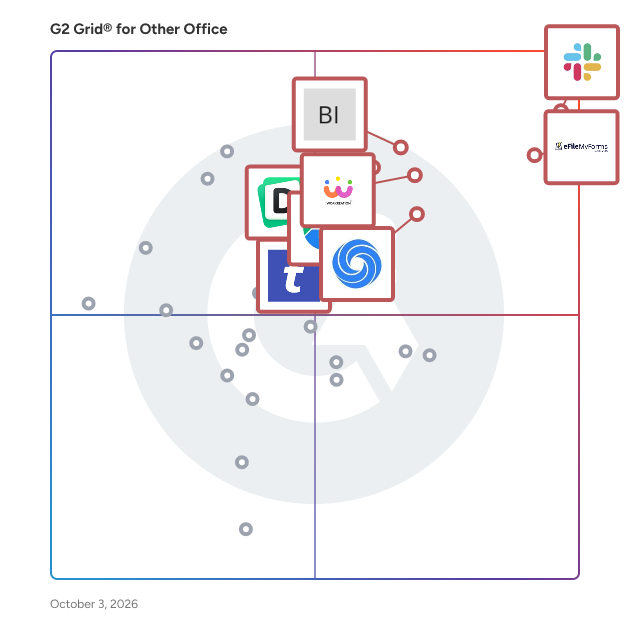
G2 Grid® for Other Office Software

G2 Grid® for Other Office Software plotting products by satisfaction and market presence

Highlighted products: Slack Connector for Jira, Sovos eFileMyForms, Google Drive & Docs for Confluence, Workreation®, Drive Uploader, NoteGPT, TransferNow, and Diffchecker.

Underlying data: [Grid® JSON](https://www.g2.com/categories/other-office/grids.json?focus%5B%5D=slack-connector-for-jira&focus%5B%5D=sovos-efilemyforms&focus%5B%5D=google-drive-docs-for-confluence&focus%5B%5D=workreation&focus%5B%5D=drive-uploader&focus%5B%5D=notegpt&focus%5B%5D=transfernow&focus%5B%5D=diffchecker)

Multi-Page TIFF Editor

Multi-Page TIFF Editor is a comprehensive solution for viewing, editing, annotating, and printing multipage TIFF files. Designed for both individual and corporate use, it offers a user-friendly interface combined with a robust set of features, making it an indispensable tool for managing TIFF documents. Key Features and Functionality: - Advanced Page Management: Easily add, delete, reorder, rotate, replace, and extract pages within multipage TIFF documents. Pages can be rearranged effortlessly using drag-and-drop functionality. - Image Editing Capabilities: Utilize the built-in bitmap editor for per-pixel editing, drawing, and adjusting color or contrast. External bitmap editors can also be integrated for enhanced editing options. - Annotations and Comments: Add text, sticky notes, highlight areas, color boxes, freehand remarks, and pre-defined stamps to each page. Annotations support Unicode characters and can be password-protected to restrict visibility. - Metadata Support: Read and write IPTC and XMP metadata, including headlines, descriptions, and keywords. Import custom metadata fields from XMP files and search files by metadata fields within folders and subfolders. - Optical Character Recognition (OCR: Recognize text within images and convert multiple pages or entire multipage TIFF files into single multipage RTF files. - Barcode Recognition and Generation: Generate and insert barcodes into documents and recognize existing barcodes for efficient document management. - File Conversion: Convert between TIFF and PDF formats, including PDF to TIFF raster conversion and raster editing of PDF files. - Batch Processing: Perform batch conversions for "TIFF to PDF," "TIFF to TIFF," and "PDF to TIFF" operations, streamlining workflow processes. - Scanning Integration: Support for multipage scanning using TWAIN or WIA interfaces directly into multipage TIFF or PDF files. - Efficient File Handling: Open and process large TIFF files up to 4 GB quickly using multi-thread technology, enhancing performance for sizable documents. Primary Value and User Solutions: Multi-Page TIFF Editor addresses the challenges associated with managing and editing multipage TIFF documents by providing a comprehensive suite of tools that streamline document workflows. Its advanced features, such as OCR, metadata management, and annotation capabilities, make it particularly valuable for professionals in sectors like government agencies, archives, healthcare facilities, financial institutions, and legal firms. By offering efficient file handling, extensive editing options, and robust security features, it enhances productivity and ensures the effective management of TIFF documents.

Who Is the Company Behind Multi-Page TIFF Editor?

  • Seller: ADEO Imaging
  • Year Founded: 2014
  • HQ Location: Tallinn, EE
  • Twitter: @awscloud
    2,232,483 Twitter followers
  • LinkedIn® Page: www.linkedin.com
    2 employees on LinkedIn®

Multi PDF Converter

Multi PDF Converter is a native desktop app for Windows and macOS that converts between PDF and image formats in bulk. Render every page of a PDF to JPG, PNG or WebP; bundle JPG, PNG, HEIC or WebP images into one PDF or one PDF per image; and convert iPhone HEIC photos and WebP images to JPG or PNG without installing codecs. Output is 75, 150 or 300 dpi. Conversion runs on the user's computer and files are never uploaded to a server, so confidential documents stay in-house. Drag in files or whole folders, or click Choose files, and outputs land in a folder you pick. Available in 15 languages. Native builds for Windows 10/11 (64-bit) and macOS 13+, Apple silicon and Intel. The first 3 conversions are free, any number of files each; paid plans have a 30-day money-back guarantee.

Who Is the Company Behind Multi PDF Converter?

AI can help you find the answers. G2 helps you trust them.

Connect G2 to Claude or ChatGPT for answers grounded in G2's trusted reviews, comparisons, and pricing from real user insights.

How it works

My Efact: Paperless Office

Welcome to My Efact Paperless Office, My Efact is a paperless office system that gives you scanning, secure email, archiving, and all the other features of a powerful online document management system.

Who Is the Company Behind My Efact: Paperless Office?

Myqueue

Myqueue lets you enjoy your favorite articles in audio format for on-the-go listening.

Who Is the Company Behind Myqueue?

MyScript

MyScript creates digital ink solutions and productivity apps for developers, OEMs and end users – all powered by the world’s best handwriting recognition.

Who Is the Company Behind MyScript?

  • Seller: MyScript
  • Year Founded: 1998
  • HQ Location: Nantes, FR
  • LinkedIn® Page: www.linkedin.com
    98 employees on LinkedIn®

Namelume

"Namelume is a domain registration and hosting platform built for Indian startups and small businesses. • AI domain name generator: describe your business and get brandable name ideas with live availability. • Bulk search: check many names or extensions at once. • 300+ extensions, including .in, .co.in, .com, .ai and .store. • Hosting you can add in the same checkout. • Domain search in Tamil for local businesses. • Saved names and search history so you can compare options before you buy. Based in Coimbatore, Tamil Nadu."

Who Is the Company Behind Namelume?

NeuroSpell

NeuroSpell is an advanced spelling and grammar auto-corrector powered by deep learning technology, supporting over 30 languages. It offers a comprehensive suite of features designed to enhance writing accuracy and efficiency across various applications. Key Features and Functionality: - Multilingual Support: Provides spelling and grammar correction in more than 30 languages, catering to a diverse user base. - Speech-to-Text Integration: Includes a Dictaphone feature that enables speech-to-text conversion across all supported languages. - Customizable Training: Allows training on domain-specific vocabulary, sentence structures, and machine-specific errors to improve accuracy in specialized fields. - On-Premise Deployment: Offers the option for on-premise deployment, ensuring data privacy by keeping all data within the user's intranet. - Industrial Applications: Features human-in-the-loop charge optimization, text-stream improvement, writing aid, proofreading RPA, customer-workflow input enrichment, speech-to-text enhancement, and OCR error correction. Primary Value and User Solutions: NeuroSpell addresses the need for accurate and efficient text correction across multiple languages and industries. By leveraging deep learning, it not only corrects basic spelling and grammar errors but also adapts to specific industry terminologies and writing styles. Its speech-to-text capabilities and on-premise deployment options make it a versatile tool for professionals seeking to enhance their writing quality while maintaining data security. Whether for content creation, proofreading, or speech transcription, NeuroSpell streamlines workflows and improves communication accuracy.

Who Is the Company Behind NeuroSpell?

  • Seller: cubAlx
  • Year Founded: 2022
  • HQ Location: Vienne, FR
  • LinkedIn® Page: www.linkedin.com
    1 employees on LinkedIn®

News Teaser for Confluence

Appfire is a global software company with dozens of top-selling apps that help teams with Workflow Automation, Product Portfolio Management, IT Service Management, Document Management, Business Intelligence and Reporting, Administrative Tools, Agile, Developer Tools, and Publishing. After several major acquisitions over the last couple years, we're in the process of merging all our app brands into a single Appfire platform in order to provide a more streamlined experience for all Atlassian customers and partners. Be on the lookout for a growing number of apps in this account as we continue this work into 2022, and please feel follow along with our progress at appfire.com/one-appfire.

Who Is the Company Behind News Teaser for Confluence?

  • Seller: Appfire
  • Year Founded: 2005
  • HQ Location: Boston, Massachusetts
  • Twitter: @Appfire
    1,632 Twitter followers
  • LinkedIn® Page: www.linkedin.com
    727 employees on LinkedIn®

NexAEI VisMate

NexAEI VisMate is a no-touch visitor management system that has been designed to help businesses get back to the office. Our unique visitor self-registration flow ensures that your receptions or lobbies are touchless and safe!

Who Is the Company Behind NexAEI VisMate?

  • Seller: NexAEI
  • Year Founded: 2022
  • HQ Location: Kolkata, IN
  • LinkedIn® Page: www.linkedin.com
    9 employees on LinkedIn®

Who Uses This Product?

  • Company Size: 100% Medium

What Are Recent G2 Reviews of NexAEI VisMate?

What Are G2 Users Discussing About NexAEI VisMate?

NinetyMinutesPlus

NinetyMinutesPlus is an AI-powered football platform built for fans worldwide. It brings live scores, fixtures, standings, player statistics, transfers, football news, videos, AI-powered insights, fantasy football, and official football merchandise together in one connected platform. NinetyMinutesPlus combines real-time football data with intelligent analysis and fan-focused experiences, helping users follow their favorite teams and players, discover insights, participate in fantasy football, and shop football merchandise. The platform covers clubs, national teams, leagues, and players across football's global ecosystem. Core features include: Live football scores, fixtures, standings, and statistics Player and team profiles Transfer news and football news AI-powered predictions and insights Fantasy football Football videos and fan content Official jerseys, name sets, boots, training gear, and merchandise NinetyMinutesPlus is designed to become a comprehensive digital destination for football fans, combining data, media, AI, community, fantasy, and commerce in a single ecosystem.

Who Is the Company Behind NinetyMinutesPlus?

Notion Automations

2sync is a Notion integration tool designed to automate and streamline the synchronization between Notion databases and various external applications, including Google Calendar, Todoist, Outlook, and Gmail. By establishing a live two-way sync, 2sync ensures that any changes made in one application are reflected in the other within minutes, thereby eliminating the need for manual data entry and reducing the risk of inconsistencies. The primary features of 2sync include: - **Two-Way Synchronization**: 2sync facilitates automatic bidirectional updates between Notion and connected applications. For instance, modifying a task in Notion will promptly update the corresponding task in Todoist, and vice versa. This ensures that all platforms remain consistent without manual intervention. - **Flexible Field Mapping**: Users can customize how data fields correspond between Notion and external applications. 2sync supports all Notion property types, allowing users to map any Notion property to any field in the connected applications. This flexibility ensures that the synchronization aligns with individual workflows and data structures. - **Automated Background Syncing**: Once configured, 2sync operates in the background, performing syncs as frequently as every two minutes. Users receive notifications only when specific attention is required, allowing them to focus on their tasks without disruptions. - **Comprehensive Integration Support**: 2sync integrates with a range of applications, including Google Calendar, Outlook Calendar, Google Tasks, Todoist, Google Contacts, Outlook Contacts, Gmail, and Outlook Mail. This broad compatibility enables users to maintain a cohesive and synchronized ecosystem across various tools. - **User-Friendly Setup**: Setting up 2sync is straightforward and can be completed in under five minutes. The process involves connecting the desired applications, mapping the relevant fields, and activating the synchronization. Once set up, 2sync handles the rest, ensuring continuous and reliable data synchronization. By leveraging 2sync, users can significantly enhance their productivity by reducing the time spent on manual data entry and minimizing errors associated with data inconsistencies. The tool's robust features and ease of use make it a valuable asset for individuals and teams seeking to maintain synchronized and up-to-date information across multiple platforms.

Who Is the Company Behind Notion Automations?

  • Seller: Twain
  • Year Founded: 2021
  • HQ Location: Berlin, DE
  • Twitter: @Twain_ai
    87 Twitter followers
  • LinkedIn® Page: www.linkedin.com
    19 employees on LinkedIn®

Nouncify

Nouncify is an innovative web application designed to help individuals record, share, and ensure the correct pronunciation of their names. By allowing users to create personalized audio recordings accessible directly through their browsers, Nouncify fosters respect for cultural identity and enhances communication across diverse communities. Key Features and Functionality: - Browser-Based Recording: Users can record their name pronunciations without the need for additional app installations or browser extensions. - Easy Sharing: The platform offers seamless integration with social media and communication apps, enabling quick sharing of name pronunciations. - Custom Profile Pages: Each user receives a unique Nouncify URL, allowing others to listen to their name pronunciation and record their own. - Group Functionality: Nouncify Groups facilitate learning and remembering names in both virtual and physical events, promoting inclusivity. - Embeddable Audio Widgets: Users can embed audio widgets on websites or blogs, enabling visitors to learn name pronunciations directly from the site. Primary Value and User Solutions: Nouncify addresses the common challenge of name mispronunciation, which can lead to discomfort and misunderstandings. By providing a straightforward platform for recording and sharing name pronunciations, Nouncify ensures that individuals' names are heard and respected accurately. This promotes inclusivity, strengthens personal connections, and fosters a world where every name is celebrated and understood.

Who Is the Company Behind Nouncify?

Nova-APR

Novatek’s Automated Proof Reading software is an innovative process driven solution, which is completely 21 CFR Part 11 compliant and includes an extensive and independent audit trail. Furthermore Novatek’s Automated Proof Reading software is a language independent proofreading program which enables a new safety and quality standard for optimal inspection of all printed materials (labels, cartons, inserts, leaflets, procedures and contracts) within an organization. With Novatek’s advanced inspection technology, pharmaceutical and other life science organizations are now able to improve the accuracy of information distributed to their customers and diminish the difficulties associated with printed materials and its text validity.

Who Is the Company Behind Nova-APR?

NSF to PST Converter Software for Lotus Notes

NSF to PST Converter Software for Lotus Notes is an nsf to pst converter for Windows that moves mail out of IBM and HCL Notes databases. It reads the .nsf file on its own, so the PC needs neither a Notes client nor a Domino server, and it writes a Unicode PST that Outlook opens like any other data file. Nothing is uploaded anywhere: parsing and writing happen on your machine. It suits the common NSF to PST job where the archive survived and Notes did not. 🛠️ How to use 1. Open a .nsf or .ntf database, whether it sits in a local folder, on a mapped drive or on an external disk. 2. Browse the folder tree and read messages in the preview pane before anything is written. 3. Set a date range, search by subject, sender or recipient, and leave Trash out if you do not need it. 4. Choose a destination and press Start. When the summary appears, add the new PST to Outlook as a data file from the File menu. ✅ Why IT and office teams pick it - No Notes install. The nsf to pst converter parses the database directly, which matters once the company has retired Notes. - Mail stays on the workstation, with no cloud step and no account. - Attachments come out as real files, including the ones Domino compressed on the server. - Canonical Notes names are replaced with SMTP addresses, so replies work in Outlook. - Inbox, Sent, Drafts and personal folders keep their names, and a message listed both in a folder and in All Documents is written once. - Filters run inside the reader, so the message list on screen matches what lands in the PST. - Multi-gigabyte databases are read by a separate 64-bit process. - When a file cannot be read, the program says why instead of showing an empty mailbox. 👥 Who uses it IT admins moving a department from Notes to Outlook or Microsoft 365, migration contractors who receive NSF archives from clients, legal or audit staff who need to search an inherited mailbox, and anyone handed an old archive with nothing to open it in. ❓ FAQ Can I convert NSF to PST without Lotus Notes installed? Yes. The program reads the file structure itself, so you need neither Notes nor a Domino server. Outlook is only needed later, to open the PST. Which Notes versions does it support? Databases with On-Disk Structure 41 to 55, which covers Notes 5 up to the 14.x line. Files written by Notes 4.x and older are reported as unreadable. Does it convert contacts and calendar entries? No. This version handles mail only: messages, folders and attachments. What does NSF stand for? NSF is short for Notes Storage Facility. Template files with the .ntf extension share that on-disk format, and the program reads them too. 💡 The free trial of the nsf to pst converter needs no sign-up and converts a sample of each database so you can check the result in Outlook. Runs on Windows 11 and 10 with 4 GB of RAM.

Who Is the Company Behind NSF to PST Converter Software for Lotus Notes?

Neeraja Prakash
NP
Researched and written by Neeraja Prakash
Updated June 16, 2025