Best Other Office Software - Page 22

How Many Other Office Software Products Does G2 Track?

Total Products under this Category: 629

Category Stats (Nov 2026)

  • Average Rating: 4.41/5 (↑0.01 vs Oct 2026) The average rating of products in this category, based on all submitted ratings
  • Top Trending Product: Sider (+7.14%) - Among all products in this category, Sider recorded the largest rating increase compared to last month

Last updated: November 01, 2026

How Does G2 Rank Other Office Software Products?

Why You Can Trust G2's Software Rankings:

  • 30 Analysts and Data Experts
  • 1,300+ Authentic Reviews
  • 629+ Products
  • Unbiased Rankings

G2's software rankings are built on verified user reviews, rigorous moderation, and a consistent research methodology maintained by a team of analysts and data experts. Each product is measured using the same transparent criteria, with no paid placement or vendor influence. While reviews reflect real user experiences, which can be subjective, they offer valuable insight into how software performs in the hands of professionals. Together, these inputs power the G2 Score, a standardized way to compare tools within every category.

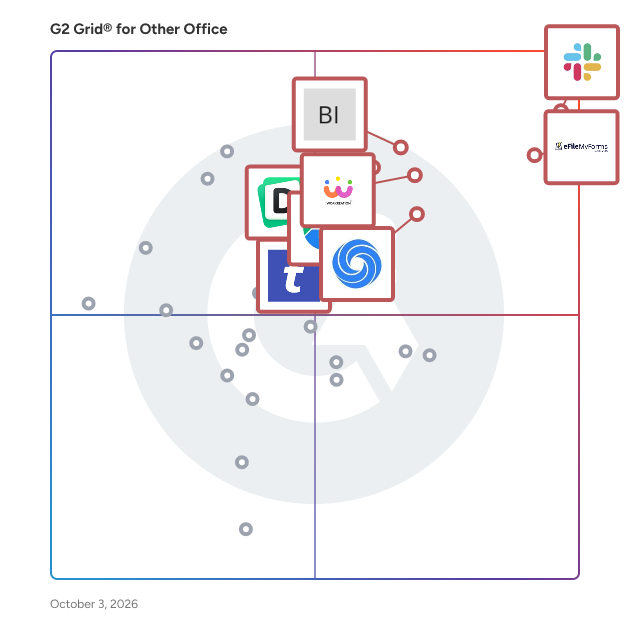
G2 Grid® for Other Office Software

G2 Grid® for Other Office Software plotting products by satisfaction and market presence

Highlighted products: Slack Connector for Jira, Sovos eFileMyForms, Google Drive & Docs for Confluence, Workreation®, Drive Uploader, NoteGPT, TransferNow, and Diffchecker.

Underlying data: [Grid® JSON](https://www.g2.com/categories/other-office/grids.json?focus%5B%5D=slack-connector-for-jira&focus%5B%5D=sovos-efilemyforms&focus%5B%5D=google-drive-docs-for-confluence&focus%5B%5D=workreation&focus%5B%5D=drive-uploader&focus%5B%5D=notegpt&focus%5B%5D=transfernow&focus%5B%5D=diffchecker)

ENaiBLD _ Buyer

ENaiBLD – Buyer-Enabled Evaluation System ENaiBLD is a persistent, AI-powered solution expert that helps B2B companies support buyer-led evaluation at scale. It gives every stakeholder — across every role and every stage of the buying journey — instant access to accurate, governed answers to complex questions, without requiring a sales rep to be present. Unlike chatbots, demo automation tools, or digital sales rooms, ENaiBLD is built specifically for the space between sales conversations: the independent evaluation that happens across committees, late-night research sessions, and internal alignment meetings. It ensures that as buyers explore, they do so with disciplined, source-grounded explanation aligned to how the organization actually sells and supports its solution. What ENaiBLD does: Delivers structured, source-backed answers to buyer questions in real time Generates intelligent follow-up questions to guide deeper exploration Captures every question asked, every topic explored, and every resource accessed — surfacing observable intent, not inferred behavior Routes buyers to the right sales contact at the right moment with full context Operates without login friction, under your brand, embedded in your existing buyer experience Who it's for: Revenue teams at B2B companies who want to reduce misalignment during complex, multi-stakeholder deals — and ensure understanding, not confusion, is the foundation of every sales conversation. ENaiBLD fills the gap the modern GTM stack doesn't address: what happens to buyer understanding between your touchpoints.

Average Rating: 4.5/5.0

Total Reviews: 1

How Do G2 Users Rate ENaiBLD _ Buyer?

  • Quality of Support: 8.3/10 (Category avg: 8.8/10)
  • Ease of Use: 10.0/10 (Category avg: 9.0/10)

Who Is the Company Behind ENaiBLD _ Buyer?

Who Uses This Product?

  • Company Size: 100% Small

What Are Recent G2 Reviews of ENaiBLD _ Buyer?

Enolsoft DXF Viewer

DXF Viewer for Mac is a lightweight, fast and dedicated CAD viewer designed for macOS and Windows. It allows you to effortlessly open, view, measure, annotate, export and print DXF & DWG files without installing bulky AutoCAD software. With intuitive controls and complete toolset, it becomes your handy daily assistant for CAD drawing review.

Who Is the Company Behind Enolsoft DXF Viewer?

AI can help you find the answers. G2 helps you trust them.

Connect G2 to Claude or ChatGPT for answers grounded in G2's trusted reviews, comparisons, and pricing from real user insights.

How it works

Enolsoft PST Viewer

Enolsoft PST Viewer is a lightweight, powerful application that lets you open and read Microsoft Outlook PST files without installing Outlook. Key Capabilities: Open PST files independently — no Outlook required View all mailbox items: emails, contacts, calendars, notes, tasks, journals Preserve original folder hierarchy with item counts displayed Open password-protected and encrypted PST files without entering password Preview, open, and batch-save email attachments with one click Convert emails to EML, contacts to VCF, calendars to ICS, notes to TXT Built-in search to locate emails by keywords quickly Print emails with full customization or save as PDF Export directly to Mac Contacts and Calendar apps (macOS) Compatibility: Works on both macOS and Windows Supports all Outlook versions (2003-2021, Microsoft 365) ANSI and UNICODE PST formats supported No file size limitations Process multiple PST files simultaneously Safe & Secure: Read-only access ensures your original PST files remain unchanged and protected.

Average Rating: 4.0/5.0

Total Reviews: 1

How Do G2 Users Rate Enolsoft PST Viewer?

  • Quality of Support: 8.3/10 (Category avg: 8.8/10)
  • Ease of Use: 10.0/10 (Category avg: 9.0/10)

Who Is the Company Behind Enolsoft PST Viewer?

Who Uses This Product?

  • Company Size: 100% Small

What Are Recent G2 Reviews of Enolsoft PST Viewer?

eNoticesOnline

eNoticesOnline.com is a digital platform designed to streamline the delivery and management of important documents such as bills, statements, and invoices. By transitioning from traditional paper-based methods to electronic notifications, users can access their documents securely and conveniently from any device with internet connectivity. This service not only enhances efficiency but also promotes environmental sustainability by reducing paper consumption. Key Features and Functionality: - Email Notifications: Users receive prompt email alerts whenever a new document becomes available, ensuring timely awareness and action. - Universal Access: Documents can be viewed and managed from various devices, including smartphones, tablets, and computers, offering flexibility and convenience. - Cost Savings: By eliminating the need for postage and physical mail handling, users can save on mailing costs and reduce mailbox clutter. - Environmental Impact: The platform supports eco-friendly practices by minimizing paper usage, contributing to a greener planet. Primary Value and User Solutions: eNoticesOnline.com addresses the common challenges associated with paper-based document delivery, such as delays, misplacement, and environmental concerns. By offering a secure and efficient electronic alternative, it ensures that users receive their important documents promptly and can access them anytime, anywhere. This transition not only simplifies document management but also aligns with modern digital practices, enhancing overall user experience and operational efficiency.

Who Is the Company Behind eNoticesOnline?

EraseNoise

Clean noisy speech in audio or video online—preview free, pay only if it sounds better. EraseNoise removes wind, fan, traffic, and mic hum from spoken recordings in the browser. Free 30-second before/after preview; download the full cleaned file as WAV or MP4. Extra tools for echo, reverb, buzz/hum, and applause, plus an in-browser silence cutter. Uploads deleted after 24 hours. Formats: MP3, WAV, M4A, AAC, OGG, Opus, FLAC, MP4, MOV, M4V, WebM up to 2GB. Freemium. Categories: AI Audio, Noise Removal, Podcast/Video, Productivity.

Who Is the Company Behind EraseNoise?

e-Redact

Since 2006, e-Redact has delivered an advanced document redaction solution for irreversibly removing confidential and sensitive information from electronic files, documents, scanned output, or any other information source such as a database report.

Who Is the Company Behind e-Redact?

espacioenblanco

Espacioenblanco es una plataforma creativa que destaca proyectos de arte, diseño y cultura, promoviendo la innovación y la expresión artística.

Who Is the Company Behind espacioenblanco?

EstimateHub PDF to ESX Converter

EstimateHub converts Xactimate and Cotality/Symbility estimate PDFs into ESX files you can import straight into Xactimate, keeping line items, F9 notes and folder structure, so you do not retype a carrier estimate. Upload a PDF, download the ESX, and start editing. Scanned image PDFs and all 11 standard Xactimate PDF report types are supported, along with all forms of Cotality/Symbility estimate PDFs. EstimateHub also writes estimates in Xactimate or Cotality/Symbility, and offers free Xactimate training and ESX templates. The first PDF to ESX conversion is free, with no credit card. EstimateHub is not affiliated with Verisk or Xactimate.

Who Is the Company Behind EstimateHub PDF to ESX Converter?

Who Uses This Product?

  • Company Size: 100% Small

What Are Recent G2 Reviews of EstimateHub PDF to ESX Converter?

EuroDrop

EuroDrop is a lightweight secure intake tool for accountants, legal teams, and other small professional firms that still run on email. Instead of chasing sensitive attachments through inbox threads or rolling out a heavy client portal, teams send one secure upload link. Clients open it, drag files in, and submit without creating another account. Files route directly to the firm's connected Google Drive, which keeps setup light for the team while giving clients a more professional intake experience. EuroDrop is built to support GDPR-aligned workflows and is especially suited to firms that want better intake without changing how they already communicate.

Who Is the Company Behind EuroDrop?

  • Seller: EuroDrop
  • Year Founded: 2026
  • HQ Location: Stockholm , SE
  • LinkedIn® Page: www.linkedin.com
    1 employees on LinkedIn®

Everbridge Travel Protector

Everbridge Travel Protector™ is a comprehensive travel risk management solution designed to ensure the safety and well-being of employees during business travel. By integrating real-time risk intelligence, dynamic traveler tracking, and advanced communication tools, it enables organizations to proactively monitor and respond to potential threats, thereby fulfilling their duty of care obligations. Key Features and Functionality: - Real-Time Threat Monitoring: Continuously analyzes global data sources to identify emerging risks that may impact travelers. - Dynamic Traveler Tracking: Combines itinerary details with GPS data to provide precise location awareness of employees. - Automated Alerts and Notifications: Delivers timely alerts via multiple channels, including email, SMS, and push notifications, to inform travelers of potential disruptions. - Pre-Trip Advisories: Offers essential information such as vaccination requirements, visa regulations, and cultural insights to prepare travelers before departure. - Emergency Assistance: Provides 24/7 multilingual medical and security support, including an SOS feature for immediate help during emergencies. - Audit Trails: Maintains detailed records of actions and communications to demonstrate compliance with duty of care standards. Primary Value and User Benefits: Everbridge Travel Protector™ addresses the critical need for organizations to safeguard their traveling employees by offering a unified platform that enhances situational awareness and streamlines response to incidents. By proactively identifying and mitigating travel-related risks, it minimizes disruptions, ensures compliance with legal obligations, and fosters employee confidence in their safety while traveling. This comprehensive approach not only protects individuals but also upholds the organization's reputation and operational continuity.

Who Is the Company Behind Everbridge Travel Protector?

  • Seller: Everbridge
  • Year Founded: 2002
  • HQ Location: Vienna, VA
  • Twitter: @Everbridge
    4,786 Twitter followers
  • LinkedIn® Page: www.linkedin.com
    1,617 employees on LinkedIn®
  • Phone: +1.888.366.4911

Excel Password Recovery Software

Excel Password Recovery Software is a Windows desktop program for workbooks you own and can no longer edit or open. It handles two different locks. Sheet and workbook protection comes off at once, with no password needed. A forgotten open password is searched for on your PC and shown to you when it is found. For anyone who needs excel password recovery without sending a spreadsheet to a website, everything here runs offline. 🔰 How to use Excel Password Recovery Software 1. Install the program and open it. No sign-up is asked for. 2. Drop in one file or a whole folder of .xlsx and .xls workbooks. 3. Start the run. The program first tries to unprotect Excel sheet and workbook structure locks, which takes seconds. 4. If a workbook is encrypted with an open password, the search begins. You see the speed, a time estimate and a Stop button. 5. Read the result: an editable workbook for protection locks, or the password itself for an encrypted file. 👍 Why office and IT staff choose it for Excel password recovery - Local processing. Payroll, budgets and client lists never leave the computer. - One pass for a folder. Dozens of locked files are queued and worked through while you do something else. - No manual workaround. A locked sheet is only a setting stored in the workbook, so the program deletes that setting for you. - Honest odds. The search covers the everyday passwords that office users invent, plus typical twists on them. A lengthy random string set in Office 2013 or later stays out of reach, and you are told so before any waiting starts. - Hardware you already have. A GPU shortens the wait, and a machine without one still does the job after quoting how long it may take. ✅ Who uses it - Finance and office staff who locked a budget workbook months ago and need it before a deadline. - IT admins who inherit a file share full of protected sheets with no passwords written down. - Owners of old .xls accounting archives. Legacy files use weaker protection, so they usually open fast. ❓ FAQ How do I open an Excel file when the password is forgotten? Add the file and start. The program looks for the open password you chose and displays it, so you type it into Excel yourself. Can I unprotect a sheet without knowing its password? Yes. Sheet protection is not encrypted, so it is removed with nothing to remember. Do I need a graphics card? No, but it helps. Removing sheet protection needs no GPU at all, and to recover an Excel password on a CPU just takes longer. Is this an excel password remover for files that belong to other people? No. It is meant for workbooks that are yours or that you are authorized to open. ℹ️ Free trial: the full job runs and you get a preview, either the unprotected content or the recovered password with characters hidden. Saving the file and reading the whole password need a license. Excel password recovery runs on Windows 11, 10, 8.1, 8 or 7 with 4 GB of RAM and 1 GB of disk space.

Who Is the Company Behind Excel Password Recovery Software?

Excel Password Recovery Tool

In the off chance where the user has lost or forgotten excel (.xlsx, .xls, .xlsm, .xlsb, .xla, .xlam, .xltm) file password or security key then the smart way to re-open locked excel sheet password protection is eSoftTools Excel Password Recovery Software. All users can use this excel password unlocker tool without any difficulty with the help of its simple and spontaneous Graphical User Interface. It has provided the best recovery attack such as Dictionary attack, Mask attack, & Brute Force attack to recover all possible password combinations easily. The password may comprise any type of characters such as alphabets in lower case, upper case, numeric, special character, and other user-defined printable characters. Download this excel password remover tool to immediately open over locked spreadsheet password safely and effortlessly. The strong features of free excel password recovery tool are *) Rapidly recover excel password protection *) Free demo version to recover excel password with only first three characters as a preview *) 3- in-1 feature to unlock Excel, Word, and Access file password protection *) Supports all Microsoft Excel versions up to 2019 and Windows versions up to 10 (32-bit, & 64-bit) with regular free updates *) Secure and fast recovery techniques with the assurance of no data damage or modification *) Provision of three recovery attack methods: - Mask attack, Dictionary attack, & Brute Force attack *) Remove password combinations with any key length and specification which may include all UNICODE characters like Alphanumeric, Numbers, and Symbols *) 100% guaranteed recovery excel workbook password

Who Is the Company Behind Excel Password Recovery Tool?

  • Seller: eSoftTools
  • Year Founded: 2014
  • HQ Location: Fort Mill SC, US
  • Twitter: @esofttools
    97 Twitter followers
  • LinkedIn® Page: www.linkedin.com
    20 employees on LinkedIn®

Exela Visitor & Lobby Management

Enrich your onsite branding and make a memorable first impression with a fully digital check-in process, virtual lobby support, and integrated Intelligent Lockers. Exela’s visitor and lobby management technologies streamline reception and personalize your guests’ experience.

Who Is the Company Behind Exela Visitor & Lobby Management?

  • Seller: Exela Technologies
  • HQ Location: Irving, US
  • LinkedIn® Page: www.linkedin.com
    6,065 employees on LinkedIn®
  • Ownership: NASDAQ: XELA
  • Total Revenue (USD mm): $1,562
Neeraja Prakash
NP
Researched and written by Neeraja Prakash
Updated June 16, 2025