Best Other Office Software - Page 11

How Many Other Office Software Products Does G2 Track?

Total Products under this Category: 523

Category Stats (Sep 2026)

  • Average Rating: 4.4/5 The average rating of products in this category, based on all submitted ratings
  • Top Trending Product: NoteGPT (+0.81%) - Among all products in this category, NoteGPT recorded the largest rating increase compared to last month

Last updated: September 06, 2026

How Does G2 Rank Other Office Software Products?

Why You Can Trust G2's Software Rankings:

  • 30 Analysts and Data Experts
  • 1,100+ Authentic Reviews
  • 523+ Products
  • Unbiased Rankings

G2's software rankings are built on verified user reviews, rigorous moderation, and a consistent research methodology maintained by a team of analysts and data experts. Each product is measured using the same transparent criteria, with no paid placement or vendor influence. While reviews reflect real user experiences, which can be subjective, they offer valuable insight into how software performs in the hands of professionals. Together, these inputs power the G2 Score, a standardized way to compare tools within every category.

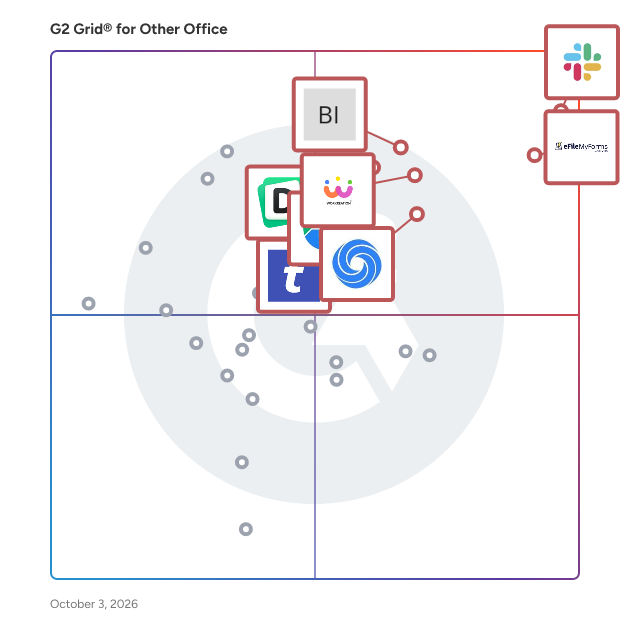
G2 Grid® for Other Office Software

G2 Grid® for Other Office Software plotting products by satisfaction and market presence

Highlighted products: Slack Connector for Jira, Google Drive & Docs for Confluence, Workreation®, NoteGPT, Drive Uploader, Diffchecker, TransferNow, and DocsAutomator.

Underlying data: [Grid® JSON](https://www.g2.com/categories/other-office/grids.json?focus%5B%5D=slack-connector-for-jira&focus%5B%5D=google-drive-docs-for-confluence&focus%5B%5D=workreation&focus%5B%5D=notegpt&focus%5B%5D=drive-uploader&focus%5B%5D=diffchecker&focus%5B%5D=transfernow&focus%5B%5D=docsautomator)

Word Counts

Word Counts is a free online word counter tool. It counts words, lines, and characters. Word Counts is used by businesses and educational institutions around the world for uses such as marketing, SEO, company blogs, and advertising.

Average Rating: 4.0/5.0

Total Reviews: 1

Who Is the Company Behind Word Counts?

Who Uses This Product?

  • Company Size: 100% Small

What Are Recent G2 Reviews of Word Counts?

WordPerfect

Corel Screencap

Average Rating: 4.5/5.0

Total Reviews: 1

How Do G2 Users Rate WordPerfect?

  • Quality of Support: 8.3/10 (Category avg: 8.7/10)
  • Ease of Use: 8.3/10 (Category avg: 9.0/10)

Who Is the Company Behind WordPerfect?

Who Uses This Product?

  • Company Size: 100% Medium

What Are Recent G2 Reviews of WordPerfect?

What Are G2 Users Discussing About WordPerfect?

321Soft TIFF Studio 4.0.1

An easy multi-page TIFF editing and converting software for Windows, Easily view, convert, edit, print multipage TIFF, FAX, and PDF files. the ability to merge, split, rotate, mix, watermark, extract pages from TIFF files. It also work with PDF, FAX, DCX, EPS, PS, AI, GIF, JBIG and DICOM files.

Who Is the Company Behind 321Soft TIFF Studio 4.0.1?

Aba Search and Replace

Aba is a tool for replacing text in multiple files. With Aba, you can quickly correct errors on your web pages, replace banners and copyright notices, change method names, and perform other text-processing tasks. Features: search-as-you-type interface, multi-line search and replace, regular expression support, Unicode support, search history, favorites, undo for any replacement, and command-line interface.

Who Is the Company Behind Aba Search and Replace?

ABCFastDirectory

ABCFastDirectory is a software help to manage the member directory and create telephone or photo directories.

Who Is the Company Behind ABCFastDirectory?

Accelerator Keys

Accelerator Keys is a macOS application designed to bring Windows-style Alt-key shortcuts to Microsoft Excel and PowerPoint on Mac. By leveraging Apple's assistive features, it enables users to navigate and control the ribbon interface efficiently, eliminating the need for cumbersome workarounds. This tool is particularly beneficial for professionals accustomed to Windows shortcuts, enhancing productivity and streamlining workflow on Mac systems. Key Features and Functionality: - Extensive Shortcut Support: Provides over 200 frequently used Alt-key shortcuts, covering the entire Home tab and most functions in the Insert, View, Formulas, and Data tabs. - Seamless Integration: Operates unobtrusively from the menu bar, monitoring keystrokes and utilizing the Accessibility API to display hotkeys and control Excel and PowerPoint. - Broad Compatibility: Supports both Intel and Apple Silicon Macs running macOS 11 and later versions, and is compatible with Office 365, 2021, 2019, and 2016. - Quick Access Toolbar Control: Allows configuration of up to 10 buttons on the Quick Access Toolbar, enabling efficient control through Alt-key shortcuts. - Multi-Monitor Support: Ensures functionality across multiple monitors, displaying ribbon shortcuts on the active Excel window regardless of its screen location. Primary Value and User Benefits: Accelerator Keys addresses the longstanding challenge faced by Mac users who miss the efficiency of Windows Alt-key shortcuts in Excel and PowerPoint. By replicating this functionality, it enhances productivity, reduces reliance on the mouse, and provides a more intuitive and efficient user experience. This solution is invaluable for professionals such as investment bankers, consultants, accountants, and data scientists who require rapid and precise control over their spreadsheet and presentation tasks.

Who Is the Company Behind Accelerator Keys?

Access Database Viewer

Open Access Database Files With Ease Even When They Are Corrupt

Who Is the Company Behind Access Database Viewer?

  • Seller: Aryson Technologies
  • Year Founded: 2014
  • HQ Location: Noida, Uttar Pradesh
  • Twitter: @Arysontec
    46 Twitter followers
  • LinkedIn® Page: www.linkedin.com
    101 employees on LinkedIn®

Who Uses This Product?

  • Company Size: 100% Small

Admin Center

Easily Manage All Your officeatwork Apps in One Central Location. Your Centralized Management Hub for All officeatwork Apps Across Microsoft 365! Are you tired of switching between multiple apps to manage their settings within your Microsoft 365 environment? Does it feel like a chore to keep everything organized and running smoothly? The Admin Center brings everything together, allowing you to adjust and control the settings for all your officeatwork apps from one clear, simple interface. Now, administrators can handle all officeatwork app settings in applications like Word, Excel, PowerPoint, Outlook, and more without the need to change from one app to another. The Admin Center makes it straightforward for you to keep track of and manage all your officeatwork apps. It’s designed to save you time by putting all the controls in one single place and to ensure that your apps work well together across Microsoft 365. Key Benefits - Centralized Oversight: All your app settings are in one place, making it easier to handle your officeatwork apps. - User-Centric Customization: Personalize app behaviors for different role-based user groups. - Real-Time Configuration: Instantly update and synchronize app settings for all users at once. With the officeatwork Admin Center, managing your apps becomes a simpler, more intuitive process. This means less hassle for you and a smoother operation across all officeatwork applications.

Who Is the Company Behind Admin Center?

  • Seller: officeatwork
  • Year Founded: 1975
  • HQ Location: Zug, CH
  • Twitter: @officeatwork365
    62 Twitter followers
  • LinkedIn® Page: www.linkedin.com
    15 employees on LinkedIn®
  • Ownership: Martin S. Seifert

AiAgent.app

AiAgent.app is a user-friendly AI agent in the browser that boosts your productivity.

Who Is the Company Behind AiAgent.app?

Ainter

Ainter.me is a AI platform that creates icon from transcription.

Who Is the Company Behind Ainter?

AIRPA Connect

AIRPA Connect is the ultimate productivity app designed for the busy individual. With AIRPA Connect, you're getting: - A modern, intuitive workspace giving you instant access to all your vital links, documents, apps and drives - AI-powered search capabilities across all your apps, including the ability to connect up as many Gmail, Outlook, GDrive, OneDrive and Dropbox accounts as you want - A game-changing tab management solution, powered by AIRPA's game-changing browser extension - A simple way to share groups of links and notes with anybody outside of AIRPA Connect - A smart launchpad for all your essential apps Connect brings all your essentials into one seamless interface, making it easier than ever to stay organised and focused. Why Choose Connect? - Significantly reduce time spent on admin work - Access, organise and find all your info - Stay organised with intuitive categorisation - Collaborate effortlessly across platforms with your peers Make your work and life less about managing admin chaos and more about achieving your goals. Join AIRPA Connect on this journey and experience the future of work and AI with Connect. We are only just getting started and we want to work with YOU, the community, as we build more and more connections to your data. In this connected environment we will bring the full power of market leading AI solutions inside your business. This will give you a platform that rivals that which the big blue chip companies and their people will be using to try to outsmart you.

Who Is the Company Behind AIRPA Connect?

alameen

Almeensoft is a specialized software designed to manage accounting systems, particularly the ERP (Enterprise Resource Planning) system. This software provides support for electronic invoicing and electronic receipts. Its primary purpose is to facilitate seamless integration and communication between different departments within a company. Implementing Almeensoft can save valuable time during the initial setup phase. One of the key features of Almeensoft is its ability to manage general accounts. It offers a centralized platform for handling various financial transactions, tracking expenses, and maintaining accurate records. This feature ensures efficient and organized management of a company's financial data. In addition to accounts management, Almeensoft also includes robust inventory management capabilities. It enables effective monitoring and control of stock levels, tracks item movement, and conducts periodic inventory audits. With this functionality, inventory processes can be optimized, and smooth operations within the supply chain can be ensured.

Who Is the Company Behind alameen?

Alliance Virtual Offices

Alliance Virtual Offices provides premium virtual office and telecommunications solutions for companies all over the world. Alliance combines three central components necessary to service mobile and work-from-home professionals: People, Place and Technology.

Who Is the Company Behind Alliance Virtual Offices?

All-in-one File Importer for Confluence

The All-in-one File Importer for Confluence is a versatile tool designed to streamline the process of importing various document formats into Confluence as pages. By supporting a wide range of file types, this app enhances productivity and simplifies content migration for teams. Key Features and Functionality: - Bulk Import Capability: Efficiently import multiple files simultaneously, saving time and effort. - Wide Format Support: Compatible with numerous file formats, including: - HTML - Markdown (CommonMark, GFM - LaTeX - Open Document Format (ODT - Microsoft Word (docx - reStructuredText (RST - EPUB - DocBook - Various wiki markups - Accurate Content Conversion: Ensures that elements like tables, code blocks, and lists are accurately converted into Confluence pages. Primary Value and User Benefits: The All-in-one File Importer addresses the challenge of integrating diverse documentation formats into Confluence. By automating and simplifying the import process, it reduces manual effort, minimizes errors, and accelerates content migration. This leads to improved collaboration and a more efficient documentation workflow within teams.

Who Is the Company Behind All-in-one File Importer for Confluence?

AnyCase App

AnyCase is an in-place case converter, where you can use shortcuts to convert the text case directly in place without rewriting. +50 Different Windows integrations supported, making it possible to convert Case from uppercase to lowercase, lowercase to uppercase, lowercase to title case, and even toggle case, for those times you started to write with the caps lock on. AnyCase integration lets you convert the case directly in all major browsers such as Google's Chrome, Microsoft Edge, Firefox, Opera, and communication programs such as WhatsApp, Slack, Zoom, in email programs such as Outlook, Thunderbird, Gmail, and many others. Beyond covering all the most popular Windows programs, AnyCase supports case conversions in over 24 different languages and includes a built-in pagination engine. Changing capitalization using AnyCase takes a fraction of a second (~0.3 sec), no matter the program you are working in, in place and without rewriting. Use AnyCase when you want to switch from manually converting, to automatic case conversions across Windows. Shortcuts available: Win+Alt+L – To convert selection to lowercase Win+Alt+U – To convert selection to UPPERCASE Win+Alt+T – To convert selection to Title Case Win+Alt+S – To convert selection to Sentence case Win+Alt+A – To convert selection to AlTeRnAtInG CaPs Win+Alt+O – To Toggle the case of the selected Text You'll be able to convert case in Browser Support - Chrome - Mozilla Firefox - Microsoft Edge - Internet Explorer CMS’s Support - WordPress - Joomla - Drupal - Progress Sitefinity Document Writing / Presentations / Publishing Software / Research Software - Microsoft 360 - Microsoft Word (App + in browser) - Microsoft PowerPoint (App + in browser) - Microsoft Excel (App + in browser) - Microsoft Publisher - OneNote (App + in browser) - Google Docs - Google Slides - Google Spreadsheets - Evernote - Grammarly - EndNote - iA Writer - Affinity Publisher - Scribus - LucidPress - Bibisco - Writemonkey - miro (collaborative whiteboard) E-commerce site support / Web shops / Website Builders - WooCommerce - Squarespace - Shopify - MonsterCommerce - Wix - InfusionSoft - Marketo Marketing (Email Marketing, Social Media Marketing Etc.) - HubSpot - Marketo - InfusionSoft - AWeber - MailChimp - Constant Contact .... and many more (full list on the site) +24 Languages supported!! for Immediate in-place text case conversion (Uppercase to lowercase, lowercase to uppercase etc.

Who Is the Company Behind AnyCase App?

Neeraja Prakash
NP
Researched and written by Neeraja Prakash
Updated June 16, 2025