Dynamic Forms
Who Is the Company Behind Dynamic Forms?
- Seller: Next Gen Web Solutions
- Year Founded: 2008
- HQ Location: Jacksonville, US
-
LinkedIn® Page: www.linkedin.com
57 employees on LinkedIn®
Total Products under this Category: 517
Last updated: November 01, 2026
Why You Can Trust G2's Software Rankings:
G2's software rankings are built on verified user reviews, rigorous moderation, and a consistent research methodology maintained by a team of analysts and data experts. Each product is measured using the same transparent criteria, with no paid placement or vendor influence. While reviews reflect real user experiences, which can be subjective, they offer valuable insight into how software performs in the hands of professionals. Together, these inputs power the G2 Score, a standardized way to compare tools within every category.
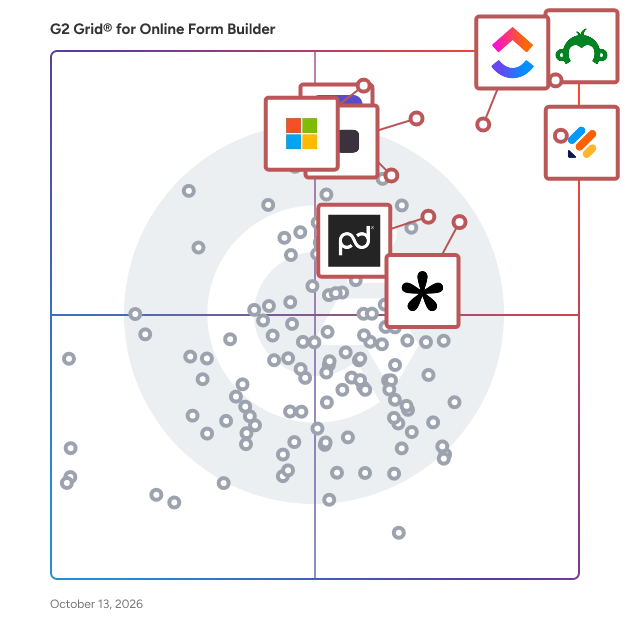
Highlighted products: SurveyMonkey, Jotform, ClickUp, Typeform, Microsoft Forms, Tally, Adobe Acrobat Sign, and PandaDoc.
Underlying data: [Grid® JSON](https://www.g2.com/categories/online-form-builder/grids.json?focus%5B%5D=surveymonkey&focus%5B%5D=jotform&focus%5B%5D=clickup&focus%5B%5D=typeform&focus%5B%5D=microsoft-forms&focus%5B%5D=tally-forms-tally&focus%5B%5D=adobe-acrobat-sign&focus%5B%5D=pandadoc)
Extend Jira fields management possibilities and ask your users only the relevant questions
This easy to use online form builder will get you ready in minutes.
Connect G2 to Claude or ChatGPT for answers grounded in G2's trusted reviews, comparisons, and pricing from real user insights.
elixForms is a low-code platform built for Italian public administrations. It enables municipalities, universities, regions, and government agencies to create, publish, and manage digital forms and online procedures — without requiring IT expertise. Public sector staff build custom forms, automate back-office workflows, and handle citizen requests entirely online. The platform integrates natively with Italy's national digital infrastructure: SPID and CIE for identity verification, PagoPA for payments, and the protocol and document management systems used across the Italian PA. The elixForms community includes over 30,000 shared templates, allowing public bodies to reuse forms already deployed by other administrations — cutting setup time and standardizing citizen-facing services. The platform has managed more than 11 million form submissions to date. elixForms is hosted exclusively on OVHcloud EU infrastructure, fully outside the scope of US CLOUD Act. It holds ISO 9001, ISO/IEC 27001, 27017, and 27018 certifications, and is qualified as a SaaS provider by ACN (Italy's National Cybersecurity Agency). Adopted by 200+ public entities, including Comune di Milano, Ministero delle Infrastrutture e dei Trasporti, Università Politecnica delle Marche, and Regione Puglia.
O Enveo é uma plataforma brasileira para captar e organizar o cadastro de clientes. Você monta o formulário em minutos e divulga por link no WhatsApp, por QR Code impresso no balcão ou dentro do seu site (WordPress, Elementor, Wix ou HTML). Cada cadastro chega conferido: CPF e CNPJ validados, endereço preenchido pelo CEP, telefone e e-mail no formato certo. Com a base pronta, você imprime as etiquetas de endereço direto na impressora térmica de etiquetas (como as da Argox), em rolo, ou em folhas Pimaco na impressora comum, com calibração para sair certinho. Também dá para consultar e filtrar os clientes, exportar para planilha, puxar a lista de aniversariantes e acompanhar as métricas de cada formulário. Os dados de cada empresa ficam isolados, seguindo a LGPD. Teste grátis por 14 dias, sem cartão de crédito. Planos a partir de R$ 29/mês.
ExpressBase is an open-source, low-code rapid application development platform designed to help small and mid-sized businesses (SMBs build, run, and manage internal business process applications up to ten times faster. By combining the stability of ready-made software with the flexibility of custom solutions, ExpressBase enables organizations to develop comprehensive web and mobile applications efficiently. Its cloud-native architecture and suite of intuitive builders empower developers to create complex business applications with minimal coding, significantly reducing development time and effort. Key Features and Functionality: - Drag-and-Drop Builders: Utilize web-based builders for forms, visualizations, dashboards, PDF reports, mobile pages, emails, SMS, chatbots, and more, facilitating rapid application development. - Low-Code Environment: While offering extensive pre-built components, ExpressBase allows for custom coding in JavaScript, C#, and SQL to meet complex business requirements. - Database Integration: Connects natively with popular databases like PostgreSQL and MySQL, supporting both on-premise and cloud environments. - Role-Based Access Control (RBAC: Implement robust security measures by authorizing users based on roles, with the ability to create unlimited roles and group permissions. - Comprehensive Integrations: Seamlessly integrate with services such as Amazon S3, Dropbox, Google Drive, Slack, Twilio, SendGrid, Cloudinary, Google Analytics, Google Maps, ExpertTexting, WhatsApp, and Facebook. - Built-in Audit Trail: Track field-level modifications to maintain data integrity and compliance. Primary Value and Solutions Provided: ExpressBase addresses the challenges SMBs face in developing and deploying internal business applications by offering a platform that accelerates the development process without compromising on customization or security. It reduces the time, effort, and cost associated with traditional application development, enabling businesses to respond swiftly to evolving requirements. By providing a low-code environment with extensive integrations and robust security features, ExpressBase empowers organizations to create tailored solutions that enhance operational efficiency and drive growth.
FieldWaiver is digital waiver software built for activity businesses that collect waivers on site, often where the connection is poor. Staff devices save every submission locally first, so signing carries on with no signal and records upload in the background when the connection returns. Build your own waiver and consent forms with signatures, photos, conditional questions and group or family sign-up, then let people sign before they arrive from a share link or QR code, or at the gate on a tablet in kiosk mode. Everything is organised by event, site or job, and you can export CSV, PDF or ZIP records at any time. There is a free plan, and paid plans start at GBP 29 a month with their limits published up front.
FigForm is a free, no-code form and survey builder designed for marketers, founders, and teams that care about visual design. It features a Figma-like editor, making it easy to create beautifully branded, interactive forms without writing code. Forms can be embedded anywhere with a single script tag, and FigForm includes basic analytics, AI-assisted form generation, and webhook integration.
Design how your business, does business. Fiiber is the toolkit designed for businesses looking for fast and easy client billing and registration.
Filla is an Airtable-native form builder that helps teams create forms directly from their Airtable bases without complex setup or field mapping. It is built for workflows that go beyond basic forms, including updating existing records, working with linked records, using conditional logic, prefilling fields, and managing relational data cleanly. Filla is designed for Airtable-first teams that want a simpler way to collect, manage, and automate data through forms while keeping Airtable as their source of truth. It works well for use cases like client intake, CRM updates, internal requests, surveys, onboarding, and operational workflows.
Filly AI is an AI-powered document filling solution designed to streamline the process of completing forms and contracts for professionals such as lawyers, freelancers, and HR teams. By leveraging advanced artificial intelligence, Filly AI automates the extraction and population of form fields, significantly reducing the time and effort required for manual data entry. The platform operates by allowing users to upload any form or contract in PDF or DOCX format, including scanned documents. Filly AI's AI engine then identifies and extracts every field within the document, determining the type of data each field requires. This process is enhanced by Optical Character Recognition (OCR) capabilities, ensuring accurate extraction even from scanned documents. One of the core features of Filly AI is its reusable client profiles. Users can save client information once, and the system will automatically populate relevant fields across all forms associated with that client. This not only ensures consistency but also provides a completeness score, indicating any missing information that may be required. The smart autofill functionality enables users to select a client profile and have matching fields filled automatically. The system employs a color-coded confidence system, highlighting fields based on the certainty of the autofill, allowing users to focus their review efforts where it's most needed. For users handling multiple clients, the batch fill feature allows the generation of the same form for up to 20 clients simultaneously, with all completed forms available for download as a single ZIP file. This is particularly beneficial for HR teams or legal professionals managing high volumes of standardized documents. Filly AI also facilitates the sharing and electronic signing of documents. Users can send no-login-required links to clients, enabling them to review, edit, and sign documents on any device. Notifications are sent to the user once the client has completed the signing process. The platform ensures that exported PDFs maintain the original document's formatting, overlaying the filled data onto the original form. This pixel-perfect export feature guarantees that completed documents are ready for immediate use or filing without additional adjustments. By automating the document filling process, Filly AI offers substantial time savings. For instance, filling 20 forms manually might take approximately 3.3 hours per week, whereas with Filly AI, the same task can be completed in about 15 minutes, translating to over 13 hours saved per month. In summary, Filly AI provides a comprehensive solution for professionals seeking to automate and optimize their document filling processes. Its features, including AI field extraction, reusable client profiles, smart autofill, batch processing, and seamless e-signature integration, collectively enhance efficiency, accuracy, and productivity in handling forms and contracts.
Fingertip is an all-in-one platform that lets you run your entire business from a single link. It combines essential tools in one place, allowing you to sell products, book clients, and connect with customers across Instagram, TikTok, and Facebook—all from your phone, with no technical skills required.
