Top Free Microsoft 365 Management Tools - Page 2

How Many Microsoft 365 Management Tools Products Does G2 Track?

Total Products under this Category: 77

Category Stats (Oct 2026)

  • Average Rating: 4.5/5 The average rating of products in this category, based on all submitted ratings
  • Top Trending Product: Datto SaaS Protection (+5.16%) - Among all products in this category, Datto SaaS Protection recorded the largest rating increase compared to last month

Last updated: October 07, 2026

How Does G2 Rank Microsoft 365 Management Tools Products?

Why You Can Trust G2's Software Rankings:

  • 30 Analysts and Data Experts
  • 7,100+ Authentic Reviews
  • 77+ Products
  • Unbiased Rankings

G2's software rankings are built on verified user reviews, rigorous moderation, and a consistent research methodology maintained by a team of analysts and data experts. Each product is measured using the same transparent criteria, with no paid placement or vendor influence. While reviews reflect real user experiences, which can be subjective, they offer valuable insight into how software performs in the hands of professionals. Together, these inputs power the G2 Score, a standardized way to compare tools within every category.

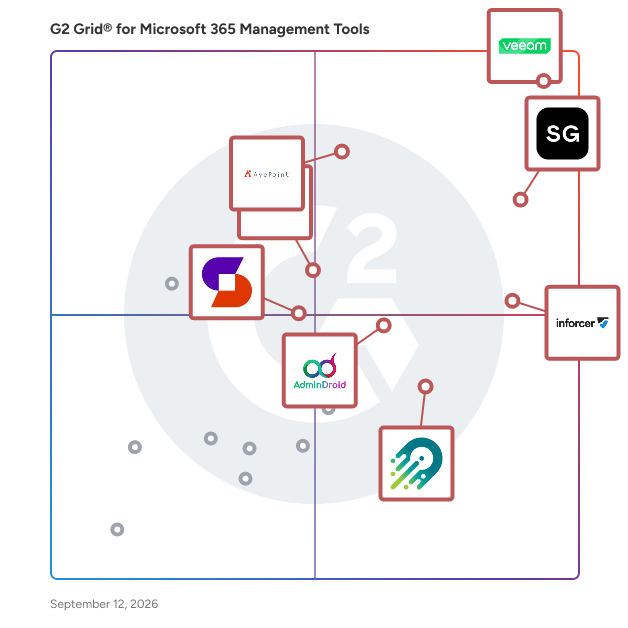
G2 Grid® for Microsoft 365 Management Tools

G2 Grid® for Microsoft 365 Management Tools plotting products by satisfaction and market presence

Highlighted products: Veeam Data Cloud for Microsoft 365, ShareGate, inforcer, AvePoint Confidence Platform, AdminDroid, CoreView, Orchestry, and Syskit Point.

Underlying data: [Grid® JSON](https://www.g2.com/categories/microsoft-365-management-tools/grids.json?focus%5B%5D=veeam-data-cloud-for-microsoft-365&focus%5B%5D=sharegate&focus%5B%5D=inforcer&focus%5B%5D=avepoint-confidence-platform&focus%5B%5D=admindroid&focus%5B%5D=coreview&focus%5B%5D=orchestry&focus%5B%5D=syskit-syskit-point)

SharedConX

SharedConX is a specialized automation platform for managing shared mailbox permissions in Microsoft Exchange environments, including Exchange On-Premises, Hybrid deployments, and Microsoft 365. It addresses a common operational and security challenge in Exchange: the lack of native support for reliable Outlook automapping when permissions are assigned via security groups. In standard Microsoft environments, organizations often have to choose between structured, group-based access control and user-friendly Outlook automapping. SharedConX removes this limitation by enabling group-based permission management with fully functional automapping, ensuring that shared mailboxes are automatically and consistently available in Outlook for authorized users. Now also with account mapping technology. The solution continuously synchronizes security group membership with mailbox permissions and Outlook automapping / accountmapping. When users are added to or removed from a security group, SharedConX automatically applies or revokes the corresponding mailbox permissions and ensures that Outlook reflects these changes without manual intervention. This works across Outlook Classic, Outlook (new), and Outlook Web Access (OWA). SharedConX is built around a modular architecture consisting of a central management component, a core automation service, and a client interface. This design allows organizations to centrally define settings, permission structures, and behaviors while automating execution and maintaining full transparency. All changes are applied consistently and can be audited, helping organizations meet internal governance, security, and compliance requirements. By automating shared mailbox management, SharedConX significantly reduces administrative effort and operational overhead. IT teams no longer need to manually assign permissions, troubleshoot missing automapping / accountmapping, or handle repetitive access requests. This leads to fewer configuration errors, lower support workload, and measurable cost savings over time. SharedConX is ideal for organizations that rely heavily on shared mailboxes and require a scalable, secure, and structured approach to access management. It supports clean security group strategies, improves the user experience in Outlook, and helps organizations maintain control, consistency, and compliance across their email infrastructure.

Average Rating: 5.0/5.0

Total Reviews: 2

How Do G2 Users Rate SharedConX?

  • Management: 10.0/10 (Category avg: 9.0/10)
  • Bulk User Management: 10.0/10 (Category avg: 9.0/10)

Who Is the Company Behind SharedConX?

Who Uses This Product?

  • Company Size: 50% Large, 50% Small

What Are Recent G2 Reviews of SharedConX?

SPDocKit

SPDocKit by Syskit is the ultimate SharePoint management and administration tool. It was developed for administrators and consultants to save time and automate their administration tasks. Improve your SharePoint farm performance with this user-friendly and powerful solution trusted by thousands of global customers. Features: - Automatically generate SharePoint farm documentation with a few clicks - Explore and manage SharePoint permissions - Audit and validate farm configuration according to the latest best practices - Compare farms (e.g. Production, QA, DEV) and track changes - Compare Web Applications, Site Collections, Permissions, Servers and Web. config Files - Create reports on farm storage, structure, features and content usage - Enforce governance policies with queries and rules - Generate an AutoSPInstaller XML Configuration File - Monitor usage trends across the farm, track visits and learn how users interact with your site SharePoint farm administration is faster and easier with SPDocKit.

Average Rating: 4.3/5.0

Total Reviews: 2

How Do G2 Users Rate SPDocKit?

  • Has the product been a good partner in doing business?: 10.0/10 (Category avg: 9.3/10)

Who Is the Company Behind SPDocKit?

  • Seller: Syskit
  • Year Founded: 2009
  • HQ Location: Elsworth, Cambridge, GB
  • Twitter: @syskitteam
    624 Twitter followers
  • LinkedIn® Page: www.linkedin.com
    97 employees on LinkedIn®

Who Uses This Product?

  • Company Size: 50% Large, 50% Medium

What Are Recent G2 Reviews of SPDocKit?

What Are G2 Users Discussing About SPDocKit?

Vyapin Office 365 Manager

Provision/De-provision Office 365 User Licenses with full audit trail of when and to whom the licenses were assigned or removed. Create and manage Office 365 Licenses in bulk. View assigned licenses by Users or by License types or by usage count of each license type. Keep track of purchased versus assigned licenses with audit trail.

Average Rating: 4.3/5.0

Total Reviews: 2

How Do G2 Users Rate Vyapin Office 365 Manager?

  • Management: 10.0/10 (Category avg: 9.0/10)
  • Storage Insights: 10.0/10 (Category avg: 8.5/10)
  • Bulk User Management: 10.0/10 (Category avg: 9.0/10)

Who Is the Company Behind Vyapin Office 365 Manager?

  • Seller: Vyapin
  • Year Founded: 1996
  • HQ Location: Chennai, Tamil Nadu
  • Twitter: @vyapinsoftware
    94 Twitter followers
  • LinkedIn® Page: www.linkedin.com
    28 employees on LinkedIn®

Who Uses This Product?

  • Company Size: 100% Large

What Are Recent G2 Reviews of Vyapin Office 365 Manager?

What Are G2 Users Discussing About Vyapin Office 365 Manager?

AI can help you find the answers. G2 helps you trust them.

Connect G2 to Claude or ChatGPT for answers grounded in G2's trusted reviews, comparisons, and pricing from real user insights.

How it works

Easy365Manager

Easy365Manager is a snap-in for Active Directory users and computers that allows you to manage email attributes, Office 365 licenses, and Office 365 mailboxes.

Average Rating: 4.0/5.0

Total Reviews: 1

How Do G2 Users Rate Easy365Manager?

  • Management: 8.3/10 (Category avg: 9.0/10)
  • Bulk User Management: 8.3/10 (Category avg: 9.0/10)

Who Is the Company Behind Easy365Manager?

  • Seller: Agema A/S
  • Year Founded: 2017
  • HQ Location: N/A
  • LinkedIn® Page: linkedin.com
    1 employees on LinkedIn®

Who Uses This Product?

  • Company Size: 100% Large

What Are Recent G2 Reviews of Easy365Manager?

SProbot

SProbot is a SaaS which provides AI-powered tools for optimizing storage and security within SharePoint environments. The feature set includes storage cleanup and data health monitoring, with reporting available at both a tenant-wide and granular file level. SProbot is designed for SharePoint administrators and MSPs looking to reduce storage costs, remove clutter, and improve data readiness for Copilot. Dashboard SProbot's tenant dashboard displays core tenant metrics across storage, cleanup and security. Health check SProbot's health check provides an overview of the state of a tenant and displays detailed metrics and actionable drill-downs across storage, security, content and activity. Content reports Detailed content reports enable searching, filtering and remediation of large, inactive and trivial files with cleanup actions like version trimming and deletion. Discover AI content assessment enables discovery and actioning of sites based on topic tags and realistic descriptions of their contents.

Average Rating: 4.0/5.0

Total Reviews: 1

Who Is the Company Behind SProbot?

  • Seller: SProbot
  • Year Founded: 2022
  • HQ Location: Cape Town, ZA
  • LinkedIn® Page: www.linkedin.com
    1 employees on LinkedIn®

Who Uses This Product?

  • Company Size: 100% Large

What Are Recent G2 Reviews of SProbot?

Team Master

Team Master by NighCloud is a Microsoft Teams channel management and migration tool built for IT administrators. It handles the operations Microsoft Teams can't do natively: merging two channels into one, moving a channel to another team, copying channels with their content, and converting channel types — all while preserving chat history, files, tabs, and permissions. As a verified Microsoft Partner (MPN 6586036), NighCloud operates entirely through the official Microsoft Graph API, keeping your data inside Microsoft's secure infrastructure. Since 2021, Team Master has helped 100+ organizations migrate 10,000+ channels across healthcare, finance, technology, education, and manufacturing. Pricing starts at $399 for a 3-month license (up to 50 Teams users); annual and custom enterprise plans available.

Average Rating: 5.0/5.0

Total Reviews: 1

How Do G2 Users Rate Team Master?

  • Has the product been a good partner in doing business?: 10.0/10 (Category avg: 9.3/10)
  • Management: 10.0/10 (Category avg: 9.0/10)

Who Is the Company Behind Team Master?

Who Uses This Product?

  • Company Size: 100% Small

What Are Recent G2 Reviews of Team Master?

365TUNE

365TUNE is a Microsoft 365 reporting and auditing platform that provides organizations with structured insights into license usage, user activity, and cost allocation across their Microsoft 365 environment. The software aggregates operational and financial data into a unified view so IT, finance, and governance teams can evaluate how licenses are assigned, how they are being used, and where inefficiencies or compliance gaps may exist. It is designed for IT administrators, cloud engineers, financial controllers, MSPs, and enterprises seeking detailed reporting and auditing capabilities for day-to-day operational oversight. The platform supports a wide range of use cases, including Microsoft 365 license reporting, tenant auditing, cost analysis, compliance validation, and user activity monitoring. Organizations use 365TUNE to understand the distribution of licenses across departments, identify inactive or unassigned accounts, review changes over time, and verify whether assigned licenses match actual utilization. These capabilities help teams improve operational transparency, support internal audits, and plan budgets based on real consumption trends. Key product capabilities include: Comprehensive Microsoft 365 reporting covering assigned licenses, usage levels, inactive accounts, guest users, and directory attributes. Cost breakdowns by department, project code, cost center, company, country, or user segments. Microsoft 365 auditing features that track user lifecycle events, recently created or deleted accounts, MFA status, and configuration deviations. Cost reporting that breaks down financial impact by department, location, or organizational structure. Historical trend analysis to monitor changes in user activity, license assignments, and provisioning decisions. Exportable reports for reviews, governance assessments, and internal audit requirements. The platform also assists organizations managing multiple tenants or distributed teams by centralizing Microsoft 365 reporting and auditing across environments. This allows MSPs and multi-region enterprises to maintain consistent oversight while supporting compliance requirements and internal policy reviews. Additional capabilities include: Monitoring for cloud-only, hybrid, guest, inactive, and recently modified users. License allocation analysis to highlight over-provisioning or under-utilization. Role and group reporting that supports identity governance activities. Automated report generation to reduce manual data extraction. Structured dashboards that can be shared with IT leadership or audit stakeholders. 365TUNE is suited for organizations of various sizes, from small businesses seeking essential Microsoft 365 reporting to large enterprises requiring deeper visibility for Microsoft 365 auditing and compliance tracking. By providing detailed, data-driven insights, the platform helps teams ensure that licenses, user activity, and tenant configurations align with organizational goals and governance standards.

Who Is the Company Behind 365TUNE?

Contacts Pro

Contacts Pro is a type of contact management and shared directory software for Microsoft Teams that helps organizations centralize, organize, and access professional contacts directly within their collaboration workspace. Designed for businesses, departments, and project teams, Contacts Pro provides a shared contact database where users can manage employees, customers, partners, suppliers, and other business relationships without leaving Microsoft Teams. The solution helps reduce information fragmentation by making contact details accessible, searchable, and shareable across the organization. Unlike traditional contact directories that require switching between multiple applications, Contacts Pro is embedded directly into Microsoft Teams and integrates with Teams chats, calls, and email workflows. Users can create, edit, and maintain contact records, organize contacts into groups, and quickly reach the right person from a centralized interface. The platform supports both internal and external contacts, making it suitable for sales teams, customer-facing departments, project teams, and operational groups that rely on accurate contact information. Key capabilities include: 1. Centralized contact management with a shared database for business contacts, including employees, customers, suppliers, and partners. 2. Advanced search and filtering to quickly locate contacts by name, department, company, role, or other attributes. 3. Contact grouping and organization that allows teams to create and manage contact groups for projects, departments, regions, or business functions. 4. Microsoft Teams integration enabling users to initiate chats, calls, and emails directly from contact records without changing applications. 5. Import and export capabilities through Outlook and CSV/Excel formats, supporting onboarding, migration, and ongoing directory maintenance. The software is intended for organizations that want a collaborative contact directory inside Microsoft Teams rather than a standalone CRM system. By consolidating contact information into a shared workspace, Contacts Pro helps teams access key contacts faster, improve communication efficiency, simplify onboarding, and maintain consistent contact data across the organization. It can support hundreds to thousands of contacts while remaining integrated with existing Microsoft 365 and Teams workflows.

Who Is the Company Behind Contacts Pro?

  • Seller: Witivio
  • Year Founded: 2017
  • HQ Location: Colmar, Paris, Lyon, Marseille, Bordeaux, FR
  • Twitter: @witiviolive
    127 Twitter followers
  • LinkedIn® Page: www.linkedin.com
    53 employees on LinkedIn®

KoalaFix

KoalaFix is an automated IT helpdesk for Windows and Microsoft 365 teams. Staff describe a problem in plain English, and the Windows desktop app diagnoses and resolves common issues across OneDrive, Outlook, Teams, SharePoint, Microsoft 365 accounts, printers and Windows. Built-in approval controls and a clear audit trail help businesses stay in control of every fix. KoalaFix is built for Australian and New Zealand organisations managing 1 to 100 Windows users on Microsoft 365. Pricing starts at A$39 per managed user per month, excluding GST. Annual billing is A$374.40 per managed user, paid upfront. New customers can start with a 30-day Business trial. Built in Melbourne, Australia.

Who Is the Company Behind KoalaFix?

  • Seller: KoalaFix
  • Year Founded: 2026
  • HQ Location: Melbourne, AU
  • LinkedIn® Page: www.linkedin.com
    3 employees on LinkedIn®

nBold

nBold is a collaboration management platform for Microsoft 365, founded in 2019 and headquartered in Paris, France. It helps organizations streamline how teams collaborate — across projects, deal execution, customer onboarding, crisis management, and any business scenario where getting people working together fast and consistently matters. At the core is an advanced workspace templating engine. A single template provisions everything a business scenario needs: a complete Microsoft Teams structure with channels, a full SharePoint site with document libraries, folders, and metadata, Planner boards with pre-loaded tasks, Lists, OneNote notebooks, and Forms. For sales and revenue teams, nFlow connects Salesforce and HubSpot to automatically trigger workspace creation from CRM events — deal rooms, account spaces, and customer project channels, structured and ready to go. IT teams get full governance control: naming policies, approval workflows, sensitivity labels, lifecycle management, bulk operations, and audit trails across the entire M365 environment. nBold eliminates the manual, inconsistent process of building workspaces from scratch every time a project starts, a deal opens, or a customer is onboarded. Teams start collaborating immediately with the right structure already in place. IT governs the environment at scale without slowing the business down. Certified under ISO 27001 and SOC 2 Type II.

Who Is the Company Behind nBold?

  • Seller: nBold
  • Year Founded: 2019
  • HQ Location: Paris, FR
  • LinkedIn® Page: www.linkedin.com
    4 employees on LinkedIn®

Presify

Presify is a Microsoft Teams presence tracker. It keeps the presence history Teams doesn't, so managers of remote and hybrid teams can see who's online, when, and for how long. The green dot shows one moment. It isn't the whole story. Someone can stay green all day and barely be around, and a mouse jiggler keeps Teams green just fine. Someone who always looks yellow might be doing their best work at 11pm. Presify keeps the record, so your read on your team comes from the pattern, not a glance. See the pattern: a timeline for every person and team, every status change on a 24-hour day view, online-time totals and trends, and up to a year of history depending on plan. Spot presence that looks gamed: six automatic flags on Pro and Scale (Standard includes one), each showing its math. Four of them (unbroken Available, no idle time, robotic regularity, no activity variation) are patterns a mouse jiggler or keep-alive script tends to leave; overnight presence and weekend uniformity flag unusual hours, which can just as easily be someone working late. A flag is a pattern worth a look, not proof. Quick and light: one read-only Microsoft sign-in by your Microsoft 365 admin, about five minutes. Nothing is installed on anyone's laptop. No screenshots, no keystrokes, no message content. Ask your AI assistant: a read-only Model Context Protocol (MCP) connector, on every plan, lets Claude, ChatGPT, Microsoft Copilot, or other MCP clients answer questions about presence history, online time, and flags. Presence isn't productivity. Presify gives you a directional read and a better starting point for a conversation. Need screenshots, keystroke logging, app tracking, or timesheets? Presify isn't that tool. Available to US customers, with a free trial and no credit card.

Who Is the Company Behind Presify?

Shoviv Exchange Migration Tool

Shoviv Exchange Migration Tool is powerful software that can move Exchange mailboxes easily. This software is capable of migrating the mailboxes in batches, making the process efficient and saving time. The software lets people move from Office 365 to On-Premises Exchange and vice versa. Shoviv Software has no limit on the size of the mailbox or the number of mailboxes. This application has a user-friendly GUI that makes it easy to migrate the data even for non-technical users. Install the demo version of the application on your system, which lets you process the first 50 items per folder for free.

Who Is the Company Behind Shoviv Exchange Migration Tool?

  • Seller: Shoviv Software
  • Year Founded: 2017
  • HQ Location: Dehra Dun, IN
  • Twitter: @shoviv
    96 Twitter followers
  • LinkedIn® Page: www.linkedin.com
    25 employees on LinkedIn®
  • Ownership: Vivek Chaube

Shoviv Outlook Suite

Shoviv Outlook Suite is all-in-one solution to manage Outlook tasks in a quick and efficient way. This tool is capable of merging PST files, compressing PST files, splitting PST files, and deleting duplicate items from PST files. This tool can even work on corrupted OST/PST files and recover or restore corrupt OST/PST files without altering their properties. Furthermore, it assists in adding Outlook Profile Store along with OST/PST and exporting to Exchange On-Premises/Office 365.

Who Is the Company Behind Shoviv Outlook Suite?

  • Seller: Shoviv Software
  • Year Founded: 2017
  • HQ Location: Dehra Dun, IN
  • Twitter: @shoviv
    96 Twitter followers
  • LinkedIn® Page: www.linkedin.com
    25 employees on LinkedIn®
  • Ownership: Vivek Chaube

softXspace365

With softXspace365, you can easily manage company business processes, and create a fully functional workspace for daily work with tasks and documents, including effective SharePoint document management. Maximize the benefits of Microsoft 365 for your company. The product is fully integrated with the entire Microsoft 365 infrastructure (Outlook, Teams, OneDrive, SharePoint, Word, Excel, Power BI, etc.) and Azure Active Directory. We also help solve individual integration tasks and integrate the product into the company's IT landscape based on Microsoft products. Establish the storage for all documents and information in a single, reliable, and secure cloud environment, and automate the processes of controlling document copies storage terms and the storage location. Our no-code process builder allows you to create and manage all business processes in your organization without programming. Any employee can easily design process stages, assign responsibilities, determine task queues (parallel/sequential/mixed), set deadlines and priorities, and add instructions or checklists for each process step. Fully digitize your company's activities and power your electronic documents by legal significance due to digital signing with built-in modules such as softXspace Sign, AdobeSign, DocuSign, etc. Increase your profit by automating sales processes and efficient planning. Optimize the approval, signing, and monitoring of contracts with clients and partners, invoice and statement issuance processes, and processing of sales requests or commercial proposals. Thanks to business process automation, you can achieve up to a 60% reduction in operational losses, a 30% reduction in administrative costs, and a decrease in financial risks due to delays. The time required for approval and signing of documents is reduced from 2-3 weeks to just 1 hour. 150% - an average indicator of work productivity increasing; a quick start for new employees. Request our presentation: https://softxpansion.global/get-it-now-product-presentation

Who Is the Company Behind softXspace365?

Tian Lin
TL
Researched and written by Tian Lin
Updated March 1, 2026