Best Landscape Design Software for Small Business

How Many Landscape Design Software Products Does G2 Track?

Total Products under this Category: 160

Category Stats (Nov 2026)

  • Average Rating: 3.99/5 (↑0.03 vs Oct 2026) The average rating of products in this category, based on all submitted ratings
  • Top Trending Product: AroFlo (+15.17%) - Among all products in this category, AroFlo recorded the largest rating increase compared to last month

Last updated: November 25, 2026

How Does G2 Rank Landscape Design Software Products?

Why You Can Trust G2's Software Rankings:

  • 30 Analysts and Data Experts
  • 3,000+ Authentic Reviews
  • 160+ Products
  • Unbiased Rankings

G2's software rankings are built on verified user reviews, rigorous moderation, and a consistent research methodology maintained by a team of analysts and data experts. Each product is measured using the same transparent criteria, with no paid placement or vendor influence. While reviews reflect real user experiences, which can be subjective, they offer valuable insight into how software performs in the hands of professionals. Together, these inputs power the G2 Score, a standardized way to compare tools within every category.

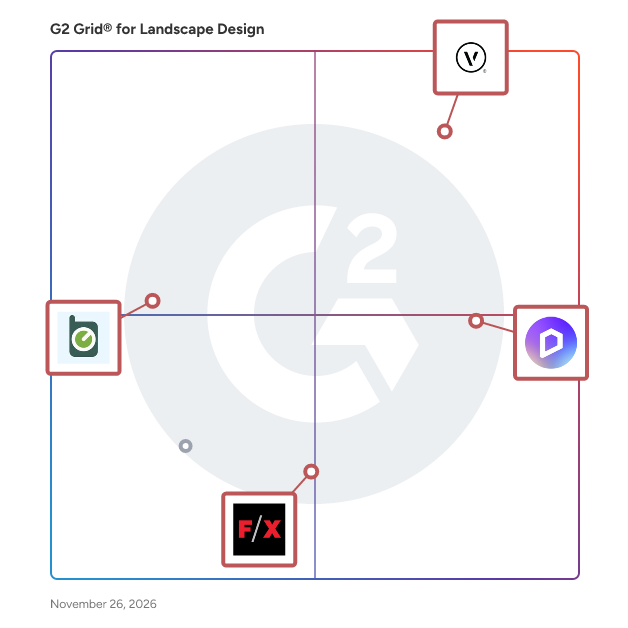
G2 Grid® for Landscape Design Software

G2 Grid® for Landscape Design Software plotting products by satisfaction and market presence

Highlighted products: Vectorworks Landmark, D5 Render, Land F/X, and LMN.

Underlying data: [Grid® JSON](https://www.g2.com/categories/landscape-design/grids.json?focus%5B%5D=vectorworks-landmark&focus%5B%5D=d5-render&focus%5B%5D=land-f-x&focus%5B%5D=lmn&segment=small-business)

Vectorworks Landmark

Vectorworks Landmark is a design and Building Information Modeling (BIM) software platform for landscape architects and designers. It helps professionals take site and landscape projects from early concepts through coordinated documentation and final deliverables while balancing creative intent, constructability, and environmental performance. The platform brings terrain modeling, planting design, BIM, visualization, and documentation together in one intuitive interface. Vectorworks Landmark 2027 includes intelligent landscape objects, powerful plant and site databases, flexible documentation tools, and cloud-based collaboration with Vectorworks Cloud Services. New capabilities include the Volume Fill tool for quantifying spaces such as attenuation ponds and site-model low areas, simplified georeferencing via the Geolocation Setup Wizard, and AI-assisted visualization using Nano Banana models in the AI Visualizer. Vectorworks Landmark helps landscape professionals design resilient, data-rich environments more efficiently. It reduces manual rework by helping teams evaluate grading and site-volume impacts, streamline plant selection and placement, coordinate project information, and clearly communicate design intent—from conceptual landscape plans to detailed construction documentation. Vectorworks Landmark supports projects across every phase of the design process: • Phase 1: Pre-design — Every site designer’s process begins with a base file, and Landmark frees your workflow from there — whether you start from field measurements, surveys, GIS mapping, or drone-captured data, you’ll be able to work with an informed context plan and model to conduct pre-development analysis such as sun/shade, surface drainage, and slope. • Phase 2: Schematic Design — Bring your sketches to life by converting them to smart objects like hardscapes, landscape areas, plantings, and more. Landmark continuously supports your project through varying levels of detail, from 2D drafted concepts and bubble diagrams to 3D site modeling. This gives you the flexibility to use conceptual objects until you’re ready to specify your exact materials and easily update them with more accurate components as your design progresses. • Phase 3: Design Development — Count on Landmark to keep your projects current by referencing DWG, IFC, and RVT files and work through iterative changes from your collaborators. As your maturing projects gather more intelligence and data, you can use visual analysis to ensure your designed elements and their impacts on the site will be better performing. This data is also harvested through reports to capture the crucial calculations required by the client, contractor, and approving agencies. • Phase 4: Construction Documentation — Vectorworks Landmark’s sheet layers and customizable viewports allow you to make detailed construction documents that fit the needs of your design process. 3D data-driven design tools and a flexible BIM workflow allow you to seamlessly update and coordinate plans, elevations, sections, and any other details in your designs. Collaborate without compromise with a software that makes producing construction documents more efficient and less tedious.

Average Rating: 4.3/5.0

Total Reviews: 75

Who Is the Company Behind Vectorworks Landmark?

  • Seller: Vectorworks, Inc.
  • Company Website:
  • Year Founded: 1985
  • HQ Location: Columbia, Maryland
  • LinkedIn® Page: www.linkedin.com
    321 employees on LinkedIn®

Who Uses This Product?

  • Who Uses This: Landscape Architect, Owner
  • Top Industries: Architecture & Planning, Design
  • Company Size: 77% Small, 15% Medium

What Do G2 Reviewers Say About Vectorworks Landmark?

AI-generated summary from verified user reviews

Pros
  • Users value the ease of use in Vectorworks Landmark, facilitating seamless workflows and intuitive drafting capabilities.
  • Users value the seamless integration of 2D and 3D workflows in Vectorworks Landmark, enhancing their overall design experience.
  • Users love the versatile drawing tools in Vectorworks Landmark, enhancing both creativity and efficiency in landscape design.
  • Users value the powerful parametric/BIM tools in Vectorworks Landmark, enabling efficient integration of design elements and workflows.
  • Users value the integrated parametric/BIM tools in Vectorworks Landmark for simplifying complex design tasks and workflows.
Cons
  • Users find the steep learning curve of Vectorworks Landmark requires significant time and patience to master.
  • Users find the difficult learning curve of Vectorworks Landmark hinders quick proficiency in basic tasks.
  • Users find the poor usability of Vectorworks Landmark frustrating, often requiring excessive searching and struggling with the interface.
  • Users often find the complexity of Vectorworks Landmark overwhelming, particularly due to its steep learning curve and interface issues.
  • Users express frustration with inadequate tools, highlighting issues with updates, 3D modeling, and text formatting limitations.

What Are Recent G2 Reviews of Vectorworks Landmark?

What Are G2 Users Discussing About Vectorworks Landmark?

D5 Render

D5 is a visualization ecosystem for architecture, landscape architecture, interior design, engineering, and other 3D design professionals. Combining real-time rendering, AI-assisted visualization, design content, and team collaboration, the D5 ecosystem brings together D5 Render, D5 Lite, D5 Works, and D5 Teams to support visualization workflows from concept design through project presentation and collaboration. The D5 ecosystem includes four complementary products: - D5 Render is a real-time rendering and visualization solution that combines GPU ray tracing, rasterization, and real-time path tracing. It enables designers to create photorealistic images, animations, panoramas, and Interactive Presentations while visualizing design changes in real time. D5 Render supports LiveSync and direct import workflows for SketchUp, Revit, Rhino, Archicad, 3ds Max, Blender, Cinema 4D, and Vectorworks. - D5 Lite is an AI-native visualization plugin for SketchUp, Rhino, and Revit. It brings AI-powered visualization and real-time path tracing into the modeling environment, allowing designers to explore lighting, materials, and atmosphere during early-stage design before continuing in D5 Render. - D5 Works is a 3D asset platform for architecture, landscape, and interior design. It offers professionally curated models, materials, and design assets, and integrates with D5 Render to support content discovery and visualization workflows. - D5 Teams is a collaboration solution for design teams featuring Enterprise Team Library, enabling teams to securely access, organize, and share content across projects. Key capabilities of D5 Render include: - Real-time rendering with GPU ray tracing, real-time path tracing, and D5 Global Illumination (D5 GI). - Interactive visualization and presentation, including Interactive Presentation, animation, VR Recording, and stereoscopic panoramas. - AI-powered visualization tools, including AI Agent, AI Scene Match, AI Atmosphere Match, AI PBR Material Snap, AI Ultra HD Texture, AI Model Generation, AI Enhancer, AI Style Transfer, and AI Inpainting. - Landscape and environment tools, including Scatter, Brush, Path, Terrain, City Generator, Seasonal Vegetation, and HeightField Tracing. - Professional rendering output, supporting images and panoramas up to 16K resolution, 4K video rendering at up to 120 FPS, and render passes including Material ID, Reflection, Ambient Occlusion (AO), Sky Mask, and Z-depth. - Integrated CAD and BIM workflows through LiveSync plugins and direct file support for SketchUp, Revit, Rhino, Archicad, 3ds Max, Blender, Cinema 4D, and Vectorworks.

Average Rating: 4.8/5.0

Total Reviews: 1,099

Who Is the Company Behind D5 Render?

  • Seller: Dimension 5 Techs
  • Company Website:
  • Year Founded: 2020
  • HQ Location: New York, US
  • LinkedIn® Page: www.linkedin.com
    155 employees on LinkedIn®

Who Uses This Product?

  • Who Uses This: Architect, Student
  • Top Industries: Architecture & Planning, Design
  • Company Size: 91% Small, 2% Medium

What Do G2 Reviewers Say About D5 Render?

AI-generated summary from verified user reviews

Pros
  • Users commend the ease of use of D5 Render, making architectural visualization intuitive and fun.
  • Users admire the realistic rendering quality of D5 Render, making it an essential tool for stunning visual outputs.
  • Users are impressed with the realistic rendering of D5 Render, enhancing quality and satisfaction in architectural visualization.
  • Users value the incredible speed of D5 Render, which enhances efficiency in architectural visualization workflows.
  • Users highlight the incredibly fast real-time rendering of D5 Render, enhancing efficiency in architectural visualization workflows.
Cons
  • Users find the asset library limited, needing more variety and customization for a better rendering experience.
  • Users feel that the material customization is limited, hindering detailed architectural presentations and creative flexibility.
  • Users experience performance issues with D5 Render due to high hardware requirements, leading to lag on lower-end devices.
  • Users note the high system requirements of D5 Render can lead to performance issues on less powerful hardware.
  • Users feel that D5 Render is expensive, especially in Brazil, where the price is seen as a significant drawback.

What Are Recent G2 Reviews of D5 Render?

What Are G2 Users Discussing About D5 Render?

Land F/X

Automate the planting, hardscape, and irrigation design processes with the family of CAD plugins from Land F/X.

Average Rating: 4.2/5.0

Total Reviews: 15

Who Is the Company Behind Land F/X?

  • Seller: Land F/X
  • Year Founded: 2004
  • HQ Location: San Luis Obispo, CA
  • LinkedIn® Page: www.linkedin.com
    44 employees on LinkedIn®

Who Uses This Product?

  • Top Industries: Architecture & Planning
  • Company Size: 73% Small, 20% Medium

What Are Recent G2 Reviews of Land F/X?

What Are G2 Users Discussing About Land F/X?

AI can help you find the answers. G2 helps you trust them.

Connect G2 to Claude or ChatGPT for answers grounded in G2's trusted reviews, comparisons, and pricing from real user insights.

How it works

LMN

LMN is a comprehensive business management software tailored specifically for the landscaping and snow removal industries. Since its inception in 2009, LMN has empowered over 3,000 landscaping companies and 50,000 crew members to streamline operations, enhance productivity, and drive profitability. Key Features and Functionality: - Estimating: Create accurate, repeatable estimates swiftly, ensuring every job is priced for profit. - Budgeting: Plan for profitability by setting clear financial goals and monitoring progress. - Job Costing: Gain real-time insights into job costs, comparing actual expenses against estimates to maintain profitability. - Time Tracking & Payroll: Utilize the LMN Crew app for efficient time tracking, reducing administrative tasks and ensuring accurate payroll. - CRM: Manage client relationships effectively, keeping all communications, proposals, and job notes organized. - Invoicing: Automate billing processes, generating professional invoices quickly to improve cash flow. - Integrations: Seamlessly connect with over 6,000 apps, including QuickBooks, MailChimp, Microsoft Office, and Google Sheets, to enhance workflow efficiency. Primary Value and Solutions Provided: LMN addresses the unique challenges faced by landscaping and snow removal businesses by offering an all-in-one platform that simplifies complex processes. By integrating essential functions such as estimating, budgeting, job costing, and client management, LMN enables businesses to operate more efficiently, reduce manual errors, and make informed decisions. The software's mobile capabilities, particularly through the LMN Crew app, empower field teams with real-time information, fostering better communication and accountability. Ultimately, LMN helps businesses enhance their operational efficiency, improve customer satisfaction, and drive sustainable growth.

Average Rating: 3.5/5.0

Total Reviews: 14

Who Is the Company Behind LMN?

Who Uses This Product?

  • Top Industries: Construction
  • Company Size: 73% Small, 27% Medium

What Are Recent G2 Reviews of LMN?

What Are G2 Users Discussing About LMN?

Reviews of Landscape Design products
Neya Kumaresan
NK
Researched and written by Neya Kumaresan
Updated