Best Enterprise Knowledge Base Software - Page 3

How Many Knowledge Base Software Products Does G2 Track?

Total Products under this Category: 304

Category Stats (Oct 2026)

  • Average Rating: 4.48/5 The average rating of products in this category, based on all submitted ratings
  • Top Trending Product: Fluid Topics (+0.37%) - Among all products in this category, Fluid Topics recorded the largest rating increase compared to last month

Last updated: October 15, 2026

How Does G2 Rank Knowledge Base Software Products?

Why You Can Trust G2's Software Rankings:

  • 30 Analysts and Data Experts
  • 103,500+ Authentic Reviews
  • 304+ Products
  • Unbiased Rankings

G2's software rankings are built on verified user reviews, rigorous moderation, and a consistent research methodology maintained by a team of analysts and data experts. Each product is measured using the same transparent criteria, with no paid placement or vendor influence. While reviews reflect real user experiences, which can be subjective, they offer valuable insight into how software performs in the hands of professionals. Together, these inputs power the G2 Score, a standardized way to compare tools within every category.

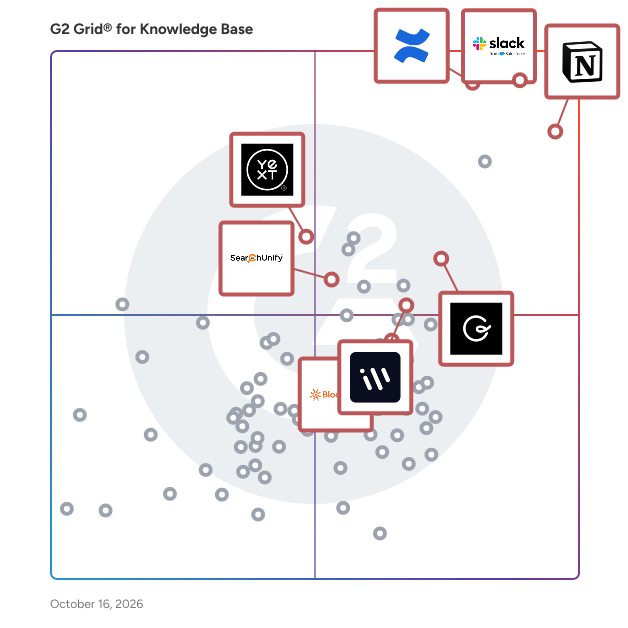
G2 Grid® for Knowledge Base Software

G2 Grid® for Knowledge Base Software plotting products by satisfaction and market presence

Highlighted products: Confluence, Slack, Notion, Workvivo, Guru, Yext, SearchUnify, and Bloomfire.

Underlying data: [Grid® JSON](https://www.g2.com/categories/knowledge-base-software/grids.json?focus%5B%5D=confluence&focus%5B%5D=slack&focus%5B%5D=notion&focus%5B%5D=workvivo&focus%5B%5D=guru&focus%5B%5D=yext&focus%5B%5D=searchunify&focus%5B%5D=bloomfire&segment=enterprise)

Slab

Slab is a modern knowledge hub and wiki that helps teams unlock their full potential through shared learning and documentation. Slab features a beautiful, easy-to-use editor, dozens of integrations like Slack, GitHub and Google, and blazing-fast search, both across Slab and across your integrated apps. No matter where it lives, the knowledge you need to do your best work is just a click away!

Average Rating: 4.6/5.0

Total Reviews: 300

How Do G2 Users Rate Slab?

  • Has the product been a good partner in doing business?: 9.3/10 (Category avg: 9.0/10)
  • Quality of Support: 9.3/10 (Category avg: 8.8/10)
  • Other Integrations: 8.8/10 (Category avg: 8.3/10)
  • Ease of Use: 9.2/10 (Category avg: 8.8/10)

Who Is the Company Behind Slab?

  • Seller: Slab, Inc
  • Company Website:
  • Year Founded: 2016
  • HQ Location: San Francisco, California
  • Twitter: @SLAB
    1,250 Twitter followers
  • LinkedIn® Page: www.linkedin.com
    20 employees on LinkedIn®

Who Uses This Product?

  • Who Uses This: Account Manager, Software Engineer
  • Top Industries: Computer Software, Information Technology and Services
  • Company Size: 60% Small, 37% Medium

What Do G2 Reviewers Say About Slab?

AI-generated summary from verified user reviews

Pros
  • Users love the ease of use of Slab, appreciating its seamless integration and straightforward document sharing capabilities.
  • Users benefit from the advanced search functions of Slab, enhancing their daily workflows and access to information.
  • Users value the seamless integrations of Slab, enhancing collaboration and information sharing within their teams.
  • Users value the easy integrations of Slab, enhancing their workflow with seamless connections to essential tools like GitHub and Slack.
  • Users value the easy access and seamless integration of Slab, enhancing their information searching and sharing experience.
Cons
  • Users find the limited customization options in Slab can hinder consistency and detailed formatting across documentation.
  • Users find Slab has a steep learning curve due to its terminology and limited customization options.
  • Users find the limited functionality of Slab frustrating, especially regarding permissions and mobile experience.
  • Users find missing features in Slab, such as advanced image handling and mobile performance issues, quite frustrating.
  • Users find Slab's overwhelming interface challenging for new users, especially with extensive existing content.

What Are Recent G2 Reviews of Slab?

What Are G2 Users Discussing About Slab?

Ocasta

Ocasta is a modular frontline operations platform for multi-site businesses that need operational communications, task management, knowledge management, learning, inspections, checklists, observations, coaching, and new starter onboarding in one connected system. Ocasta gives frontline teams the knowledge and insight they need to improve performance in every moment. From retail and hospitality to fitness, leisure, contact centres, and other frontline environments, Ocasta replaces daily guesswork with clear, confident action. Frontline teams know what is changing, what needs doing, how to do it, and when to act — no manager relay required. Ocasta brings operational comms, task management, knowledge, learning, inspections, checklists, observations, coaching, and new starter onboarding into one connected platform. HQ gets real-time visibility into what is happening across the frontline, while teams get the answers and actions they need on web and native apps, whether they use corporate or personal devices. Too many frontline comms are treated like updates to read, when they are really tasks in disguise. A process change, product update, standards check, or site issue is not useful until someone notices it, understands it, and acts on it. Ocasta pairs comms with task management so every important message can become measurable action. That means less time hunting through old documents, waiting for answers, or relying on managers to cascade information. Instead, frontline teams feel capable, confident, and in control. Ocasta customers have seen outcomes including 98% team engagement, faster onboarding, and fewer operational issues. Ocasta is modular, so you can start where the need is greatest. While many frontline platforms push teams towards broad, fixed packages, Ocasta lets you choose the hubs that solve your most urgent challenges first, then add more when the time is right. That makes Ocasta a better-value way to build your frontline operations platform. You get one connected system without paying for features your teams are not ready to use. Start with the biggest source of guesswork in your operation, prove the impact, and build from there. Ocasta is made up of five hubs, each focused on turning everyday moments into better performance. Comms & Task Management: Know what’s changing. Get it done. Comms & Task Management is the home for one-off operational action. It brings targeted comms and task management together, so important updates do not stop at “read and understood”. They become clear actions people can complete, track, and measure. Use Comms & tasks for process changes, urgent updates, campaign launches, product information, store actions, compliance reminders, internal calendars, corporate podcasts, recognition, sales incentives, kudos, and instant push alerts. Messages reach the right people directly, without depending on managers to interpret, filter, or relay them. For HQ, that means visibility into who has seen, understood, and acted. For frontline teams, it means less noise and more clarity about what matters now. Knowledge & Learning: Know more. Do more. Knowledge & Learning gives frontline teams one source of truth. Searchable knowledge, instantly editable content, microlearning courses, and knowledge checks make it easier for people to find answers, learn fast, and stay sharp during the moments that matter. Instead of relying on old PDFs, shared drives, or repeated questions in group chats, teams can search for the latest answer and act with confidence. When knowledge changes, HQ can update it quickly, so people are not left guessing with out-of-date information. Knowledge also reinforces learning in the flow of work. Short, focused courses and knowledge checks keep teams confident without pulling them away from the job for too long. Inspections & Checklists: Know what’s working. Fix what isn’t. Inspections & Checklists turns site visits, audits, standards checks, daily checklists, and scheduled reviews into consistent insight. Teams can spot patterns, track performance, and fix issues before they become bigger problems. Use Inspections for retail store visits, loss prevention checks, learning and development visits, compliance reviews, daily opening and closing checks, service standards, safety checks, and operational audits. Managers can complete structured reviews, capture what they see, and create follow-up tasks when something needs fixing. That gives HQ a clearer view of standards across locations. Instead of relying on anecdotal feedback, inconsistent spreadsheets, or delayed reports, teams can see what is working, what is slipping, and where support is needed. Observations & Coaching: Know the gaps. Coach the moment. Observations & Coaching gives managers a clear way to observe behaviour, identify skill gaps, coach in the moment, and turn follow-up actions into progress. It shows where training is needed, not where people are assumed to need support. Use Coaching when managers need to compare real frontline behaviour against the ideal customer journey, service standard, sales process, or operational routine. They can observe what happens on the floor, give feedback, and create direct actions that move people forward. That makes coaching more consistent and practical. Teams get support based on real moments, while HQ gets a live view of training needs across the business. New Starter: Less unknowns. Less no-shows. New Starter gives new hires the knowledge, confidence, and connection they need before day one. Welcome content, site details, key information, and early engagement reduce uncertainty and help people arrive ready to start. New starters can see what to expect, where to go, who they will meet, and what they need to know before they walk through the door. That early connection matters, especially in frontline roles where uncertainty can quickly lead to no-shows. With New starters, onboarding starts before the first shift. People feel more prepared, managers spend less time repeating the basics, and new hires have a stronger reason to turn up and stay. Choose Ocasta because Ocasta is for organisations with large frontline teams, distributed locations, and operational standards that need to be understood and acted on every day. Our ideal customers are multi-site businesses in retail, hospitality, fitness, leisure, contact centres, and other frontline environments where head office needs to reach teams quickly, managers need clearer visibility, and employees need answers in the moment. Ocasta is especially valuable for operations leaders, retail operations teams, field managers, learning and development teams, internal communications teams, HR and people teams, compliance teams, and customer experience leaders who need to improve performance without adding more noise to the frontline. Teams choose Ocasta when they need to turn operational comms into tracked action, give frontline teams one trusted place to find answers, replace spreadsheets and inconsistent site visit forms with structured inspections, see real training needs through observations and coaching, reduce first-day uncertainty and new starter no-shows, give HQ real-time insight into what is happening across locations, and improve frontline performance without relying on manager cascade. Unlike many frontline platforms that push teams towards broad, fixed packages, Ocasta is modular. Our five hubs work together as one connected frontline operations platform, but you do not have to buy everything at once. That makes Ocasta a better-value choice for organisations that want to solve their biggest frontline challenge first. Start with Comms & Task Management to turn operational updates into action. Add Knowledge & Learning when teams need faster answers. Bring in Inspections & Checklists, Observations & Coaching, or New Starter when you are ready to improve standards, skills, and onboarding. You only invest in the hubs your teams are ready to use, while keeping a clear path to a more connected frontline operation over time. For frontline employees, Ocasta means less guesswork and faster answers. For managers, it means clearer priorities and fewer repeated questions. For HQ, it means live insight into whether the right work is happening in the right places. Together, these hubs give frontline teams the tools and know-how to perform at their best — and give HQ the insight to stop guessing and start knowing.

Average Rating: 4.7/5.0

Total Reviews: 32

G2 Deal: Lifetime 30% discount & 60 day free pilot

Don’t just inform — supercharge your frontline team’s know-how through comms, microlearning and knowledge with Ocasta Engage, the comms and training app. Get a lifetime 30% discount on Ocasta Engage, the internal comms and training app for frontline teams.

View this exclusive G2 deal

How Do G2 Users Rate Ocasta?

  • Has the product been a good partner in doing business?: 9.9/10 (Category avg: 9.0/10)
  • Quality of Support: 9.6/10 (Category avg: 8.8/10)
  • Other Integrations: 7.3/10 (Category avg: 8.3/10)
  • Ease of Use: 9.3/10 (Category avg: 8.8/10)

Who Is the Company Behind Ocasta?

  • Seller: Ocasta
  • Year Founded: 2011
  • HQ Location: Brighton, United Kingdom
  • Twitter: @ocastahq
    963 Twitter followers
  • LinkedIn® Page: www.linkedin.com
    16 employees on LinkedIn®

Who Uses This Product?

  • Top Industries: Telecommunications
  • Company Size: 74% Large, 12% Medium

What Do G2 Reviewers Say About Ocasta?

AI-generated summary from verified user reviews

Pros
  • Users love the user-friendly interface of Ocasta, enhancing workflow and making reporting seamless and efficient.
  • Users value the exceptional customer support from Ocasta, noting its effectiveness and responsiveness when needed.
  • Users love the high usability of Ocasta, enhancing communication and real-time information capture for teams.
  • Users appreciate the user-friendly interface of Ocasta, enhancing workflow and facilitating real-time feedback effectively.
  • Users find Ocasta to provide high usability and accessibility, enhancing communication with front-line teams effectively.
Cons
  • Users experience connectivity issues with Ocasta, limiting access to its features in areas with unreliable internet.
  • Users feel the inadequate reporting limits their overview, yet appreciate Ocasta's efforts to improve this aspect.
  • Users find it challenging to keep up with organizational developments on the Ocasta platform, complicating implementation efforts.
  • Users desire a wider overview of reporting, yet acknowledge Ocasta's efforts to address this concern.

What Are Recent G2 Reviews of Ocasta?

What Are G2 Users Discussing About Ocasta?
Upland RightAnswers

RightAnswers is the leading KCS v6 verified knowledge management platform purpose-built for complex enterprises needing scalable, AI-powered support solutions. With over 20 years of experience providing enterprise knowledge management solutions to some of the world’s largest companies. We have proven scalability to support customers in excess of 2M searches monthly with user populations of over 200,000. With flexible AI options including BYO AI, AI Approver Review, Gen Answers API, and more, RightAnswers transforms how organizations handle technical support. The platform seamlessly integrates across entire tech stacks, enabling L1 agents to handle L2/L3 issues while empowering customer self-service. Organizations can dramatically reduce resolution times, scale operations without adding headcount, and maintain perfect accuracy across exploding product portfolios. RightAnswers turns technical complexity into competitive advantage through intelligent knowledge creation, curation, and delivery. RightAnswers transforms support chaos into confidence by combining battle-tested knowledge management with intelligent AI, empowering both agents and customers to solve complex technical challenges at expert speed. Our KCS v6 verified platform turns every support interaction into a powerful resolution engine – enabling L1 agents to handle L2/L3 issues, slashing resolution times, and scaling support operations without adding headcount. While others offer tools, we deliver a complete solution that makes technical complexity your competitive advantage. Our Unique Selling Points (USPs) - KCS v6 Verified - 23 years of proven KM expertise across consulting & product - RightAnswers X- make knowledge available wherever agents work without added cost. - Connected Knowledge framework - Embedded and flexible AI options - Scalable, configurable enterprise ready Why RightAnswers is the right AI knowledge management platform for you: 1) Next-Generation Technical Support with Intelligent Knowledge Automation -Accelerate time-to-value: RightAnswers comes with 30,000+ pre-built knowledge articles (K-Paks), so you start seeing measurable value from Day 1. -Create and curate knowledge intelligently: With AI-driven content authoring, duplication detection, and AI knowledge lifecycle management, teams achieve up to 85% faster content creation and 90% faster quality control, ensuring your knowledge stays current, compliant, and clean. -Knowledge in the flow of work: RightAnswers seamlessly integrates with CRM, ITSM, and self-service systems, ensuring agents and customers access precise answers where they already work, cutting search time by nearly 50% and boosting resolution accuracy to 80%+. 2) Conquer Enterprise Complexity with Configurability that Fits You -Built for scale: Unlike other KM platforms, RightAnswers speaks the language of large, technical support organizations, built to support thousands of agents, complex workflows, and multi-system dependencies without friction. -Configurable to your reality: Every process, permission, and workflow can be tuned to your organization’s needs from role-based access control to automated retirement policies, ensuring security and governance at enterprise scale. -Connect your entire ecosystem: RightAnswers connects effortlessly with leading CRMs and ITSMs, ensuring every ticket, interaction, and self-service portal draws from the same accurate knowledge source eliminating silos and reducing escalations. 3) Knowledge Expertise that Drives Measurable Results -KCS leadership you can trust: As the world’s first KCS v6 Verified platform with certified trainers and consultants, RightAnswers embeds KCS best practices directly into your workflows, touching various focus points where knowledge is needed, enabling faster adoption and measurable performance improvements. -Backed by decades of innovation: With 23+ years of knowledge management and contact-center leadership, RightAnswers brings the proven frameworks replicable in various use cases to operationalize knowledge and scale globally. -Partnership beyond software: Our experts work with you to align strategy, metrics, and enablement, ensuring your knowledge program drives higher CSAT, lower cost-to-serve, and sustainable adoption across every department.

Average Rating: 4.5/5.0

Total Reviews: 46

How Do G2 Users Rate Upland RightAnswers?

  • Has the product been a good partner in doing business?: 9.2/10 (Category avg: 9.0/10)
  • Quality of Support: 9.0/10 (Category avg: 8.8/10)
  • Other Integrations: 6.7/10 (Category avg: 8.3/10)
  • Ease of Use: 8.5/10 (Category avg: 8.8/10)

Who Is the Company Behind Upland RightAnswers?

  • Seller: Upland Software
  • Company Website:
  • Year Founded: 2010
  • HQ Location: Austin, TX
  • LinkedIn® Page: www.linkedin.com
    802 employees on LinkedIn®
  • Ownership: NASDAQ:UPLD

Who Uses This Product?

  • Top Industries: Information Technology and Services
  • Company Size: 56% Large, 25% Medium

What Do G2 Reviewers Say About Upland RightAnswers?

AI-generated summary from verified user reviews

Pros
  • Users appreciate the ease of use of Upland RightAnswers, benefiting from its user-friendly interface and fast AI search.
  • Users value the robust features of Upland RightAnswers, enhancing usability, integration, and efficiency for knowledge management.
  • Users praise the excellent customer support of Upland RightAnswers, enhancing their overall experience and efficiency.
  • Users love the efficient knowledge segmentation and AI-assisted search of RightAnswers, significantly enhancing productivity and saving time.
  • Users appreciate the AI search capabilities of Upland RightAnswers for providing fast, accurate, and helpful answers.
Cons
  • Users experience software bugs that can hinder efficiency and complicate the troubleshooting process with long resolution times.
  • Users report AI limitations in Upland RightAnswers, noting issues with search accuracy and response reliability.
  • Users express frustration with delays in customization and support responses, impacting overall satisfaction and effectiveness.
  • Users face challenges with issue resolution, experiencing delays, conflicting information, and unresolved problems over time.
  • Users express frustration with poor customer support, noting delays in issue resolution and communication challenges with customizations.

What Are Recent G2 Reviews of Upland RightAnswers?

What Are G2 Users Discussing About Upland RightAnswers?

AI can help you find the answers. G2 helps you trust them.

Connect G2 to Claude or ChatGPT for answers grounded in G2's trusted reviews, comparisons, and pricing from real user insights.

How it works

Zoho Learn

Online Portals for Group Collaboration & Knowledge Sharing

Average Rating: 4.1/5.0

Total Reviews: 36

How Do G2 Users Rate Zoho Learn?

  • Has the product been a good partner in doing business?: 9.2/10 (Category avg: 9.0/10)
  • Quality of Support: 7.9/10 (Category avg: 8.8/10)
  • Ease of Use: 7.6/10 (Category avg: 8.8/10)

Who Is the Company Behind Zoho Learn?

  • Seller: Zoho
  • Year Founded: 1996
  • HQ Location: Austin, TX
  • Twitter: @Zoho
    137,880 Twitter followers
  • LinkedIn® Page: www.linkedin.com
    30,913 employees on LinkedIn®
  • Phone: +1 (888) 900-9646

Who Uses This Product?

  • Who Uses This: Graduate Teaching Assistant
  • Top Industries: Higher Education, Education Management
  • Company Size: 42% Large, 39% Medium

What Are Recent G2 Reviews of Zoho Learn?

What Are G2 Users Discussing About Zoho Learn?

Slite

Slite is the self-maintaining knowledge base that keeps company information current and trusted. Powered by an AI agent, Slite watches what changes across your tools, catches when docs have drifted from reality, and proposes the fix for your team to approve, so the answer you find is always the right one. From onboarding guides to all-hands notes, Slite keeps every type of company knowledge centralised in one place: organised, verified, and tracked. And because it stays in sync, the people and AI agents relying on it can act with confidence. Replace all-in-one workspaces with a tool built for company knowledge, and join thousands of growing teams who trust Slite as their single source of truth.

Average Rating: 4.6/5.0

Total Reviews: 272

How Do G2 Users Rate Slite?

  • Has the product been a good partner in doing business?: 8.9/10 (Category avg: 9.0/10)
  • Quality of Support: 9.2/10 (Category avg: 8.8/10)
  • Other Integrations: 7.6/10 (Category avg: 8.3/10)
  • Ease of Use: 9.3/10 (Category avg: 8.8/10)

Who Is the Company Behind Slite?

  • Seller: Slite
  • Year Founded: 2016
  • HQ Location: Paris
  • Twitter: @sliteHQ
    3,527 Twitter followers
  • LinkedIn® Page: www.linkedin.com
    43 employees on LinkedIn®

Who Uses This Product?

  • Who Uses This: CEO, Product Manager
  • Top Industries: Computer Software, Information Technology and Services
  • Company Size: 63% Small, 28% Medium

What Do G2 Reviewers Say About Slite?

AI-generated summary from verified user reviews

Pros
  • Users find Slite's ease of use exceptional, enabling seamless collaboration and efficient organization of documents.
  • Users praise Slite for its intuitive interface, making it easy to navigate and quickly adopt for various tasks.
  • Users love the real-time collaboration features of Slite, enhancing teamwork and streamlining information sharing effectively.
  • Users find Slite's helpful tools and intuitive interface make documentation and navigation simple and efficient.
  • Users appreciate the clean and intuitive interface of Slite, enhancing productivity and simplifying document organization.
Cons
  • Users find the limited customization options in Slite somewhat restricting for more complex workflows and document layouts.
  • Users find formatting issues with Slite, noting a lack of customization for document layouts and basic options.
  • Users find integration options lacking in Slite, limiting seamless connectivity with other tools and workflows.
  • Users find Slite's limited reporting capabilities insufficient for complex workflows, affecting their overall experience and customization options.
  • Users find tool limitations in Slite, particularly in search efficiency and lack of multiple windows support.

What Are Recent G2 Reviews of Slite?

What Are G2 Users Discussing About Slite?

Docsie

Docsie is an innovative documentation management tool designed for ease of use and efficiency. It stands out with its AI-powered features, enabling automated content creation and updates. Ideal for technical writers, product managers, and developers, Docsie supports multi-language documentation and integrates seamlessly into various workflows. It is particularly popular in the manufacturing sector for its ability to handle extensive product manuals and technical documents. With Docsie, businesses can significantly streamline their documentation processes, improving overall productivity and user experience. You can access Docsie through a SaaS web application to create and edit documentation from any location. Then, you can publish content to a dynamic knowledge portal that end-users and employees can access whenever they need information! Docsie offers a range of powerful business-grade features to help you write and manage product documentation with ease. Onboarding Service: • Free onboarding with Docsie Pilot to import your content and help you get the most value from the platform. • Get help with custom portal design, and an optional training session so your employees can maximize their productivity in Docsie. Knowledge Base and Documentation Portal: • Internal knowledge portals to share self-service knowledge with employees. • External customer knowledge bases to share self-service help documentation and reduce customer support workloads. • Built-in knowledge base statistics and documentation feedback surveys with Docsie Vocally. • Use the default Docsie portal design or deploy a custom knowledge base design based on your brand style and image. • A free custom domain on the free plan for everyone, with additional domains available on paid plans. • Deploy knowledge portals using Docsie hosting, custom deployments, or on-premise instances (Organization plan) Documents and Content Editor: • Support for Markdown syntax and import or export Markdown content. • Docsie Editor allows you to create content in a WYSIWYG editor that supports rich text formatting, emoji symbols, section headers, tables and lists, image and video, iFrame embedded content, tooltip callouts, code snippets, URL hyperlinks • Grammar or spell checking with a configurable rule-based content linter. • Create API documentation, standard operating procedures (SOPs), and technical documents from scratch or with built-in templates. • Create your own snippet and fragment templates to reuse content across your documents with one click. Help Centers and In-App Help Interfaces: • Deploy help centers and in-app support interfaces to share contextual point-in-time help documentation with end-users using a HTML footer script. • Create product and software guided tours to walk end-users through step-by-step workflows. • Add in-app help interfaces to your web application so users can access documentation on the same page. Languages, Versions, and Translations: • Version management allows end-users to view historical documentation in your knowledge base via canonical URLs rather than duplicate pages. • Language management and extended localization helps you automate the deployment of multilingual content without the need for professional translators. • Ghost AI language translation converts source documents automatically to the target language. Docsie AI translation supports these languages: English, French, Spanish, German, Dutch, Norwegian, Portuguese, Danish, Swedish, Arabic, Chinese, and Japanese. Collaboration and Project Management: • Create workspaces for each team, business department, or product and service in your portfolio and organize your content. • Add comments, notes, and tasks to documents and tag team members to assign tasks. • Project management tools based on Agile working methodologies, with Kanban style status indicators for Draft-Review-Approval, per task user assignment, due dates and timelines, and target document or topic selection. • Webhook support enables you to share updates when content is created, edited, deleted, and published in Slack, Mattermost and other business IM tools. Security, Compliance, User Roles, and Data Protection: • Role-based access controls (RBAC) and granular permissions for each workspace. • JWT token authentication with strict and lax options. • Temporary passwords to enable access for contractors and freelancers. • Single sign on via corporate SSO, Google, LinkedIn, or Microsoft logins.

Average Rating: 4.8/5.0

Total Reviews: 115

How Do G2 Users Rate Docsie?

  • Has the product been a good partner in doing business?: 9.7/10 (Category avg: 9.0/10)
  • Quality of Support: 9.9/10 (Category avg: 8.8/10)
  • Other Integrations: 10.0/10 (Category avg: 8.3/10)
  • Ease of Use: 9.5/10 (Category avg: 8.8/10)

Who Is the Company Behind Docsie?

  • Seller: Docsie
  • Company Website:
  • Year Founded: 2020
  • HQ Location: Austin, US
  • Twitter: @likalo_llc
    18,887 Twitter followers
  • LinkedIn® Page: www.linkedin.com
    17 employees on LinkedIn®

Who Uses This Product?

  • Who Uses This: Technical Writer, Project Manager
  • Top Industries: Information Technology and Services, Management Consulting
  • Company Size: 78% Small, 19% Large

What Do G2 Reviewers Say About Docsie?

AI-generated summary from verified user reviews

Pros
  • Users value the centralization of documentation in Docsie, enhancing collaboration and management for all team members.
  • Users value the collaboration features of Docsie, enabling simultaneous work and seamless version control for all team members.
  • Users appreciate the centralized documentation management of Docsie, making collaboration and version control seamless for all teams.
  • Users appreciate the centralized documentation management of Docsie, enjoying its intuitive interface and collaboration features.
  • Users love the ease of use of Docsie, enjoying its intuitive interface for seamless documentation collaboration.
Cons
  • Users face integration issues with Docsie, longing for better compatibility with popular tools and smoother experience.
  • Users find the lack of integrations with popular tools limits their workflow and overall productivity in Docsie.
  • Users find a steep learning curve with Docsie, particularly regarding advanced features and intuitive UI elements.
  • Users face a learning difficulty with Docsie, particularly regarding advanced features and UI intuitiveness.
  • Users experience a steep learning curve with Docsie, especially for advanced features and UI intuitiveness.

What Are Recent G2 Reviews of Docsie?

What Are G2 Users Discussing About Docsie?

Neeraja Prakash
NP
Researched and written by Neeraja Prakash
Updated