Top Free Invoice Management Software - Page 9

How Many Invoice Management Software Products Does G2 Track?

Total Products under this Category: 777

Category Stats (Nov 2026)

  • Average Rating: 4.48/5 (↑0.01 vs Oct 2026) The average rating of products in this category, based on all submitted ratings
  • Top Trending Product: OneSuite (+3.41%) - Among all products in this category, OneSuite recorded the largest rating increase compared to last month

Last updated: November 01, 2026

How Does G2 Rank Invoice Management Software Products?

Why You Can Trust G2's Software Rankings:

  • 30 Analysts and Data Experts
  • 46,800+ Authentic Reviews
  • 777+ Products
  • Unbiased Rankings

G2's software rankings are built on verified user reviews, rigorous moderation, and a consistent research methodology maintained by a team of analysts and data experts. Each product is measured using the same transparent criteria, with no paid placement or vendor influence. While reviews reflect real user experiences, which can be subjective, they offer valuable insight into how software performs in the hands of professionals. Together, these inputs power the G2 Score, a standardized way to compare tools within every category.

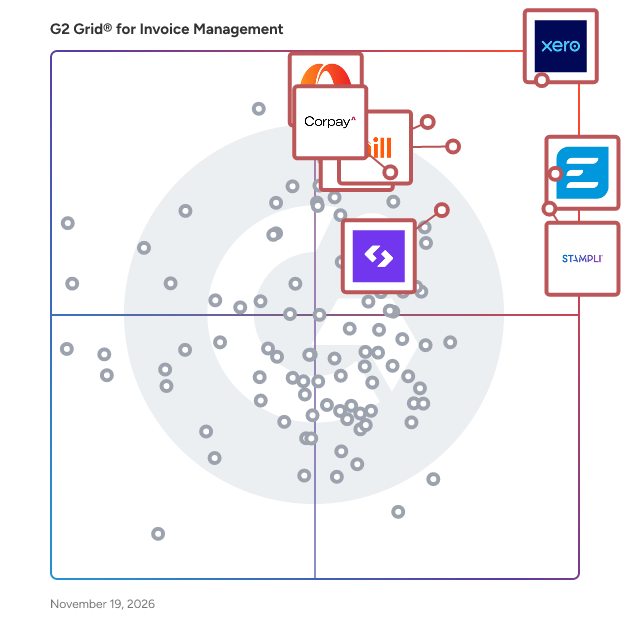
G2 Grid® for Invoice Management Software

G2 Grid® for Invoice Management Software plotting products by satisfaction and market presence

Highlighted products: Xero, Emburse, Stampli, SAP Concur, BILL AP/AR, Spendesk, Corpay Cross-Border, and Paylocity.

Underlying data: [Grid® JSON](https://www.g2.com/categories/invoice-management/grids.json?focus%5B%5D=xero&focus%5B%5D=emburse-2026-11-11&focus%5B%5D=stampli&focus%5B%5D=sap-concur&focus%5B%5D=bill-ap-ar&focus%5B%5D=spendesk&focus%5B%5D=corpay-cross-border&focus%5B%5D=paylocity)

Flick

Flick Network is a Peppol-certified B2B eInvoicing and tax compliance SaaS platform that helps businesses meet government eInvoicing mandates without disrupting their existing finance operations. Headquartered in Dubai, Flick connects your ERP to tax authorities and trading partners through a single, secure compliance layer. Built for enterprise ERPs - Flick integrates with Oracle EBS, Oracle Fusion, and other leading ERP, accounting, and POS systems to automate invoice generation, validation, transmission, and archiving. Finance teams keep working in the systems they already use while Flick handles XML/UBL conversion, Peppol network exchange, real-time clearance and reporting, QR code generation, cryptographic stamping, and audit-ready storage. Key capabilities: - Peppol Access Point for compliant B2B and B2G invoice exchange - Real-time invoice validation against local tax authority rules - Accounts payable (AP) and accounts receivable (AR) eInvoicing automation - Multi-entity, multi-country compliance from one dashboard - Secure cloud deployment on Oracle Cloud Infrastructure (OCI), with private cloud options for regulated industries - Dedicated implementation, onboarding, and local support teams

Who Is the Company Behind Flick?

Flowie

Flowie is the ultimate Procurement and Finance Operations platform for modern companies. Flowie centralizes Procure-to-Pay (P2P), Order-to-Cash (O2C) and Cash Flow Management, all with a consumer-grade user experience. Flowie has global coverage : the platform allows you to manage invoices from and to more than 60 countries, while being 100% tax compliant (e-invoicing). Flowie synchronizes natively in a few minutes with all of the company's tools, without the need for an integrator.

Who Is the Company Behind Flowie?

  • Seller: Flowie
  • Year Founded: 2022
  • HQ Location: Paris, FR
  • LinkedIn® Page: www.linkedin.com
    36 employees on LinkedIn®

Free Invoice Generator

"Free Invoice Generator is ZATCA-compliant invoicing software built for Saudi businesses. Create tax and proforma invoices with automatic VAT calculation and gapless sequential numbering, export as PDF, and manage customers and products from one catalog. Track VAT summaries, outstanding balances, and top customers with built-in reports. Supports multi-company accounts, role-based access, and 2FA security, with a bilingual Arabic/English interface."

Who Is the Company Behind Free Invoice Generator?

AI can help you find the answers. G2 helps you trust them.

Connect G2 to Claude or ChatGPT for answers grounded in G2's trusted reviews, comparisons, and pricing from real user insights.

How it works

GetFactur-X

Get Factur-X: e-invoicing compliance for France, without the enterprise price tag Get Factur-X is a browser-based e-invoicing platform built for freelancers, small businesses, and accounting professionals who need to comply with the French e-invoicing reform without deploying a heavyweight enterprise system. Create, convert, and validate compliant invoices in Factur-X, CII, and UBL formats, then send and receive them across the PDP network directly from the app. E-reporting is built in, so B2C sales, international transactions, and reverse-charge purchases are transmitted to the tax authority alongside your invoicing, from one place instead of two vendors. Core capabilities Create invoices through a deliberately minimal form. Rather than exposing all 250+ fields in the e-invoicing standard, Get Factur-X keeps the interface focused and adds fields as customers actually need them. Convert existing invoices by uploading a PDF. Invoice data is extracted automatically, you review and correct it, and you get a compliant Factur-X file with the XML embedded in your original PDF. Bidirectional CII and UBL conversion is included, along with a human-readable PDF renderer. Validate anything against official schematron rules. The validator accepts Factur-X, CII, UBL, and ZUGFeRD files regardless of where they were produced, and tells you exactly which fields are missing or invalid. Send and receive through the PDP network without leaving the app, so you are not exporting files and re-uploading them into a separate platform. Why teams choose it Every invoice is validated automatically before it leaves the platform, so nothing reaches a recipient or a PDP that would fail on arrival. Regulations change frequently, and format updates are shipped continuously, so compliance stays current without any action on your side. Nothing is installed, and invoice data is not stored on our servers. Files are processed for the conversion and then discarded. Free usage is available without an account for occasional conversions, with unlimited access on a paid plan that can be cancelled at any time.

Who Is the Company Behind GetFactur-X?

Hermes - AP Automation

The number one challenge in AP Invoice processing that we heard from CFOs was a high volume of non-standard invoices in multiple formats received from hundreds of vendors mostly via email round the clock. Other concerns and challenges the Accounts Payable team faced were the need to verify and process these invoices manually, checking for multiple validations for accuracy and validity of the invoice. Apart from the huge manual data entry effort of manually keying the invoice into the AP software, there was also a lot of manual effort to validate the invoice against PO, Contract, Vendor Master, and Tax calculations. Hermes - AP Automation was built keeping this in mind.

Who Is the Company Behind Hermes - AP Automation?

  • Seller: Calpion
  • Year Founded: 2004
  • HQ Location: Dallas, US
  • LinkedIn® Page: www.linkedin.com
    833 employees on LinkedIn®

HiveSuite

HiveSuite is a UK-built business management platform for contractors, trades, and mobile service teams. It combines quoting, invoicing, job scheduling, and client management into one simple, powerful system designed to reduce admin and streamline daily operations. Users can create professional quotes and invoices in minutes, schedule work visually through HivePlanner, and accept payments faster with integrated Stripe links. HiveAssist provides AI-powered support for generating accurate quotations, rewriting job descriptions, and improving customer communication using plain-English prompts. HiveSuite also includes mobile-friendly PWA access, secure cloud storage, team permissions, and real-time insights via HiveIntel - giving businesses everything they need to stay organised and keep jobs moving from any device. Key Features Quoting and invoicing with fully customisable templates Visual job scheduling with HivePlanner (drag and drop) AI-assisted quoting and content support via HiveAssist Secure client and contact management Stripe payment links and payment tracking Mobile-ready Progressive Web App (PWA) Real-time reporting and analytics through HiveIntel HiveSuite focuses on real-world simplicity - helping trades and service businesses look professional, stay organised, and manage every job from start to finish without switching between multiple tools.

Who Is the Company Behind HiveSuite?

INFast

Who Is the Company Behind INFast?

  • Seller: INTIA
  • Year Founded: 2015
  • HQ Location: Brest, FR
  • LinkedIn® Page: www.linkedin.com
    9 employees on LinkedIn®

Inly

Simple, fast and beautiful invoicing.

Who Is the Company Behind Inly?

  • Seller: Inly
  • Year Founded: 2017
  • HQ Location: Nashville, US
  • LinkedIn® Page: www.linkedin.com
    3 employees on LinkedIn®

INVIO

Invio is invoicing software for Australian sole traders and tradies. It creates GST tax invoices from saved client profiles and line items, calculates GST at 10 per cent, and toggles between GST-inclusive and GST-exclusive pricing. Invoices carry the ABN and the details an ATO tax invoice requires, and the title reverts to a plain invoice when a business is not registered for GST. Clients pay by card through Stripe from a link on the invoice, or by bank transfer. Reminders chase overdue invoices, quotes convert to invoices, recurring series run on a schedule, and expenses and photo receipts are recorded with GST-aware totals. Reports show outstanding amounts and summarise GST for a chosen period. Invio also connects to Claude and ChatGPT through its own MCP connector, so an assistant can draft invoices, add clients and answer account questions in a chat session. A separate Xero connector reads across several Xero organisations in one session, holding writes as drafts for approval.

Who Is the Company Behind INVIO?

  • Seller: INVIO
  • Year Founded: 2025
  • HQ Location: Hobsonville, NZ
  • LinkedIn® Page: www.linkedin.com
    1 employees on LinkedIn®

Invoice Bacon

Quote. Schedule. Invoice. Collect Payment - from your Home Services clients.

Who Is the Company Behind Invoice Bacon?

Invoice Dragon

Invoice Dragon is a fast, modern invoicing platform built for contractors, small businesses, and growing service teams who need clean, reliable financial control without the complexity of enterprise software. It streamlines the entire billing workflow — from creating professional invoices to tracking payments, managing clients, and staying on top of cash flow — all in one simple, intuitive dashboard. Invoice Dragon eliminates the frustration of manual spreadsheets, confusing accounting tools, and slow, outdated invoicing apps. Users can generate invoices in seconds, automate reminders, accept online payments, and keep every job organized with real‑time status tracking. The platform is designed for speed, clarity, and ease of use, helping businesses get paid faster and operate with confidence. Who it’s for: Contractors, freelancers, home‑service pros, SMBs, and any business that wants a clean, efficient invoicing system without the learning curve. Key capabilities include: Lightning‑fast invoice creation with customizable templates Automated payment reminders and follow‑ups Online payment support for faster cash collection Client and job tracking with clear status visibility Exportable reports for bookkeeping and tax prep Mobile‑friendly design for on‑the‑go billing Simple, intuitive interface built for real‑world business owners Why users choose Invoice Dragon: It’s powerful enough to support growing businesses, yet simple enough for anyone to use. No clutter. No accounting jargon. Just a clean, reliable invoicing system that helps businesses get paid on time and stay organized. Dragon Market is a marketplace where contractors can offer their services nationwide and sell their items via a storefront.

Who Is the Company Behind Invoice Dragon?

Invoice Manager for Excel

Invoice Manager for Excel by Uniform Software Limited turns Microsoft Excel into a powerful, flexible invoicing system. It combines the familiarity and customization of Excel with structured data management for customers, products, invoices, payments, quotations, and purchase orders. If your business already relies on Excel and you want more than a simple invoice template, Invoice Manager provides a practical way to manage your invoicing workflow without moving to a completely separate accounting or invoicing application. Your invoice remains a genuine Excel worksheet. You can customize its layout, formulas, fields, branding, and business logic using the Excel features you already know. Professional Invoicing Inside Microsoft Excel Invoice Manager combines three key components: • Excel invoice templates — Create invoices using real, editable Excel workbooks. • Invoice Manager for Excel — An Excel add-in that adds invoicing tools and an Invoice ribbon to Excel. • Structured database — Keep customers, products, invoices, payments, and related information in organized records. This approach gives you the flexibility of Excel while providing much more structure than using a standalone invoice template. 400+ Ready-Made Excel Invoice Templates Get started quickly with a library of more than 400 professionally designed invoice templates. Templates include: • Standard invoices • Sales invoices • Service invoices • Consulting invoices • Commercial invoices • Proforma invoices • Receipts • Quotations • Multi-page invoices • Other business forms The templates are genuine Excel workbooks rather than files locked into a proprietary invoice designer. You can open them in Excel, modify them, add your logo and branding, and adapt them to your business requirements. The template library is available free of charge, with no registration required. Customize Your Invoice with Excel One of the major advantages of Invoice Manager is that you are not restricted to a fixed invoice design. Because the invoice is a real Excel worksheet, you can use Excel's familiar tools to customize it: • Fonts and text formatting • Colors and borders • Logos and images • Column widths • Merged cells • Page layout and printing settings • Excel formulas • Drop-down lists • Checkboxes and other form controls • Custom fields and columns • VBA macros You can create an invoice that matches your company's branding and business processes instead of adapting your business to a rigid invoicing interface. Invoice Manager also supports multiple invoice templates. This can be useful when different businesses, departments, customers, or currencies require different invoice layouts. Custom Fields and Flexible Business Logic Invoice Manager is designed for businesses that need more flexibility than a basic invoice template can provide. You can add custom fields and columns for information such as: • Project codes • Contract numbers • Department names • Product-specific discounts • Additional customer information • Other business-specific data Excel formulas can be used for discounts, taxes, line totals, subtotals, and other calculations. This allows your invoice logic to remain visible and editable rather than being hidden inside a proprietary application. For advanced Excel users, VBA macros can also be used to extend the functionality of customized invoice templates. Invoices, Quotations, and Purchase Orders Invoice Manager is not limited to invoices. The same Excel template and database workflow can also be used for: • Invoices • Quotations • Purchase orders You can reuse your existing invoice design and business data rather than creating completely separate documents for each type of transaction. A built-in conversion workflow can help turn an invoice form into a quotation or purchase order, making it easier to maintain a consistent look and workflow. Smart Picker for Faster Data Entry Invoice Manager includes an In-Cell Smart Picker that helps you select information directly from the Excel cell you are working with. The Smart Picker can be used for information such as: • Bill To customers • Ship To addresses • Products and items • Sales representatives • Shipping options • Invoice numbers • Other supported data-selection fields Instead of repeatedly typing long customer names, product names, addresses, or other information, you can select existing records from your database. For large lists, built-in search controls make it easier to find records without scrolling through hundreds or thousands of entries. You can search using available fields to quickly locate the information you need. This can help reduce repetitive typing and minimize data-entry errors. Search Customers, Products, and Invoices Invoice Manager provides search functionality for data lists such as Customers, Products, and Invoices. You can search using available fields and operators such as Equals and Contains, making it easier to locate specific records in a large database. Frequently used search criteria can also be saved as defaults, helping speed up repetitive tasks. Designed for Businesses That Want Excel Flexibility Invoice Manager can be particularly useful for businesses that: • Already use Microsoft Excel extensively • Want customizable invoice forms • Need more than a basic invoice template • Have specialized invoicing requirements • Need custom fields and calculations • Want to maintain control over invoice layouts • Need to manage customers, products, invoices, and payments • Want invoices, quotations, and purchase orders in one workflow • Prefer working with familiar Excel formulas and features • Need multiple invoice templates for different businesses or purposes Rather than replacing Excel, Invoice Manager extends Excel with dedicated invoicing capabilities. Microsoft Marketplace Invoice Manager for Excel is available through Microsoft Marketplace, providing a convenient purchasing and subscription option for organizations that use Microsoft work or school accounts. Organizations can subscribe through Microsoft Marketplace and manage subscriptions through the Microsoft 365 administration environment. This can be particularly convenient for businesses that already manage their software and user licenses through Microsoft. Invoice Manager also has a Traditional Installation option for customers who prefer a desktop installation and a lifetime-license model. The availability of different installation and licensing options makes it easier to choose the deployment model that fits your organization. Windows and Microsoft Excel Invoice Manager for Excel is designed for Windows and requires a locally installed desktop version of Microsoft Excel. Supported environments include: • Windows 10 • Windows 11 • Microsoft Excel 2013 through Microsoft 365 • 32-bit or 64-bit Excel The desktop version requires locally installed Excel and is not intended for environments where Excel is available only through a web browser. For users who need basic invoice-template functionality in browser-based Excel, Invoice Manager Lite is also available as a free Excel web add-in through Microsoft Marketplace. Invoice Manager Lite Invoice Manager Lite provides a simpler, free option for users who mainly need basic invoice-template operations. It works with the same library of 400+ Excel invoice templates and can be used with both Excel for the web and desktop Excel. With Invoice Manager Lite, you can quickly: • Clear named cells in an invoice • Enter the current date • Generate a new invoice number It is useful when you want a lightweight way to work with Excel invoice templates without the full Invoice Manager system. A Flexible Alternative to Fixed Invoice Software Many invoicing applications provide predefined forms and workflows. Invoice Manager takes a different approach by making Excel itself the invoice form. This means you can start with a ready-made professional template and then modify it using the Excel features you already understand. You can control the appearance of the invoice, add your own fields, create formulas, define calculations, incorporate Excel controls, and adapt the document to your own business processes. At the same time, Invoice Manager provides structured records and database-backed management for the information behind those documents. Key Benefits • Turn Microsoft Excel into a complete invoicing system • Create professional invoices directly in Excel • Use more than 400 ready-made invoice templates • Customize invoice layouts with standard Excel tools • Add your own branding, logos, fields, and calculations • Use Excel formulas for taxes, discounts, totals, and other calculations • Add custom fields for business-specific information • Use Excel form controls and VBA for advanced customization • Manage customers, products, invoices, and payments in structured records • Create quotations and purchase orders using the same workflow • Select customers, products, addresses, and other information with the In-Cell Smart Picker • Search large customer, product, and invoice lists efficiently • Reduce repetitive typing and data-entry errors • Support multiple invoice templates • Use Microsoft Marketplace for convenient subscription-based deployment • Keep using the Excel skills and tools your team already knows Who Is Invoice Manager For? Invoice Manager for Excel is ideal for small and medium-sized businesses, consultants, contractors, service providers, sales teams, and other organizations that want a customizable invoicing solution built around Microsoft Excel. It is especially suitable for users who find basic Excel invoice templates too limited but do not want to give up the flexibility of Excel for a rigid, closed invoicing system. With Invoice Manager, your invoice is still an Excel worksheet — but with the data management, automation, and invoicing features needed to turn that worksheet into a practical business tool.

Who Is the Company Behind Invoice Manager for Excel?
Invoice Manager Lite

Invoice Manager Lite by Uniform Software Limited is a free Microsoft Office Web Add-in designed to streamline and automate invoicing workflows directly within Microsoft Excel and Excel for the Web (Office 365). Developed by Uniform Software, Invoice Manager Lite eliminates manual data entry, prevents costly billing errors, and accelerates client invoicing without forcing small businesses into rigid, expensive cloud accounting software. For freelancers, sole traders, contractors, and small business owners, Microsoft Excel remains the ultimate tool for custom calculations, bespoke branding, and flexible document design. However, managing invoice numbers manually, clearing old entries, and updating billing dates on standard spreadsheets can be tedious and prone to human error. Invoice Manager Lite embeds dedicated workflow automation directly into Excel’s native interface, turning standard spreadsheet workbooks into a structured, error-free invoicing platform. Key Features & Capabilities 1. Automated Sequential Invoice Numbering • Audit-Ready Records: Automatically generates non-duplicate, sequential invoice numbers every time a new bill is created. • Error Prevention: Eliminates skipped numbers, duplicate billing IDs, and manual tracking spreadsheets. • Custom Sequence Control: Allows users to define custom prefixes or baseline sequence numbers to match existing business records. 2. One-Click Form Reset ("Clear & New") • Instant Reset: Clears previous customer details, itemized line items, quantities, and totals with a single click. • Formula Protection: Specifically resets dynamic input fields while leaving all underlying Excel formulas, tax calculations, cell borders, custom fonts, and brand colors 100% intact. • Fast Turnaround: Enables users to generate back-to-back invoices in seconds without manually deleting cell values one by one. 3. Smart Date Auto-Population • Current Date Insertion: Automatically fills in the current billing date upon generating a new invoice. • Accuracy Guarantee: Reduces repetitive typing steps and eliminates backdating mistakes across client statements. 4. Seamless Integration with 400+ Free Excel Templates • Massive Template Library: Integrates directly with Uniform Software’s free online collection of over 400 industry-tailored Excel invoice, estimate, quote, and receipt templates. • Industry-Specific Layouts: Supports formats designed for general sales, professional service billing, trade contracting, commercial sales, VAT/GST compliance, and international currencies. • Custom Template Support: Flexible enough to work with existing custom Excel billing sheets created by the user. 5. Total Excel Freedom & Formula Integrity • No Lock-In: Retains complete access to standard Excel features—add custom line-item calculations, custom formulas, discount rules, or extra rows without breaking the add-in. • Branding Control: Fully supports custom typography, corporate color schemes, logos, and layout modifications. • Native File Storage: Workbooks remain standard .xlsx files that can be saved locally, emailed directly, or stored on OneDrive/SharePoint. 6. Cross-Platform Office 365 Architecture • Browser & Desktop Support: Operates smoothly across Excel for the Web, Windows desktop Excel, and Mac desktop Excel. • Cloud & Remote Friendly: Ideal for distributed teams or remote contractors working within shared Microsoft 365 web environments. Core Business Benefits • Eliminate Software Subscriptions: Provides essential billing automation at zero cost, removing the need for paid cloud accounting subscriptions for micro-businesses. • Zero Learning Curve: Operates directly within the familiar Microsoft Excel interface, eliminating staff training or software onboarding. • 100% Design Control: Avoid standardized, rigid invoice layouts imposed by traditional accounting SaaS platforms. • Reduced Administrative Overhead: Automates repetitive tasks like numbering, date population, and form wiping to save hours of administrative work each month. • Seamless Scalability: Templates and workflows created in Invoice Manager Lite offer forward compatibility with Uniform Software’s advanced desktop database applications (Invoice Manager for Excel) if business growth requires customer databases, product catalogs, and payment tracking in the future.

Who Is the Company Behind Invoice Manager Lite?

Invoice Quickly

Invoice Quickly is an online invoicing and estimating platform designed to help small businesses,freelancers and agency owners. Businesses can get paid faster by sending online invoices to their customers and accepting online payments on their invoices. Freelancers and businesses can send unlimited number of invoices and emails to their customers and clients. With Invoice Quickly users can also save details of unlimited Customers/Clients and Products/Services. Payment reminders can be easily sent on a click of a button to the customers who are late on their payment and even these emails can be customized to your needs. Invoice Quickly reports provide powerful insights about business's best and worst performing products and it can also help you identify your best customers.

Who Is the Company Behind Invoice Quickly?

Nathan Calabrese
NC
Researched and written by Nathan Calabrese
Updated April 9, 2026