Top Free Hard Drive Cloning Software

How Many Hard Drive Cloning Software Products Does G2 Track?

Total Products under this Category: 29

Category Stats (Oct 2026)

  • Average Rating: 4.26/5 (↓0.01 vs Sep 2026) The average rating of products in this category, based on all submitted ratings

Last updated: October 01, 2026

How Does G2 Rank Hard Drive Cloning Software Products?

Why You Can Trust G2's Software Rankings:

  • 30 Analysts and Data Experts
  • 600+ Authentic Reviews
  • 29+ Products
  • Unbiased Rankings

G2's software rankings are built on verified user reviews, rigorous moderation, and a consistent research methodology maintained by a team of analysts and data experts. Each product is measured using the same transparent criteria, with no paid placement or vendor influence. While reviews reflect real user experiences, which can be subjective, they offer valuable insight into how software performs in the hands of professionals. Together, these inputs power the G2 Score, a standardized way to compare tools within every category.

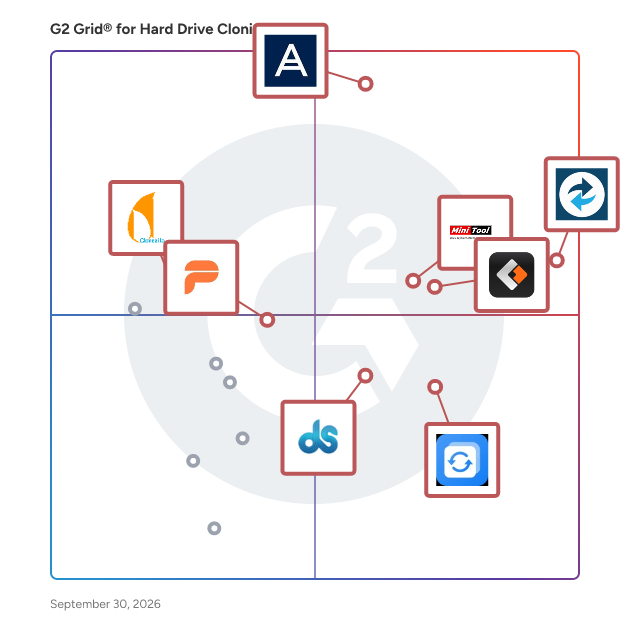
G2 Grid® for Hard Drive Cloning Software

G2 Grid® for Hard Drive Cloning Software plotting products by satisfaction and market presence

Highlighted products: Macrium Backup & Restore, Acronis True Image, EaseUS Todo Backup Business, MiniTool Partition Wizard, AOMEI Backupper, Daemon Tools, Paragon Hard Disk Manager Business, and Clonezilla.

Underlying data: [Grid® JSON](https://www.g2.com/categories/hard-drive-cloning/grids.json?focus%5B%5D=macrium-backup-restore&focus%5B%5D=acronis-true-image&focus%5B%5D=easeus-todo-backup-business&focus%5B%5D=minitool-partition-wizard&focus%5B%5D=aomei-technology-aomei-backupper&focus%5B%5D=daemon-tools&focus%5B%5D=paragon-software-group-paragon-hard-disk-manager-business&focus%5B%5D=clonezilla)

Macrium Backup & Restore

Macrium Backup & Restore is a suite of image-based backup and disaster recovery software for Windows systems. It enables IT teams in manufacturing and operational technology (OT) environments to protect data, restore systems rapidly, and reduce downtime after hardware failure, user error, or cyber threats. The suite includes four distinct products: Macrium Reflect (Standalone) for Workstation & Server Backup, Macrium SiteBackup, Macrium Reflect LTSC, and Macrium Technician’s License. Each product serves a specific purpose in supporting resilient IT and OT infrastructure: Macrium provides comprehensive backup and disk imaging for individual endpoints such as critical manufacturing systems and production lines. It supports full, differential, and incremental backups, allowing organizations to create reliable recovery points and restore systems quickly. Macrium SiteBackup offers centralized management of backups across multiple endpoints and servers. With Macrium Site Manager, IT teams can automate backup schedules, monitor backup status, and access detailed reporting — all from a single interface. SiteBackup supports physical and virtual machines and is suited to small IT teams or large enterprise environments. Macrium Reflect LTSC (Long-Term Service Channel) is a perpetual license version of Reflect with built-in maintenance. Designed for organizations that require long-term stability and minimal software change, Reflect LTSC is well-suited to regulated industries, industrial control systems, and manufacturing environments where consistent platform behavior over time is essential. Macrium Technician’s License is a portable backup and recovery toolkit for IT professionals. It enables technicians to run Macrium Reflect directly from a USB or external drive, supporting ad hoc backup, restore, or system troubleshooting across multiple machines — without installing software on each device. Key features across the product suite: - Image-based backup for Windows workstations, servers, and virtual machines - Bare metal restore with support for dissimilar hardware - Centralized management and reporting - Support for incremental and differential backup strategies - Built-in encryption and protection against ransomware threats - One-time and subscription licensing models to suit different IT needs Macrium Backup & Restore is used by IT teams across healthcare, education, manufacturing, and corporate IT to ensure business continuity, maintain operational uptime, and reduce the impact of system outages. Speak to one of our experts here: https://www.macrium.com/contact

Average Rating: 4.7/5.0

Total Reviews: 92

How Do G2 Users Rate Macrium Backup & Restore?

  • Has the product been a good partner in doing business?: 9.1/10 (Category avg: 9.0/10)
  • Quality of Support: 8.6/10 (Category avg: 8.2/10)
  • Ease of Use: 9.0/10 (Category avg: 8.8/10)

Who Is the Company Behind Macrium Backup & Restore?

Who Uses This Product?

  • Who Uses This: IT Manager
  • Top Industries: Information Technology and Services, Manufacturing
  • Company Size: 54% Small, 33% Medium

What Do G2 Reviewers Say About Macrium Backup & Restore?

AI-generated summary from verified user reviews

Pros
  • Users appreciate the ease of use of Macrium Backup & Restore, finding it intuitive and simple for daily backups.
  • Users praise the flawless reliability of Macrium Backup & Restore, valuing its ease of use and effective automation.
  • Users find the easy setup of Macrium Backup & Restore fast and straightforward, enhancing their backup experience.
  • Users value the effective data restoration capabilities of Macrium Backup & Restore, ensuring peace of mind with reliable backups.
  • Users find Macrium Backup & Restore to be extremely reliable, offering flawless performance and effortless automated backups every time.
Cons
  • Users face backup issues such as lack of cloud options and inconvenient restore processes, complicating data recovery.
  • Users find that some features need improvement for broader usability, as advanced management feels too specific and complex.
  • Users face challenges with restore processes, including timeouts and issues with BitLocker security during restores.
  • Users find insufficient information on adding drivers and using Rescue Media, which complicates the experience with legacy machines.
  • Users find the lack of features in Macrium Backup & Restore limits advanced management and usability with legacy machines.

What Are Recent G2 Reviews of Macrium Backup & Restore?

What Are G2 Users Discussing About Macrium Backup & Restore?

Acronis True Image

In today’s digital world, it's not if you'll be attacked, but when. Cyber protection can be complex and costly — unless you have Acronis True Image. This single, simple solution delivers reliable fast backup and recovery, AI-powered security, and Identity Protection.* Manage everything easily, from any device. Stop the frustration; save time and money. Acronis True Image protects your computers, mobile devices and online identity* with effortless, "set-and-forget" peace of mind. Acronis True Image features include: - Backup: Flexible local backups – from full system images to individual files. Or select files and folders on a flexible schedule that enables your cybersecurity. - Encrypted cloud backup: Reliable, secure and speedy backup to Acronis data centers. Offering additional protection, easy recovery and anywhere access. - Cybersecurity protection: Integrated award-winning antimalware capabilities protect both your device and backup data from ransomware, cryptojacking, and never-before-seen cyber threats - Disk cloning: Create a complete replica of your data as a backup or a way to migrate to a new drive or computer. - Easy-of-use: Intuitive interface to manage your protection. - Affordable subscription plans: starting from just $49.99/year. *Available in the U.S. for Advanced and Premium subscriptions Acronis is majority-owned by EQT.

Average Rating: 4.3/5.0

Total Reviews: 70

How Do G2 Users Rate Acronis True Image?

  • Has the product been a good partner in doing business?: 8.5/10 (Category avg: 9.0/10)
  • Quality of Support: 8.2/10 (Category avg: 8.2/10)
  • Ease of Use: 8.5/10 (Category avg: 8.8/10)

Who Is the Company Behind Acronis True Image?

  • Seller: Acronis
  • Year Founded: 2003
  • HQ Location: Schaffhausen
  • Twitter: @acronis
    94,498 Twitter followers
  • LinkedIn® Page: www.linkedin.com
    1,923 employees on LinkedIn®
  • Ownership: Acronis is majority-owned by EQT

Who Uses This Product?

  • Top Industries: Information Technology and Services, Computer Software
  • Company Size: 46% Small, 39% Medium

What Do G2 Reviewers Say About Acronis True Image?

AI-generated summary from verified user reviews

Pros
  • Users appreciate the robust data security features of Acronis True Image, ensuring protection for their sensitive data.
  • Users appreciate the prioritization of data security in Acronis True Image, ensuring their sensitive data is well-protected.
  • Users find Acronis True Image to be highly user-friendly, making it easy to use and implement effectively.
  • Users find Acronis True Image to be easy to use and implement, enhancing their backup experience effortlessly.
Cons
  • Users criticize Acronis True Image for its poor interface design, finding it non-intuitive and visually unappealing.
  • Users report significant backup issues with Acronis True Image, citing poor MacOS support and ineffective customer service.
  • Users report significant compatibility issues with Acronis True Image on newer MacOS versions, alongside inadequate customer support.
  • Users find Acronis True Image to be expensive and ineffective, particularly due to poor customer support and compatibility issues.
  • Users express frustration over Acronis True Image's lack of compatibility with MacOS and inadequate customer support.

What Are Recent G2 Reviews of Acronis True Image?

What Are G2 Users Discussing About Acronis True Image?

O&O DiskImage

O&O DiskImage provides a wide range of options for backing up systems. You have the choice of creating images or making file backups. With images you can restore a system1:1 back to its original status. File backups let you save selected files and folders that you can keep in a safe place for future access. O&O DiskImage supports the VHDX format. VHDX protects against file corruption by logging changes in the metadata. On top of that, it can support images of up to 64 TB. Imaging and restoration in Hyper-V environments make it easier for IT departments to migrate from physical to virtual machines. Reduce costs O&O DiskImage allows even less experienced IT staff to run simple backups and more complex backup jobs with only a minimum amount of labor. This allows you to save or avoid expenses you’d otherwise need to spend on integration, schooling, or overall operations. Protection against sabotage It happens time and again that malware creeps into a company, infecting many, maybe even all, computers and then starts systematically destroying data. This is often noticed only when it’s too late, when important data has been lost forever. In cases like this, restoring the system and its data is top priority. O&O DiskImage provides the necessary mechanisms needed to recover single files or entire systems in the blink of an eye. Machine Independent Restore on/from virtual environments Hardware that reaches the end of its lifespan must be exchanged. At that point it’s important to decide how best to get the computer’s operating system and all its data onto a new computer. To do this, O&O DiskImage provides Machine Independent Restore (in short M.I.R.) which enables the restoration of a system image onto a machine with different hardware components. Drivers and settings are automatically replaced to keep the system in working order. O&O DiskImage simplifies migration from physical to virtual machines. VHD and VHDX support along with direct restoration in Hyper-V environments makes virtualization of your IT systems really easy.

Average Rating: 4.1/5.0

Total Reviews: 10

How Do G2 Users Rate O&O DiskImage?

  • Has the product been a good partner in doing business?: 9.2/10 (Category avg: 9.0/10)
  • Quality of Support: 8.1/10 (Category avg: 8.2/10)
  • Ease of Use: 9.3/10 (Category avg: 8.8/10)

Who Is the Company Behind O&O DiskImage?

Who Uses This Product?

  • Company Size: 70% Small, 20% Medium

What Are Recent G2 Reviews of O&O DiskImage?

AI can help you find the answers. G2 helps you trust them.

Connect G2 to Claude or ChatGPT for answers grounded in G2's trusted reviews, comparisons, and pricing from real user insights.

How it works

Active@Disk Image

Active@ Disk Image creates an exact copy of entire computer or selected disks and restores them from backup in case of hardware failure or data corruption New! Fully supported disks 4096 bytes sectors (ADI & RAW images) Multi-language support (English, French, Portuguese, Spanish). Installation & Boot Disk Creator as well. Active@ Virtual Disk (RAW & ADI images can be mounted and visible in Windows Explorer, read-only mode) Generic uncompressed raw images support Pre- and post-execution commands for scheduled tasks Copy Disk to Disk feature (direct copying partitions with resizing) Scheduled incremental backups support (Pro version) Incremental backup of unknown file systems is supported Create Backup Disk Image & Raw Disk Image Back up to almost any media Disk Image Explorer

Average Rating: 4.2/5.0

Total Reviews: 11

How Do G2 Users Rate Active@Disk Image?

  • Has the product been a good partner in doing business?: 10.0/10 (Category avg: 9.0/10)
  • Quality of Support: 8.7/10 (Category avg: 8.2/10)
  • Ease of Use: 9.3/10 (Category avg: 8.8/10)

Who Is the Company Behind Active@Disk Image?

  • Seller: LSoft Technologies
  • Year Founded: 1999
  • HQ Location: Mississauga, Ontario
  • Twitter: @lsoft_net
    258 Twitter followers
  • LinkedIn® Page: www.linkedin.com
    6 employees on LinkedIn®

Who Uses This Product?

  • Company Size: 55% Small, 27% Medium

What Are Recent G2 Reviews of Active@Disk Image?

What Are G2 Users Discussing About Active@Disk Image?

Iperius Backup

Iperius Backup unites file, image-based, VM, database, and Microsoft 365 protection with fast recovery in one lightweight platform for Windows servers and PCs. It delivers pro-grade resilience with a minimal footprint and a predictable, perpetual licensing model. Protect all your workloads: Proxmox VE (incremental VM backup/restore, unlimited VMs), VMware vSphere/ESXi, Microsoft Hyper-V, Microsoft 365 (Exchange, OneDrive, SharePoint, Teams), and leading databases (SQL Server/Express, MySQL, MariaDB, PostgreSQL, Oracle). Store backups on NAS, LTO/RDX, FTP/SFTP, or the cloud—Amazon S3/S3-compatible, Azure Storage, Google Drive, OneDrive, Backblaze/Wasabi. Built-in scheduling, incrementals, compression, and AES-256 encryption help you meet RPO/RTO targets without complicating daily operations. Iperius Backup makes modern data protection simple—and cost-effective—for businesses and MSPs.

Average Rating: 4.5/5.0

Total Reviews: 39

How Do G2 Users Rate Iperius Backup?

  • Has the product been a good partner in doing business?: 8.7/10 (Category avg: 9.0/10)
  • Quality of Support: 8.9/10 (Category avg: 8.2/10)
  • Ease of Use: 9.0/10 (Category avg: 8.8/10)

Who Is the Company Behind Iperius Backup?

  • Seller: Enter
  • HQ Location: Grottammare, AP
  • Twitter: @enter
    2,965 Twitter followers
  • LinkedIn® Page: www.linkedin.com
    29 employees on LinkedIn®

Who Uses This Product?

  • Top Industries: Information Technology and Services, Computer Software
  • Company Size: 69% Small, 27% Medium

What Are Recent G2 Reviews of Iperius Backup?

What Are G2 Users Discussing About Iperius Backup?

WittyTool DiskClone

Wittytool Disk Clone delivers effortless disk cloning for Windows. This powerful tool simplifies HDD/SSD upgrades, quickly transfers your entire system to another computer, and helps you set up reliable local backups, all through a unified and efficient procedure.

Who Is the Company Behind WittyTool DiskClone?

Tian Lin
TL
Researched and written by Tian Lin
Updated October 3, 2024