Top Free General-Purpose CAD Software - Page 3

How Many General-Purpose CAD Software Products Does G2 Track?

Total Products under this Category: 150

Category Stats (Oct 2026)

  • Average Rating: 4.35/5 The average rating of products in this category, based on all submitted ratings
  • Top Trending Product: GstarCAD (+2.56%) - Among all products in this category, GstarCAD recorded the largest rating increase compared to last month

Last updated: October 20, 2026

How Does G2 Rank General-Purpose CAD Software Products?

Why You Can Trust G2's Software Rankings:

  • 30 Analysts and Data Experts
  • 12,800+ Authentic Reviews
  • 150+ Products
  • Unbiased Rankings

G2's software rankings are built on verified user reviews, rigorous moderation, and a consistent research methodology maintained by a team of analysts and data experts. Each product is measured using the same transparent criteria, with no paid placement or vendor influence. While reviews reflect real user experiences, which can be subjective, they offer valuable insight into how software performs in the hands of professionals. Together, these inputs power the G2 Score, a standardized way to compare tools within every category.

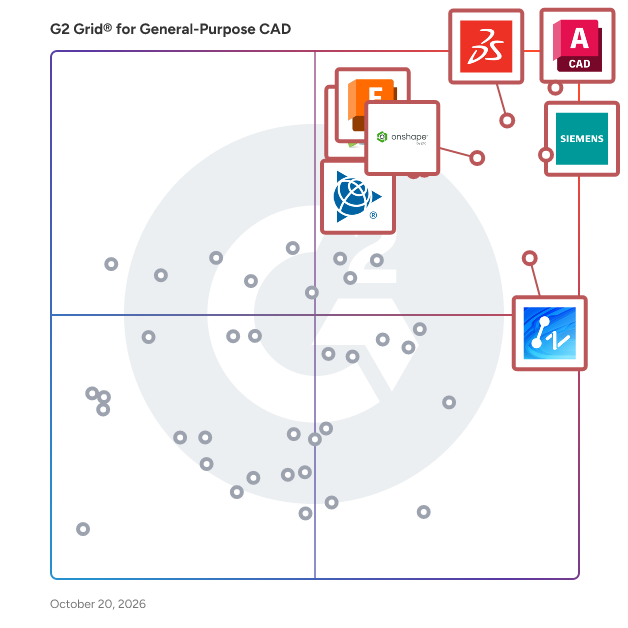
G2 Grid® for General-Purpose CAD Software

G2 Grid® for General-Purpose CAD Software plotting products by satisfaction and market presence

Highlighted products: AutoCAD, Designcenter Solid Edge, SOLIDWORKS, Onshape, SketchUp, ZWCAD, DraftSight, and Autodesk Fusion.

Underlying data: [Grid® JSON](https://www.g2.com/categories/general-purpose-cad/grids.json?focus%5B%5D=autocad&focus%5B%5D=designcenter-solid-edge&focus%5B%5D=solidworks&focus%5B%5D=onshape&focus%5B%5D=sketchup&focus%5B%5D=zwcad&focus%5B%5D=draftsight&focus%5B%5D=autodesk-fusion)

PTCAD

PTCAD is a versatile CAD software designed for businesses and professionals seeking efficient, cost-effective solutions for 2D and 3D drawing and drafting. Tailored for architects, engineers, designers, and construction experts, PTCAD simplifies complex design tasks with its user-friendly interface and comprehensive feature set. Whether you're creating intricate architectural plans, mechanical designs, or detailed construction layouts, PTCAD empowers you to achieve your drafting goals without the burden of high costs or steep learning curves. Experience the flexibility and performance of PTCAD, the ideal AutoCAD alternative for businesses of all sizes.

Average Rating: 4.5/5.0

Total Reviews: 1

Who Is the Company Behind PTCAD?

Who Uses This Product?

  • Company Size: 100% Small

What Do G2 Reviewers Say About PTCAD?

AI-generated summary from verified user reviews

Pros
  • Users value the easy-to-use interface of PTCAD for designing and understanding 2D and 3D models effectively.
  • Users appreciate the ease of use of PTCAD, finding it intuitive and accessible for designing in 2D and 3D.
  • Users appreciate the intuitive interface of PTCAD, making 2D and 3D design easy to understand and use.
  • Users value the user-friendly interface of PTCAD, making 2D and 3D design easy and accessible.

What Are Recent G2 Reviews of PTCAD?

True IntelliCAD 11 Software

JTS IntelliCAD is an economical 2D Drafting and 3D Wireframe Modeling CAD software meant for Engineers, Architects and other technical consultants. JTS IntelliCAD works in native DWG & DXF CAD software to create and edit drawings.

Average Rating: 4.0/5.0

Total Reviews: 1

How Do G2 Users Rate True IntelliCAD 11 Software?

  • Has the product been a good partner in doing business?: 6.7/10 (Category avg: 8.5/10)

Who Is the Company Behind True IntelliCAD 11 Software?

Who Uses This Product?

  • Company Size: 100% Small

What Are Recent G2 Reviews of True IntelliCAD 11 Software?

3ds Max

Autodesk 3ds Max Design is a professional 3D modeling, rendering, and animation software tailored for architects, designers, and visualization specialists. It enables users to create detailed and realistic visualizations of architectural designs, engineering projects, and other complex structures, facilitating effective communication of design intent and exploration of creative concepts. Key Features and Functionality: - Advanced 3D Modeling: Offers an extensive polygon modeling and texturing toolset, including the Graphite toolset for free-form sculpting and advanced polygonal modeling, allowing for the creation of unique forms and detailed designs. - High-Quality Rendering: Equipped with multiple rendering options, including the integrated Arnold renderer, enabling the production of photorealistic images and animations. - Lighting Simulation and Analysis: Features Exposure technology for simulating and analyzing sun, sky, and artificial lighting, assisting in achieving accurate lighting conditions and supporting LEED 8.1 certification. - Interoperability: Provides optimized workflows for aggregating data from various CAD and Building Information Modeling (BIM) file formats, ensuring efficient data continuity throughout the design process. - Animation Tools: Includes advanced animation support with tools like rigging, keyframing, and procedural animation, helping bring designs to life with natural movement. Primary Value and User Solutions: 3ds Max Design addresses the need for high-quality visual communication in design professions. By offering powerful modeling and rendering tools, it enables users to create compelling visualizations that effectively convey design concepts to clients and stakeholders. The software's interoperability with other Autodesk products and support for various file formats streamline workflows, reducing time and effort in the design process. Additionally, its lighting simulation capabilities allow for accurate analysis of environmental lighting conditions, aiding in sustainable design practices and compliance with certification standards.

Average Rating: 4.3/5.0

Total Reviews: 318

How Do G2 Users Rate 3ds Max?

  • Has the product been a good partner in doing business?: 8.2/10 (Category avg: 8.5/10)

Who Is the Company Behind 3ds Max?

  • Seller: Autodesk
  • Year Founded: 1982
  • HQ Location: San Francisco
  • Twitter: @autodesk
    273,215 Twitter followers
  • LinkedIn® Page: www.linkedin.com
    15,757 employees on LinkedIn®
  • Ownership: NASDAQ:ADSK

Who Uses This Product?

  • Who Uses This: Interior Designer, Architect
  • Top Industries: Architecture & Planning, Design
  • Company Size: 66% Small, 23% Medium

What Do G2 Reviewers Say About 3ds Max?

AI-generated summary from verified user reviews

Pros
  • Users value the powerful 3D modeling and visualization tools of 3ds Max Design, enhancing creativity and productivity in design.
  • Users appreciate the ease of use in 3ds Max Design, making complex 3D modeling accessible and efficient.
  • Users value the effective 3D modeling tools in 3ds Max Design, facilitating impressive visualizations and professional results.
  • Users appreciate the effective 3D visualization tools of 3ds Max Design, enabling realistic renders and creative flexibility.
  • Users value the efficiency of 3ds Max Design, as it streamlines workflows and enhances productivity in design projects.
Cons
  • Users find the difficult learning curve of 3ds Max Design challenging, especially for beginners navigating its extensive tools.
  • Users find the high hardware requirements of 3ds Max Design limits its feasibility and efficiency significantly.
  • Users face high system requirements for 3ds Max Design, leading to slow performance with complex scenes and heavy files.
  • Users express frustration with slow rendering times, especially when dealing with complex scenes and limited hardware capabilities.
  • Users often face software bugs, leading to crashes and delays during rendering, affecting workflow efficiency.

What Are Recent G2 Reviews of 3ds Max?

What Are G2 Users Discussing About 3ds Max?

AI can help you find the answers. G2 helps you trust them.

Connect G2 to Claude or ChatGPT for answers grounded in G2's trusted reviews, comparisons, and pricing from real user insights.

How it works

BIMsmarter

BIMsmarter is a suite of four free browser-based tools that automate the repetitive tasks of BIM coordination, built by a BIM coordinator working in Luxembourg and Belgium. IFC Viewer & Audit opens IFC files locally in the browser (WebAssembly, nothing uploaded) and runs a 20-point quality audit with an A-F grade, exporting results as PDF, BCF 2.1 or IDS. BIM Document Generator produces ISO 19650-compliant document numbers with real-time field validation. BIM Workflow Generator creates ISO 19650-2 coordination workflows, CDE steps and RACI matrices without manual diagramming. GID-Assistant filters the mandatory data requirements of the Luxembourg CRTI-B GID standards by phase, use case and IFC version, with an AI assistant that cites its sources. All tools are free with an account, no credit card required. An organization license adds higher AI quotas and professional exports for teams.

Who Is the Company Behind BIMsmarter?

  • Seller: BIMsmarter
  • Year Founded: 2026
  • HQ Location: Châtillon, BE
  • LinkedIn® Page: www.linkedin.com
    1 employees on LinkedIn®
  • Ownership: Renaud Climent
  • Phone: +32 498 02 30 78

CrownCAD

CrownCAD is a cloud-native 3D CAD solution that enables real-time collaboration and intelligent version management, empowering teams to complete the entire product development cycle in the cloud–anytime, anywhere. Key Features: Cloud-native Architecture: No installation required-ready to use in a browser. Design anytime, anywhere, delivering a convenient user experience. Real-time Collaboration: Native cloud architecture keeps all team members perfectly synchronized. Seamless Workflow: Our product loads massive models in seconds and smoothly handles millions of components, ensuring a seamless workflow. Clear Version Management: Intuitive branching and history tracking eliminate confusion. Cross-platform Collaboration: Our product supports multi-device sync across web, PC, andmobile, enabling real-time teamwork and enhanced productivity. Data Conversion: Import/export models in STEP, IGES, and mainstream CAD formats for seamless historical data reuse. Part Design: Combines parametric & direct modeling with intuitive sketching tools and advanced surface design. Assembly Design: Supports top-down & bottom-up approaches with real-time part-to-assembly linkages. Engineering Drawings: Highly efficient hidden line removal algorithms, to create engineering drawings that meet national standards.

Who Is the Company Behind CrownCAD?

ELITECAD Architecture

ELITECAD Architecture is a powerful, intuitive 3D CAD software specifically designed to meet the complex needs of architects, planners, and construction professionals. Featuring advanced Building Information Modeling (BIM) capabilities, ELITECAD simplifies the entire design process from initial concept to detailed construction documentation. With its state-of-the-art visualization engine, ELITECAD Architecture delivers stunning real-time renderings, virtual walkthroughs, and interactive presentations, enabling architects and clients to vividly experience projects before construction begins. Its user-friendly interface, comprehensive library of parametric objects, and seamless interoperability with industry-standard formats like IFC, DWG, and DXF streamline collaboration and ensure compatibility across multiple platforms. Focused on efficiency and accuracy, ELITECAD Architecture includes intelligent automation features, precise quantity calculations, and sustainability assessments through integrated EPD mappings. Additionally, users have the flexibility to customize workflows, adapt the software to specific project requirements, and harness robust cloud-based licensing solutions. Perfectly suited for small to large-scale architectural projects, ELITECAD Architecture empowers professionals to deliver superior quality designs faster, with greater precision, creativity, and ease.

Who Is the Company Behind ELITECAD Architecture?

  • Seller: XEOMETRIC
  • Year Founded: 2001
  • HQ Location: Linz, AT
  • LinkedIn® Page: www.linkedin.com
    15 employees on LinkedIn®
  • Phone: +43 732 341574

EngView Suite

EngView Packaging Suite is a CAD/CAM solution for the structural design and production of boxes and POP/POS displays. It offers a wide range of tools that accelerate and automate the daily tasks of structural designers, graphic designers, die-makers, and sales professionals involved in the creation, communication, and manufacturing of packaging. EngView integrates directly with Adobe® Illustrator®, enabling graphic and structural designers to work together on a unified platform. Visualize packaging in 3D with the product inside, apply high-resolution artwork directly onto the structure, and generate production-ready files — all from within Illustrator. With the Step and Repeat feature, which automatically duplicates the single design across the layout directly in Illustrator®, designers can generate production-ready files with high-resolution graphics. EngView Packaging Suite improves every stage of the packaging design - from initial concept to die-line creation, 3D visualization, and output generation. It gives everyone the tools to DREAM, CREATE, and SUCCEED.

Who Is the Company Behind EngView Suite?

  • Seller: EngView
  • Year Founded: 1999
  • HQ Location: Sofia, BG
  • Twitter: @EngviewSystems
    130 Twitter followers
  • LinkedIn® Page: www.linkedin.com
    30 employees on LinkedIn®

Rayon

Rayon is a collaborative space design software made for professionals working on floor plans every day. It is a web-based tool that supports various file formats, including DWG, DXF, PDF, and image files. It boasts a variety of use cases for the creative minds of the architectural industry including floor planning, mood boarding and the redlining of drawings. Rayon enables users to draw walls, add doors, annotate floor plans, and to store and reuse furniture blocks. Users can generate PDFs of finalised floor plans, calculate square footage, and create tables.

Average Rating: 4.5/5.0

Total Reviews: 2

How Do G2 Users Rate Rayon?

  • Has the product been a good partner in doing business?: 7.5/10 (Category avg: 8.5/10)

Who Is the Company Behind Rayon?

Who Uses This Product?

  • Company Size: 50% Large, 50% Medium

What Are Recent G2 Reviews of Rayon?

Revit

Autodesk® Revit® software is built for Building Information Modeling (BIM), helping professionals design, build, and maintain higher-quality, more energy-efficient buildings. Using the information-rich models created with Autodesk Revit software, architects, engineers, and construction firms can collaborate to make more-informed decisions earlier in the design process to deliver projects more efficiently. Any design changes made in Revit models are automatically updated throughout the model, keeping designs and documentation coordinated and more reliable. Autodesk Revit includes features for architectural design, mechanical, electrical, and plumbing, structural engineering, and construction, providing a comprehensive solution for the entire building project team. Revit pricing starts at $290.00 per month, per user. Revit does offer a free trial. Flexible subscription options available. Talk to sales at: Call: (818) 639-7755

Average Rating: 4.6/5.0

Total Reviews: 1,187

How Do G2 Users Rate Revit?

  • Has the product been a good partner in doing business?: 8.1/10 (Category avg: 8.5/10)

Who Is the Company Behind Revit?

  • Seller: Autodesk
  • Company Website:
  • Year Founded: 1982
  • HQ Location: San Francisco
  • Twitter: @autodesk
    273,215 Twitter followers
  • LinkedIn® Page: www.linkedin.com
    15,757 employees on LinkedIn®

Who Uses This Product?

  • Who Uses This: BIM Manager, Architect
  • Top Industries: Architecture & Planning, Construction
  • Company Size: 44% Medium, 36% Small

What Do G2 Reviewers Say About Revit?

AI-generated summary from verified user reviews

Pros
  • Users appreciate the real-time collaboration in Revit, enhancing teamwork and improving project efficiency across disciplines.
  • Users find Revit's 3D modeling ability invaluable for visualizing designs and enhancing project accuracy and efficiency.
  • Users value the ease of use in Revit, enabling efficient 2D and 3D work and enhancing collaboration.
  • Users highly value Revit's 3D design capabilities and efficient tools, enhancing precision and collaboration in projects.
  • Users appreciate Revit for its three-dimensional designing capability, enhancing visualization and advancing mechanical and electrical designs.
Cons
  • Users find Revit's compatibility issues challenging, particularly with no backward compatibility and difficulties managing different versions.
  • Users often face performance issues with Revit, especially when handling large models, leading to frustration and inefficiency.
  • Users experience slow performance with larger projects, leading to frustrations during file management and version control.
  • Users find Revit expensive, especially when factoring in costs for multiple Autodesk software, yet see value in its benefits.
  • Users warn about the high hardware requirements of Revit, which can lead to instability and performance issues.

What Are Recent G2 Reviews of Revit?

What Are G2 Users Discussing About Revit?

VariCAD

VariCAD is 3D / 2D CAD software primarily intended for mechanical engineering design. The comprehensive CAD software enables designers to quickly create, evaluate, and modify their models. The software is sold as one "fully loaded" package, with all features and functions, for one affordable price. VariCAD delivers an excellent performance-to-price ratio, making it one of the smartest choices on the market today. VariCAD is compact, fast, easy to use, and provides everything necessary for mechanical design. The system contains: 3D Modeling 2D Drawing and Editing Optional Support of Parameters Optional Support of Geometrical Constraints Shells Modeling, Pipelines, Wires Crash Tests (Interferences) 3D Assemblies and Groups Surface Development (Sheet Metal Unbending) Mechanical Part Libraries and Symbol Libraries Calculations of 3D Objects or 2D Sections BOM and Title Blocks VariCAD is available in English, German, Czech, Portuguese and Japanese versions. All features are included in one package (for one affordable price). For data exchanging, VariCAD uses STEP, STL, IGES, DWG and DXF file formats.

Who Is the Company Behind VariCAD?

  • Seller: VariCAD
  • Year Founded: 1994
  • HQ Location: Liberec, CZ
  • LinkedIn® Page: www.linkedin.com
    3 employees on LinkedIn®
Daniel Rivera
DR
Researched and written by Daniel Rivera
Updated October 3, 2024