# Best Enterprise IT Management Software - Page 7

*By [Tian Lin](https://research.g2.com/insights/author/tian-lin)*


Enterprise IT management software tools serve as an infrastructure control center for IT departments in mid- to large-sized businesses. These platforms allow the information technology team to oversee company-wide endpoints and communicate with the network for a variety of tasks. Enterprise IT management software give users remote desktop access to employee and administrator platforms for patch and software updates, security settings, and disaster recovery, in addition to system setup and configuration. A number of these programs help bolster IT operations with asset tracking and operational intelligence reporting for data insights such as power consumption and system performance. These programs may also offer multi-factor authentication for identity management and automation of routine tasks. Depending on the platform, certain solutions may be compatible with a single operating system or offer mixed-platform compatibility.

To qualify for inclusion in the Enterprise IT Management Software category, a product must:

- Assist in managing applications, business systems, or networks
- Monitor or log abnormalities within IT systems
- Manage virtual machines and resources
- Analyze systems for security and performance optimization


## Top Enterprise IT Management Software at a Glance
| # | Product | Rating | Best For | What Users Say |
|---|---------|--------|----------|----------------|
| 1 | [NinjaOne](https://www.g2.com/products/ninjaone/reviews) | 4.7/5.0 (4,439 reviews) | Unified endpoint patching with single-pane visibility | "[Turning Endpoint Management Into a Competitive Advantage](https://www.g2.com/survey_responses/ninjaone-review-8769111)" |
| 2 | [ServiceNow IT Operations Management](https://www.g2.com/products/servicenow-it-operations-management/reviews) | 4.4/5.0 (417 reviews) | CMDB discovery with service-mapping and event correlation | "[Ticket-to-Email Integration and Easy Customization](https://www.g2.com/survey_responses/servicenow-it-operations-management-review-12931183)" |
| 3 | [ManageEngine Endpoint Central](https://www.g2.com/products/manageengine-endpoint-central/reviews) | 4.5/5.0 (1,114 reviews) | Unified endpoint patching and cross-platform deployment | "[Outstanding, Fully Automated Patch &amp; OS Deployment with Centralized BitLocker Control](https://www.g2.com/survey_responses/manageengine-endpoint-central-review-13076927)" |
| 4 | [Atera](https://www.g2.com/products/atera/reviews) | 4.6/5.0 (1,201 reviews) | Per-technician RMM with unlimited endpoint coverage | "[Atera: All-in-One IT Management with Strong Integrations, Automation, and ROI](https://www.g2.com/survey_responses/atera-review-12982693)" |
| 5 | [AWS Systems Manager](https://www.g2.com/products/aws-systems-manager/reviews) | 4.4/5.0 (23 reviews) | AWS-native EC2 fleet patching and compliance | "[Helps in managing hybrid system, easy automation of configure management, OS patches, and inventory.](https://www.g2.com/survey_responses/aws-systems-manager-review-6930107)" |
| 6 | [OpManager Nexus](https://www.g2.com/products/opmanager-nexus/reviews) | 4.5/5.0 (218 reviews) | — | "[Comprehensive IT Ops and Network Observability with OP Manager Nexus](https://www.g2.com/survey_responses/opmanager-nexus-review-13115435)" |
| 7 | [TeamViewer](https://www.g2.com/products/teamviewer/reviews) | 4.5/5.0 (3,942 reviews) | Cross-platform unattended remote IT support | "[TeamViewer’s Global Culture and Expanding Digital Workplace Vision](https://www.g2.com/survey_responses/teamviewer-review-13087488)" |
| 8 | [AWS Management Console](https://www.g2.com/products/aws-management-console/reviews) | 4.5/5.0 (46 reviews) | AWS-native cross-service provisioning and cost visibility | "[Centralized, Searchable Hub for Managing Virtually Every AWS Service](https://www.g2.com/survey_responses/aws-management-console-review-12934121)" |
| 9 | [Freshservice](https://www.g2.com/products/freshservice/reviews) | 4.6/5.0 (1,292 reviews) | No-code ITSM automation across incident-to-change lifecycle | "[Clean, Fast ITSM with Seamless Integrations and Big ROI from Freddy AI](https://www.g2.com/survey_responses/freshservice-review-13115147)" |
| 10 | [Red Hat Smart Management](https://www.g2.com/products/red-hat-smart-management/reviews) | 4.9/5.0 (32 reviews) | RHEL-native patching, provisioning, and compliance | "[Red Hat Smart Management gets the Job done](https://www.g2.com/survey_responses/red-hat-smart-management-review-8587944)" |

---
## What Are the Most Common Questions About Enterprise IT Management Software?
*AI-generated · Last updated: May 26, 2026*
### Top tools for managing enterprise-wide IT infrastructure?
Based on G2 reviews, buyers evaluating enterprise IT management software often prioritize centralized visibility, automation, and faster incident response. Recent reviewers describe [NinjaOne](https://www.g2.com/products/ninjaone/reviews/ninjaone-review-12713054) as strong for endpoint management, patching, remote support, and consolidating multiple tools into one workspace. According to verified users, [ServiceNow IT Operations Management](https://www.g2.com/products/servicenow-it-operations-management/reviews/servicenow-it-operations-management-review-12823704) stands out for discovery, CMDB, service mapping, and operational visibility across infrastructure. G2 reviewers mention [ManageEngine Endpoint Central](https://www.g2.com/products/manageengine-endpoint-central/reviews/manageengine-endpoint-central-review-12619587) for unified endpoint management, software deployment, and remote troubleshooting at scale. Across reviews, the most valued outcomes are fewer manual tasks, better device visibility, and more consistent operations.

**Here are some of the top-rated products on G2:**

- [NinjaOne](https://www.g2.com/products/ninjaone/reviews/ninjaone-review-12713054) – used for centralized endpoint monitoring, patching, scripting, and remote support
- [ServiceNow IT Operations Management](https://www.g2.com/products/servicenow-it-operations-management/reviews/servicenow-it-operations-management-review-12823704) – suited for discovery, CMDB visibility, event management, and service mapping
- [ManageEngine Endpoint Central](https://www.g2.com/products/manageengine-endpoint-central/reviews/manageengine-endpoint-central-review-12619587) – fits teams needing patching, software deployment, inventory, and remote troubleshooting


### Which platform is best for IT asset lifecycle management?
Based on G2 reviews, [NinjaOne](https://www.g2.com/products/ninjaone/reviews/ninjaone-review-12820079) is the strongest recent fit for IT asset lifecycle management in this category page’s review set. Verified users frequently mention centralized asset visibility, inventory tracking, patch management, and day-to-day management from a single console. Reviewers also describe faster troubleshooting, easier software deployment, and better control over distributed devices. G2 reviewers mention that buyers should still weigh tradeoffs such as reporting flexibility or areas where deeper customization may be needed. For organizations focused on keeping assets visible, updated, and easier to support throughout their lifecycle, the recurring review themes point to centralized management, automation, and reduced manual work as the main reasons it stands out.


### Best software for hybrid IT environment management?
Based on G2 reviews, enterprise buyers looking for hybrid IT environment management tend to value unified visibility across endpoints, servers, cloud-connected systems, and remote locations. Recent reviewers say [NinjaOne](https://www.g2.com/products/ninjaone/reviews/ninjaone-review-12708540) helps centralize monitoring, patching, endpoint management, and remote support from one platform. According to verified users, [ServiceNow IT Operations Management](https://www.g2.com/products/servicenow-it-operations-management/reviews/servicenow-it-operations-management-review-12765793) is useful for infrastructure visibility, event management, and mapping dependencies across environments. G2 reviewers mention [ManageEngine OpManager Plus](https://www.g2.com/products/zoho-manageengine-opmanager-plus/reviews/manageengine-opmanager-plus-review-12503206) for centralized monitoring across network, server, and application layers. Across the reviews, the strongest signals are faster troubleshooting, fewer disconnected tools, and better visibility across complex environments.

**Here are some of the top-rated products on G2:**

- [NinjaOne](https://www.g2.com/products/ninjaone/reviews/ninjaone-review-12708540) – supports centralized endpoint management, patching, and remote monitoring
- [ServiceNow IT Operations Management](https://www.g2.com/products/servicenow-it-operations-management/reviews/servicenow-it-operations-management-review-12765793) – helps with end-to-end visibility, event management, and infrastructure mapping
- [ManageEngine OpManager Plus](https://www.g2.com/products/zoho-manageengine-opmanager-plus/reviews/manageengine-opmanager-plus-review-12503206) – fits teams that need unified network, server, and application monitoring


### Top IT management platforms for automation and orchestration?
Based on G2 reviews, automation and orchestration leaders in enterprise IT management software are typically the tools that reduce repetitive work while connecting monitoring, remediation, and workflow execution. Recent reviewers describe [NinjaOne](https://www.g2.com/products/ninjaone/reviews/ninjaone-review-12713054) as effective for policy-based patching, scripting, alerts, and remote actions from one console. According to verified users, [Tines](https://www.g2.com/products/tines/reviews/tines-review-12649278) is valued for building no-code and low-code workflows that connect security and IT tools with less manual effort. G2 reviewers mention [ServiceNow IT Operations Management](https://www.g2.com/products/servicenow-it-operations-management/reviews/servicenow-it-operations-management-review-12841588) for workflow automation, event response, and operational processes tied to broader service management. Across reviews, buyers consistently point to time savings, standardized workflows, and faster response as the biggest benefits.

**Here are some of the top-rated products on G2:**

- [NinjaOne](https://www.g2.com/products/ninjaone/reviews/ninjaone-review-12713054) – good for automated patching, scripting, and remediation across endpoints
- [Tines](https://www.g2.com/products/tines/reviews/tines-review-12649278) – used to automate repetitive IT and security workflows across connected tools
- [ServiceNow IT Operations Management](https://www.g2.com/products/servicenow-it-operations-management/reviews/servicenow-it-operations-management-review-12841588) – supports workflow automation tied to discovery, events, and service operations


### Top-rated IT management platforms for large-scale enterprises?
Based on G2 reviews, large-scale enterprise buyers tend to favor platforms that combine broad visibility with automation and operational consistency. Recent feedback highlights [NinjaOne](https://www.g2.com/products/ninjaone/reviews/ninjaone-review-11195093) for managing many devices from a single location with patching, monitoring, and support workflows. According to verified users, [ServiceNow IT Operations Management](https://www.g2.com/products/servicenow-it-operations-management/reviews/servicenow-it-operations-management-review-12823704) is valued for CMDB trust, service mapping, discovery, and enterprise-wide governance. G2 reviewers mention [Atera](https://www.g2.com/products/atera/reviews/atera-review-12797264) for consolidating RMM, PSA, patching, and remote access into one platform, especially where efficiency and reduced tool sprawl matter. The common themes are centralized control, proactive monitoring, and the ability to standardize operations across large, distributed environments.

**Here are some of the top-rated products on G2:**

- [NinjaOne](https://www.g2.com/products/ninjaone/reviews/ninjaone-review-11195093) – supports centralized management of infrastructure, endpoints, and monitoring tasks
- [ServiceNow IT Operations Management](https://www.g2.com/products/servicenow-it-operations-management/reviews/servicenow-it-operations-management-review-12823704) – well suited for enterprise visibility, discovery, and service mapping
- [Atera](https://www.g2.com/products/atera/reviews/atera-review-12797264) – useful for organizations wanting one place for monitoring, ticketing, patching, and remote support


### Which is the best enterprise IT management platform for large organizations?
Based on G2 reviews, [NinjaOne](https://www.g2.com/products/ninjaone/reviews/ninjaone-review-12745630) is the strongest single-winner pick here because it has the broadest recent review presence among products in this dataset. According to verified users, it helps large organizations centralize endpoint management, patching, remote support, automation, and monitoring in one place. G2 reviewers mention that teams benefit from faster troubleshooting, less tool sprawl, and better day-to-day visibility into distributed devices. Reviews also note some limitations in areas like reporting flexibility, permissions granularity, or certain advanced workflows, so fit still depends on priorities. Even so, the recurring themes across recent feedback make it the most consistently supported option in this review export for large-scale enterprise IT management needs.


### Best tools for ensuring IT compliance and security?
Based on G2 reviews, buyers focused on compliance and security usually look for tools that automate patching, improve visibility, and support policy control. Recent reviewers describe [NinjaOne](https://www.g2.com/products/ninjaone/reviews/ninjaone-review-12708540) as helping teams automate patching, strengthen security posture, and reduce tool sprawl. According to verified users, [ManageEngine Endpoint Central](https://www.g2.com/products/manageengine-endpoint-central/reviews/manageengine-endpoint-central-review-12619587) supports compliance through centralized patching, policy enforcement, software deployment, and endpoint visibility. G2 reviewers mention [ServiceNow IT Operations Management](https://www.g2.com/products/servicenow-it-operations-management/reviews/servicenow-it-operations-management-review-12823704) for creating a trusted source of infrastructure data, which supports governance and operational control. Across the reviews, the clearest security and compliance benefits are reduced vulnerabilities, better asset visibility, and more consistent enforcement of updates and controls.

**Here are some of the top-rated products on G2:**

- [NinjaOne](https://www.g2.com/products/ninjaone/reviews/ninjaone-review-12708540) – helps automate patching and improve visibility across managed devices
- [ManageEngine Endpoint Central](https://www.g2.com/products/manageengine-endpoint-central/reviews/manageengine-endpoint-central-review-12619587) – supports policy control, endpoint compliance, and software deployment
- [ServiceNow IT Operations Management](https://www.g2.com/products/servicenow-it-operations-management/reviews/servicenow-it-operations-management-review-12823704) – helps maintain operational governance through discovery, CMDB, and service mapping


### Which enterprise IT management tool offers AI-driven monitoring?
Based on G2 reviews, [NinjaOne](https://www.g2.com/products/ninjaone/reviews/ninjaone-review-12745630) is the strongest single-winner answer in this review set. Verified users mention AI-assisted patching, AI recommendations for patch management, and centralized monitoring that helps teams stay proactive. G2 reviewers also describe faster troubleshooting, better visibility, and less manual effort when managing endpoints from one platform. While several products in the category mention AI, the most consistent recent review volume belongs to NinjaOne, which makes it the safest grounded choice here. Buyers should still note that some reviewers want deeper reporting flexibility or more advanced customization, but the overall review pattern points to AI-supported monitoring and patch workflows as a meaningful strength.


### Best platforms for integrating IT management with service desks?
Based on G2 reviews, enterprise buyers often favor platforms that connect monitoring, ticketing, and remediation without forcing teams to jump between systems. Recent reviewers say [NinjaOne](https://www.g2.com/products/ninjaone/reviews/ninjaone-review-12713054) helps route alerts into ticketing workflows while keeping remote access and scripting close at hand. According to verified users, [ServiceNow IT Operations Management](https://www.g2.com/products/servicenow-it-operations-management/reviews/servicenow-it-operations-management-review-12766057) integrates operational visibility with CMDB, change management, and service tickets. G2 reviewers mention [Freshservice](https://www.g2.com/products/freshservice/reviews/freshservice-review-12723140) for centralizing requests, assets, incidents, and workflows with useful automation. The clearest benefits across reviews are fewer disconnected tools, faster resolution paths, and better visibility into service issues and ownership.

**Here are some of the top-rated products on G2:**

- [NinjaOne](https://www.g2.com/products/ninjaone/reviews/ninjaone-review-12713054) – connects alerting, remote support, and remediation with ticketing workflows
- [ServiceNow IT Operations Management](https://www.g2.com/products/servicenow-it-operations-management/reviews/servicenow-it-operations-management-review-12766057) – ties operational monitoring to service tickets, change management, and CMDB processes
- [Freshservice](https://www.g2.com/products/freshservice/reviews/freshservice-review-12723140) – centralizes service requests, incidents, assets, and workflow automation


### Which enterprise IT management software offers the best reporting?
Based on G2 reviews, [NinjaOne](https://www.g2.com/products/ninjaone/reviews/ninjaone-review-12745630) is the strongest single-winner choice under the required selection rule because it has the highest recent review volume in this dataset. According to verified users, teams value its reporting alongside patch management, monitoring, and automation, especially when managing many endpoints from one console. G2 reviewers do note that reporting customization can feel limited or may require workarounds for more advanced needs, so “best” here reflects overall product momentum and recent reviewer presence rather than universal praise for reporting depth. Even with that caveat, recent feedback consistently ties NinjaOne to centralized visibility and operational reporting that helps IT teams track environments more efficiently.


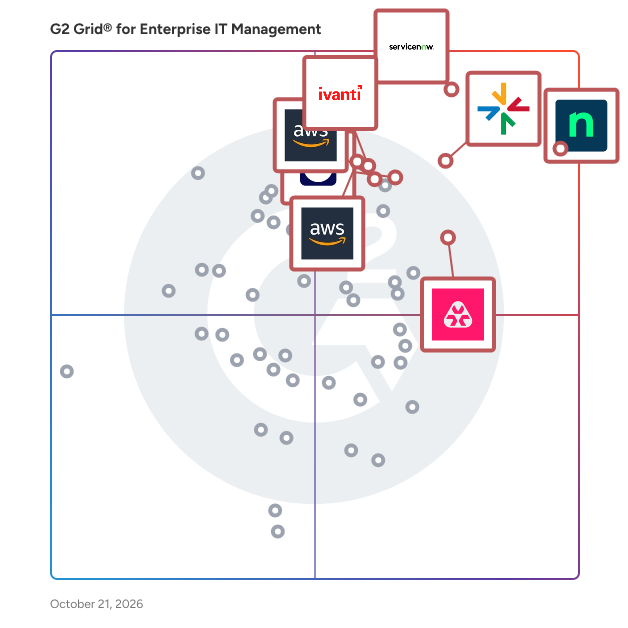
## G2 Grid® for Enterprise IT Management Software
![G2 Grid® for Enterprise IT Management Software plotting products by satisfaction and market presence](https://www.g2.com/categories/enterprise-it-management/grids.png?focus%5B%5D=25671&focus%5B%5D=115948&focus%5B%5D=10524&focus%5B%5D=16222&focus%5B%5D=52114&focus%5B%5D=17351&focus%5B%5D=2397&focus%5B%5D=67010)
Highlighted products: NinjaOne, ServiceNow IT Operations Management, ManageEngine Endpoint Central, Atera, AWS Systems Manager, OpManager Nexus, TeamViewer, and AWS Management Console.
Underlying data: [Grid® JSON](https://www.g2.com/categories/enterprise-it-management/grids.json?focus%5B%5D=ninjaone&amp;focus%5B%5D=servicenow-it-operations-management&amp;focus%5B%5D=manageengine-endpoint-central&amp;focus%5B%5D=atera&amp;focus%5B%5D=aws-systems-manager&amp;focus%5B%5D=opmanager-nexus&amp;focus%5B%5D=teamviewer&amp;focus%5B%5D=aws-management-console)


## How Many Enterprise IT Management Software Products Does G2 Track?
**Total Products under this Category:** 121

### Category Stats (Jul 2026)
- **Average Rating**: 4.4/5 (↑0.01 vs Jun 2026) The average rating of products in this category, based on all submitted ratings
- **Top Trending Product**: OpsRamp (+0.46%) - Among all products in this category, OpsRamp recorded the largest rating increase compared to last month
*Last updated: July 16, 2026*


## How Does G2 Rank Enterprise IT Management Software Products?

**Why You Can Trust G2's Software Rankings:**

- 30 Analysts and Data Experts
- 19,000+ Authentic Reviews
- 121+ Products
- Unbiased Rankings

G2's software rankings are built on verified user reviews, rigorous moderation, and a consistent research methodology maintained by a team of analysts and data experts. Each product is measured using the same transparent criteria, with no paid placement or vendor influence. While reviews reflect real user experiences, which can be subjective, they offer valuable insight into how software performs in the hands of professionals. Together, these inputs power the G2 Score, a standardized way to compare tools within every category.


## Which Enterprise IT Management Software Is Best for Your Use Case?

- **Leader:** [NinjaOne](https://www.g2.com/products/ninjaone/reviews)
- **Highest Performer:** [OpsRamp](https://www.g2.com/products/opsramp/reviews)
- **Easiest to Use:** [NinjaOne](https://www.g2.com/products/ninjaone/reviews)
- **Top Trending:** [NinjaOne](https://www.g2.com/products/ninjaone/reviews)
- **Best Free Software:** [NinjaOne](https://www.g2.com/products/ninjaone/reviews)


---

**Sponsored**

### BackBox

More than 500 enterprises worldwide trust BackBox as their network cyber resilience platform. BackBox includes support for network devices from over 180 vendors, thousands of pre-built automations, and a no-code way to create new ones. BackBox empowers teams with the confidence to automate critical network processes, maintain business continuity during disruptions, and recover swiftly. From backups and OS updates to configuration compliance and vulnerability management, BackBox ensures that automations deliver consistent, reliable outcomes.


[Visit website](https://www.g2.com/external_clickthroughs/record?secure%5Bad_program%5D=paid_promo&amp;secure%5Bad_slot%5D=category_product_list&amp;secure%5Bcategory_id%5D=648&amp;secure%5Bchosen_at%5D=2026-07-17T03%3A53%3A00Z&amp;secure%5Bmedium%5D=sponsored&amp;secure%5Bprioritized%5D=false&amp;secure%5Bproduct_id%5D=57110&amp;secure%5Bresource_id%5D=648&amp;secure%5Bresource_type%5D=Category&amp;secure%5Bsource_type%5D=category_page&amp;secure%5Bsource_url%5D=https%3A%2F%2Fwww.g2.com%2Fcategories%2Fenterprise-it-management%3Fpage%3D7&amp;secure%5Btoken%5D=076ee9c8583ea10861133fd225dcdc7355f46662a59a41b4085c3e4777db6082&amp;secure%5Burl%5D=https%3A%2F%2Fbackbox.com%2F%3Futm_source%3Dg2%26utm_medium%3Dppc&amp;secure%5Burl_type%5D=paid_promos)

---


## What Is Enterprise IT Management Software?

[IT Management Software](https://www.g2.com/categories/it-management)

## What Software Categories Are Similar to Enterprise IT Management Software?

- [Network Monitoring Software](https://www.g2.com/categories/network-monitoring)
- [Incident Management Software](https://www.g2.com/categories/incident-management)
- [Remote Support Software](https://www.g2.com/categories/remote-support)
- [IT Asset Management Software](https://www.g2.com/categories/it-asset-management)
- [Patch Management Software](https://www.g2.com/categories/patch-management)
- [IT Service Management Tools](https://www.g2.com/categories/it-service-management-itsm-tools)
- [Unified Endpoint Management (UEM) Software](https://www.g2.com/categories/unified-endpoint-management-uem)


---

## How Do You Choose the Right Enterprise IT Management Software?

### What You Should Know About Enterprise IT Management Software

### What is Enterprise IT Management Software?

Enterprise IT management software provides a centralized point of control for hundreds or thousands of IT asset lifecycles and users involved in one or multiple environments. IT departments use this comprehensive tool to monitor, optimize, and troubleshoot hardware, software, and applications to ensure that they have enough resources to perform at the SLA level.&amp;nbsp;

This software is a collection of software that usually includes [monitoring tools](https://www.g2.com/categories/monitoring), [help desk software](https://www.g2.com/categories/help-desk), [service desk software](https://www.g2.com/categories/service-desk), [IT service management tools](https://www.g2.com/categories/it-service-management-itsm-tools), [incident management software](https://www.g2.com/categories/incident-management), [endpoint management software](https://www.g2.com/categories/endpoint-management), and other types of IT management solutions. Beyond basic monitoring and inventory management, many tools in this category offer assistance for cloud computing processes and automated software patching so IT experts can manage their time better and not have to manually update each computer. Some of the tools can also assist routine IT tasks automation, allowing IT departments to focus time and energy on more pressing activities. There is no standard as to which software capabilities should be included in this software. Software features requirements for companies are different based on factors such as operating systems, workflows, business processes, business applications, and so on. The main goal is to centralize different IT management processes into a one-stop tool for enterprise-grade IT environments.

For mid-size and enterprise business operations with a complex tech environment, IT issues can halt daily operations. Once an organization reaches a certain size, it’s nearly impossible for IT teams to manually deliver system maintenance and updates. Furthermore, ensuring each company computer is updated with the correct applications and compliant with internal standards affects everything from security to financial outcomes. If a business is approaching a headcount that demands a simplified version of IT operational health, this software is a must-have to complete all of the tasks mentioned above.

#### What Types of Enterprise IT Management Software Exist?

**Service management tools**

This type of tool focuses on IT service management to help employees and customers navigate the company’s IT operations. This includes [help desk](https://www.g2.com/categories/help-desk), [service desk](https://www.g2.com/categories/service-desk), [knowledge management](https://www.g2.com/categories/knowledge-management), [patch management](https://www.g2.com/categories/patch-management), [IT service management](https://www.g2.com/categories/it-service-management-itsm-tools), and [incident management](https://www.g2.com/categories/incident-management) software. DevOps and IT teams would use this type of tool to respond and deliver great user experiences.

**Performance management tools**

Performance management tools focus on ensuring that the company’s IT infrastructure is running smoothly. This includes a set of [monitoring software](https://www.g2.com/categories/monitoring) such as [application performance monitoring](https://www.g2.com/categories/application-performance-monitoring-apm), [cloud infrastructure monitoring](https://www.g2.com/categories/cloud-infrastructure-monitoring), ​​[network monitoring](https://www.g2.com/categories/network-monitoring), and so on. This provides visibility to all the company’s IT infrastructure performance and connects with service management tools when a performance problem arises. Advanced tools also have [AIOps](https://www.g2.com/categories/aiops-platforms) and machine learning to analyze to identify performance issues and provide root-cause analysis for the IT teams.&amp;nbsp;

### What are the Common Features of Enterprise IT Management Software?

The following are some core features within enterprise IT management tools that can help users in better managing their IT infrastructure and service:

**Asset discovery:** At any point in an enterprise, there can be hundreds or thousands of technology assets that are critical for employees and the operation of the company. Taking proper stock of these assets is important for tracking, maintenance, and ensuring compliance and security. The platforms in this category offer enterprise data management related to asset inventory, performance, and history, beginning with the initial discovery of assets for accurate representation. A primary component of many enterprise IT management solutions is the ability to scan a company’s networks and identify the connected devices and assets, including laptops, desktops, and monitors. If new computers are added or removed, the discovery tools in some platforms can automatically detect this and update the data as necessary. IT experts might still need to perform certain manual tasks for configuring new assets based on proper compliance and permissions, but automated asset discovery and history tracking can help provide an accurate picture with minimal legwork.

**IT monitoring:** Monitor or log abnormalities is one of the key capabilities. Monitoring software allows companies to keep tabs on every aspect of their application, software, network, and other IT assets’ functionality. It sets a functional baseline for their overall IT health status and alerts IT managers when the performance dips below the baseline. Most software provides dashboards that allow companies to view their IT performance in real-time.

**Patch management:** Technology evolves quickly, and once employees are set up with appropriate systems, they require ongoing support to keep various applications updated with the constant flow of security patches and third-party updates. The platforms in this category help IT specialists maintain a bird’s eye view of the many patches and updates required for company assets, and the status of each device and network concerning these updates. When an important patch comes along, the files can be mass distributed to many systems connected to the company network, and in some cases automatically installed within corresponding apps. Several platforms offer similar capabilities with new software as a whole, deploying new applications onto devices so employees don’t have to do it themselves.

**Remote desktop access and control:** Although IT teams in larger companies can’t always deliver in-person assistance, modern solutions allow them to assist with individual support issues from afar. Many enterprise IT tools in this category share features of [remote support software](https://www.g2.com/categories/remote-support), which provide users with a way to remotely connect and gain temporary control over employee devices. If an employee is having technical issues with an application or the device itself, IT experts can leverage some of the tools in the category to provide direct support, either walking the employee through the troubleshooting process or taking specific actions directly on their computers through remote control. These capabilities can also be leveraged to help onboard new employees or help them master complex processes involving their technology assets.&amp;nbsp;

**ITSM integration** : IT service management (ITSM) tools should be connected with the monitoring and system management tools. This makes it easier for the users to manage their IT resources and support tickets. For optimal monitoring and resolution of internal issues, these platforms may integrate with service desk software or other programs designed around internal IT support ticketing, case assignment, and resource management.

### What are the Benefits of Enterprise IT Management Software?

A few of the benefits of enterprise IT management software are as follows:

**Provide visibility over the complete IT infrastructure:** The enterprise solutions in this category offer high-level insights into critical systems, assist with project management related to optimization, balancing, and remediation of company infrastructure. The data generated by these platforms makes them a natural complement to [corporate performance management software](https://www.g2.com/categories/corporate-performance-management-cpm), which provides insight into business objectives and the distributed activities that play a role in several KPIs. In addition, this solution can collect data from various sources such as SaaS, cloud platforms, mobile devices, on-premise assets, and so on. Enterprise IT management platforms offer the most relevant data for keeping systems running alongside other assets that assist with many other tasks IT teams perform. Visibility is a priceless commodity for modern IT teams; these tools are an ideal way for these departments to achieve it.

**Reduce downtime:** For mid-size and enterprise businesses, the integrity and performance of company data centers and devices are paramount. With these robust platforms, IT teams can better manage IT asset performance via a central dashboard and related systems to ensure that operations run smoothly. The comprehensive performance metrics and actionable insights offered by these solutions benefit IT teams with planning and execution of resource allocation. When companies get too big for more hands-on IT processes, these tools can help transition teams into the enterprise mindset with large-scale device management and analysis.

**Save time from repetitive tasks:** To manage hundreds to thousands of IT assets and devices, IT managers can streamline tasks such as patch deployment and user administration to make sure everything is up to date and follows compliance. Enterprise IT management solutions help automate security and compliance by systematically applying patches, configurations, and custom policies. This helps companies to enforce the most up-to-date IT policies to better control their IT infrastructure.

### Who Uses Enterprise IT Management Software?

Below are the teams, personas, roles, and functions that may use the software:

**IT teams:** Enterprise IT management tools are specially designed to be used across the IT department of a mid-sized or larger organization. With this software, the IT team can automate asset management, fix abnormalities, and support individual employees with IT issues.&amp;nbsp;

**Cross-functional teams:** Outside of the IT department, other teams can use this software to manage software and devices. They can file tickets and receive remote support when they encounter IT problems.&amp;nbsp;

#### Software Related to Enterprise IT Management Software

Related solutions that can be used together with enterprise IT management software include:

[Software asset management (SAM) software](https://www.g2.com/categories/software-asset-management-sam) **:** The software used by any organization are central to the daily processes and objectives. These applications can require a great deal of tracking and updating as new versions are released and licenses approach expiration. Software asset management (SAM) is a natural complement to enterprise IT management software since they help IT teams maintain visibility over software, its usage, and use cases across teams. These platforms offer a detailed inventory of a company’s active and inactive software tools, along with their versioning and license details, and the employees currently using them. If an important patch is made available for a tool, these platforms can help deploy and configure timely updates. Furthermore, if a critical application is nearing the end of its license terms, these platforms can help facilitate renewals or upgrades so employees can continue to use and benefit from their important applications.

[IT strategy consulting providers](https://www.g2.com/categories/it-strategy-consulting) **:** Deciding how to structure an IT team—including the technology and how they use it—requires a great deal of consideration, with each decision affecting the business as a whole. As a company grows and IT operations become more complex, it may benefit a company to hire an outside consultant for assistance in making the best decisions for a business’s unique needs. IT strategy consulting providers offer a variety of advisory services related to planning and implementing technology strategies. These services might come in handy when mapping out a company’s initial IT efforts, but also when restructuring or optimizing an existing IT department.

### Challenges with Enterprise IT Management Software

Software solutions can come with their own set of challenges.&amp;nbsp;

**Integration with other solutions:** Since an enterprise IT management software is usually a collection of software, it is difficult to integrate them with existing infrastructure. Unless the company operates under a single environment, which is rarely the case with large companies, there will be compatibility issues. The company should prepare to pay for additional customization to integrate the software into its legacy systems.&amp;nbsp;

**Resistance to change:** There will be resistance from employees when the company is introducing a set of software. This is an implementation challenge that usually comes with the introduction of any new software, except that this time the challenge is bigger with a collection of software. Those who benefit from the current infrastructure or manual work might fear losing their job or have trouble adapting to the new software. The best way to handle this is to communicate with the stakeholders early during the RFP process so they can have their input. This also encourages buy-in since everyone’s voice is being heard.

**Lack of training:** It is not easy to adapt to a new set of software. The company needs to ensure that the IT team and other employees have time for training before the official launch. There should also be a place where staff can ask questions early so everyone is on the same page. Again, those questions sometimes bring out integration issues so it is best to spot them early.&amp;nbsp;

### How to Buy Enterprise IT Management Software

#### Requirements Gathering (RFI/RFP) for Enterprise IT Management Software

Enterprise IT management software requirements can include standard asset management features like asset discovery and remote control and industry-specific criteria such as compliance with data regulations. Every company has different needs and many might not even need every software under this software. The buyer should make a business case of what goals need to be accomplished. Then they can list out the feature requirements based on the goals. Last, the buyer needs to create a budget based on the identified goals, and how much value will the software bring to the table.&amp;nbsp;

#### Compare Enterprise IT Management Software Products

**Create a long list**

A long list should include all products that have the core features for an enterprise-level IT management software unless the feature requirement doesn’t need that specific feature. For example, there is no need to have network monitoring if the company is happy with the existing network monitoring software. When buyers also need to replace certain systems, the long list can consist of software with advanced functionality such as workload automation and cloud computing.&amp;nbsp;

**Create a short list**

To generate a short list, buyers should eliminate products from the long list based on integration issues, budget, and bundling. Integration issues are paramount, so the buyer should enquire about additional customization costs with the vendor. Some vendors sell everything in a bundle, which increases the cost. Bundling should be negotiated to fit the budget, especially when the buyer already has some part of the system in place. There should be fewer than five vendors at this point.&amp;nbsp;

**Conduct demos**

The demos should be based on scenarios that simulate real-life operations at each stage of the IT asset operation, from daily operations to specific scenarios such as server downtime. Each scenario can focus on a type of requirement, such as monitoring abnormalities, remote support on company devices, or patching new software across different environments. This might take a long time because the buyer is testing a software. Ensuring that there are five or lesser than five products from the short list will help the company to save time while conducting extensive demos.&amp;nbsp;

#### Selection of Enterprise IT Management Software

**Choose a selection team**

The selection team usually includes IT asset managers, executives such as the CIO, and subject matter experts with extensive knowledge of the use cases. Managers from other departments such as support or procurement can also be involved in their teams using the software depending on the use case. Employees should also have their input during the product demo so everyone has a basic understanding of the software.&amp;nbsp;

**Negotiation**

The negotiation should focus on the strengths and weaknesses of each product and vendor. For instance, the ability of the vendor to customize the system or provide global support can be a deal-breaker.

**Final decision**

Since different software will provide different capabilities, there might not be a direct comparison between the selections. So while the pricing of the software is important, buyers should try to estimate the potential ROI of each solution before making a decision.


