Best Email Signature Software for Small Business - Page 2

How Many Email Signature Software Products Does G2 Track?

Total Products under this Category: 97

Category Stats (Oct 2026)

  • Average Rating: 4.51/5 (↑0.02 vs Sep 2026) The average rating of products in this category, based on all submitted ratings
  • Top Trending Product: MySignature (+0.28%) - Among all products in this category, MySignature recorded the largest rating increase compared to last month

Last updated: October 07, 2026

How Does G2 Rank Email Signature Software Products?

Why You Can Trust G2's Software Rankings:

  • 30 Analysts and Data Experts
  • 17,200+ Authentic Reviews
  • 97+ Products
  • Unbiased Rankings

G2's software rankings are built on verified user reviews, rigorous moderation, and a consistent research methodology maintained by a team of analysts and data experts. Each product is measured using the same transparent criteria, with no paid placement or vendor influence. While reviews reflect real user experiences, which can be subjective, they offer valuable insight into how software performs in the hands of professionals. Together, these inputs power the G2 Score, a standardized way to compare tools within every category.

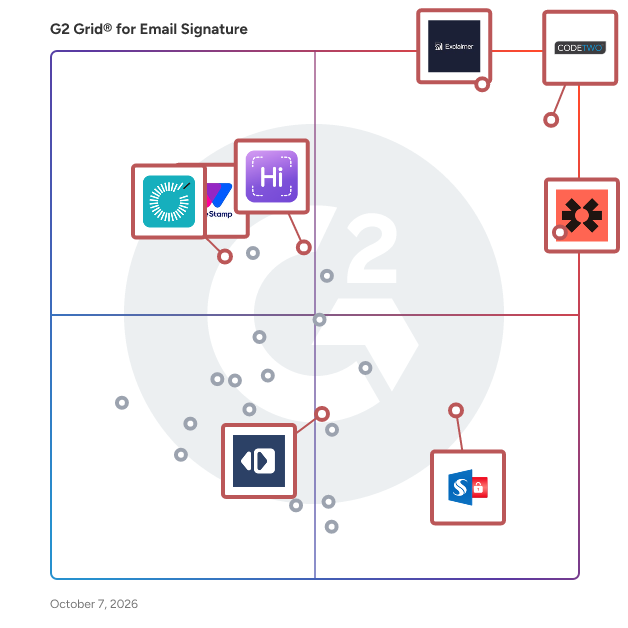
G2 Grid® for Email Signature Software

G2 Grid® for Email Signature Software plotting products by satisfaction and market presence

Highlighted products: Blinq, CodeTwo Email Signatures 365, Exclaimer, WiseStamp, Sigsync, HiHello, Rocketseed, and MySignature.

Underlying data: [Grid® JSON](https://www.g2.com/categories/email-signature/grids.json?focus%5B%5D=blinq-me&focus%5B%5D=codetwo-email-signatures-365&focus%5B%5D=exclaimer&focus%5B%5D=wisestamp&focus%5B%5D=sigsync&focus%5B%5D=hihello&focus%5B%5D=rocketseed&focus%5B%5D=mysignature&segment=small-business)

MySigMail

MySigMail is an open-source email signature generator designed to help users create professional and customizable email signatures without any coding knowledge. It offers a user-friendly interface that allows for deep customization, including fonts, colors, avatar shapes, and social icons, ensuring that each signature aligns with personal or corporate branding. The platform provides ready-to-use templates for a quick start and flexible add-ons like disclaimers and call-to-action blocks to enhance the signature's functionality. Built with Vue 3, Vite, and Tailwind, MySigMail is lightweight and operates entirely on the client-side, making it easy to run locally without server setup. Key Features: - Customization: Adjust fonts, colors, avatar shapes, and social icons to match your brand identity. - Templates: Access a variety of professionally designed layouts for quick and easy signature creation. - Add-Ons: Incorporate elements like disclaimers and call-to-action blocks to enhance your signature's effectiveness. - Client-Side Operation: Run the application locally without the need for server setup, ensuring privacy and control. - Open Source: Freely access, modify, and distribute the code, fostering community-driven improvements and collaboration. The primary value of MySigMail lies in its ability to simplify the creation of professional email signatures, enabling users to enhance their brand image and communication without technical expertise. By offering a free, customizable, and open-source solution, it addresses the need for accessible and flexible email signature generation, catering to individuals and businesses seeking to maintain a consistent and polished email presence.

Average Rating: 4.8/5.0

Total Reviews: 55

How Do G2 Users Rate MySigMail?

  • Has the product been a good partner in doing business?: 9.6/10 (Category avg: 9.2/10)
  • Email Software Integrations: 8.8/10 (Category avg: 8.8/10)
  • Email Distribution: 9.5/10 (Category avg: 9.0/10)
  • Account-Based Marketing: 8.6/10 (Category avg: 8.5/10)

Who Is the Company Behind MySigMail?

  • Seller: MySigMail
  • HQ Location: N/A
  • Twitter: @mysigmail
    78 Twitter followers
  • LinkedIn® Page: www.linkedin.com
    1 employees on LinkedIn®

Who Uses This Product?

  • Top Industries: Marketing and Advertising, Information Technology and Services
  • Company Size: 96% Small, 2% Large

What Do G2 Reviewers Say About MySigMail?

AI-generated summary from verified user reviews

Pros
  • Users find MySigMail's user-friendly interface remarkably intuitive, streamlining the process of creating professional email signatures.
  • Users love the user-friendly interface of MySigMail, making email signature creation simple and efficient for all skill levels.
  • Users commend the intuitive design of MySigMail, simplifying the creation of professional email signatures effortlessly.
  • Users value the intuitive communication of MySigMail, praising its user-friendly design and responsive customer support.
  • Users praise the exceptional customer satisfaction with MySigMail, noting responsive support and a user-friendly experience.
Cons
  • Users face integration issues with MySigMail, requiring manual signature insertion instead of seamless platform integration.
  • Users find the learning difficulty with MySigMail challenging, especially during setup and for advanced features.
  • Users find the initial setup time-consuming and experience a learning curve when using advanced MySigMail features.
  • Users face the challenge of no direct integration, requiring manual signature insertion, which complicates usability.

What Are Recent G2 Reviews of MySigMail?

What Are G2 Users Discussing About MySigMail?

Email Signature Rescue

Since 2013 we've been providing SMBs with online tools to create, manage and deploy their own HTML email signatures. 250,000+ Professionals trust Email Signature Rescue with their HTML email signature software and template needs.

Average Rating: 4.7/5.0

Total Reviews: 27

How Do G2 Users Rate Email Signature Rescue?

  • Has the product been a good partner in doing business?: 8.5/10 (Category avg: 9.2/10)
  • Email Software Integrations: 7.7/10 (Category avg: 8.8/10)
  • Email Distribution: 8.9/10 (Category avg: 9.0/10)
  • Account-Based Marketing: 7.4/10 (Category avg: 8.5/10)

Who Is the Company Behind Email Signature Rescue?

  • Seller: Loadout Pty Ltd.
  • Year Founded: 2012
  • HQ Location: Adelaide, AU
  • Twitter: @DivParty
    26 Twitter followers
  • LinkedIn® Page: au.linkedin.com
    2 employees on LinkedIn®

Who Uses This Product?

  • Company Size: 93% Small, 4% Medium

What Do G2 Reviewers Say About Email Signature Rescue?

AI-generated summary from verified user reviews

Pros
  • Users find Email Signature Rescue incredibly easy to use, facilitating quick implementation and management for everyone.
  • Users enjoy the easy integration and high-quality design of Email Signature Rescue, making it perfect for small businesses.
  • Users love the signature quality of Email Signature Rescue, enjoying its modern look and consistent functionality.
  • Users value the amazing customer support provided by Email Signature Rescue, enhancing their overall experience with the product.
  • Users value the reliability and ease of implementation of Digital Signatures for enhancing email communication.
Cons
  • Users face Outlook integration issues that hinder signature display, particularly with iPhone's Mail app, complicating usage.
  • Users find the setup process challenging, requiring multiple steps and app downloads before enjoying easy updates.
  • Users desire a greater option of user accounts as the pricing jump is quite significant between tiers.
  • Users find the interface not user-friendly initially, needing improvement for a smoother experience and modern design.
  • Users face poor mobile support with Email Signature Rescue, particularly when using the Mail app on iPhone.

What Are Recent G2 Reviews of Email Signature Rescue?

Bybrand

Email signature software that helps strengthen your brand image using the employees. At Bybrand, we improved the way businesses manage email signatures. Our platform offers a seamless and efficient solution to create, manage, and deploy professional email signatures across your organization, enhancing brand consistency and communication effectiveness. ##Integrations Bybrand's key offerings include seamless integrations with leading tools such as Google Workspace, Google Sheets, Zoho, Microsoft 365 (Outlook), and more. This integration capability allows for faster email signature creation and deployment, saving valuable time for IT managers and ensuring uniform email communication across the company. ##For different industries Our solution is designed to meet the needs of various industries, including IT & tech services, marketing, branding, healthcare, accounting firms, tourism, HR, and consulting companies. Bybrand's email signature marketing feature helps capture clients for businesses on every email message sent, contributing to marketing success and brand reinforcement. Your company's email communication (external and internal) with Bybrand will no longer be the same. We will provide you with a powerful tool for marketing, help desk, sales, and finally branding.

Average Rating: 4.7/5.0

Total Reviews: 20

How Do G2 Users Rate Bybrand?

  • Has the product been a good partner in doing business?: 9.4/10 (Category avg: 9.2/10)
  • Email Software Integrations: 9.3/10 (Category avg: 8.8/10)
  • Email Distribution: 9.2/10 (Category avg: 9.0/10)
  • Account-Based Marketing: 9.0/10 (Category avg: 8.5/10)

Who Is the Company Behind Bybrand?

  • Seller: Bybrand
  • Year Founded: 2017
  • HQ Location: Rio de Janeiro, BR
  • Twitter: @bybrandio
    228 Twitter followers
  • LinkedIn® Page: www.linkedin.com
    2 employees on LinkedIn®

Who Uses This Product?

  • Company Size: 85% Small, 15% Medium

What Do G2 Reviewers Say About Bybrand?

AI-generated summary from verified user reviews

Pros
  • Users praise the helpful customer support of Bybrand, ensuring a smooth setup and integration process.
  • Users find Bybrand to be incredibly easy to use, streamlining email signature creation with helpful templates.
  • Users find the easy setup of Bybrand beneficial for creating professional email signatures effortlessly.
  • Users love the easy email integration with Bybrand, enhancing their professional image effortlessly.
  • Users value the friendly support from Bybrand, exemplified by the quick assistance from the CEO himself.

What Are Recent G2 Reviews of Bybrand?

AI can help you find the answers. G2 helps you trust them.

Connect G2 to Claude or ChatGPT for answers grounded in G2's trusted reviews, comparisons, and pricing from real user insights.

How it works

Letsignit

Letsignit is a leading email signature management and marketing platform that helps organizations transform employee emails into powerful, branded communication touchpoints. Designed for both marketing and IT teams, Letsignit centralizes and automates email signature deployment to ensure every message reflects a unified, on-brand identity. Trusted by over 2,000,000 users worldwide and maintaining a 98% customer satisfaction rate, Letsignit empowers businesses of all sizes to optimize brand consistency, boost engagement, and turn everyday emails into measurable marketing opportunities. With its intuitive drag-and-drop signature designer, teams can easily create professional, personalized email signatures that include dynamic, trackable marketing banners: perfect for promoting events, sharing updates, or driving traffic to key campaigns. This agility enables marketing teams to adapt signatures in real time, keeping communications aligned with current initiatives while increasing visibility and click-through rates. For IT departments, Letsignit integrates seamlessly with systems such as Microsoft 365 and Active Directory, allowing quick and secure signature deployment across departments, regions, or subsidiaries. This reduces administrative workload while maintaining compliance and consistency. Built to meet strict global data protection standards, Letsignit is ISO/IEC 27001:2017 and ISO/IEC 27018:2019 certified, ensuring enterprise-grade security and privacy. With dedicated multilingual support in English, French, and Spanish, Letsignit combines reliable technology with human expertise, making it the preferred solution for organizations that want to elevate their email communications, strengthen their brand image, and engage audiences with every send.

Average Rating: 4.5/5.0

Total Reviews: 217

How Do G2 Users Rate Letsignit?

  • Has the product been a good partner in doing business?: 8.9/10 (Category avg: 9.2/10)
  • Email Software Integrations: 9.0/10 (Category avg: 8.8/10)
  • Email Distribution: 9.2/10 (Category avg: 9.0/10)
  • Account-Based Marketing: 8.8/10 (Category avg: 8.5/10)

Who Is the Company Behind Letsignit?

  • Seller: Letsignit
  • Company Website:
  • Year Founded: 2013
  • HQ Location: Marseille, Bouches-du-Rhône
  • Twitter: @letsignit
    401 Twitter followers
  • LinkedIn® Page: www.linkedin.com
    102 employees on LinkedIn®

Who Uses This Product?

  • Who Uses This: Marketing Manager
  • Top Industries: Information Technology and Services, Computer Software
  • Company Size: 68% Medium, 26% Small

What Do G2 Reviewers Say About Letsignit?

AI-generated summary from verified user reviews

Pros
  • Users value the quick and effective customer support provided by Letsignit, enhancing their overall experience.
  • Users appreciate the fast response time of Letsignit support, enhancing their experience and problem resolution.
  • Users praise the ease of use in Letsignit, noting straightforward implementation and responsive customer support.
  • Users value the friendly support from Letsignit, appreciating fast and professional assistance whenever needed.
  • Users love the easy integration and quick deployment of email signature templates and campaigns with Letsignit.
Cons
  • Users find the SMTP connector configuration a bit complicated, which hampers the overall ease of use.
  • Users find a steep learning curve, but appreciate the excellent customer support available to help them navigate.
  • Users face Outlook integration issues, highlighting the need for easier access to the Outlook add-in.

What Are Recent G2 Reviews of Letsignit?

What Are G2 Users Discussing About Letsignit?

Crossware Email Signature

Crossware Email Signature is an email signature management solution designed to help organizations maintain consistent, compliant, and personalized signatures across all emails sent from their domain. This tool integrates seamlessly with Microsoft 365, Microsoft Exchange, and HCL Domino, ensuring that every email sent from any device includes a professional signature that reflects the company’s branding and legal requirements. The target audience for Crossware Email Signature includes businesses of all sizes that prioritize brand consistency and compliance in their communications. It is particularly beneficial for marketing and legal teams who need to ensure that signatures not only promote the brand but also include necessary disclaimers and legal information. The solution is versatile, catering to various use cases such as managing marketing campaigns through signature banners, ensuring compliance with legal standards, and enhancing brand visibility in every email correspondence. One of the standout features of Crossware Email Signature is its user-friendly drag-and-drop visual editor, which allows users to create custom signatures without needing extensive technical knowledge. For those who prefer a more hands-on approach, the HTML source code editor provides the flexibility to design signatures with greater complexity. Additionally, the tool is designed to be dynamic and intelligent, allowing for context-sensitive signatures that can adapt based on specific criteria such as recipient details or the sender's department. Crossware Email Signature offers robust rule-building capabilities that enable organizations to define when and how signatures are applied. Users can create rules based on various parameters, including Active Directory fields, recipient addresses, and specific dates. For more advanced needs, the option to write complex rules in C# provides further customization. This level of control ensures that the right signatures are applied in the right contexts, enhancing the relevance and professionalism of email communications. Security is a priority for Crossware Email Signature. The solution is built to operate securely within Microsoft Azure Datacenters, ensuring that emails are processed without being stored or copied. Organizations can also choose their preferred Microsoft Datacenter during setup, adding an extra layer of security. With features such as real-time previewing of signatures based on recipient and sender information, and the ability to manage signature edits by different teams, Crossware Email Signature stands out as a comprehensive solution for email signature management.

Average Rating: 4.8/5.0

Total Reviews: 34

How Do G2 Users Rate Crossware Email Signature?

  • Has the product been a good partner in doing business?: 9.8/10 (Category avg: 9.2/10)
  • Email Software Integrations: 9.1/10 (Category avg: 8.8/10)
  • Email Distribution: 9.0/10 (Category avg: 9.0/10)
  • Account-Based Marketing: 8.6/10 (Category avg: 8.5/10)

Who Is the Company Behind Crossware Email Signature?

  • Seller: Crossware Ltd
  • Company Website:
  • Year Founded: 1992
  • HQ Location: Auckland
  • Twitter: @TeamCrossware
    1,757 Twitter followers
  • LinkedIn® Page: www.linkedin.com
    33 employees on LinkedIn®

Who Uses This Product?

  • Top Industries: Information Technology and Services
  • Company Size: 47% Medium, 44% Small

What Do G2 Reviewers Say About Crossware Email Signature?

AI-generated summary from verified user reviews

Pros
  • Users find Crossware Email Signature to be easy to use, appreciating its intuitive design and helpful guides.
  • Users praise the exceptional customer support of Crossware Email Signature for its responsiveness and helpfulness.
  • Users value the signature quality of Crossware, ensuring consistency and professionalism across all email communications.
  • Users value the flexible integration of Crossware Email Signature, enhancing signature management and overall efficiency.
  • Users find the easy setup of Crossware Email Signature invaluable for seamless email communication and consistent branding.
Cons
  • Users feel that Crossware Email Signature is expensive and suggest that additional features would justify the cost.
  • Users find the lack of visibility in signature application logs and minor delays problematic during use.
  • Users find the user interface clunky, indicating a need for improvement despite the tool’s branding benefits.
  • Users find the complex administration challenging, desiring better logging for email signatures applied to messages.
  • Users often face email issues, with HTML files not rendering correctly and icons disappearing in received emails.

What Are Recent G2 Reviews of Crossware Email Signature?

Dynasend

A pioneer of email signature management, Dynasend was founded in 1999 on the premise that the simple email signature plays an outsized role in corporate branding - often serving as the brand’s first impression. Replacing random, user-created, DIY signatures with standardized (brand approved) signatures has been at the forefront of everything we have done over the past 27 years. Our deep experience in meeting the ever-evolving needs of marketing departments has guided the design and feature set of our second-generation email signature management platform. At the same time, we’re fully aware that the task of configuring and deploying the email signature technology falls on the shoulders of IT, and furthermore that the ongoing maintenance and support of the program can be both cumbersome and time-consuming. Dynasend serves as the bridge between IT and marketing. The approach is quite simple: - Dynasend collaborates with your marketing team on the design requirements for the email signature program and completes the setup and configuration. This is our area of expertise, and we see no reason to ask our customers to learn it. - IT (optionally) configures the sync to Entra ID and (optionally) sets up SSO. They then deploy the Dynasend O365 add-in to their user’s mailboxes (via the O365 admin dashboard). - Marketing then takes over program management via the Dynasend manager’s dashboard. In other words, we prepare a plug-and-play service for you, IT plugs it, and marketing plays it. Every decision we’ve made in the design of the service has been to make things as easy as possible for IT while still giving marketing the flexibility and tools that they inevitably will want. Dynasend is a true “one and done” for IT, forever ending email signature headaches while satisfying the needs of your marketing department. And best of all, the additional burden on users is zero!

Average Rating: 4.9/5.0

Total Reviews: 55

How Do G2 Users Rate Dynasend?

  • Has the product been a good partner in doing business?: 9.8/10 (Category avg: 9.2/10)
  • Email Software Integrations: 9.8/10 (Category avg: 8.8/10)
  • Email Distribution: 9.7/10 (Category avg: 9.0/10)
  • Account-Based Marketing: 8.7/10 (Category avg: 8.5/10)

Who Is the Company Behind Dynasend?

  • Seller: Dynasend
  • Company Website:
  • Year Founded: 1999
  • HQ Location: 5698 County Rd N, Potosi, WI 53820, USA
  • LinkedIn® Page: www.linkedin.com
    2 employees on LinkedIn®

Who Uses This Product?

  • Top Industries: Manufacturing, Construction
  • Company Size: 73% Medium, 18% Small

What Do G2 Reviewers Say About Dynasend?

AI-generated summary from verified user reviews

Pros
  • Users find Dynasend's ease of use outstanding, making email signature management effortless and efficient across organizations.
  • Users value the easy setup of Dynasend, ensuring seamless integration and management for email signatures across the organization.
  • Users appreciate the ease of managing email signatures with Dynasend, ensuring consistent branding organization-wide.
  • Users commend exceptional customer satisfaction with Dynasend, praising reliable support and a seamless user experience.
  • Users praise the excellent customer support of Dynasend, enhancing their overall experience and easing the process.
Cons
  • Users face a learning difficulty with advanced customization, but helpful documentation and support ease the process.

What Are Recent G2 Reviews of Dynasend?

Mailbutler

This is Mailbutler, the email plugin which makes your inbox smarter. Mailbutler gives you a multitude of useful, productivity-boosting features which you can access right in your inbox. It improves on the native features of your Apple Mail, Gmail or Outlook email client by offering smart functionality. It offers an artificial intelligence-powered email assistant that can write messages for you, Cloud Delivery so your scheduled email can be sent even if your computer is offline, advanced email tracking which doesn't require approval from your recipient, and a powerful Contacts feature which can help you improve your customer relationships, among many other smart, inbox-enhancing features. These include: • Smart Assistant: An AI-powered email assistant that writes, summarizes and improves messages, finds tasks and contacts, and responds for you. • Smart Send Later: Smart scheduling functionality to help you optimize your email delivery times. • Recipient Optimized Scheduling: Suggests the best time for you to send an email to maximize your chances of it being opened. • Email Tracking: Find out when, where, and how often your email or link was opened. For those using iCloud or IMAP email addresses, see exactly who has opened your email when you send a message to multiple recipients. Also send tracked emails from your mobile phone. • Snooze: Snooze less important emails temporarily and they’ll reappear at a time of your choosing. • Contacts: Get essential insights into your contacts to maintain peak customer communication. • Signatures: Beautiful and professional email signatures with extensive creative control. • Templates: Craft message templates to increase productivity and efficiency. • Tasks: Always remember to take action. Attach tasks to your contacts and emails and keep your to-dos organized. • Notes: Never forget anything again. Add notes to your contacts and emails so you never forget any important information. • Collaborators: Be consistent. Share contacts, notes, tasks, signatures, templates and more with your team members. === Why Mailbutler? === • We’re constantly upgrading and revamping features based on customer feedback • Mailbutler integrates directly and easily into your email client • Cross-platform functionality means if other members of your team are using other email clients, Mailbutler still works perfectly • All your messages are secure and never accessed or read by Mailbutler • Every user gets a 14-day free trial with no credit card required • Our dedicated customer support team responds to all queries within 24 hours === Testimonials === “Without a doubt, I recommend Mailbutler. It’s revolutionized my inbox.” Hollie Barac, Accountability and Productivity Partner “Mailbutler’s support feels personal and it’s what sets them apart from so many other companies.” Craig Bowman, President of Common Ground Consulting “With Email Tracking I can focus my energy on serving clients instead of chasing emails.” Charlene Brown, Owner of Bklyn Custom Designs === Got questions? === Contact us anytime at support@mailbutler.io Head to our Support Center for detailed help on using Mailbutler === Connect with us! === Facebook: https://www.facebook.com/mailbutler/ Twitter: https://twitter.com/mailbutler LinkedIn: https://www.linkedin.com/company/mailbutler-gmbh/

Average Rating: 4.5/5.0

Total Reviews: 65

How Do G2 Users Rate Mailbutler?

  • Has the product been a good partner in doing business?: 9.7/10 (Category avg: 9.2/10)
  • Email Software Integrations: 10.0/10 (Category avg: 8.8/10)
  • Email Distribution: 9.2/10 (Category avg: 9.0/10)

Who Is the Company Behind Mailbutler?

Who Uses This Product?

  • Who Uses This: CEO
  • Top Industries: Marketing and Advertising
  • Company Size: 82% Small, 9% Medium

What Do G2 Reviewers Say About Mailbutler?

AI-generated summary from verified user reviews

Pros
  • Users find Mailbutler's affordable pricing for the Smart Plan a great value for its professional tools and features.
  • Users value the AI integration in Mailbutler, enhancing professionalism and efficiency in managing email tasks.
  • Users value the excellent performance of read receipts in Mailbutler, enhancing professionalism and ease in email tasks.
  • Users find the excellent customer support of Mailbutler tremendously helpful in enhancing their email experiences.
  • Users highlight the ease of use of Mailbutler, particularly appreciating its Smart Plan and AI Assistant features.

What Are Recent G2 Reviews of Mailbutler?

What Are G2 Users Discussing About Mailbutler?

Yukta Rustagi
YR
Researched and written by Yukta Rustagi
Updated