Best Document Management Software - Page 29

How Many Document Management Software Products Does G2 Track?

Total Products under this Category: 750

Category Stats (Oct 2026)

  • Average Rating: 4.44/5 (↑0.01 vs Sep 2026) The average rating of products in this category, based on all submitted ratings
  • Top Trending Product: Nectain (+2.02%) - Among all products in this category, Nectain recorded the largest rating increase compared to last month

Last updated: October 26, 2026

How Does G2 Rank Document Management Software Products?

Why You Can Trust G2's Software Rankings:

  • 30 Analysts and Data Experts
  • 26,700+ Authentic Reviews
  • 750+ Products
  • Unbiased Rankings

G2's software rankings are built on verified user reviews, rigorous moderation, and a consistent research methodology maintained by a team of analysts and data experts. Each product is measured using the same transparent criteria, with no paid placement or vendor influence. While reviews reflect real user experiences, which can be subjective, they offer valuable insight into how software performs in the hands of professionals. Together, these inputs power the G2 Score, a standardized way to compare tools within every category.

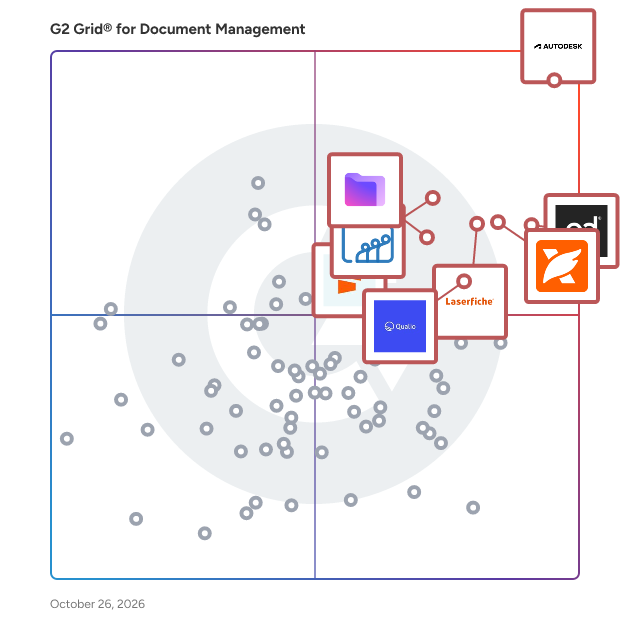
G2 Grid® for Document Management Software

G2 Grid® for Document Management Software plotting products by satisfaction and market presence

Highlighted products: Autodesk Forma (formerly Autodesk Construction Cloud), PandaDoc, Foxit PDF Editor, Laserfiche, Zoho WorkDrive, Proton Drive For Business, Qualio, and Seismic Enablement Cloud.

Underlying data: [Grid® JSON](https://www.g2.com/categories/document-management/grids.json?focus%5B%5D=autodesk-forma-formerly-autodesk-construction-cloud&focus%5B%5D=pandadoc&focus%5B%5D=foxit-pdf-editor&focus%5B%5D=laserfiche&focus%5B%5D=zoho-workdrive&focus%5B%5D=proton-drive-for-business&focus%5B%5D=qualio&focus%5B%5D=seismic-enablement-cloud)

ELOprofessional

The enterprise content management system ELOprofessional provides you with all the functions you need to effectively manage, quickly access, and securely control information throughout its entire life cycle.

Who Is the Company Behind ELOprofessional?

  • Seller: ELO
  • Year Founded: 2015
  • HQ Location: Miami, US
  • Twitter: @elo_usa
    152 Twitter followers
  • LinkedIn® Page: www.linkedin.com
    4 employees on LinkedIn®

elsai DocLoom

DocLoom is a document intelligence layer that converts PDFs, images, and forms into clean, structured, verified data for enterprise workflows. Instead of relying on a single OCR engine, DocLoom analyzes each document and routes it to the most appropriate extraction provider based on document type, layout, complexity, and cost. The extracted content is normalized into structured Markdown while preserving tables, headers, and document hierarchy. DocLoom then maps the content to an organization’s required JSON schema using configurable extraction instructions, making the output ready for downstream applications, analytics, and automated workflows. Every extracted field receives a confidence score. When a value falls below the configured threshold, DocLoom automatically re-extracts the affected field or page using a higher-capability provider and merges the corrected result back into the final output. This confidence-aware workflow helps teams identify and resolve low-quality extractions before the data moves downstream. DocLoom supports Azure Document Intelligence, AWS Textract, Google Document AI, and DotsOCR with ranked fallback routing if the primary provider fails. Organizations handling sensitive or regulated documents can also run DotsOCR locally within their own infrastructure, keeping document data inside their environment. Documents can be submitted through an API, Python SDK, or portal. DocLoom can be accessed through Azure Marketplace, delivered as SaaS, or deployed within the customer’s own infrastructure. It is designed for organizations that need reliable structured data extraction while maintaining control over output consistency, confidence thresholds, provider selection, and data residency.

Who Is the Company Behind elsai DocLoom?

  • Seller: elsai
  • Year Founded: 2025
  • HQ Location: India, Chennai
  • Twitter: @elsai_ai
  • LinkedIn® Page: www.linkedin.com
    9 employees on LinkedIn®
  • Ownership: elsai

Who Uses This Product?

  • Company Size: 100% Small

What Are Recent G2 Reviews of elsai DocLoom?

Elyse

Elyse® is a high-integrity controlled document management system that understands your data. Designed from the ground up to serve the people who use it, Elyse has a User-Centric data architecture that carefully mirrors the real world experience of how users expect controlled document management systems to behave. The result is: Users find what they need faster and experience less frustration. Administrators spend less time maintaining the system because there are fewer workarounds and customizations. Auditors have stronger evidence because foundational rules are hard wired. Organizations have a platform that is easier to validate and extend because it doesn't need program code to compensate for highly abstracted data. Elyse is designed for any organization that needs to manage controlled documents such as procedures, standards, SOPs, work instructions, quality plans, manuals and engineering drawings. It is fully configured and ready to use out of the box and does not require a team of deployment specialists. Elyse addresses many of the compromises and recurring pathologies presented by common alternatives. Rather than treating a document as an independent file with metadata, Elyse models the relationships of metadata first. This smooths the flow of everything that occurs downstream. File sharing systems are centered on files. Sophisticated document management systems are centered on metadata associated with the files. Elyse is centered on the relationships that give the metadata of controlled documents their context, meaning and integrity. Experience the power of Elyse via the interactive live demonstration at demo.silkwoodsoftware.com. No registration required. Or download the software for a full evaluation.

Who Is the Company Behind Elyse?

AI can help you find the answers. G2 helps you trust them.

Connect G2 to Claude or ChatGPT for answers grounded in G2's trusted reviews, comparisons, and pricing from real user insights.

How it works

EML to PDF Converter Software

EML to PDF Converter Software turns saved .eml messages into PDF, HTML or plain text files on a Windows PC. Add a folder of exported mail, pick the format and get one document per email or a single merged file for the whole queue. EML to PDF conversion runs locally, so the mail never leaves the computer. 🔰 How to use the converter 1. Click Add files or Add folder, or drag .eml files into the window. 2. Click a message in the list to read it in the built-in preview before converting. 3. Choose the output: PDF for print and archive, HTML for a browser, TXT for text only. 4. Pick one file per message, or combine the queue into one PDF in list order. 5. Switch Include images on to keep inline pictures, or off for lighter printouts. 6. Set the destination folder and start. Messages are processed one after another. 👍 Why IT and office teams pick this EML to PDF tool - Mail stays on the workstation. There is no upload step and no account to create. - Neither Outlook nor Thunderbird has to be installed, because the program reads the saved files directly. - An export of hundreds or thousands of messages goes through in one run, with no cap on the number of files in the licensed version. - HTML layout, fonts, colors and tables survive, and links stay clickable in the PDF. - Each document starts with From, Date, To and Subject. The date is printed as the sender wrote it, time offset included. - Messages in KOI8-R, Windows-1251 and Unicode come out readable. - It doubles as a simple EML viewer when someone only needs to read a message. ✅ Who uses it - Legal and HR staff who file correspondence as PDF and share it with people who have no mail client. - IT admins who inherited folders of exports from Thunderbird or Outlook "Save as" and must make them readable. - Accountants and office managers keeping receipts and supplier mail as documents. - Tenants and freelancers who store agreements made by email next to their contracts. - Anyone building an offline backup of important threads in one merged file. ❓ FAQ How can I open an EML file without a mail client? Add it to the list and click it. The preview shows the headers and the formatted body, and a PDF copy is one click away. Can I combine many emails into one PDF? Yes. Choose the combine option and the messages are written to a single document in the order of the list, with a separator between them. Is my mail sent to a server during conversion? No. Parsing and rendering happen on the PC and the program works offline. Does it convert MSG, MBOX or PST files? No. This EML to PDF converter handles .eml only, and file attachments are not embedded in the PDF. ℹ️ Free trial: three emails per day can be converted, enough to check how your own messages look. Lifetime, business, one-year and monthly licenses are available. EML to PDF Converter Software runs on Windows 10 and 11.

Who Is the Company Behind EML to PDF Converter Software?

  • Seller: SoftOrbits
  • Year Founded: 2006
  • HQ Location: Koh Phangan, TH
  • LinkedIn® Page: www.linkedin.com
    3 employees on LinkedIn®

Eondocs

Eondocs is an AI-powered Enterprise Information Management platform built by Emerpro IT Solutions. We help organizations centralize business documents, simplify document-intensive processes, and give teams faster, secure access to the information they need. What We Do : Centralize enterprise documents in one secure platform Automate document workflows and approval processes Improve collaboration across teams Strengthen compliance and information governance Prepare organizations for AI with connected, trusted information Product Capabilities : AI-powered Document Management Intelligent Document Processing (IDP) OCR and Intelligent Data Extraction Workflow Automation Version Control and Audit Trails Enterprise Search Role-Based Access Control Cloud and On-Premise Deployment Integrations with SAP, Oracle, Microsoft Dynamics, Salesforce, Odoo, Zoho Eondocs supports organizations across banking, healthcare, government, logistics, real estate, legal, and other document-intensive industries throughout the UAE and GCC. On this page, we share practical insights on Enterprise Information Management, AI, workflow automation, compliance, and digital transformation - along with ideas to help businesses work smarter with their information.

Who Is the Company Behind Eondocs?

  • Seller: EonDocs
  • HQ Location: Dubai Silicon oasis, AE
  • LinkedIn® Page: www.linkedin.com
    1 employees on LinkedIn®

eValue

Who Is the Company Behind eValue?

EverCraft

A file history management tool or version control tool. It’s not as powerful as Git, but it’s simpler and more suitable for non-technical users such as designers, no-code engineers, etc. Say goodbye to file names like “Version 1”, “Version 2”, and “Final Version”.

Who Is the Company Behind EverCraft?

  • Seller: EverXYZ
  • Year Founded: 2017
  • HQ Location: ShenZhen, CN
  • LinkedIn® Page: www.linkedin.com
    4 employees on LinkedIn®

EveryTask

EveryTask is document workflow software for professionals and small teams that work with clients. It helps turn the PDF files that are often scattered across inboxes, shared folders and message threads into active working documents. With EveryTask, teams can edit, annotate, fill, organize, redact and sign PDFs in the browser. They can add text, images, comments, highlights, signatures, dates and other document elements without needing separate tools for each task. Files can be grouped into projects, making it easier to manage a proposal, agreement, report, intake form or client package alongside the work it supports. EveryTask is designed for the stages after a document is created as well. A team can share a document with a client using a link, allowing the client to read it, leave comments, approve it or sign it without creating an EveryTask account. This removes an unnecessary barrier for clients while giving the team a more practical way to handle review and sign-off. Reusable templates help teams start recurring documents more quickly, while document history helps preserve an accurate record as work develops. Rather than repeatedly downloading, reattaching and renaming files, users can keep a document connected to its project and continue working from the same place. EveryTask is useful for agencies sending creative work or campaign reports, consultants managing proposals and scope documents, real-estate teams preparing client document packages, and field-service businesses collecting customer sign-off after a job. It is also suited to any client-facing team that wants a simpler way to prepare, share, review and complete important documents.

Who Is the Company Behind EveryTask?

ExactDocs

With ExactDocs, you can centralize and control all your document templates, ensuring perfectly compliant and accurate documents every time. This user-friendly solution seamlessly integrates with your Microsoft productivity tools, including SharePoint, OneDrive, Dynamics 365, Word, and more. As a versatile SaaS product, ExactDocs easily connects with third-party systems. When paired with Microsoft Power Automate and/or the InRule Decisions Platform, it can generate documents based on complex rule sets and workflows. Say goodbye to proposals with wrong amounts or customer names, agreements with incorrect terms and conditions, and employment contracts with outdated company policies. Ensure your brand remains consistent and professional by always providing the most up-to-date versions of your documents.

Average Rating: 5.0/5.0

Total Reviews: 1

How Do G2 Users Rate ExactDocs?

  • Has the product been a good partner in doing business?: 10.0/10 (Category avg: 8.8/10)
  • Ease of Admin: 10.0/10 (Category avg: 8.4/10)
  • Quality of Support: 10.0/10 (Category avg: 8.6/10)
  • Ease of Use: 10.0/10 (Category avg: 8.7/10)

Who Is the Company Behind ExactDocs?

  • Seller: ExactDocs
  • Year Founded: 2018
  • HQ Location: Darlinghurst, AU
  • LinkedIn® Page: www.linkedin.com
    2 employees on LinkedIn®

Who Uses This Product?

  • Company Size: 100% Medium

What Do G2 Reviewers Say About ExactDocs?

AI-generated summary from verified user reviews

Pros
  • Users value the automated document generation feature of ExactDocs, greatly enhancing efficiency and productivity.
  • Users value the reliable customer support of ExactDocs, enhancing their experience with prompt assistance and updates.
  • Users value the customization options of ExactDocs, enhancing branding and streamlining document generation efficiently.
  • Users appreciate the time-saving automated document generation of ExactDocs, which streamlines their workflow effectively.
  • Users appreciate the ease of use of ExactDocs, citing its intuitive interface and quick document generation capabilities.
Cons
  • Users find the lack of integrations limits functionality and requires manual input for updates, impacting efficiency.
  • Users face update issues due to manual input requirements and a lack of third-party platform integrations.

What Are Recent G2 Reviews of ExactDocs?

Ezidox

Who Is the Company Behind Ezidox?

  • Seller: ezidox
  • Year Founded: 2022
  • HQ Location: Sydney, AU
  • LinkedIn® Page: www.linkedin.com
    25 employees on LinkedIn®

Facilitr

Facilitr is a Software as a Service platform designed to streamline the capture, organization, and management of facility-related documents. By consolidating all pertinent documents—such as permits, blueprints, contracts, and photographs—into a centralized, searchable repository, Facilitr ensures that critical information is readily accessible. The platform enhances document intelligence by providing alerts for upcoming events and expirations, thereby reducing complexity and improving operational efficiency. Key Features and Functionality: - Comprehensive Document Management: Facilitr organizes all facility-related documents into a single, reliable source, making them easily retrievable by facility, type, date, or exception. - Easy Capture and Retrieval: The platform allows users and vendors to scan and upload documents from any device, tagging them appropriately for instant verification and secure access. - Automated Alerts and Notifications: Facilitr provides automated reminders for upcoming events and expirations, helping teams stay ahead of compliance requirements. - Analytics and Insights: The system analyzes documents to provide valuable data on asset integrity, financial performance, and facilities-related risks. - User-Friendly Interface: Designed for ease of use, Facilitr requires minimal training, making it accessible for maintenance staff and small companies. Primary Value and Problem Solved: Facilitr addresses the challenges associated with managing numerous facility documents scattered across various files and locations. By centralizing and automating document management, it reduces the risk of missing critical deadlines, enhances operational transparency, and improves overall efficiency. This solution is particularly beneficial for industries such as real estate, healthcare, telecom, transportation, petrochemical, government, manufacturing, and retail, where maintaining control over facility documents is crucial for compliance and operational success.

Who Is the Company Behind Facilitr?

  • Seller: Facilitr
  • Year Founded: 2011
  • HQ Location: South San Francisco, US
  • LinkedIn® Page: www.linkedin.com
    1 employees on LinkedIn®
Neeraja Prakash
NP
Researched and written by Neeraja Prakash
Updated October 3, 2024