Best Continuous Integration Tools with Web Capabilities

How Many Continuous Integration Tools Products Does G2 Track?

Total Products under this Category: 143

Category Stats (Sep 2026)

  • Average Rating: 4.4/5 The average rating of products in this category, based on all submitted ratings
  • Top Trending Product: BMC AMI Data (+0.97%) - Among all products in this category, BMC AMI Data recorded the largest rating increase compared to last month

Last updated: September 01, 2026

How Does G2 Rank Continuous Integration Tools Products?

Why You Can Trust G2's Software Rankings:

  • 30 Analysts and Data Experts
  • 11,200+ Authentic Reviews
  • 143+ Products
  • Unbiased Rankings

G2's software rankings are built on verified user reviews, rigorous moderation, and a consistent research methodology maintained by a team of analysts and data experts. Each product is measured using the same transparent criteria, with no paid placement or vendor influence. While reviews reflect real user experiences, which can be subjective, they offer valuable insight into how software performs in the hands of professionals. Together, these inputs power the G2 Score, a standardized way to compare tools within every category.

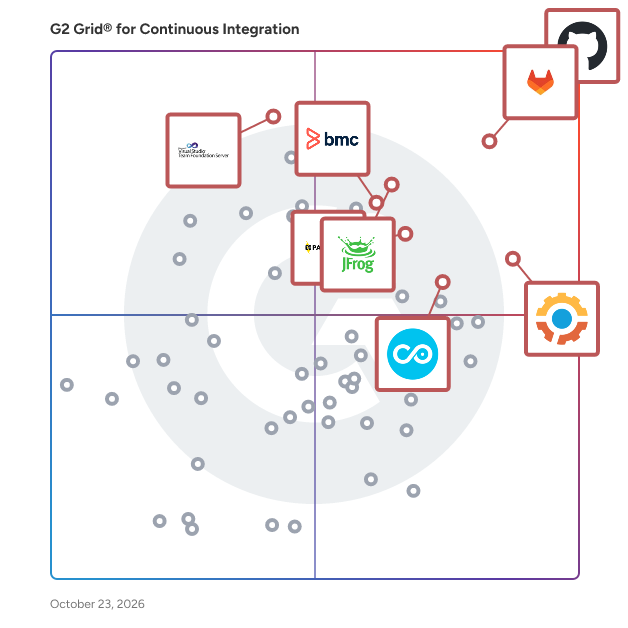
G2 Grid® for Continuous Integration Tools

G2 Grid® for Continuous Integration Tools plotting products by satisfaction and market presence

Highlighted products: GitHub, GitLab, Gearset DevOps, JFrog, Pantheon, Bitrise Mobile DevOps Platform, Copado DevOps, and Azure DevOps Server.

Underlying data: [Grid® JSON](https://www.g2.com/categories/continuous-integration/grids.json?focus%5B%5D=github&focus%5B%5D=gitlab&focus%5B%5D=gearset-devops&focus%5B%5D=jfrog-2024-03-28&focus%5B%5D=pantheon&focus%5B%5D=bitrise-mobile-devops-platform&focus%5B%5D=copado-devops&focus%5B%5D=azure-devops-server)

GitHub

GitHub is where the world builds software. Millions of individuals, organizations and businesses around the world use GitHub to discover, share, and contribute software. Developers at startups to Fortune 50 companies use GitHub, every step of the way.

Average Rating: 4.7/5.0

Total Reviews: 2,339

How Do G2 Users Rate GitHub?

  • Third-Party Integrations: 9.3/10 (Category avg: 8.8/10)
  • Ease of Use: 8.7/10 (Category avg: 8.7/10)
  • Test Customization: 8.6/10 (Category avg: 8.6/10)
  • Automation: 8.9/10 (Category avg: 8.9/10)

Who Is the Company Behind GitHub?

  • Seller: GitHub
  • Year Founded: 2008
  • HQ Location: San Francisco, CA
  • Twitter: @github
    2,673,925 Twitter followers
  • LinkedIn® Page: www.linkedin.com
    6,653 employees on LinkedIn®

Who Uses This Product?

  • Who Uses This: Software Engineer, Senior Software Engineer
  • Top Industries: Computer Software, Information Technology and Services
  • Company Size: 47% Small, 31% Medium

What Do G2 Reviewers Say About GitHub?

AI-generated summary from verified user reviews

Pros
  • Users value GitHub's seamless collaboration and powerful version control, enhancing project transparency and workflow management.
  • Users appreciate the ease of use of GitHub, enabling seamless collaboration and efficient version control.
  • Users value the seamless team collaboration on GitHub, enhancing code sharing and workflow management effectively.
  • Users value the seamless collaboration offered by GitHub, enhancing project transparency and team workflow management.
  • Users value GitHub for its seamless version control, enhancing collaboration and streamlining the development process.
Cons
  • Users find the complexity in advanced features of GitHub challenging, particularly for newcomers and managing large repositories.
  • Users find the learning curve challenging, especially when designing workflows and managing permissions effectively.
  • Users find the complexity for beginners challenging, especially with CI/CD workflows and permission management.
  • Users find learning GitHub challenging due to overwhelming settings and complexities, making navigation difficult for newcomers.
  • Users find the steep learning curve of GitHub challenging, especially in mastering workflows and managing permissions.

What Are Recent G2 Reviews of GitHub?

What Are G2 Users Discussing About GitHub?

GitLab

GitLab is the most comprehensive AI-Powered DevSecOps platform that enables software innovation by empowering development, security, and operations teams to build better software, faster. With GitLab, teams can create, deliver, and manage code quickly and continuously instead of managing disparate tools and scripts. GitLab helps your teams across the complete DevSecOps lifecycle, from developing, securing, and deploying software. What makes us truly different? - Flexibility: Consume as a service or manage your own deployment - Cloud-Agnostic: Deploy anywhere with no vendor lock-in - No rip and replace: Scale to a platform approach at your own pace

Average Rating: 4.5/5.0

Total Reviews: 885

How Do G2 Users Rate GitLab?

  • Third-Party Integrations: 9.0/10 (Category avg: 8.8/10)
  • Ease of Use: 8.7/10 (Category avg: 8.7/10)
  • Test Customization: 8.4/10 (Category avg: 8.6/10)
  • Automation: 8.9/10 (Category avg: 8.9/10)

Who Is the Company Behind GitLab?

  • Seller: GitLab Inc.
  • Company Website:
  • Year Founded: 2014
  • HQ Location: San Francisco, California
  • Twitter: @gitlab
    171,534 Twitter followers
  • LinkedIn® Page: www.linkedin.com
    3,431 employees on LinkedIn®

Who Uses This Product?

  • Who Uses This: Software Engineer, Senior Software Engineer
  • Top Industries: Computer Software, Information Technology and Services
  • Company Size: 37% Medium, 37% Small

What Do G2 Reviewers Say About GitLab?

AI-generated summary from verified user reviews

Pros
  • Users value the ease of use in GitLab, enjoying its all-in-one DevOps capabilities and intuitive interface.
  • Users value the all-encompassing features of GitLab, which enhance collaboration and streamline the DevOps workflow.
  • Users love the seamless CI/CD integration of GitLab, simplifying automation and collaboration in DevOps workflows.
  • Users value the seamless integrations in GitLab, resulting in efficient workflows and streamlined management across multiple functions.
  • Users praise the seamless CI/CD integration in GitLab, enhancing automation and collaboration within their DevOps workflow.
Cons
  • Users find the complexity of GitLab's setup and management to be a significant barrier to efficient use.
  • Users find the difficult learning curve of GitLab challenging due to its complex interface and YAML syntax.
  • Users find the interface confusing due to clutter and slow performance with large repositories, complicating their navigation.
  • Users find the complex user interface challenging, especially with slow performance and difficulties in navigation and management.
  • Users find the learning curve steep, particularly for those new to DevOps and managing extensive features.

What Are Recent G2 Reviews of GitLab?

What Are G2 Users Discussing About GitLab?

JFrog

JFrog Ltd. (Nasdaq: FROG), the creators of the unified DevOps, DevSecOps, DevGovOps and MLOps platform, is on a mission to create a world of software delivered without friction from development to production. Driven by a “Liquid Software” vision to keep software continuously flowing, secure, and always up to date, the JFrog Platform serves as the definitive software supply chain system of record. It is uniquely engineered to power organizations as they build, manage, and distribute trusted software with unprecedented speed, security, and scale across hybrid and multi-cloud environments. As software engineering evolves in the AI era, JFrog’s newest offerings address the industry's most pressing trend: the rise of agentic software development and the hidden security risks of "Shadow AI." In response to threat actors increasingly targeting developer workflows including a massive surge in malicious open-source AI models and infected packages; JFrog has expanded its platform capabilities to deliver absolute end-to-end visibility and automated compliance. Key new innovations include the JFrog AI Catalog, which enables organizations to centralize, govern, and control the lifecycle of AI models approved for enterprise use. To secure autonomous coding environments, JFrog introduced the Universal MCP Registry and the Agent Skills Registry (developed alongside NVIDIA). These new solutions establish the industry’s first enterprise-grade trust layer to safely manage and store AI agent skills, monitor connections, and instantly block unsafe developer tools or malicious coding extensions right where developers work. Furthermore, the integration of advanced DevGovOps and Runtime Security tools allows teams to replace slow, manual compliance audits with continuous, background policy enforcement. By shifting security left directly into the binary pipeline, JFrog ensures that the volume of AI-assisted code does not outpace an organization's ability to verify its safety. Today, millions of users and approximately 6,600 organizations worldwide, including a majority of the Fortune 100, depend on the universal JFrog Platform to eliminate point-solution fatigue, bridge the governance gap, and securely embrace digital transformation. Learn more at www.jfrog.com or follow us on X @JFrog.

Average Rating: 4.2/5.0

Total Reviews: 159

How Do G2 Users Rate JFrog?

  • Third-Party Integrations: 8.0/10 (Category avg: 8.8/10)
  • Ease of Use: 8.1/10 (Category avg: 8.7/10)
  • Test Customization: 7.8/10 (Category avg: 8.6/10)
  • Automation: 7.5/10 (Category avg: 8.9/10)

Who Is the Company Behind JFrog?

  • Seller: JFrog Ltd
  • Company Website:
  • Year Founded: 2008
  • HQ Location: Sunnyvale, CA
  • Twitter: @jfrog
    23,186 Twitter followers
  • LinkedIn® Page: www.linkedin.com
    2,527 employees on LinkedIn®

Who Uses This Product?

  • Who Uses This: Software Engineer, DevOps Engineer
  • Top Industries: Information Technology and Services, Computer Software
  • Company Size: 50% Large, 30% Medium

What Do G2 Reviewers Say About JFrog?

AI-generated summary from verified user reviews

Pros
  • Users appreciate the unified support for various package formats that simplifies DevOps management and integration.
  • Users praise JFrog for its efficient repository management, streamlining the storage and tracking of artifacts in DevOps workflows.
  • Users value the seamless integration of JFrog with CI/CD tools, enhancing efficiency in artifact management and security.
  • Users value the seamless integrations of JFrog with various tools, enhancing their CI/CD workflows significantly.
  • Users appreciate the easy integrations of JFrog, enhancing CI/CD processes and supporting various package formats seamlessly.
Cons
  • Users find the complexity of JFrog overwhelming, often needing extensive training to use all features effectively.
  • Users often find JFrog to be expensive, especially challenging for smaller teams and individual developers to afford.
  • Users find the steep learning curve of JFrog challenging, requiring significant time and investment to master.
  • Users note the difficult learning curve with JFrog, requiring extensive training to navigate its complex features effectively.
  • Users find the learning difficulty of JFrog challenging, requiring significant time investment to master its features.

What Are Recent G2 Reviews of JFrog?

What Are G2 Users Discussing About JFrog?

Pantheon

Pantheon is the website operations (WebOps) platform top developers, marketers, and IT use to build, launch and run their Drupal, WordPress and NextJS websites. Pantheon includes all of the tools professional developers need to build mission-critical sites—like staging environments, version control, backups and workflow. Powering 700,000+ sites with over 17 billion page views, Pantheon’s container-based infrastructure allows you to launch websites faster, without worrying about traffic spikes, security, or performance. It’s free in development. You can scale in software on the same infrastructure from day one, and never touch a server again. Create your free account now!

Average Rating: 4.4/5.0

Total Reviews: 588

How Do G2 Users Rate Pantheon?

  • Third-Party Integrations: 8.8/10 (Category avg: 8.8/10)
  • Ease of Use: 8.8/10 (Category avg: 8.7/10)
  • Test Customization: 8.8/10 (Category avg: 8.6/10)
  • Automation: 8.5/10 (Category avg: 8.9/10)

Who Is the Company Behind Pantheon?

  • Seller: Pantheon
  • Company Website:
  • Year Founded: 2010
  • HQ Location: San Francisco, CA
  • Twitter: @getpantheon
    22,508 Twitter followers
  • LinkedIn® Page: www.linkedin.com
    443 employees on LinkedIn®

Who Uses This Product?

  • Who Uses This: Web Developer, Senior Web Developer
  • Top Industries: Marketing and Advertising, Information Technology and Services
  • Company Size: 65% Small, 26% Medium

What Do G2 Reviewers Say About Pantheon?

AI-generated summary from verified user reviews

Pros
  • Users appreciate the 24/7 customer support from Pantheon, finding the team knowledgeable and responsive to their needs.
  • Users find Pantheon to be user-friendly, facilitating quick updates and seamless website management even for beginners.
  • Users find Pantheon incredibly helpful, appreciating knowledgeable support and easy website management with consistent performance.
  • Users commend Pantheon for its reliable uptime and speed, ensuring consistent website performance and effective management.
  • Users value the easy setup of Pantheon, facilitating seamless updates and fast website management across multiple environments.
Cons
  • Users note that Pantheon is expensive, but believe the quality justifies the high cost for reliable service.
  • Users find the high pricing of Pantheon a drawback, particularly for smaller projects despite its quality services.
  • Users experience bug issues with Pantheon, particularly during deployments and while using command line tools.
  • Users find the steep learning curve of Pantheon challenging, especially for teams lacking technical expertise.
  • Users find Pantheon's pricing issues challenging, especially for smaller projects and organizations with distinct needs.

What Are Recent G2 Reviews of Pantheon?

ACCELQ

ACCELQ offers AI-powered No-Code test automation and management built on a cloud-native platform. ACCELQ provides a unified platform for web, mobile, API, database, and packaged apps. Automation-first, codeless capabilities make it easy to use for testing teams without deep programming expertise. ACCELQ allows businesses to achieve 7.5x productivity and over 72% savings with its industry-first autonomics-based automation platform. ACCELQ was named a leader in The Forrester Wave™: Continuous Automation Testing Platforms, Q4 2022.

Average Rating: 4.8/5.0

Total Reviews: 113

How Do G2 Users Rate ACCELQ?

  • Third-Party Integrations: 9.6/10 (Category avg: 8.8/10)
  • Ease of Use: 9.6/10 (Category avg: 8.7/10)
  • Test Customization: 9.6/10 (Category avg: 8.6/10)
  • Automation: 9.5/10 (Category avg: 8.9/10)

Who Is the Company Behind ACCELQ?

  • Seller: ACCELQ
  • Company Website:
  • Year Founded: 2014
  • HQ Location: Dallas, US
  • Twitter: @accelq
    1,677 Twitter followers
  • LinkedIn® Page: www.linkedin.com
    233 employees on LinkedIn®

Who Uses This Product?

  • Top Industries: Information Technology and Services, Computer Software
  • Company Size: 40% Medium, 35% Large

What Do G2 Reviewers Say About ACCELQ?

AI-generated summary from verified user reviews

Pros
  • Users value the ease of use of ACCELQ, enabling rapid implementation and efficient automation without deep technical knowledge.
  • Users praise the ease of automation with ACCELQ, enabling rapid development of comprehensive testing suites.
  • Users value the codeless automation of ACCELQ, enabling easy collaboration and effective testing for all team members.
  • Users appreciate the time-saving features of ACCELQ, enabling efficient backend testing and quicker bug detection.
  • Users appreciate the automation ease of ACCELQ, streamlining testing processes and enhancing efficiency from day one.
Cons
  • Users find the learning curve steep for desktop automation compared to web and mobile testing, impacting user experience.
  • Users find integration issues with ACCELQ, noting limited options and complexities in learning the platform effectively.
  • Users mention poor reporting, noting the dashboard becomes congested when handling many test cases and scenarios.
  • Users face a difficult learning curve in ACCELQ, particularly when trying to grasp advanced features and setup.
  • Users feel the missing features in ACCELQ hinder productivity and limit effective test management and reporting.

What Are Recent G2 Reviews of ACCELQ?

What Are G2 Users Discussing About ACCELQ?

Azure DevOps Server

Azure DevOps Server, formerly known as Team Foundation Server (TFS), is a comprehensive on-premises solution developed by Microsoft for managing the entire application lifecycle. It integrates version control, project management, build automation, testing, and release management into a unified platform, facilitating collaboration among development teams. Designed to support both agile and waterfall methodologies, Azure DevOps Server enables organizations to plan, develop, test, and deliver software efficiently within their own infrastructure. Key Features and Functionality: - Version Control: Offers robust source code management through Team Foundation Version Control (TFVC) and Git, allowing teams to choose between centralized or distributed version control systems. - Project Management: Provides agile planning tools, including configurable Kanban boards and backlogs, to plan, track, and discuss work across teams. - Build Automation: Enables continuous integration and continuous delivery (CI/CD) pipelines to build, test, and deploy applications across various platforms and environments. - Testing: Includes manual and exploratory testing tools to ensure code quality and support the entire testing lifecycle. - Release Management: Facilitates controlled and automated deployment of applications to different environments, ensuring consistent and reliable releases. - Extensibility: Supports integration with various development environments, including Microsoft Visual Studio and Eclipse, and offers APIs for custom extensions. Primary Value and User Benefits: Azure DevOps Server addresses the challenges of managing complex software development projects by providing a centralized platform that enhances collaboration, streamlines workflows, and improves code quality. By integrating various development tools and processes, it reduces the overhead associated with managing multiple disparate systems. Organizations benefit from increased transparency, better project tracking, and faster delivery times, all while maintaining control over their data within their own infrastructure. This makes Azure DevOps Server particularly valuable for enterprises with strict compliance requirements or those operating in environments where cloud-based solutions are not feasible.

Average Rating: 4.2/5.0

Total Reviews: 195

How Do G2 Users Rate Azure DevOps Server?

  • Third-Party Integrations: 8.9/10 (Category avg: 8.8/10)
  • Ease of Use: 8.0/10 (Category avg: 8.7/10)
  • Test Customization: 8.5/10 (Category avg: 8.6/10)
  • Automation: 8.9/10 (Category avg: 8.9/10)

Who Is the Company Behind Azure DevOps Server?

  • Seller: Microsoft
  • Year Founded: 1975
  • HQ Location: Redmond, Washington
  • Twitter: @microsoft
    13,091,739 Twitter followers
  • LinkedIn® Page: www.linkedin.com
    232,750 employees on LinkedIn®
  • Ownership: MSFT

Who Uses This Product?

  • Who Uses This: Software Engineer, Senior Software Engineer
  • Top Industries: Information Technology and Services, Computer Software
  • Company Size: 40% Large, 39% Medium

What Do G2 Reviewers Say About Azure DevOps Server?

AI-generated summary from verified user reviews

Pros
  • Users appreciate the seamless automation in Azure DevOps Server, enhancing collaboration and streamlining the entire development lifecycle.
  • Users value the seamless collaboration facilitated by Azure DevOps Server, streamlining the entire software development lifecycle effectively.
  • Users appreciate the convenience of Azure DevOps Server, effectively managing the entire SDLC without juggling multiple tools.
  • Users commend the quick and effective customer support of Azure DevOps Server, providing timely solutions for issues encountered.
  • Users appreciate the seamless deployment integration of Azure DevOps Server, optimizing their development process under one roof.
Cons
  • Users find the complex setup of Azure DevOps Server challenging, requiring extra effort for proper configuration and permissions management.
  • Users find the complexity in setting up advanced pipelines and managing permissions to be a significant challenge.
  • Users find the complexity of setting up advanced pipelines and managing permissions to be challenging and time-consuming.
  • Users find complex management challenging, especially when configuring advanced pipelines and permissions in Azure DevOps Server.
  • Users find Azure DevOps Server's difficult configuration challenging, especially with advanced pipelines and managing permissions.

What Are Recent G2 Reviews of Azure DevOps Server?

What Are G2 Users Discussing About Azure DevOps Server?

AWS CodePipeline

AWS CodePipeline is a continuous integration and continuous delivery (CI/CD) service that automates the build, test, and deployment phases of your release process. By modeling your software release workflow, CodePipeline enables rapid and reliable application and infrastructure updates. It integrates seamlessly with various AWS services and third-party tools, allowing you to create a streamlined and efficient pipeline tailored to your development needs. Key Features and Functionality: - Workflow Modeling: Define your release process with a series of stages (e.g., build, test, deploy) and actions, providing a clear visualization and management of your pipeline. - Parallel Execution: Increase workflow speed by configuring build, test, and deployment actions to run concurrently. - AWS Integrations: Connect with services like AWS CodeCommit, AWS CodeBuild, AWS CodeDeploy, and AWS Lambda to automate various stages of your release process. - Third-Party Tool Integration: Easily incorporate external tools such as GitHub, Jenkins, and others into your pipeline for source control, build, test, or deployment actions. - Custom Plugins: Integrate your own systems by registering custom actions, allowing for a tailored pipeline that meets specific requirements. - Declarative Templates: Define your pipeline structure using JSON documents, facilitating easy updates and creation of new pipelines. - Access Control: Manage permissions and control over your release workflow using AWS Identity and Access Management (IAM). - Notifications: Set up Amazon Simple Notification Service (SNS) notifications for events impacting your pipelines, keeping your team informed of status changes. Primary Value and User Solutions: AWS CodePipeline addresses the need for efficient and reliable software release processes by automating the steps involved in building, testing, and deploying applications. This automation reduces manual intervention, minimizes errors, and accelerates the delivery of new features and updates. By integrating with a wide range of AWS services and third-party tools, CodePipeline offers a flexible and scalable solution that adapts to various development workflows. Ultimately, it empowers development teams to focus on innovation and quality, ensuring that applications are delivered to users swiftly and with confidence.

Average Rating: 4.3/5.0

Total Reviews: 62

How Do G2 Users Rate AWS CodePipeline?

  • Third-Party Integrations: 8.9/10 (Category avg: 8.8/10)
  • Ease of Use: 7.9/10 (Category avg: 8.7/10)
  • Test Customization: 7.9/10 (Category avg: 8.6/10)
  • Automation: 8.8/10 (Category avg: 8.9/10)

Who Is the Company Behind AWS CodePipeline?

  • Seller: Amazon Web Services (AWS)
  • Year Founded: 2006
  • HQ Location: Seattle, WA
  • Twitter: @awscloud
    2,232,483 Twitter followers
  • LinkedIn® Page: www.linkedin.com
    147,094 employees on LinkedIn®
  • Ownership: NASDAQ: AMZN

Who Uses This Product?

  • Top Industries: Computer Software, Information Technology and Services
  • Company Size: 36% Large, 36% Small

What Do G2 Reviewers Say About AWS CodePipeline?

AI-generated summary from verified user reviews

Pros
  • Users value the easy integrations of AWS CodePipeline with various AWS services, making deployments hassle-free.
  • Users appreciate the seamless integrations of AWS CodePipeline with various AWS services for efficient deployment workflows.
  • Users appreciate the easy integration with AWS services, streamlining their DevOps processes and enhancing productivity.
  • Users appreciate the seamless integration and abundant tools offered by AWS CodePipeline for service deployment.
  • Users value the comprehensive suite of tools in AWS CodePipeline that enhances the DevOps lifecycle significantly.
Cons
  • Users face complexity issues with AWS CodePipeline, making simple setups feel unnecessarily complicated and challenging to troubleshoot.
  • Users find API limitations frustrating, impacting tracking and external access to pipeline execution progress.
  • Users find the complexity of AWS CodePipeline challenging due to its multiple components and troubleshooting difficulties.
  • Users find the complex setup for cross-account pipelines cumbersome and time-consuming, hindering efficient project management.
  • Users face delay issues in AWS CodePipeline, especially when configuring cross-account setups that complicate the process.

What Are Recent G2 Reviews of AWS CodePipeline?

What Are G2 Users Discussing About AWS CodePipeline?

Jenkins

The leading open source automation server, Jenkins provides hundreds of plugins to support building, deploying and automating any project.

Average Rating: 4.4/5.0

Total Reviews: 558

How Do G2 Users Rate Jenkins?

  • Third-Party Integrations: 9.3/10 (Category avg: 8.8/10)
  • Ease of Use: 8.0/10 (Category avg: 8.7/10)
  • Test Customization: 8.9/10 (Category avg: 8.6/10)
  • Automation: 9.2/10 (Category avg: 8.9/10)

Who Is the Company Behind Jenkins?

Who Uses This Product?

  • Who Uses This: Software Engineer, Senior Software Engineer
  • Top Industries: Information Technology and Services, Computer Software
  • Company Size: 41% Large, 37% Medium

What Do G2 Reviewers Say About Jenkins?

AI-generated summary from verified user reviews

Pros
  • Users find Jenkins to be very easy to learn and use, enhancing their productivity in CI/CD workflows.
  • Users value the seamless integration capabilities of Jenkins, enhancing their CI/CD workflows significantly.
  • Users value the extensive plugin options in Jenkins, enhancing customization and flexibility for their projects.
  • Users value the extensive plugin support in Jenkins, enhancing flexibility and integration for their projects.
Cons
  • Users face plugin issues that lead to confusion, high maintenance, and dependency risks in Jenkins.
  • Users find the confusing interface of Jenkins challenging, particularly when managing plugins and navigating job configurations.
  • Users find the difficult setup of Jenkins challenging, particularly for newcomers and complex pipeline management.
  • Users find the outdated interface of Jenkins cumbersome, complicating setup and management compared to modern alternatives.
  • Users experience complex setup challenges with Jenkins, particularly due to the intricate configuration and plugin management.

What Are Recent G2 Reviews of Jenkins?

What Are G2 Users Discussing About Jenkins?

CircleCI

CircleCI is the worlds largest shared continuous integration and continuous delivery (CI/CD) platform, and the central hub where code moves from idea to delivery. As one of the most-used DevOps tools that processes more than 1 million builds a day, CircleCI has unique access to data on how engineering teams work, and how their code runs. Companies like Spotify, Coinbase, Stitch Fix, and BuzzFeed use us to improve engineering team productivity, release better products, and get to market faster.

Average Rating: 4.4/5.0

Total Reviews: 500

How Do G2 Users Rate CircleCI?

  • Third-Party Integrations: 8.7/10 (Category avg: 8.8/10)
  • Ease of Use: 8.5/10 (Category avg: 8.7/10)
  • Test Customization: 8.2/10 (Category avg: 8.6/10)
  • Automation: 8.8/10 (Category avg: 8.9/10)

Who Is the Company Behind CircleCI?

  • Seller: CircleCI
  • Year Founded: 2011
  • HQ Location: San Francisco, CA
  • Twitter: @CircleCI
    39,461 Twitter followers
  • LinkedIn® Page: www.linkedin.com
    354 employees on LinkedIn®

Who Uses This Product?

  • Who Uses This: Software Engineer, Senior Software Engineer
  • Top Industries: Computer Software, Information Technology and Services
  • Company Size: 45% Small, 43% Medium

What Do G2 Reviewers Say About CircleCI?

AI-generated summary from verified user reviews

Pros
  • Users appreciate the easy integrations with CircleCI, highlighting its user-friendly setup and excellent configuration features.
  • Users appreciate the easy integrations with CircleCI, enjoying its speed, flexibility, and user-friendly interface.
  • Users value the seamless collaboration features of CircleCI, facilitating efficient teamwork and problem-solving in CI/CD processes.
  • Users highlight the ease of use of CircleCI, appreciating its simple integration and fast performance.
  • Users love the automation features of CircleCI, enhancing testing speed and flexibility with a user-friendly interface.
Cons
  • Users find the complex configuration of CircleCI challenging for beginners, leading to confusion and a steep learning curve.
  • Users find the difficult configuration challenging, particularly for beginners trying to navigate CI/CD and YAML settings.
  • Users find CircleCI expensive, especially if compilations aren't optimized, leading to confusion over pricing and UI.
  • Users find the learning curve steep for beginners, complicating the onboarding process for CI/CD and YAML configurations.
  • Users find configuration complex, making CircleCI challenging for beginners, particularly with advanced features.

What Are Recent G2 Reviews of CircleCI?

What Are G2 Users Discussing About CircleCI?

Bamboo

Bamboo is Atlassian's continuous delivery and release management tool. It offers first-class support for the "delivery" aspect of continuous delivery, tying automated builds, tests, and releases together in a single, integrated workflow. Bamboo gives developers, testers, build engineers, and system administrators a common space to work and share information – while still keeping sensitive operations like production deploys locked down. Got Git? Bamboo puts branches under test automatically, as well as merges and deploys them according to your team’s processes. And because Bamboo is from Atlassian, it boasts the best Bitbucket and JIRA Software integration available. Visit out continuous delivery microsite to learn more about CI/ CD and best practices: https://www.atlassian.com/continuous-delivery

Average Rating: 4.1/5.0

Total Reviews: 68

How Do G2 Users Rate Bamboo?

  • Third-Party Integrations: 8.8/10 (Category avg: 8.8/10)
  • Ease of Use: 8.3/10 (Category avg: 8.7/10)
  • Test Customization: 7.5/10 (Category avg: 8.6/10)
  • Automation: 8.3/10 (Category avg: 8.9/10)

Who Is the Company Behind Bamboo?

  • Seller: Atlassian
  • Year Founded: 2002
  • HQ Location: Sydney and San Francisco
  • Twitter: @Atlassian
    106,496 Twitter followers
  • LinkedIn® Page: www.linkedin.com
    16,946 employees on LinkedIn®
  • Ownership: NASDAQ:TEAM

Who Uses This Product?

  • Top Industries: Computer Software, Information Technology and Services
  • Company Size: 42% Medium, 30% Large

What Do G2 Reviewers Say About Bamboo?

AI-generated summary from verified user reviews

Pros
  • Users value the excellent customer support of Bamboo, enhancing their experience and productivity immensely.
  • Users find Bamboo's ease of use exceptional, allowing anyone to navigate the tool with minimal guidance.
  • Users value the intuitive layout of Bamboo, complemented by excellent customer support and user-friendly features.
  • Users find Bamboo's automation capabilities invaluable, streamlining deployments and enhancing team collaboration across projects.
  • Users praise the automation efficiency of Bamboo, streamlining builds and deployments across multiple integrations and tasks.
Cons
  • Users highlight the access restrictions of Bamboo, limiting task execution solely on the server and not remote agents.
  • Users desire integration with more systems, as current limitations hinder their overall experience with Bamboo.
  • Users wish Bamboo had limited compatibility with more systems, hindering seamless integration with other platforms.
  • Users are frustrated by the resource limitations of Bamboo, as tasks can only execute on the server, hindering flexibility.

What Are Recent G2 Reviews of Bamboo?

What Are G2 Users Discussing About Bamboo?

CloudBees

The Complete DevOps solution. CloudBees empowers your software delivery teams to transform your business. CloudBees solution brings together development, operations, IT, security, and business teams to: Create fast with scalable repeatable workflows. Continuously improve customer experiences by progressively delivering features with speed and control. Command everything with higher-order visibility, management, and intelligence across tools, teams, pipelines, and process... all at enterprise scale.

Average Rating: 4.4/5.0

Total Reviews: 591

How Do G2 Users Rate CloudBees?

  • Third-Party Integrations: 8.9/10 (Category avg: 8.8/10)
  • Ease of Use: 8.6/10 (Category avg: 8.7/10)
  • Test Customization: 8.5/10 (Category avg: 8.6/10)
  • Automation: 9.0/10 (Category avg: 8.9/10)

Who Is the Company Behind CloudBees?

  • Seller: CloudBees
  • Company Website:
  • Year Founded: 2010
  • HQ Location: San Jose, CA
  • Twitter: @CloudBees
    39,175 Twitter followers
  • LinkedIn® Page: www.linkedin.com
    485 employees on LinkedIn®

Who Uses This Product?

  • Who Uses This: Software Engineer, DevOps Engineer
  • Top Industries: Information Technology and Services, Computer Software
  • Company Size: 48% Large, 41% Medium

What Do G2 Reviewers Say About CloudBees?

AI-generated summary from verified user reviews

Pros
  • Users value the reliability of CloudBees, benefiting from its scalable tools and robust security in CI/CD processes.
  • Users find CloudBees' ease of use exceptional, enabling seamless integration and efficient workflow management across teams.
  • Users appreciate the centralized management and robust security of CloudBees, enhancing their CI/CD lifecycle and workflows.
  • Users value the seamless integrations of CloudBees with major DevOps tools, enhancing workflow automation and efficiency.
  • Users appreciate the powerful automation in CloudBees, significantly streamlining their continuous delivery and integration processes.
Cons
  • Users face complexity in understanding and configuration of CloudBees, requiring significant time and specialized expertise.
  • Users find the complex setup of CloudBees time-consuming and difficult to navigate, requiring specialized expertise.
  • Users face configuration issues with CloudBees, finding it complex and time-consuming to manage effectively.
  • Users face difficult configuration challenges with CloudBees, requiring time and specialized expertise for effective setup.
  • Users face complex configuration challenges with CloudBees, requiring specialized expertise for effective plugin management.

What Are Recent G2 Reviews of CloudBees?

What Are G2 Users Discussing About CloudBees?

Buddy

Host apps and websites, spin up Sandboxes, manage domains, run tests, deploy to any cloud, and automate delivery with pipelines, all in one platform. Configure everything through the UI, YAML, or code, or let Claude Code, Cursor, Copilot, and other AI agents operate Buddy directly through MCP or CLI, including deployments, infrastructure, and logs.

Average Rating: 4.7/5.0

Total Reviews: 208

How Do G2 Users Rate Buddy?

  • Third-Party Integrations: 9.3/10 (Category avg: 8.8/10)
  • Ease of Use: 9.5/10 (Category avg: 8.7/10)
  • Test Customization: 9.3/10 (Category avg: 8.6/10)
  • Automation: 9.4/10 (Category avg: 8.9/10)

Who Is the Company Behind Buddy?

  • Seller: Buddy
  • Year Founded: 2015
  • HQ Location: Bielsko-Bia_a, Poland
  • Twitter: @useBuddy
    22,886 Twitter followers
  • LinkedIn® Page: www.linkedin.com
    27 employees on LinkedIn®

Who Uses This Product?

  • Who Uses This: Developer, Software Engineer
  • Top Industries: Computer Software, Information Technology and Services
  • Company Size: 83% Small, 14% Medium

What Do G2 Reviewers Say About Buddy?

AI-generated summary from verified user reviews

Pros
  • Users highlight the ease of use of Buddy, praising its intuitive interface and simple pipeline management.
  • Users appreciate the intuitive pipeline management of Buddy, making setup and deployment quick and easy.
  • Users appreciate the ease of deployment with Buddy, finding it quick and user-friendly for managing workflows.
  • Users appreciate the clean and intuitive interface of Buddy, making setup simple even without CI/CD skills.
  • Users love the intuitive automation features of Buddy, making deployment workflows easy and accessible for everyone.
Cons
  • Users find Buddy's pricing expensive and limited in its free tier, impacting those starting out or budget-conscious.
  • Users find the limited features of Buddy's free tier insufficient for hobbyists and startups, restricting their initial use.
  • Users find the limited free access of Buddy restrictive, affecting its suitability for hobbyists or new organizations.
  • Users point out the pricing issues with Buddy, as the free tier is limited for new users and hobbyists.
  • Users find Buddy's limited free tier restrictive, impacting new users and hobbyists trying to get started.

What Are Recent G2 Reviews of Buddy?

Provar

Provar provides a Salesforce-centric, low-maintenance testing solution that delivers speed, reliability, and scalability. With comprehensive coverage, integration support, and AI at every stage of the testing lifecycle, Provar helps QA teams to confidently release high-quality software faster.

Average Rating: 4.3/5.0

Total Reviews: 171

How Do G2 Users Rate Provar?

  • Third-Party Integrations: 8.6/10 (Category avg: 8.8/10)
  • Ease of Use: 8.4/10 (Category avg: 8.7/10)
  • Test Customization: 8.5/10 (Category avg: 8.6/10)
  • Automation: 8.6/10 (Category avg: 8.9/10)

Who Is the Company Behind Provar?

  • Seller: Provar
  • Year Founded: 2000
  • HQ Location: London, GB
  • Twitter: @ProvarTesting
    1,316 Twitter followers
  • LinkedIn® Page: www.linkedin.com
    118 employees on LinkedIn®

Who Uses This Product?

  • Who Uses This: Software Engineer, Test Analyst
  • Top Industries: Information Technology and Services, Computer Software
  • Company Size: 40% Large, 36% Small

What Do G2 Reviewers Say About Provar?

AI-generated summary from verified user reviews

Pros
  • Users find Provar's ease of use exceptional, simplifying Salesforce testing and automation with its intuitive interface.
  • Users commend the easy integration with Salesforce, simplifying testing and automation for enhanced efficiency.
  • Users value the responsive customer support of Provar, providing quick and effective solutions for all queries.
  • Users find Provar's ease of learning exceptional, making it simple to automate and navigate Salesforce testing.
  • Users highlight the easy integrations of Provar, simplifying Salesforce testing and enhancing development workflows.
Cons
  • Users find the complexity for non-Salesforce testing challenging, impacting their overall experience with Provar.
  • Users find Provar expensive, which impacts their overall satisfaction and accessibility of the product.
  • Users find the learning curve steep, making it challenging for those unfamiliar with Salesforce to use Provar effectively.
  • Users notice slow performance with Provar during large scale test executions, impacting their overall experience.

What Are Recent G2 Reviews of Provar?

What Are G2 Users Discussing About Provar?

UrbanCode

UrbanCode is the makers of DevOps Application Release & Deployment Automation solutions.

Average Rating: 4.1/5.0

Total Reviews: 16

How Do G2 Users Rate UrbanCode?

  • Ease of Use: 8.4/10 (Category avg: 8.7/10)

Who Is the Company Behind UrbanCode?

  • Seller: IBM
  • Year Founded: 1911
  • HQ Location: Armonk, New York, United States
  • Twitter: @IBMSecurity
    74,660 Twitter followers
  • LinkedIn® Page: www.linkedin.com
    344,328 employees on LinkedIn®
  • Ownership: SWX:IBM

Who Uses This Product?

  • Top Industries: Information Technology and Services
  • Company Size: 65% Large, 24% Medium

What Are Recent G2 Reviews of UrbanCode?

Progress Chef

The Progress Chef portfolio consists of multiple, integrated products. It offers a set of capabilities that provide organizations the flexibility to support different use cases. All these capabilities are based on a trusted set of tools rooted in open source, starting with the ability to configure, deploy and manage all aspects of a technology stack as well as the ability to secure and support compliance across the asset fleet. The Chef portfolio includes configuration/infrastructure management, application delivery (including edge support and device management as well as support for security and compliance), all of which are supported by a single pane of glass for fleet wide visibility and control.

Average Rating: 4.3/5.0

Total Reviews: 133

How Do G2 Users Rate Progress Chef?

  • Third-Party Integrations: 8.8/10 (Category avg: 8.8/10)
  • Ease of Use: 7.9/10 (Category avg: 8.7/10)
  • Test Customization: 8.7/10 (Category avg: 8.6/10)
  • Automation: 8.5/10 (Category avg: 8.9/10)

Who Is the Company Behind Progress Chef?

  • Seller: Progress Software
  • Company Website:
  • Year Founded: 1981
  • HQ Location: Burlington, MA.
  • Twitter: @ProgressSW
    48,773 Twitter followers
  • LinkedIn® Page: www.linkedin.com
    4,242 employees on LinkedIn®

Who Uses This Product?

  • Who Uses This: DevOps Engineer
  • Top Industries: Information Technology and Services, Computer Software
  • Company Size: 39% Large, 39% Medium

What Are Recent G2 Reviews of Progress Chef?

What Are G2 Users Discussing About Progress Chef?