Top Free Construction CRM Software - Page 4

How Many Construction CRM Software Products Does G2 Track?

Total Products under this Category: 252

Category Stats (Nov 2026)

  • Average Rating: 4.4/5 (↑0.04 vs Oct 2026) The average rating of products in this category, based on all submitted ratings
  • Top Trending Product: Jonas Construction Software (+1.17%) - Among all products in this category, Jonas Construction Software recorded the largest rating increase compared to last month

Last updated: November 24, 2026

How Does G2 Rank Construction CRM Software Products?

Why You Can Trust G2's Software Rankings:

  • 30 Analysts and Data Experts
  • 21,300+ Authentic Reviews
  • 252+ Products
  • Unbiased Rankings

G2's software rankings are built on verified user reviews, rigorous moderation, and a consistent research methodology maintained by a team of analysts and data experts. Each product is measured using the same transparent criteria, with no paid placement or vendor influence. While reviews reflect real user experiences, which can be subjective, they offer valuable insight into how software performs in the hands of professionals. Together, these inputs power the G2 Score, a standardized way to compare tools within every category.

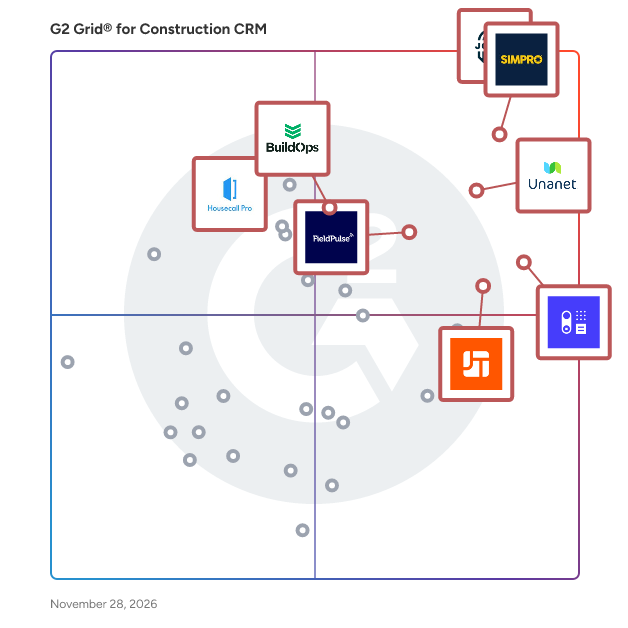
G2 Grid® for Construction CRM Software

G2 Grid® for Construction CRM Software plotting products by satisfaction and market presence

Highlighted products: Jobber, Simpro, Unanet CRM, Capsule CRM, JobTread, FieldPulse, Housecall Pro, and BuildOps.

Underlying data: [Grid® JSON](https://www.g2.com/categories/construction-crm/grids.json?focus%5B%5D=jobber&focus%5B%5D=simpro&focus%5B%5D=unanet-crm&focus%5B%5D=capsule-crm&focus%5B%5D=jobtread&focus%5B%5D=fieldpulse-fieldpulse&focus%5B%5D=housecall-pro&focus%5B%5D=buildops)

Masmer

Masmer is a CRM for small residential contractors, built by a contractor. It runs the whole job in one place, from the first call to the final payment. Eliko, the estimator: type the job the way you would text it. Eliko writes the scope of work, the estimate, the materials list priced at local stores by ZIP code, the crew punch list and a supplier order list, in minutes. Alma, the receptionist: answers every call on your business line, tells the caller she is automated and that the call is recorded, and files the caller as a lead. Jobs and money: a jobs board, payment schedules, e-signature on the estimate, and a page where your customer sees status, schedule, payments and photos. Ozeri: ask about your jobs and money over chat. For remodelers, general contractors and home improvement contractors with 1 to 20 people. $279 a month, 30 days free.

Who Is the Company Behind Masmer?

Mr. Task

MrTask is field service management software built for contractors, trade businesses, and property managers who need to run scheduling, dispatch, work orders, estimates, and invoicing from a single platform. Formerly known as Field Complete, MrTask is used by HVAC, plumbing, electrical, roofing, handyman, fencing, and general contractor businesses across the United States to coordinate every step of the job lifecycle — from the first customer call to the final payment. The core of MrTask is a configurable workflow engine that adapts to how your business already operates, rather than forcing your team into a fixed process. Build estimates from a predefined price book on desktop or mobile, convert quotes into work orders, and dispatch technicians by skill, availability, or location with a drag-and-drop calendar. Field technicians use the mobile app to receive job details, capture before-and-after photos, add notes, collect signatures, and process payments on-site, with full offline support for jobs in low-coverage areas. MrTask is the only field service platform purpose-built to manage W-2 employees, 1099 contractors, and third-party subcontracting companies in one system. That makes it uniquely suited to businesses that work with property managers, insurance carriers, or home warranty providers, where multi-party coordination is the norm. Built-in approval workflows, not-to-exceed (NTE) amounts, change orders, and a complete job history audit trail keep every stakeholder aligned without phone tag or email threads. Vendor dispatch, customer communication, invoicing, and job documentation all live under one login. Key features include scheduling and dispatching, work order management, mobile field service app with offline mode, customer relationship management (CRM), subcontractor and vendor management, estimates and quotes, digital invoicing and payment processing, QuickBooks integration, GPS-enabled job tracking, customizable business rules, role-based permissions, and reporting on revenue, technician productivity, first-time fix rates, and job profitability. Property managers and multi-unit operators use MrTask to build preferred vendor lists, route service requests, track approvals, and consolidate maintenance spend across portfolios of any size. MrTask is free to start for teams of up to 10 users, with no credit card required and full access from day one. Paid plans add advanced reporting, deeper integrations, and dedicated support. The platform also powers a job-sharing network, so service providers can pass overflow work to vetted partners and grow capacity without hiring. For field service contractors, trade businesses, HVAC and plumbing companies, electricians, handymen, roofers, and property management teams looking to replace spreadsheets, paper work orders, and disconnected tools, MrTask consolidates the entire field service operation into one cloud-based, mobile-ready platform.

Average Rating: 3.9/5.0

Total Reviews: 5

How Do G2 Users Rate Mr. Task?

  • Has the product been a good partner in doing business?: 10.0/10 (Category avg: 9.3/10)
  • Ease of Admin: 10.0/10 (Category avg: 8.8/10)
  • Ease of Use: 7.2/10 (Category avg: 8.8/10)
  • Quality of Support: 9.4/10 (Category avg: 8.8/10)

Who Is the Company Behind Mr. Task?

  • Seller: MrTask
  • Year Founded: 2019
  • HQ Location: Atlanta, US
  • LinkedIn® Page: www.linkedin.com
    14 employees on LinkedIn®

Who Uses This Product?

  • Company Size: 60% Small, 40% Medium

What Are Recent G2 Reviews of Mr. Task?

Ninox

Ninox is an AI-native low-code platform designed to empower teams to create the software solutions they truly require. By blending artificial intelligence with a low-code approach, Ninox enables users to develop applications tailored to their specific needs, whether that involves customer relationship management (CRM), enterprise resource planning (ERP), project management, or human resources (HR). This versatility makes Ninox suitable for a wide range of industries and organizational sizes, from startups to established enterprises. The platform is particularly beneficial for teams looking to streamline their workflows and improve collaboration. With Ninox, users can build custom applications without extensive coding knowledge, allowing for rapid development and deployment. This low-code flexibility means that teams can quickly adapt their software to meet evolving business requirements, ensuring that they are always equipped with the tools necessary to succeed. Additionally, Ninox facilitates real-time collaboration, enabling team members to work together seamlessly, regardless of their physical location. One of the standout features of Ninox is its ability to serve as a single source of truth for organizations. By integrating document management and data storage within the platform, teams can centralize their information, reducing the risk of data silos and ensuring that everyone has access to the most current and accurate data. This holistic approach not only enhances productivity but also fosters better decision-making, as teams can rely on consistent information across all levels of the organization. Ninox is trusted by over 250,000 users across more than 6,000 companies globally, highlighting its effectiveness and reliability. The platform is designed with security in mind, being GDPR-compliant and ISO 27001-certified, which assures users that their data is handled with the highest standards of privacy and protection. This commitment to security, combined with its innovative features, positions Ninox as a compelling choice for organizations seeking to harness the power of AI and low-code development in their software solutions.

Average Rating: 4.7/5.0

Total Reviews: 332

How Do G2 Users Rate Ninox?

  • Has the product been a good partner in doing business?: 9.0/10 (Category avg: 9.3/10)
  • Ease of Admin: 8.7/10 (Category avg: 8.8/10)
  • Ease of Use: 8.7/10 (Category avg: 8.8/10)
  • Quality of Support: 9.1/10 (Category avg: 8.8/10)

Who Is the Company Behind Ninox?

Who Uses This Product?

  • Who Uses This: CEO, Director
  • Top Industries: Education Management, Construction
  • Company Size: 86% Small, 10% Medium

What Do G2 Reviewers Say About Ninox?

AI-generated summary from verified user reviews

Pros
  • Users value the ease of use of Ninox, enabling quick customization and seamless integration with existing systems.
  • Users love Ninox for its flexibility, enabling quick, custom database creation without complex coding challenges.
  • Users appreciate the low code capabilities of Ninox, enabling quick custom solutions for various business needs.
  • Users appreciate the low coding flexibility of Ninox, enabling custom database creation without extensive programming knowledge.
  • Users appreciate the customizable customer management features of Ninox, enabling tailored solutions and improved workflows.
Cons
  • Users find Ninox to be expensive, particularly with high costs for storage and additional licenses required.
  • Users are frustrated by restrictive storage limits and unreasonable costs, which significantly impact the software's usability and value.
  • Users find the access restrictions for manual backups frustrating, requiring a pricier plan for essential features.
  • Users find backup issues frustrating as manual backups require a more expensive plan than the basic tier.
  • Users find Ninox's software features too complex for non-experts, complicating the overall user experience significantly.

What Are Recent G2 Reviews of Ninox?

What Are G2 Users Discussing About Ninox?

AI can help you find the answers. G2 helps you trust them.

Connect G2 to Claude or ChatGPT for answers grounded in G2's trusted reviews, comparisons, and pricing from real user insights.

How it works

OnePageCRM

Built for small businesses and solo founders, OnePageCRM is a super simple, clean, and easy-to-use CRM system with stress-free onboarding and affordable pricing. With fast setup and a lightweight interface, it has zero bloat and offers only the features you actually need. OnePageCRM is trusted by thousands of users in over 80 countries.

Average Rating: 4.7/5.0

Total Reviews: 274

G2 Deal: Get 4 months free on all annual plans

Get 33% off OnePageCRM by subscribing to one of our annual plans via G2. Prior to the discount, plans start at $15/per user per month. OnePageCRM is a powerful combination of a simple database and a productivity tool.

Price: ~~$15~~ → $9.95

View this exclusive G2 deal

How Do G2 Users Rate OnePageCRM?

  • Has the product been a good partner in doing business?: 9.7/10 (Category avg: 9.3/10)
  • Ease of Admin: 9.4/10 (Category avg: 8.8/10)
  • Ease of Use: 9.3/10 (Category avg: 8.8/10)
  • Quality of Support: 9.5/10 (Category avg: 8.8/10)

Who Is the Company Behind OnePageCRM?

  • Seller: OnePageCRM
  • Year Founded: 2010
  • HQ Location: Galway, Ireland
  • LinkedIn® Page: www.linkedin.com
    21 employees on LinkedIn®
  • Phone: +1 (646) 762 1303

Who Uses This Product?

  • Who Uses This: Founder, Managing Director
  • Top Industries: Non-Profit Organization Management, Marketing and Advertising
  • Company Size: 85% Small, 12% Medium

What Do G2 Reviewers Say About OnePageCRM?

AI-generated summary from verified user reviews

Pros
  • Users value the ease of use of OnePageCRM, appreciating its intuitive interface and effective lead management.
  • Users value the simplicity and user-friendly interface of OnePageCRM, enhancing efficiency for sales professionals.
  • Users love the simplicity of OnePageCRM, praising its intuitive design and focus on actionable steps.
  • Users appreciate the excellent customer support from OnePageCRM, providing quick and helpful responses to improve their experience.
  • Users praise the easy setup of OnePageCRM, appreciating the smooth integration and intuitive interface for quick onboarding.
Cons
  • Users find the missing features in OnePageCRM limit functionality, especially in reporting, automation, and integrations.
  • Users find limited options for reporting, automation, and language support, impacting their overall experience with OnePageCRM.
  • Users find export limitations in OnePageCRM frustrating, as custom reporting requires external tools for deeper analysis.
  • Users note integration issues with OnePageCRM, wishing for more connections to modern tools and enhanced functionality.
  • Users find the lack of integrations in OnePageCRM limits its functionality, especially for billing and automation needs.

What Are Recent G2 Reviews of OnePageCRM?

What Are G2 Users Discussing About OnePageCRM?

Planyard

Planyard makes construction financials incredibly easy. All of our workflows are designed by construction professionals who want to ditch the spreadsheet, get rid of duplicate data entry, and simplify their work lives. With Planyard, management enjoys a real-time overview of portfolio financials, giving them the peace of mind to focus on growing the business. Why construction teams choose Planyard: * Speed: It typically takes just 1-2 hours to get started as your next project begins. * Accuracy: Standardized cost estimating and quoting, budget management and forecasting without manual errors. * Automation: Streamline subcontractor billing, pay applications, and RFQs. * Connectivity: Seamlessly sync with Xero, QuickBooks, Sage, and MYOB. Stop wasting days every month on manual admin. Get real-time oversight of your project profitability and scale your business with software built for the job site, not just the office.

Average Rating: 4.7/5.0

Total Reviews: 13

How Do G2 Users Rate Planyard?

  • Has the product been a good partner in doing business?: 8.3/10 (Category avg: 9.3/10)
  • Ease of Admin: 8.3/10 (Category avg: 8.8/10)
  • Ease of Use: 9.0/10 (Category avg: 8.8/10)
  • Quality of Support: 9.4/10 (Category avg: 8.8/10)

Who Is the Company Behind Planyard?

  • Seller: Planyard
  • Year Founded: 2018
  • HQ Location: Tallinn, Estonia
  • LinkedIn® Page: www.linkedin.com
    5 employees on LinkedIn®

Who Uses This Product?

  • Top Industries: Construction
  • Company Size: 86% Small, 14% Medium

What Are Recent G2 Reviews of Planyard?

What Are G2 Users Discussing About Planyard?

Procore

Procore construction software manages your construction projects, resources and financials from planning to closeout. The platform connects every project contributor to solutions built specifically for the industry for the owner, the general contractor and the specialty contractor. The ability to communicate across teams makes it easier to work together by establishing a single source of truth. This is how Procore gives your team easy access to everything they need to know to get the job done.

Average Rating: 4.6/5.0

Total Reviews: 4,668

How Do G2 Users Rate Procore?

  • Has the product been a good partner in doing business?: 8.9/10 (Category avg: 9.3/10)
  • Ease of Admin: 8.5/10 (Category avg: 8.8/10)
  • Ease of Use: 8.6/10 (Category avg: 8.8/10)
  • Quality of Support: 9.0/10 (Category avg: 8.8/10)

Who Is the Company Behind Procore?

  • Seller: Procore Technologies
  • Company Website:
  • Year Founded: 2003
  • HQ Location: Carpinteria, CA
  • LinkedIn® Page: www.linkedin.com
    4,950 employees on LinkedIn®
  • Ownership: NYSE: PCOR

Who Uses This Product?

  • Who Uses This: Project Manager, Project Engineer
  • Top Industries: Construction, Architecture & Planning
  • Company Size: 48% Medium, 40% Small

What Do G2 Reviewers Say About Procore?

AI-generated summary from verified user reviews

Pros
  • Users find the interface intuitive and easy to navigate, helping them move through daily tasks with ease.
  • Users value its clear communication and collaboration, which help field and office teams stay aligned and coordinate project work.
  • Users value having project information and documents centralized in one shared place, making them easy to access across teams.
  • Users find setup straightforward and easy, helping teams implement and adopt the platform smoothly.
  • Users value the breadth of construction and project-management tools in one platform, avoiding the need for separate products.
Cons
  • Users find the interface and navigation confusing, making tools and information difficult to locate.
  • Users find the platform takes substantial time and training to learn, especially for new or occasional users.
  • Users find the high cost difficult to justify, especially for small teams, with add-ons and licensing further increasing expenses.
  • Users find training insufficiently hands-on, with limited or outdated learning materials and lessons that can be overly long.
  • Users find the tools insufficiently customizable, with limited control over fields, reports, workflows, templates, and project-specific settings.

What Are Recent G2 Reviews of Procore?

What Are G2 Users Discussing About Procore?

Project Map It

Project Map It (PMI) is a proof-driven sales and reputation platform built for home improvement contractors who want to win trust faster, close at higher rates, and stand out in competitive local markets. Instead of relying on traditional, high-pressure sales tactics, PMI empowers contractors to sell with transparency, data, and real customer proof, giving homeowners the confidence they need to choose a contractor they trust. PMI transforms real-world work - projects, photos, reviews, partnerships, and product data, into interactive digital maps and portfolios that showcase verified jobs in a homeowner's neighborhood. Every completed project becomes a visible proof point that helps contractors demonstrate quality, reputation, and consistency at scale. In addition to displaying proof, PMI helps contractors generate it. With integrated review-capture tools, contractors can easily request and collect new Google reviews and showcase them directly on their PMI map. The result is a repeatable system for growing online credibility, and building trust in the home, where buying decisions are made. PMI also integrates with major distributors (ABC Supply, SRS Distribution, QXO and more), making it seamless to keep their map up to date whithout the hassle of manually adding jobs. PMI also enables contractors to display trusted brand affiliations and real delivery/project data on their maps. This brings unprecedented transparency to the home improvement space and gives contractors a modern edge during sales appointments, virtual presentations, and marketing campaigns. From multi-location contractors to growing local businesses, PMI helps companies turn reputation into revenue by giving sales teams a visually compelling, credibility-rich tool that proves expertise before they ever sit at the kitchen table. Show your work. Earn real reviews. Build trust. With PMI, every project becomes your next best sales asset.

Who Is the Company Behind Project Map It?

ProStruct360

ProStruct360 stands at the forefront of construction project management software, offering a modern solution designed to streamline and enhance every aspect of construction projects. Tailored for builders, contractors, and project managers, ProStruct360 seamlessly integrates a suite of powerful tools to optimize project efficiency, collaboration, and overall success. Key Features: Project Planning and Scheduling: ProStruct360 excels in providing intuitive project planning and scheduling tools. From setting milestones to managing timelines, this software empowers users to create robust project plans that ensure timely completion. Collaborative Workspaces: Foster collaboration like never before. With ProStruct360, teams can work together seamlessly, sharing documents, updates, and feedback in real-time. This enhances communication and accelerates decision-making processes. Resource Management: Efficient resource allocation is critical in construction projects. ProStruct360 includes robust resource management features, helping users optimize workforce allocation, equipment usage, and material procurement. Budgeting and Cost Tracking: Keep a tight grip on project finances with ProStruct360's budgeting and cost tracking capabilities. Easily monitor expenditures, track budget adherence, and generate comprehensive financial reports. Document Management: Say goodbye to paperwork chaos. ProStruct360 centralizes document management, making it easy to organize, access, and share crucial project documents securely. Why ProStruct360? ProStruct360 isn't just a software; it's a strategic ally for construction professionals. By combining cutting-edge technology with user-friendly interfaces, ProStruct360 empowers construction teams to navigate the complexities of their projects efficiently. Whether you're a seasoned project manager or a growing construction firm, ProStruct360 brings the tools needed to enhance productivity, minimize risks, and ensure the success of your construction endeavors.

Who Is the Company Behind ProStruct360?

Pursuit

Pursuit is a construction CRM and bid management platform built for estimators and contractors who are tired of tracking bids across inboxes, spreadsheets, and sticky notes. It keeps every customer, bid date, vendor quote, email, and project document in one place, and it is built around how construction bidding actually works rather than a generic sales funnel. Who it is for: commercial and civil contractors, subcontractors, and estimating teams that bid to general contractors and owners. It fits a single estimator who wants to stop losing track of follow ups, and it scales to a full estimating department that needs shared calendars, quotas, and reporting. See every bid at a glance. A bid board with custom statuses, custom fields, and checklists for each bid keeps the whole team on the same page. Follow up on time. A shared bid calendar and automated reminders make sure vendors and GCs hear from you when it matters. Stop digging through email. Outlook and Gmail add ins log threads to the right bid with one click, and RFQs to vendors and questions to customers are tracked on the project. Get answers from your documents. Project Brain reads plans, specs, emails, and soils reports and answers questions with a citation to the source page. AI also extracts soils data, specifications, and contractor details, and flags risk in contracts before you sign. Know who you are bidding to. Vendor and customer intelligence reports check business legitimacy, liens and payment history, court records, OSHA safety, and reviews, so you can avoid nonpayment and change order fights before they start. Learn where you win. Win/loss analytics by customer, project type, and region, user and company quotas, and an AI report builder that turns a plain English question into a saved report. Do takeoff in the same place. Every plan includes BidScreen Cloud for browser based PDF takeoff. Connect your stack. An open REST API, webhooks, and a hosted MCP server connect Pursuit to your own tools and to AI assistants like Claude. Pursuit is made by Vertigraph, the team behind BidScreen XL and SiteWorx/OS. Every plan includes hands on onboarding where we load your historical bid data and train your team at no extra cost, plus an in app help center, tutorial videos, and phone and email support. Plans start with a 30 day free trial.

Who Is the Company Behind Pursuit?

Roofr

One platform – all the tools you need to run your roofing business, for a fraction of the cost. Replace your multiple subscriptions and manual process with a single platform that includes roof measurements, digital proposals, material ordering, invoicing and payments, plus the CRM features that help you capture and close leads, track job progress, and keep customer records organized. Roofr is easy to learn, and even easier to use, so businesses can spend their time on more important work. It's the single source of truth roofing companies need to organize, manage, and grow their roofing business.

Average Rating: 4.9/5.0

Total Reviews: 46

How Do G2 Users Rate Roofr?

  • Has the product been a good partner in doing business?: 9.4/10 (Category avg: 9.3/10)
  • Ease of Admin: 9.6/10 (Category avg: 8.8/10)
  • Ease of Use: 9.5/10 (Category avg: 8.8/10)
  • Quality of Support: 9.8/10 (Category avg: 8.8/10)

Who Is the Company Behind Roofr?

  • Seller: Roofr
  • Company Website:
  • Year Founded: 2015
  • HQ Location: San Francisco, US
  • LinkedIn® Page: www.linkedin.com
    303 employees on LinkedIn®

Who Uses This Product?

  • Who Uses This: Owner
  • Top Industries: Construction
  • Company Size: 100% Small

What Do G2 Reviewers Say About Roofr?

AI-generated summary from verified user reviews

Pros
  • Users appreciate the ease of use of Roofr, benefiting from streamlined workflows and accessible templates.
  • Users value the extraordinarily helpful customer support at Roofr, enhancing their experience with responsive assistance and feedback opportunities.
  • Users value the streamlined system of Roofr, integrating lead management, measurements, proposals, and invoicing in one platform.
  • Users value the streamlined client communication in Roofr, enhancing workflow efficiency and professionalism in interactions.
  • Users appreciate how Roofr’s organization features streamline workflow, integrating everything from estimates to invoicing seamlessly.
Cons
  • Users find significant integration issues with Roofr, specifically lacking QuickBooks and other essential functionalities for streamlined operations.
  • Users express frustration over missing features such as local pricing, user interface issues, and limited material options.
  • Users find the mobile compatibility lacking, particularly with photo uploads and measurement creation difficulties.
  • Users find the complex usability of Roofr challenging, wishing for more intuitive features and streamlined processes.
  • Users find the pricing for Roofr's premium options to be expensive and lacking value for small businesses.

What Are Recent G2 Reviews of Roofr?

What Are G2 Users Discussing About Roofr?

Sage Sales Management

ForceManager is the leading CRM with a full-service WebApp created for a range of work styles including home, office or the field. The success of the solution is due to its user-friendly interface, built-in geolocation features, and high user adoption rates.

Average Rating: 4.7/5.0

Total Reviews: 10

How Do G2 Users Rate Sage Sales Management?

  • Has the product been a good partner in doing business?: 6.7/10 (Category avg: 9.3/10)
  • Ease of Admin: 8.3/10 (Category avg: 8.8/10)
  • Ease of Use: 8.7/10 (Category avg: 8.8/10)
  • Quality of Support: 8.7/10 (Category avg: 8.8/10)

Who Is the Company Behind Sage Sales Management?

  • Seller: Sage Software
  • Year Founded: 1981
  • HQ Location: Newcastle
  • LinkedIn® Page: www.linkedin.com
    15,833 employees on LinkedIn®
  • Ownership: SGE.L
  • Phone: +1 (866) 996-7243

Who Uses This Product?

  • Company Size: 45% Medium, 36% Large

What Are Recent G2 Reviews of Sage Sales Management?

What Are G2 Users Discussing About Sage Sales Management?

Stone Project

Stone Project is shop management software for stone fabricators: granite, quartz, marble, quartzite, porcelain and solid surface countertop shops. It brings CRM, quoting, scheduling, invoicing and workflow automation into one app on iOS, Android, macOS, Windows and the web. Salespeople draw the countertop with edges and cutouts and send a professional PDF quote, and every job moves from lead to quote, job, install and done on a kanban pipeline. Templating, fabrication and installation are scheduled with route optimization. Crews measure, take photos and collect signatures offline at the job site, with AR/LiDAR measurement on supported iOS devices, and clients follow quotes and project status in a portal opened by a magic link. Customers, estimates, invoices and payments sync two-way with QuickBooks Online, and the shop can also connect Xero or QuickBooks Desktop. Card payments run through Stripe, Square, PayPal and other processors. Shops can catalog remnants and sell them on a searchable marketplace. The app is available in English, Spanish, Portuguese and Italian. Every plan includes the full app and differs by users and storage: Solo (1 user) at $149.99/month, Team (3 users) at $239.99, Business (5 users) at $399.99 and Enterprise plans from 10 to 50 users, with launch prices for the first 12 months and a 14-day free trial with no credit card required.

Who Is the Company Behind Stone Project?

The Builder Market

The Builder Market is an all-in-one platform designed for home services and construction professionals. It combines a comprehensive business directory, client management tools, scheduling and booking software, and lead generation solutions in one place. Professionals can claim a free business listing, connect with potential clients, manage projects efficiently, and utilize features like moodboard collaboration, CRM, invoicing, and bid management. With a built-in social network, The Builder Market fosters industry connections while offering tools to streamline operations. Whether you're a contractor, architect, or service provider, The Builder Market provides a fully integrated SaaS platform to grow your business, get hired, and manage projects seamlessly.

Who Is the Company Behind The Builder Market?

Trustup Pro

Who Is the Company Behind Trustup Pro?

  • Seller: Deegital
  • Year Founded: 2017
  • HQ Location: Liège, Belgium / Lesquin, France
  • LinkedIn® Page: www.linkedin.com
    1 employees on LinkedIn®

Zoho CRM

Zoho CRM is a cloud-based 360° customer relationship management tool that caters to business needs of mid-scale businesses to large-scale enterprises. Key features include contact management, sales funnels, pipeline management, workflow automation, AI-powered conversational assistant, task management, managing marketing campaigns, sales forecasting, customer support & service, inventory management, reporting & analytics, and seamlessly integrating with 500+ popular business apps in a single business system.

Average Rating: 4.1/5.0

Total Reviews: 2,860

G2 Deal: Get 50% off and save up to $100

Zoho CRM is a cloud-based, 360° business management platform that streamlines business processes to deliver better customer experiences. Close deals faster with better visibility at every stage of your sales pipeline, omnichannel connectivity and AI-powered tools.

Price: ~~$14/user/month~~ → $7/user/month

View this exclusive G2 deal

How Do G2 Users Rate Zoho CRM?

  • Has the product been a good partner in doing business?: 8.0/10 (Category avg: 9.3/10)
  • Ease of Admin: 8.0/10 (Category avg: 8.8/10)
  • Ease of Use: 8.3/10 (Category avg: 8.8/10)
  • Quality of Support: 7.6/10 (Category avg: 8.8/10)

Who Is the Company Behind Zoho CRM?

  • Seller: Zoho
  • Year Founded: 1996
  • HQ Location: Austin, TX
  • LinkedIn® Page: www.linkedin.com
    30,913 employees on LinkedIn®
  • Phone: +1 (888) 900-9646

Who Uses This Product?

  • Who Uses This: Owner, CEO
  • Top Industries: Information Technology and Services, Computer Software
  • Company Size: 62% Small, 33% Medium

What Do G2 Reviewers Say About Zoho CRM?

AI-generated summary from verified user reviews

Pros
  • Users like the intuitive, user-friendly interface, which makes everyday navigation and common CRM tasks easy to learn.
  • Users value its broad, seamless integrations with Zoho apps and other business tools, helping connect workflows and save time.
  • Users value the extensive customization of fields, layouts, and workflows, which lets them tailor the CRM to their business needs.
  • Users value the broad, useful feature set, which brings together capabilities for managing CRM and wider business needs.
  • Users value the workflow automation for reducing manual work and handling repetitive tasks like follow-ups and lead assignments.
Cons
  • Users say the platform takes time to learn, especially for beginners and when exploring advanced features.
  • Users report slow loading and occasional lag, especially when working with large datasets or complex workflows.
  • Users report slow, inconsistent support responses and difficulty getting effective help with complex issues.
  • Users find the interface cluttered and overwhelming, with too many options and elements on screen.
  • Users find integrations difficult to configure and need extra setup or manual troubleshooting to get them working reliably.

What Are Recent G2 Reviews of Zoho CRM?

What Are G2 Users Discussing About Zoho CRM?

Neya Kumaresan
NK
Researched and written by Neya Kumaresan
Updated October 3, 2024