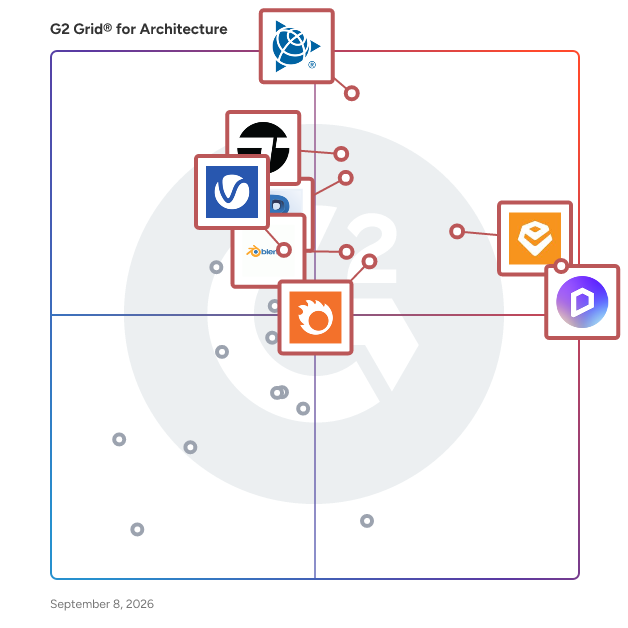
# Best Architecture Software - Page 4

*By [Neya Kumaresan](https://research.g2.com/insights/author/neya-kumaresan)*


Architecture software is used primarily by architects to visualize, create, view, and document building designs with powerful 2D precision drawing and drafting tools. Additional capabilities include schedule management, drafting automation, and customizable work environments.

Products in the Architecture category offer a repertoire of 2D design tools that assist in the process of scheduling, planning, and executing detailed construction drawings. Using personalized environments, these platforms allow architects to simulate real-world obstacles, helping provide advanced problem solving abilities. Some products, similar to those in [General-Purpose CAD](https://www.g2.com/categories/general-purpose-cad) and [Building Design and Building Information Modeling (BIM)](https://www.g2.com/categories/building-design-and-building-information-modeling-bim) categories, include 3D modeling capabilities and integrations, allowing for a greater ability to visualize and generate complex designs.

To qualify for inclusion in the Architecture category, a product must:

- Have capabilities specifically designed for architects
- Include 2D precision drawing and drafting tools
- Provide a customizable platform
- Offer documentation and scheduling capabilities


## Top Architecture Software at a Glance
| # | Product | Rating | Best For | What Users Say |
|---|---------|--------|----------|----------------|
| 1 | [D5 Render](https://www.g2.com/products/d5-render/reviews) | 4.8/5.0 (1,035 reviews) | Real-time archviz with live modeling sync | "[D5 Render: Intuitive, Fast Real-Time Rendering](https://www.g2.com/survey_responses/d5-render-review-12868224)" |
| 2 | [SketchUp](https://www.g2.com/products/sketchup/reviews) | 4.5/5.0 (1,296 reviews) | Rapid architectural concept modeling with client visualization | "[Intuitive 2D/3D Design with Minor Material Limitations](https://www.g2.com/survey_responses/sketchup-review-8371926)" |
| 3 | [Enscape 3D](https://www.g2.com/products/enscape-3d/reviews) | 4.6/5.0 (411 reviews) | Real-time architectural visualization inside BIM workflows | "[Easy workflow](https://www.g2.com/survey_responses/enscape-3d-review-11658503)" |
| 4 | [Twinmotion](https://www.g2.com/products/twinmotion/reviews) | 4.5/5.0 (61 reviews) | Real-time architectural visualization with BIM integration | "[Twinmotion-Architectural Presentation Tool](https://www.g2.com/survey_responses/twinmotion-review-11141126)" |
| 5 | [Revit](https://www.g2.com/products/revit/reviews) | 4.6/5.0 (915 reviews) | Parametric BIM coordination across AEC disciplines | "[Best-in-Class BIM Coordination: User-Friendly, Great Performance, and Strong Support](https://www.g2.com/survey_responses/revit-review-12871112)" |
| 6 | [Chaos Corona](https://www.g2.com/products/chaos-corona/reviews) | 4.7/5.0 (115 reviews) | Photorealistic archviz rendering with minimal setup | "[Intuitive Workflow and Great Results Right Out of the Box](https://www.g2.com/survey_responses/chaos-corona-review-12262636)" |
| 7 | [Blender](https://www.g2.com/products/blender/reviews) | 4.6/5.0 (307 reviews) | Archviz rendering and visualization pipelines | "[Blender: A Free, Full-Package 3D Tool with Great Rendering and Modeling](https://www.g2.com/survey_responses/blender-review-12750908)" |
| 8 | [V-Ray](https://www.g2.com/products/v-ray/reviews) | 4.5/5.0 (215 reviews) | Photorealistic architectural visualization with multi-DCC integration | "[15 Years of Professional Rendering Experience With V-Ray](https://www.g2.com/survey_responses/v-ray-review-12863057)" |
| 9 | [Archicad](https://www.g2.com/products/archicad/reviews) | 4.6/5.0 (284 reviews) | Architect-native BIM with integrated construction documentation | "[Centralized Workflow with Powerful BIM Capabilities](https://www.g2.com/survey_responses/archicad-review-12701477)" |
| 10 | [Lumion Pro](https://www.g2.com/products/lumion-pro/reviews) | 4.5/5.0 (107 reviews) | Fast architectural visualization with real-time rendering | "[Realistic Visualizations Made Simple](https://www.g2.com/survey_responses/lumion-pro-review-12625699)" |


## How Many Architecture Software Products Does G2 Track?
**Total Products under this Category:** 85

### Category Stats (Jun 2026)
- **Average Rating**: 4.45/5 The average rating of products in this category, based on all submitted ratings
- **Top Trending Product**: Vectorworks Architect (+0.07%) - Among all products in this category, Vectorworks Architect recorded the largest rating increase compared to last month
*Last updated: June 23, 2026*


## How Does G2 Rank Architecture Software Products?

**Why You Can Trust G2's Software Rankings:**

- 30 Analysts and Data Experts
- 5,600+ Authentic Reviews
- 85+ Products
- Unbiased Rankings

G2's software rankings are built on verified user reviews, rigorous moderation, and a consistent research methodology maintained by a team of analysts and data experts. Each product is measured using the same transparent criteria, with no paid placement or vendor influence. While reviews reflect real user experiences, which can be subjective, they offer valuable insight into how software performs in the hands of professionals. Together, these inputs power the G2 Score, a standardized way to compare tools within every category.


## Which Architecture Software Is Best for Your Use Case?

- **Leader:** [D5 Render](https://www.g2.com/products/d5-render/reviews)
- **Highest Performer:** [The Wild](https://www.g2.com/products/the-wild/reviews)
- **Top Trending:** [D5 Render](https://www.g2.com/products/d5-render/reviews)
- **Best Free Software:** [D5 Render](https://www.g2.com/products/d5-render/reviews)


---

**Sponsored**

### Cedreo

Cedreo is the only cloud-based 3D architecture software designed specifically for building and remodeling professionals — with zero learning curve required. Create professional conceptual designs in just 2 hours, even with no design experience. From concept to presentation: - Professional 2D and 3D floor plans - Detailed electrical and site plans - Cross-sections and elevation drawings - Photorealistic 3D renderings of interiors and exteriors - Automated surface area reports - Client-ready proposal documents with your branding Why building and remodeling professionals love Cedreo: ✓ Learn in minutes, not months - Intuitive drag-and-drop interface anyone can master ✓ Keep design in-house - No more waiting weeks for external designers nor costly design fees ✓ Close deals on the spot - Show breathtaking 3D renderings during your first meeting Perfect for professionals who want to win more jobs without the complexity of traditional design software.


[Visit website](https://www.g2.com/external_clickthroughs/record?secure%5Bad_program%5D=ppc&amp;secure%5Bad_slot%5D=category_product_list&amp;secure%5Bcategory_id%5D=473&amp;secure%5Bdisplayable_resource_id%5D=473&amp;secure%5Bdisplayable_resource_type%5D=Category&amp;secure%5Bmedium%5D=sponsored&amp;secure%5Bplacement_reason%5D=page_category&amp;secure%5Bplacement_resource_ids%5D%5B%5D=473&amp;secure%5Bprioritized%5D=false&amp;secure%5Bproduct_id%5D=69227&amp;secure%5Bresource_id%5D=473&amp;secure%5Bresource_type%5D=Category&amp;secure%5Bsource_type%5D=category_page&amp;secure%5Bsource_url%5D=https%3A%2F%2Fwww.g2.com%2Fcategories%2Farchitecture%3Fpage%3D4&amp;secure%5Btoken%5D=481ac5db79a0efe188083f8917ecaad01e94e8011db579de92787bedec5ad608&amp;secure%5Burl%5D=https%3A%2F%2Fcedreo.com%2Fsignup%2F%3Futm_campaign%3D25017129-g2-sponsored%26utm_source%3Dg2%26utm_medium%3Ddirectories%26utm_content%3Dsponsored&amp;secure%5Burl_type%5D=free_trial)

---

## What Are the Top-Rated Architecture Software Products in 2026?
### 1. [Velocity AOI](https://www.g2.com/products/velocity-aoi/reviews)
Velocity AOI is an AI powered architectural visualization tool built for architects, designers, and real estate professionals. It transforms building screenshots and 3D views into high quality, photo realistic renders while preserving original geometry. Users can explore facade concepts, experiment with materials, enhance environmental realism, and generate presentation ready visuals in minutes. Designed as a design copilot, Velocity accelerates concept development without compromising structural accuracy.


**Who Is the Company Behind Velocity AOI?**

- **Seller:** [Velocity](https://www.g2.com/sellers/velocity-fd85a1b6-9c5e-4631-afc7-6a92cca6e80c)
- **HQ Location:** N/A
- **LinkedIn® Page:** https://www.linkedin.com/company/No-Linkedin-Presence-Added-Intentionally-By-DataOps (1 employees on LinkedIn®)


### 2. [Veras](https://www.g2.com/products/veras/reviews)
Veras® is an AI-powered visualization app for SketchUp®, Revit®, Rhinoceros®, and the Web that uses your substrate for creativity and inspiration. With Veras, designers and architects can now generate multiple design solutions in a fraction of the time it would take using traditional methods. Please visit www.evolvelab.io/veras to download a free trial or purchase Veras. SketchUp® supported versions: 2021, 2022, 2023 Revit® supported versions: 2019, 2020, 2021, 2022, 2023 and 2024 Rhinoceros® supported versions: 7


**Who Is the Company Behind Veras?**

- **Seller:** [EvolveLAB](https://www.g2.com/sellers/evolvelab)
- **Year Founded:** 2015
- **HQ Location:** Boulder, US
- **Twitter:** @evolvelabio (2,758 Twitter followers)
- **LinkedIn® Page:** https://www.linkedin.com/company/evolvelabio/ (7 employees on LinkedIn®)


### 3. [Vibe3D](https://www.g2.com/products/vibe3d/reviews)
Vibe3D is an AI-powered rendering tool for Interior Designers &amp; Architects. It generates ultra-realistic, client-ready renders from 3D models along with one-click edits &amp; contextual prompt suggestions, making it very easy to create stunning renders in no time.


**Who Is the Company Behind Vibe3D?**

- **Seller:** [Vibe3D](https://www.g2.com/sellers/vibe3d)
- **HQ Location:** N/A
- **LinkedIn® Page:** https://www.linkedin.com/company/No-Linkedin-Presence-Added-Intentionally-By-DataOps (1 employees on LinkedIn®)


### 4. [Virtual Architect Kitchens &amp; Baths 8.0](https://www.g2.com/products/virtual-architect-kitchens-baths-8-0/reviews)
This innovation in home design software delivers the powerful tools and inspiration you need to transform your living space, plus expert help to get the job done right. With Virtual Architect Kitchens &amp; Baths 2.0, you can plan room additions and other home improvement projects with ease, make your home energy efficient with new lighting and appliances, breathe new life into an outdated kitchen, bathroom or bedroom and so much more. You can even design your dream home, complete with landscaping or a deck, from scratch. No design experience necessary with our wizard-driven interface, all you have to do is point and click!


**Who Is the Company Behind Virtual Architect Kitchens &amp; Baths 8.0?**

- **Seller:** [Claranova](https://www.g2.com/sellers/claranova)
- **Year Founded:** 1984
- **HQ Location:** Courbevoie, Île-de-
- **Twitter:** @Avanquest_Soft (746 Twitter followers)
- **LinkedIn® Page:** https://www.linkedin.com/company/18459004/ (13 employees on LinkedIn®)
- **Ownership:** CLA.PA


### 5. [Visual Impression](https://www.g2.com/products/visual-impression/reviews)
Produce 3D presentations as part of your normal office design and specification process with 2020 Visual Impression. Fully integrated with 2020 Cap, 2020 Giza and 2020 Worksheet you can create 3D visualizations using actual office furniture fabrics and finishes from the widest selection of manufacturer catalogs available. Move, pan and zoom within scenes for an exceptionally real feel. With our office furniture rendering software, show your clients exactly what they are buying!


**Who Is the Company Behind Visual Impression?**

- **Seller:** [Cyncly](https://www.g2.com/sellers/cyncly)
- **HQ Location:** N/A
- **Twitter:** @CynclyCo (151 Twitter followers)
- **LinkedIn® Page:** https://www.linkedin.com/company/cyncly/ (3,593 employees on LinkedIn®)


### 6. [VizCloud](https://www.g2.com/products/vizcloud/reviews)
VizCloud is an AI-powered architectural rendering platform that transforms drawings, photos, and design files into high-quality 3D renderings in seconds. Built for speed, simplicity, and scalability, VizCloud allows users to upload 2D CAD elevations, floor plans, sketches, construction photos, or screenshots from tools like SketchUp and Revit, and instantly generate realistic exterior and interior renderings using artificial intelligence. By combining advanced AI with a simple text prompt workflow, VizCloud removes the need for complex 3D modeling, rendering software, or long production timelines. As a modern AI house rendering tool, VizCloud is designed for architects, designers, builders, real estate professionals, and homeowners who need fast, affordable visualization. Users can describe materials, lighting, landscaping, and overall style in natural language, and the platform will generate polished, presentation-ready visuals that reflect their vision. This makes it ideal for real estate marketing, architectural design, client presentations, pre-construction planning, and early-stage concept exploration. VizCloud supports a wide range of input types, making it highly flexible across different workflows. Whether starting from a simple line drawing, a CAD elevation, a 3D model screenshot, or even a real-world construction photo, users can quickly convert their inputs into compelling 3D visuals. This ability to bridge the gap between 2D and 3D allows professionals to communicate ideas more effectively and helps clients better understand the final outcome of a project. In addition to AI architectural rendering, VizCloud includes a suite of powerful tools such as AI virtual staging, image editing, and style transfer. Users can transform empty or outdated interiors into fully furnished spaces, enhance and modify existing renderings, or explore multiple design directions with ease. The platform also enables iterative workflows, allowing users to refine images, adjust prompts, and make changes without starting from scratch—saving both time and cost. Compared to traditional architectural rendering services, which often require hours or days of manual work, VizCloud delivers results in seconds at a fraction of the cost. This makes it a highly scalable solution for both individual users and teams producing large volumes of visual content. By streamlining the visualization process and removing technical barriers, VizCloud empowers users to create high-quality 3D renderings faster, more efficiently, and more affordably than ever before.


**Who Is the Company Behind VizCloud?**

- **Seller:** [VizCloud](https://www.g2.com/sellers/vizcloud)
- **Year Founded:** 2025
- **HQ Location:** N/A
- **LinkedIn® Page:** https://www.linkedin.com/company/vizcloud-io/ (1 employees on LinkedIn®)


### 7. [vizera.ai](https://www.g2.com/products/vizera-ai/reviews)
Vizera.ai is a Swiss-made AI platform for architectural and interior design visualization. It transforms sketches, 3D models, CAD plans, and reference photos into high-quality, photorealistic visuals within minutes. Built specifically for architects and designers, Vizera.ai supports concept development, façade studies, interior design, material variations, mood boards, and presentation-ready imagery—delivering consistent, professional results with modern AI technology. Free trial available.


**Who Is the Company Behind vizera.ai?**

- **Seller:** [vizera.ai](https://www.g2.com/sellers/vizera-ai)
- **Year Founded:** 2023
- **HQ Location:** Zurich, CH
- **LinkedIn® Page:** https://linkedin.com/company/vizera-ai/ (1 employees on LinkedIn®)


### 8. [VSDECO](https://www.g2.com/products/vsdeco/reviews)
Transform your room with a click! Take a picture and explore different styles instantly. With our AI-powered rendering, visualize your space like never before. From photos, sketches, to drawings, witness them evolve into stunning photorealistic renders. Explore a variety of interior design styles and bring your vision to life effortlessly.


**Who Is the Company Behind VSDECO?**

- **Seller:** [VSDECO](https://www.g2.com/sellers/vsdeco)
- **Twitter:** @vsdecoai (1 Twitter followers)
- **LinkedIn® Page:** https://www.linkedin.com/company/vsdeco/


### 9. [yanus.ai](https://www.g2.com/products/yanus-ai/reviews)
YANUS.AI is a SaaS (Software-as-a-Service) solution that provides a web app-based platform for architectural visualization. It offers seamless plugin integrations with leading architectural software solutions such as Revit, ArchiCAD, Rhino, and SketchUp. This integration allows architects to visualize their models directly from their preferred programs, optimizing the workflow and further enhancing efficiency. The web app offers a range of powerful features, including: ▌ Photorealistic visualizations ▌ Extensive material catalog ▌ creative upscale to any high-end resolution ▌ Style presets ▌ Full control over building components ▌ Style transfer ▌ Custom AI training With YANUS.AI, architects can enhance their productivity, reduce costs, and achieve superior visualization quality for their projects.


**Who Is the Company Behind yanus.ai?**

- **Seller:** [yanus.ai](https://www.g2.com/sellers/yanus-ai)
- **Year Founded:** 2024
- **HQ Location:** Cologne, DE
- **LinkedIn® Page:** https://www.linkedin.com/company/yanus-ai-arch (2 employees on LinkedIn®)


### 10. [Zlendo Realty](https://www.g2.com/products/zlendo-realty/reviews)
Zlendo Realty is a cloud-based, AI-powered 3D visualization platform for real estate professionals and individuals. It transforms 2D floor plans into intelligent 3D models with immersive 360° walkthroughs and ultra-realistic 8K renders. With Vastu compliance, localized cost estimation, and AI-generated images and videos, Zlendo Realty helps turn ideas into reality—making planning, presentations, and decision-making faster, clearer, and more confident.


**Who Is the Company Behind Zlendo Realty?**

- **Seller:** [Zlendo](https://www.g2.com/sellers/zlendo)
- **Year Founded:** 2020
- **HQ Location:** Madurai, IN
- **LinkedIn® Page:** https://www.linkedin.com/company/zlendo (60 employees on LinkedIn®)


## What Is Architecture Software?

[Vertical Industry Software](https://www.g2.com/categories/vertical-industry)


---

## How Do You Choose the Right Architecture Software?

### What You Should Know About Architecture Software

### What is Architecture Software?

Architecture software allows architects to communicate their designs, intentions, and expectations in a digital format. That communication happens between architect, designer, contractor, engineer, material supplier, and (most importantly) client. At the minimum, architectural software reduces errors, boosts efficiency, and ensures accuracy of calculations. Architecture software can enhance manual drawings and workflows, as well as streamline and provide comprehensive oversight for the entire architect and construction project lifecycle. The software also allows architects and contractors to ensure their agendas and cost estimates are set in place–—and agreed upon with the client—prior to embarking upon a project. Architecture software makes sure that those plans meets legal and safety requirements.

The requirements and needs of architects blur the lines between architectural software, [BIM applications](https://www.g2.com/categories/building-design-and-building-information-modeling-bim), and [CAD systems](https://www.g2.com/categories/general-purpose-cad). Architecture software also isn’t architect- or architectural firm-exclusive; this software type can be used by drafters, engineers, contractors, and builders.

Architectural software facilitates the creation of any and all documents regarding the plans for a project.

While the idea of an architect’s studio covered in blueprints and paper contracts is romantic, it’s neither efficient nor desirable. Human error is always an inevitable part of any industry, but it comes at a higher cost (literally) in the architectural industry. Why slowly and manually calculate mathematical equations or painstakingly redraw plans after client feedback? Software is equipped with algorithms and allows designers to manipulate their drawings at will. Architects are no longer constrained by the limits of paper; they can easily work in 3D and 4D.

With an architecture software tool, you can:

- Publish designs in PDF format
- Develop overall standards for the production of design content
- Produce more precise designs
- Manage and organize assets

### Why Use Architecture Software?

A major benefit of utilizing architecture software is that it opens up channels of collaboration and communication between architects, designers, engineers, and clients. Architectural software enhances workflow, regardless of whether an architectural firm uses it for design. Software enables electronic file sharing, automatic quantity takeoff and estimation, and overall project management. Editing features ensure that everyone relevant has contributed to the project, before and during construction.

Architectural software also reduces fragmentation between different players: All designs, information, edits, and changes are centralized into one database. This minimizes conflict, creates a source of truth, and simplifies project coordination. Additionally, architecture software improves business outcomes for clients, because of its tendency to create transparency at every step of the project.

### Who Uses Architecture Software?

Those who are involved in architecture agencies and projects utilize architectural software. This includes architects, designers, contractors, subcontractors, clients, and compliance and legal professionals.

### Architecture Software Features

**Rendering –** 2D and 3D renderings (even without the help of [augmented reality (AR)](https://www.g2.com/categories/augmented-reality) technology) enable architects to show clients realistic models and visualizations. By rendering their concepts, architects can present to clients how their plans will look upon completion.

**Drafting –** Architectural software must allow for direct drafting or the import and/or export of drafts in the software. Whether the drafts can be initially drawn in 2D and then prototyped in 3D doesn’t matter, so long as the software enables drafting capability. An added bonus to this drafting feature is architecture calculators, which can automate the counting of resources, materials, and finances.

**Workflow –** Effective architect software should facilitate the integration of existing workflows. Once those workflows are uploaded into the software, they can be better monitored and tracked, ultimately enabling full collaboration across the organization. Integrated workflows also speed up the entire design and construction processes, because they reduce redundant, back-and-forth communication.

**Database –** A lot of architecture software offers some version of a database. This can range from a materials database, full of updated costs and availability, to a file storage database. Regardless of database type, it will be helpful for the architect who wants to go back and find context for their original drafts and plans.

**Document management –** Architect assets are digital designs and drafts. Architecture software that provides a place to store, edit, and share those pieces of content helps professionals stay on top of things. With document management capabilities, drafts, plans, and communication can be standardized and tracked more efficiently. Additionally, some document management modules can ensure file compatibility. For those that do, this can be a make-it-or-break-it feature; if a software is unable to export or import files in a certain file type, then architects are forced to jump through hoops during presentation and sharing. Some software will integrate with [business content management](https://www.g2.com/categories/business-content-management) solutions, easing the entire process of identifying, discovering, and tracking down relevant content.

#### Additional Architecture Features

**Project management –** Job costing, job coordination, time tracking, and business reports are not architecture industry-specific features, but they are crucial to keeping architecture projects from blowing past initial estimates and undermining client relationships.

**Integration with accounting solutions –** Beyond basic invoicing and generating of BOQs (bill of quantities), architecture software usually does not offer a full-fledged accounting module. Integration with third-party accounting solutions, then, can enhance the benefits of architectural software within a design firm.

**Integration with CAD and BIM –** Despite any overlaps between CAD and BIM software with architecture software, not all architecture software necessarily offers those capabilities. Integration with CAD and BIM enables architectural software to demonstrate a greater ability for visualization and design generation.

**Construction site management –** Contractors, engineers, and construction crews make possible the physical reconstruction of design plans into tangible buildings. Therefore, architectural software that offers construction site management features helps provide synchronization and consistency across the entire building lifecycle.

### Trends Related to Architecture Software

**Continued benefits of automation —** The more menial and manual tasks that can be automated with architectural software, the more creative and technical energy architects can put towards their projects. Instead of wasting time redrafting or editing drawings, architects and designers can better client relationships, adhere to any and all regulations, and attempt to keep to budget.

**New developments in AEC —** The intersection between the different industries that make up AEC (architecture, engineering, and construction) and developments in technology continues to transform and innovate design. [Virtual reality (VR)](https://www.g2.com/categories/virtual-reality) and augmented reality (AR) will only add to the capabilities of simulations and 3D modeling, rendering, and other visualizations. Additionally, plugins and mobile applications are regularly cropping up and enhancing existing tools, based on newly discovered needs and requirements of AEC.

**New applications for** [**AR/VR**](https://www.g2.com/categories/ar-vr) **—** These technologies will continue to transform construction site observation and building and field inspection. VR can enhance existing construction processes, keeping open the lines of communication between architecture firms and relevant players throughout the entire project lifecycle. VR makes possible the synchronizing of virtual environments with planned-out data points and design plans. AR can better capture the layouts of construction sites, adding to the usefulness of plans and models, by creating realistic visualizations of the &quot;real world.&quot; AR also promises to further reduce project costs, as both architects and contractors can plan out every single variable before physically breaking ground.

**Cloud and/or mobile technology —** While architects may generally draft up building plans at their desks, cloud and/or mobile technology is a boon because it encourages and allows for the presence of the architect at a site. Gathering, storing, and sharing data from any device at any time is hugely desirable and almost expected at this point in time. Cloud technology can also be updated in real-time, which is helpful to accurately track the progress of projects.

### Potential Issues with Architecture Software

Ideally, architecture software reduces the time and energy spent on creating drafts, communicating with clients and relevant parties, and adjusting plans throughout the project lifecycle. Architecture software equips agencies and professionals with the tools to discover efficiencies, ensure accuracy despite speeding up the lifecycle, and facilitate integration between disparate solutions that may already be in place.

However, despite the hundreds, if not more, hours of manpower that could be saved by utilizing such software, there are still some issues that arise when implementing it:

**Sweeping learning curve –** Ironically, the biggest hurdle with architecture software is the technology bit. Like landscape designers or other trades that put emphasis on hand drawing skills, it’s difficult to convince professionals to switch to a mostly—if not entirely—digital platform. Additionally, some architecture solutions are either too expensive for smaller-sized design firms or independent architects or too expansive for the technically-unsavvy user to comfortably learn.

**Hand drawing versus digital drawing –** Architecture software logically increases efficiencies in drawing, drafting, and file sharing. However, some architects resolutely prefer the old-school creative process. The issue, then, is how to onboard those architects who refuse to adopt new technologies. The silver lining here, though, is that those architects would probably gravitate toward software that allows them to export their hand drawn sketches into the software.

**Project management –** If an architecture software doesn’t provide visibility into the progress of projects and continued availability of resources, it’s difficult to argue that the unfamiliar tool will ultimately be useful. Helpful architectural software should take over the manual process of coordinating project leads, contractors, and team members. The tool should also unify the entire architecture project, allowing for harmony and reduced friction and misunderstanding.

### Software and Services Related to Architecture Software

[**CAD**](https://www.g2.com/categories/general-purpose-cad) **—** CAD stands for &quot;computer-aided design,&quot; and CAD software can be used across a number of industries to produce technical drawings of buildings and physical objects.

[**BIM**](https://www.g2.com/categories/building-design-and-building-information-modeling-bim) **—** Building information modeling (BIM) software offers the architecture and construction industries with a model-based process for designing buildings and infrastructures. The appealing aspect of BIM is its ability to generate a granular, digital design which professionals can better present to their clients.

[**Sketching**](https://www.g2.com/categories/sketching) **—** Sketching software digitizes the previously manual process of creating drawings on paper. The software can transform 2D digital sketches into 3D files and typically integrates with CAD solutions.

[**Drawing**](https://www.g2.com/categories/drawing) **—** Similar to sketching software, drawing software enables users to draw on their computers or other relevant mobile devices. Drawing software always allows users to export completed drawings into commonly used file types.

[**3D Rendering**](https://www.g2.com/categories/3d-rendering) **—** 3D rendering software fully realizes both 2D and 3D models, designs, and images. Architecture software that provides 3D rendering capabilities further helps clients visually imagine the plans of architects and designers.

[**Team Collaboration**](https://www.g2.com/categories/team-collaboration) **—** An already touched-upon benefit of architecture software is its capability to induce collaboration and communication between team members. While architectural software’s collaboration features might not necessarily integrate with team collaboration-specific tools, it still echoes or mimics them.

[**Project Management**](https://www.g2.com/categories/project-management) **—** Like any other project, architectural projects require a lot of coordinating and monitoring, especially considering that they tend to quickly blow past their initial budget.

[**Construction Management**](https://www.g2.com/categories/construction-management) **—** Architect designs and plans are realized on construction sites. Construction management software helps companies oversee and follow the progress of construction projects and activities of construction crews.

[**Field Service Management**](https://www.g2.com/categories/field-service-management) **—** Because construction management solutions specifically oversee the activities of construction crews, field service management (FSM) software would be a helpful supplement for architectural software. After all, construction field workers are not the only extra personnel involved in architectural projects.


