
Amita Jain
Amita Jain is a Senior Writer at G2, where she tests and evaluates software to help buyers make sense of the technologies businesses rely on. She brings over five years of technology writing experience, more than a decade as an editor, and a journalism background covering business and education policy. Her interests span finance, data, and marketing technologies. Away from the keyboard, she’s happiest with a philosophical mystery or a blank canvas.
I evaluated 20+ tools to find the 8 best database management software. These are Microsoft SQL Server, Snowflake, Google Cloud SQL, SAP HANA Cloud, Databricks, SAS Viya, Amazon Athena, and SQL Developer.
I think of our database as the office’s well. Everyone draws from it: I pull the numbers behind my work, finance pulls revenue, product pulls usage, and leadership refreshes the dashboard they won’t admit to checking hourly.
Most of us never think about the well itself, which is usually the surest sign someone chose it well: hundreds of footprints around it, the water stays clean, and the queries come back fast.
If you’re the person responsible for database performance, your analytics infrastructure, or keeping business-critical apps running, the wrong database management system means escalating costs, constant troubleshooting, and users who feel it.
That's the choice this list is about, and it's why I didn't judge these systems by their feature pages alone. I evaluated 1,000+ G2 reviews across 20 database management software for what the “well-keepers” report a year in: did the data stay reliable, did performance hold up, did administration get easier, did costs stay sane, and did anyone regret the system they chose.
The eight that held up serve three kinds of buyers: teams running the apps a business depends on, teams building an analytics platform, and teams going deeper on an Oracle, Microsoft, or SAP stack. Find your situation below, and you'll leave with a shortlist.
8 best database management software for 2026: My top picks
-
Microsoft SQL Server: Best for enterprise relational database management in MS/Azure environments
Supports high-volume transactional workloads with built-in backup, disaster recovery, security controls, and integration with Microsoft applications, Power BI, and Azure. (From $73/month/core)
-
Snowflake: Best for cloud data warehousing and multi-cloud analytics
Separates storage from compute so each scales independently, with instant data sharing and minimal maintenance. (From $2/credit + $23/TB/month storage)
-
Google Cloud SQL: Best for cloud database management without running servers in-house
Runs the databases most teams work with, like MySQL, PostgreSQL, and SQL Server, with Google handling the backups, updates, and uptime for you. (From $30/month)
-
SAP HANA Cloud: Best for real-time enterprise analytics and SAP environments
Uses in-memory processing to analyze large volumes of operational and transactional datasets in real time while integrating natively with SAP business applications. (Pricing available on request)
-
Databricks: Best for data engineering, machine learning, and lakehouse analytics on big data
Combines data pipelines, SQL analytics, AI development, and machine learning workflows in a unified lakehouse architecture built for large-scale datasets. (From $0.15/DBU)
-
SAS Viya: Best for end-to-end analytics with in-memory processing
Brings data preparation, forecasting, statistical modeling, AI, and decision intelligence into a single platform that can process complex analytical workloads quickly. (Pricing available on request)
-
Amazon Athena: Best for serverless SQL analytics on data lakes
Lets teams run SQL queries directly on data stored in Amazon S3 without setting up or managing infrastructure, making it useful for ad hoc analysis and large-scale reporting. (From $5/TB scanned)
-
SQL Developer: Best for Oracle database development and administration
Provides SQL development, performance tuning, database administration, migration, and debugging tools through a single interface designed for Oracle environments. (Available for free)
8 best database management software I recommend when your data starts getting in the way
What surprises me is how modern database management tools have evolved far beyond the traditional databases most of us started with. Today's options aren't just places to store rows and columns. Some are built for fast analytics, others for handling massive datasets or pulling answers on demand, each working with your data in a different way.
That variety is what makes the choice hard. Pick the wrong one, and you feel it everywhere: in slow queries, and in a bill that creeps up month after month. And the cost of getting it wrong is real too: the average estimated cost of unplanned downtime is nearly $15,000 a minute.
The eight platforms below solve different problems well. The choice comes down to your specific needs. Some handle a flood of everyday transactions without slowing down. Others are made for drilling down into huge datasets. A few practically run themselves in the cloud, so you're not babysitting servers.
How did I find and evaluate these best database management software?
I started with G2's Database Management Systems (DBMS) Summer Grid report to build my shortlist of the best database management software, ranking candidates by G2 Score, user satisfaction, and market presence. I also weighed review recency and review volume, so the list leans on tools with steady, up-to-date feedback rather than a handful of old five-star reviews. That gave me a pool of platforms that real users rate highly.
From there, I read G2 reviews at scale to work out what actually matters to the people who live in these systems every day: database administrators, data engineers, analysts, and developers.
I looked at how each platform holds up under heavy workload, where performance or costs start to creep as data grows, how much day-to-day babysitting it demands, and how safely it handles sensitive data. I paid close attention to recurring themes that people praise when a tool just works, and complain about when it doesn't.
I also looked at who each tool actually serves, using G2's customer-segment data to see whether a platform skews toward small businesses, mid-market teams, or large enterprises because the best system changes depending on the size and complexity of your operation.
The screenshots in this article come from G2 vendor profiles and publicly available product documentation.
What makes the best database management software: My selection criteria
Choosing a database management software comes down to what you actually need the system to do, and the eight here were built for very different jobs: running the apps a business depends on, powering analytics, or simply making data easier to manage and work with. Because they serve such different purposes, I didn't evaluate them on one narrow feature.
I judged each system against the capabilities that decide whether a database actually earns its place on a team, day to day. Here's what I prioritized:
- Performance under real workloads: I looked at how well each system handles the work it is meant for, whether that means fast transactional queries, large-scale analytics, real-time reporting, or ad hoc SQL analysis. I like tools that stay responsive as data volumes grow and queries become more complex.
- Reliability when the stakes are high: I looked for signs that the system can protect data and keep teams working when something goes wrong. Backups, recovery options, replication, failover, and high availability mattered here, particularly for teams running business-critical workloads.
- Ease of management: I paid attention to how much day-to-day effort each system demands. Some tools require more hands-on tuning, patching, monitoring, and infrastructure management, while others handle more of that through managed services and automation. I favored systems that reduce admin burden without hiding important controls.
- Scalability without a rebuild: I looked at how easily each platform can handle more data, more users, and heavier workloads over time. The strongest options make growth feel planned for, not like a breaking point that forces teams to rethink their setup.
- Security and governance: I considered how well each system helps teams control and protect sensitive data. Access controls, encryption, audit logs, compliance support, and governance features were important, particularly for organizations with strict internal or regulatory requirements.
- Fit with the existing stack: I looked at how naturally each tool fits into the systems teams already use, including cloud platforms, BI tools, data pipelines, developer workflows, and enterprise applications. A powerful database can still create friction if it needs too much custom work to connect with everything else.
- Total cost of ownership: I considered the real cost beyond the listed price. Storage, compute, data scanned, support, scaling, and administration can all change what a system actually costs over time. Tools with clearer pricing and fewer operational surprises stood out.
These criteria helped me look past the biggest feature lists and focus on where each database management system is genuinely useful, where it may create trade-offs, and what kind of teams it is best suited for. I've flagged where each one truly shines, so you can choose for your situation.
The list below contains verified user reviews from the best database management software. To qualify for inclusion in the Database Management Systems (DBMS) category, a product must:
- Manage and align with a database model (e.g., relational, object-oriented, hierarchical, distributed, non-relational)
- Can also exist as a standalone tool to manage databases
- Provide database maintenance functionalities
- Provide extensive reporting and activity analytics
*This data was pulled from G2 in 2026. Some reviews may have been edited for clarity.
Want to learn more about Database Management Systems (DBMS)? Explore Database Management Systems (DBMS) products.
1. Microsoft SQL Server: Best for enterprise relational database management in MS/Azure environments
Microsoft SQL Server is the relational database I look at when data is not just sitting in the background, but powering applications, feeding reports, supporting finance or operations teams in MS environments, and being used by developers, analysts, and admins at the same time.
If there's a word that defines how reviewers feel about SQL Server, it's reliable, not in a generic sense, but specifically in the context of uptime, data integrity, and performance under load. SQL Server holds a 4.4/5 rating across 2,200+ reviews and scores 92% on meets requirements, two points above the category average. Even its lowest-rated features in the comparison data: data dictionary, replication, migration, and modeling, all hold a 90% satisfaction rating.
What I take from that is that reviewers trust it most for the unglamorous, but important parts of database management: dependable backups, recovery, access control, and high availability that teams can count on when something goes wrong.
The first thing that stands out to me based on my evaluation of reviews is the familiar working environment. SQL Server Management Studio gives developers and DBAs a clear place to write queries, inspect tables, trace dependencies, and troubleshoot issues, and reviewers consistently describe it as somewhere they can simply sit down and get to work.
Just as important is how naturally it connects to the rest of the Microsoft stack. Reviews point to clean integration with Azure, Power BI, Excel, .NET applications, SSIS, and Azure Data Factory. For teams already invested in Microsoft tooling, that fit is a big part of why SQL Server stays at the center of how they build and report.
What I noticed across the review base is that people don't talk about SQL Server like a black box. G2 feedback leans on Query Store, T-SQL, stored procedures, triggers, and indexes that help them move from “this query is slow” to “why it's slow” and fix performance problems without guesswork.
Its feature ratings line up with that maturity. Query language is rated 93% in G2 reviews against a 92% category average, while user access control and multi-user environment both sit at 92% against an 89% average. Those scores match the story reviewers tell: SQL Server is at its best when many users and applications depend on the same structured data, and it holds up under high-concurrency workloads that would strain simpler systems.
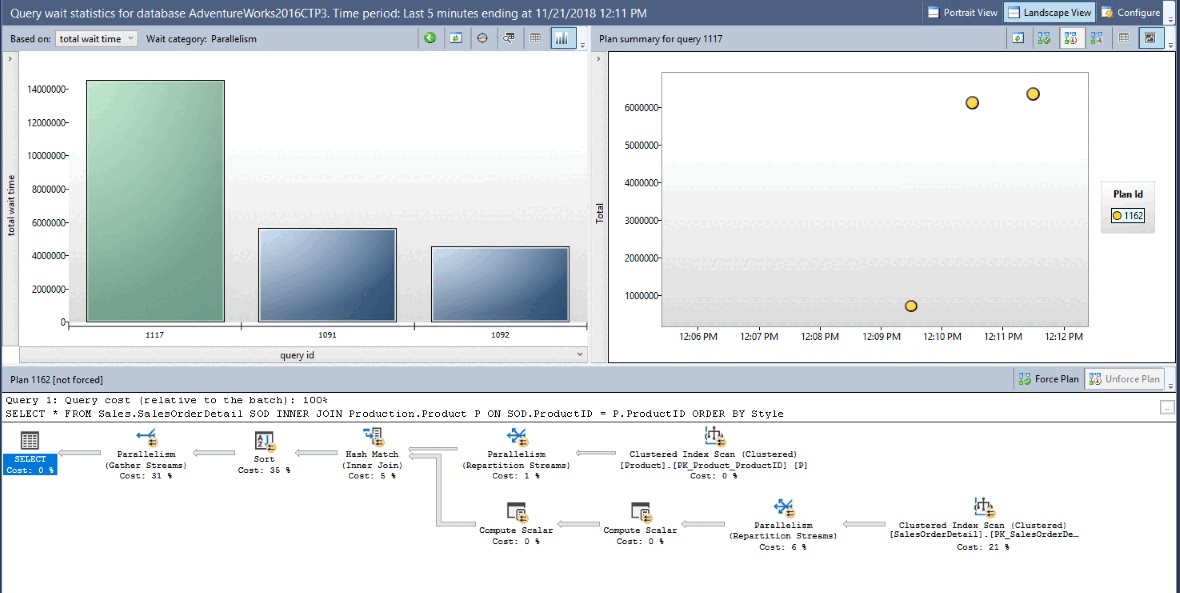
One theme I kept seeing across the G2 reviews was resilience. Backup and Recovery rates 92%, and Microsoft's built-in high-availability and disaster-recovery feature keep databases available through failover. The pattern holds in the reviews: more than a quarter of the ones I analyzed bring up backups, recovery, or availability unprompted.
Security is the other place it earns enterprise trust. G2 reviews describe the permissions model and access controls as mature and straightforward to implement, which matters for the finance, healthcare, and operations teams that carry strict governance and compliance requirements.
SQL Server is built as an enterprise-grade database platform, so the cost conversation depends heavily on scale and Microsoft fit. Reviews say it's smaller teams with lighter projects who feel the cost sometimes, usually when a higher edition or a broader deployment comes up. It’s best suited to teams that will use its reliability, tooling, security, and Microsoft ecosystem depth enough to justify the licensing.
Across the G2 reviews, I noticed that SQL Server can run serious workloads, but it isn’t a lightweight database you can ignore once it is running. It rewards teams that have the discipline to monitor, tune, index, and configure it well. Without that database expertise, the maintenance can feel heavier than expected. For teams with DBAs or Microsoft-experienced engineers, that same depth is what helps SQL Server stay stable under demanding workloads.
SQL Server's reviewer base on G2 skews toward enterprise teams, which fits everything above. If your business runs on Microsoft and you need a stable, secure, and deeply manageable relational database, MS SQL Server is the one I’d reach for first.
What I like about Microsoft SQL Server:
- It sits at the center of a Microsoft stack. Clean ties to Azure, Power BI, Excel, .NET, SSIS, and Azure Data Factory mean teams already invested in Microsoft don't fight their tooling to build and report.
- I like the visibility it gives into slow queries. Execution plans, Query Store, and indexing tools make it easier to understand why something is taking longer than expected.
What G2 users like about Microsoft SQL Server:
“From a day-to-day operations standpoint, features like Query Store are absolute lifesavers. It takes the guesswork out of troubleshooting performance regressions by letting you pinpoint exactly which query is bogging down the system, so you can address it quickly. The indexing options and execution plan visualizations are top-tier as well, giving you precise control over optimization.
Plus, the security model is mature and straightforward to implement. Whether you’re running it on-premises or scaling into a hybrid cloud setup, it handles high-concurrency environments without breaking a sweat. It just works, which is exactly what you need from a core database.”
- Microsoft SQL Server review, Sivabalan A.
What I dislike about Microsoft SQL Server:
- Licensing is the cost consideration G2 reviewers mention often. SQL Server is a better fit for teams that are already standardized on Microsoft or need a mature, enterprise-grade database platform. For organizations that use its ecosystem depth, security, and reliability, the spend is easier to understand as part of the platform value.
- SQL Server also expects real database expertise. Reviewers point out that it runs best with proper indexing, monitoring, configuration, and tuning, so it may feel heavier for teams without in-house database experience. For teams with DBAs or Microsoft-skilled engineers, that operational depth becomes a strength because it gives them more control over performance and stability.
What G2 users dislike about Microsoft SQL Server:
“If I had to point to a few areas that could be improved, the licensing model can feel complex and expensive for smaller teams or startups. That sometimes nudges them toward open-source alternatives before they’ve even had a chance to properly evaluate what SQL Server can do.”
- Microsoft SQL Server review, Kavipriya S.
Did you know? SQL Server is one of several heavyweight relational engines, and the right fit often comes down to your stack and licensing appetite. Compare the top relational database systems before you commit.
2. Snowflake: Best for cloud data warehousing and multi-cloud analytics
Snowflake is the cloud data warehouse I recommend to analytics-heavy teams, and the reason has to do with how cleanly it scales. It's built so a lot of people can query the same data at the same time without slowing each other down.
That lines up with the pattern I see in reviewer feedback. Snowflake holds a 4.5/5 across 750+ G2 reviews, and its strongest signals cluster around usability and analytical work: Query language rates 95% against a 92% category average, while multi-user environment and data migration both score 94%, at least five points above average.
Ease of use scores 94%, and that score reflects a recurring pattern in the review data.. The picture people paint matches the numbers. They mention it’s easy to work in, easier to scale than the warehouses that came before it, and dependable when more than one team leans on the same data.
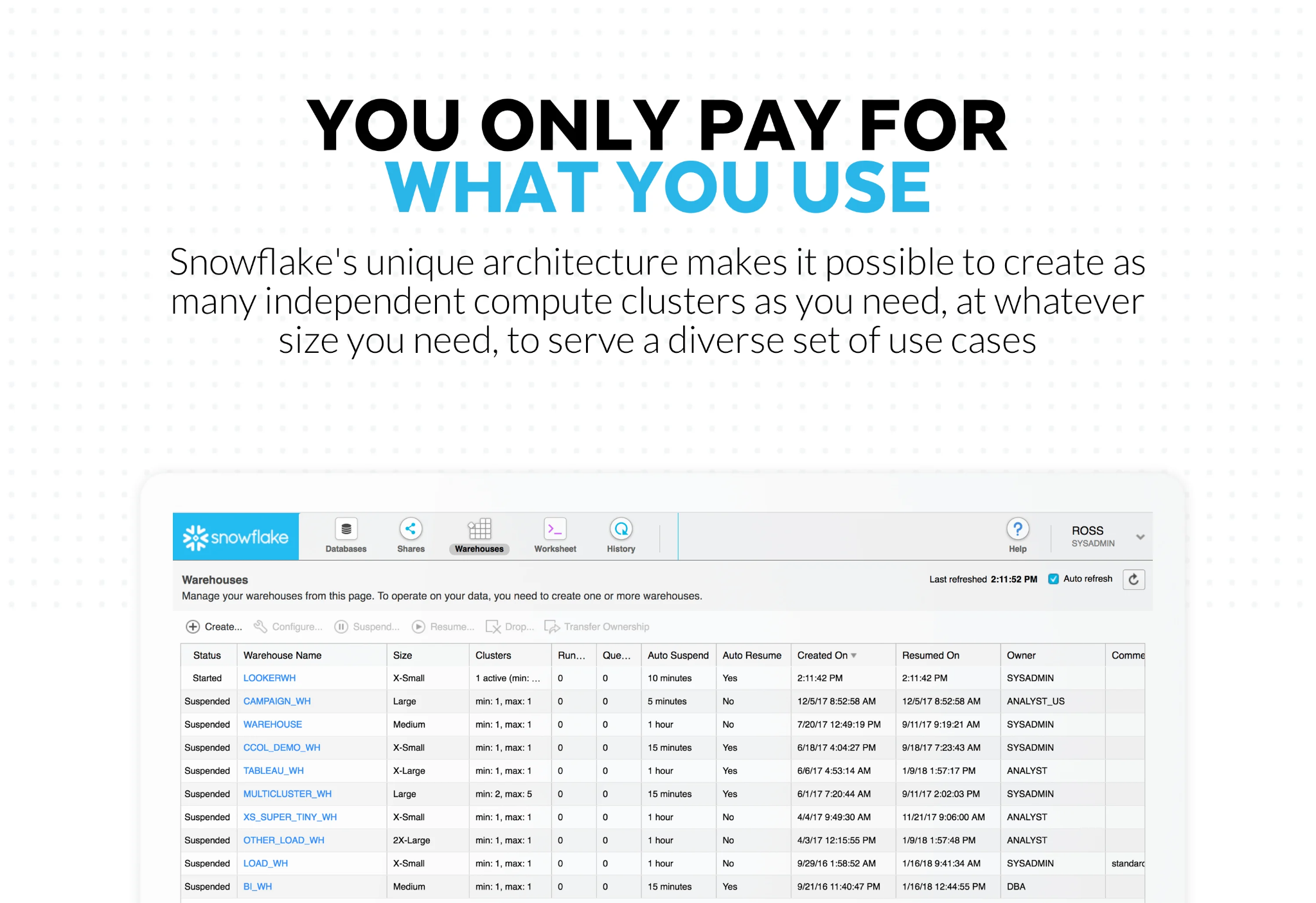
The reason it scales the way it does comes down to one architectural choice: storage and compute are separated. In plain terms, your data lives in one place, but the processing power can be adjusted separately. So a finance team can run heavy reconciliation queries on a larger warehouse. Data engineers can run scheduled transformation jobs on another. Analysts can keep working on smaller, everyday queries without groups fighting for the same compute pool.
What I keep seeing in reviews is that teams also tie this to far less infrastructure to manage. Because Snowflake is fully managed, there are no servers to provision, patch, or keep alive, and it handles the operational layer in the background. Reviewers describe getting their time back for the actual analysis rather than spending it keeping the warehouse running, which is a recurring reason they give for moving off older, self-managed setups.
Where Snowflake shows its range is how it slots into the rest of the analytics stack. Reviewers mention using it with SQL, Snowpark, dbt, Airflow, Python, and BI tools like Looker, Tableau, and Power BI, and running it across all three major clouds: AWS, Azure, and GCP. This makes Snowflake a shared surface. Data engineers load and model the data, analysts query it, business teams read the dashboards, and data science teams build on the same source.
Security is a quieter strength that the G2 Data shows loudly. Data encryption and user access control both rate 94%, the highest score among the eight tools here, and reviewers say role-based access is something that just works smoothly. For a warehouse that's increasingly shared across departments and even outside partners, that baseline matters.
Another capability that makes shared-data models easier to implement is Zero-Copy Cloning that lets teams create test or development copies of data without duplicating the full dataset. Reviewers mention that it reduces the usual mess of copying, moving, and reconciling data.
The main trade-off I'd clock is cost visibility. Snowflake's pay-as-you-go model works well when teams size their warehouses carefully, set auto-suspend rules, and watch their credit usage. A theme I saw across the G2 reviews is that teams without that discipline are the ones who get surprised, since it's easy to let an unoptimized query quietly burn through credits before anyone sees why the bill climbed.
Another bigger-picture point I’d raise is that Snowflake is more than the simple warehouse teams sign up for. The basics are quick to learn, but some G2 reviewers note the wider platform takes more planning. Teams eventually have to think through warehouse sizing, usage limits, access rules, Snowpark workloads, and cost monitoring. Larger data teams may welcome that room to grow, while smaller teams that only need basic reporting may use just a slice of what they pay for.
According to G2 Data, mid-market and enterprise teams make up the bulk (87%) of Snowflake's reviewers, which fits the picture. I;d say Snowflake makes the most sense for teams that need a cloud data warehouse for analytics, reporting, large-scale data preparation, and data sharing across departments and cloud environments, particularly when the warehouse becomes a shared workspace rather than just the place where data lands.
What I like about Snowflake:
- Snowflake’s compute model lets teams match resources to the work. A small query and a heavy transformation job shouldn't need the same processing power, and Snowflake lets teams size compute around the work, then pause it when it's no longer needed.
- I also notice that built-in data sharing comes up often as a positive in reviews. Snowflake makes it easier to share live data without sending files or maintaining separate extracts, which helps companies working with partners, customers, or multiple internal teams that all need the same data.
What G2 users like about Snowflake:
“I really like Snowflake's elastic scaling; it's my favorite part. We can run huge queries without managing servers, and it pauses automatically, so we only pay for what we use. The data sharing feature also works great. Sharing live data securely with partners avoids copying and keeps everyone synced on one version of the truth.”
- Snowflake review, Philip F.
What I dislike about Snowflake:
- Snowflake’s consumption pricing can be hard to predict without active usage management. G2 reviewers say bills can climb when warehouses stay running or teams don’t yet know which queries are driving the most credit usage. It fits best for data teams with the operational maturity to monitor usage and use controls like auto-suspend and credit monitors. In that environment, the pricing model becomes more flexible than restrictive.
- G2 reviewers also note that Snowflake is a bigger platform than the simple warehouse many teams come for. Its basics are quick to learn, but the advanced features take time to get comfortable with. It’s strongest for growing data teams that want room to expand into sharing, optimization, and more complex workloads, where that extra platform depth becomes an advantage.
What G2 users dislike about Snowflake:
“Some advanced features require a deeper understanding to optimize properly, and debugging performance issues isn’t always straightforward. While support and documentation are good, fine-tuning usage to control costs takes effort.”
- Snowflake review, Akshat G.
Related: See how the leading data warehouse solutions stack up before you commit.
3. Google Cloud SQL: Best for cloud database management without running servers in-house
Google Cloud SQL has a very different appeal than the rest: it takes databases teams already know, like MySQL, PostgreSQL, and SQL Server, and moves the maintenance burden into Google Cloud.
The patching, the backups, the failover at 2 a.m., the server that needs resizing right as traffic spikes. When I see a team in that spot, wanting a dependable relational database for applications, internal tools, or operational data, but not the operational weight of maintaining servers or infrastructure, Google Cloud SQL is one of the first names I consider.
That also shows up in G2 Data. Google Cloud SQL rates 4.5/5 across 360+ reviews, and it posts some of the strongest ease scores on this list: ease of use at 94%, with ease of admin and ease of setup both at 93%. To me, that shows Cloud SQL is genuinely hands-off. Reviewers describe handing the day-to-day operations to Google so they can put their time into building instead.
Getting started is where reviewers light up first. Teams report going live in just about 1.3 months on average, among the fastest on this list, and several describe being productive within days of setup.
Underneath that simplicity is real resilience. Automated backups, replication, failover, and high availability come built in. Many described the relief of knowing backups just happen, with no maintenance window and no manual step.
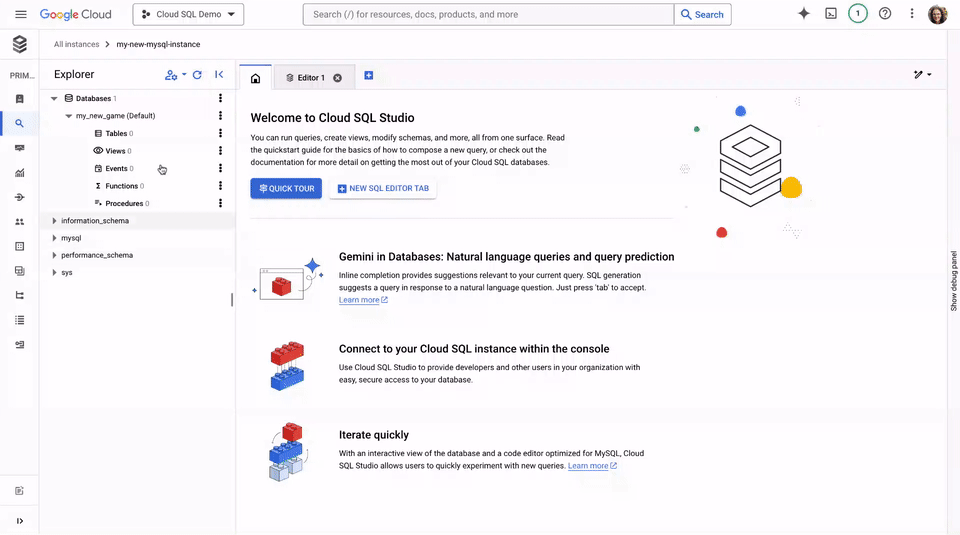
I saw engine choice come up often in G2 reviews I evaluated. Cloud SQL doesn't ask teams to learn a new database. It runs on the ones they already use: MySQL, PostgreSQL, or SQL Server. That makes moving an existing workflow over far less work.
Plus, many say they connect it to BigQuery and other GCP services with little friction, which keeps the data reachable for the analysts and engineers who need it. For teams already building on Google Cloud, that closeness is a plus.
Growth is handled, too. A majority of the reviews I analyzed call out scaling as a strength, impressive for a product that mostly serves smaller teams. When more people start querying the database, you can add read replicas and storage expands automatically as data grows.
Security and support round things out. On G2, data encryption and user access control both rate 93%, against category averages of 88% and 89%, and reviewers single out the Google Cloud Platform (GCP) support team as quick and helpful when something needs sorting out.
Google Cloud SQL takes the server burden off small and midsize teams, and for those workloads reviewers say it rarely gets in the way. The ones who feel its ceilings are running very large or fast-growing systems: G2 reviews point out that scaling an instance up can mean a brief restart and a steeper bill, and that it doesn't spread across multiple servers the way the biggest workloads need. For most standard relational work this stays a non-issue, while teams expecting heavy growth should size for it early.
What G2 reviewers running very large or heavily tailored systems point to is low-level configuration control. Google Cloud SQL takes the server burden off your plate, but teams give up some of the fine-grained control they would have running the database themselves. For most standard relational workloads that trade is an easy one, while teams with highly specialized configurations or unique infrastructure needs may want to check whether a self-managed approach gives them the customization they need.
Cloud SQL skews toward small-business and mid-market teams (74% of reviewers) in G2 Data. It's the right pick for smaller database teams, app teams, and companies already building on Google Cloud and who need a database they can stand up fast and then mostly stop thinking about.
What I like about Google Cloud SQL:
- What I like most is how little it asks of users. Reviewers describe handing backups, patching, replication, and failover to Google and getting their time back for real work instead of keeping a database alive.
- Reviewers also point to how easily it fits where teams already are. It runs MySQL, PostgreSQL, and SQL Server, so people bring the engine they know, and it plugs into the rest of Google Cloud, including a clean path into BigQuery.
What G2 users like about Google Cloud SQL:
“I like how seamless it is to transform and manipulate multiple data tables from multiple sources using Google Cloud SQL. It helps me locate and analyze data very quickly and easily, making my day-to-day job much easier. The initial setup was very easy and seamless, allowing me to get started with my credentials within a few days of starting. I find Google Cloud SQL impressive in how it stores and is able to transform data into actionable insights, and it is a very scalable tool.”
- Google Cloud SQL review, Joshua M.
What I dislike about Google Cloud SQL:
- G2 reviewers say running large or fast-growing systems point to scaling ceilings. Scaling an instance up can require a brief restart and a higher bill, and Cloud SQL doesn't spread across multiple servers. That makes it a stronger fit for small and midsize applications, standard transactional workloads, and teams that want a familiar managed database without taking on the full operational burden themselves.
- The managed model also means less low-level control than a self-hosted database, since Google runs more of the infrastructure and configuration layer for you. G2 reviewers with heavily customized needs feel that trade; teams on standard workloads don't. And it's the same trade that makes MySQL, PostgreSQL, or SQL Server available with far less maintenance, and enough control for most application needs.
What G2 users dislike about Google Cloud SQL:
“It can be costly for large or high traffic databases and offers limited flexibility for advanced configuration or performance tuning. It could be improved with more granular performance tuning.”
- Google Cloud SQL review, Rachana P.
Did you know? Cloud SQL is one example of a broader shift to database as a service, where a provider runs the database so you don't have to. Explore how the model works and where it fits.
4. SAP HANA Cloud: Best for real-time enterprise analytics and SAP environments
SAP HANA Cloud is built around a simple idea: keep data in memory so results come back quickly. It's an in-memory database and analytics platform designed for those already using SAP applications. By processing data in real time, it helps teams analyze large volumes of business information and act on current insights instead of waiting for scheduled data updates.
Reviewers call it stable, secure, and reliable for daily finance and operations work. In the G2 Data I reviewed, 56% of its reviewers come from enterprise companies, which matches the kind of buyer I would expect for this product, and it has a 4.3/5 rating across more than 600 reviews. In my reading of the reviews, the praise clusters around two aspects: speed and integration.
Because SAP HANA Cloud processes data in memory rather than reading from disk, reviewers describe heavy SQL queries and complex joins on large datasets coming back almost instantly. For people running regression tests or analytics over millions of rows, that responsiveness is the headline.
What that speed unlocks, as I read it, is real-time analysis. Rather than separating the system that records transactions from the one that analyzes them, SAP HANA Cloud handles both on the same data, so teams act on what's happening now instead of yesterday's extract. G2 reviewers in finance, supply chain, and operations describe pulling live insights for decisions they used to make on stale numbers.
For SAP shops, the integration is a major advantage. Several users highlight how well it connects with S/4HANA and the broader SAP ecosystem, with several describing the migration of on-premises data into the cloud to be smoother than anticipated. If your business already runs on SAP, that native fit removes a lot of plumbing.
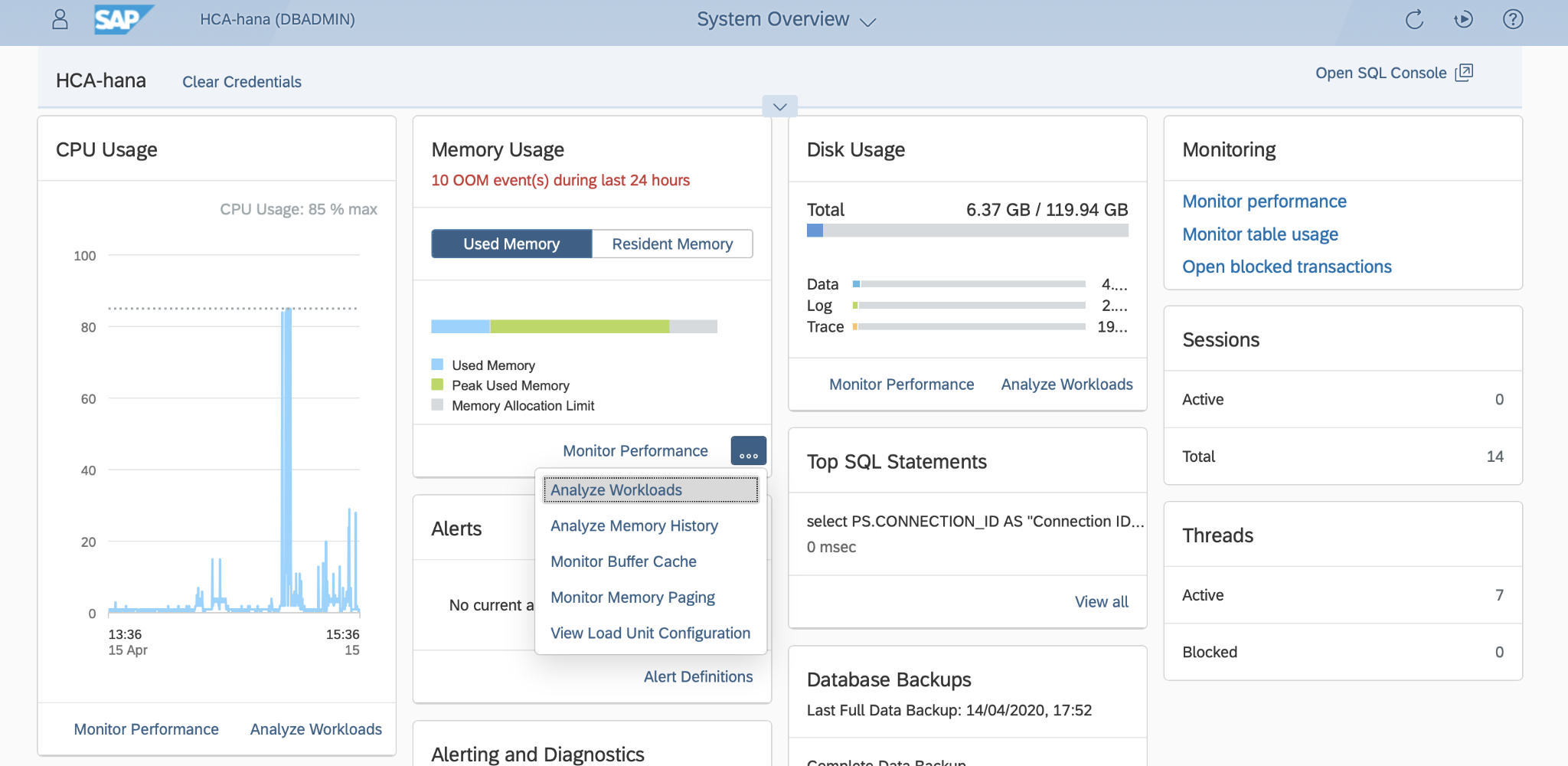
It also struck me how broad the data model is. Reviewers point to a single platform that stores relational, JSON, graph, geospatial, and time-series data together, with built-in data virtualization that queries SAP and third-party sources live without copying anything. This being a "single source of truth" is a reason teams consolidate onto it.
The feature scores back up what I was reading. On G2, query language rates 92%, with backup and recovery at 92% against an 88% category average and data replication at 91%, also above category average. Those marks line up with how reviewers describe it: quick to query and dependable once it's running.
Scalability comes up more often than I expected for an in-memory platform. A majority of the reviews I analyzed mention scale unprompted. For a system holding everything in memory, that confidence is earned, not assumed. Compute and memory scale independently in the cloud, so teams grow capacity without re-architecting.
The most common reservation is that it’s not plug-and-play. G2 reviewers say new users need time to get comfortable with the interface, setup, commands, and monitoring, especially if they’re coming from simpler databases. That makes it less natural for teams looking for a lightweight, quick-start database, but a stronger fit for organizations already invested in SAP or working with more complex enterprise data environments where that added control is useful.
The other thing reviewers are candid about is SAP HANA Cloud sits at the premium end of pricing, and that licensing and resource costs climb as you scale. This can weigh on small and mid-sized organizations. For large enterprises getting full value from the platform, the spend tends to pencil out.
SAP HANA Cloud fits a platform built for scale and deep enterprise workflows. It's a strong choice for teams already invested in SAP, that need real-time analytics on large operational datasets and have the resources to implement it well.
What I like about SAP HANA Cloud:
- What I'd put first is the speed. Reviewers describe in-memory processing returning heavy queries on huge datasets almost instantly, which is the whole reason teams reach for it over a disk-based database.
- I'd also point to how naturally it fits SAP environments. Reviewers say it integrates cleanly with S/4HANA and the wider SAP estate, giving teams real-time analytics on operational data without bolting on extra tools.
What G2 users like about SAP HANA Cloud:
“Complex queries on large datasets run significantly faster compared to traditional databases. It also integrates well within the SAP ecosystem, which makes the overall architecture more streamlined and reduces the extra integration effort.
The strong performance means we can run complex reports and analytics without slowing down the core system, even during peak hours. Scalability gives us the confidence that the system can handle growth without major rework.”
- SAP HANA Cloud review, Iryna Y.
What I dislike about SAP HANA Cloud:
- A recurring note in the G2 reviews is that the platform rewards preparation the platform rewards preparation. Setup, commands, and monitoring take a real ramp-up time, and teams without prior SAP experience should plan for a longer onboarding window.
- Reviewers tie the speed to the spend. The in-memory design that makes HANA fast is also what drives the bill, since data lives in memory and costs rise as datasets grow and compute scales with them. Enterprises running SAP-wide workloads tend to see the spend pay off; smaller teams with modest datasets should price their actual data volume before committing.
What G2 users dislike about SAP HANA Cloud:
“It can feel complex to learn and manage, especially for teams without strong technical expertise. The pricing may seem high for smaller organizations, and customization or migration from legacy systems can require significant time and effort. For businesses seeking simpler or lower-cost solutions, the platform may feel heavier than necessary for their day-to-day needs.”
- SAP HANA Cloud review, Sanjay K.
Related: Learn how data-centric architecture helps reduce silos, replication, and integration overhead.
5. Databricks: Best for data engineering, machine learning, and lakehouse analytics on big data
Databricks is the one platform on this list that isn’t just a database. It’s a lakehouse: a single place to do data engineering, analytics, and machine learning on the same large-scale data, built on Apache Spark. I'd reach for it when a team has outgrown shuttling data between a warehouse, a pipeline tool, and a separate ML setup, and wants all of that to live in one governed workspace.
The G2 scores back that up. Databricks holds a 4.6/5 across 8000+ G2 reviews, and 90% say they will recommend it.
The thing reviewers come back to first is that everything lives in one place. Data engineers build pipelines, analysts run SQL, and data scientists train models on the same data, in the same workspace, without stitching five separate tools together.
Underneath it is serious horsepower for big data. Databricks runs on Apache Spark and uses Delta Lake to bring warehouse-style reliability to data-lake-scale storage. Reviewers working with very large datasets describe it handling volumes that would overwhelm a traditional database, which is exactly the workload it's built for.
Where it shows up day to day is collaboration. The notebook interface lets teams work together in Python, SQL, and Scala side by side, and its Ease of use score sits at 92% on G2, a notch above the category average. Reviewers single out shared notebooks for keeping engineering, analytics, and data science on the same page.
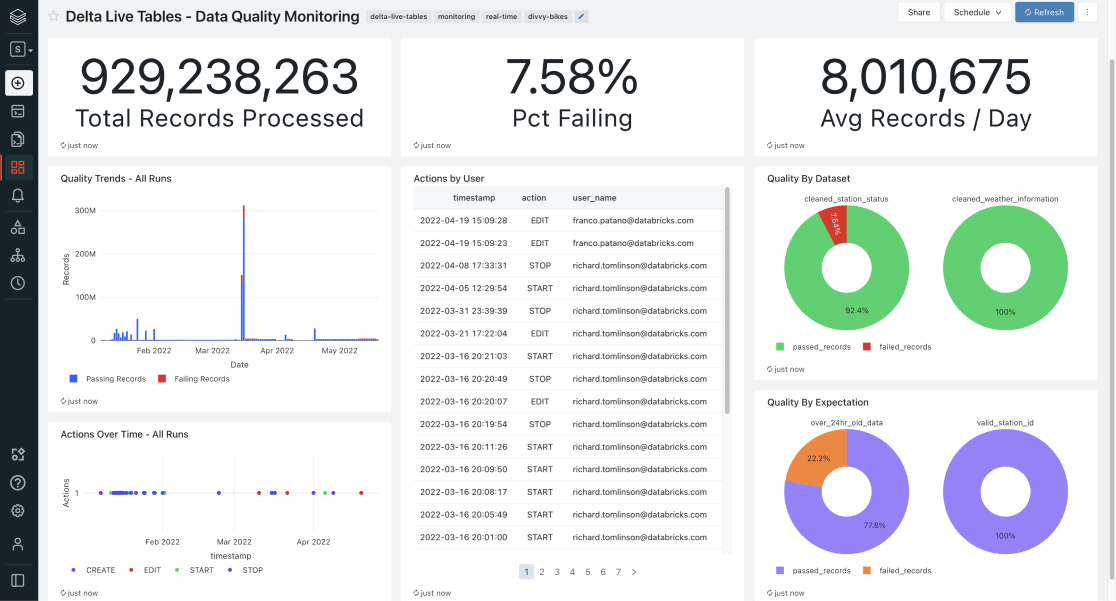
Many reviewers call out Unity Catalog, which is the governance layer. It gives access control and fine-grained permissions across data and AI assets, with column-level lineage, so teams can let analysts self-serve while keeping sensitive data locked down. For regulated industries like the financial services teams well represented in its reviewer base on G2, that's a real draw.
The platform has also leaned hard into AI. Reviewers point to Genie, the built-in assistant, for generating code, diagnosing failed jobs, and answering ad hoc questions, and they note Databricks keeps adding capabilities without extra licensing. What surprised me is how quickly that depth pays off. According to G2 Data, the typical payback period is just 5 months, among one of the fastest on the list.
For a platform this broad, getting started is lighter than you'd guess. According to G2 Data, teams go live in 2.2 months on average, and 92% of reviewed deployments run in the cloud. Many reviewers describe the adoption like this: connect a cloud account, start in notebooks, and let the platform grow into the harder workloads.
The friction that comes through most in the G2 reviews is the everyday interface. Databricks puts most of the daily work in its notebooks, and reviewers generally find that environment productive and collaborative. Though, a few note that search doesn't always surface older work, and that the editor can lag during busy sessions. Teams who work in it daily settle into the layout and rarely feel it, while those doing constant ad hoc analysis, or used to a polished IDE, notice the rough edges more.
The other consistent theme is it takes some onboarding effort. The notebooks themselves are approachable, but reviewers say the wider platform for anyone new to Spark takes time to get comfortable with. It pays the investment back, but it asks for one upfront.
Databricks is the right call when data engineering, machine learning, and large-scale analytics need to live together in one governed lakehouse. If that's the problem you're solving, few platforms do it as fully.
What I like about Databricks:
- What stands out to me is how much it pulls into one place. Reviewers describe running data engineering, analytics, and machine learning in a single workspace instead of stitching separate tools together, and they say shared notebooks make working across teams easier.
- I'd also highlight the Unity Catalog. Reviewers lean on it as a single governance layer with fine-grained access control and column-level lineage, which lets analysts self-serve without exposing sensitive data.
What G2 users like about Databricks:
“What I like most about Databricks is how it centralizes data engineering, analytics, and AI in a single platform, which greatly facilitates the workflow on a daily basis. The integration between notebooks, pipelines, and distributed processing makes development faster and more organized, especially in projects with a large volume of data and automations.”
- Databricks review, Leonardo Q.
What I dislike about Databricks:
- G2 Reviewers find Databricks' notebooks productive day to day, but some say the surrounding interface hasn't kept pace with the platform's growth, pointing to search that misses older work and occasional editor lag. Teams in it daily rarely feel it, while heavy ad hoc users notice the rough edges most.
- G2 reviewers find the notebooks approachable, but the wider platform asks for an upfront investment in learning cluster setup, navigation, and Spark fundamentals. Teams with data-engineering depth ramp quickly, while those newer to Spark should plan for a steeper start.
What G2 users dislike about Databricks:
“It can feel a bit heavy when you’re just trying to do something simple. There’s a lot going on under the hood, and while that’s great for scaling, it also comes with a learning curve. Things like clusters, configurations, and job setup take some time to get comfortable with. Cost is another concern. Usage can creep up quickly if you’re not actively monitoring it, especially when teams can spin up compute freely.”
- Databricks review, Hunar M.
Related: Explore the best ETL tools to understand how teams move, transform, and prepare data before it feeds a warehouse, lakehouse, or machine learning workflow.
6. SAS Viya: Best for end-to-end analytics with in-memory processing
SAS Viya is a full analytics workbench. It's a cloud-native platform for the entire analytics lifecycle, with in-memory processing underneath to keep it fast. I'd look at it when analytics, not storage, is the main requirement, and a team wants real depth from data prep all the way through to decisions.
It holds a 4.3/5 across 800+ G2 reviews, and its reviewer base is fairly evenly split across small-business, mid-market, and enterprise teams, though it clusters in analytics-heavy, regulated industries: pharmaceuticals, banking, and higher education. What I read in the reviews is a platform people rate highly for depth rather than flash.
The whole analytics lifecycle lives in one place. Reviewers describe doing data preparation, modeling, machine learning, and reporting without leaving the platform, and several call out how that single environment makes work easier to govern and audit, which matters in the regulated industries where SAS has deep roots.
Another draw for users is the speed. Since it runs in-memory, through its CAS engine, reviewers describe large datasets and heavy models processing far faster than on disk-based tools. For statistical work over big data, that responsiveness is a meaningful part of the appeal.
What widens the audience is that you don't have to be a SAS programmer to use it. Reviewers repeatedly praise the mix of coding and no-code tools. You can work in SAS, Python, R, or SQL, or stay in the point-and-click visual interface, and Ease of use is one of its most-cited strengths in reviews. That range lets analysts, statisticians, and less technical users share one platform.
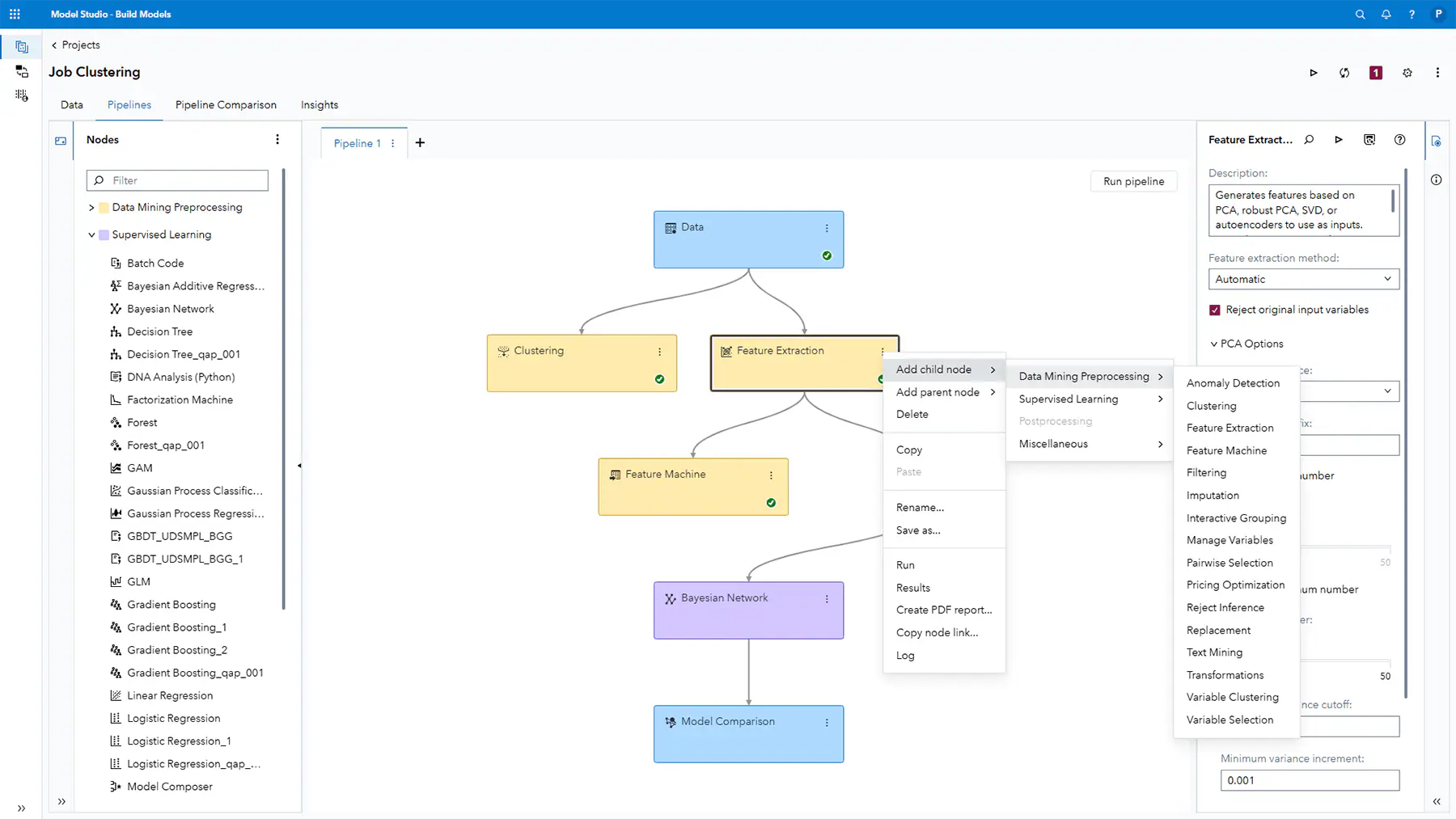
The analytics also run deep. Beyond standard reporting, reviewers point to advanced statistics, forecasting, machine learning, and the visualization tools. The Explore and Visualize app in particular comes up often as a highlight for turning models into something stakeholders can actually read.
Architecturally, it's built for modern workflows. It runs cloud-native on Kubernetes and scales with the workload, so data scientists stay in their preferred tools while IT keeps one platform to operate.
It also holds up as a shared environment. Query Language rates 94%, Data Replication 92%, and Multi-User Environment 91% in the comparison data, all above their category averages, which matches reviewers describing analysts, statisticians, and less technical users working in the same governed space.
SAS Viya asks for a real ramp-up before it pays off. Reviewers describe an adjustment period, lengthened by deployment, before teams get full value from the platform. That ramp is uneven. People with cloud or analytics experience move quickly, while less technical users take longer to find their footing. For data-mature teams, that upfront work leads to a more scalable analytics environment.
The interface is the other tradeoff. A few G2 reviewers describe it as dense, and slower to respond on large datasets than newer analytics platforms. Teams committed to SAS ecosystem, or teams that need advanced modeling and governed analytics, are more likely to see the interface as part of a powerful system rather than a blocker.
SAS Viya is for organizations that need serious, end-to-end analytics and machine learning on one governed platform and have the expertise to invest in it.
What I like about SAS Viya:
- One platform covers the whole analytics lifecycle: data prep, modeling, machine learning, and reporting all in one platform, with in-memory processing keeping it fast. Reviewers describe running the whole analytics lifecycle without leaving the tool.
- I also like how it meets people at their skill level. Reviewers praise being able to work in SAS, Python, R, or SQL, or stay in the visual no-code interface, which lets technical and less technical users share one platform.
What G2 users like about SAS Viya:
“What I like best about SAS Viya is that it combines powerful data analytics, machine learning, and visualization into one modern, cloud-based platform. It allows users to process large datasets quickly using scalable computing while supporting multiple programming languages like SAS, Python, and R, which makes collaboration easier across teams.”
- SAS Viya review, John M.
What I dislike about SAS Viya:
- Reviewers say advanced features and SAS syntax take time to master, but it's manageable for businesses with analytics specialists on the team, and the visual interface softens the curve for less technical users. Expect a ramp before the depth pays off.
- Many value SAS Viya's visual, no-code tools, but a few G2 reviewers describe the wider interface as dense and dated next to newer analytics platforms. Teams invested in SAS depth look past it, while those comparing modern look and feel notice it most.
What G2 users dislike about SAS Viya:
“Navigating clients and all their sub-categories can get a little busy. Also, the initial setup is a bit intricate and can be harder for those who are not technically inclined. A better menu presentation or a menu that provides options on what I would like to see could improve the navigation.”
- SAS Viya review, Curtis C.
Explore: Brush up on business analytics to see how statistical models, predictive modeling, and visualization turn data into decisions.
7. Amazon Athena: Best for serverless SQL analytics on data lakes
Amazon Athena answers one question really well: how do I run SQL on the data already sitting in my data lake without setting up any infrastructure? I'd reach for it when the data already lives in Amazon S3 and the goal is to explore, analyze, or report on it quickly rather than move it into a database first.
On G2 it holds a 4.4/5 across 170+ reviews, and the feedback is strikingly consistent about where it shines, though I'll note the review base here is smaller than others on this list, so I've leaned on the clearest recurring patterns.
The headline is that there's nothing to manage with Athena. It's fully serverless, so reviewers describe starting to query without provisioning a cluster, sizing a warehouse, or building ETL pipelines first. You point it at your data and go, which is part of why ease of setup rates 92% on G2, three points above the category average.
What makes that useful is that the data never has to move. Reviewers query raw files in S3 directly, in standard ANSI SQL. Several describe using it to validate the output of Spark ETL jobs or to explore raw lake data immediately, which is the kind of fast, in-place analysis it's built for.
Speed is another theme that comes up repeatedly in reviews. Even on large datasets, users describe queries returning quickly, making Athena a natural fit for ad hoc analysis and data exploration.
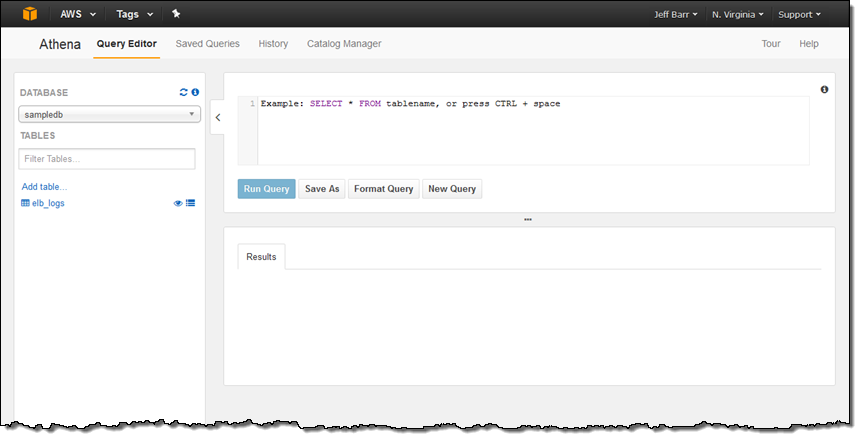
It also fits naturally into the AWS ecosystem. Reviewers connect it to S3, feed results into QuickSight for visualization, and access data through programming libraries. If a team is already invested in AWS, Athena feels less like another platform to manage and more like a natural extension of an existing data stack.
For something this hands-off, the security story is reassuring. User Access Control and Data Encryption both score 92% on G2, above category averages, and reviewers generally describe the platform as straightforward to secure and govern.
Cost efficiency is another reason reviewers gravitate toward it. Because Athena charges based on the amount of data scanned rather than keeping infrastructure running around the clock, there's no cluster sitting idle between queries. For teams that query data periodically rather than continuously, that pricing model can be particularly attractive.
The way I'd think about Athena's pricing is that it rewards good data organization. Because you pay for the amount of data a query scans, reviewers who partitioned, compressed, and structured datasets describe it as a very cost-effective option. Several reviewers note that costs can rise quickly when queries scan large, unoptimized datasets, so getting the most value out of Athena often comes down to how much attention a team pays to data hygiene.
Athena is not a traditional database, and that’s the tradeoff I’d make clear upfront. It’s not the tool I’d choose for transactional workloads or heavy transformations, but G2 reviewers consistently point to its strength in exploring S3 data, validating ETL outputs, building reports, and answering ad-hoc questions. For teams with data already sitting in S3, that read-in-place model is the advantage: Athena gives them a fast way to analyze data without standing up another warehouse or database first.
According to G2 Data, well over half of Athena's reviewers (58%) come from enterprises, with the rest almost equally divided between small and mid-market businesses. It’s the right pick when your data already lives in S3 and you want quick, serverless SQL analysis over it without standing up or maintaining a database.
What I like about Amazon Athena:
- What I'd lead with is that there's nothing to run and nothing to move. Reviewers query data sitting in S3 directly, in standard SQL, with no infrastructure to provision and no ETL pipeline first. For teams already invested in AWS, the fit feels especially natural.
- Another thing that comes through clearly is the pricing model avoids paying for idle infrastructure. Reviewers pay for the data they query rather than maintaining a cluster around the clock, which means costs tend to scale with usage.
What G2 users like about Amazon Athena:
“It's easy to use, very fast performance, uses ANSI SQL, relatively cheap compared to other options and it's easy to integrate with programming languages using libraries.”
- Amazon Athena review, Chaim and Liora S.
What I dislike about Amazon Athena:
- Reviewers note that Athena can be very economical, but costs can climb on messy data. Because you pay per gigabyte scanned, queries against large datasets get expensive quickly. Several mentioned savings depend on partitioning and organizing data in a way that limits unnecessary scanning for each query.
- Athena is best understood as an analytics service rather than a traditional database. While reviewers on G2 praise it for querying and reporting, they note that teams with heavy write operations tend to rely on other systems alongside it.
What G2 users dislike about Amazon Athena:
“The cost can increase quickly if queries are not optimized properly, since pricing is based on data scanned. For large and unpartitioned datasets, it becomes expensive. Also, performance sometimes depends heavily on how well the data is structured in S3.”
- Amazon Athena review, Pradip G.
Explore: Learn what is serverless computing before deciding if this model fits your query patterns.
8. SQL Developer: Best for Oracle database development and administration
SQL Developer is the odd one out on this list. It isn't a database, but rather Oracle's free desktop IDE for working with Oracle databases. For any team that lives in Oracle, it's the tool I reach for first.
On G2 it holds a 4.3/5 across more than 250 reviews. Reviewers consistently describe it as a full-featured tool that is rarely treated just as a lightweight option. It covers the full daily scope for developers and DBAs working in Oracle. People describe writing, testing, and debugging SQL and PL/SQL, browsing complex schemas without writing code, and handling routine administration, all from one interface.
Because Oracle builds it specifically for its own database, the integration runs deep. It natively understands the Oracle Data Dictionary (rated 91% on G2), and features like the built-in debugger and schema browser feel native in a way generic SQL clients don't. While the interface is intuitive, its real strength is its depth. Developers can jump straight into queries or complex admin tasks without ceremony.
The core metrics bear this out: query language rates 94% and user access control 92%, both above category averages. It's dependable for the daily work that consumes most of a developer's time.
Reviewers also point to well-documented error codes and tutorials that make it easy to learn and to explain to others. After years as a default Oracle tool, the knowledge around it is everywhere.
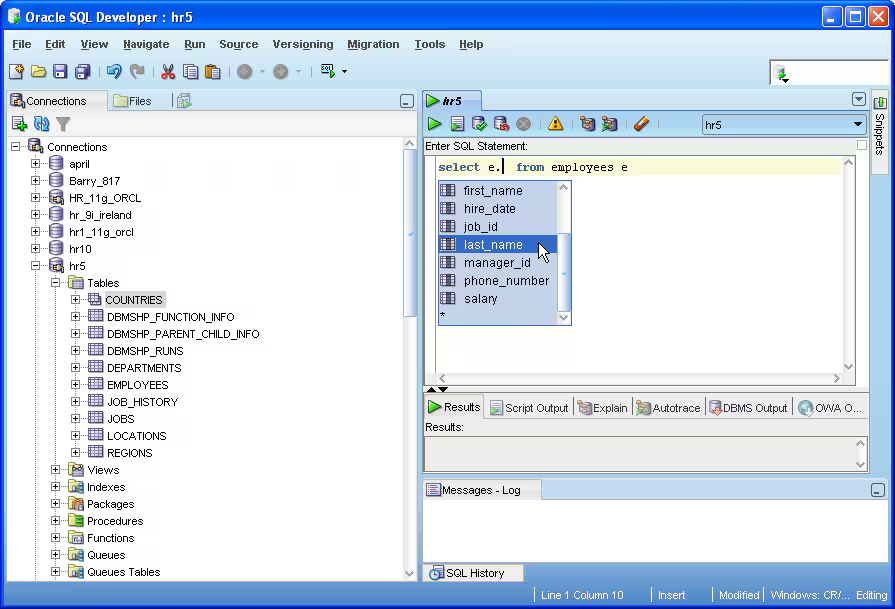
What I found is that the tool covers more ground than its query-editor reputation suggests. A built-in Data Modeler designs and documents schemas, a migration workbench moves third-party databases onto Oracle, and reporting comes standard. Oracle ships all of it at no cost.
The performance caveat shows up with very large queries and big result sets. In the G2 reviews I analyzed, a few users said the desktop app can feel slow or memory-heavy when they pull heavier outputs. Since it's a desktop application, adding capable hardware smooths it out. And for day-to-day Oracle querying, reviewers still find it responsive and well-integrated.
I also noticed a few comments that the interface feels a little dated next to newer editors, and that connections can occasionally be fussy over a VPN or cloud setup. It reads as a minor note rather than a common theme, and most reviewers work around it without much friction.
According to G2 Data, SQL Developer's base skews toward enterprises, and it's almost always running against Oracle, often on-premises. It's the right pick when your team works in Oracle and wants a capable, native environment for development and administration.
What I like about SQL Developer:
- The depth of Oracle integration is what reviewers value most. Built by Oracle for its own database, it brings the debugger, schema browser, and data-dictionary awareness that generic SQL clients lack, so it feels native in a way alternatives don't.
- Its all-in-one range is the other standout. Reviewers write, test, and debug SQL and PL/SQL, browse schemas, and handle admin tasks from a single, easy-to-navigate interface, which keeps most of the daily Oracle job in one place.
What G2 users like about SQL Developer:
“The best thing about SQL Developer is its ability to efficiently handle database tasks. I can write, test, and debug SQL queries quickly, which helps me save time and avoid errors."- SQL Developer review, Neeraj D.
What I dislike about SQL Developer:
- Performance holds up for everyday work, but teams pushing very large queries or big result sets through it should expect some lag, since it's a Java desktop app that leans on the workstation's memory. A few reviewers note that capable hardware takes care of it.
- The interface is easy to use but a little dated next to newer editors, and a handful of reviewers mention connections getting fussy over VPNs or cloud setups. It reads as a minor note for most, and it's easy enough to work around once you're set up.
What G2 users dislike about SQL Developer:
“The Java-based interface can be resource-intensive and prone to lagging or freezing, especially when handling large result sets. The UI also feels somewhat dated compared to modern code editors, and the connection management can occasionally be temperamental when dealing with multiple VPNs or cloud environments."
- SQL Developer review, Simone B.
Related: If your team is trying to move database changes faster, learn how database DevOps brings schema updates, testing, and delivery into CI/CD pipelines.
Comparison of the best database management software
| Software | G2 rating | Free plan | Ideal for |
| Microsoft SQL Server | 4.4/5 | Available | Running business apps on MS or Azure environments |
| Snowflake | 4.5/5 | Free-trial available | Cloud data warehousing and multi-cloud analytics |
| Google Cloud SQL | 4.5/5 | Free-trial available | Managed databases without your own servers |
| SAP HANA Cloud | 4.3/5 | Free-trial available | Real-time analytics for teams on SAP |
| Databricks | 4.6/5 | Available | Data engineering, ML, and big data analytics |
| SAS Viya | 4.3/5 | Free-trial available | Deep, end-to-end analytics and modeling |
| Amazon Athena | 4.4/5 | No free plan or free-trial available | Running SQL on data already in your data lake |
| SQL Developer | 4.3/5 | Available | Oracle database development and admin |
Related: If budget is the deciding factor, it's worth seeing which options are genuinely free. Here's a look at the best free database software and where each makes sense.
Frequently asked questions about best database management software
Have more questions? Find more answers below.
Q1. What is the best database management system?
There's no single 'best' system; it depends on your workload. Microsoft SQL Server is top-tier for enterprise transactional applications. Snowflake excels at cloud data warehousing, while Databricks is ideal if you need to combine data engineering, analytics, and machine learning.
Q2. Which DBMS is best for enterprise applications?
For enterprise applications, Microsoft SQL Server is ideal for Microsoft-centric environments with high security and multi-user needs. SAP HANA Cloud is the better choice if your business is already running SAP applications and needs real-time insights on live operational data.
Q3. Which database systems are best for transactional workloads?
Microsoft SQL Server is the top choice for heavy transactional workloads. For a lower-maintenance option using familiar engines like MySQL or PostgreSQL, Google Cloud SQL handles the heavy lifting — including backups, replication, and scaling—for you.
Q4. Which DBMS is best for analytics and large datasets?
It depends on your workflow. Snowflake is best for cloud data warehousing and shared analytics. If you also need machine learning, Databricks unifies both tasks. For occasional SQL queries on raw files in Amazon S3, Amazon Athena is a simple, cost-effective choice.
Q5. What are the best platforms for managing large-scale relational databases?
Microsoft SQL Server is built for large, demanding relational workloads with mature tuning and high-availability tools. If you prefer to avoid infrastructure management, Google Cloud SQL offers the same relational engines as a managed service.
Q6. Which DBMS works best for hybrid deployments?
Microsoft SQL Server is the standout for hybrid deployments, using Azure Arc to extend centralized management, security, and automation to on-premises instances. SAP HANA Cloud is also effective for hybrid environments, particularly for teams connecting SAP and third-party data, though it is more SAP-focused.
Q7. Which DBMS platforms are top-rated for security and compliance?
Snowflake is highly rated for security, offering strong encryption and user access controls well suited to governed cloud analytics. Microsoft SQL Server is the go-to for regulated or on-premises environments, offering mature, trusted security and permission tools.
Q8. Which DBMS supports the widest range of data types?
SAP HANA Cloud covers the most data types, including relational, graph, and JSON, in one engine. For data lakes, Databricks is a better alternative.
Q9. Which DBMS offers the lowest total cost of ownership?
It depends on how you use them. Amazon Athena is often cheapest because you only pay for the data you scan. Google Cloud SQL is affordable for small projects, while Snowflake and Databricks require careful monitoring to keep costs low.
Keep in mind that ownership costs more than the subscription. And in the case of a DBMS, you're typically paying license or usage fees, the compute and storage underneath, and, easiest to miss, the hours your team spends patching, tuning, and monitoring.
Q10. Which DBMS integrates best with business applications?
Choose based on your current tools. Microsoft SQL Server works best with Microsoft apps, while SAP HANA Cloud is ideal for SAP-heavy businesses. Snowflake connects easily to most major BI tools and cloud platforms.
Query before you commit
The thing that surprised me after a thousand reviews was that hardly anyone said their database failed at the actual job. It stored, it served, it held up. The frustration shows up somewhere else: the bill that crept upward, the weeks it took to learn, the steady tuning needed to keep it quick.
That's the quiet shift in this category. These systems have largely settled the question of whether they work; the real contest is how much they cost you to keep working, in money and in the hours spent on maintaining.
Look past the feature list to the upkeep: what a system charges as your data grows, and what it demands from the people running it. That's where the next chunk of your attention should go before you commit.
Whichever system you pour your data into, make protecting it part of the plan from day one. Start with the essentials of database security.