AI-Generated Results
Finding matches…

A suite of tools for creating, editing, publishing, and selling custom coloring pages and books.
Not seeing what you're looking for?
Dive deeper into "Colorbliss" on G2 AI

Colorblindly is a Chrome extension designed to assist developers in creating accessible websites by simulating how users with various types of color blindness perceive web content. By applying specific CSS filters, it enables developers to experience their websites through the lens of individuals with color vision deficiencies, facilitating the identification and correction of potential accessibility issues.
Key Features:
- Simulation of Multiple Color Blindness Types: Colorblindly offers eight distinct simulation modes, including:
- Blue Cone Monochromacy (Achromatomaly
- Monochromacy (Achromatopsia
- Green-Weak (Deuteranomaly
- Green-Blind (Deuteranopia
- Red-Weak (Protanomaly
- Red-Blind (Protanopia
- Blue-Weak (Tritanomaly
- Blue-Blind (Tritanopia
- Real-Time Application: The extension overlays CSS filters directly onto the webpage, modifying color ratios to reflect the visual experience of colorblind users.
- User-Friendly Interface: Developers can easily switch between different simulation modes to assess and enhance their website's accessibility.
Primary Value:
Colorblindly addresses the critical need for web accessibility by enabling developers to understand and rectify color-related issues that may hinder users with color vision deficiencies. By providing real-time simulations of various types of color blindness, it empowers developers to create more inclusive web experiences, ensuring that content is perceivable and navigable for all users, regardless of their color vision capabilities.
Contrast Checker is a user-friendly tool designed for designers and developers to evaluate color contrast compliance with the Web Content Accessibility Guidelines established by the World Wide Web Consortium . By selecting foreground and background colors, users can instantly determine if their color combinations meet accessibility standards, ensuring content is readable for all users, including those with visual impairments. The tool also offers a colorblind simulation feature, allowing users to view their color choices in grayscale to assess visibility for colorblind individuals. This functionality aids in creating inclusive designs that adhere to accessibility best practices.
Key Features and Functionality:
- Color Contrast Evaluation: Automatically calculates and displays contrast ratios between selected foreground and background colors, indicating pass, margin, or fail statuses based on WCAG standards.
- Colorblind Simulation: Provides a grayscale view of color combinations to assess how designs appear to colorblind users, enhancing accessibility considerations.
- History and Export Options: Allows users to save multiple color swatches to a history list and export them as a PDF for documentation or sharing purposes.
Primary Value and Problem Solved:
Contrast Checker addresses the critical need for accessible digital content by enabling designers and developers to ensure their color choices meet WCAG guidelines. By facilitating the creation of designs with sufficient color contrast, the tool enhances readability and usability for individuals with visual impairments, promoting inclusivity and compliance with accessibility standards.
MTCaptcha is a smart captcha service that prioritizes privacy and accessibility. It offers an adaptive invisible noCaptcha that is easy for humans but hard for bots, making verification friction-less. MTCaptcha is GDPR and WCAG compliant, ensuring that your data is never sold or shared with third parties. The captcha images are certified colorblind safe and the widget is fully VPAT compliant and optimized for screen readers. MTCaptcha supports any language and can be fully customized to match any webpage. It also supports audio in captcha, making it accessible to users who are visually impaired. MTCaptcha is trusted by Enterprises, Government, NGOs worldwide and is available in all the major world languages. MTCaptcha works around the world, including in China, making it a truly global captcha solution. It is backed by an adaptive Risk Engine that monitors and responds to threats, making it difficult for bots but easy for humans.
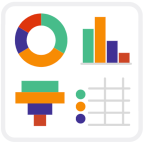
Customised Jira Reporting
A consistent display makes at a glance data visualization with Jira reports easy. Want your RAG status charts to actually be red, amber, and green? Choose the colors you need for every segment of your Jira reports.
Reorder your reports however makes sense to you. Merge and hide segments with a simple click and drag interface to make the charts you need.
Whether you’re keeping on brand or supporting your colorblind teammate, everyone can now easily make great looking Jira Reports with a few simple clicks (no coding, nor training required).
Powerful Jira Dashboard Gadgets
Use saved filters, standard or advanced custom Jira Query Language (JQL), or the simple click and drag interface to make the charts you need.
Custom Tables, Pie Charts, Bar Charts and 2-Dimensional Stacked and Grouped Charts work with all the standard and custom fields in your Jira (including Status, Priority, and Assignee).
Chart by Issues, Story Points, and Time Estimated, Remaining or Spent, as well as any calculated scripted number fields.
Real-Time Jira Visualization
Get immediate updates with real-time data reporting on Jira Dashboards or Confluence Pages.
Avoid exporting data to third-party servers, and avoid another silo by letting everyone work and share real-time updates in the tools they’re already working in.
Custom Charts for Jira and Confluence Reports is powerful and easy enough for everyone to want to use. Make Jira the reporting dashboard for every team.

This website provides free color contrast analysis tools that will display the color contrast issues of a web page or chosen color-pair; per WCAG 2.1 Guidelines. Color Contrast refers to how bright or dark colors appear against each other on screens; particularly with regard to the relative, gray-scale luminosity as perceived by the human eye.
When it comes to website accessibility, the contrast between the text and the text background is a concern for colorblind and other visually impaired users.

TPGi’s Colour Contrast Analyser (CCA) is a free accessibility testing tool that checks if the contrast ratios on your website are WCAG compliant. This way, your website will be more accessible for customers who are colorblind or have low vision.
To use, select a foreground and a background color with the beginner-friendly eyedropper tool or the more specific and technical raw text entry and RGB sliders. (The foreground color will be accurately measured because the CCA supports alpha transparency on foreground colors.) The CCA will then use the color data to determine the numerical color contrast ratio and if that ratio is WCAG AA and AAA compliant. This tool also includes a simple Color Blindness Simulator of the colors selected for testing.
Achieve your digital accessibility conformance goals with TPGi experts, analytics, and solutions.

At Colorblast Films, we’ll work WITH you from the start to gather information and explore the different directions in which we can take the project. From there, we’ll have fun creating colorful content that is sure to delight upon delivery!
GATHER
This is where you’ll have your people meet our people so we can get down with all the nitty-gritty details of this fun new project! We’ll chat to discuss expectations, goals, and an overall vision. We understand that convincing content is built on information that’s actually RELEVANT! Our content certainly doesn’t hang out at the shallow end of the pool, we dive deep into the oceans here at Colorblast Films, encompassing all aspects of YOUR signature brand.
EXPLORE
Once we have an idea of the scope of this new project, we’ll really get into some fun exploration! Armed with the information you’ve given us, we’ll focus more on your overall objective. We’ll take a look at the bottlenecks, the target audience, forecasts, and opportunities that may arise as we move forward together.
CREATE
This is the really fun part for our team! We’ve gathered intel, we’ve explored the waters, – and now! – we can create something really powerful! Our team uses all the data we’ve gathered to create a blend of incredible ideas. Our deliverables are attractive, creative, well-packaged, and inventive yet strongly perched on the overall core objective.
DELIVER
The moment of truth! Our final product is measured by your audience’s response and we want to make sure you get the expected reaction. We want to deliver content that both captivates your audience while contributing to your brand’s overall growth. This is the culmination of our entire work process and we’re not happy until you are!

AutoCropper is a web-based application designed to streamline the digitization of physical photographs by automating the detection, cropping, and straightening of multiple images from a single scan. By leveraging advanced computer vision algorithms, AutoCropper enables users to efficiently process large batches of photos, significantly reducing the time and effort required compared to manual methods.
Key Features and Functionality:
- Batch Uploading and Processing: Users can upload multiple scans simultaneously, with each scan containing several photos. AutoCropper detects and separates each photo, allowing for batch processing and export of individual images.
- Automatic Photo Detection: Utilizing custom Python OpenCV algorithms, AutoCropper identifies the boundaries of individual photos against a uniform background, typically white, ensuring precise cropping.
- Rotation Detection and Correction: The application automatically detects and corrects slight rotations in photos, ensuring that each cropped image is properly aligned.
- High-Quality Output: AutoCropper processes images at their original full quality without compression, preserving the integrity of the photos.
- Client-Side Processing for Privacy: To maintain user privacy, the full-size scans are not uploaded or stored on any server. Instead, a compressed, colorless, metadata-stripped copy is processed, ensuring that original images remain secure.
- Customizable File Naming: Users can define unique file naming structures, facilitating organized storage and retrieval of digitized photos.
Primary Value and User Solutions:
AutoCropper addresses the challenges associated with digitizing large collections of physical photographs. Traditional methods often involve time-consuming manual cropping and alignment, which can be inefficient and prone to errors. By automating these processes, AutoCropper significantly reduces the time required to digitize photos, allowing users to focus on preserving and sharing their memories without the hassle of manual editing. Its user-friendly interface and advanced features make it an invaluable tool for individuals and professionals seeking an efficient solution for photo digitization.