AI-Generated Results
Finding matches…
Cigati OST Converter utility is one of the most advanced and powerful utilities that can convert Offline OST file to PST, MBOX, EML & MSG formats successfully. It is one of the fastest and safest OST conversion into the Outlook PST files. The utility can transfer your attachments like the emails, calendars, contacts, tasks, journals, notes, etc. from your OST files into the PST file format. The utility is embedded with the advanced feature of data integrity and auto-search option. Data inside your files and the folders remain the same and software helps in maintaining the hierarchy of the items present in your Office OST files. Cigati OST Converter is also able to convert the files that are in good condition, it can also convert the OST files that are corrupted after recovering it with the utmost accuracy. With this utility, the user can easily convert the Offline OST files into the PST and other file formats. This utility takes no time to convert the OST files into the PST one or the other file format. Many users are afraid of unprotected conversions means data loss at the time of the conversion, So if you are also one of them then do not worry about this problem if you are using the Cigati Solutions company product. The tool takes very little time to convert your OST files in the desired file format and the process is fully secured. There is an option provided in this utility that if a user wants to save the multiple files in a single run into the most acceptance formats like the PST, MSG, DBX, MBOX, and Archive format. There is an option in the utility in which the preview option is available so that the user can preview the OST file mailbox. So many times users encrypt the OST files to secure their crucial data and in some cases, they forget their password and unable to open that data files again. In such cases, users are required to take the help of the OST to PST converter to open encrypted files again. The demo version of this utility is also available.
Not seeing what you're looking for?
Dive deeper into "UFile" on G2 AI
The professional solution for hassle-free vCard to PST and PST to vCard file switching is the ViceVersa vCard to PST & PST to vCard Switcher. Because of its ease of use, anyone can use this software without worrying about losing any data. All Windows OS versions, including 11, 10, 8, 7, XP, and others, can use it. Without file size limitations, it switches unlimited vCard files to Outlook PST files and Outlook PST files to vCard formats. It is lightweight and offers a free test version to all users, anyone can install this application. It saves time by swiftly switching Outlook PST files to vCard files or vCard files to PST files. It switches any tye Outlook files UNICODE and ANSI PST files to vCard files without error. All techy and non-techy users will find this software easy to use.
Tsend Pro is a secure file transfer solution designed to facilitate the sending and receiving of large files with ease and compliance. It enables users to share files of any size and type securely, ensuring data protection and adherence to regulations.
Key Features and Functionality:
- Large File Transfers: Send files up to 10 GB per transfer without size limitations.
- Secure Access: Protect file access with password protection and set validity periods to encourage timely downloads.
- User-Friendly Interface: Send files in just two clicks, with recipients able to access them without a TransfertPro account.
- File Requests: Easily collect files from team members or external parties through file deposit requests.
- Integration: Utilize plugins for Windows and Outlook to send files directly from your desktop or email client.
- Customization: Personalize the interface by adding your organization's logo and background image.
Primary Value and User Solutions:
Tsend Pro addresses the challenges of securely transferring large files by providing a compliant, user-friendly platform. It ensures data security through password protection and customizable validity periods, while its integration capabilities with Windows and Outlook streamline workflows. The ability to request files from others simplifies collaboration, making Tsend Pro an essential tool for organizations needing reliable and secure file transfer solutions.

Cigati VCF Split and Merge Tool is a kind of tool that can split VCF files of any large-sized file without causing any loss of data or information. It has no file size limitations. It's completely secure and reliable. This software can also merge any number of VCF files without corrupting the data. Therefore it should be on the top priority list for those who need to split and merge the vCard files. It's an ideal software and it helps the users to manage the VCF files easily. Apart from merging and splitting the files this tool also helps the users to save the files into their preferred locations, which means users can save their data files according to their selected folders, and if the users forget to do so the get files automatically get saved and appear on the desktop in a folder by default. Cigati VCF Split and Merge Tool can split and merge any size of vCard or VCF files. Users can select the files accordingly and can make the split or merge accordingly without any limitations of file size. This software also supports various versions of VCF files. Users can split or merge any type of VCF or vCard irrespective of their updates and also the converted VCF files can easily be compatible with all kinds of platforms and users can have access and can share them from every device that supports the virtual card. This software is the safest software in breaking or joining the VCF files without getting files corrupted or being damaged. Cigati VCF Split and Merge Tool is widely compatible and runs on all the updated and lower versions of the Windows operating systems. Its simple and smooth Graphical Users Interface makes the work easy for both the technical and non-technical users without causing any kind of hindrance. This software also has a demo version where it provides 50 free VCF files merging and splitting facility to analyze the software before buying its full version.

Aryson OLM Converter Tool is a professional Mac OLM File Exporter that helps to migrate or convert emails from Mac OLM file into Gmail, Yahoo, Hotmail, IMAP, Thunderbird, Zimbra, Office 365 & Live Exchange Server. The Mac OLM Converter software allows us to save the mailboxes from Mac Outlook OLM File as PST, MSG, EMLX, EML, MBOX, PDF, and other file formats. It maintains the hierarchy of OLM file mailboxes after conversion into other file formats. With the help of OLM File Converter software, users can directly import OLM file into Office 365, and Live Exchange Server without any data loss. It offers to directly migrate mailboxes for Mac OLM file into Gmail, Yahoo, Hotmail, IMAP, and Thunderbird without any hassle. This software helps to print the mailboxes of the OLM file as PDF and HTML file formats. It also converts OLM file to PST file format without MS Outlook installation. Aryson OLM Converter software offers a demo version that allows users to migrate up to 50 items per folder for free.

NetDrive is a software solution that enables users to mount various cloud storage services and remote servers as local drives on their computers. By integrating seamlessly with platforms like Google Drive, Dropbox, OneDrive, and protocols such as WebDAV and FTP, NetDrive allows users to manage remote files directly through their operating system's file explorer, facilitating a familiar and efficient workflow.
Key Features and Functionality:
- Access Remote Files as Local Files: Interact with cloud storage and remote servers as if they were local drives, using Windows Explorer or macOS Finder.
- File Browser: Open, download, rename, and delete remote files without mounting them, providing quick and efficient file management.
- Background Uploading: Upload files to remote storage in the background, reducing system overhead and improving efficiency, especially when handling multiple small files.
- Team Drive: Configure and publish shared drives for team members, ensuring consistent drive configurations and streamlined collaboration.
- File Lock: Lock files, including Microsoft Office documents, to prevent overwriting or deletion by other users, ensuring data integrity during collaborative work.
- Multi-User File Lock for Microsoft Office Files: When one user is editing an Office file, others can only open it in read-only mode, preventing simultaneous edits and potential conflicts.
- Mount Storage Without Login on Windows: Configure drives to mount automatically at system boot without requiring user login, facilitating access for system services and background processes.
- Force Refresh Folder: Manually refresh folders to retrieve the latest file list from the server, ensuring up-to-date access to remote files.
Primary Value and User Solutions:
NetDrive simplifies the management of multiple cloud storage services and remote servers by integrating them into the local file system. This integration allows users to access and manage remote files with the same ease as local files, eliminating the need for multiple client applications or web interfaces. By providing features like file locking and team drives, NetDrive enhances collaborative workflows, ensuring data consistency and security. Its background uploading and automatic mounting capabilities improve productivity by reducing manual intervention and system overhead. Overall, NetDrive offers a unified, efficient, and secure solution for accessing and managing remote storage resources.

Dynbox is an AI-powered file organization platform designed to streamline the management of both cloud-based and local files. By integrating with your existing storage solutions, Dynbox enables you to interact with your files through a conversational AI interface, allowing for efficient organization, search, and automation. Whether you're looking to move, rename, clean, or search files, Dynbox's AI handles these tasks seamlessly, learning and improving with your feedback. With a strong emphasis on user control and privacy, Dynbox ensures that you have the final say in all actions, and your data remains secure.
Key Features and Functionality:
- AI-Powered File Management: Engage with your files using a chat interface to perform tasks such as moving, renaming, cleaning, and searching.
- Semantic Search: Utilize advanced vector search to find files based on their actual meaning, enhancing retrieval accuracy.
- Automated Sorting: Set up rules to automatically sort files in the background, keeping your storage organized without manual intervention.
- Cloud Integration: Connect seamlessly with existing cloud storage services, enabling centralized file management.
- Privacy-Focused: Maintain control over which files the AI can access, with a commitment to not storing your files on Dynbox servers.
Primary Value and User Solutions:
Dynbox addresses the common challenges of file clutter and disorganization by providing an intelligent, automated solution for file management. It saves users time and effort by automating routine tasks, enhancing search capabilities, and ensuring files are organized efficiently. By leveraging AI, Dynbox adapts to user preferences, offering a personalized and secure approach to file organization.

Right-click a new file in Windows and see which program created it.
Windows doesn't keep a record of which program created a file. CapyWatcher runs in the background and records every new file in the folders you choose: the program that created it, the program that started that one, the user and the time. When a file turns up and you wonder where it came from, the answer is already there.
It's made for people who run AI coding agents such as Claude Code, Codex or Cursor, for Windows power users with mystery files, and for anyone who wants to know which installer, game, download or script put a file on their computer.
WHO CREATED THIS FILE
Right-click one new file or several in a tracked folder and select "CapyWatcher: who created this file?". Each file gets its own answer: the program that created it, the program that started that one, its folder, the user and the time. You can also look up a file from inside the app, or drop files and folders on its window.
AI AGENTS
A file written by node.exe or cargo.exe also names the program that started it, such as claude.exe. So you can see what your AI agent wrote and where. Like git blame, for new files.
HISTORY
Start from a program and see every file it created. Search by path, program and user, filter by program, parent process, user and time, and export what History shows to CSV. Hide a process that creates files all day, and History leaves it out.
DELETE ALERTS AND FOLDER LOCKS
Turn on a tracked folder's bell, and a Windows notification says which program deleted files and how many, with a button to stop it. Lock a folder, and nothing can delete, move or rename its files until you unlock it. A program running as administrator can remove the lock, and CapyWatcher puts it back within 2 seconds and tells you.
WHAT'S USING THIS FILE
Right-click a file or folder to see each program using it, with its icon, name and user. Close a program from there, or stop it if it doesn't close.
IN THE EXPLORER MENU
Right-click a file, folder or drive for the CapyWatcher submenu: show it in History, track or stop tracking it, lock or unlock a folder and turn its delete alerts on or off. On Windows 11 it's under Show more options.
ANY DRIVE, USB AND NETWORK DRIVES TOO
Track folders on any drive in your computer, on a USB drive or pendrive, or on a network drive or share you add. On a network drive, CapyWatcher records what programs on your computer do there, and offers delete alerts but no lock. When someone on another computer creates, renames or deletes a file in a folder you share, History shows their address and name.
FILES PER FOLDER
See how many files were created and deleted in each tracked folder: today, over 7 or 30 days, or since tracking began.
RENAMES KEEP THEIR RECORD
A download renamed when it finishes still names the browser that saved it.

Outlook PST Splitter tool is a professional software to split the large-sized Outlook PST files into smaller PST files without any data loss. It supports both UNICODE and ANSI PST files and breaks them into multiple PST files according to user requirements. The PST File Splitter software to split an oversized PST file based on their size, folder, and date range. It also allows us to break compressed or encrypted oversized Outlook PST files successfully. The PST Splitter software to split or achieve Outlook data file automatically and create a different or multiple new PST file according to size. Split the large PST file comprising emails, contacts, calendars, journals, notes, tasks, etc. using the Cigati Outlook PST Splitter tool. It offers a demo version for a free evaluation and allows users to save up to 25 items after splitting PST files. It supports all versions of MS Outlook PST files, including Outlook 2019 and the lower version. This software also runs with all versions of Windows OS.
The ViceVersa vCartd Split and Merge Software is the best solution for splitting huge vCard files and merging two or more vCard files without any data loss. An expert substitute for rapidly merging or dividing vCard files without time wasting. This software is easy to use for techy and non-techy users without any hassle. Windows OS versions that are compatible include 11, 10, 8.1, 8, 7, XP, Vista, and others. Regardless of the amount of information they contain, it separates and merges vCard files. One of the better choices is to use the software to join numerous vCard files and split large VCF files into multiple VCF files with easy steps. Anyone can install this application because it is lightweight and provides a free demo version for users. To split huge vCard files into many vCard files and merge multiple vCard files into one vCard file without any email client. It splits and merges any vCard file version with ease.

MBOX to NSF Converter Tool is the best utility software that is driven by a highly advanced algorithm. It is intended to perform effective and flawless conversion of MBOX files into NSF format. Its highly advanced exclusive algorithm allows users to export MBOX files with all their metadata, internet header, attachments, graphics, etc. Users can also export MBOX files of any emailing platform like Apple Mail, Opera Mail, Eudora & Thunderbird to Lotus Notes file format. It performs a seamless conversion of corrupted as well as normal MBOX files to the Lotus Notes platform without any data loss. The tool can do the conversion in bulk when users are having a bunch of files to export all of them at the same time. The tool comes with a new feature to migrate multiple MBOX files in a single click and create a separate NSF file for each MBOX files. MBOX to Lotus Notes program has multiple saving feature that can be saved into a new NSF file or the existing NSF file at the user-defined location. The MBOX to NSF converter allows users to save all the listed data to an HTML file or Text file format at the desired location. MBOX to Lotus Notes tool performs a successful conversion of MBOX files into NSF format with ease for both the normal or corrupted MBOX file. The Converter tool allows users to take the preview of converted MBOX files before saving them into Lotus Notes NSF format. The User can preview by clicking on a particular folder in the tree structure easily see all the emails in the grid view and its corresponding attachments. MBOX to NSF converter supports all the popular email clients that create MBOX files like Thunderbird, Pocomail, AppleMail, Netscape, Entourage, Spicebird, etc. Also, It is compatible with all major versions of Windows operating systems including Windows 10. In terms of user-friendly, the tool is built with a simplified user-interface that can be easily handled by novice users.

The Outlook files are instantaneously exported to a diverse array of other file formats using the WholeClear OST Converter. It maintains the Outlook file's original formatting during the conversion process. The advanced filter options of this utility enable it to migrate the specified files or folders from OST files. No, Outlook installation is not required for the conversion. The OST files can be migrated to a variety of other file formats, including PST, MSG, MBOX, MHTML, EMLX, EML, TGZ, HTML, and NSF. Every version of the Windows operating system can execute this program. This application maintains the metadata of the OST files during the conversion process. The free trial version of the software is available for users to use in order to migrate a limited number of OST files to the desired file format.

Aryson Maildir Converter software exports emails from Maildir to various file formats and email clients without losing any data. This software maintains the hierarchy of email file or folder after conversion of the Maildir file. This software allows its users to successfully convert emails from Maildir to MS Outlook PST file format. This professional utility has options to split the resultant PST file after saving emails from Maildir files. It also removes duplicate email items from resultant PST files. The Maidir Converter software has an excellent feature named Mail Filter, therefore, you can export emails from Maildir files according to the date. It also converts emails into PDF, HTML, or Text file format with all attachments. Aryson Maildir Converter software supports converting single or multiple Mailboxes files into EML, MSG, MBOX, PST, PDF, and HTML file formats at a time. Aryson Maildir Converter offers a demo version software that allows exporting of 50 email items per folder from Maildir files to version file format. This software runs with all versions of Windows platforms including 32-bit and 64-bit.

PST Viewer software is released by Aryson that allows to fix corrupted PST file and open PST file with all email properties successfully. It is totally free software for open or views PST files on Windows platforms. Aryson PST File Viewer is an ideal Outlook Email Viewer solution that allows users to export items from corrupted or unreadable PST files into an HTML format and TXT format. If you want to open your folder Outlook data without Outlook application and Exchange Server, then you can use this software that will open or view the PST file successfully. This software has some excellent features, which are the following - 1. PST Viewer has a search filter option; therefore, users can easily open emails from the PST file according to date range. 2. This software has three scanning modes; therefore, it quickly scans highly corrupted PST files and open emails on Windows platforms. 3. It supports both ANSI and UNICODE PST files and opens them successfully with email properties. 4. It exports items from PST files into HTML and TXT file formats. 5. It is free software for open PST files. This software installs and runs on all versions of Windows and supports to open PST files of all Outlook Versions.

Aryson Split PST Software is developed to split the heavy sized PST files into small, compact and reliable parts. The best feature of this utility is this it safely split the large PST files into the smaller one means your PST files will split successfully without an error. Its main function is to maintain the hierarchy or structure of the PST files and folder likewise the original PST file. Aryson Split PST Software is a powerful utility designed with the most advanced algorithms to split multiple PST files into the smaller one with high precision and speed. It provides an amazing option for the user to split the PST files according to the different filters like split PST files based on date, size and according to the sender's email address. Also, this utility empowers the user to save the truncate MS Outlook PST files at the desired destination. It has a special functionality that also can split the Outlook archive PST files or active PST files. This advanced utility with the simple user interface allows the user from the non-technical background to split files in just a few clicks and this feature makes this utility the most demanding for splitting PST files. This utility is also concern about user privacy and hence it supports file encryption means it allows the user to encrypt the newly generated PST file. And it is easy to encrypt the PST files according to the user's need and then apply a password to it. Aryson Split PST Software provides the encryption feature with the three different encryption modes i.e., Compressible, Best, and No encryption. This utility is compatible with all different versions of the Microsoft Windows like 10, 8, 7, Vista, XP, 2000, 98, NT, 95, and other previous versions and even with the MS Outlook versions. To run this splitter utility, the minimum requirement of RAM is only 512MB which is quite interesting.

GainTools EML Converter Tool is the most reliable and efficient solution to convert EML into other file formats without data loss. The EML File Converter Tool supports bulk EML file migration and enables you to convert complete EML data like email, attachments, etc. As well as this application offers the latest preview feature and an easy-to-use GUI for an ultimate user experience. Users can simply convert EML files into MSG, PST, MBOX, and other file formats. No file size or file number limitation and it supports all EML files created by any email client version. This significant Converter for EML files can work on any edition of Windows up to 11 (64-bit). The tool offers a multiple file selection feature to browse the bulk of EML files to convert in a single go. A free trial edition of GainTools EML Conversion Tool is available for evaluation.

EML to NSF converter is the best utility tool that is driven by a highly advanced algorithm that converts EML files into Lotus Notes efficiently. Its highly advanced exclusive algorithm performs a secure and fast conversion of EML files to NSF file format. The tool readily exports Outlook EML files that are generated by any other email applications like Outlook Express, Mozilla Thunderbird, Windows Live Mail, Incredimail, and convert them into Lotus Notes NSF file format. Lotus Notes supports only NSF file format when you try to access any other file extension on Lotus Notes, it will show you an error message. But with the help of EML to NSF conversion tool, you can easily view multiple email client database in the Lotus Notes. EML to NSF exporter tool has been designed to export any size of the EML file into the NSF file. EML to NSF Software program has an advanced file filter assistance that allows you to browse and locate the targeted EML files for migration. Export Outlook Express EML files to Lotus Notes NSF Batch file migration is the key feature of this Tool. Here you have a great opportunity to select as many files as you want. EML to NSF conversion program is one that you can trust to export your precious data. No file is damaged or lost during migration. It carefully treats each file by making no change in the folder structure and retains all meta-properties of email like CC, BCC, date from attachment. The Tool is easy to operate and Don't hesitate to use this EML to NSF converter. It is the easiest and user-friendly application with an interactive user interface. Novice to export all can handle the program independently. After one-two trials, users can get the confidence to run up the software without hesitation. It works smoothly. There is not a match of EML to NSF exporter tool in terms of compatibility. It works very smoothly in the email client to export EML files of Thunderbird, Apple Mail, WLM, and many other email clients.

Cigati Exchange Backup Extractor is the advanced and the most effective utility available in the market. This utility helps the user to extract the corrupted mailbox item from the corrupted Exchange Backup files. This utility can automatically scan the corrupted files so that it gives you the preview of the files and their complete details. This tool can recover the Exchange database files that are stored in the EDB, STM, and the LOG file format. The utility is installed with the auto-search option in order to search the available BKF files faster. This utility is loaded with the amazing feature of saving the snapshot of the recovered files in order to get back in the future. This process is taken in order to upload the saved recovery snapshot to avoid rescanning the same BKF file. The Exchange backup extractor utility will generate the LOG files that contain all the recovery process information. The lof file is created in the text format and users can easily save this file for future reference. The user will automatically create a tree-structure preview of all the recovered files that is, the user can view all the attributes and the items. Users only have to click on the BKF files to define the items and see what has recovered from it. One can decide to expand the files and can easily get to know, what is recovered or what is not. Apart from all these features, there is an interactive platform for the user so that the user will not get any trouble to run this utility. Cigati Exchange Backup File extractor is one of the finest and the complete package to recover your corrupted Exchange BKF files. The Demo version of this utility is also available in the official site so that the user will download this utility and do familiar with the working and the interface of this utility. It supports all versions of the Windows and users get the 24x7 customer care support with this utility package so that if they find ant problem then they can request for the help.

Aryson Excel to vCard Converter Software is a safe and secure software to convert or migrate Excel data files into vCard File Format. The Excel to VCF Converter utility ensures that there is no loss of data while performing Excel to vCard conversion processes. The software allows the migration of single, as well as multiple Excel data files into vaCard file format in a single, go without any type of data loss. This means it migrates several mailboxes into a single attempt with high accuracy. Software is capable of maintaining data integrity during the entire conversion process. An Advanced Mode in the software is available to convert specific no. of columns in the spreadsheet. Aryson Excel to vCard Converter Tool is highly compatible and runs smoothly on all versions of Windows O S. Allows to Load and Preview all types of spreadsheet files. It supports multiple Excel file formats XLSX, XLS, XLSM, XLSB, XLTX, XLTM, XLT, XLAM, XLA into vCard files. It allows you to migrate an account email on all versions of Windows including Windows 10 and other earlier versions. Supports different versions of vCard files that are compatible with every OS. Also, this software has no file size limitations. In this professional utility, users can preview all attributes and attachments of the excel data files before migration. The software gives permission to save the email attachments of the email separately when you save them into other file formats. This Aryson Excel to vCard Converter Software offers an amazing to select the Saving Path of the converted vCard file. By using this feature, users can save the required data files to be converted into required vCard Data files. The Excel to VCF Converter Tool creates a single vCard file for all contacts and separate files for individual contact. Provides Manual Field Mapping option to map excel column to vCard field.
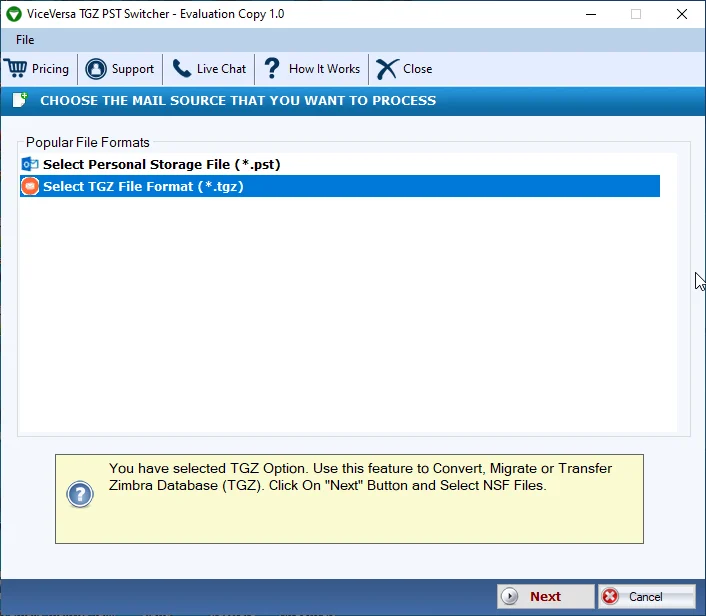
The ViceVersa TGZ to PST & PST to TGZ Switcher instantly switched TGZ files to PST files and PST files to TGZ format with no data loss. Without any issues, it is the safest method for switching numerous TGZ files to PST files and PST files to TGZ files without needing MS Outlook and Zimbra. It is easy to use for technical and non-technical users can simply use it thanks to its user-friendly interface. All you have to do is convert several TGZ files to PST format and PST files to TGZ format. Every version of Windows OS, including 11, 10, 8, 8.1, 7, XP, Vista, and others, can use it. This utility allows users to convert TGZ to PST files and PST files to TGZ format directly. Users don't require any additional software to use this easy-to-use solution. Switching from TGZ files to any version of Microsoft Outlook is possible, including 2021, 2019, 2016, 2013, 2010, 2003, 2000, and more. This tool is compatible with all versions of Zimbra. Because of its portability and ease of use, this application is appropriate for all users. It has a demo version so all users can try it and analyze the tool features.