Advanced FiltersClear Filter
Star Rating
Categories
National Cybersecurity and Popular Products Across the World

National Cybersecurity and Popular Products Across the World

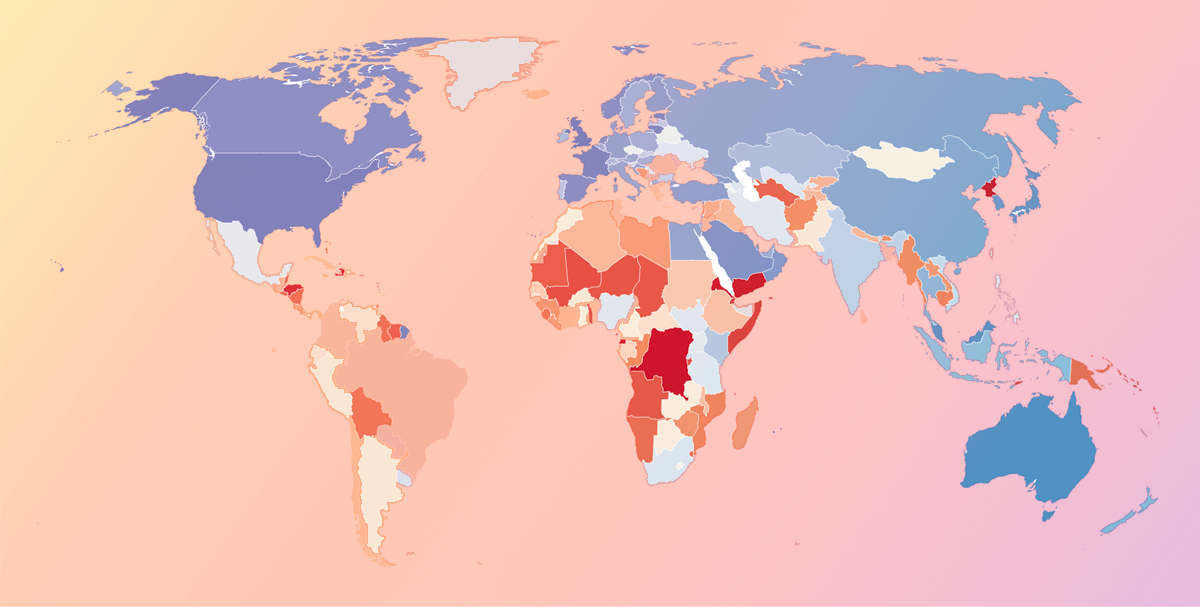
In a digital age, data security is a top priority, but it can be difficult to know who exactly is  responsible for securing sensitive information. While companies may feel they have sufficiently secured their own data, those that utilize SaaS vendors in their business put their sensitive information and business data in the hands of these vendors, who store it in the cloud or on-premises at their location. There are a number of security considerations and variables a business should keep in mind, especially related to cloud security. But it's helpful to remember one simple question when considering vendors or evaluating current protection efforts: Does the country housing my data care about security? Countries that do have taken action to protect personal and business data stored in their country or region. Other efforts to protect personal information include enforcing security standards, developing national cybersecurity strategies, and providing public awareness campaigns, among others. Countries that received lower scores have done less to ensure businesses are protecting data and require less transparency between data collectors and individuals.  In a globalized world, servers could be housed in any number of countries other than the one your business or a software vendor operates in. Still, it should be considered a potential red flag if vendors operate out of extremely vulnerable geographical regions.  Every year, the International Telecommunication Union (ITU) releases the results of a worldwide security survey titled the United Nations Global Cybersecurity Index (CGI). The index provides an overall security rating based on a number of factors related to legislative, organizational, technical, capacity building, and international cooperation.
by Aaron Walker
To-Do Lists

To-Do Lists

What is a to-do list? A to-do list is a structured list of tasks organized by priority, deadline, or category to help individuals or teams manage work, stay productive, and track progress. Modern to-do lists are often created using project or task management software and can range from simple daily checklists to long-term planning systems. TL;DR: To-do lists definition, types, and benefits A to-do list is a prioritized set of tasks used to plan and track work or personal activities. Types range from daily and weekly lists to long-term plans like vision or 100-day lists. They boost productivity, focus, and time management while helping track progress. Effective lists include clear tasks, priorities, and deadlines, and work best when kept updated, focused, and aligned with goals.
by Mara Calvello
The Promises and Pitfalls of Virtual Classroom Tools

The Promises and Pitfalls of Virtual Classroom Tools

A couple of months ago, no one in K–12 education was talking about virtual classrooms.
by Shaun Bishop
Remote Learning Tools Educators Need Most

Remote Learning Tools Educators Need Most

Most teachers I’ve met are master improvisers. They have to be ready to adapt to situations in the moment, and the COVID-19 health crisis is a perfect example of when adaptation is a must.
by Shaun Bishop
46 Best Sales Tools for Sales Operations

46 Best Sales Tools for Sales Operations

Sales operations teams are an essential piece of the sales department puzzle. For sales representatives to properly dedicate focus to making sales, operations teams ensure that representatives are equipped with the right tools and datasets and prevent potential sales pipeline roadblocks by implementing proper sales planning.
by Tricia Dempsey
I Evaluated the 9 Best Free Antivirus Software for PC in 2026

I Evaluated the 9 Best Free Antivirus Software for PC in 2026

Malware, viruses, Trojans, ransomware — the threats targeting PCs are everywhere.
by Devyani Mehta
4 Types of Team Collaboration Tools and Their Importance

4 Types of Team Collaboration Tools and Their Importance

We can all list a small but consistent issue at work that throws off our groove.
by Adithya Siva
Five Free Rapid Application Development Tools for your App

Five Free Rapid Application Development Tools for your App

Virtually every company, brand and website has its own mobile or web application. 
by Aaron Walker
7 Unity Analytics Tools to Track Your App in 2020

7 Unity Analytics Tools to Track Your App in 2020

So you’ve created your first app using the game engine tool Unity. Congratulations, you’re now officially a Unity game maker and have created a ready-for-market game. 
by G2
What Is Cloud Integration? Why Join On-Prem and Cloud Apps

What Is Cloud Integration? Why Join On-Prem and Cloud Apps

Hybrid environments with clouds and on-premise systems make information technology (IT) delivery challenging.Organizations with multiple lines of businesses (LOBs) use multiple disparate software-as-a-service (SaaS) applications on top of existing legacy systems. These new applications become part of the IT ecosystem with little involvement from the internal IT team. As a result, businesses suffer from security issues and a lack of data intelligence. The way forward for these enterprises with a hybrid SaaS and on-premise applications lies in simplifying application integration. Businesses must adopt an integration platform as a service (iPaaS) software to aggregate, integrate, and manage cloud and non-cloud services reliably. iPaaS systems enable organizations to unify applications, integrate cloud data, manage application programming interfaces (APIs), automate workflows, and visualize business intelligence.
by Aaron Walker