
Introducing G2.ai, the future of software buying.Try now

Docusign CLM Reseñas y Detalles del Producto

Valor de un vistazo

Promedios basados en opiniones de usuarios reales.

Tiempo de Implementación

3 meses

Contenido Multimedia de Docusign CLM

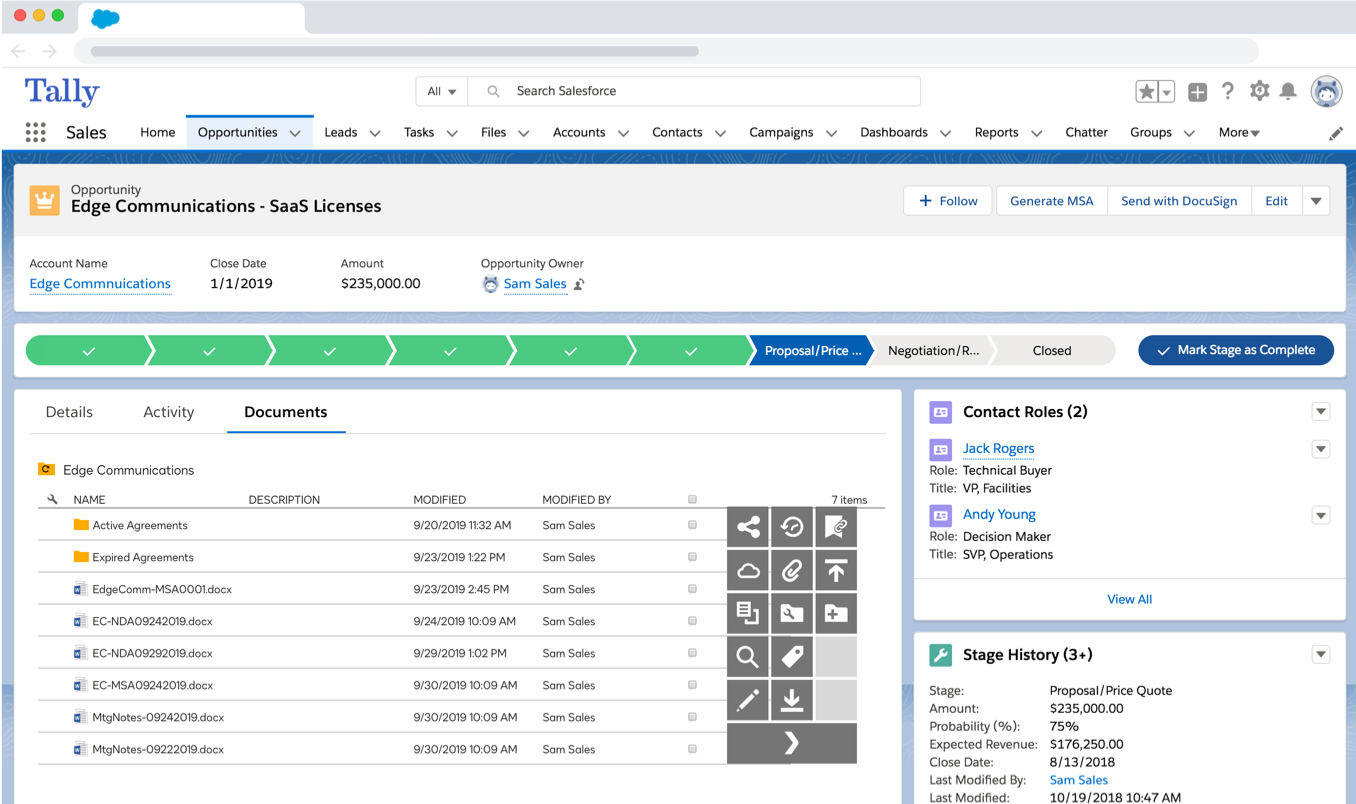
Demo Docusign CLM - Manage and interact with agreements directly on your Opportunities.
Manage and interact with agreements directly on your Opportunities.
Demo Docusign CLM - Generate new agreements from predefined templates.
Generate new agreements from predefined templates.
Demo Docusign CLM - Merge Salesforce data into contract with simple forms.
Merge Salesforce data into contract with simple forms.
Demo Docusign CLM - Review and approve from any location or device.
Review and approve from any location or device.
Demo Docusign CLM - Create workflows for collaboration and review.
Create workflows for collaboration and review.
Demo Docusign CLM - Centralize negotiation, redlining and version control.
Centralize negotiation, redlining and version control.
Imagen del Avatar del Producto

¿Has utilizado Docusign CLM antes?

Responde algunas preguntas para ayudar a la comunidad de Docusign CLM

Reseñas de Docusign CLM (460)

Reseñas

Reseñas de Docusign CLM (460)

4.3
Reseñas de 460

Pros y Contras

Generado a partir de reseñas de usuarios reales
Ver Todos los Pros y Contras
Buscar reseñas
Filtrar Reseñas
Borrar resultados
Las reseñas de G2 son auténticas y verificadas.
SL
IT Manager
Seguridad de Redes y Computadoras
Mediana Empresa (51-1000 empleados)
"Organized, Automated Contract Management With High Visibility"
¿Qué es lo que más te gusta de Docusign CLM?

Docusign CLM is organized in matters contract management, proper drafting and vibrant negotiation for easy execution

Most of contract management tasks like approvals are automated to enhance quality services and save on time

Docusign CLM integrates with other e-Signature solutions and this makes documents legally binding

The app shows the exact position a contract is in it’s cycle, demonstrating high visibility Reseña recopilada por y alojada en G2.com.

¿Qué es lo que no te gusta de Docusign CLM?

Docusign CLM is completely powerful, but the tool needs a comprehensive set up that can be draining

The price for Docusign is premium and the implementation process is demanding Reseña recopilada por y alojada en G2.com.

AC
Homebound Case Manager
Pequeña Empresa (50 o menos empleados)
"Efficient Client Paperwork Management with DocuSign CLM"
¿Qué es lo que más te gusta de Docusign CLM?

I like that DocuSign CLM provides tracking and notifications to both the client and me. When I send a document out, I know where it is and what its status is. I can control the document by either resending, editing, and more, which makes it very convenient for me to complete my paperwork. With tracking, I can see whether the client has received the document that needs to be signed and whether they've completed it. Since I have multiple clients on my caseload, I can keep track of all of them at once, which is very helpful for time management and efficient processing of paperwork. Reseña recopilada por y alojada en G2.com.

¿Qué es lo que no te gusta de Docusign CLM?

If I need to redo a DocuSign form and I had edited the fields in DocuSign, I'd have to start from a fresh template or document if I wanted to edit those fields after sending the form out. Reseña recopilada por y alojada en G2.com.

Cynthia J.
CJ
Realtor.
Pequeña Empresa (50 o menos empleados)
"Effortless Signing, Time-Saving Powerhouse"
¿Qué es lo que más te gusta de Docusign CLM?

I like DocuSign CLM because it's easy and convenient for getting signatures without having to meet in person or exchange emails. The saved signature feature is great since I don't have to do a new one each time. The steps are quick and the instructions are straightforward, letting me just press send or complete, and it's done. The initial setup was simple too, just getting the signature the way I wanted. Easy access to DocuSign CLM saves a lot of time and lets me get paperwork back to the sender quickly, sometimes within minutes. Reseña recopilada por y alojada en G2.com.

¿Qué es lo que no te gusta de Docusign CLM?

The only thing that could be improved is sometimes it's hard to get your signature on the exact line. For the most part, that's probably happened one time for me. Reseña recopilada por y alojada en G2.com.

"Simplifies Signatures Across Borders with Ease"
¿Qué es lo que más te gusta de Docusign CLM?

I appreciate how user-friendly Docusign CLM is, even if you've never used it before, as it guides you through to where you need to be once you click the link. I love that I can 'set it and forget it,' meaning I can set up everything from the initial submission, give it prompts on how I want the requests sent, and then see the finished product at the end of it. The initial setup was very easy, as our procurement team had no issues setting up our accounts. It was a game-changer as it allows us to get signatures across businesses and countries, and it's a certified, acceptable medium that's beneficial when someone is not in the office, or by their laptop, especially in urgent matters. Reseña recopilada por y alojada en G2.com.

¿Qué es lo que no te gusta de Docusign CLM?

I don't like that I have to recall the entire document if there is an error. It would be nice if I could just fix the error, notify the recipients and continue. This is particularly frustrating if the error doesn't affect the outcome. Reseña recopilada por y alojada en G2.com.

George C.
GC
Sales Executive
"Effortless Contract Management, Streamlined Signing Process"
¿Qué es lo que más te gusta de Docusign CLM?

I like Docusign CLM because it's simple and direct, with nothing overly complicated about it. Its guided signing journey is especially useful because customers know exactly where they need to read and sign, without having to look through every single page. This feature increases the signature rate at the end of a sales cycle. Additionally, the initial setup was really easy and took me just a few minutes. Reseña recopilada por y alojada en G2.com.

¿Qué es lo que no te gusta de Docusign CLM?

The main thing I've noticed over the years is flexibility in templates. Sometimes, if there's a preloaded template perhaps from sales ops, it can be a bit difficult to have to delete the template and then add your own one in and figure out where things to be signed. Reseña recopilada por y alojada en G2.com.

Isabele M.
IM
Customer Support Associate
Pequeña Empresa (50 o menos empleados)
"Effortless Digital Signing and Seamless Contract Management"
¿Qué es lo que más te gusta de Docusign CLM?

This platform is very easy to use, and typically, anyone who receives a contract or document to sign digitally through it can do so without any trouble. Additionally, managing contracts is straightforward and intuitive. The platform is also integrative, which helps make it an efficient and fast solution. Reseña recopilada por y alojada en G2.com.

¿Qué es lo que no te gusta de Docusign CLM?

Once you become familiar with how to use and access all the features, the app feels very intuitive. However, it can be a bit challenging to manage and set up at first. Reseña recopilada por y alojada en G2.com.

Linda E.
LE
Senior Pastor
Mediana Empresa (51-1000 empleados)
"Effortless Digital Signatures with Smooth Document Forwarding"
¿Qué es lo que más te gusta de Docusign CLM?

What is most helpful with this product, is you are able to digitally sign a document and then the document gets forwarded to the next person to sign. Reseña recopilada por y alojada en G2.com.

¿Qué es lo que no te gusta de Docusign CLM?

I like everything about this product. I’ve never had any issues with it, and it works exactly as stated. Reseña recopilada por y alojada en G2.com.

Sara M.
SM
Marketing and Community Manager
Pequeña Empresa (50 o menos empleados)
"Simplifies Contract Management with Ease of Use"
¿Qué es lo que más te gusta de Docusign CLM?

I like how easy it is to sign up for Docusign CLM and the ability to save templates. It really simplifies sending documents to recipients. There aren't many other softwares that offer such an ease of use, especially when setting up templates so that I only need to type in a name and email. Docusign CLM saves all other fields that need to be filled in on lengthy documents, simplifying the process and saving me time and energy. Reseña recopilada por y alojada en G2.com.

¿Qué es lo que no te gusta de Docusign CLM?

I don't can't note anything at all. Maybe integration support? Reseña recopilada por y alojada en G2.com.

Ayush M.
AM
senior software engineer
Mediana Empresa (51-1000 empleados)
"Streamlined Contract Management with Some Integration Hurdles"
¿Qué es lo que más te gusta de Docusign CLM?

I really find the end-to-end automated workflow in DocuSign CLM beneficial, as it makes management faster and more organized. The templates save a lot of time since I don't need to draft from scratch, which helps me create consents more quickly. I appreciate the version control feature during negotiations because it allows us to track changes effectively. Additionally, the real-time tracking feature is extremely helpful for following up on contracts or consents. Reseña recopilada por y alojada en G2.com.

¿Qué es lo que no te gusta de Docusign CLM?

Integration with Salesforce or other tools require effort and technical support, sometimes the UI feels slow, and the search can be more flexible and accurate. Reseña recopilada por y alojada en G2.com.

Abdul H.
AH
Practice Associate
Empresa (> 1000 empleados)
"Effortless Document Signing, Excellent Tracking"
¿Qué es lo que más te gusta de Docusign CLM?

I like how the turnaround time for the signature process has decreased drastically with Docusign CLM. It's also easier now to keep track of all our documents and follow up on them during the signature process. The shared access feature is great because all team members can track the status of documents, which is really helpful when the business owners of these documents are on leave or taking a break. Reseña recopilada por y alojada en G2.com.

¿Qué es lo que no te gusta de Docusign CLM?

The process of integrating with other apps is a little complex and can be simplified. Reseña recopilada por y alojada en G2.com.

Información de Precios

Promedios basados en opiniones de usuarios reales.

Tiempo de Implementación

3 meses

Retorno de la Inversión

14 meses

Descuento Promedio

12%

Docusign CLM Comparaciones
Imagen del Avatar del Producto
Icertis Contract Management Software
Comparar ahora
Imagen del Avatar del Producto
Microsoft SharePoint
Comparar ahora
Imagen del Avatar del Producto
Conga CLM
Comparar ahora
Características de Docusign CLM
Creación de contratos
Plantillas de contrato
Edición de contratos
Software
Documentos
Automatización
Flujo
Imagen del Avatar del Producto
Docusign CLM