Best Workflow Management Software - Page 23

How Many Workflow Management Software Products Does G2 Track?

Total Products under this Category: 529

Category Stats (Oct 2026)

  • Average Rating: 4.54/5 (↓0.01 vs Sep 2026) The average rating of products in this category, based on all submitted ratings
  • Top Trending Product: Striven (+1.0%) - Among all products in this category, Striven recorded the largest rating increase compared to last month

Last updated: October 07, 2026

How Does G2 Rank Workflow Management Software Products?

Why You Can Trust G2's Software Rankings:

  • 30 Analysts and Data Experts
  • 147,900+ Authentic Reviews
  • 529+ Products
  • Unbiased Rankings

G2's software rankings are built on verified user reviews, rigorous moderation, and a consistent research methodology maintained by a team of analysts and data experts. Each product is measured using the same transparent criteria, with no paid placement or vendor influence. While reviews reflect real user experiences, which can be subjective, they offer valuable insight into how software performs in the hands of professionals. Together, these inputs power the G2 Score, a standardized way to compare tools within every category.

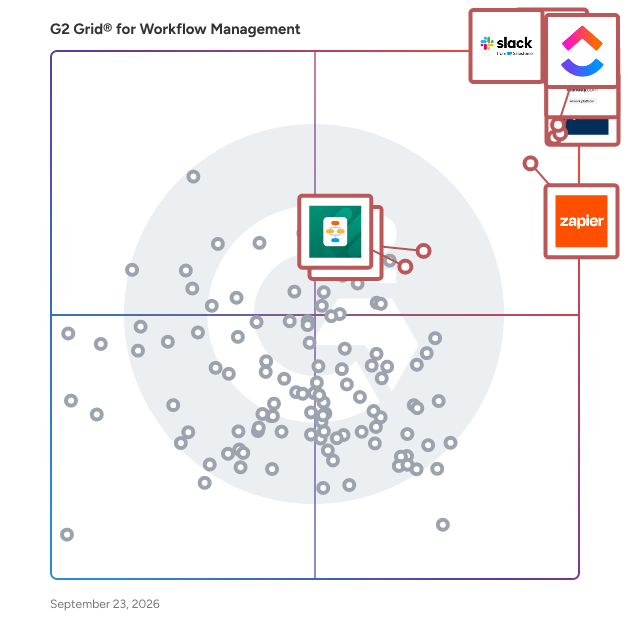
G2 Grid® for Workflow Management Software

G2 Grid® for Workflow Management Software plotting products by satisfaction and market presence

Highlighted products: Slack, Asana, ClickUp, monday AI Work Platform, Smartsheet, Zapier, Karbon, and Jotform Workflows.

Underlying data: [Grid® JSON](https://www.g2.com/categories/workflow-management/grids.json?focus%5B%5D=slack&focus%5B%5D=asana&focus%5B%5D=clickup&focus%5B%5D=monday-com&focus%5B%5D=smartsheet&focus%5B%5D=zapier&focus%5B%5D=karbon-2025-03-03&focus%5B%5D=jotform-workflows)

Flowis

Flowis is a comprehensive business process automation platform that enhances efficiency and productivity in various business procedures. Its main features include workflow management, ERP integration, process automation, OCR scanning technology and AI-powered data extraction. The platform excels in automating tasks like accounts payable, account reconciliations, accounts receivable, journal entries, HR procedures, and intercompany transactions, leveraging machine learning, AI, and no-code customization. Praised for its user-friendly interface and flexible integration capabilities, Flowis is an effective tool for both simple tasks and complex business operations, aiming to streamline processes and improve business outcomes.

Who Is the Company Behind Flowis?

  • Seller: Flowis
  • Year Founded: 2015
  • HQ Location: Ružinov, Bratislava
  • LinkedIn® Page: www.linkedin.com
    46 employees on LinkedIn®

Flowora

Flowora is an AI-powered business platform that brings forms, customer management, workflows, automation, analytics, and AI together in one place. Instead of using separate tools to create forms, collect information, manage leads and contacts, build approval processes, and analyze responses, Flowora provides a connected workspace where information can move from data collection → CRM → workflow → automation → insights. 📝 Build powerful forms Create professional, customizable forms without starting from scratch. With Flowora, you can: Build forms using an intuitive Form Builder Create forms with AI Import existing forms and documents Import from PDF Import from Word documents Convert images into forms Import Google Forms Import Typeform Import Tally Customize questions and fields Add conditional logic and branching Control what users see based on their answers Collect and manage responses Publish and share forms Flowora is designed to make the transition from an existing document or form into a structured digital workflow much faster. 👥 Manage customers with CRM Flowora goes beyond collecting form responses by helping you turn submitted information into actionable customer data. With the CRM, you can: Manage contacts and customers Capture leads Organize customer information Track customer activities Manage customer relationships Maintain structured customer records Connect collected information with your customer workflows Track opportunities and customer progress This means the information collected through a Flowora form doesn't have to remain isolated as a response. It can become part of your customer management workflow. ⚡ Automate repetitive work Flowora helps reduce manual work by connecting forms, CRM data, rules, approvals, and actions. Create workflows for processes such as: Form submission → Review → Approval → CRM update → Follow-up You can build workflows around: Conditional logic Rules Approvals Automated actions Status changes Business events Customer workflows Follow-up processes Instead of manually checking every submission or customer record, Flowora helps turn repetitive processes into structured workflows. 🤖 AI-powered productivity AI is built into Flowora to help users create and work with their data more efficiently. Flowora's AI capabilities can help with: AI Form Builder AI-powered form creation Question rewriting Form optimization Form health analysis Response insights Sentiment analysis Topic clustering Understanding collected responses Turning raw information into useful insights The goal isn't simply to add AI as a separate feature. AI is designed to assist users throughout the Flowora workflow. 📊 Understand your responses and business data Collecting information is only the beginning. Flowora provides analytics and insights to help users understand what is happening after information has been collected. Users can analyze: Form responses Response trends Form performance Customer information Workflow activity Business events AI-generated insights This creates a complete journey from: Collect → Organize → Automate → Analyze → Act 🔄 One connected workflow One of Flowora's key advantages is that Forms, CRM, Automation, and AI are designed to work together. For example: Create Form ↓ Collect Information ↓ Capture Lead / Customer ↓ Add to CRM ↓ Apply Business Rules ↓ Trigger Workflow ↓ Approval / Action ↓ Analyze Results ↓ AI Insights Instead of managing these activities across multiple disconnected applications, Flowora brings them together into a single platform. 🎯 Who is Flowora for? Flowora can be useful for businesses and teams that need to collect information and then do something meaningful with it. Typical use cases include: Lead generation Customer onboarding Customer feedback Registration forms Internal business processes Approval workflows Surveys Applications Employee workflows Customer data collection CRM workflows Business process automation Response analysis 🚀 Why Flowora? Traditional form tools primarily focus on: Create a form → Collect responses Flowora is designed around a broader workflow: Create → Collect → Manage → Automate → Analyze → Act That makes Flowora more than a form builder. It brings together: Forms Build and collect structured information. CRM Manage the people and customer relationships behind that information. Automation Turn repetitive processes into workflows. AI Create, improve, analyze, and gain insights from your data.

Who Is the Company Behind Flowora?

AI can help you find the answers. G2 helps you trust them.

Connect G2 to Claude or ChatGPT for answers grounded in G2's trusted reviews, comparisons, and pricing from real user insights.

How it works

Flowwasp

FlowWasp is an AI-powered product workflow-to-content platform that turns recorded software workflows into interactive product stories, polished videos, documentation, release notes, blog content, and social highlights. With the FlowWasp Chrome extension, users record themselves performing a workflow in their product. FlowWasp captures the recording along with workflow events, screenshots, timestamps, and interaction context. Its AI analyzes the workflow to identify meaningful moments, organize the sequence, and reduce unnecessary activity. From a single recording, FlowWasp can generate: * Interactive product stories that guide viewers through important workflow moments * Product videos with intelligent framing, zooming, panning, cursor emphasis, narration, captions, and presentation effects * Product documentation and step-by-step help content * Release notes based on product changes and workflows * Blog content derived from product walkthroughs * Social highlight clips selected from meaningful moments in a workflow FlowWasp is designed around a simple idea: record the workflow once, then let AI determine what matters and transform it into the content needed to explain the product. Key Features * AI-powered workflow understanding * Automatic workflow and moment selection * Interactive product stories * AI-edited product videos * Intelligent timeline optimization * Automated zoom, pan, and framing * AI-generated narration and captions * Documentation generation * Release-note generation * Blog-content generation * Social highlight generation * Browser-based workflow recording * Multiple content formats from a single recording What problems does FlowWasp solve? Creating product content often requires the same workflow to be recreated repeatedly for different purposes. Teams may need to record a demo, capture screenshots for documentation, edit a video, write release notes, and create social content separately. FlowWasp reduces that repeated work by using a single recorded workflow as the source for multiple content formats. Who uses FlowWasp? FlowWasp is designed for teams that regularly need to demonstrate, document, explain, or promote software products, including product, marketing, sales, customer success, and documentation teams. What makes FlowWasp different? FlowWasp focuses on what happens after the recording. Rather than simply storing or sharing a screen recording, FlowWasp analyzes the workflow and uses that understanding to determine which moments are important, how they should be presented, and which content formats can be created from the same source. Record your workflow. Let AI explain what matters.

Who Is the Company Behind Flowwasp?

Flow XO for Workflow

Flow XO for Workflow is our automation platform that provides a seamless drag and drop way to create workflows (flows) that connect things that happen (triggers) with things you want to do (actions). Each time a workflow is triggered, we call that an 'interaction'.

Who Is the Company Behind Flow XO for Workflow?

  • Seller: Flowxo
  • Year Founded: 2020
  • HQ Location: New York
  • Twitter: @FlowXO
    2,183 Twitter followers
  • LinkedIn® Page: www.linkedin.com
    153 employees on LinkedIn®

Flowzivo

Flowzivo is workspace software that consolidates freelance administrative tasks into one platform, handling invoicing, quotes, client management, time tracking, contracts, payments, expenses, and scheduling. Modules integrate seamlessly, eliminating manual re-entry. Invoicing offers customizable layouts, VAT calculations, discounts, deposits, and recurring invoices. Quotes convert to invoices with one click. Client management centralizes billing details, currencies, and document languages while linking related records. Time tracking supports timers, manual entries, and billable classifications. Contracts include templates for NDAs and service agreements with e-signatures. Expense tracking allows receipt uploads, categorization, and rebilling. Payment management tracks balances and sends reminders. Reporting covers revenue, profit, and hourly rates. The calendar generates booking pages with time zone conversion, and the platform operates across devices with conflict resolution.

Who Is the Company Behind Flowzivo?

Floyo

Floyo brings full ComfyUI to your browser, making it effortless to find & run open source workflows. 3-Second launch, Zero setup, free unlimited workflow building. Premade workflows ready to run, faster, easier sharing, all open source with no limits. Run Any Workflow in Seconds Browse hundreds of ready-made ComfyUI workflows, click Run, and they’re live in seconds - no missing nodes, no missing models, no hassle. Focus on creating; we handle the setup. Hundreds of Models, All Preloaded Choose from community-uploaded, pre-loaded open-source models - or upload your own checkpoints and LoRAs. They’re ready to slot into any workflow right away, so you can move from idea to output fast. Free Unlimited Workflow Building Experiment, tinker, leave the app open the whole day if you want to. Pay only for generation time. 2500+ Custom Nodes We add new nodes to Floyo every day. If your workflow needs one we haven’t installed yet, just add your workflow - our vetting process spots the missing node and we will install it for you.

Who Is the Company Behind Floyo?

Fluid BPM

Fluid is an Enterprise Java application that brings business process management; document / object management; data management; and integrability together into one elegant, agile solution.

Who Is the Company Behind Fluid BPM?

  • Seller: Fluid BPM
  • Year Founded: 2014
  • HQ Location: North Holland, NL
  • LinkedIn® Page: www.linkedin.com
    2 employees on LinkedIn®

fluidTrail

fluidTrail is an advanced workflow automation and document management platform created to empower organizations of all sizes to streamline operations, eliminate manual inefficiencies, and encourage team collaboration across teams. With its user-friendly interface and powerful functions, fluidTrail revolutionizes the way organizations operate, enabling users to accomplish their goals at unprecedented speed and effectiveness.

Who Is the Company Behind fluidTrail?

  • Seller: Wepsol
  • Year Founded: 2000
  • HQ Location: Bengaluru, IN
  • LinkedIn® Page: www.linkedin.com
    478 employees on LinkedIn®

FORG

Who Is the Company Behind FORG?

Forms Manager

Forms Manager is a business management platform that helps organizations centralize forms, requests, approvals, documents, employees, financial processes, and daily operations in one workspace. Organizations can create and customize forms, define approval workflows, assign permissions, track request statuses, maintain audit trails, and manage documents from a centralized platform. A library of ready-to-use business forms helps teams get started quickly across administrative, HR, finance, procurement, operations, and other departments. Forms Manager also includes tools for employee management, leave requests, attendance, invoices, accounting, expenses, purchasing, inventory, reporting, and internal administrative services. Organizations can customize the platform according to their business activity by installing optional industry packages. Multiple organizations can also be managed through one account, while each organization maintains its own separate workspace, users, permissions,

Who Is the Company Behind Forms Manager?

Bijou Barry
BB
Researched and written by Bijou Barry
Updated April 9, 2026