Best Workflow Management Software - Page 20

How Many Workflow Management Software Products Does G2 Track?

Total Products under this Category: 393

Category Stats (Aug 2026)

  • Average Rating: 4.54/5 The average rating of products in this category, based on all submitted ratings
  • Top Trending Product: R2 Docuo (+0.84%) - Among all products in this category, R2 Docuo recorded the largest rating increase compared to last month

Last updated: August 04, 2026

How Does G2 Rank Workflow Management Software Products?

Why You Can Trust G2's Software Rankings:

  • 30 Analysts and Data Experts
  • 145,200+ Authentic Reviews
  • 393+ Products
  • Unbiased Rankings

G2's software rankings are built on verified user reviews, rigorous moderation, and a consistent research methodology maintained by a team of analysts and data experts. Each product is measured using the same transparent criteria, with no paid placement or vendor influence. While reviews reflect real user experiences, which can be subjective, they offer valuable insight into how software performs in the hands of professionals. Together, these inputs power the G2 Score, a standardized way to compare tools within every category.
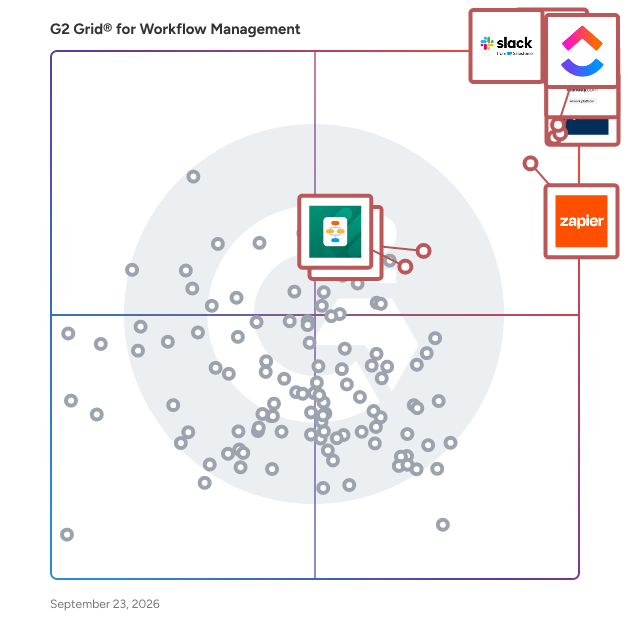
G2 Grid® for Workflow Management Software

G2 Grid® for Workflow Management Software plotting products by satisfaction and market presence

Highlighted products: Slack, Asana, Smartsheet, ClickUp, monday AI Work Platform, Zapier, Karbon, and MuleSoft Automation.

Underlying data: [Grid® JSON](https://www.g2.com/categories/workflow-management/grids.json?focus%5B%5D=slack&focus%5B%5D=asana&focus%5B%5D=smartsheet&focus%5B%5D=clickup&focus%5B%5D=monday-com&focus%5B%5D=zapier&focus%5B%5D=karbon-2025-03-03&focus%5B%5D=mulesoft-automation)

Sponsored

INE

INE is a comprehensive training solution designed to empower organizations with the skills necessary to navigate the complexities of IT and cybersecurity. With over 20 years of experience serving Fortune 500 companies, INE offers a robust suite of on-demand courses, live virtual training sessions, and immersive labs that provide hands-on practical experience. This approach ensures that teams are not only prepared for examinations but also equipped to tackle real-world challenges with confidence. Targeted towards professional and enterprise teams, INE's offerings cater to a diverse audience that includes IT professionals, cybersecurity experts, and organizations seeking to enhance their workforce capabilities. The platform is particularly beneficial for companies looking to upskill their employees, retain talent, and maintain compliance with industry standards. By leveraging INE’s resources, organizations can create a continuous cycle of skill development that is essential in today’s rapidly evolving technological landscape. INE’s key features include an extensive library of over 750 expert-led courses, more than 70 structured learning paths, and thousands of hands-on labs designed to provide practical experience. Additionally, the platform offers 12 industry-awarded certifications that validate the skills acquired by learners. These features not only enhance the learning experience but also ensure that users gain in-depth knowledge and practical techniques necessary for identifying and mitigating IT and cyber threats effectively. Furthermore, INE provides enhanced business analytics and dashboarding tools that allow organizations to measure training return on investment (ROI) and gain real-time insights into their workforce development efforts. This data-driven approach enables organizations to make informed decisions about training investments and further develop their teams in alignment with evolving industry demands. As cyber threats continue to evolve, INE equips professionals with the tools and knowledge needed to stay ahead, making it a trusted partner for over 1,450 global organizations committed to workforce development.

Visit website

Gathering Tools

Gathering Tools is a web-based platform designed to replace complex Excel-based business processes without forcing organizations to redesign the way they work. It preserves the flexibility and business logic of Excel while providing the automation, governance, integration, and data quality features expected from modern enterprise software. ________________________________________ 🔍 What problem does Gathering Tools solve? Across organizations of all sizes, a large portion of operational processes still depends on Excel files shared or exchanged by email: forecasting, budgeting, HR data collection, QHSE audits, production planning, procurement workflows, and many others. These processes involve anticipatory or declarative data—information that does not exist in any system until contributors enter it. Because ERP, EPM, BI, and no-code tools are built for structured or transactional data, they cannot absorb these flexible workflows. As a result: • files multiply (“v12_final_final.xlsx”), • formulas break, • consolidation is manual, • data quality is fragile, • governance is impossible, • and teams lose time reconciling inconsistent versions. Gathering Tools eliminates these issues while preserving the power and fine-grained logic of Excel models. ________________________________________ 🧩 What is Gathering Tools? Gathering Tools is a structured Excel replacement platform that transforms an existing Excel workbook into a governed, web-based application — without rewriting formulas or redesigning business logic. The platform interprets the original Excel model (including formulas, constraints, multi-entry tables, and layout), turns it into an interactive web form, and manages: • data collection • multi-step workflows • validations • consolidations • integrations with enterprise systems • auditability and governance • versioning and lifecycle management Contributors work in a user-friendly interface that feels familiar, while administrators benefit from complete control, traceability, and automation. ________________________________________ 🧠 Why do organizations choose Gathering Tools? Preserves business expertise The expertise encoded in Excel files—logic, relationships, calculations—is a competitive asset. Gathering Tools allows organizations to capitalize on this know-how instead of forcing teams to rebuild processes in rigid tools. Handles multi-entry and multi-dimensional models Unlike no-code and form-based systems, Gathering Tools can manage cross-dimensional tables that combine rows, columns, blocks, and repeating structures—exactly like Excel, but safely. Automates the full data collection workflow Workflows, reminders, consolidation, and validations are fully automated, eliminating email exchanges and manual merges. Improves data quality and governance The platform enforces validation rules, mandatory fields, authorized values, version control, and audit trails — turning fragile Excel processes into dependable enterprise workflows. Integrates seamlessly into the IT ecosystem Gathering Tools connects with corporate data, making collected data immediately usable for reporting, analytics, and planning. Reduces operational risk Organizations reduce errors, accelerate cycles, and standardize processes without losing flexibility. ________________________________________ 🎯 Who is Gathering Tools designed for? Gathering Tools is used by: • Finance teams: budgeting, forecasting, reporting • HR departments: headcount collection, skill matrices, compensation planning • Operations: production planning, inventory, maintenance • QHSE: audits, conformity checklists, risk scoring • Procurement & Supply Chain: vendor data, sourcing, planning • IT & Data teams: governance, standardization, integration layers It is ideal for mid-sized companies and large enterprises that rely on Excel processes involving many contributors and frequent consolidations. ________________________________________ 🚀 What makes Gathering Tools unique? • Structured Excel compatibility: preserves formulas, layouts, business rules, and multi-entry logic. • Enterprise-grade governance: audit trail, versioning, workflow, security. • Superior data collection capabilities: optimized for anticipatory, declarative, and multi-dimensional inputs. • No redesign required: migrate existing Excel processes without rebuilding models. • Contributor-friendly UX: clean web interface, offline mode if needed. • Deep SI integration: APIs, connectors, export packages, automation. • Designed specifically for business processes where Excel remains the only flexible tool. ________________________________________ 🌍 Our mission Gathering Tools enables organizations to modernize their Excel-based processes without sacrificing the flexibility and business expertise that make them work. We believe that Excel logic is an asset—not a legacy problem—and that companies should be able to structure, secure, and automate these processes while keeping the intelligence that users built over years.

Who Is the Company Behind Gathering Tools?

gdnest

GDNest streamlines garage operations by keeping tasks organized, tracking vehicle status, and reducing the need for excessive phone communication. The software consolidates labor, parts, and service costs into a single, easily accessible location, ensuring efficiency and transparency. Designed with adaptability in mind, GDNest incorporates region-specific terminology, formats, and currencies, making it suitable for garages across diverse markets. Additionally, the platform mirrors real-world garage workflows, allowing mechanics and managers to seamlessly integrate it into their daily operations. By simplifying complex processes and providing a centralized hub for essential information, GDNest enhances productivity, reduces errors, and fosters better communication within the team. Its user-friendly interface and tailored features make it an indispensable tool for modern garages aiming to optimize their services and improve customer satisfaction.

Who Is the Company Behind gdnest?

Genity.ai

Genity.ai is an advanced platform designed to build, deploy, and manage autonomous AI agents capable of handling complex tasks. It offers a visual interface for designing agent logic, integrating AI modules, and orchestrating tasks, enabling users to create intelligent agents that operate independently to achieve specified goals. Key Features: - Visual Agent Designer: An intuitive tool to map out agent logic, reasoning flows, and complex actions without extensive coding. - Integrated AI Modules: Pre-built capabilities in vision, natural language processing (NLP), and analytics that can be easily incorporated into agents. - Autonomous Task Orchestration: Users define high-level objectives, and the platform manages the planning and execution details autonomously. - Sophisticated Reasoning Engine: Agents can handle uncertainty, learn over time, and adapt to real-time events through dynamic re-planning. - Custom AI Integration: Flexibility to incorporate custom models alongside built-in AI modules, catering to specific needs. - Code-Level Extensibility: Extend agent capabilities and integrate unique systems using familiar scripting languages. Primary Value and Solutions: Genity.ai empowers organizations to create intelligent agents that autonomously tackle complex goals, reducing manual intervention and enhancing operational efficiency. By providing a robust, scalable, and secure foundation, it enables the deployment of mission-critical agents across various environments, including major cloud platforms, on-premises, or hybrid setups. This adaptability allows businesses to address unique challenges across industries, such as healthcare, manufacturing, commerce, and risk management, by building agents tailored to their specific needs.

Who Is the Company Behind Genity.ai?

GitUp

GitUp is a powerful 2-way integration tool that connects ClickUp and Git repositories to automate the entire development workflow — from task creation to release. It helps engineering and project teams to speed up processes, eliminates manual overhead and keep everyone aligned. With GitUp, developers no longer have to manually create branches, move tasks, or update merge request descriptions. Project managers gain full real-time visibility into development progress without disturbing engineers. It’s a seamless bridge between product and code. Whether you’re running fast-paced sprints or managing long-term product delivery, GitUp brings precision, transparency, and automation to your tech stack. Key features: Branch management – automatically create/delete Git branches based on ClickUp task statuses Seamless tack movement – automatically move tasks once the MR is created or merged Release management – establish your own rules and organize your releases with less effort Instant notifications – provide your team with full visibility into all projects and keep everyone informed AI-Powered MR description – generate a detailed MR description using AI based on your preferred custom templates Perfect order in projects and repository – prevent clutter, reduce confusion, and help your team stay focused on active development

Who Is the Company Behind GitUp?

GridTracks

OrangeGrid's award-winning no-code technology framework eliminates SDLC's, and empowers business leaders with the ability to achieve quick technology wins, eliminate technology migration risks, manage costs, and return leadership time to tackling market – not system – challenges.

Who Is the Company Behind GridTracks?

  • Seller: GridTracks
  • Year Founded: 2014
  • HQ Location: Flower Mound, US
  • Twitter: @OrangeGrid
    21 Twitter followers
  • LinkedIn® Page: www.linkedin.com
    23 employees on LinkedIn®

Grux

Grux is a Google Workspace task management, shared inbox, and workflow platform that turns Gmail and Google Chat conversations into structured, trackable work. Teams running on Google Workspace often coordinate work through Gmail threads, Google Chat messages, shared Drive folders, and informal conversations. Requests arrive through email or chat, but ownership, status, and workflow are rarely defined. As organizations grow, work becomes harder to track, follow-ups become manual, and execution depends on memory rather than systems. Grux solves this by adding task management and workflow structure directly inside Google Workspace. Using the Grux Chrome extension, teams can convert Gmail messages and Google Chat conversations into trackable tasks, assign ownership, define workflow stages, and maintain shared visibility across projects without switching tools. Instead of moving work into a separate project management platform, Grux enables teams to manage tasks and workflows directly inside Gmail and Google Workspace. Grux also functions as a collaborative shared inbox for teams managing high volumes of communication. Incoming requests from clients, teammates, and partners can be routed through defined workflows, assigned to the right owners, and tracked through completion. This makes Grux useful for operations teams, professional services organizations, and customer support teams looking for a shared inbox for Gmail or a help desk workflow built on Google Workspace. Grux connects execution directly to the files and conversations that created the work. Teams can link Google Drive documents to tasks, collaborate through shared views, annotate screenshots, and record short walkthroughs when additional context is needed. By linking conversations, files, and task tracking together, Grux prevents work from getting lost across inboxes, chat threads, and documents. Many organizations rely on multiple disconnected tools to manage task tracking, shared inboxes, internal coordination, documentation, and customer communication. Over time this creates SaaS sprawl, where different teams adopt overlapping software that increases cost and operational complexity. Grux consolidates these workflows into a single execution system built directly on top of Google Workspace. Organizations often use Grux to replace lightweight task managers, shared inbox software, internal help desk tools, and coordination platforms. By centralizing work inside Gmail, Google Chat, and Google Drive, teams can manage projects, requests, and communication without introducing additional software layers. Designed for organizations running on Google Workspace as their operational backbone, Grux improves visibility, accountability, and coordination by turning everyday communication into structured work.

Who Is the Company Behind Grux?

HansaWorld

Standard ERP is a robust solution that encompasses essential ERP features for accounts, order processing, inventory, production and job costing. What sets it apart is the seamless integration of CRM, including email, document management and graphical calendars. This powerful combination facilitates enhanced collaboration and interaction across a diverse range of industry-specific functionalities. Standard ERP's global reach spans over 120 countries, with support for over 30 languages. Standard ERP is a powerful multilingual system with comprehensive verticals including production, rental, construction, hospitality, warehouse management, retail, services and consolidation

Average Rating: 4.8/5.0

Total Reviews: 2

Who Is the Company Behind HansaWorld?

  • Seller: Hansaworld
  • Year Founded: 1988
  • HQ Location: London, GB
  • Twitter: @HansaWorld
    552 Twitter followers
  • LinkedIn® Page: www.linkedin.com
    110 employees on LinkedIn®

Who Uses This Product?

  • Company Size: 50% Large, 50% Medium

What Are Recent G2 Reviews of HansaWorld?

What Are G2 Users Discussing About HansaWorld?

happierFlow

Simple drag and drop process builder allows hassle-free designing of your custom workflows.

Who Is the Company Behind happierFlow?

Harbr

Harbr is a Work Management Platform for Retail Owners.

Who Is the Company Behind Harbr?

  • Seller: Harbr
  • Year Founded: 2017
  • HQ Location: London, GB
  • Twitter: @HarbrData
    189 Twitter followers
  • LinkedIn® Page: www.linkedin.com
    43 employees on LinkedIn®

HighOrbit BPM

HighOrbit Corporation provides software solutions for small businesses that help them automate routine workflow tasks, provide accountability for contractors and employees, and maintain consistent business processes to improve their customer service.

Who Is the Company Behind HighOrbit BPM?

HyperPortal

HyperPortal is a comprehensive web-based platform designed to centralize company data, streamline business processes, and enhance digital initiatives. By integrating a headless content management system with flexible integration capabilities, HyperPortal consolidates business objects, contact information, and operational workflows into a unified portal. Its intuitive, no-code business process modeling tools enable organizations to transform complex processes into manageable tasks, facilitating automation and improved productivity. Additionally, HyperPortal offers robust email automation features and provides in-depth analytics through integrated reporting and visualization tools, empowering businesses to gain valuable insights and drive growth. Key Features and Functionality: - Headless CMS: Centralizes data management and allows for flexible integration with existing business systems. - No-Code Business Process Modeling: Enables users to design and automate workflows without coding expertise. - Email Automation: Facilitates the creation and scheduling of email campaigns with customizable templates and tracking capabilities. - Advanced Reporting and Analytics: Provides real-time data visualization and business intelligence insights to monitor performance and inform decision-making. - Flexible Integrations: Supports integration with various applications, including CRM and ERP systems, to synchronize data across departments. - User Access Controls: Offers role-based permissions and two-factor authentication to ensure secure access management. Primary Value and Solutions Provided: HyperPortal addresses the challenges of fragmented data management and complex business processes by offering a centralized platform that integrates various operational aspects. It simplifies workflow automation, enhances collaboration, and provides actionable insights through advanced analytics. By reducing manual tasks and improving data visibility, HyperPortal empowers organizations to boost productivity, make informed decisions, and drive digital transformation effectively.

Who Is the Company Behind HyperPortal?

Ignition Engine

Ignition Engine is a digital business management suite, providing a range of integrated solutions for entrepreneurs, their teams and customers. It provides entrepreneurs with customisable functionality to support the startup and growth of their business. It has wizards, tools and resources to help people achieve success across 7 key areas of business startup and growth. 1. Strategy and Operations 2. Admin and Backoffice 3. Legal and Compliance 4. Accounts and Financial Control 5. Investment and Funding 6. Web and App Coding 7. Digital Marketing and Analysis

Who Is the Company Behind Ignition Engine?

Impact360

Impact360 is a no-code platform connects to design systems, converting unstructured data into structured knowledge to power automated workflows. The software creates workflows and outputs such as bounding boxes, volume calculations, inspection reports, and dimensional checks. Manufacturing teams can access hole feature summaries, quality teams receive FAI packages, sales teams generate product datasheets, and operations teams work with geometry-aware BOMs. The platform includes real-time collaboration tools, secure supplier communication channels, advanced visualization capabilities, and multi-CAD interoperability. Impact360 operates securely within existing environments while protecting intellectual property and maintaining compliance standards across complex engineering operations.

Who Is the Company Behind Impact360?

Indeks

The easy way to digitally capture, archive and manage your documents.

Who Is the Company Behind Indeks?

InitusApprove for NetSuite

The InitusApprove Bundle automates and simplifies your NetSuite transaction approvals. InitusApprove standardizes and automates approvals directly inside NetSuite. With customizable routing and advanced controls, you get a scalable solution that gives you back time and confidence. • Accelerated approval timelines. • Improved compliance and security. • More time for your team to focus on strategic work.

Who Is the Company Behind InitusApprove for NetSuite?

  • Seller: Initus
  • Year Founded: 2005
  • HQ Location: Dallas, US
  • LinkedIn® Page: www.linkedin.com
    10 employees on LinkedIn®
Bijou Barry
BB
Researched and written by Bijou Barry
Updated April 9, 2026