Flow321
Who Is the Company Behind Flow321?
- Seller: GMK Foundry
- HQ Location: N/A
-
LinkedIn® Page: www.linkedin.com
1 employees on LinkedIn®
Total Products under this Category: 516
Last updated: September 15, 2026
Why You Can Trust G2's Software Rankings:
G2's software rankings are built on verified user reviews, rigorous moderation, and a consistent research methodology maintained by a team of analysts and data experts. Each product is measured using the same transparent criteria, with no paid placement or vendor influence. While reviews reflect real user experiences, which can be subjective, they offer valuable insight into how software performs in the hands of professionals. Together, these inputs power the G2 Score, a standardized way to compare tools within every category.
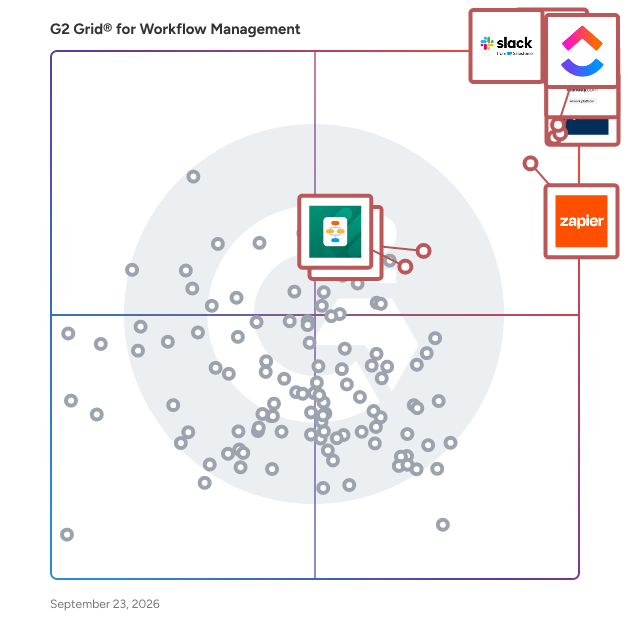
Highlighted products: Slack, Asana, ClickUp, monday AI Work Platform, Smartsheet, Zapier, Karbon, and Jotform Workflows.
Underlying data: [Grid® JSON](https://www.g2.com/categories/workflow-management/grids.json?focus%5B%5D=slack&focus%5B%5D=asana&focus%5B%5D=clickup&focus%5B%5D=monday-com&focus%5B%5D=smartsheet&focus%5B%5D=zapier&focus%5B%5D=karbon-2025-03-03&focus%5B%5D=jotform-workflows)
Software zur Digitalisierung von Geschäftsabläufen Flow360 ist die No-Code-Plattform aus Deutschland, mit der du Workflows in Minuten statt Wochen baust - sicher, flexibel und ganz ohne IT. Perfekt für KMUs, Handwerk und Verbände, die Abläufe beschleunigen, Kosten senken und ihr Team entlasten wollen. Ob Leistungsnachweis, Urlaubsantrag, Angebotsfreigabe oder Kunden-Onboarding - du baust deine Workflows einfach selbst, per Drag-and-Drop, genau so, wie du sie brauchst. Für den schnellen Start gibt's jede Menge fertige Vorlagen. Der visuelle Planer sorgt dafür, dass alle im Team wissen, was wann zu tun ist. Aufgaben werden automatisch verteilt, Benachrichtigungen halten alle auf dem Laufenden - so bleibt nichts liegen. Warum Flow360.io? • Sofort einsatzbereit - ohne Unterstützung der IT-Abteilung • DSGVO-konform und in Deutschland gehostet • Speziell für KMU entwickelt Egal, ob dein Team wächst oder sich verkleinert - Flow360 passt sich an. Flexible Funktionen, faire Preise und keine langen IT-Projekte: Du startest einfach und merkst sofort, wie sich Abläufe beschleunigen, Kosten sinken und die Zusammenarbeit leichter wird. · Erstelle individuelle Workflows ohne Programmierung: mit intuitivem Drag & Drop Formularbuilder und Prozess-Designer. · Vorgefertigte Templates für typische KMU-Abläufe beschleunigen den Roll-out - z. B. Rechnungsfreigabe, Bestellprozesse, Vertragsmanagement, Lieferantenbewertung, Ticketsystem, etc. · Anschließen statt anpassen – dank API & Webhooks verbindest du Flow360 mit allen Tools, die du schon nutzt. · DSGVO-konform entwickelt und gehostet in Deutschland. · Reduziert manuelle Arbeit, senkt Prozesskosten und eliminiert Medienbrüche Ideal für Unternehmen mit 10-300 Mitarbeitern. Kurz gesagt: Flow360 bringt Struktur, Tempo und Sicherheit in deinen Geschäftsalltag - und macht Workflow-Management endlich so einfach, dass du dich wieder aufs Wesentliche konzentrieren kannst. 30 Minuten investieren – Zeig uns deine Abläufe und wo es heute hakt. Dein Prozess entsteht – Wir setzen ihn für dich auf, klar und effizient. In 1 Stunde fit – Du und dein Team beherrschen den Prozessaufbau und ihr könnt sofort eigenständig durchstarten.
Flowdash is the fastest way to build semi-automated workflows. Not every process can, or should, be automated but nobody likes doing mundane, repetitive tasks either. Flowdash helps you build custom workflows faster that are catered to your unique business processes and help drive your business forward.
Grux is a Google Workspace task management, shared inbox, and workflow platform that turns Gmail and Google Chat conversations into structured, trackable work. Teams running on Google Workspace often coordinate work through Gmail threads, Google Chat messages, shared Drive folders, and informal conversations. Requests arrive through email or chat, but ownership, status, and workflow are rarely defined. As organizations grow, work becomes harder to track, follow-ups become manual, and execution depends on memory rather than systems. Grux solves this by adding task management and workflow structure directly inside Google Workspace. Using the Grux Chrome extension, teams can convert Gmail messages and Google Chat conversations into trackable tasks, assign ownership, define workflow stages, and maintain shared visibility across projects without switching tools. Instead of moving work into a separate project management platform, Grux enables teams to manage tasks and workflows directly inside Gmail and Google Workspace. Grux also functions as a collaborative shared inbox for teams managing high volumes of communication. Incoming requests from clients, teammates, and partners can be routed through defined workflows, assigned to the right owners, and tracked through completion. This makes Grux useful for operations teams, professional services organizations, and customer support teams looking for a shared inbox for Gmail or a help desk workflow built on Google Workspace. Grux connects execution directly to the files and conversations that created the work. Teams can link Google Drive documents to tasks, collaborate through shared views, annotate screenshots, and record short walkthroughs when additional context is needed. By linking conversations, files, and task tracking together, Grux prevents work from getting lost across inboxes, chat threads, and documents. Many organizations rely on multiple disconnected tools to manage task tracking, shared inboxes, internal coordination, documentation, and customer communication. Over time this creates SaaS sprawl, where different teams adopt overlapping software that increases cost and operational complexity. Grux consolidates these workflows into a single execution system built directly on top of Google Workspace. Organizations often use Grux to replace lightweight task managers, shared inbox software, internal help desk tools, and coordination platforms. By centralizing work inside Gmail, Google Chat, and Google Drive, teams can manage projects, requests, and communication without introducing additional software layers. Designed for organizations running on Google Workspace as their operational backbone, Grux improves visibility, accountability, and coordination by turning everyday communication into structured work.
Insightly AppConnect is a powerful workflow automation tool that empowers you to easily integrate the Insightly platform with every app you use to run your business. With over 500 pre-built connections, AppConnect gives you a head start at maximizing the data you already have in Insightly to drive your success. At the core of AppConnect is a very easy to use integration design tool that allows anyone in your team to visually build out sophisticated integrations and workflows of any complexity level quickly without having to write any code. Connect to hundreds of apps you already use, map fields, transform and manipulate data, perform calculations, then deploy, schedule and trigger integrations in seconds without servers or IT involvement.
Matidor is a GIS-native field operations platform built for oil and gas companies, environmental consulting firms, and multi-site operations teams. Founded in 2019 in Canada by a team with roots in Google Earth, Matidor was designed to solve the operational problems that generic project management tools cannot: real-time budget control, offline field work, and geographic coordination across distributed sites. Operations teams use Matidor to manage 10 to 100 concurrent projects without spreadsheet chaos — whether overseeing well abandonment programs, pipeline integrity inspections, Phase I through III environmental site assessments, remediation projects, or multi-site construction and utilities work. Four core capabilities power the platform: •Location Intelligence puts every project on an interactive GIS map with multi-layer visualization of regulatory zones, right-of-way corridors, environmental constraints, and asset disposition. Operations managers see their entire portfolio geographically, enabling proximity-based resource coordination and complete spatial context for every decision. •Project Management delivers portfolio dashboards with color-coded health indicators, custom workflows, contractor portals, and centralized communication. Monthly reports that previously took days generate in minutes. •Budget and Cost Control tracks every dollar as field costs flow in real time. Automated alerts trigger at 70, 90, and 100 percent of budget thresholds. AFE budget tracking, cost-by-well reporting, and accounting integration eliminate the month-end surprise cycle. Integrations include QuickBooks Online and Deltek Vantagepoint. •Field Operations delivers 100 percent offline-first mobile apps for remote well sites, pipeline corridors, and environmental assessment zones with zero cellular coverage. Field crews collect GPS-tagged photos and submit forms without connectivity. Everything syncs automatically when connection returns, with timestamps and attribution for compliance-ready documentation. Implementation takes 4 to 6 weeks, not 6 to 12 months. No IT team required. Integrates with QuickBooks Online, Deltek Vantagepoint, ArcGIS, Microsoft Power BI, Harvest, Replicon, and custom systems via REST API. Recognized as a TechCrunch Startup Battlefield finalist and SXSW 2021 pitch finalist. Trusted by 100+ operations teams across North America. Free 14-day trial at matidor.com.
Average Rating: 4.9/5.0
Total Reviews: 7
AI-generated summary from verified user reviews
"Matidor's been great at streamlining our projects and keeping everything in one place."
Rating: 5.0/5.0 stars
— Phoenix P.
"Intuitive Map-Centric Platform That Centralizes Location-Based Workflows"
Rating: 5.0/5.0 stars
— Laura J.
Meegle is the world’s #1 visualized project management tool powered by the next-gen visual workflow engine. At Meegle, we ensure every process step is interconnected and transparent. With Meegle, you gain a comprehensive view of your projects through intuitive workflow diagrams that illustrate every phase-from high-level plans to detailed tasks. This clarity establishes clear roles and responsibilities while fostering consensus among teams, paving the way for smoother communication and effective collaboration. Moreover, Meegle recognizes that every project is unique. That’s why Meegle offers unparalleled flexibility in configuration and customization. Tailor every aspect of your project from work items to workflows, ensuring that our tool fits your specific needs—whether in software development, retail operations, or hardware development. Our goal at Meegle is to empower teams to explore and continually optimize their workflows and processes, enhancing transparency and driving efficiency. Together, we can transform project management and unlock your team's full potential.
Average Rating: 4.5/5.0
Total Reviews: 1
Rating: 5.0/5.0 stars
— SHUBHAM KUMAR A.
"Fresh and fast platform for project management for developers"
Rating: 4.5/5.0 stars
— Juan F.
Navifia is the finance toolkit inside Excel and PowerPoint — built for finance teams that ship the monthly reporting pack. Export once. Push when the model moves. Link charts, tables, and cell values from the Excel model straight into the deck. When the numbers change, one Push refreshes every linked shape — and links survive the workbook moving, rows being inserted in the model, and life on OneDrive or SharePoint. Review stays in the file. Cell-anchored Threads keep the "where did this number come from?" conversation on the number itself — statuses, attachments, audit trail. One-click Stamps flag draft, final, or confidential on one slide or the whole deck. Audit before it ships. Check Period sweeps for stale quarters and mixed fiscal labels. Check Numbers finds leftover figures — it knows $1.2m and 1,200,000 are the same number. Check Fonts catches the stray typeface. In Excel, Formula Audit traces the precedents and dependents behind every figure. Calibrated for FP&A. 50+ features across both add-ins, including 30+ Excel tools: consolidate and split workbooks, batch-clean sheets with thirteen operations, variance and CAGR in a keystroke. Set up in minutes. Pin your layouts and elements, tune the Smart Formatting cyclers, rebind any shortcut — all from the ribbon. Export the whole setup as one file and the entire team gets the same ribbon. Private by architecture. Your spreadsheets and slides never leave your computer. The add-ins send only license-validation data. $16/user/month for both add-ins — it pays for itself the first month-end. Public Beta: Free until 31 August 2026.
Nimble is an enterprise platform built for managing complex projects with confidence, consistency, and complete visibility. Designed for organizations that need more than basic task tracking, NimbleWork brings together teams, workflows, resources, and data into one unified delivery system that helps enterprises plan smarter, execute faster, and deliver more predictably at scale. Nimble supports the full lifecycle of project delivery—from intake and prioritization to execution, governance, and reporting. Its flexible hierarchy modeling allows organizations to structure work the way they operate, whether it’s simple projects or large, multi-team programs with dependencies, risks, and cross-functional workflows. Teams get real-time visibility across initiatives, while leaders gain clarity into progress, bottlenecks, resource utilization, and delivery risks—without relying on spreadsheets or disconnected tools. Key capabilities include: Project Visibility: Unified views of all projects, dependencies, milestones, and risks, enabling proactive decision-making across teams and portfolios. Flexible Work Hierarchy & Custom Work Types: Model projects, tasks, risks, decisions, and change requests with configurable workflows and forms. Hybrid Delivery Support: Manage Agile, Waterfall, or hybrid teams in a consistent framework—ideal for large enterprises with diverse execution models. Advanced Scheduling & Resource Management: Balance workloads, allocate skilled resources, and forecast capacity with built-in intelligence. Real-Time Dashboards & Reporting: Executive-level insights for PMOs, CIOs, and delivery leaders—no custom BI required. Integrated Collaboration: Comments, updates, file sharing, approvals, and discussions happen in context of the work, reducing communication gaps. Automation & Integrations: Rule-based automation, API integrations, and connectivity with 2000+ apps through Zapier and other connectors. AI Capabilities: Nimble includes AI-powered Agents that accelerate planning, automate routine work, and surface actionable insights across projects and teams. From generating project plans and acceptance criteria to summarizing discussions and highlighting risks, these AI companions help teams work smarter, faster, and with greater predictability. For teams adopting modern Project management practices, Nimble also offers intuitive Agile boards, sprint tools, and backlog management—making it easy to support iterative delivery while preserving enterprise governance and traceability. Whether you're managing a multi-year transformation program, cross-team engineering projects, or department-wide initiatives, Nimble helps enterprises eliminate chaos, improve predictability, and deliver with confidence.
Average Rating: 4.0/5.0
Total Reviews: 11
AI-generated summary from verified user reviews
Rating: 5.0/5.0 stars
— Subba Rao V.
"It has been a very good experience"
Rating: 4.0/5.0 stars
— ishwari .
Octaviaflow is an AI-native data integration, workflow automation, and orchestration platform. It helps teams connect applications, databases, warehouses, and APIs; automate multi-step business processes; and move and transform data in real time or on a schedule. With a visual builder and AI assistance, teams can create workflows in plain English, map data across systems, monitor pipelines, and manage integrations from a single platform. Octaviaflow is available as a managed cloud service or for self-hosted deployment.
Pandaflow.io is an intelligent automation platform that enables business users and developers to integrate the apps and automate workflows across any number of SaaS applications so that they can scale their productivity and growth. The product allows business users to connect & automate SaaS apps with built-in connectors and create automated workflows using drag and drop editor. For advanced workflows, Pandaflow also allows developers to write code in popular languages like JS.
QuickBPM is cloud-based software focused on fast workflow automation that gets business processes on the right track. For a quick start, users can download pre-built apps from QuickStore. The apps contain pre-configured forms and workflows for the most common use cases, such as hiring, onboarding, mail handling, invoice approval, etc. Non-technical users can easily modify the apps or create new ones in a point and click graphical interface. No coding is required to build custom apps, workflows, and forms - everything is done in the browser. QuickBPM ensures smooth collaboration and helps a company work as a team. With a corporate messenger, calendars and notifications employees stay informed and can quickly deal with work issues. All features are available both on mobile devices and PCs. The multi-language user interface, flexible subscription plans, and technical support facilitate fast onboarding and an easy start. Join QuickBPM and find out how much more efficient your business can be!
Quick Payable automates invoice scanning, approval workflows, and vendor tracking inside Salesforce using AI-powered OCR helping finance teams process invoices faster with fewer errors. Automate approvals, track payables in real time, and reduce manual effort without disrupting existing systems. Built for teams that want clarity, control, and a faster AP process without unnecessary complexity. Key Features: 1. AI OCR Invoice Scanning: Extract invoice data instantly no manual entry needed 2. Duplicate Invoice Detection: Prevent overpayments with built-in smart validation 3. Fast Approval Workflows: Approve invoices in seconds with full visibility 4. Centralized Dashboard: Track invoices, vendors, and payments in one place 5. CSV/Excel Import & Export: Simplify reconciliation and financial reporting
Average Rating: 5.0/5.0
Total Reviews: 2
"Fully Automated AP - Reduced my half of time for manual invoice entry"
Rating: 5.0/5.0 stars
— Shyam A.
"Detailed Payables Dashboard with Responsive Support"
Rating: 5.0/5.0 stars
— Deven T.
SalesUp Approval for Creatio is a powerful application that simplifies the process of creating approval workflows. Whether you need to set up a simple or complex approval process, this tool allows you to easily create custom patterns. The interface for creating approval processes is located in a separate section within Creatio, making it easy to access and use. You can define different rules and conditions for transitioning from one approval stage to another, allowing you to tailor the approval process to your specific needs. With Approval for Creatio, you can create approval processes for a variety of scenarios, such as managing orders with receivables by accounts, approving vacation requests for department heads, or managing contract approval. The application's versatility makes it an essential tool for any organization that needs to manage approval workflows. Use cases: Setting up a new approving pattern is conveniently implemented in a separate section in Creatio. With this application, you can create both simple and branched approval processes. You can also include different rules for the transition from one approval stage to another.
