# Best WordPress Management Tools

  *By [Gauri Pawsey](https://research.g2.com/insights/author/gauri-pawsey)*

   WordPress management tools enable users with multiple WordPress sites to manage all of them from one dashboard. WordPress managers allow users to access, monitor, update, and edit multiple sites without the hassle of remembering separate logins and credentials or making changes one site at a time.

WordPress management products can be used by any person or business managing multiple WordPress sites, but are most often used by freelancers or businesses that maintain client websites. These products are implemented as a one-stop solution to monitor and perform maintenance on multiple sites.

To qualify for inclusion in the WordPress Management category, a product must:

- Connect multiple WordPress sites to one dashboard
- Roll out updates and changes to multiple WordPress sites simultaneously
- Monitor website security and performance
- Automate website maintenance
- Back up website information


## Category Overview

**Total Products under this Category:** 61


## Trust & Credibility Stats

**Why You Can Trust G2's Software Rankings:**

- 30 Analysts and Data Experts
- 1,900+ Authentic Reviews
- 61+ Products
- Unbiased Rankings

G2's software rankings are built on verified user reviews, rigorous moderation, and a consistent research methodology maintained by a team of analysts and data experts. Each product is measured using the same transparent criteria, with no paid placement or vendor influence. While reviews reflect real user experiences, which can be subjective, they offer valuable insight into how software performs in the hands of professionals. Together, these inputs power the G2 Score, a standardized way to compare tools within every category.
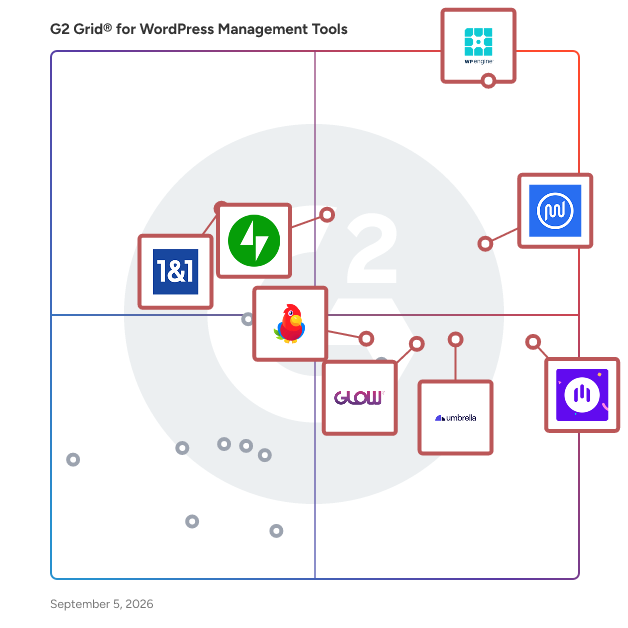

## Best WordPress Management Tools At A Glance

- **Leader:** [WP Engine](https://www.g2.com/products/wp-engine/reviews)
- **Highest Performer:** [WP Umbrella](https://www.g2.com/products/wp-umbrella/reviews)
- **Easiest to Use:** [Modular DS](https://www.g2.com/products/modular-ds/reviews)
- **Top Trending:** [WP Umbrella](https://www.g2.com/products/wp-umbrella/reviews)
- **Best Free Software:** [WP Umbrella](https://www.g2.com/products/wp-umbrella/reviews)


## Top-Rated Products (Ranked by G2 Score)
### 1. [WP Engine](https://www.g2.com/products/wp-engine/reviews)
  WP Engine is a global web enablement company that provides premium products and solutions for websites built with WordPress. WP Engine&#39;s platform is engineered to deliver high performance, robust security, and specialized support across all types of WordPress installations. WP Engine manages complex technical aspects—from proprietary caching to automatic maintenance—allowing businesses, agencies, and developers to focus on content, innovation and business growth. The service is a highly scalable solution designed to power and protect critical web projects. The platform is trusted by over 1.5 million sites for fast, secure website hosting, with a focus on optimizing environments for various use cases, including e-commerce and modern headless architectures. Performance Optimization: Provides an environment specifically optimized for performance, featuring proprietary EverCache® technology and global infrastructure to ensure unmatched speed and reliability, particularly for high-traffic websites built with WordPress. Enterprise-Grade Security: Delivers best-in-class, certified security (SOC 2 Type II and ISO 27001) with proactive threat detection and platform-level protection to maintain site integrity and customer trust. Developer Workflow: Offers developer-friendly tools like one-click staging, Git integration, SSH access, and the Local development environment, making it ideal for agencies and developers to streamline their building process. Modern Architecture Support: Fully supports headless and REST API workflows with specialized tooling, enabling the creation of fast, modern digital experiences separate from the traditional WordPress front end. Expert Support: Access to 24/7/365 award-winning technical specialists who provide rapid issue resolution and proactive advise and guidance, covering all aspects of the managed hosting platform.


  **Average Rating:** 4.6/5.0
  **Total Reviews:** 326

**User Satisfaction Scores:**

- **Has the product been a good partner in doing business?:** 9.2/10 (Category avg: 8.8/10)
- **Backups:** 8.9/10 (Category avg: 8.5/10)
- **Theme and Plugin Management:** 9.4/10 (Category avg: 8.2/10)
- **Analytics:** 8.7/10 (Category avg: 7.9/10)


**Seller Details:**

- **Seller:** [WPEngine](https://www.g2.com/sellers/wpengine)
- **Company Website:** https://wpengine.com
- **Year Founded:** 2010
- **HQ Location:** Austin, Texas
- **Twitter:** @wpengine (45,751 Twitter followers)
- **LinkedIn® Page:** https://www.linkedin.com/company/1556180/ (1,096 employees on LinkedIn®)

**Reviewer Demographics:**
  - **Who Uses This:** Owner, Founder
  - **Top Industries:** Marketing and Advertising, Information Technology and Services
  - **Company Size:** 77% Small-Business, 18% Mid-Market


#### Pros & Cons

**Pros:**

- Customer Support (33 reviews)
- Helpful (23 reviews)
- Ease of Use (19 reviews)
- 24/7 Support (14 reviews)
- Hosting Services (12 reviews)

**Cons:**

- Pricing Issues (12 reviews)
- Expensive (10 reviews)
- Complexity (6 reviews)
- Expensive Hosting (6 reviews)
- High Pricing (6 reviews)

### 2. [WPMU DEV](https://www.g2.com/products/wpmu-dev/reviews)
  The most award-winning and highly-rated WordPress managed hosting, plugin, and reseller platform. Since 2006, WPMU DEV&#39;s award-winning WordPress plugins, hosting, world beating support and site management tools have helped millions of web developers, freelancers and agencies run and grow their businesses. ==Stress-free site and client management== Having a hard time juggling multiple clients or sites? WPMU DEV’s site management hub gives you everything you need to manage, monitor, secure, optimize, update, and backup unlimited sites. Including a fully-integrated client billing system that you can use to set up recurring subscriptions and create your own branded client portal. ==WPMU DEV Hosting - SECURE, reliable, powerful, and feature-packed== WPMU DEV Hosting offers a range of flexible and affordable hosting plans. They’re all isolated, compartmentalized, and use dedicated resources to ensure peak site-speed and security. Some of the best hosting plans when it comes to performance and features. Speaking of features… enjoy free email accounts, Web Application Firewall (WAF), SSL certificates, and migration assistance. As well as developer-friendly tools like: one-click staging, easy SFTP/SSH access, phpMyAdmin. Finally, take your hosting to the next level with cloning and templates, easy file and DNS management, and smart site analytics. We’ve earned SOC 2 Type II Certification, a rigorous and universally recognized security compliance standard, established and verified by the American Institute of CPAs (AICPA). Passing a compliance audit at this level means we’ve maintained an incredibly high standard of security with all of our products. We’ve demonstrated we have the necessary systems in place to secure your data and ensure constant system availability. Now available: IMAP webmail accounts with up to 50 GB of storage at affordable rates, starting at just $1/month. ==12 integrated pro WPMU DEV plugins== A full suite of pro WordPress plugins covering all aspects of site development, design, and management. WPMU DEV&#39;s plugins cover everything from site security, performance, and backups, to white labeling, marketing, and SEO. Including our award-winning Smush plugin, which currently boasts 2,5+ million active installs. ==White label and resell everything WPMU DEV== Our built-in Reseller platform allows you to easily white label and sell our products as your own. It’s the complete suite of tools agencies and WordPress professionals need to sell hosting, domains, templates, SEO, PPC, Expert Services and Support, IMAP Webmail and more. Make money while you sleep without managing servers, dealing with downtime, or having to manually onboard customers. ==The best WordPress support== Every WordPress company claims to provide amazing support, but our team truly delivers the goods. We guarantee: fast response, friendly service, and to do everything we can to solve your problem. You can turn to our experts about ANY WordPress issue via private ticket and 24/7 live chat, or there’s always our growing community of members and like-minded web developers, who are more than happy to help and share their opinions.


  **Average Rating:** 4.8/5.0
  **Total Reviews:** 854

**User Satisfaction Scores:**

- **Has the product been a good partner in doing business?:** 9.6/10 (Category avg: 8.8/10)
- **Backups:** 9.2/10 (Category avg: 8.5/10)
- **Theme and Plugin Management:** 9.4/10 (Category avg: 8.2/10)
- **Analytics:** 9.0/10 (Category avg: 7.9/10)


**Seller Details:**

- **Seller:** [INCSUB](https://www.g2.com/sellers/incsub-45cfaf49-9123-4d0c-b5fb-e008f039523d)
- **Year Founded:** 2005
- **HQ Location:** Albert Park, Victoria
- **Twitter:** @incsub (160 Twitter followers)
- **LinkedIn® Page:** https://www.linkedin.com/company/incsub/ (29 employees on LinkedIn®)

**Reviewer Demographics:**
  - **Who Uses This:** Owner, CEO
  - **Top Industries:** Marketing and Advertising, Design
  - **Company Size:** 97% Small-Business, 3% Mid-Market


#### Pros & Cons

**Pros:**

- Customer Support (18 reviews)
- Helpful (14 reviews)
- Technical Support (13 reviews)
- 24/7 Support (8 reviews)
- Plugin Quality (7 reviews)

**Cons:**

- Backup Issues (4 reviews)
- Expensive (4 reviews)
- Pricing Issues (4 reviews)
- High Cost (3 reviews)
- Plugin Issues (3 reviews)

### 3. [WP Umbrella](https://www.g2.com/products/wp-umbrella/reviews)
  Manage multiple WordPress site effortlessly with WP Umbrella. WP Umbrella is a new alternative to ManageWP, WPMU DEV, MainWP, Infinite WP and Jetpack. It offers all what agencies and freelancers need to manage multiple WordPress websites from a single place. This includes: automatic backups, uptime monitoring, safe update manager for plugins and theme, php errors monitoring, automated maintenance report and much more. More info: https://wp-umbrella.com


  **Average Rating:** 4.9/5.0
  **Total Reviews:** 132

**User Satisfaction Scores:**

- **Has the product been a good partner in doing business?:** 9.9/10 (Category avg: 8.8/10)
- **Backups:** 9.4/10 (Category avg: 8.5/10)
- **Theme and Plugin Management:** 9.6/10 (Category avg: 8.2/10)
- **Analytics:** 8.8/10 (Category avg: 7.9/10)


**Seller Details:**

- **Seller:** [WP Umbrella](https://www.g2.com/sellers/wp-umbrella)
- **HQ Location:** Lyon, FR
- **Twitter:** @wpumbrella (810 Twitter followers)
- **LinkedIn® Page:** https://www.linkedin.com/company/wp-umbrella/ (12 employees on LinkedIn®)

**Reviewer Demographics:**
  - **Who Uses This:** CEO, Owner
  - **Top Industries:** Internet, Information Technology and Services
  - **Company Size:** 95% Small-Business, 2% Mid-Market


#### Pros & Cons

**Pros:**

- Customer Support (19 reviews)
- Features (14 reviews)
- Pricing (8 reviews)
- User Interface (8 reviews)
- Ease of Use (7 reviews)

**Cons:**

- Update Issues (4 reviews)
- Backup Issues (3 reviews)
- Lack of Improvement (2 reviews)
- Email Issues (1 reviews)
- Missing Features (1 reviews)

### 4. [Jetpack](https://www.g2.com/products/automattic-inc-jetpack/reviews)
  Jetpack is a powerful collection of security and performance tools made just for WordPress sites by the WordPress experts. It is easy to set up, and works behind the scenes to ensure your site is fast and secure. It’s one less thing to keep track of, allowing you to focus on more important things – like running your business. More than 5 million WordPress sites trust Jetpack for their website security, performance, and growth. Whether you manage a few sites or upwards of 1,000 sites, Jetpack Manage will help automate your client site management. Get notified immediately if a site needs attention, ensuring your time is managed effectively, and your clients remain happy. Jetpack Security provides easy‑to‑use, comprehensive WordPress site security so you can focus on running your business. - Real‑time backups and one‑click restores with VaultPress Backup - WAF, automated malware scanning, and one‑click fixes with Jetpack Scan - Powerful spam protection for comments and forms with Akismet Anti‑spam Jetpack’s performance features make your site lightning‑fast, while also improving your SEO and giving your visitors a better experience. - Full HD, ad‑free video inside the WordPress editor with VideoPress - Instant site search to help your visitors find your content with Jetpack Search - Free speed enhancements to rank higher on Google with Jetpack Boost - Free global CDN to deliver content instantly Jetpack’s growth tools help you find new visitors, turn leads into customers, and customers into advocates. - Auto‑share post and pages to social media on your schedule with Jetpack Social - Find new fans by promoting your posts and pages across millions of sites with the Blaze ad network - Native WordPress CRM to convert your leads and create repeat customers with Jetpack CRM - Free advanced WordPress site stats with Jetpack Stats With Jetpack&#39;s AI features, turn your ideas into ready‑to‑publish content at light speed. - Boost your productivity with the AI Assistant that fits right into your WordPress Editor. - Simplify the creation and customization of text, forms, tables, and lists for your pages and posts, making routine tasks more efficient. - Receive intelligent feedback on your drafts, ensuring every post is polished and powerful before going live. - Effortlessly create top‑quality content by utilizing features such as spell check, grammar correction, auto‑translation, and tone adjustment.


  **Average Rating:** 4.3/5.0
  **Total Reviews:** 125

**User Satisfaction Scores:**

- **Has the product been a good partner in doing business?:** 8.9/10 (Category avg: 8.8/10)
- **Backups:** 8.2/10 (Category avg: 8.5/10)
- **Theme and Plugin Management:** 8.4/10 (Category avg: 8.2/10)
- **Analytics:** 8.8/10 (Category avg: 7.9/10)


**Seller Details:**

- **Seller:** [Automattic Inc.](https://www.g2.com/sellers/automattic-inc)
- **Year Founded:** 2005
- **HQ Location:** San Francisco, CA
- **Twitter:** @automattic (57,138 Twitter followers)
- **LinkedIn® Page:** https://www.linkedin.com/company/58194/ (4,058 employees on LinkedIn®)

**Reviewer Demographics:**
  - **Top Industries:** Information Technology and Services, Education Management
  - **Company Size:** 83% Small-Business, 14% Mid-Market


#### Pros & Cons

**Pros:**

- Ease of Use (2 reviews)
- Features (2 reviews)
- Centralized Management (1 reviews)
- Customization (1 reviews)
- Setup Ease (1 reviews)

**Cons:**

- Inadequate Security (1 reviews)

### 5. [Modular DS](https://www.g2.com/products/modular-ds/reviews)
  Modular DS is an all-in-one platform that helps freelancers and agencies manage multiple WordPress sites more efficiently, save time on maintenance, and scale their services with ease. From a single, intuitive dashboard, you can automate bulk updates, backups and restores, uptime monitoring, security scans, database optimization, client reports, and more. Other key features include one-click login, safe updates, Update Copilot (our AI-powered risk scoring system), and white label branding. With ongoing improvements and regular feature releases, Modular DS helps you keep clients happy and turn site maintenance into a recurring revenue stream. Learn more at modulards.com.


  **Average Rating:** 4.9/5.0
  **Total Reviews:** 33

**User Satisfaction Scores:**

- **Has the product been a good partner in doing business?:** 10.0/10 (Category avg: 8.8/10)
- **Backups:** 9.1/10 (Category avg: 8.5/10)
- **Theme and Plugin Management:** 9.6/10 (Category avg: 8.2/10)
- **Analytics:** 9.3/10 (Category avg: 7.9/10)


**Seller Details:**

- **Seller:** [Modular DS](https://www.g2.com/sellers/modular-ds)
- **Year Founded:** 2021
- **HQ Location:** León, ES
- **Twitter:** @Modulards_en (190 Twitter followers)
- **LinkedIn® Page:** https://www.linkedin.com/company/modulards/ (8 employees on LinkedIn®)

**Reviewer Demographics:**
  - **Top Industries:** Marketing and Advertising, Information Technology and Services
  - **Company Size:** 91% Small-Business


#### Pros & Cons

**Pros:**

- Updates Availability (12 reviews)
- Backup (11 reviews)
- Features (10 reviews)
- User Interface (8 reviews)
- Website Monitoring (8 reviews)

**Cons:**

- Backup Issues (3 reviews)
- Update Issues (2 reviews)
- Expensive (1 reviews)
- Hosting Limitations (1 reviews)
- Inadequate Security (1 reviews)

### 6. [Glow](https://www.g2.com/products/glow-glow/reviews)
  Almost all agencies need the same core set of tools to efficiently manage multiple WordPress sites: a support system, a maintenance system, client reporting, team collaboration and time tracking. And with traditional WordPress management software, you can get some of those tools. But you’ll find yourself needing at least one or two extra subscriptions to get it all. When you manage your clients’ WordPress sites with Glow, everything is in one place. Your team is aligned, it’s super easy to carry out support and maintenance tasks and at the same time, consistently prove the value of your service to your clients. Manage multiple WordPress sites? It’s all here.


  **Average Rating:** 4.9/5.0
  **Total Reviews:** 38

**User Satisfaction Scores:**

- **Has the product been a good partner in doing business?:** 9.9/10 (Category avg: 8.8/10)
- **Backups:** 9.3/10 (Category avg: 8.5/10)
- **Theme and Plugin Management:** 9.7/10 (Category avg: 8.2/10)
- **Analytics:** 9.5/10 (Category avg: 7.9/10)


**Seller Details:**

- **Seller:** [Glow](https://www.g2.com/sellers/glow)
- **Year Founded:** 2021
- **HQ Location:** Lisbon, Portugal
- **LinkedIn® Page:** https://www.linkedin.com/company/glow-digital-media-limited (7 employees on LinkedIn®)

**Reviewer Demographics:**
  - **Top Industries:** Marketing and Advertising, Information Technology and Services
  - **Company Size:** 92% Small-Business, 3% Mid-Market


#### Pros & Cons

**Pros:**

- Customer Support (12 reviews)
- Ease of Use (10 reviews)
- Features (7 reviews)
- Updates Availability (4 reviews)
- Backup (3 reviews)

**Cons:**

- Backup Issues (2 reviews)
- Limited Customization (1 reviews)
- Plugin Issues (1 reviews)
- Technical Issues (1 reviews)
- Update Issues (1 reviews)

### 7. [ThemeIsle](https://www.g2.com/products/themeisle/reviews)
  Themeisle was founded in 2012 by a group of passionate developers who wanted to create beautiful and functional WordPress themes and plugins. Since then, we have grown into a team of over 20 dedicated professionals who are committed to delivering the best possible products to our customers. At Themeisle, we offer a wide range of WordPress themes and plugins that are designed to meet the needs of both beginners and advanced users. Our products are feature-rich, easy to use, and are designed to help you create beautiful and functional websites. Themes: Neve (300,000+ active installs): A fast, customizable theme suitable for blogs, e-commerce, and small businesses. Hestia (100,000+ active installs): A modern one-page theme ideal for startups and small businesses. Plugins: Optimole (200,000+ active installs): An image optimization plugin ensuring fast-loading images without quality loss. Otter Blocks (300,000+ active installs): Enhances the Gutenberg editor with additional blocks and templates for building beautiful pages. Feedzy (50,000+ active installs): A powerful RSS aggregator that helps you curate content and display RSS feeds effortlessly. Visualizer (30,000+ active installs): A user-friendly tool for creating interactive charts and tables, making data presentation engaging. WP Full Pay (3,000+ active installs): A comprehensive solution for integrating Stripe payments into your WordPress site, facilitating seamless transactions. Personalized Product Option Manager (20,000+ active installs): Enhances WooCommerce products by adding custom input fields, allowing personalized options for customers. Multiple Pages Generator (3,000+ active installs): Enables the creation of multiple pages with dynamic content, ideal for large-scale site deployments. Hyve (9,000+ active installs): An AI-powered chatbot that leverages your WordPress content to intelligently respond to user inquiries. Super Page Cache (50,000+ active installs): A plugin that caches webpages and static files to the Cloudflare CDN, enhancing site speed and performance. Revive Social (300,000+ active installs): Automates the sharing of your old and new content on social media platforms, increasing engagement and reach. Redirection for Contact Form 7 (300,000+ active installs): Streamlines form submissions by offering flexible redirection options, including redirecting users to specific pages and executing post-submission JavaScript.


  **Average Rating:** 4.5/5.0
  **Total Reviews:** 26

**User Satisfaction Scores:**

- **Has the product been a good partner in doing business?:** 8.9/10 (Category avg: 8.8/10)
- **Backups:** 6.0/10 (Category avg: 8.5/10)
- **Theme and Plugin Management:** 7.3/10 (Category avg: 8.2/10)
- **Analytics:** 6.7/10 (Category avg: 7.9/10)


**Seller Details:**

- **Seller:** [ThemeIsle](https://www.g2.com/sellers/themeisle)
- **Year Founded:** 2013
- **HQ Location:** Bucharest
- **Twitter:** @themeisle (4,766 Twitter followers)
- **LinkedIn® Page:** https://www.linkedin.com/company/themeisle/ (17 employees on LinkedIn®)

**Reviewer Demographics:**
  - **Company Size:** 75% Small-Business, 14% Mid-Market


#### Pros & Cons

**Pros:**

- Customer Support (6 reviews)
- Helpful (4 reviews)
- Features (3 reviews)
- Problem Resolution (3 reviews)
- Simple (2 reviews)

**Cons:**

- Complexity Issues (1 reviews)
- Limited Resources (1 reviews)
- Plugin Issues (1 reviews)
- Technical Issues (1 reviews)

### 8. [IONOS 1&amp;1 Wordpress](https://www.g2.com/products/ionos-1-1-wordpress/reviews)
  1&amp;1 MyWebsite is a business-specific site builder tool.


  **Average Rating:** 3.9/5.0
  **Total Reviews:** 39

**User Satisfaction Scores:**

- **Has the product been a good partner in doing business?:** 7.7/10 (Category avg: 8.8/10)
- **Backups:** 7.9/10 (Category avg: 8.5/10)
- **Theme and Plugin Management:** 6.3/10 (Category avg: 8.2/10)
- **Analytics:** 7.5/10 (Category avg: 7.9/10)


**Seller Details:**

- **Seller:** [IONOS by 1&amp;1](https://www.g2.com/sellers/ionos-by-1-1)
- **Year Founded:** 1988
- **HQ Location:** Montabaur, Rheinland-Pfalz
- **LinkedIn® Page:** https://www.linkedin.com/company/10298/ (2,792 employees on LinkedIn®)

**Reviewer Demographics:**
  - **Top Industries:** Marketing and Advertising
  - **Company Size:** 95% Small-Business, 2% Enterprise


### 9. [SpinupWP](https://www.g2.com/products/spinupwp/reviews)
  SpinupWP is a cloud app that makes it so much easier to host WordPress sites yourself. Technically, developers can use it to host any PHP site but SpinupWP is focused on making the WordPress experience the best. As one of their Twitter fans put it, SpinupWP “bridges the gap between scary self-hosting and expensive managed hosting.” Think of it like a control panel for servers, but modern &amp; with a ton of helpful guidance along the way, much of it specific to hosting WordPress sites. Setting up and managing a server yourself can mean a lot of manual work for a developer. Since we first opened up for beta in November of 2018, we’ve helped users spin up over 83.5k sites, perform over 5 million site backups, and perform over 7.7 million tasks.


  **Average Rating:** 4.8/5.0
  **Total Reviews:** 12

**User Satisfaction Scores:**

- **Has the product been a good partner in doing business?:** 8.9/10 (Category avg: 8.8/10)
- **Backups:** 9.1/10 (Category avg: 8.5/10)
- **Theme and Plugin Management:** 5.9/10 (Category avg: 8.2/10)
- **Analytics:** 2.8/10 (Category avg: 7.9/10)


**Seller Details:**

- **Seller:** [SpinupWP](https://www.g2.com/sellers/spinupwp)
- **Year Founded:** 2018
- **HQ Location:** Truro, CA
- **Twitter:** @spinupwp (1,536 Twitter followers)
- **LinkedIn® Page:** https://www.linkedin.com/company/spinupwp/ (4 employees on LinkedIn®)

**Reviewer Demographics:**
  - **Company Size:** 100% Small-Business


#### Pros & Cons

**Pros:**

- Customer Support (5 reviews)
- Pricing (4 reviews)
- User Interface (3 reviews)
- Backup (2 reviews)
- Ease of Use (2 reviews)

**Cons:**

- Limited Control (4 reviews)
- Complexity (2 reviews)
- Backup Issues (1 reviews)
- Limited Features (1 reviews)
- Poor Customer Support (1 reviews)

### 10. [MainWP](https://www.g2.com/products/mainwp/reviews)
  MainWP is a suite of open-source self-hosted plugins and Extensions for users with multiple WordPress sites who want to control them from one central location. This includes sites on different hosts or servers. Once you have connected your sites (called Child Sites) to your Dashboard, you can do almost anything from your MainWP Dashboard that you would be able to do from your Child Sites wp-admin. MainWP is the only WordPress management plugin with 2000+ ⭐⭐⭐⭐⭐ reviews on WP.org 👉 https://wordpress.org/support/plugin/mainwp/reviews/?filter=5 Combined with the MainWP Extensions, here&#39;s a glimpse of what you can do to manage hundreds of WordPress websites effortlessly: 💰 Free Forever 🏅 White Label ♾️ Connect Unlimited Websites ▶️ Demo Mode with sample data to try MainWP firsthand 🌐 Track Updates via Browser with MainWP Browser Extension 🧑‍💻 Manage all Sites, Users, Plugins, Themes, Updates 👥 Full Client Management 🏷️ Organize Sites &amp; Clients via Colorful Tags 🕒 Uptime &amp; Site Health Monitoring 🚩 1-Click Lighthouse Stats for all Sites 🔄 Effortless Bulk Updates 🚧 Staging, Cloning 📝 Professional Reports for Clients 💬 Bulk Manage Comments 🛡️ Bulk Manage Security 🚀 Purge Cache from the Dashboard ✏️ Fully Customizable 🔍 Domain &amp; SSL Certificate Monitoring 🔑 Passwordless 1-click Login to all Connected Sites 🔒 Full Privacy, Self-hosted, Lock Your Dashboard 😌 Bulk Content Management (Draft, Publish, Edit, Trash) ➕ Perform Pressable hosting-specific tasks With MainWP, you can easily manage &amp; control settings for several plugins/services directly from the dashboard. 🗃️ UpdraftPlus, WPvivid, WP Staging, BackWPup, BackupBuddy, Time Capsule 🔒 Termageddon, Wordfence, Jetpack Protect &amp; Scan, Sucuri, iThemes Security, Virusdie, Activity Log, Security Ninja 🚀 WP Rocket, WP Compress, Google Lighthouse Stats ✅ Atarim, WooCommerce, Database Updater 📈 Yoast, SEOPress, Google Analytics (GA4), Matomo, Fathom Stats 🌐 Uptime Robot, NodePing, Site24x7, Better Uptime And a lot more 👉 https://mainwp.com/mainwp-extensions/ The MainWP plugin is 100% FREE, forever! However, MainWP Pro offers a wide range of 32+ Extensions at a single price. The Extensions aren&#39;t required, but they extend the functionality to improve your workflow. During the subscription, you&#39;ll get Priority Support, Important security &amp; performance updates for Existing extensions, and access to all new extensions. - Monthly: $29/mon - Yearly: $199/year (Save $149 compared to monthly) - Lifetime: $499 (One-time) The MainWP Free version is perfect for essential management; the Pro unleashes the full power of your Dashboard with advanced features that help you manage your sites more efficiently and effectively. 👉 https://mainwp.com/free-vs-pro/


  **Average Rating:** 4.7/5.0
  **Total Reviews:** 23

**User Satisfaction Scores:**

- **Has the product been a good partner in doing business?:** 10.0/10 (Category avg: 8.8/10)
- **Backups:** 8.3/10 (Category avg: 8.5/10)
- **Theme and Plugin Management:** 9.3/10 (Category avg: 8.2/10)
- **Analytics:** 8.7/10 (Category avg: 7.9/10)


**Seller Details:**

- **Seller:** [MainWP WordPress Management](https://www.g2.com/sellers/mainwp-wordpress-management)
- **Year Founded:** 2013
- **HQ Location:** Florida, US
- **Twitter:** @MyMainWP (1,666 Twitter followers)
- **LinkedIn® Page:** https://www.linkedin.com/company/mainwp (4 employees on LinkedIn®)

**Reviewer Demographics:**
  - **Top Industries:** Marketing and Advertising
  - **Company Size:** 79% Small-Business, 21% Mid-Market


### 11. [ManageWP](https://www.g2.com/products/managewp/reviews)
  ManageWP helps you manage multiple WordPress websites. It saves you a ton of time and nerves by automating things like backups, updates, performance &amp; security checks, and more. It is fast, secure and free for an unlimited number of websites. For more information visit our website: https://managewp.com/


  **Average Rating:** 4.2/5.0
  **Total Reviews:** 62

**User Satisfaction Scores:**

- **Has the product been a good partner in doing business?:** 9.1/10 (Category avg: 8.8/10)
- **Backups:** 9.0/10 (Category avg: 8.5/10)
- **Theme and Plugin Management:** 8.8/10 (Category avg: 8.2/10)
- **Analytics:** 7.5/10 (Category avg: 7.9/10)


**Seller Details:**

- **Seller:** [ManageWP](https://www.g2.com/sellers/managewp)
- **Year Founded:** 2011
- **HQ Location:** Belgrade, Serbia
- **Twitter:** @managewp (19,922 Twitter followers)
- **LinkedIn® Page:** https://www.linkedin.com/company/2335570/

**Reviewer Demographics:**
  - **Who Uses This:** Owner
  - **Top Industries:** Marketing and Advertising, Internet
  - **Company Size:** 89% Small-Business, 6% Mid-Market


### 12. [WPBlazer](https://www.g2.com/products/wpblazer/reviews)
  WPBlazer - WordPress Management Service offers complete WordPress Theme, Plugin, SSL, Post, Page, comment management from a Single Dashboard. Our Features: Instant Backup Bulk Action Tools SEO &amp; Social Management Client Management Plugin Rebranding Malware Scanning 1-Click WordPress Install WordPress Clone SSL Management User Management


  **Average Rating:** 4.2/5.0
  **Total Reviews:** 15

**User Satisfaction Scores:**

- **Has the product been a good partner in doing business?:** 8.3/10 (Category avg: 8.8/10)
- **Backups:** 8.1/10 (Category avg: 8.5/10)
- **Theme and Plugin Management:** 8.8/10 (Category avg: 8.2/10)
- **Analytics:** 9.0/10 (Category avg: 7.9/10)


**Seller Details:**

- **Seller:** [WPBlazer](https://www.g2.com/sellers/wpblazer)
- **HQ Location:** Tirunelveli, IN
- **Twitter:** @blazersio (1,493 Twitter followers)
- **LinkedIn® Page:** https://www.linkedin.com/company/wpblazer (6 employees on LinkedIn®)

**Reviewer Demographics:**
  - **Company Size:** 53% Small-Business, 33% Mid-Market


### 13. [WPRemote](https://www.g2.com/products/wpremote/reviews)
  WP Remote is a web app to help you track all your WordPress sites. Core, Plugin and Theme updates with a single click, manual/automatic backups and much more.


  **Average Rating:** 4.6/5.0
  **Total Reviews:** 16

**User Satisfaction Scores:**

- **Has the product been a good partner in doing business?:** 9.6/10 (Category avg: 8.8/10)
- **Backups:** 9.4/10 (Category avg: 8.5/10)
- **Theme and Plugin Management:** 9.3/10 (Category avg: 8.2/10)
- **Analytics:** 8.1/10 (Category avg: 7.9/10)


**Seller Details:**

- **Seller:** [WP Remote](https://www.g2.com/sellers/wp-remote)
- **Year Founded:** 2015
- **HQ Location:** Dubai, Dubai
- **Twitter:** @wpremote (1,256 Twitter followers)
- **LinkedIn® Page:** https://www.linkedin.com/company/wp-technology.net (7 employees on LinkedIn®)

**Reviewer Demographics:**
  - **Company Size:** 75% Small-Business, 13% Enterprise


### 14. [Siterack](https://www.g2.com/products/siterack/reviews)
  Siterack is a comprehensive platform designed to streamline the management and maintenance of WordPress websites. By automating routine tasks, it allows users to focus on building and enhancing their sites without the burden of ongoing upkeep. With Siterack, users can remotely manage all their WordPress sites from a single dashboard, significantly improving productivity and efficiency. Key Features and Functionality: - Automated Maintenance: Siterack performs safe updates, malware scans and removal, error detection, and backups, ensuring websites remain secure and up-to-date. - Single Sign-On: Users can access any of their WordPress sites with a single click, eliminating the need to remember multiple login credentials. - Remote Management: The platform enables tasks such as flushing caches, updating plugins, and adding new users to be performed remotely from a centralized dashboard. - Team Collaboration: Siterack facilitates team management by allowing the onboarding of team members and streamlining collaborative workflows. Primary Value and User Solutions: Siterack addresses the common challenges associated with managing multiple WordPress sites by automating essential maintenance tasks and providing a unified interface for site management. This automation reduces the time and effort required for routine upkeep, allowing users to concentrate on content creation and business growth. By enhancing security through regular updates and malware scans, Siterack ensures that websites remain reliable and perform optimally. Its user-friendly design and comprehensive features make it an invaluable tool for website owners, developers, and agencies seeking to optimize their WordPress site management processes.


  **Average Rating:** 4.3/5.0
  **Total Reviews:** 14

**User Satisfaction Scores:**

- **Has the product been a good partner in doing business?:** 8.9/10 (Category avg: 8.8/10)
- **Backups:** 9.6/10 (Category avg: 8.5/10)
- **Theme and Plugin Management:** 9.3/10 (Category avg: 8.2/10)
- **Analytics:** 9.6/10 (Category avg: 7.9/10)


**Seller Details:**

- **Seller:** [Siterack](https://www.g2.com/sellers/siterack)
- **Year Founded:** 2020
- **HQ Location:** San Antonio
- **Twitter:** @LandonRodd (71 Twitter followers)
- **LinkedIn® Page:** https://www.linkedin.com/company/No-Linkedin-Presence-Added-Intentionally-By-DataOps (1 employees on LinkedIn®)

**Reviewer Demographics:**
  - **Company Size:** 71% Small-Business, 29% Mid-Market


#### Pros & Cons

**Pros:**

- Features (1 reviews)
- Updates Availability (1 reviews)


### 15. [InfiniteWP](https://www.g2.com/products/infinitewp/reviews)
  InfiniteWP is an admin panel for Wordpress sites.


  **Average Rating:** 4.1/5.0
  **Total Reviews:** 11

**User Satisfaction Scores:**

- **Has the product been a good partner in doing business?:** 6.7/10 (Category avg: 8.8/10)
- **Backups:** 6.7/10 (Category avg: 8.5/10)
- **Theme and Plugin Management:** 6.7/10 (Category avg: 8.2/10)
- **Analytics:** 5.7/10 (Category avg: 7.9/10)


**Seller Details:**

- **Seller:** [InfiniteWP](https://www.g2.com/sellers/infinitewp)
- **Year Founded:** 2012
- **HQ Location:** N/A
- **Twitter:** @infinitewp (2,829 Twitter followers)
- **LinkedIn® Page:** https://www.linkedin.com/company/infinitewp/ (1 employees on LinkedIn®)

**Reviewer Demographics:**
  - **Company Size:** 82% Small-Business, 27% Enterprise


### 16. [CommandWP](https://www.g2.com/products/commandwp/reviews)
  White label options, multiple users, and bulk commands allow developers to provide managed WordPress services to clients. Make money: Sell management services to your clients Save time: Manage and debug sites quickly Reliability: Keep your clients sites running well Uses WP-CLI, SSH, and standard Linux tools to manage sites directly on the server.


  **Average Rating:** 3.4/5.0
  **Total Reviews:** 14

**User Satisfaction Scores:**

- **Has the product been a good partner in doing business?:** 8.3/10 (Category avg: 8.8/10)
- **Backups:** 8.3/10 (Category avg: 8.5/10)
- **Theme and Plugin Management:** 7.3/10 (Category avg: 8.2/10)
- **Analytics:** 7.2/10 (Category avg: 7.9/10)


**Seller Details:**

- **Seller:** [CommandWP](https://www.g2.com/sellers/commandwp)
- **Year Founded:** 2018
- **HQ Location:** Centennial, US
- **LinkedIn® Page:** https://www.linkedin.com/company/commandwp

**Reviewer Demographics:**
  - **Company Size:** 64% Small-Business, 36% Mid-Market


### 17. [WP Stagecoach](https://www.g2.com/products/wp-stagecoach/reviews)
  WP Stagecoach is a WordPress staging plugin designed to simplify the process of creating and managing staging sites. With its one-click setup, users can effortlessly create a staging environment to test updates, troubleshoot issues, or develop new features without affecting their live website. This ensures that any changes can be thoroughly evaluated before being deployed, maintaining the integrity and functionality of the live site. Key Features and Functionality: - One-Click Staging Site Creation: Quickly set up a staging site with a single click, streamlining the development and testing process. - Password-Protected Staging Sites: Secure your staging environment with password protection, allowing controlled access for clients or team members. - SSL Support: Ensure your staging site mirrors the security of your live site with full SSL support. - Database Merge Feature: Unlike traditional methods that overwrite databases, WP Stagecoach merges databases, preserving new content or transactions made on the live site during the staging process. - Selective Migration: Choose to import only specific changes, such as files, databases, or both, providing flexibility in deployment. - Off-Site Staging Setup: Staging sites are hosted on WP Stagecoach&#39;s servers, conserving your hosting resources and providing an isolated environment for testing. - Compatibility with Any Host: WP Stagecoach is designed to work seamlessly with any hosting provider, eliminating the need for host-specific staging solutions. Primary Value and Problem Solved: WP Stagecoach addresses the critical need for a safe and efficient way to test changes in WordPress websites without risking the live site&#39;s performance or data integrity. By offering a user-friendly, one-click staging solution that merges databases instead of overwriting them, it ensures that any new content or transactions on the live site are preserved. This is particularly beneficial for e-commerce sites and platforms with dynamic content, where maintaining up-to-date information is essential. Ultimately, WP Stagecoach empowers users to implement updates and new features confidently, reducing downtime and potential errors on live sites.


  **Average Rating:** 3.8/5.0
  **Total Reviews:** 12

**User Satisfaction Scores:**

- **Has the product been a good partner in doing business?:** 4.2/10 (Category avg: 8.8/10)
- **Backups:** 9.0/10 (Category avg: 8.5/10)
- **Theme and Plugin Management:** 7.0/10 (Category avg: 8.2/10)
- **Analytics:** 7.9/10 (Category avg: 7.9/10)


**Seller Details:**

- **Seller:** [WP Stagecoach](https://www.g2.com/sellers/wp-stagecoach)
- **Year Founded:** 2013
- **HQ Location:** N/A
- **Twitter:** @WPStagecoach (607 Twitter followers)
- **LinkedIn® Page:** https://www.linkedin.com/company/No-Linkedin-Presence-Added-Intentionally-By-DataOps (1 employees on LinkedIn®)

**Reviewer Demographics:**
  - **Company Size:** 67% Small-Business, 25% Enterprise


#### Pros & Cons

**Pros:**

- Staging Environments (1 reviews)

**Cons:**

- Poor Customer Support (1 reviews)

### 18. [BlogVault](https://www.g2.com/products/blogvault/reviews)
  BlogVault is a comprehensive WordPress backup and security solution designed to ensure the safety and integrity of your website. It offers automatic, incremental backups that capture only the changes made since the last backup, minimizing server load and ensuring efficient data storage. With offsite encrypted storage, your data remains secure and accessible even in the event of server failures. The platform also provides one-click restore functionality, allowing you to recover your site swiftly and reliably. Additionally, BlogVault includes a staging environment where you can test updates, plugins, and design changes before deploying them to your live site, reducing the risk of potential issues. Its migration feature enables seamless transfer of your website to a new host or domain without downtime. For WooCommerce users, BlogVault offers real-time backups to ensure that every order and transaction is securely saved. The solution also supports WordPress Multisite networks, allowing for efficient management of multiple sites. By integrating these features, BlogVault addresses the critical needs of website owners, providing peace of mind through reliable backups, easy restoration, secure staging, and hassle-free migration, all while maintaining optimal site performance.


  **Average Rating:** 4.6/5.0
  **Total Reviews:** 16

**User Satisfaction Scores:**

- **Has the product been a good partner in doing business?:** 10.0/10 (Category avg: 8.8/10)
- **Backups:** 10.0/10 (Category avg: 8.5/10)
- **Theme and Plugin Management:** 10.0/10 (Category avg: 8.2/10)
- **Analytics:** 7.8/10 (Category avg: 7.9/10)


**Seller Details:**

- **Seller:** [Blogvault](https://www.g2.com/sellers/blogvault)
- **Year Founded:** 2010
- **HQ Location:** Bangalore, IN
- **Twitter:** @blogVault (1,187 Twitter followers)
- **LinkedIn® Page:** https://www.linkedin.com/company/blogvault-inc./ (65 employees on LinkedIn®)

**Reviewer Demographics:**
  - **Company Size:** 81% Small-Business, 13% Mid-Market


#### Pros & Cons

**Pros:**

- Backup (4 reviews)
- Features (4 reviews)
- Migration Ease (3 reviews)
- Easy Recovery (2 reviews)
- Easy Restore (2 reviews)

**Cons:**

- Backup Issues (1 reviews)
- Limited Control (1 reviews)
- Limited Customization (1 reviews)
- Limited Options (1 reviews)
- Plugin Issues (1 reviews)

### 19. [CMS Commander](https://www.g2.com/products/cms-commander/reviews)
  CMS Commander helps you take care of your blogs in less time by completing updates and other tasks on all your sites in bulk, allowing you to completely focus on growing your business.


  **Average Rating:** 3.3/5.0
  **Total Reviews:** 9

**User Satisfaction Scores:**

- **Has the product been a good partner in doing business?:** 7.5/10 (Category avg: 8.8/10)
- **Backups:** 9.2/10 (Category avg: 8.5/10)
- **Theme and Plugin Management:** 8.1/10 (Category avg: 8.2/10)
- **Analytics:** 7.3/10 (Category avg: 7.9/10)


**Seller Details:**

- **Seller:** [CMS Commander](https://www.g2.com/sellers/cms-commander)
- **Year Founded:** 1995
- **HQ Location:** N/A
- **Twitter:** @cmscommander (552 Twitter followers)
- **LinkedIn® Page:** https://www.linkedin.com/company/No-Linkedin-Presence-Added-Intentionally-By-DataOps (1 employees on LinkedIn®)

**Reviewer Demographics:**
  - **Company Size:** 50% Mid-Market, 50% Small-Business


### 20. [iControlWP](https://www.g2.com/products/icontrolwp/reviews)
  Free-up time that lets you focus on important work of building your business.


  **Average Rating:** 4.1/5.0
  **Total Reviews:** 9

**User Satisfaction Scores:**

- **Has the product been a good partner in doing business?:** 8.3/10 (Category avg: 8.8/10)
- **Backups:** 9.5/10 (Category avg: 8.5/10)
- **Theme and Plugin Management:** 8.3/10 (Category avg: 8.2/10)
- **Analytics:** 8.6/10 (Category avg: 7.9/10)


**Seller Details:**

- **Seller:** [iControlWP](https://www.g2.com/sellers/icontrolwp)
- **Year Founded:** 2012
- **HQ Location:** Belfast, Belfast
- **Twitter:** @iControlWP (133 Twitter followers)
- **LinkedIn® Page:** https://www.linkedin.com/company/2662965 (2 employees on LinkedIn®)

**Reviewer Demographics:**
  - **Company Size:** 100% Small-Business


### 21. [Neve](https://www.g2.com/products/neve/reviews)
  Neve is a fast, lightweight WordPress theme designed for blogs, businesses, agencies, and online stores. It’s optimized for speed, SEO, and mobile performance, ensuring a smooth user experience. Fully compatible with the WordPress block editor, Elementor, Bricks, and WooCommerce, Neve makes it easy to build and customize your site without bloat. Key Features: - Blazing Fast &amp; Lightweight – Designed for speed, Neve keeps your site running smoothly. - Easy to Customize – Flexible layout options, a header/footer builder, and plenty of design controls. - Optimized for SEO &amp; Mobile – Built with clean code and responsive design for better search rankings. - WooCommerce-Ready – Set up an online store quickly and easily. - Multilingual &amp; RTL Support – Works with WPML, Polylang, and other translation tools. - White Label Support – Perfect for agencies looking to customize branding. Neve helps you create a modern, high-performing website effortlessly.


  **Average Rating:** 4.7/5.0
  **Total Reviews:** 9

**User Satisfaction Scores:**

- **Has the product been a good partner in doing business?:** 6.7/10 (Category avg: 8.8/10)
- **Backups:** 8.3/10 (Category avg: 8.5/10)
- **Theme and Plugin Management:** 6.7/10 (Category avg: 8.2/10)
- **Analytics:** 8.9/10 (Category avg: 7.9/10)


**Seller Details:**

- **Seller:** [ThemeIsle](https://www.g2.com/sellers/themeisle)
- **Year Founded:** 2013
- **HQ Location:** Bucharest
- **Twitter:** @themeisle (4,766 Twitter followers)
- **LinkedIn® Page:** https://www.linkedin.com/company/themeisle/ (17 employees on LinkedIn®)

**Reviewer Demographics:**
  - **Company Size:** 56% Mid-Market, 22% Enterprise


#### Pros & Cons

**Pros:**

- Ease of Use (2 reviews)
- Efficiency (2 reviews)
- Features (2 reviews)
- Productivity (2 reviews)
- Simple (2 reviews)

**Cons:**

- Limited Customization (2 reviews)
- Limited Features (2 reviews)
- Missing Features (2 reviews)
- Pricing Issues (1 reviews)
- Slow Loading (1 reviews)

### 22. [PrettyWP](https://www.g2.com/products/prettywp/reviews)
  We’re PrettyWP, a team of WordPress experts and developers with a passion for creating beautiful, and innovative WordPress solutions. These are tailored to your exact business needs and help you save time, effort, and money.


  **Average Rating:** 4.6/5.0
  **Total Reviews:** 8

**User Satisfaction Scores:**

- **Has the product been a good partner in doing business?:** 10.0/10 (Category avg: 8.8/10)
- **Backups:** 9.3/10 (Category avg: 8.5/10)
- **Theme and Plugin Management:** 8.3/10 (Category avg: 8.2/10)
- **Analytics:** 9.3/10 (Category avg: 7.9/10)


**Seller Details:**

- **Seller:** [PrettyWP](https://www.g2.com/sellers/prettywp)
- **Year Founded:** 2020
- **HQ Location:** Cuddalore
- **Twitter:** @PrettyWPHQ (19 Twitter followers)
- **LinkedIn® Page:** https://www.linkedin.com/company/prettywp/about/ (1 employees on LinkedIn®)

**Reviewer Demographics:**
  - **Company Size:** 63% Small-Business, 25% Enterprise


### 23. [AMP CMS](https://www.g2.com/products/amp-cms/reviews)
  AMP CMS combines content management, business expertise, and implementation to support teams and save both time and money.


  **Average Rating:** 4.2/5.0
  **Total Reviews:** 6

**User Satisfaction Scores:**

- **Backups:** 7.1/10 (Category avg: 8.5/10)
- **Theme and Plugin Management:** 6.3/10 (Category avg: 8.2/10)
- **Analytics:** 7.5/10 (Category avg: 7.9/10)


**Seller Details:**

- **Seller:** [Triton Digital](https://www.g2.com/sellers/triton-digital)
- **HQ Location:** New York, US
- **Twitter:** @TritonDigital (2,668 Twitter followers)
- **LinkedIn® Page:** https://www.linkedin.com/company/triton-digital/ (239 employees on LinkedIn®)

**Reviewer Demographics:**
  - **Company Size:** 50% Mid-Market, 50% Small-Business


### 24. [Pressidium](https://www.g2.com/products/pressidium/reviews)
  Pressidium® offers fast, robust, scalable and secure Premium Managed WordPress Hosting. Our platform is built specifically to host professional WordPress sites, by using web-scale technologies and systems specifically optimized to deliver incredible speed, unparalleled availability and uptime. Leverage industrial grade Enterprise WordPress Hosting with cutting-edge technology and a specialist 24/7 DevOps support team staffed solely by WordPress Experts &amp; Experienced Systems Engineers. You can experience our award-winning WordPress Hosting and Dashboard by taking advantage of our fully-featured trial, completely free of charge.


  **Average Rating:** 4.9/5.0
  **Total Reviews:** 19

**User Satisfaction Scores:**

- **Has the product been a good partner in doing business?:** 9.9/10 (Category avg: 8.8/10)
- **Backups:** 10.0/10 (Category avg: 8.5/10)
- **Theme and Plugin Management:** 10.0/10 (Category avg: 8.2/10)
- **Analytics:** 10.0/10 (Category avg: 7.9/10)


**Seller Details:**

- **Seller:** [Pressidium](https://www.g2.com/sellers/pressidium)
- **Year Founded:** 2014
- **HQ Location:** London, United Kingdom
- **Twitter:** @pressidium (1,489 Twitter followers)
- **LinkedIn® Page:** https://www.linkedin.com/company/pressidium/about (25 employees on LinkedIn®)

**Reviewer Demographics:**
  - **Company Size:** 80% Small-Business, 10% Enterprise


#### Pros & Cons

**Pros:**

- Customer Support (6 reviews)
- Quick Response (5 reviews)
- Reliability (5 reviews)
- Fast Hosting (4 reviews)
- Staff Expertise (4 reviews)

**Cons:**

- Inadequate Security (1 reviews)

### 25. [WordPress VIP](https://www.g2.com/products/wordpress-vip/reviews)
  WordPress VIP is the agile content platform leading a powerful enterprise ecosystem for an array of global brands including Salesforce, Merck, Condé Nast, and Facebook. As we fit seamlessly across your organization, have the ease, flexibility, and freedom you need to scale the digital experiences that drive your growth. WordPress VIP offers content management, enterprise commerce, and content analytics. Our platform provides best-in-class content creation agility combined with the insights to understand and optimize the impact of those digital experiences. We go beyond support: we provide expertise. Our team has been delivering the largest WordPress deployments for more than a decade, and will guide your team with architecture, integrations, plugins, agencies, and more. Say farewell to software bloat, lock-ins, and pricey marketing clouds. Select the technologies that actually solve your customer experience needs. And discover how quickly you see ROI with the agile CMS that powers 40% of the internet and 30% of the F100.


  **Average Rating:** 4.5/5.0
  **Total Reviews:** 53

**User Satisfaction Scores:**

- **Has the product been a good partner in doing business?:** 9.5/10 (Category avg: 8.8/10)


**Seller Details:**

- **Seller:** [Automattic Inc.](https://www.g2.com/sellers/automattic-inc)
- **Year Founded:** 2005
- **HQ Location:** San Francisco, CA
- **Twitter:** @automattic (57,138 Twitter followers)
- **LinkedIn® Page:** https://www.linkedin.com/company/58194/ (4,058 employees on LinkedIn®)

**Reviewer Demographics:**
  - **Top Industries:** Computer Software, Information Technology and Services
  - **Company Size:** 64% Small-Business, 31% Mid-Market


#### Pros & Cons

**Pros:**

- Cloud Hosting (1 reviews)
- Ease of Management (1 reviews)
- Ease of Use (1 reviews)
- Intuitive (1 reviews)
- Management Ease (1 reviews)

**Cons:**

- Expensive (1 reviews)
- Poor Customer Support (1 reviews)


## Parent Category

[Content Management Systems](https://www.g2.com/categories/content-management)


---

## Buyer Guide

### What You Should Know About WordPress Site Management Software

### What is WordPress Site Management Software?

WordPress site management software enables users with multiple WordPress sites to manage them all from one dashboard. These tools allow users to access, monitor, update, and edit multiple sites without remembering separate logins and credentials or making changes one site at a time.&amp;nbsp;

WordPress is an open-source content management system written in PHP that uses a MySQL database. When WordPress launched in 2003, it was the world’s first website builder, primarily a tool for creating blogs rather than traditional websites. However, with updates to its core code, additional features, and its large ecosystem of plugins and themes, users can use WordPress to create any type of website.

WordPress site management software is beneficial for those with multiple WordPress websites to manage or those who want to outsource the technical aspects of website maintenance to a third-party service. With the right WordPress site management system, users can save time, streamline their workflows, and keep their site running smoothly.

### What are the Common Features of WordPress Site Management Software?

The following are some core features of WordPress site management software:

**Site management:** These tools aim to manage multiple sites from a single dashboard. Site management includes monitoring, optimizing, and updating sites. Dashboards give users a complete view of the status and performance of various sites to see what needs to be done, saving time and errors.

**Automation updates:** Users can decide which updates need to be made. Whether it’s updating content, plugins, or themes, these tools allow users to schedule their sites for automatic updates.

**Site performance optimization:** Dashboards will provide live site performance data, such as page speed and site response time, so users can evaluate which areas can be improved.

**Security:** Users can run security scans to stay on top of site threats. These scans give users an overview of security threats and suggested solutions. Security features also include the ability to restrict IPs across all of the sites with global block or allow lists.&amp;nbsp;

**Automated backups:** Users can schedule and manage backups of their sites, storing a copy of all of the website’s data in case the site crashes or is hacked.

**Optimize SEO:** Some tools will have SEO health checkers, so users can get an overview of their site’s performance and suggestions on improving their SEO rankings.

**Analytics:** Users can view real-time analytics about their sites, including traffic and engagement metrics. Some tools will offer more robust metric tracking than others. This is a good way to compare the performance of all of their sites side by side.

**Monetization:** Some tools may integrate with payment systems to enable users to manage billing and subscriptions that their sites may allow. If users are using their WordPress sites as e-commerce storefronts, they will need to be able to process payments. WordPress site management software may have features to help users manage these payments by creating and sending invoices, managing customer information, and setting up automated subscriptions.

### What are the Benefits of WordPress Site Management Software?

WordPress site management software can help save time, improve website security and performance, and simplify website management.

**Time saving:** With WordPress management software, users can automate repetitive tasks such as updates, backups, and security checks, saving time and effort.

**Improved site security:** The software can help users keep their site secure by monitoring for security threats, identifying vulnerabilities, and providing security patches and updates.

**Easy to use:** WordPress management software is user-friendly and easy to navigate, making it an ideal choice for beginners and non-technical users.

**Increased site availability:** A WordPress site management system can monitor website uptime and alert users if their site goes down, ensuring the website is always available to visitors.

**Centralized management:** With this software, users can manage all aspects of their site from a single dashboard, including updates, backups, security, and performance.

### Who Uses WordPress Site Management Software?

WordPress site management software is used by a diverse range of individuals and organizations who need a user-friendly and customizable website management tool.

**Small business owners:** WordPress is used by small business owners who need to create their own websites. WordPress provides an affordable and easy way to create a professional-looking website.

**Freelancers:** Many freelancers build and maintain WordPress websites for their clients, and using a WordPress site management tool helps them keep track of all of the websites on one platform.

**Bloggers:** Many bloggers use WordPress to create and manage their blogs, allowing them to develop and publish content without technical knowledge. Site management tools give them a way to manage all their blogs.&amp;nbsp;

**E-commerce businesses:** They use WordPress to create and manage their online stores. WordPress site management tools provide a range of e-commerce plugins that allow companies to add features such as shopping carts, payment gateways, and shipping options.

### Challenges with WordPress Site Management Software

Software solutions can come with their own set of challenges.&amp;nbsp;

**Compatibility issues:** Some WordPress site management tools may not be compatible with certain themes or plugins, which can cause problems with website functionality or appearance.

**Technical support:** Technical support for WordPress site management tools can be inconsistent or limited, which can be frustrating for users who need help troubleshooting issues.

**Performance:** Some WordPress site management tools can cause websites to load slowly, negatively impacting user experience and SEO.

**Cost:** Many WordPress site management tools require a subscription or upfront payment, which can be expensive for users on a tight budget.

### How to Buy WordPress Site Management Software

#### Requirements Gathering (RFI/RFP) for WordPress Site Management Software

Before beginning to search for a WordPress site management tool, it’s essential to understand the business requirements for the site management process. Depending on the number of websites involved, the types of content the websites publish, and the primary pain points of maintaining multiple sites,&amp;nbsp; there are different tools that will be best suited to optimize performance. Some additional factors to consider are:

**User-friendly interface:** The tool should be easy to use, with a simple and intuitive interface that allows users to manage their websites without requiring advanced technical knowledge.

**Compatibility:** The tool should be compatible with the latest version of WordPress and with a wide range of plugins and themes.

**Backup and restore capabilities:** The tool should provide an easy way to back up and restore the website, including the database and files, in case of data loss or website downtime.

**Security:** The tool should have robust security features to protect the website from cyber threats, including malware scans, vulnerability assessments, and firewalls.

**Performance optimization:** The tool should provide tools and features to optimize the website&#39;s performance, including caching, minification, and CDN integration.

**Analytics and reporting:** The tool should provide detailed analytics and reporting on website traffic, user behavior, and other important metrics to help users make informed decisions about their website.

**Integration with third-party tools:** The tool should allow easy integration with third-party tools and services, such as e-commerce platforms, social media, and email marketing services.

#### Compare WordPress Site Management Software Products

**Create a long list**

After listing down requirements, buyers can browse products at a high level to create a long list. These products won’t necessarily meet all the requirements, so buyers will need to prioritize their list of requirements. By visiting G2’s category for WordPress site management software, buyers may sift through it and add products to their “My List” within g2.com.

**Create a short list**

Once buyers have created a short list, they can further sort their options by checking the product’s ratings on the G2 Grid® and reading user reviews to understand their peers’ experience with the software. This way, buyers can find the best software for their needs.

**Conduct demos**

After narrowing down the selection, buyers must contact the vendors to schedule demonstrations of the solution. Businesses can contact many vendors directly on g2.com to request demos by selecting the “Get a Quote” button. At each demo, buyers must be sure to ask the same questions and use case scenarios to best evaluate each product.

#### Selection of WordPress Site Management Software

**Negotiation**

Price is usually determined by how many websites users need to manage, with discounts offered to those managing many sites.

**Final decision**

Whoever will be using the site management tool regularly to oversee the website performance should be the one determining which software to purchase.

### WordPress Site Management Software Trends

**Automation**

As the complexity of managing a WordPress site increases, more site management tools are incorporating automation features to streamline the process. This includes features like automatic updates, backups, and security scans.

**AI-powered**

Some site management tools incorporate artificial intelligence (AI) to provide personalized recommendations and insights to help users improve their website&#39;s performance, security, and SEO.

**Integration with other tools**

Site management tools are increasingly being designed to integrate with other tools and services, such as marketing automation platforms, e-commerce platforms, and social media management tools.

**Mobile optimization**

With more and more people accessing the internet from mobile devices, site management tools focus on mobile optimization, providing mobile apps and responsive design to allow users to manage their websites on the go.


