Best Video Content Creation Software - Page 4

How Many Video Content Creation Software Products Does G2 Track?

Total Products under this Category: 210

Category Stats (Oct 2026)

  • Average Rating: 4.59/5 The average rating of products in this category, based on all submitted ratings
  • Top Trending Product: ngram (+2.39%) - Among all products in this category, ngram recorded the largest rating increase compared to last month

Last updated: October 01, 2026

How Does G2 Rank Video Content Creation Software Products?

Why You Can Trust G2's Software Rankings:

  • 30 Analysts and Data Experts
  • 33,400+ Authentic Reviews
  • 210+ Products
  • Unbiased Rankings

G2's software rankings are built on verified user reviews, rigorous moderation, and a consistent research methodology maintained by a team of analysts and data experts. Each product is measured using the same transparent criteria, with no paid placement or vendor influence. While reviews reflect real user experiences, which can be subjective, they offer valuable insight into how software performs in the hands of professionals. Together, these inputs power the G2 Score, a standardized way to compare tools within every category.

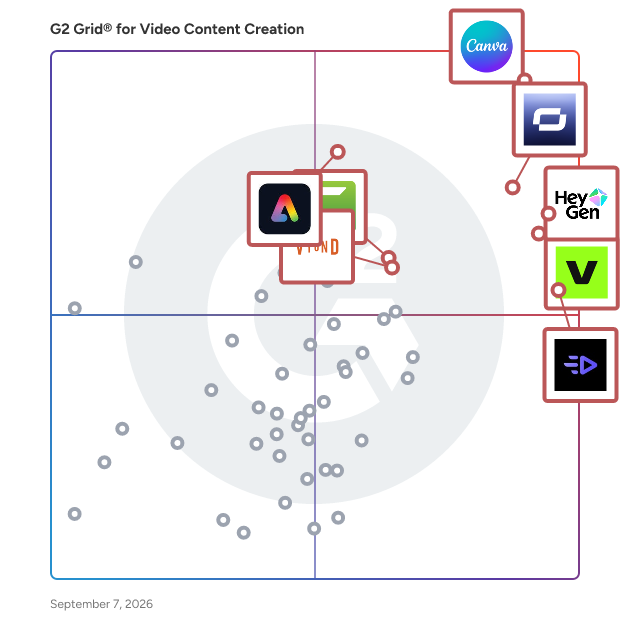
G2 Grid® for Video Content Creation Software

G2 Grid® for Video Content Creation Software plotting products by satisfaction and market presence

Highlighted products: Canva, HeyGen, Synthesia, VEED, Creatify AI, Adobe Express, Camtasia, and Vyond.

Underlying data: [Grid® JSON](https://www.g2.com/categories/video-content-creation/grids.json?focus%5B%5D=canva&focus%5B%5D=heygen&focus%5B%5D=synthesia&focus%5B%5D=veed&focus%5B%5D=creatify-labs-inc-creatify-ai&focus%5B%5D=adobe-express&focus%5B%5D=camtasia&focus%5B%5D=vyond)

Vozo AI

Vozo is an AI video localization platform that helps creators, marketers, educators, and enterprise teams adapt video content for global audiences. It combines AI video translation, dubbing, subtitle translation, voice cloning, lip sync, and on-screen text translation into a single workflow, allowing teams to localize videos without rebuilding them from scratch. Supporting video translation and dubbing in over 165 languages and accents, Vozo enables users to create multilingual content that feels natural and culturally relevant. Today, more than 7 million creators and companies across 40 countries use Vozo to expand their global reach. One of Vozo's standout capabilities is Visual Translation, which automatically detects, removes, translates, and rebuilds on-screen text while preserving the original layout and visual style. This makes it ideal for product demos, tutorials, presentations, training materials, educational content, and social media videos. Vozo also provides subtitle translation with intelligent semantic line breaks and customizable styling for greater control over localized captions. Vozo further differentiates itself through its proprietary voice and lip sync technologies. VoiceREAL™ delivers authentic voice cloning by preserving the original speaker's voice identity, tone, and emotional expression across languages. VoiceNATIVE™ generates natural, native-sounding speech with localized target-language accents, helping translated videos sound as if they were originally created for that audience. Complementing both voice models, LipREAL™ synchronizes translated speech with realistic lip movements, creating immersive dubbed videos that look and feel natural. By combining translation, dubbing, lip sync, subtitles, voice cloning, and visual text adaptation in a unified platform, Vozo helps teams produce high-quality multilingual videos faster and more cost-effectively.

Average Rating: 4.6/5.0

Total Reviews: 30

How Do G2 Users Rate Vozo AI?

  • Has the product been a good partner in doing business?: 10.0/10 (Category avg: 9.2/10)
  • Customer support: 8.3/10 (Category avg: 8.9/10)

Who Is the Company Behind Vozo AI?

  • Seller: Honeybee Technology
  • Company Website:
  • Year Founded: 2024
  • HQ Location: Sunnyvale, US
  • Twitter: @vozoai
    1,141 Twitter followers
  • LinkedIn® Page: www.linkedin.com
    10 employees on LinkedIn®

Who Uses This Product?

  • Top Industries: Marketing and Advertising
  • Company Size: 73% Small, 13% Medium

What Do G2 Reviewers Say About Vozo AI?

AI-generated summary from verified user reviews

Pros
  • Users appreciate the human-like voiceovers of Vozo AI, enhancing authenticity and professionalism in multilingual demos.
  • Users value the exceptional quality of Vozo AI, offering precise edits and smart automation for effective content transformation.
  • Users love the seamless video editing capabilities of Vozo AI, creating engaging content efficiently for social media.
  • Users appreciate the intuitive and accurate AI features of Vozo AI, enhancing video translation and dubbing with ease.
  • Users value the intuitive and accurate translation capabilities of Vozo AI, enhancing video content with ease and proficiency.
Cons
  • Users note AI limitations like robotic voices in less common languages and a lack of emotional tone in storytelling.
  • Users desire limited customization options in Vozo AI, particularly for fonts, animations, and voice-over capabilities.
  • Users desire more preset templates for various platforms to enhance their experience with Vozo AI.
  • Users find the slow rendering time can occasionally hinder the experience, especially with longer or complex videos.
  • Users find the missing features of Vozo AI noticeable, with requests for more templates and improved highlight detection.

What Are Recent G2 Reviews of Vozo AI?

Reclips AI

Reclips AI is the easiest way to make video ads for Meta and TikTok. Turn any product into AI UGC, video ads, and product shoots in about 20 minutes. No filming, no editing, no studio. Just bring your product and Reclips creates ads that are ready to test. What you can make: - AI UGC videos that look like real creators - Video ads for Meta (Facebook and Instagram) and TikTok - Product shoots without a photographer - Multiple versions of every ad, so you can test & find winners faster Who it's for: Marketers, DTC and e-commerce brands, and agencies who need a steady flow of fresh ad creative without the cost and wait of a shoot. Over 4,723 ads have been made on Reclips. Teams use it to cut shoot costs, make more ads, and find their next winner faster. Make your first ad free at www.reclips.ai

Average Rating: 4.4/5.0

Total Reviews: 19

How Do G2 Users Rate Reclips AI?

  • Has the product been a good partner in doing business?: 9.2/10 (Category avg: 9.2/10)
  • Storyboard timeline: 10.0/10 (Category avg: 8.4/10)
  • Media assets: 10.0/10 (Category avg: 8.5/10)
  • Customer support: 10.0/10 (Category avg: 8.9/10)

Who Is the Company Behind Reclips AI?

Who Uses This Product?

  • Company Size: 86% Small, 10% Medium

What Are Recent G2 Reviews of Reclips AI?

Simplified

Simplified is the one app to create, collaborate, and scale your marketing. Design, write marketing copy, create videos, collaborate, and publish to socials—all in the same place. Built for speed and simplicity, Simplified helps over 2,000,000 creators, marketers and businesses to scale their marketing, streamline their workflows, and get work done in a few clicks. With a no-code design editor, AI writer, stunning templates, multiple brand kits, unlimited workspaces, and in-app publishing, you can start and finish your marketing without switching tabs. Ever.

Average Rating: 4.6/5.0

Total Reviews: 4,447

How Do G2 Users Rate Simplified?

  • Has the product been a good partner in doing business?: 9.1/10 (Category avg: 9.2/10)
  • Storyboard timeline: 7.0/10 (Category avg: 8.4/10)
  • Media assets: 7.3/10 (Category avg: 8.5/10)
  • Customer support: 6.8/10 (Category avg: 8.9/10)

Who Is the Company Behind Simplified?

  • Seller: Simplified
  • Year Founded: 2020
  • HQ Location: San Francisco, US
  • Twitter: @sosimplified
    7,924 Twitter followers
  • LinkedIn® Page: www.linkedin.com
    51 employees on LinkedIn®

Who Uses This Product?

  • Who Uses This: Founder, CEO
  • Top Industries: Writing and Editing, Marketing and Advertising
  • Company Size: 94% Small, 4% Medium

What Do G2 Reviewers Say About Simplified?

AI-generated summary from verified user reviews

Pros
  • Users find Simplified's interface exceptionally easy to use, with intuitive tools that deliver results quickly and effectively.
  • Users find the ease of use of Simplified exceptional, allowing for efficient writing of various documents effortlessly.
  • Users love the unique content creation capabilities of Simplified, streamlining their workflow across various business needs.
  • Users love the time-saving features of Simplified, enhancing collaboration and producing high-quality marketing materials effortlessly.
  • Users love the ease of use of Simplified, making complex tasks simple and accessible for everyone.
Cons
  • Users express frustration over limited credits, wishing for more affordable subscription options to enhance app usage.
  • Users feel the credit system limits accessibility for students, suggesting a subscription model for better affordability.
  • Users find that the AI's limitations in generating responses can hinder its overall effectiveness, despite its appealing style.
  • Users report insufficient credits leading to frustrating experiences, with requests timing out and support responsiveness lacking.
  • Users find the app expensive due to high subscription costs and limited trial options, impacting accessibility for students.

What Are Recent G2 Reviews of Simplified?

What Are G2 Users Discussing About Simplified?

AI can help you find the answers. G2 helps you trust them.

Connect G2 to Claude or ChatGPT for answers grounded in G2's trusted reviews, comparisons, and pricing from real user insights.

How it works

Exemplary AI

Exemplary AI is an all-in-one content creation tool It revolutionizes content creation with its AI-powered transcription, translation, and content generation. Our platform leverages cutting-edge AI models to provide accurate transcriptions in over 120 languages, breaking language barriers for a global audience. Our intuitive interface and user-friendly tools make it simple to extract key insights, create engaging content, and streamline workflows. You can effortlessly create summaries, and audiograms, add subtitles, and translations from audio/video files, and engage with real-time AI Chat based on the content. Also, generate AI clips from the transcript within minutes, edit them using AI video editor, generate platform-specific captions, and hashtags, and post them on social media directly from Exemplary AI. This streamlines your content creation smoothly without juggling between multiple tools. Whether you're a content creator, researcher, journalist, or business professional, Exemplary AI helps with efficient workflows, improves productivity, and enhances content accessibility with our industry-leading AI solutions.

Average Rating: 4.6/5.0

Total Reviews: 24

How Do G2 Users Rate Exemplary AI?

  • Has the product been a good partner in doing business?: 9.6/10 (Category avg: 9.2/10)
  • Storyboard timeline: 6.3/10 (Category avg: 8.4/10)
  • Media assets: 8.7/10 (Category avg: 8.5/10)
  • Customer support: 8.0/10 (Category avg: 8.9/10)

Who Is the Company Behind Exemplary AI?

  • Seller: EXEMPLARY, INC.
  • HQ Location: San Francisco, US
  • Twitter: @exemplaryai
    148 Twitter followers
  • LinkedIn® Page: www.linkedin.com
    10 employees on LinkedIn®

Who Uses This Product?

  • Top Industries: Marketing and Advertising
  • Company Size: 92% Small, 8% Medium

What Do G2 Reviewers Say About Exemplary AI?

AI-generated summary from verified user reviews

Pros
  • Users praise the high accuracy of Exemplary AI, especially in generating transcripts for Finnish media effectively.
  • Users praise the excellent transcription capabilities of Exemplary AI, especially for challenging languages like Finnish.
  • Users praise the transcription accuracy of Exemplary AI, particularly excelling with challenging languages like Finnish.
  • Users find content creation effortless with Exemplary AI, especially appreciating its exceptional transcription capabilities for Finnish.
  • Users find Exemplary AI's transcription capabilities exceptional, particularly appreciating its accuracy with Finnish language media.
Cons
  • Users express frustration with download issues, facing frequent errors and slow support responses impacting functionality.
  • Users express strong frustration over forced purchases and a decline in platform reliability, leading to disappointment.
  • Users face login issues that hinder functionality, compounded by slow support and file download problems.
  • Users find the interface not intuitive, leading to frustration with errors and lack of support on Exemplary AI.
  • Users express dissatisfaction with the poor customer support, experiencing delays and unresolved issues affecting their experience.

What Are Recent G2 Reviews of Exemplary AI?

Brandlive

Bring the magic of television to your webinars, events, and town halls with Brandlive, your platform for creating elevated video experiences. Whether it’s monthly webinars, product launches, investor meetings, or the biggest event of the year, we help companies take projects of any scale and complexity from boring to bingeworthy. Brandlive offers a unique combination of software and services that enables our customers to create incredible content, considerate vendors, and reduce spend - all while driving their most important audiences to action. Visit brandlive.com to learn more.

Average Rating: 4.5/5.0

Total Reviews: 58

How Do G2 Users Rate Brandlive?

  • Has the product been a good partner in doing business?: 9.2/10 (Category avg: 9.2/10)

Who Is the Company Behind Brandlive?

  • Seller: Brandlive
  • Year Founded: 2010
  • HQ Location: Portland, Oregon
  • LinkedIn® Page: www.linkedin.com
    127 employees on LinkedIn®

Who Uses This Product?

  • Top Industries: Apparel & Fashion
  • Company Size: 48% Medium, 28% Large

What Do G2 Reviewers Say About Brandlive?

AI-generated summary from verified user reviews

Pros
  • Users find Brandlive's ease of use invaluable, enhancing engagement and allowing seamless execution of events with minimal effort.
  • Users value the easy navigation and integration of Brandlive, facilitating seamless and professional event experiences.
  • Users value the effective communication features of Brandlive, enabling real-time engagement and memorable customer connections.
  • Users praise Brandlive's excellent customer support, highlighting professionalism and ease of collaboration during events.
  • Users highlight the high-quality platform of Brandlive, enhancing virtual conferences with professional execution and creativity.
Cons
  • Users find the complex setup of Brandlive challenging, particularly when implementing features like virtual backgrounds.
  • Users find Brandlive to be expensive for smaller organizations and less valuable for infrequent events.
  • Users find Brandlive expensive for smaller organizations and implementation of virtual backgrounds can be tedious.
  • Users find Brandlive to be expensive for smaller organizations, questioning its value for less frequent events.
  • Users find a lack of guidance in utilizing Brandlive, making features like virtual backgrounds tedious and complicated.

What Are Recent G2 Reviews of Brandlive?

What Are G2 Users Discussing About Brandlive?

IMG.LY

IMG.LY SDK brings state-of-the-art image, video, and design editing capabilities to your application. With intuitive, user-friendly features, extensive automation options, and powerful templating capabilities, IMG.LY enables efficient workflows by reducing repetitive tasks and providing users with customizable templates. This helps streamline content creation and ensures consistency across designs. We built a single creative engine that is portable to any platform. 
Whether iOS, Android, desktop, or the web, every platform uses the same underlying tech, empowering developers to seamlessly integrate advanced creative tools into mobile, web, and desktop platforms. Our SDK is designed to scale, offering full customization to align with your app's branding, style, and functionality. Whether you're building a social media app, e-commerce platform, or a content creation tool, IMG.LY equips your users with everything they need to create stunning visuals. Join hundreds of companies worldwide who trust IMG.LY to enhance their user experience with cutting-edge editing tools.

Average Rating: 4.7/5.0

Total Reviews: 19

How Do G2 Users Rate IMG.LY?

  • Has the product been a good partner in doing business?: 8.6/10 (Category avg: 9.2/10)
  • Storyboard timeline: 7.5/10 (Category avg: 8.4/10)
  • Media assets: 8.9/10 (Category avg: 8.5/10)
  • Customer support: 7.8/10 (Category avg: 8.9/10)

Who Is the Company Behind IMG.LY?

  • Seller: IMG.LY
  • Year Founded: 2018
  • HQ Location: Bochum, DE
  • LinkedIn® Page: www.linkedin.com
    42 employees on LinkedIn®

Who Uses This Product?

  • Top Industries: Marketing and Advertising
  • Company Size: 63% Small, 26% Medium

What Do G2 Reviewers Say About IMG.LY?

AI-generated summary from verified user reviews

Pros
  • Users commend IMG.LY for their responsive customer support, ensuring quick help and solutions when needed.
  • Users commend the ease of use of IMG.LY, highlighting smooth integration and excellent documentation for developers.
  • Users find the easy integration and excellent documentation of IMG.LY enhance their implementation experience significantly.
  • Users rave about the extensive features and customization options of IMG.LY, enhancing their development experience significantly.
  • Users find IMG.LY's easy integrations straightforward, backed by excellent documentation and responsive customer support.
Cons
  • Users note that the poor documentation can complicate finding specific information and hinder advanced customization efforts.
  • Users note the limited learning resources with IMG.LY, seeking improved documentation for advanced customization and clearer organization.
  • Users find the limited customization options challenging, particularly for advanced scenarios requiring extensive setup and support.
  • Users experience a steep learning curve with IMG.LY's advanced customization features, complicating initial integration and usage.
  • Users face poor description issues with IMG.LY, making it difficult to find accurate and organized documentation.

What Are Recent G2 Reviews of IMG.LY?

Socialive

Socialive is an AI-powered video creation platform. It is the fastest and most cost-effective way to record, edit, publish, and livestream professional video. Easily record yourself, or a group of people, from anywhere in the world. HD video is captured from each person every time, regardless of the quality of their internet connection, and uploaded to the secure recordings library where it is ready to edit. Streamline the editing process with templates anyone can apply to a recording, or have a producer edit in real-time as you record. The AI-powered editor provides an intuitive experience for everyone, transforming people without formal video training into full-fledged content creators while reducing production time and costs for video experts. The platform unlocks the potential to scale strategic video creation across large organizations.

Average Rating: 4.8/5.0

Total Reviews: 14

How Do G2 Users Rate Socialive?

  • Has the product been a good partner in doing business?: 9.4/10 (Category avg: 9.2/10)

Who Is the Company Behind Socialive?

  • Seller: Socialive
  • Year Founded: 2015
  • HQ Location: El Segundo, California
  • Twitter: @GoSocialive
    1,495 Twitter followers
  • LinkedIn® Page: www.linkedin.com
    46 employees on LinkedIn®

Who Uses This Product?

  • Company Size: 43% Medium, 36% Large

What Do G2 Reviewers Say About Socialive?

AI-generated summary from verified user reviews

Pros
  • Users praise the quick customer support of Socialive, along with its user-friendly interface and straightforward training.
  • Users appreciate the ease of learning with Socialive, finding the interface and training straightforward and accessible.
  • Users value the easy creation capabilities of Socialive, enhancing productivity with a simple and intuitive interface.
  • Users value the time-saving efficiency of Socialive, benefiting from quick support and a user-friendly interface.
  • Users value the easy training provided by Socialive, facilitating a smooth onboarding experience.

What Are Recent G2 Reviews of Socialive?

What Are G2 Users Discussing About Socialive?

Tyle

Tyle is a smart video and image editor that enables users to quickly create high-quality content and daily social posts using stock resources.

Average Rating: 3.9/5.0

Total Reviews: 5

How Do G2 Users Rate Tyle?

  • Has the product been a good partner in doing business?: 10.0/10 (Category avg: 9.2/10)

Who Is the Company Behind Tyle?

Who Uses This Product?

  • Company Size: 120% Small

What Do G2 Reviewers Say About Tyle?

AI-generated summary from verified user reviews

Pros
  • Users find Tyle's ease of use invaluable for creating simple videos effortlessly, especially for mobile export.
  • Users find easy creation of simple videos with Tyle to be incredibly user-friendly and efficient for mobile use.
  • Users find Tyle's video creation process easy and efficient, especially for exporting videos for mobile use.
Cons
  • Users express concern over the outdated technology of Tyle, as it lacks support and newer features from the latest app.

What Are Recent G2 Reviews of Tyle?

What Are G2 Users Discussing About Tyle?

XSplit Broadcaster

XSplit Broadcaster is a premier all-in-one live streaming and video mixing software designed for content creators, businesses, and event producers who demand professional-grade video production. As one of the most established tools in the industry, XSplit Broadcaster transforms your PC into a fully functional TV studio, allowing you to create rich, dynamic broadcasts for platforms like Twitch, YouTube, Facebook Live, and more. At its core, the software offers an intuitive drag-and-drop interface that simplifies scene creation. Users can mix unlimited video sources, including webcams, screen captures, images, and overlays, to create polished visuals. Whether you are streaming gameplay, hosting a webinar, or producing a podcast, the software supports advanced features like Scene Preview and a Projector Mode, ensuring you have full control over what your audience sees before it goes live. For gamers and influencers, XSplit Broadcaster provides robust integration with all major capture cards and industry-standard alerts. It features a streamlined In-Game HUD, allowing streamers to interact with chat and manage their broadcast without ever leaving their game window. Beyond entertainment, XSplit Broadcaster has become a vital tool for professional communication. With its virtual camera function, the software integrates seamlessly with Zoom, Microsoft Teams, and Skype, allowing professionals to use their broadcast scenes and high-quality video inputs in standard conference calls. The platform is built for reliability and high performance, supporting 4K60fps streaming and recording. It also offers extensive customization through a plugin store, supporting macros, custom transitions, and whiteboard features. From simple screen sharing to complex multi-camera productions, XSplit Broadcaster provides the stability and toolset required to produce high-quality video content effortlessly.

Average Rating: 3.9/5.0

Total Reviews: 23

How Do G2 Users Rate XSplit Broadcaster?

  • Has the product been a good partner in doing business?: 0.0/10 (Category avg: 9.2/10)

Who Is the Company Behind XSplit Broadcaster?

  • Seller: SplitmediaLabs
  • HQ Location: Queen's Road West, Sheung Wan, Hong Kong
  • Twitter: @SplitmediaLabs
    124 Twitter followers
  • LinkedIn® Page: www.linkedin.com
    34 employees on LinkedIn®

Who Uses This Product?

  • Company Size: 74% Small, 22% Medium

What Are Recent G2 Reviews of XSplit Broadcaster?

What Are G2 Users Discussing About XSplit Broadcaster?

MiriCanvas

🩵MiriCanvas is the ultimate platform that makes designing effortless and fun. This free, user-friendly tool offers a stunning collection of customizable templates for every need—whether it's presentations, social media graphics, marketing materials, or more. Perfect for individuals, businesses, and educators, MiriCanvas empowers you to create professional-quality designs in minutes, no design experience required! Say goodbye to complexity and hello to creativity with MiriCanvas.😉 Targeted at a diverse audience, MiriCanvas caters to students, small business owners, marketers, and anyone in need of quick and effective design solutions. The platform is particularly beneficial for those who may lack the time or resources to engage a professional designer. With its intuitive interface and extensive library of templates, users can quickly find a starting point for their projects, allowing them to focus on content rather than design intricacies. MiriCanvas stands out in the design platform category by integrating AI-powered tools that enhance the creative process. These tools assist users in generating unique design elements, suggesting color palettes, and even recommending layout adjustments based on the content provided. This feature not only streamlines the design process but also encourages users to experiment with their creativity, resulting in more personalized and engaging content. Key features of MiriCanvas include a vast selection of customizable templates, an easy-to-navigate interface, and robust AI tools that facilitate design creation. Users can choose from a variety of layouts tailored for different platforms, ensuring that their content is optimized for its intended audience. Additionally, the platform supports collaboration, allowing multiple users to work on a project simultaneously, which is particularly useful for teams and educational settings. By offering a comprehensive suite of design tools and resources, MiriCanvas adds significant value to users looking to create high-quality visuals quickly and efficiently. Its combination of accessibility, versatility, and innovative features makes it a noteworthy option for anyone seeking to enhance their design capabilities without the steep learning curve typically associated with graphic design software.

Average Rating: 4.7/5.0

Total Reviews: 87

How Do G2 Users Rate MiriCanvas?

  • Has the product been a good partner in doing business?: 10.0/10 (Category avg: 9.2/10)

Who Is the Company Behind MiriCanvas?

  • Seller: MIRIDIH
  • Year Founded: 2008
  • HQ Location: Seoul, KR
  • LinkedIn® Page: www.linkedin.com
    228 employees on LinkedIn®

Who Uses This Product?

  • Top Industries: Design, Higher Education
  • Company Size: 14% Small, 1% Medium

What Do G2 Reviewers Say About MiriCanvas?

AI-generated summary from verified user reviews

Pros
  • Users find MiriCanvas to be easy to use, allowing for quick and effortless project creation and presentations.
  • Users love the easy-to-use templates with plenty of themes, facilitating friendly edits and fulfilling requirements seamlessly.
  • Users love the intuitive design and ease of customization in MiriCanvas, making their creative process enjoyable and efficient.
  • Users find MiriCanvas to be a time-saving tool, simplifying design and video creation for their online stores.
  • Users love the AI image generator feature of MiriCanvas for its ease and efficiency in creating visuals.
Cons
  • Users wish for more limited templates, indicating a need for greater variety and customization options in MiriCanvas.
  • Users experience slow performance on MiriCanvas, with frequent freezing and extended approval times causing frustration.
  • Users find MiriCanvas to be expensive, especially when premium options dominate their search results despite filtering for free products.
  • Users report experiencing slow loading times with MiriCanvas, which hampers productivity and can lead to lost work.
  • Users find MiriCanvas has limited customization, affecting their experience, especially for larger and more complex projects.

What Are Recent G2 Reviews of MiriCanvas?

Butter

Butter is an all-in-one video editing platform designed to streamline the video creation process for modern brands and marketing teams. It offers a user-friendly interface that combines powerful features with ease of use, enabling users to produce high-quality videos efficiently. One of Butter's standout features is its extensive library of templates and building blocks. Users can explore and remix templates from leading brands, facilitating the testing of new concepts and creative strategies. This modular design system allows for rapid creation and iteration, empowering teams to generate multiple video variations in minutes, thereby enhancing productivity and creative output. Beyond templates, Butter provides advanced motion graphics capabilities that are accessible without the steep learning curve typically associated with professional animation software. Users can elevate their videos with modern motion effects, achieving results comparable to those produced with tools like Adobe After Effects. Butter also incorporates smart tools designed to expedite the editing process. The instant background removal feature allows users to effortlessly remove backgrounds from product and model shots, streamlining the creation of polished visuals. AI-powered captioning enables one-click generation of captions, with a variety of styles to choose from or the option to design custom captions. Additionally, the magic resize function allows users to adapt their content for various platforms by resizing videos with ease, ensuring optimal presentation across different media channels. For developers and technical users, Butter offers the ability to create customizable video components using p5.js, a JavaScript library for creative coding. This feature enables the development of unique visuals that can be dynamically updated through input fields, providing flexibility and control over the creative process. Butter's platform supports built-in exports, rendering videos quickly in the cloud, including any video or audio in the project, eliminating the need for screen recording or concerns about dropped frames. Users can seek anywhere on the timeline, similar to traditional video editors, and manage fonts and assets efficiently by selecting from Google Fonts and saving reusable assets within the platform. Input fields can be animated on the timeline with keyframes, allowing for precise control over motion and effects. Components can be combined with effects, layered with other elements, and integrated into traditional video editing workflows, enhancing the composability and versatility of the platform. In summary, Butter is a comprehensive video editing solution that combines powerful features with an intuitive interface, enabling brands and marketing teams to create high-quality videos efficiently. Its modular design system, advanced motion graphics capabilities, and smart tools cater to both creative professionals and developers, offering a versatile platform for video production.

Average Rating: 5.0/5.0

Total Reviews: 3

Who Is the Company Behind Butter?

Who Uses This Product?

  • Company Size: 67% Small, 33% Medium

What Do G2 Reviewers Say About Butter?

AI-generated summary from verified user reviews

Pros
  • Users appreciate the ease of creation with Butter, finding it a powerful all-in-one solution for design and video content.
  • Users love Butter for its speed and efficiency, enabling quicker content creation and improved productivity across teams.
  • Users value the time-saving features of Butter, allowing for faster, high-quality content creation with ease.
  • Users appreciate the customization options in Butter, enabling tailored workflows and enhanced teamwork across diverse projects.
  • Users find Butter's ease of learning invaluable, allowing team members of all skill levels to contribute effectively.

What Are Recent G2 Reviews of Butter?

Design Huddle

Design Huddle is a white label design and video creation platform, offering complete branding control and powerful APIs for custom integrations. It empowers businesses to streamline the creation of digital, print, video, and slide content through template-based editing and automation. Who it’s for: - Web-to-print businesses that want to simplify the design experience and increase customer loyalty with easy-to-personalize standard and large format media, packaging, signage, stickers, apparel, and any other unique product. - SaaS and technology platforms looking to expand their product offerings through a custom media creation experience, featuring programmatic automation for personalized content and a user-friendly UI for seamless editing. - Brands and agencies seeking to fast-track the design-to-approval process by giving teams and clients the autonomy to edit designs and videos within brand-approved guardrails. - Franchises aiming to scale marketing to a diverse network of business owners while maintaining brand consistency and enabling franchisees to effortlessly localize content. Product Description: Design Huddle’s API-first embeddable media creation platform makes it easy to import existing designs, convert them into editable, lockable templates, and personalize media through an intuitive interface or programmatically. The platform offers a comprehensive feature set, including media asset management, smooth design and motion graphics imports, granular template locking, and creative automation for programmatic content population. Design Huddle also provides user-friendly editing workflows, a robust API library and JavaScript SDK for custom integrations and UI experiences, a drag-and-drop editor for both static and motion graphics, royalty-free stock media libraries, social media integrations, user roles and permissions, and dedicated admin and user portals. The benefits of Design Huddle include: - One tool for every media type - Create editable templates for digital, print, video, and slides–everything in one place. - Built for everyone, not just designers - An intuitive UI and consistent, template-based editing workflows empower any user to customize designs and eliminate guesswork. - Personalized content at scale - Creative automation streamlines repetitive production tasks on existing designs and videos, boosting efficiency, speeding up production, and saving businesses and creative teams time. - Your creative process, uninterrupted - Design Huddle’s seamless design and motion graphics imports let you design in your favorite apps, then quickly import pixel-perfect media and convert it into editable templates. - Design autonomy, brand aligned - Template locking defines which elements and properties can be edited, guaranteeing that designs remain consistent while giving users the creative independence and simple workflows to produce designs quickly. - Custom development with turnkey speed - Design Huddle’s API and JavaScript SDK make it easy to use our ready-made editor as a base for customizations, speeding up time-to-launch and reducing development costs.

Average Rating: 4.8/5.0

Total Reviews: 35

How Do G2 Users Rate Design Huddle?

  • Has the product been a good partner in doing business?: 9.7/10 (Category avg: 9.2/10)

Who Is the Company Behind Design Huddle?

Who Uses This Product?

  • Top Industries: Marketing and Advertising, Computer Software
  • Company Size: 70% Small, 24% Medium

What Do G2 Reviewers Say About Design Huddle?

AI-generated summary from verified user reviews

Pros
  • Users value the seamless branding management in Design Huddle, enhancing consistency and collaboration across projects.
  • Users value the versatility of Design Huddle, enabling easy customization and consistent branding across all materials.
  • Users appreciate the user-friendly and collaborative branding tools of Design Huddle, enhancing design resource accessibility.
  • Users love the seamless branding customization of Design Huddle, ensuring consistent application of brand standards across materials.
  • Users love the customization capabilities of Design Huddle, enhancing customer satisfaction and streamlining the production process.
Cons
  • Users note feature limitations, yet appreciate the team's responsiveness and adaptability in addressing their needs.
  • Users note some limitations in user account setup, though many have found effective workarounds.
  • Users find it difficult from the admin side to keep everything organized effectively.
  • Users find it difficult to keep everything organized from the admin side, impacting their overall experience with Design Huddle.
  • Users find editing difficult, making organization challenging from the admin perspective in Design Huddle.

What Are Recent G2 Reviews of Design Huddle?

What Are G2 Users Discussing About Design Huddle?

Explainer Video production

Wildbeez is an animated explainer video production company committed to providing effective animated video solutions to brands across the globe for its internal and external communication needs. We have delivered over 400 explainer videos for companies spread across numerous verticals. Some of our notable customers are Samsung, Amazon India, Societe Generale, Dubai Municipality, BCG, GoIbibo, Snapdeal, United Spirits, OlaCabs, Vodafone Foundation, Reliance Jio, etc.

Average Rating: 4.0/5.0

Total Reviews: 3

How Do G2 Users Rate Explainer Video production?

  • Has the product been a good partner in doing business?: 8.3/10 (Category avg: 9.2/10)

Who Is the Company Behind Explainer Video production?

Who Uses This Product?

  • Company Size: 67% Medium, 33% Small

What Are Recent G2 Reviews of Explainer Video production?

Mozaik: Corporate Video Plattform

Mozaik is your solution for quick and easy video creation - without any prior knowledge! Founded in 2019, we have made it our mission to help companies create authentic videos in their corporate design. Our goal is to revolutionize the entire video process - from planning and recording to editing and publishing. Our user-friendly platform enables teams to efficiently and creatively produce content for a wide range of communication channels - e.g. social media, email campaigns or the intranet. Customers such as Vodafone, Lechwerke AG, Haufe, Bruker, Westnetz GmbH and DB Systemtechnik GmbH rely on Mozaik to strengthen their HR marketing and employer branding strategies. With a passionate team based in Germany, we develop tools that inspire and simplify video processes. Our vision? Authentic and professional videos that are ready to use in minutes. Welcome to Mozaik - your future of video production!

Average Rating: 4.8/5.0

Total Reviews: 3

How Do G2 Users Rate Mozaik: Corporate Video Plattform?

  • Has the product been a good partner in doing business?: 8.3/10 (Category avg: 9.2/10)
  • Storyboard timeline: 6.7/10 (Category avg: 8.4/10)
  • Customer support: 10.0/10 (Category avg: 8.9/10)

Who Is the Company Behind Mozaik: Corporate Video Plattform?

  • Seller: Mozaik
  • Year Founded: 2019
  • HQ Location: Aitrang, DE
  • LinkedIn® Page: www.linkedin.com
    12 employees on LinkedIn®

Who Uses This Product?

  • Company Size: 67% Large, 33% Medium

What Are Recent G2 Reviews of Mozaik: Corporate Video Plattform?

Personate AI

Personate is a AI Video Generation platform using Synthetic Humans. With Personate you can create Video Presentations for Learning and Development Content for your teams without camera and make a Human speak just by Typing text. This frees you from expensive Video Production cost and saves more time than conventional methods. Personate AI can Maximize conversions across customer funnel, reduce cart drop-off rates, re-engage lost leads & enhance customer experience with Hyper- Personalized videos at scale addressing one user at a time.

Average Rating: 4.1/5.0

Total Reviews: 5

How Do G2 Users Rate Personate AI?

  • Has the product been a good partner in doing business?: 10.0/10 (Category avg: 9.2/10)
  • Storyboard timeline: 8.3/10 (Category avg: 8.4/10)
  • Media assets: 9.2/10 (Category avg: 8.5/10)
  • Customer support: 5.0/10 (Category avg: 8.9/10)

Who Is the Company Behind Personate AI?

Who Uses This Product?

  • Company Size: 60% Small, 20% Medium

What Do G2 Reviewers Say About Personate AI?

AI-generated summary from verified user reviews

Pros
  • Users value the ease of creation with Personate AI, enabling quick video production without prior skills.
  • Users love the easy creation of professional videos, benefiting from the simple drag-and-drop functionality.
  • Users love the quick and easy video creation process, requiring no skills, just drag and drop functionality.
  • Users value the quick video creation capability of Personate AI, enabling the production of professional-looking content effortlessly.
  • Users value the quick video creation enabled by Personate AI's innovative AI integration, enhancing professionalism effortlessly.
Cons
  • Users find the customization options too limited, which restricts the ability to create unique effects.

What Are Recent G2 Reviews of Personate AI?

Neeraja Prakash
NP
Researched and written by Neeraja Prakash
Updated October 3, 2024