Best Vector Graphics Software - Page 3

How Many Vector Graphics Software Products Does G2 Track?

Total Products under this Category: 81

Category Stats (Sep 2026)

  • Average Rating: 4.39/5 (↑0.01 vs Aug 2026) The average rating of products in this category, based on all submitted ratings
  • Top Trending Product: SVGsmith (+14.29%) - Among all products in this category, SVGsmith recorded the largest rating increase compared to last month

Last updated: September 01, 2026

How Does G2 Rank Vector Graphics Software Products?

Why You Can Trust G2's Software Rankings:

  • 30 Analysts and Data Experts
  • 10,400+ Authentic Reviews
  • 81+ Products
  • Unbiased Rankings

G2's software rankings are built on verified user reviews, rigorous moderation, and a consistent research methodology maintained by a team of analysts and data experts. Each product is measured using the same transparent criteria, with no paid placement or vendor influence. While reviews reflect real user experiences, which can be subjective, they offer valuable insight into how software performs in the hands of professionals. Together, these inputs power the G2 Score, a standardized way to compare tools within every category.

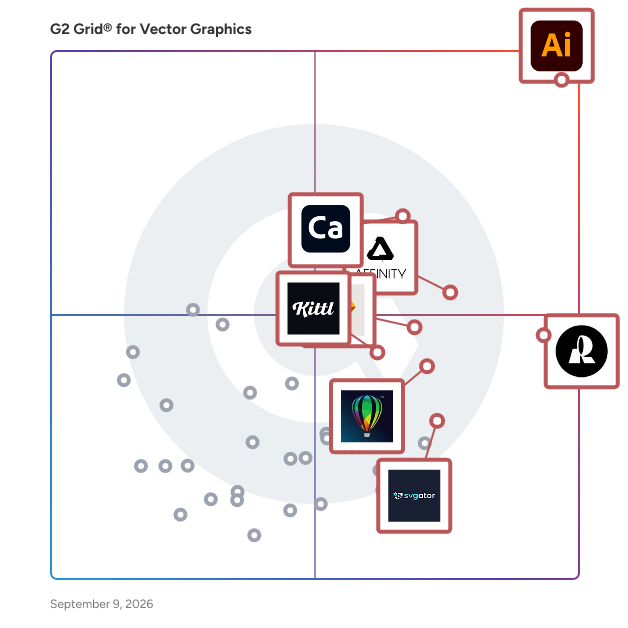
G2 Grid® for Vector Graphics Software

G2 Grid® for Vector Graphics Software plotting products by satisfaction and market presence

Highlighted products: Adobe Illustrator, Recraft, Adobe Capture, Affinity Designer, Sketch, CorelDRAW, Kittl, and SVGator.

Underlying data: [Grid® JSON](https://www.g2.com/categories/vector-graphics/grids.json?focus%5B%5D=adobe-illustrator&focus%5B%5D=recraft&focus%5B%5D=adobe-capture&focus%5B%5D=affinity-designer&focus%5B%5D=sketch&focus%5B%5D=coreldraw&focus%5B%5D=kittl&focus%5B%5D=svgator)

LogoMaven

LogoMaven is a Windows application for logo and vector design. We invented the drag n' drop logo design software market with our first one created in 1995! and created the worlds #1 logo design software called Logo Design Studio with over 1 Million users! --> Creates Logos for all industries in minutes! --> Packed with 1000's of high-resolution logo design objects and templates, all royalty free! --> Full Vector editor to help you create any design. --> Export your logo for any of your business needs.

Average Rating: 4.4/5.0

Total Reviews: 12

Who Is the Company Behind LogoMaven?

  • Seller: AppMaven
  • HQ Location: N/A
  • Twitter: @LogoMaven
    205 Twitter followers
  • LinkedIn® Page: www.linkedin.com
    1 employees on LinkedIn®

Who Uses This Product?

  • Top Industries: Design
  • Company Size: 67% Small, 33% Medium

What Are Recent G2 Reviews of LogoMaven?

What Are G2 Users Discussing About LogoMaven?

SaviDraw

Touch-centric. Voice-enhanced. SaviDraw is the next generation of 2D vector drawing. Draw simply. Draw Savvy.

Average Rating: 4.5/5.0

Total Reviews: 18

How Do G2 Users Rate SaviDraw?

  • Ease of Admin: 10.0/10 (Category avg: 8.5/10)

Who Is the Company Behind SaviDraw?

Who Uses This Product?

  • Company Size: 50% Small, 22% Medium

What Do G2 Reviewers Say About SaviDraw?

AI-generated summary from verified user reviews

Pros
  • Users praise the intuitive interface of SaviDraw, enhancing their drawing experience with easy setup and efficient tools.
  • Users value the easy import/export features of SaviDraw, enhancing workflow and efficiency in creating designs.
  • Users appreciate the intuitive interfaces of SaviDraw, enhancing their design experience and productivity significantly.
  • Users appreciate the templates in SaviDraw, enhancing efficiency and creativity in their design process.

What Are Recent G2 Reviews of SaviDraw?

What Are G2 Users Discussing About SaviDraw?

Rapidresizer

Make beautiful full-size arts & crafts designs

Average Rating: 3.6/5.0

Total Reviews: 15

Who Is the Company Behind Rapidresizer?

Who Uses This Product?

  • Company Size: 67% Small, 33% Medium

What Are Recent G2 Reviews of Rapidresizer?

What Are G2 Users Discussing About Rapidresizer?

DesignEvo

DesignEvo is a design platform that helps users create custom logos in minutes for free, no design experience needed.

Average Rating: 4.0/5.0

Total Reviews: 36

How Do G2 Users Rate DesignEvo?

  • Ease of Admin: 9.2/10 (Category avg: 8.5/10)

Who Is the Company Behind DesignEvo?

  • Seller: PearlMountain
  • Year Founded: 2006
  • HQ Location: Sichuan, China
  • Twitter: @fotojetapp
    250 Twitter followers
  • LinkedIn® Page: www.linkedin.com
    31 employees on LinkedIn®

Who Uses This Product?

  • Top Industries: Design
  • Company Size: 73% Small, 32% Medium

What Do G2 Reviewers Say About DesignEvo?

AI-generated summary from verified user reviews

Pros
  • Users value the color management options in DesignEvo, which enhance brand customization and logo aesthetics.
  • Users value the extensive customization options in DesignEvo, allowing logos to be tailored precisely to their brand needs.
  • Users love the ease of use of DesignEvo, finding it simple to create professional logos with no design experience.
  • Users appreciate the ability to download high-quality files in various formats, enhancing flexibility for their logo designs.
  • Users love the large selection of fonts in DesignEvo, enhancing their logo customization and creativity.
Cons
  • Users note the design limitations in DesignEvo, particularly regarding export options and advanced customization tools.
  • Users find the limited editing options in DesignEvo restricts their creative potential and customization capabilities.
  • Users find the limited export options in DesignEvo's free version to be a drawback for their needs.
  • Users find the limited templates in DesignEvo restrict creativity and wish for more advanced customization options.

What Are Recent G2 Reviews of DesignEvo?

What Are G2 Users Discussing About DesignEvo?

Art Text

Amateurs can use Letters to browse hundreds of ready-made templates, enter their own text and get immediate results.

Average Rating: 4.4/5.0

Total Reviews: 16

Who Is the Company Behind Art Text?

  • Seller: Text.Design
  • Year Founded: 2013
  • HQ Location: Long Island City, NY
  • Twitter: @BeLightSoftware
    4,578 Twitter followers
  • LinkedIn® Page: www.linkedin.com
    1 employees on LinkedIn®

Who Uses This Product?

  • Company Size: 88% Small, 19% Medium

What Are Recent G2 Reviews of Art Text?

What Are G2 Users Discussing About Art Text?

Autotracer

You can use this Autotracer to convert raster images into vector graphics. This process is called tracing or vectorization. Tracing can be done by hand or you can use a tool which does this cumbersome job automatically, although further post-processing is usually necessary.

Average Rating: 4.5/5.0

Total Reviews: 8

Who Is the Company Behind Autotracer?

Who Uses This Product?

  • Top Industries: Design
  • Company Size: 80% Small, 20% Medium

What Are Recent G2 Reviews of Autotracer?

What Are G2 Users Discussing About Autotracer?

Fontastic

Fontastic is a platform to create custom icon fonts.

Average Rating: 3.9/5.0

Total Reviews: 12

How Do G2 Users Rate Fontastic?

  • Ease of Admin: 10.0/10 (Category avg: 8.5/10)

Who Is the Company Behind Fontastic?

Who Uses This Product?

  • Company Size: 58% Small, 42% Medium

What Are Recent G2 Reviews of Fontastic?

What Are G2 Users Discussing About Fontastic?

Mega Creator

Create graphics for any needs and tell your stories with visuals. Mega Creator is a free web app to craft custom graphics, illustrations, and collages. It comes with built-in Icons8 galleries of icons, illustrations, and photos and is powered by AI tools. The app is easy to use and doesn't require design skills.

Average Rating: 4.4/5.0

Total Reviews: 38

How Do G2 Users Rate Mega Creator?

  • Ease of Admin: 7.8/10 (Category avg: 8.5/10)

Who Is the Company Behind Mega Creator?

  • Seller: Icons8
  • Year Founded: 2012
  • HQ Location: United States
  • Twitter: @icons_8
    12,216 Twitter followers
  • LinkedIn® Page: www.linkedin.com
    50 employees on LinkedIn®

Who Uses This Product?

  • Company Size: 70% Small, 25% Medium

What Are Recent G2 Reviews of Mega Creator?

What Are G2 Users Discussing About Mega Creator?

Illustrations AI

Help Brands create custom illustrations following their Brand Guidelines

Average Rating: 4.0/5.0

Total Reviews: 7

Who Is the Company Behind Illustrations AI?

Who Uses This Product?

  • Company Size: 71% Small, 43% Medium

What Do G2 Reviewers Say About Illustrations AI?

AI-generated summary from verified user reviews

Pros
  • Users find the ease of use in Illustrations AI exceptional, enabling quick creation of professional graphics effortlessly.
  • Users value the intuitive interface and design of Illustrations AI, enabling effortless creation of professional graphics.
  • Users value the accuracy of Illustrations AI, as it effectively matches their brand's visual style with uploaded images.
  • Users value the affordability of Illustrations AI, appreciating free usage for an initial period and easy access.
  • Users value the collaboration behind Illustrations AI, resulting in powerful tools tailored for designers.
Cons
  • Users struggle with tool limitations such as basic outputs, lack of detail, and restricted usage, hindering creativity.
  • Users find the expensive pricing structure limits experimentation and creativity due to restricted free usage and upgrade costs.
  • Users struggle with color limitations as AI often overlooks specific palettes and design rules, needing manual adjustments.
  • Users find the limited image editing capabilities hinder creative expression, especially with complex prompts and styles.
  • Users desire better tools and more options with Illustrations AI for a more enhanced experience.

What Are Recent G2 Reviews of Illustrations AI?

Angle Mockups

Start creating your best presentations in minutes.

Average Rating: 4.5/5.0

Total Reviews: 6

How Do G2 Users Rate Angle Mockups?

  • Ease of Admin: 6.7/10 (Category avg: 8.5/10)

Who Is the Company Behind Angle Mockups?

Who Uses This Product?

  • Company Size: 67% Small, 33% Medium

What Do G2 Reviewers Say About Angle Mockups?

AI-generated summary from verified user reviews

Pros
  • Users love the user-friendly templates of Angle Mockups, enabling easy and visually appealing presentations for all skill levels.
  • Users value the ease of learning with Angle Mockups, thanks to its intuitive interface and simple functionality.
  • Users love the user-friendly interface of Angle Mockups, which simplifies the design process for everyone.
  • Users love the variety of file formats supported by Angle Mockups, enhancing flexibility for different design needs.
  • Users appreciate the super user-friendly interface of Angle Mockups, enjoying its accessibility for beginners and professionals alike.
Cons
  • Users find Angle Mockups difficult for beginners, with inconsistent effects and varying complexity depending on the device used.
  • Users find the learning curve challenging with Angle Mockups, experiencing inconsistency across different devices during creation.
  • Users find the learning difficulty of Angle Mockups varies by device, complicating the initial setup and experience.

What Are Recent G2 Reviews of Angle Mockups?

Xara Photo & Graphic Designer+

Xara Photo & Graphic Designer+ is a type of graphic design and photo editing software solution that helps users create, edit, and combine raster images, vector graphics, text, and layouts for digital and print use within a single desktop application. The product belongs to the graphic design and photo editing software category and is designed to support visual content creation workflows that involve both image-based and vector-based elements. It allows users to work on photo adjustments, illustrations, typography, and document layouts in the same workspace, reducing the need to use multiple separate tools. The software is installed and run locally on Windows systems and supports common industry file formats for importing and exporting design assets. Xara Photo & Graphic Designer+ is intended for a wide audience, including small businesses, marketing teams, educators, content creators, and individual users who need to produce visual materials on a recurring basis. Common use cases include editing and enhancing photographs, designing marketing graphics, creating social media visuals, producing flyers and posters, and preparing images and layouts for websites or digital publications. The application is built around a visual, on-canvas editing model that allows users to directly manipulate objects such as images, shapes, and text. The software combines non-destructive photo editing with vector drawing and layout tools. Non-destructive editing enables users to modify images while preserving original image data, while vector-based tools allow graphics to be resized and reused without loss of quality. Text handling supports structured layouts and typographic styling suitable for both print and screen-based output. Key features, capabilities, and value-related aspects include: - Photo editing tools for image enhancement, background removal, object erasing, and color adjustments. - Vector illustration and drawing tools for creating shapes, icons, and custom graphic elements. - Layout and text tools for designing single-page and multi-page documents. - Support for common file formats such as JPEG, PNG, SVG, PDF, and layered PSD files. - Built-in templates and design resources that support faster project setup and consistent output. Overall, Xara Photo & Graphic Designer+ is positioned as a general-purpose visual design application that integrates photo editing, graphic design, and layout functionality into one environment, supporting a range of content creation needs without focusing on a single specialized design discipline.

Average Rating: 4.5/5.0

Total Reviews: 29

How Do G2 Users Rate Xara Photo & Graphic Designer+?

  • Ease of Admin: 8.3/10 (Category avg: 8.5/10)

Who Is the Company Behind Xara Photo & Graphic Designer+?

  • Seller: Xara Cloud Limited
  • Year Founded: 1981
  • HQ Location: Berlin, Germany
  • Twitter: @XaraGroup
    1,492 Twitter followers
  • LinkedIn® Page: www.linkedin.com
    46 employees on LinkedIn®

Who Uses This Product?

  • Top Industries: Graphic Design
  • Company Size: 76% Small, 17% Medium

What Are Recent G2 Reviews of Xara Photo & Graphic Designer+?

ZeldDesigner

ZeldDesigner is a simple to use yet powerful 2D vector graphics drawing application for creating illustrations, schematics, diagrams, artwork, and more. Draw, edit, and combine shapes, with a variety of line strokes, fill colors, and fill gradients to create impressive, complex illustrations. Vector drawings are described mathematically, rather than using bitmaps, allowing them to be scaled to any resolution for display and printing.

Average Rating: 4.5/5.0

Total Reviews: 6

Who Is the Company Behind ZeldDesigner?

Who Uses This Product?

  • Company Size: 50% Small, 33% Large

What Do G2 Reviewers Say About ZeldDesigner?

AI-generated summary from verified user reviews

Pros
  • Users find ZeldDesigner to offer a user-friendly interface, making design projects easier for those with some experience.
  • Users enjoy the intuitive interface of ZeldDesigner, which simplifies the design process and enhances creativity.
  • Users love the easy-to-use interface of ZeldDesigner, making illustration and design projects accessible for all skill levels.
  • Users love the intuitive interface and versatile design tools of ZeldDesigner, enhancing their creativity and workflow.
  • Users find the friendly user interface of ZeldDesigner easy and enjoyable for their design projects.
Cons
  • Users find the complexity of missing functions hampers their ability to create professional-looking text elements.
  • Users face challenges with font issues, limiting the professional quality of text-heavy designs like brochures and infographics.
  • Users find the limited text formatting options frustrating, lacking essential features for effective design customization.
  • Users express frustration with the limited customization and export options, restricting their overall creative freedom.

What Are Recent G2 Reviews of ZeldDesigner?

What Are G2 Users Discussing About ZeldDesigner?

sK1

Open-source vector graphics program with professional color management and Cairo-based rendering engine for prepress industry.

Average Rating: 4.2/5.0

Total Reviews: 5

Who Is the Company Behind sK1?

  • Seller: sK1 Project
  • HQ Location: N/A
  • Twitter: @sK1ProjectOrg
    236 Twitter followers
  • LinkedIn® Page: www.linkedin.com
    1 employees on LinkedIn®

Who Uses This Product?

  • Company Size: 60% Small, 20% Large

What Do G2 Reviewers Say About sK1?

AI-generated summary from verified user reviews

Pros
  • Users find the affordability of sK1 appealing, enjoying its accessibility for creating and editing illustrations.
  • Users love the flexible content creation tools of sK1, enabling illustration creation and editing effortlessly.
  • Users find sK1 to be easy to use, benefiting from its expert design and well-organized layout.
  • Users appreciate the editing control of sK1, praising its comprehensive tools and user-friendly layout.
  • Users appreciate the extensive editing tools of sK1, finding it user-friendly and expertly designed for vector graphics.
Cons
  • Users are frustrated by the color limitations of sK1, hindering design flexibility and creativity.
  • Users find the difficult navigation challenging, as the UI feels dated and requires time to learn.
  • Users find the learning curve for sK1 challenging due to its dated UI and navigation difficulties.
  • Users find the limited editing options frustrating, as text and shapes can't be easily modified or adjusted.
  • Users struggle with limited image editing options in sK1, hindering their creative flexibility and customization.

What Are Recent G2 Reviews of sK1?

What Are G2 Users Discussing About sK1?

TactileView

TactileView Design is a graphic design available provides tools to create tactile graphics. It has characteristics, such as wide range of embossers, extensive range of filters and numerous ready-to-use designs.

Average Rating: 4.5/5.0

Total Reviews: 5

Who Is the Company Behind TactileView?

  • Seller: IRIE-AT
  • Year Founded: 2011
  • HQ Location: Corvallis, OR
  • Twitter: @irieat
    187 Twitter followers
  • LinkedIn® Page: www.linkedin.com
    3 employees on LinkedIn®

Who Uses This Product?

  • Company Size: 120% Medium, 40% Large

What Are Recent G2 Reviews of TactileView?

What Are G2 Users Discussing About TactileView?

BPT-Pro

BPT-Pro is an Adobe Illustrator® plug-in that assists your designing work. By installing this into your Illustrator, you will see tools useful for 2D-CAD drafting such as dimensioning, scaling, angle and annotation added to the tool box. BPT-Pro is easy-to-use and speeds up your workflow and ensures accurate and professional-looking results.

Average Rating: 4.5/5.0

Total Reviews: 4

Who Is the Company Behind BPT-Pro?

Who Uses This Product?

  • Company Size: 50% Small, 25% Large

What Do G2 Reviewers Say About BPT-Pro?

AI-generated summary from verified user reviews

Pros
  • Users value the exceptional accuracy of BPT-Pro, enhancing their work with real-time data and seamless compatibility.
  • Users find the Adobe Integration of BPT-Pro essential, appreciating its seamless functionality and ease of use.
  • Users value the seamless compatibility of BPT-Pro with Illustrator, enjoying real-time updates and accurate rendering.
  • Users find BPT-Pro's ease of use perfect for enhancing their workflow in Adobe Illustrator smoothly.
  • Users value the efficiency improvement of BPT-Pro, which simplifies complex global workflows without requiring extensive development resources.
Cons
  • Users face compatibility issues with BPT-Pro, limiting integration with essential 3D design software for diverse projects.
  • Users find the complexity of BPT-Pro hinders regional teams' ability to create independent analytics reports effectively.
  • Users find the difficulty for beginners challenging as the setup and UI complexity hinder effective utilization.
  • Users face limited options for customization in BPT-Pro, hindering regional teams' ability to manage their own analytics effectively.
  • Users feel that the platform exclusivity limits practical use, as licenses do not allow simultaneous device activation.

What Are Recent G2 Reviews of BPT-Pro?

Neeraja Prakash
NP
Researched and written by Neeraja Prakash
Updated October 8, 2024