  # Best Systems Engineering &amp; MBSE Tools - Page 3

  *By [Subhransu Sahu](https://research.g2.com/insights/author/subhransu-sahu)*

   Systems engineering software provides graphical programming and drag and drop modeling features to model complex systems and simulate industrial system performance. Systems engineers use systems engineering software to simplify the development of complex industrial systems as well as to create diagrams of how an industrial system should function. Industrial systems are often made up of many different elements and components which can make it hard to understand which components work together to produce a functioning unit. Systems engineering software simplifies this by displaying which elements must work together to produce effective system results. Systems engineering software is often used to create smart machines, IoT systems, and other industrial equipment. Model-based systems engineering (MBSE) is the formalized application of modeling to support system requirements, design, analysis, verification and validation activities. Systems engineers use MBSE to cost-effectively explore and document system characteristics.

To qualify for inclusion in the Systems Engineering category, a product must:

- Provide drag and drop modeling features for either graphical programming or component modeling
- Provide features to simulate and analyze system performance
- Provide features for requirements verification and analysis


## How Many Systems Engineering &amp; MBSE Tools Products Does G2 Track?
**Total Products under this Category:** 42

### Category Stats (Jun 2026)
- **Average Rating**: 4.21/5 The average rating of products in this category, based on all submitted ratings
- **New Reviews This Quarter**: 2
- **Buyer Segments**: Mid-Market 80% │ Small-Business 20% Represents the distribution of reviewers across all products in this category.

*Last updated: June 01, 2026*

  
## How Does G2 Rank Systems Engineering &amp; MBSE Tools Products?

**Why You Can Trust G2's Software Rankings:**

- 30 Analysts and Data Experts
- 800+ Authentic Reviews
- 42+ Products
- Unbiased Rankings

G2's software rankings are built on verified user reviews, rigorous moderation, and a consistent research methodology maintained by a team of analysts and data experts. Each product is measured using the same transparent criteria, with no paid placement or vendor influence. While reviews reflect real user experiences, which can be subjective, they offer valuable insight into how software performs in the hands of professionals. Together, these inputs power the G2 Score, a standardized way to compare tools within every category.

  
## Which Systems Engineering &amp; MBSE Tools Is Best for Your Use Case?

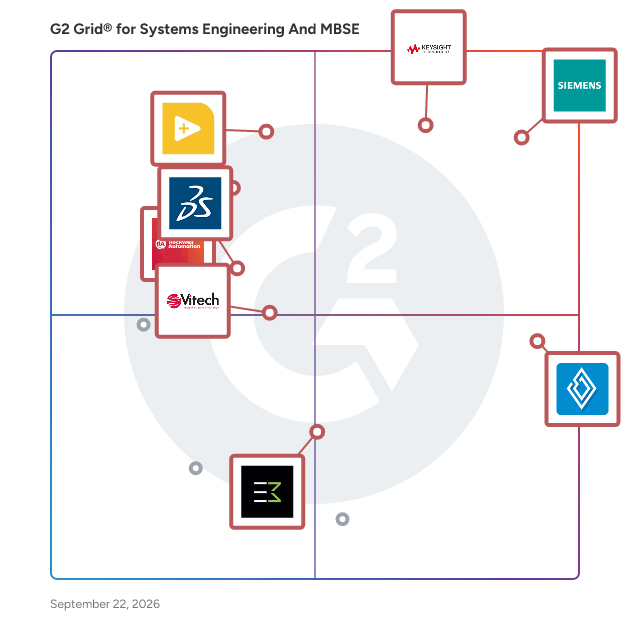
- **Leader:** [PathWave System Design](https://www.g2.com/products/pathwave-system-design/reviews)
- **Highest Performer:** [Innoslate](https://www.g2.com/products/innoslate/reviews)
- **Easiest to Use:** [Innoslate](https://www.g2.com/products/innoslate/reviews)
- **Top Trending:** [Flow Engineering](https://www.g2.com/products/flow-engineering/reviews)
- **Best Free Software:** [LabVIEW](https://www.g2.com/products/labview/reviews)

  
---

**Sponsored**

### Visure Requirements

Visure offers a modern enterprise AI-powered ALM platform and requirements management software for organizations in safety-critical industries, enabling them to ease their compliance process, gain full traceability across the development cycle, reduce rework, and accelerate their requirements elicitation phase. It offers product and system development teams out-of-the-box features, including full traceability, tight integration with MS Word/Excel, FMEA risk management, test management, bug tracking, requirements testing, requirements quality analysis, requirement versioning and baselining, powerful reporting and standard compliance templates for ISO 26262, IEC 62304, IEC 61508, CENELEC 50128, DO-178B/C, DO-254, FMEA, SPICE, CMMI, and more. It supports round-trip integrations with MS Word, Excel, JIRA, and DOORS and the most popular engineering tools


[Visit website](https://www.g2.com/external_clickthroughs/record?secure%5Bad_program%5D=ppc&amp;secure%5Bad_slot%5D=category_product_list&amp;secure%5Bcategory_id%5D=2489&amp;secure%5Bdisplayable_resource_id%5D=2489&amp;secure%5Bdisplayable_resource_type%5D=Category&amp;secure%5Bmedium%5D=sponsored&amp;secure%5Bplacement_reason%5D=page_category&amp;secure%5Bplacement_resource_ids%5D%5B%5D=2489&amp;secure%5Bprioritized%5D=false&amp;secure%5Bproduct_id%5D=88966&amp;secure%5Bresource_id%5D=2489&amp;secure%5Bresource_type%5D=Category&amp;secure%5Bsource_type%5D=category_page&amp;secure%5Bsource_url%5D=https%3A%2F%2Fwww.g2.com%2Fcategories%2Fsystems-engineering-and-mbse%3Fpage%3D3&amp;secure%5Btoken%5D=a954aa6102b7f8c8e8a51d849d7fc10914551614b33abb596f180d641bdf2bfa&amp;secure%5Burl%5D=https%3A%2F%2Fvisuresolutions.com%2Fwatch-a-demo&amp;secure%5Burl_type%5D=product_website)

---

  
    ## What Is Systems Engineering &amp; MBSE Tools?
  [CAD Software](https://www.g2.com/categories/cad)

  
---

## How Do You Choose the Right Systems Engineering &amp; MBSE Tools?

### What You Should Know About Systems Engineering Software

### What is Systems Engineering Software?

Systems engineering is an interdisciplinary field of engineering that focuses on how complex engineering projects and complex industrial systems are designed and managed. When engineers build complex machinery such as smart machinery, internet of things (IoT) connected systems, or industrial systems, they must ensure that the various parts of the systems work together to create a functioning system that meets their design requirements. An example of this would be a systems engineer creating a complex system such as an aircraft. The engineer would put in all of their requirements for the aircraft such as speed, capacity, weight, and load pressure. The systems engineer would then have to execute the connection of various parts of the system such as the airframe, propulsion, navigation, and the guidance to ensure that all requirements and parts are connected so the aircraft will not only take off but also fly smoothly and safely. Since there are so many different components that go into creating a complex system such as an aircraft, systems engineers need a simple way to visualize all the necessary components and requirements of their designs. Systems engineering software helps engineers visualize all the necessary components of their designs by providing features such as model based design (diagramming), requirements analysis, and simulation.

Key Benefits of Systems Engineering Software

- Allows systems engineers to simplify the design of complex industrial systems
- Allows systems engineers to collaborate more effectively by sharing designs across various teams
- Allows systems engineers to test the performance of their designs with simulation features
- Speeds up design times by providing change management and simple model-based engineering 

### Why Use Systems Engineering Software?

Systems engineering software provides a multitude of features for systems engineers to simplify and speed up complex designs. From collaboration features to drag-and-drop systems modeling, systems engineering is all about making the complex task of systems engineering as simple and intuitive as possible.

**Speed up design time —** Systems engineering software provides drag-and-drop modeling and diagramming features which speeds up design time and makes system visualization as easy as possible.

**Collaboration —** Designing a complex industrial system requires a lot of cross team collaboration. While most teams opt for sharing a spreadsheet between all workers across several teams, this is far from the ideal way of sharing and collaborating on industrial system design. Systems engineering software provides more context with model based designs, more explanations with design feedback and collaboration tags, and more alerts with emails and notifications whenever another team member needs to take a look at the design.

### Who Uses Systems Engineering Software?

Systems engineering software is not only about designing complex systems but also about the management of complex systems. This revolves around teams that not only design but also teams that handle logistics, manufacturing, project management and more. It is a software that is used by any team that has to do with the design as well as implementation of a system design. Here is how both systems engineers and project managers utilize systems engineering software.

**Systems engineers —** Systems engineering software will most often be used by various engineers that deal with designing and implementing complex systems.These are industrial engineers, mechanical engineers, production engineers, electrical engineers, and much more. All of these job functions rely on creating systems that require various components that must work together to function. Systems engineering software helps them with diagramming features that easily displays how these components work in synergy to create one functioning system.

**Project managers —** Project management plays a big role in systems engineering. Various types of engineers must work on a complex system for the system to be completed. A project manager uses the diagramming features in a systems engineering software to assign roles and job functions to completing certain tasks. This will make it easier for systems engineers to visualize where they need to focus their attention.

### Kinds of Systems Engineering Software

Almost all systems engineering software will provide some sort of model-based systems engineering. Model-based systems engineering is essentially a diagramming function that allows for easy system visualization. Other systems engineering software provide a graphical programming function on top of this model-based systems engineering software which allows users to code the various functions of the systems they’re creating as well as integrate the software with hardware. Here are the differences between model-based systems engineering and graphical systems engineering.

**Model-based systems engineering —** Some systems engineering software are strictly model based. Model-based systems engineering software allows engineers to diagram operational systems to display the sequences of exchanges that must happen inside a given system for it to function.

**Graphical systems engineering —** Graphical systems engineering is a type of systems engineering software that relies more heavily on coding and hardware integration. With graphical systems engineering features, users integrate the software with hardware to dramatically simplify and speed up design. With the hardware integration users design all the electronic components and IoT signals that may need to be present within an industrial system.

### Systems Engineering Software Features

Systems engineering software provides a variety of features for systems engineers to conceptualize, design, and manage the development of an industrial system.

**Requirements traceability —** When systems engineers begin to design industrial systems, they always start out with a list of requirements that need to be met. Once the requirements and parameters are set forth, systems engineers then must design the individual components of the design that will link together to meet those requirements. Requirements traceability features alert the systems engineer if a design requirement is not being met as they begin to design the system. This allows rapid analysis and ensures that requirements are always being met throughout the design.

**Simulation —** Most systems engineering tools provide simulation and model execution features. This allows users to simulate the performance of a design before it’s gone into production. This provides early design validation and eliminates the need for reworks following production.

**Team and stakeholder collaboration —** Most systems engineering software is accessed through a web browser. Owners grant sharing and collaboration permissions to all relevant parties so various teams and stakeholders sign in and collaborate or make comments on a design.

**Reusability —** Reusability features of systems engineering software allow models to be reused for future system designs. This helps speed up the design process which in turn reduces costs and saves time.

**Model diagramming —** Model diagramming is the cornerstone of systems engineering software. Model diagramming allows users to diagram the various components of an industrial design so the entire system is easily visualized. This shows which system functions must connect to create one functioning unit.

**Debugging —** Debugging features provide systems engineers with features that detect any bugs in the systems engineering code. This allows engineers to quickly identify issues and resolve them at a quicker pace.

### Software and Services Related to Systems Engineering Software

[**Low-code development platforms**](https://www.g2.com/categories/low-code-development-platforms) **—** Low-code development platforms are used alongside of or as an alternative to the coding features that are available in some systems engineering software. While systems engineering software provides some features for drag and drop graphical programming, some provide strictly model-based engineering which don’t have as extensive coding features. Low-code development platforms are a great complimentary software so systems engineers can prototype, build, or scale applications without developing complex infrastructures.

[**Industrial IoT software**](https://www.g2.com/categories/industrial-iot) **—** Many systems engineers are tasked with creating complex industrial systems that are IoT connected. These are systems that are connected in a network to other software or devices which enhances the functionality of the system. An example would be a smart manufacturing system that is connected via sensors to other assets in a factory such as inventory counts or energy management software. Systems engineering software provides the diagramming features to display which systems should be connected to create an IoT connected device but Industrial IoT software is also a helpful complimentary software to use. Industrial IoT software provides assistance with configuring, managing, and monitoring IoT devices used in manufacturing operations.


