  # Best PC Backup Software

  *By [Tian Lin](https://research.g2.com/insights/author/tian-lin)*

   PC backup software, also known as computer backup software, protects all computer files and specified operating systems (Windows, macOS, or Linux) saved on internal or external hard drives. Organizations use PC backup solutions to secure their computer data and operations in case of virus attacks, file corruption, and uninstallations. There are many ways to backup a computer. Users can store the backup content in their computer hard drive disk, USB flash drive, online storage, or even on their private server. Not all options provide security and ease of use. Storing the backup content on-premises is convenient but subject to external risks such as theft or power surge. Online storage is scalable in storage space; however, it requires an internet connection and decent internet speed for download/upload. The best PC backup software should recover exactly what the users want with minimal hassle and risk. Since PC backup software is necessary and easy to use, anyone can use this software to prevent their computer from unwanted changes. More importantly, the software must meet their business requirements. While smaller businesses tend to buy individual backup software, enterprise to midsize companies implement their PC backup solution into their IT backup solutions.

Top vendors integrate PC backup software as part of [disaster recovery software](https://www.g2.com/categories/disaster-recovery), [online backup software](https://www.g2.com/categories/online-backup), and [hard drive cloning software](https://www.g2.com/categories/hard-drive-cloning). This category primarily focuses on vendors who offer standalone PC backup software.

To qualify for inclusion in the PC Backup category, a product must:

- Backup PC (Windows, macOS, or Linux) to hard drives, USB flash drives, CD/DVD, or cloud
- Create a bootable drive image on another storage device by cloning the whole system
- Automatically backup on schedule


## How Many PC Backup Software Products Does G2 Track?
**Total Products under this Category:** 67

### Category Stats (May 2026)
- **Average Rating**: 4.38/5
- **New Reviews This Quarter**: 136
- **Buyer Segments**: Small-Business 59% │ Mid-Market 23% │ Enterprise 18%
- **Top Trending Product**: Acronis True Image (+0.02)
*Last updated: May 25, 2026*

  
## How Does G2 Rank PC Backup Software Products?

**Why You Can Trust G2's Software Rankings:**

- 30 Analysts and Data Experts
- 7,400+ Authentic Reviews
- 67+ Products
- Unbiased Rankings

G2's software rankings are built on verified user reviews, rigorous moderation, and a consistent research methodology maintained by a team of analysts and data experts. Each product is measured using the same transparent criteria, with no paid placement or vendor influence. While reviews reflect real user experiences, which can be subjective, they offer valuable insight into how software performs in the hands of professionals. Together, these inputs power the G2 Score, a standardized way to compare tools within every category.

  
## Which PC Backup Software Is Best for Your Use Case?

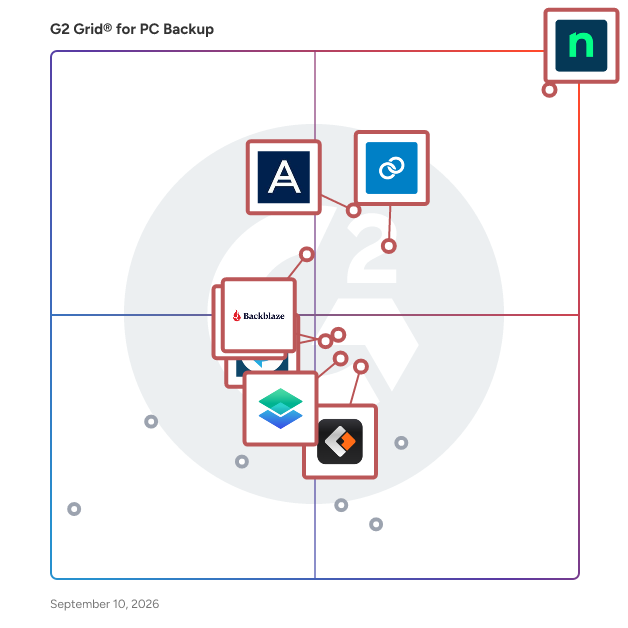
- **Leader:** [NinjaOne](https://www.g2.com/products/ninjaone/reviews)
- **Highest Performer:** [MSP360 Backup](https://www.g2.com/products/msp360-backup/reviews)
- **Easiest to Use:** [NinjaOne](https://www.g2.com/products/ninjaone/reviews)
- **Top Trending:** [NinjaOne](https://www.g2.com/products/ninjaone/reviews)
- **Best Free Software:** [NinjaOne](https://www.g2.com/products/ninjaone/reviews)

  
---

**Sponsored**

### MSP360 Backup

MSP360 Managed Backup is a centralized backup platform for managed service providers and IT teams. It covers multiple clients, platforms, and workloads from a single web console - no on-premises infrastructure needed. Deploy agents remotely, configure backup plans, track job status in real time, and handle issues without site visits. The platform supports the full range of environments MSPs work with: - File-level and image-based backup for Windows, macOS, and Linux desktops and servers - Virtual machine backup for VMware (vSphere 6.0+), Hyper-V, and Proxmox - SQL Server backup and application-aware (VSS-based) backup - Local, cloud, and hybrid destinations, including NAS and network shares MSP360 Managed Backup works on a bring-your-own-storage model - connect your preferred provider and keep full control over costs and data residency. Supported storage includes Amazon S3, Microsoft Azure, Wasabi, Backblaze B2, Google Cloud, and IDrive e2. No proprietary storage required. Security and compliance are covered at every level: - AES 256-bit encryption in transit and at rest - Object Lock (immutability) to protect backups from ransomware and deletion - Two-factor authentication and role-based access control - GFS retention policies and versioning - Audit logging and scheduled reporting Group endpoints by company, apply policies in bulk, and configure alerts and reports per client. White-labeling lets MSPs deliver the platform under their own brand. Native integration with MSP360 RMM gives teams a unified view of endpoint health and backup status in one console. PSA integrations include ConnectWise PSA and Autotask for billing automation and ticketing, and HaloPSA for asset sync and remote access. Recovery options include bare-metal restore, granular file and folder recovery, and restore to dissimilar hardware or virtual machines.


[Visit website](https://www.g2.com/external_clickthroughs/record?secure%5Bad_program%5D=ppc&amp;secure%5Bad_slot%5D=category_product_list&amp;secure%5Bcategory_id%5D=2635&amp;secure%5Bdisplayable_resource_id%5D=1517&amp;secure%5Bdisplayable_resource_type%5D=Category&amp;secure%5Bmedium%5D=sponsored&amp;secure%5Bplacement_reason%5D=neighbor_category&amp;secure%5Bplacement_resource_ids%5D%5B%5D=1518&amp;secure%5Bplacement_resource_ids%5D%5B%5D=1517&amp;secure%5Bprioritized%5D=false&amp;secure%5Bproduct_id%5D=16278&amp;secure%5Bresource_id%5D=2635&amp;secure%5Bresource_type%5D=Category&amp;secure%5Bsource_type%5D=category_page&amp;secure%5Bsource_url%5D=https%3A%2F%2Fwww.g2.com%2Fcategories%2Fpc-backup%3Fpage%3D4&amp;secure%5Btoken%5D=efffcd09634d5987f14d7bb316adabc61cd3417c283f0425e85f6ef3b0ade9f3&amp;secure%5Burl%5D=https%3A%2F%2Fwww.msp360.com%2Fbackup%2F%3Futm_source%3Dg2%26utm_medium%3Dcpc%26utm_campaign%3Dg2_clicks_backup%26utm_content%3Dprofile_click&amp;secure%5Burl_type%5D=custom_url)

---

  ## What Are the Top-Rated PC Backup Software Products in 2026?
### 1. [NinjaOne](https://www.g2.com/products/ninjaone/reviews)
  NinjaOne unifies IT to simplify work for nearly 40,000 customers in 140+ countries. The NinjaOne Unified IT Operations Platform delivers endpoint management, autonomous patching, backup, and remote access in a single console to improve efficiency, increase resilience, and reduce spend. Intelligent automation and human-centered AI gives employees a great technology experience.


  **Average Rating:** 4.7/5.0
  **Total Reviews:** 4,264
**How Do G2 Users Rate NinjaOne?**

- **Ease of Admin:** 9.1/10 (Category avg: 8.8/10)
- **Incremental Backup:** 8.9/10 (Category avg: 8.9/10)
- **Deduplication:** 8.2/10 (Category avg: 8.3/10)
- **Lag Free Operation:** 8.6/10 (Category avg: 8.6/10)

**Who Is the Company Behind NinjaOne?**

- **Seller:** [NinjaOne](https://www.g2.com/sellers/ninjaone)
- **Company Website:** https://www.ninjaone.com/
- **Year Founded:** 2013
- **HQ Location:** Austin, Texas
- **Twitter:** @NinjaOne (3,586 Twitter followers)
- **LinkedIn® Page:** https://www.linkedin.com/company/6436301/ (2,121 employees on LinkedIn®)

**Who Uses This Product?**
  - **Who Uses This:** IT Manager, Owner
  - **Top Industries:** Information Technology and Services, Computer &amp; Network Security
  - **Company Size:** 49% Mid-Market, 43% Small-Business


#### What Are NinjaOne's Pros and Cons?

**Pros:**

- Ease of Use (1559 reviews)
- Features (980 reviews)
- Remote Access (955 reviews)
- Automation (909 reviews)
- Customer Support (813 reviews)

**Cons:**

- Missing Features (792 reviews)
- Limited Features (450 reviews)
- Improvement Needed (424 reviews)
- Needs Improvement (409 reviews)
- Feature Issues (346 reviews)

### 2. [Datto SIRIS](https://www.g2.com/products/kaseya-datto-siris/reviews)
  Datto SIRIS is an all-in-one BCDR solution built for MSPs to efficiently prevent data loss and minimize downtime. Utilizing a cloud-first approach, MSPs can offer their clients local backup and recovery with a secure, cloud-based repository and full disaster recovery in the cloud. All of this administered from a multi-tenant cloud portal that allows MSPs to view, manage and recover client data from a single interface. Simplicity is a guiding design principle for SIRIS. From deployment flexibility that spans a software-only implementation to hardened backup appliances, MSPs can implement the solution that fits their client’s requirements. SIRIS cross-platform support enables MSPs to protect their client’s data anywhere it lives, from physical servers to virtual machines running Windows Server or Linux. Innovative features include: • Inverse Chain Technology™ for reliable backup • Patented ransomware scanning • Patented Screenshot Verification for recovery assurance • Intuitive Recovery Launchpad for failproof recovery • Patented Fast Failback™ to primary system after a disaster • Instant virtualization recovery, local or in the cloud SIRIS Explainer: https://www.youtube.com/watch?v=C5We4VpRqOA


  **Average Rating:** 4.6/5.0
  **Total Reviews:** 271
**How Do G2 Users Rate Datto SIRIS?**

- **Ease of Admin:** 9.3/10 (Category avg: 8.8/10)
- **Incremental Backup:** 9.9/10 (Category avg: 8.9/10)
- **Deduplication:** 9.5/10 (Category avg: 8.3/10)
- **Lag Free Operation:** 9.2/10 (Category avg: 8.6/10)

**Who Is the Company Behind Datto SIRIS?**

- **Seller:** [Kaseya](https://www.g2.com/sellers/kaseya)
- **Company Website:** https://www.kaseya.com/
- **Year Founded:** 2000
- **HQ Location:** Miami, FL
- **Twitter:** @KaseyaCorp (17,425 Twitter followers)
- **LinkedIn® Page:** https://www.linkedin.com/company/kaseya/ (5,512 employees on LinkedIn®)

**Who Uses This Product?**
  - **Who Uses This:** Owner, President
  - **Top Industries:** Information Technology and Services, Computer &amp; Network Security
  - **Company Size:** 66% Small-Business, 28% Mid-Market


#### What Are Datto SIRIS's Pros and Cons?

**Pros:**

- Ease of Use (91 reviews)
- Reliability (81 reviews)
- Recovery Ease (63 reviews)
- Backup Solutions (62 reviews)
- Customer Support (60 reviews)

**Cons:**

- Expensive (35 reviews)
- Poor Customer Support (24 reviews)
- Pricing Issues (19 reviews)
- Restore Issues (16 reviews)
- Storage Issues (16 reviews)

### 3. [Acronis True Image](https://www.g2.com/products/acronis-true-image/reviews)
  In today’s digital world, it&#39;s not if you&#39;ll be attacked, but when. Cyber protection can be complex and costly — unless you have Acronis True Image. This single, simple solution delivers reliable fast backup and recovery, AI-powered security, and Identity Protection.\* Manage everything easily, from any device. Stop the frustration; save time and money. Acronis True Image protects your computers, mobile devices and online identity\* with effortless, &quot;set-and-forget&quot; peace of mind. Acronis True Image features include: - Backup: Flexible local backups – from full system images to individual files. Or select files and folders on a flexible schedule that enables your cybersecurity. - Encrypted cloud backup: Reliable, secure and speedy backup to Acronis data centers. Offering additional protection, easy recovery and anywhere access. - Cybersecurity protection: Integrated award-winning antimalware capabilities protect both your device and backup data from ransomware, cryptojacking, and never-before-seen cyber threats - Disk cloning: Create a complete replica of your data as a backup or a way to migrate to a new drive or computer. - Easy-of-use: Intuitive interface to manage your protection. - Affordable subscription plans: starting from just $49.99/year. \*Available in the U.S. for Advanced and Premium subscriptions Acronis is majority-owned by EQT.


  **Average Rating:** 4.3/5.0
  **Total Reviews:** 70
**How Do G2 Users Rate Acronis True Image?**

- **Ease of Admin:** 9.1/10 (Category avg: 8.8/10)
- **Incremental Backup:** 10.0/10 (Category avg: 8.9/10)
- **Deduplication:** 10.0/10 (Category avg: 8.3/10)
- **Lag Free Operation:** 7.3/10 (Category avg: 8.6/10)

**Who Is the Company Behind Acronis True Image?**

- **Seller:** [Acronis](https://www.g2.com/sellers/acronis)
- **Year Founded:** 2003
- **HQ Location:** Schaffhausen
- **Twitter:** @acronis (94,670 Twitter followers)
- **LinkedIn® Page:** https://www.linkedin.com/company/13179/ (1,917 employees on LinkedIn®)
- **Ownership:** Acronis is majority-owned by EQT

**Who Uses This Product?**
  - **Top Industries:** Information Technology and Services, Computer Software
  - **Company Size:** 46% Small-Business, 39% Mid-Market


#### What Are Acronis True Image's Pros and Cons?

**Pros:**

- Features (2 reviews)
- Data Security (1 reviews)
- Ease of Use (1 reviews)
- Implementation Ease (1 reviews)

**Cons:**

- Poor Interface Design (2 reviews)
- Backup Issues (1 reviews)
- Compatibility Issues (1 reviews)
- Expensive (1 reviews)
- Lacking Features (1 reviews)

### 4. [Backblaze Computer Backup](https://www.g2.com/products/backblaze-computer-backup/reviews)
  Never lose a file again. Backblaze Computer Backup is the cloud backup solution that works quietly in the background so you don&#39;t have to think about it, until the day you really need it. Whether you&#39;re a freelancer protecting years of project files, a small business safeguarding customer records, or an IT manager rolling out backup across a team, Backblaze delivers reliable, continuous cloud backup that just works. Why teams and individuals choose Backblaze: Unlimited cloud storage- Back up your entire computer without worrying about hitting a cap or paying for extra space. Native on Mac and PC, seamlessly integrated- Backblaze feels right at home on both Windows and macOS. No clunky workarounds, no friction, just a clean, native experience that fits naturally into the way Mac users already work. Automatic &amp; continuous backup- Files are backed up as soon as they&#39;re created or changed, so your most recent work is always protected. Simple setup, no IT degree required- Get up and running in minutes with an intuitive interface that doesn&#39;t overwhelm you with settings. File versioning- Made a mistake or need an older draft? Recover previous versions of any file with ease. Restore from anywhere- Access and restore your files from any device with an internet connection, whether you&#39;re at the office, home, or halfway across the world. Protection against the unexpected- Hardware failure, accidental deletion, ransomware, theft, fire, Backblaze keeps a secure copy of your data safe offsite, no matter what happens locally. Honest, transparent pricing makes Backblaze one of the most cost-effective cloud backup solutions on the market with no surprise fees, no confusing tiers based on how much you store. Backblaze Computer Backup is trusted by over half a million users who want the peace of mind that comes from knowing their data is protected, recoverable, and always up to date.


  **Average Rating:** 4.4/5.0
  **Total Reviews:** 37
**How Do G2 Users Rate Backblaze Computer Backup?**

- **Ease of Admin:** 8.5/10 (Category avg: 8.8/10)
- **Incremental Backup:** 8.0/10 (Category avg: 8.9/10)
- **Deduplication:** 5.8/10 (Category avg: 8.3/10)
- **Lag Free Operation:** 6.3/10 (Category avg: 8.6/10)

**Who Is the Company Behind Backblaze Computer Backup?**

- **Seller:** [Backblaze](https://www.g2.com/sellers/backblaze)
- **Company Website:** https://www.backblaze.com/
- **Year Founded:** 2007
- **HQ Location:** San Mateo, California
- **Twitter:** @backblaze (17,833 Twitter followers)
- **LinkedIn® Page:** https://www.linkedin.com/company/2749627/ (368 employees on LinkedIn®)

**Who Uses This Product?**
  - **Top Industries:** Computer Software
  - **Company Size:** 87% Small-Business, 13% Mid-Market


#### What Are Backblaze Computer Backup's Pros and Cons?

**Pros:**

- Backup Solutions (4 reviews)
- Customer Support (3 reviews)
- Ease of Use (3 reviews)
- Backup Ease (2 reviews)
- File Recovery (2 reviews)

**Cons:**

- Backup Issues (3 reviews)
- Poor Customer Support (2 reviews)
- Billing Issues (1 reviews)
- Expensive (1 reviews)
- Missing Features (1 reviews)

### 5. [MSP360 Backup](https://www.g2.com/products/msp360-backup/reviews)
  MSP360 Managed Backup is a centralized backup platform for managed service providers and IT teams. It covers multiple clients, platforms, and workloads from a single web console - no on-premises infrastructure needed. Deploy agents remotely, configure backup plans, track job status in real time, and handle issues without site visits. The platform supports the full range of environments MSPs work with: - File-level and image-based backup for Windows, macOS, and Linux desktops and servers - Virtual machine backup for VMware (vSphere 6.0+), Hyper-V, and Proxmox - SQL Server backup and application-aware (VSS-based) backup - Local, cloud, and hybrid destinations, including NAS and network shares MSP360 Managed Backup works on a bring-your-own-storage model - connect your preferred provider and keep full control over costs and data residency. Supported storage includes Amazon S3, Microsoft Azure, Wasabi, Backblaze B2, Google Cloud, and IDrive e2. No proprietary storage required. Security and compliance are covered at every level: - AES 256-bit encryption in transit and at rest - Object Lock (immutability) to protect backups from ransomware and deletion - Two-factor authentication and role-based access control - GFS retention policies and versioning - Audit logging and scheduled reporting Group endpoints by company, apply policies in bulk, and configure alerts and reports per client. White-labeling lets MSPs deliver the platform under their own brand. Native integration with MSP360 RMM gives teams a unified view of endpoint health and backup status in one console. PSA integrations include ConnectWise PSA and Autotask for billing automation and ticketing, and HaloPSA for asset sync and remote access. Recovery options include bare-metal restore, granular file and folder recovery, and restore to dissimilar hardware or virtual machines.


  **Average Rating:** 4.5/5.0
  **Total Reviews:** 527
**How Do G2 Users Rate MSP360 Backup?**

- **Ease of Admin:** 8.9/10 (Category avg: 8.8/10)
- **Incremental Backup:** 9.6/10 (Category avg: 8.9/10)
- **Deduplication:** 8.9/10 (Category avg: 8.3/10)
- **Lag Free Operation:** 9.2/10 (Category avg: 8.6/10)

**Who Is the Company Behind MSP360 Backup?**

- **Seller:** [MSP360](https://www.g2.com/sellers/msp360)
- **Company Website:** https://www.msp360.com
- **Year Founded:** 2011
- **HQ Location:** Pittsburgh, PA
- **Twitter:** @msp360 (2,790 Twitter followers)
- **LinkedIn® Page:** https://www.linkedin.com/company/298618/ (117 employees on LinkedIn®)

**Who Uses This Product?**
  - **Who Uses This:** Owner, President
  - **Top Industries:** Information Technology and Services, Computer &amp; Network Security
  - **Company Size:** 81% Small-Business, 14% Mid-Market


#### What Are MSP360 Backup's Pros and Cons?

**Pros:**

- Ease of Use (48 reviews)
- Backup Solutions (32 reviews)
- Customer Support (20 reviews)
- Features (19 reviews)
- Easy Setup (18 reviews)

**Cons:**

- Poor Interface Design (10 reviews)
- Backup Issues (9 reviews)
- Lack of Backup (9 reviews)
- Poor Customer Support (9 reviews)
- Learning Difficulty (7 reviews)

### 6. [EaseUS Todo Backup Business](https://www.g2.com/products/easeus-todo-backup-business/reviews)
  EaseUS Todo Backup Business is a commercial backup and disaster recovery software solution for small to medium-sized businesses. It provides comprehensive data protection by allowing users to create backups of their entire system, individual disks or partitions, specific files and folders, and applications such as email, SQL, and Exchange. The incremental and differential backup methods also minimize storage usage and speed up the backup process.


  **Average Rating:** 4.8/5.0
  **Total Reviews:** 131
**How Do G2 Users Rate EaseUS Todo Backup Business?**

- **Ease of Admin:** 9.3/10 (Category avg: 8.8/10)
- **Incremental Backup:** 9.6/10 (Category avg: 8.9/10)
- **Deduplication:** 9.2/10 (Category avg: 8.3/10)
- **Lag Free Operation:** 9.3/10 (Category avg: 8.6/10)

**Who Is the Company Behind EaseUS Todo Backup Business?**

- **Seller:** [EaseUS](https://www.g2.com/sellers/easeus)
- **Year Founded:** 2004
- **HQ Location:** Sichuan, China
- **Twitter:** @easeus_software (3,368 Twitter followers)
- **LinkedIn® Page:** https://www.linkedin.com/company/easeussoftware/ (83 employees on LinkedIn®)
- **Total Revenue (USD mm):** $500

**Who Uses This Product?**
  - **Top Industries:** Computer Software, Information Technology and Services
  - **Company Size:** 83% Small-Business, 14% Mid-Market


#### What Are EaseUS Todo Backup Business's Pros and Cons?

**Pros:**

- Ease of Use (9 reviews)
- Backup Solutions (8 reviews)
- Customer Support (4 reviews)
- Easy Setup (4 reviews)
- Product Quality (4 reviews)

**Cons:**

- Error Handling (3 reviews)
- Backup Issues (2 reviews)
- Authentication Issues (1 reviews)
- Backup Failures (1 reviews)
- Insufficient Information (1 reviews)

### 7. [Macrium Backup &amp; Restore](https://www.g2.com/products/macrium-backup-restore/reviews)
  Macrium Backup &amp; Restore is a suite of image-based backup and disaster recovery software for Windows systems. It enables IT teams in manufacturing and operational technology (OT) environments to protect data, restore systems rapidly, and reduce downtime after hardware failure, user error, or cyber threats. The suite includes four distinct products: Macrium Reflect (Standalone) for Workstation &amp; Server Backup, Macrium SiteBackup, Macrium Reflect LTSC, and Macrium Technician’s License. Each product serves a specific purpose in supporting resilient IT and OT infrastructure: Macrium provides comprehensive backup and disk imaging for individual endpoints such as critical manufacturing systems and production lines. It supports full, differential, and incremental backups, allowing organizations to create reliable recovery points and restore systems quickly. Macrium SiteBackup offers centralized management of backups across multiple endpoints and servers. With Macrium Site Manager, IT teams can automate backup schedules, monitor backup status, and access detailed reporting — all from a single interface. SiteBackup supports physical and virtual machines and is suited to small IT teams or large enterprise environments. Macrium Reflect LTSC (Long-Term Service Channel) is a perpetual license version of Reflect with built-in maintenance. Designed for organizations that require long-term stability and minimal software change, Reflect LTSC is well-suited to regulated industries, industrial control systems, and manufacturing environments where consistent platform behavior over time is essential. Macrium Technician’s License is a portable backup and recovery toolkit for IT professionals. It enables technicians to run Macrium Reflect directly from a USB or external drive, supporting ad hoc backup, restore, or system troubleshooting across multiple machines — without installing software on each device. Key features across the product suite: - Image-based backup for Windows workstations, servers, and virtual machines - Bare metal restore with support for dissimilar hardware - Centralized management and reporting - Support for incremental and differential backup strategies - Built-in encryption and protection against ransomware threats - One-time and subscription licensing models to suit different IT needs Macrium Backup &amp; Restore is used by IT teams across healthcare, education, manufacturing, and corporate IT to ensure business continuity, maintain operational uptime, and reduce the impact of system outages. Speak to one of our experts here: https://www.macrium.com/contact


  **Average Rating:** 4.7/5.0
  **Total Reviews:** 84
**How Do G2 Users Rate Macrium Backup &amp; Restore?**

- **Ease of Admin:** 8.8/10 (Category avg: 8.8/10)
- **Incremental Backup:** 9.5/10 (Category avg: 8.9/10)
- **Deduplication:** 10.0/10 (Category avg: 8.3/10)
- **Lag Free Operation:** 8.7/10 (Category avg: 8.6/10)

**Who Is the Company Behind Macrium Backup &amp; Restore?**

- **Seller:** [Macrium Software](https://www.g2.com/sellers/macrium-software)
- **Year Founded:** 2006
- **HQ Location:** Manchester, United Kingdom
- **LinkedIn® Page:** https://www.linkedin.com/company/paramount-software-uk-limited/ (54 employees on LinkedIn®)

**Who Uses This Product?**
  - **Who Uses This:** IT Manager
  - **Top Industries:** Information Technology and Services, Computer Software
  - **Company Size:** 55% Small-Business, 31% Mid-Market


#### What Are Macrium Backup &amp; Restore's Pros and Cons?

**Pros:**

- Ease of Use (19 reviews)
- Backup Solutions (12 reviews)
- Easy Setup (11 reviews)
- Data Restoration (8 reviews)
- Reliability (8 reviews)

**Cons:**

- Backup Issues (4 reviews)
- Needs Improvement (4 reviews)
- Restore Issues (4 reviews)
- Insufficient Information (3 reviews)
- Lacking Features (3 reviews)

### 8. [C2 Backup](https://www.g2.com/products/c2-backup/reviews)
  C2 Backup is Synology’s cloud-based backup service, designed to keep every piece of your personal data safe and offer you an easy-to-handle backup solution. ‧ All-in-one backup solution for both Mac and Windows devices Back up your Windows PCs, MAC devices, and Microsoft OneDrive data to the cloud and never lose a file again. ‧ Manage backups with ease and flexibility C2 Backup keeps all your data safe by protecting your device entirely, from software to tools you use every day, files, folders, and even external drives when you plug them into your PC. Users are also able to configure backup schedule and retention policies based on individual requirements and restore preferences. ‧ Multiple recovery methods available C2 Backup offers flexible recovery options when restoring your main PC or new devices. You can restore exactly what you need, from entire bare-metal recovery to individual files and folders. ‧ Your data is protected with our military-grade data protection C2 Backup can securely and efficiently back up Windows devices and Microsoft 365 data from a signle console. The solution is equipped with private key protection, client-side AES 256-bit encryption, and high data resiliency (servers with 99.999999999% data durability) to keep your data fully protected.


  **Average Rating:** 4.6/5.0
  **Total Reviews:** 29
**How Do G2 Users Rate C2 Backup?**

- **Ease of Admin:** 9.2/10 (Category avg: 8.8/10)
- **Incremental Backup:** 9.0/10 (Category avg: 8.9/10)
- **Deduplication:** 8.8/10 (Category avg: 8.3/10)
- **Lag Free Operation:** 9.2/10 (Category avg: 8.6/10)

**Who Is the Company Behind C2 Backup?**

- **Seller:** [Synology C2](https://www.g2.com/sellers/synology-c2)
- **Year Founded:** 2000
- **HQ Location:** New Taipei City , TW
- **Twitter:** @Synology (67,417 Twitter followers)
- **LinkedIn® Page:** https://www.linkedin.com/company/synology (986 employees on LinkedIn®)

**Who Uses This Product?**
  - **Company Size:** 66% Small-Business, 17% Mid-Market


### 9. [Cloudberry Explorer](https://www.g2.com/products/cloudberry-explorer/reviews)
  CloudBerry Lab offers cloud computing technologies and products developed by IT professionals to organizations.


  **Average Rating:** 4.6/5.0
  **Total Reviews:** 15
**How Do G2 Users Rate Cloudberry Explorer?**

- **Ease of Admin:** 8.6/10 (Category avg: 8.8/10)
- **Incremental Backup:** 8.8/10 (Category avg: 8.9/10)
- **Deduplication:** 7.5/10 (Category avg: 8.3/10)
- **Lag Free Operation:** 8.3/10 (Category avg: 8.6/10)

**Who Is the Company Behind Cloudberry Explorer?**

- **Seller:** [MSP360](https://www.g2.com/sellers/msp360)
- **Year Founded:** 2011
- **HQ Location:** Pittsburgh, PA
- **Twitter:** @msp360 (2,790 Twitter followers)
- **LinkedIn® Page:** https://www.linkedin.com/company/298618/ (117 employees on LinkedIn®)

**Who Uses This Product?**
  - **Top Industries:** Information Technology and Services
  - **Company Size:** 40% Small-Business, 33% Enterprise


### 10. [Unitrends Backup and Recovery](https://www.g2.com/products/unitrends-backup-and-recovery/reviews)
  Unitrends Data Center Backup and Recovery offers a Unified BCDR solution enabling our users to address the challenges of today with a complete, agile solution designed to backup, secure and recover all workloads. The platform encompasses protection for traditional data center infrastructure as well as cloud-based IaaS workloads, SaaS applications and the data being generated on endpoint devices such as laptops and PCs. Purposeful integrations with security tools provide end-to-end protection against cybercrime and human error, while automation and artificial intelligence is injected into the platform to simplify complex systems and provide a unified experience with visibility across a complete backup infrastructure.


  **Average Rating:** 4.2/5.0
  **Total Reviews:** 436
**How Do G2 Users Rate Unitrends Backup and Recovery?**

- **Ease of Admin:** 8.6/10 (Category avg: 8.8/10)
- **Incremental Backup:** 8.3/10 (Category avg: 8.9/10)
- **Deduplication:** 7.6/10 (Category avg: 8.3/10)
- **Lag Free Operation:** 7.5/10 (Category avg: 8.6/10)

**Who Is the Company Behind Unitrends Backup and Recovery?**

- **Seller:** [Kaseya](https://www.g2.com/sellers/kaseya)
- **Company Website:** https://www.kaseya.com/
- **Year Founded:** 2000
- **HQ Location:** Miami, FL
- **Twitter:** @KaseyaCorp (17,425 Twitter followers)
- **LinkedIn® Page:** https://www.linkedin.com/company/kaseya/ (5,512 employees on LinkedIn®)

**Who Uses This Product?**
  - **Who Uses This:** IT Manager, Network Administrator
  - **Top Industries:** Information Technology and Services, Hospital &amp; Health Care
  - **Company Size:** 62% Mid-Market, 27% Small-Business


#### What Are Unitrends Backup and Recovery's Pros and Cons?

**Pros:**

- Backup Solutions (7 reviews)
- Reliability (6 reviews)
- Customer Support (4 reviews)
- User Interface (4 reviews)
- Backup Frequency (3 reviews)

**Cons:**

- Poor Customer Support (5 reviews)
- Backup Issues (4 reviews)
- Needs Improvement (4 reviews)
- Poor Interface Design (4 reviews)
- Missing Features (3 reviews)

### 11. [GoodSync](https://www.g2.com/products/goodsync/reviews)
  GoodSync is a powerful and flexible file synchronization and backup solution developed by Siber Systems. Designed to serve individual users, small businesses, and large enterprises alike, GoodSync ensures data consistency, integrity, and availability across devices, servers, and storage platforms. With support for one-way (data backup) and two-way (data synchronization) operations, automation, and a broad range of storage protocols, from local folders to cloud services, GoodSync adapts to virtually any data workflow. Its advanced feature set includes ransomware protection, real-time change detection and transfer, automated conflict resolution, versioning, encryption, and flexible management, whether configured per endpoint or centrally managed via a unified console for mobile, workstation, and server environments. Whether deployed on a personal workstation or as part of a distributed enterprise infrastructure, GoodSync provides a scalable and secure framework for automating file backup and synchronization across diverse environments.


  **Average Rating:** 4.6/5.0
  **Total Reviews:** 74
**How Do G2 Users Rate GoodSync?**

- **Ease of Admin:** 9.1/10 (Category avg: 8.8/10)
- **Incremental Backup:** 9.0/10 (Category avg: 8.9/10)
- **Deduplication:** 7.3/10 (Category avg: 8.3/10)
- **Lag Free Operation:** 7.0/10 (Category avg: 8.6/10)

**Who Is the Company Behind GoodSync?**

- **Seller:** [Siber Systems](https://www.g2.com/sellers/siber-systems)
- **Company Website:** https://www.roboform.com/
- **Year Founded:** 1995
- **HQ Location:** Fairfax, VA
- **Twitter:** @roboform (19,868 Twitter followers)
- **LinkedIn® Page:** https://www.linkedin.com/company/1036826/ (67 employees on LinkedIn®)

**Who Uses This Product?**
  - **Top Industries:** Computer Software, Computer Networking
  - **Company Size:** 54% Small-Business, 34% Mid-Market


#### What Are GoodSync's Pros and Cons?

**Pros:**

- Ease of Use (24 reviews)
- Backup Solutions (18 reviews)
- Easy Setup (14 reviews)
- Automation (11 reviews)
- Reliability (11 reviews)

**Cons:**

- Confusing Interface (4 reviews)
- Syncing Issues (4 reviews)
- Complex Setup (3 reviews)
- Data Limitations (3 reviews)
- Learning Difficulty (3 reviews)

### 12. [CyberSentriq](https://www.g2.com/products/cybersentriq/reviews)
  CyberSentriq is an integrated cybersecurity and data protection platform, leveraging solutions from two best-of breed vendors in the MSP space. Partnering with over 3,000 MSPs and protecting over 150,000 SMBs globally, CyberSentriq provides an unmatched combination of proactive AI-driven email and web security, advanced data protection, and operational resilience. The CyberSentriq platform offers: - Data backup &amp; recovery for Microsoft M365 &amp; Entra ID, Azure, Google workspace and more - AI-driven threat intelligence and detection - Advanced email security at both the Mail Exchange (MX) and Integrated Cloud Email Security (ICES) layers. - Security awareness services - Phishing simulation - Email archiving and encryption


  **Average Rating:** 4.6/5.0
  **Total Reviews:** 379
**How Do G2 Users Rate CyberSentriq?**

- **Ease of Admin:** 9.2/10 (Category avg: 8.8/10)
- **Incremental Backup:** 9.4/10 (Category avg: 8.9/10)
- **Deduplication:** 8.8/10 (Category avg: 8.3/10)
- **Lag Free Operation:** 8.5/10 (Category avg: 8.6/10)

**Who Is the Company Behind CyberSentriq?**

- **Seller:** [CyberSentriq](https://www.g2.com/sellers/cybersentriq-d38aeb75-bc88-459b-a2d2-16ccbed4d6c5)
- **Company Website:** https://cybersentriq.com
- **Year Founded:** 2025
- **HQ Location:** Galway ,Galway
- **Twitter:** @Redstor (1,953 Twitter followers)
- **LinkedIn® Page:** https://www.linkedin.com/company/cybersentriq/ (194 employees on LinkedIn®)

**Who Uses This Product?**
  - **Who Uses This:** IT Manager, Director
  - **Top Industries:** Information Technology and Services, Computer &amp; Network Security
  - **Company Size:** 48% Mid-Market, 41% Small-Business


#### What Are CyberSentriq's Pros and Cons?

**Pros:**

- Ease of Use (58 reviews)
- Backup Solutions (45 reviews)
- Backup Ease (38 reviews)
- Backup Features (36 reviews)
- Backup Frequency (27 reviews)

**Cons:**

- Backup Issues (18 reviews)
- Inadequate Reporting (17 reviews)
- Poor Reporting (15 reviews)
- Backup Failures (12 reviews)
- Reporting Issues (12 reviews)

### 13. [BDRShield](https://www.g2.com/products/bdrshield/reviews)
  BDRSuite by Vembu offers comprehensive and cost-effective Backup and Disaster Recovery software tailored to meet the diverse data protection requirements of Businesses and Service Providers. BDRSuite provides robust backup solutions for a wide range of IT workloads, including virtual machines, servers, endpoints, SaaS applications, cloud VMs, NAS/File Shares, and databases &amp; applications. It offers the flexibility to store backups anywhere and centrally manage the entire backup infrastructure. BDRSuite is designed to help businesses keep their data secure and ensure it is easily recoverable in the event of data loss or ransomware attacks. With BDRSuite, businesses can achieve reliable data protection and ensure business continuity – all at an affordable price.


  **Average Rating:** 4.3/5.0
  **Total Reviews:** 134
**How Do G2 Users Rate BDRShield?**

- **Ease of Admin:** 8.6/10 (Category avg: 8.8/10)
- **Incremental Backup:** 9.6/10 (Category avg: 8.9/10)
- **Deduplication:** 9.2/10 (Category avg: 8.3/10)
- **Lag Free Operation:** 9.6/10 (Category avg: 8.6/10)

**Who Is the Company Behind BDRShield?**

- **Seller:** [Vembu Technologies](https://www.g2.com/sellers/vembu-technologies)
- **Year Founded:** 2002
- **HQ Location:** Pleasanton, California
- **Twitter:** @vembutech (2,266 Twitter followers)
- **LinkedIn® Page:** https://www.linkedin.com/company/vembu-technologies (268 employees on LinkedIn®)

**Who Uses This Product?**
  - **Who Uses This:** Owner
  - **Top Industries:** Information Technology and Services, Computer &amp; Network Security
  - **Company Size:** 59% Small-Business, 36% Mid-Market


#### What Are BDRShield's Pros and Cons?

**Pros:**

- Ease of Use (13 reviews)
- Backup Solutions (10 reviews)
- Customer Support (10 reviews)
- Backup Frequency (7 reviews)
- Setup Ease (7 reviews)

**Cons:**

- Licensing Issues (4 reviews)
- Confusing Interface (3 reviews)
- Poor Customer Support (3 reviews)
- Poor Interface Design (3 reviews)
- Storage Limitations (3 reviews)

### 14. [CrashPlan SMB](https://www.g2.com/products/crashplan-smb/reviews)
  CrashPlan® provides peace of mind through secure, scalable, and straightforward data backup. We help organizations recover from any worst-case scenario, whether it is a disaster, simple human error, a stolen laptop, ransomware, or an as-of-yet undiscovered calamity. CrashPlan offers unlimited storage, unlimited versioning, and unlimited deleted file retention. Powerful admin features include SSO compatibility, automatic provisioning, role-based access control, and organizational grouping – and much more. Users can easily restore files on their own through a simple web interface, or admins can push restores directly to their devices. CrashPlan locks in your data so you can keep moving forward.


  **Average Rating:** 4.4/5.0
  **Total Reviews:** 407
**How Do G2 Users Rate CrashPlan SMB?**

- **Ease of Admin:** 8.7/10 (Category avg: 8.8/10)
- **Incremental Backup:** 8.3/10 (Category avg: 8.9/10)
- **Deduplication:** 8.6/10 (Category avg: 8.3/10)
- **Lag Free Operation:** 7.5/10 (Category avg: 8.6/10)

**Who Is the Company Behind CrashPlan SMB?**

- **Seller:** [CrashPlan](https://www.g2.com/sellers/crashplan)
- **Company Website:** https://www.crashplan.com/
- **Year Founded:** 2001
- **HQ Location:** Minneapolis, MN
- **Twitter:** @crashplan (24,562 Twitter followers)
- **LinkedIn® Page:** https://www.linkedin.com/company/crashplan/ (157 employees on LinkedIn®)

**Who Uses This Product?**
  - **Who Uses This:** IT Manager, Software Engineer
  - **Top Industries:** Information Technology and Services, Higher Education
  - **Company Size:** 34% Mid-Market, 33% Enterprise


#### What Are CrashPlan SMB's Pros and Cons?

**Pros:**

- Backup Solutions (11 reviews)
- Ease of Use (10 reviews)
- Backup Frequency (8 reviews)
- Cloud Backup (7 reviews)
- Centralized Management (5 reviews)

**Cons:**

- Backup Issues (6 reviews)
- Missing Features (4 reviews)
- Backup Failures (3 reviews)
- Limited Features (3 reviews)
- Poor Interface Design (3 reviews)

### 15. [4DDiG Windows Boot Genius](https://www.g2.com/products/4ddig-windows-boot-genius/reviews)
  4DDiG Windows Boot Genius is a versatile Windows repair tool designed to troubleshoot and fix various boot-related issues on Windows PCs. It helps users repair Windows startup problems, recover data from unbootable systems, and reset passwords. The tool is particularly useful when a computer cannot boot properly due to system errors, corrupted files, or hardware issues.


  **Average Rating:** 4.0/5.0
  **Total Reviews:** 10
**How Do G2 Users Rate 4DDiG Windows Boot Genius?**

- **Ease of Admin:** 6.1/10 (Category avg: 8.8/10)

**Who Is the Company Behind 4DDiG Windows Boot Genius?**

- **Seller:** [Tenorshare](https://www.g2.com/sellers/tenorshare-22dcf893-cdbc-41a0-beee-bb96b318c148)
- **Year Founded:** 2007
- **HQ Location:** Seattle, WA
- **LinkedIn® Page:** https://www.linkedin.com/company/tenorshare/ (52 employees on LinkedIn®)

**Who Uses This Product?**
  - **Company Size:** 50% Enterprise, 40% Small-Business


### 16. [Ace Data Devices](https://www.g2.com/products/ace-data-devices/reviews)
  Ace Data is your reliable technology partner providing ultra-modern, and cutting-edge cloud back-up solutions tailored to your needs. Having done this for well over two decades, we have everything it takes to safeguard your most critical data. Our latest solution, Virtual Vault comes with an automated backup system, quick data migration, and a single code-based architecture. That&#39;s not all. It&#39;s fully compliant with all the global standards including HIPAA, HITECH for storage, backup, and disaster recovery. Because we understand the importance of your critical data, our solution offers bank-grade security and fast recovery options. Being an all-inclusive environment, Ace Data cloud allows cloud-based data backup to a physical, virtual, and hybrid environment. It allows the user to backup data in one or more data centers with quick access to dispersed data centers. Data backup to different environments targets complete systems, including all directories and files. Backup also incorporates data de duplication, compression, replication, and life cycle management. If you&#39;re seeking to safeguard your data - Virtual Vault is an ideal cloud backup solution tailored to your needs. Schedule a demo today to know more.


  **Average Rating:** 5.0/5.0
  **Total Reviews:** 10

**Who Is the Company Behind Ace Data Devices?**

- **Seller:** [Ace Data Devices](https://www.g2.com/sellers/ace-data-devices)
- **Year Founded:** 1996
- **HQ Location:** Mumbai, Maharashtra
- **Twitter:** @AceDataDevices (161 Twitter followers)
- **LinkedIn® Page:** https://www.linkedin.com/company/900970/ (44 employees on LinkedIn®)

**Who Uses This Product?**
  - **Company Size:** 64% Mid-Market, 27% Enterprise


### 17. [NovaBACKUP](https://www.g2.com/products/novabackup-corporation-novabackup/reviews)
  NovaBACKUP is a reliable Windows backup solution for businesses, resellers, and managed service providers. It uses decades of in-house data protection and backup expertise to help users simply and securely back up their critical data. The software is designed to keep backups small and fast to reduce disruption during working hours and deliver quick and easy data recovery. Customers also benefit from ongoing, personalized support from NovaBACKUP’s support team.


  **Average Rating:** 4.7/5.0
  **Total Reviews:** 11
**How Do G2 Users Rate NovaBACKUP?**

- **Ease of Admin:** 9.0/10 (Category avg: 8.8/10)
- **Incremental Backup:** 9.3/10 (Category avg: 8.9/10)
- **Deduplication:** 9.2/10 (Category avg: 8.3/10)
- **Lag Free Operation:** 8.3/10 (Category avg: 8.6/10)

**Who Is the Company Behind NovaBACKUP?**

- **Seller:** [NovaBACKUP Corporation](https://www.g2.com/sellers/novabackup-corporation)
- **HQ Location:** Agoura Hills, US
- **LinkedIn® Page:** https://www.linkedin.com/company/novabackup (33 employees on LinkedIn®)

**Who Uses This Product?**
  - **Company Size:** 64% Small-Business, 36% Mid-Market


#### What Are NovaBACKUP's Pros and Cons?

**Pros:**

- Backup Solutions (8 reviews)
- Ease of Use (7 reviews)
- Cloud Backup (4 reviews)
- Data Recovery (4 reviews)
- Data Restoration (4 reviews)

**Cons:**

- Backup Issues (2 reviews)
- Limited Features (2 reviews)
- Missing Features (2 reviews)
- Outdated Interface (2 reviews)
- Backup Failures (1 reviews)

### 18. [BackUp Xplorer](https://www.g2.com/products/backup-xplorer/reviews)
  The latest in automated backup integrations for Microsoft Office applications. You no longer have to worry about lost work or overwritten files. With this tool you can create an unlimited amount of sequential copies that are overwritten at your discretion. \*Roll back to any point in time as you develop your file \*Automatically store copies in multiple file directories \*Add multiple backup sequences to handle daily, weekly, or monthly copies \*Keep a running up-to-the-minute log of changes so you never lose valuable work \*For Multi-User files, track changes made by each user This is the ultimate tool for those who need to truly secure and track important files. Works with: Excel | Word | PowerPoint | Publisher | Project | Outlook


  **Average Rating:** 4.9/5.0
  **Total Reviews:** 6
**How Do G2 Users Rate BackUp Xplorer?**

- **Incremental Backup:** 8.3/10 (Category avg: 8.9/10)
- **Deduplication:** 8.3/10 (Category avg: 8.3/10)
- **Lag Free Operation:** 10.0/10 (Category avg: 8.6/10)

**Who Is the Company Behind BackUp Xplorer?**

- **Seller:** [Breakthrough Applications](https://www.g2.com/sellers/breakthrough-applications)
- **HQ Location:** Birmingham, GB
- **LinkedIn® Page:** https://www.linkedin.com/company/912568 (6 employees on LinkedIn®)

**Who Uses This Product?**
  - **Company Size:** 67% Small-Business, 17% Mid-Market


#### What Are BackUp Xplorer's Pros and Cons?

**Pros:**

- Data Storage (1 reviews)
- Installation Ease (1 reviews)

**Cons:**

- Complex Setup (1 reviews)
- Device Management (1 reviews)

### 19. [Pulseway](https://www.g2.com/products/pulseway/reviews)
  Pulseway is RMM software, built to help MSPs and IT teams reduce downtime, take control and become more efficient. Pulseway provides all-in-one IT monitoring and management software, filled with features and modules to boost your productivity straight out of the box and never miss critical alerts. - Pulseway’s comprehensive remote monitoring and management (RMM) software provides a complete view across your network. View operational data for workstations, servers, VMs, network devices and more, while resolving issues straight from the same interface. - Be instantly alerted to issues, resolve them before they become a problem and minimize downtime – across the network. - Let you and your team be fully productive from anywhere to deliver first-class customer service wherever you are. - Automate repetitive IT tasks and automatically fix issues before they become a problem. - Pulseway built-in Mobile Remote Control enables simple, reliable, and fluid remote access to any monitored systems. Access files, applications and control remote systems as if you were sitting right in front of them. Try Pulseway RMM today with a free 14-day no-commitment trial to see for yourself.


  **Average Rating:** 4.6/5.0
  **Total Reviews:** 120
**How Do G2 Users Rate Pulseway?**

- **Ease of Admin:** 9.2/10 (Category avg: 8.8/10)
- **Incremental Backup:** 10.0/10 (Category avg: 8.9/10)
- **Deduplication:** 9.7/10 (Category avg: 8.3/10)
- **Lag Free Operation:** 10.0/10 (Category avg: 8.6/10)

**Who Is the Company Behind Pulseway?**

- **Seller:** [MMSoft Design](https://www.g2.com/sellers/mmsoft-design)
- **Year Founded:** 2011
- **HQ Location:** Dublin, Ireland
- **Twitter:** @pulsewayapp (6,081 Twitter followers)
- **LinkedIn® Page:** https://www.linkedin.com/company/1987200/ (47 employees on LinkedIn®)

**Who Uses This Product?**
  - **Who Uses This:** IT Manager, Owner
  - **Top Industries:** Information Technology and Services, Computer &amp; Network Security
  - **Company Size:** 51% Small-Business, 43% Mid-Market


#### What Are Pulseway's Pros and Cons?

**Pros:**

- Customer Support (14 reviews)
- Ease of Use (14 reviews)
- Features (13 reviews)
- Intuitive (9 reviews)
- Monitoring (9 reviews)

**Cons:**

- Feature Issues (6 reviews)
- Improvement Needed (6 reviews)
- Missing Features (6 reviews)
- Needs Improvement (6 reviews)
- Limited Features (4 reviews)

### 20. [Storware Backup and Recovery](https://www.g2.com/products/storware-backup-and-recovery/reviews)
  Storware Backup and Recovery is a proprietary backup and recovery software developed by Storware for virtual machines, containers, cloud environments (Microsoft 365), applications, storage providers and endpoints (macOS and Windows-based desktops and laptops). The software provides data protection services for: - open virtual machines (Citrix Hypervisor, Huawei FusionCompute, KVM, Nutanix Acropolis, OpenStack, Oracle Linux Virtualization Manager, Oracle VM, oVirt, Proxmox, Red Hat Virtualization, XCP-ng, Xen), - virtual environments built on VMware vSphere and Microsoft Hyper-V hypervisors, - containers (OpenShift, Kubernetes, Proxmox) , - cloud (AWS EC2. Microsoft 365). - storage providers (Ceph RBD, SUSE Enterprise Storage, Nutanix Files, Nutanix Volume Groups, and File System) - applications (MS SQL, MySQL/MariaDB, Oracle DB, PostgreSQL, Relax &amp; Recovery, Git repository) - endpoints (macOS and Windows-based desktops and laptops) Storware Backup and Recovery is an enterprise data protection system with competitive functionalities, and intuitive HTML5 Web Interface. In addition, it allows you to backup data, applications and configurations to multiple backup providers. Storware Backup and Recovery enables VM-level data protection and can function as a standalone solution or integrate with enterprise backup software.It provides a wide range of features to extend data protection capabilities for the above advanced virtualization platforms.


  **Average Rating:** 4.7/5.0
  **Total Reviews:** 27
**How Do G2 Users Rate Storware Backup and Recovery?**

- **Ease of Admin:** 8.8/10 (Category avg: 8.8/10)
- **Incremental Backup:** 8.3/10 (Category avg: 8.9/10)
- **Deduplication:** 10.0/10 (Category avg: 8.3/10)

**Who Is the Company Behind Storware Backup and Recovery?**

- **Seller:** [Storware](https://www.g2.com/sellers/storware)
- **Year Founded:** 2014
- **HQ Location:** Warsaw, Mazowieckie
- **Twitter:** @Storware (2,406 Twitter followers)
- **LinkedIn® Page:** https://www.linkedin.com/company/9384693 (60 employees on LinkedIn®)

**Who Uses This Product?**
  - **Top Industries:** Information Technology and Services
  - **Company Size:** 46% Mid-Market, 39% Small-Business


### 21. [BounceBack](https://www.g2.com/products/bounceback/reviews)
  With BounceBack your backup is an exact duplicate of your computer&#39;s internal drive and all your backup files can be viewed using Windows Explorer.


  **Average Rating:** 4.8/5.0
  **Total Reviews:** 5

**Who Is the Company Behind BounceBack?**

- **Seller:** [CMS Products](https://www.g2.com/sellers/cms-products)
- **Year Founded:** 1983
- **HQ Location:** Mission Viejo, CA
- **Twitter:** @cmsproducts (421 Twitter followers)
- **LinkedIn® Page:** https://www.linkedin.com/company/67553/ (18 employees on LinkedIn®)

**Who Uses This Product?**
  - **Top Industries:** Information Technology and Services
  - **Company Size:** 100% Enterprise


### 22. [Iperius Backup](https://www.g2.com/products/iperius-backup/reviews)
  Iperius Backup unites file, image-based, VM, database, and Microsoft 365 protection with fast recovery in one lightweight platform for Windows servers and PCs. It delivers pro-grade resilience with a minimal footprint and a predictable, perpetual licensing model. Protect all your workloads: Proxmox VE (incremental VM backup/restore, unlimited VMs), VMware vSphere/ESXi, Microsoft Hyper-V, Microsoft 365 (Exchange, OneDrive, SharePoint, Teams), and leading databases (SQL Server/Express, MySQL, MariaDB, PostgreSQL, Oracle). Store backups on NAS, LTO/RDX, FTP/SFTP, or the cloud—Amazon S3/S3-compatible, Azure Storage, Google Drive, OneDrive, Backblaze/Wasabi. Built-in scheduling, incrementals, compression, and AES-256 encryption help you meet RPO/RTO targets without complicating daily operations. Iperius Backup makes modern data protection simple—and cost-effective—for businesses and MSPs.


  **Average Rating:** 4.5/5.0
  **Total Reviews:** 39
**How Do G2 Users Rate Iperius Backup?**

- **Ease of Admin:** 9.0/10 (Category avg: 8.8/10)

**Who Is the Company Behind Iperius Backup?**

- **Seller:** [Enter](https://www.g2.com/sellers/enter)
- **HQ Location:** Grottammare, AP
- **Twitter:** @enter (2,972 Twitter followers)
- **LinkedIn® Page:** https://www.linkedin.com/company/enter-srl/ (29 employees on LinkedIn®)

**Who Uses This Product?**
  - **Top Industries:** Information Technology and Services, Computer Software
  - **Company Size:** 69% Small-Business, 27% Mid-Market


### 23. [AOMEI Backupper](https://www.g2.com/products/aomei-technology-aomei-backupper/reviews)
  AOMEI Backupper is a comprehensive Windows backup and recovery software designed to safeguard personal and business data. It offers a user-friendly interface suitable for both novice and professional users, providing robust features for data protection and disaster recovery. Key Features and Functionality: - Backup Options: Supports full, incremental, and differential backups for files, folders, partitions, disks, and the entire system. - Restore Capabilities: Allows restoration of backed-up data to its original state, including system recovery to dissimilar hardware configurations. - File Synchronization: Offers real-time, mirror, and two-way sync to keep data consistent across different locations. - Cloning Tools: Enables disk and system cloning for OS migration or disk upgrades without reinstalling Windows. - Advanced Utilities: Includes tools like PXE Boot, bootable media creation, and command-line backup for enhanced data management. Primary Value and User Solutions: AOMEI Backupper addresses the critical need for reliable data protection by offering versatile backup, restore, sync, and clone solutions. It ensures data integrity and system availability, minimizing downtime and data loss risks. Its intuitive design and comprehensive features make it an ideal choice for users seeking efficient and effective data management solutions.


  **Average Rating:** 4.3/5.0
  **Total Reviews:** 18
**How Do G2 Users Rate AOMEI Backupper?**

- **Ease of Admin:** 9.2/10 (Category avg: 8.8/10)
- **Incremental Backup:** 7.8/10 (Category avg: 8.9/10)
- **Deduplication:** 9.2/10 (Category avg: 8.3/10)
- **Lag Free Operation:** 10.0/10 (Category avg: 8.6/10)

**Who Is the Company Behind AOMEI Backupper?**

- **Seller:** [AOMEI Technology](https://www.g2.com/sellers/aomei-technology)
- **Year Founded:** 2010
- **HQ Location:** Jiangxi, China
- **Twitter:** @aomeitech (3,182 Twitter followers)
- **LinkedIn® Page:** https://www.linkedin.com/company/aomeitech/ (30 employees on LinkedIn®)

**Who Uses This Product?**
  - **Company Size:** 56% Small-Business, 39% Mid-Market


#### What Are AOMEI Backupper's Pros and Cons?

**Pros:**

- Features (2 reviews)
- Backup Frequency (1 reviews)
- Backup Solutions (1 reviews)
- Ease of Use (1 reviews)
- Reliability (1 reviews)

**Cons:**

- Backup Failures (1 reviews)
- Backup Issues (1 reviews)
- Insufficient Information (1 reviews)
- Lack of Backup (1 reviews)
- Licensing Issues (1 reviews)

### 24. [AOMEI PXE Boot](https://www.g2.com/products/aomei-pxe-boot/reviews)
  You can use AOMEI PXE Boot Tool and make other clients or target computers boot from these micro system.


  **Average Rating:** 4.3/5.0
  **Total Reviews:** 4
**How Do G2 Users Rate AOMEI PXE Boot?**

- **Ease of Admin:** 9.4/10 (Category avg: 8.8/10)
- **Incremental Backup:** 10.0/10 (Category avg: 8.9/10)

**Who Is the Company Behind AOMEI PXE Boot?**

- **Seller:** [AOMEI Technology](https://www.g2.com/sellers/aomei-technology)
- **Year Founded:** 2010
- **HQ Location:** Jiangxi, China
- **Twitter:** @aomeitech (3,182 Twitter followers)
- **LinkedIn® Page:** https://www.linkedin.com/company/aomeitech/ (30 employees on LinkedIn®)

**Who Uses This Product?**
  - **Company Size:** 75% Mid-Market, 25% Small-Business


### 25. [APBackup](https://www.g2.com/products/apbackup/reviews)
  APBackup is an automatic backup tool that allows you to back up your data to local or network drives, FTP or LAN. The backup files can be stored uncompressed or in standard Zip format, with additional support for other compression formats (using plug-ins).


  **Average Rating:** 4.6/5.0
  **Total Reviews:** 4

**Who Is the Company Behind APBackup?**

- **Seller:** [AVPSoft.com](https://www.g2.com/sellers/avpsoft-com)
- **HQ Location:** N/A
- **LinkedIn® Page:** https://www.linkedin.com/company/No-Linkedin-Presence-Added-Intentionally-By-DataOps (1 employees on LinkedIn®)

**Who Uses This Product?**
  - **Company Size:** 100% Small-Business


    ## What Is PC Backup Software?
  [Backup Software](https://www.g2.com/categories/backup)
  ## What Software Categories Are Similar to PC Backup Software?
    - [Server Backup Software](https://www.g2.com/categories/server-backup)
    - [Online Backup Software](https://www.g2.com/categories/online-backup)
    - [Disaster Recovery Software](https://www.g2.com/categories/disaster-recovery)


