Best Password Managers - Page 5

How Many Password Managers Products Does G2 Track?

Total Products under this Category: 127

Category Stats (Sep 2026)

  • Average Rating: 4.42/5 (↑0.01 vs Aug 2026) The average rating of products in this category, based on all submitted ratings
  • Top Trending Product: Passwork (+0.13%) - Among all products in this category, Passwork recorded the largest rating increase compared to last month

Last updated: September 01, 2026

How Does G2 Rank Password Managers Products?

Why You Can Trust G2's Software Rankings:

  • 30 Analysts and Data Experts
  • 12,500+ Authentic Reviews
  • 127+ Products
  • Unbiased Rankings

G2's software rankings are built on verified user reviews, rigorous moderation, and a consistent research methodology maintained by a team of analysts and data experts. Each product is measured using the same transparent criteria, with no paid placement or vendor influence. While reviews reflect real user experiences, which can be subjective, they offer valuable insight into how software performs in the hands of professionals. Together, these inputs power the G2 Score, a standardized way to compare tools within every category.

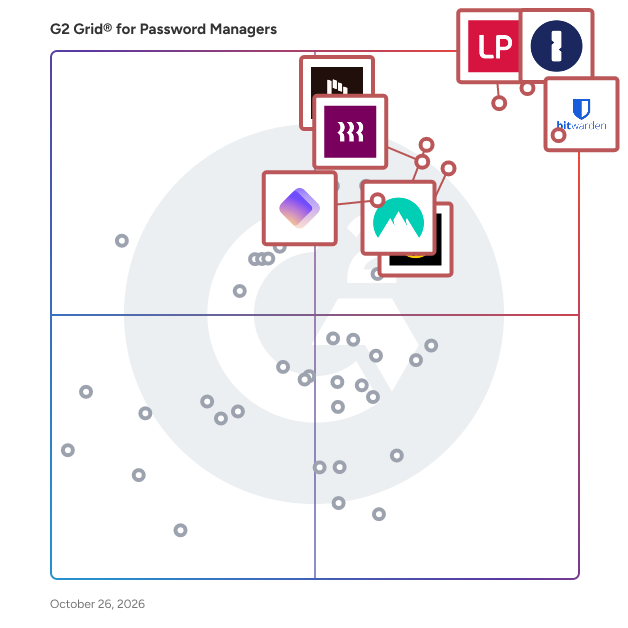
G2 Grid® for Password Managers

G2 Grid® for Password Managers plotting products by satisfaction and market presence

Highlighted products: 1Password, Bitwarden, LastPass, NordPass Business, Keeper Password Manager, Rippling IT, Dashlane Password Manager, and IT Glue.

Underlying data: [Grid® JSON](https://www.g2.com/categories/password-managers/grids.json?focus%5B%5D=1password&focus%5B%5D=bitwarden&focus%5B%5D=lastpass&focus%5B%5D=nordpass-business&focus%5B%5D=keeper-password-manager&focus%5B%5D=rippling-it&focus%5B%5D=dashlane-password-manager&focus%5B%5D=it-glue)

KeePass Pro

KeePass Pro is a password management and credential-sharing solution for Microsoft Teams that helps organizations securely store, organize, manage, and share passwords directly within their Microsoft 365 environment. The software is designed for teams and organizations that need a centralized way to manage shared accounts, software licenses, administrative credentials, Wi-Fi passwords, service accounts, and other sensitive information without relying on spreadsheets, emails, chat messages, or personal password managers. KeePass Pro operates directly within Microsoft Teams, allowing users to access passwords from the same workspace they already use for collaboration. Organizations use KeePass Pro to reduce the risks associated with password sharing and improve control over access to sensitive credentials. Users can create secure password vaults, manage both personal and shared passwords, define permissions, organize credentials into folders, and share access with authorized team members. The solution supports individual and collaborative password management scenarios while keeping credentials within the organization's Microsoft environment. KeePass Pro is built around security and access control. Documentation indicates that password vaults are stored within Microsoft technologies and protected using AES‑256 encryption and Microsoft Azure AD authentication. Organizations can maintain ownership of their credentials while restricting access to authorized users. Additional capabilities include password generation, password expiration management, activity logs, secure notes, favorites, recycle bins, and multi-owner vault management depending on the plan selected. The solution is intended for organizations seeking a password management platform integrated with Microsoft Teams. By centralizing credentials and reducing the need to send passwords through email or chat, KeePass Pro helps organizations improve security, simplify onboarding, and maintain better governance over shared access information. Key capabilities include: 1. Secure storage of personal and shared passwords within Microsoft Teams. 2. Password vaults with permission management and role-based access control. 3. AES‑256 encryption and Microsoft Azure AD authentication. 4. Password generation, expiration management, secure notes, folders, and activity logs. 5. Personal and team password management from a single Microsoft Teams workspace.

Average Rating: 5.0/5.0

Total Reviews: 1

How Do G2 Users Rate KeePass Pro?

  • Quick Login: 10.0/10 (Category avg: 9.1/10)

Who Is the Company Behind KeePass Pro?

  • Seller: Witivio
  • Year Founded: 2017
  • HQ Location: Colmar, Paris, Lyon, Marseille, Bordeaux, FR
  • Twitter: @witiviolive
    127 Twitter followers
  • LinkedIn® Page: www.linkedin.com
    53 employees on LinkedIn®

Who Uses This Product?

  • Company Size: 100% Small

What Are Recent G2 Reviews of KeePass Pro?

OmniPass Enterprise

OmniPass will automatically fill in your usernames and passwords for your favorite websites, logins and applications so you don’t have to remember them.

Average Rating: 4.5/5.0

Total Reviews: 1

How Do G2 Users Rate OmniPass Enterprise?

  • Admin Management: 10.0/10 (Category avg: 9.0/10)
  • Quick Login: 8.3/10 (Category avg: 9.1/10)
  • Two-Factor Authentication: 8.3/10 (Category avg: 9.1/10)

Who Is the Company Behind OmniPass Enterprise?

  • Seller: Softex
  • Year Founded: 1992
  • HQ Location: Austin, US
  • LinkedIn® Page: www.linkedin.com
    22 employees on LinkedIn®

Who Uses This Product?

  • Company Size: 100% Medium

What Are Recent G2 Reviews of OmniPass Enterprise?

Pleasant Password Server

Pleasant Password Server is an award-winning multi-user password management tool compatible with "KeePass Password Safe" and Bruce Schneier's "Password Safe", the most popular password management systems in the world.

Average Rating: 5.0/5.0

Total Reviews: 1

Who Is the Company Behind Pleasant Password Server?

Who Uses This Product?

  • Company Size: 100% Medium

What Do G2 Reviewers Say About Pleasant Password Server?

AI-generated summary from verified user reviews

Pros
  • Users find the cross-platform compatibility of Pleasant Password Server enhances integration and teamwork across different systems.
  • Users appreciate the user-friendly interface of Pleasant Password Server, enhancing their password management experience significantly.
  • Users appreciate the implementation ease of Pleasant Password Server, noting quick and professional initial setup experiences.
  • Users appreciate the seamless integrations of Pleasant Password Server, enhancing compatibility and security within their systems.
  • Users appreciate the process simplification in Pleasant Password Server, which enhances overall efficiency and user experience.
Cons
  • Users feel that the product lacks necessary features to function effectively as a full privilege access management solution.

What Are Recent G2 Reviews of Pleasant Password Server?

All Pass Hub

All Pass Hub is a password manager made for small teams, agencies, and startups. It makes managing and sharing passwords easy, safe, and organized for your whole team. Every password is locked and encrypted on your device before it is saved. Nothing is stored on our servers in a readable form. Your master password never leaves your device. We cannot see, access, or reset your vault — ever. Every plan, including the free one, comes with role-based access control. You decide who can see which passwords. You can safely share passwords with your team, clients, or freelancers. Only the passwords you choose to share are visible to them. Create separate vaults for different clients or projects. Everything stays neat and easy to find. Every action in your vault is logged. You can see who opened or changed a password and exactly when it happened. The browser extension fills in your login details automatically with just one click. You can also host All Pass Hub on your own server if you want full control over your data. The Free plan never expires. Premium is just $2 per user per month, and you get a full 30-day free trial with no credit card needed.

Who Is the Company Behind All Pass Hub?

AnonymPass

AnonymPass is a non-custodial crypto payment gateway built for merchants traditional processors reject. Accept USDT and USDC on Tron and Solana — funds go directly to your wallet, instantly. No KYC. No chargebacks. No holding periods. 0.25% flat fee, collected automatically on-chain. REST API, payment links, webhooks, and a WooCommerce plugin included.

Who Is the Company Behind AnonymPass?

AnyMP4 iPhone Password Manager for Mac

When working on your project, it is rather irritating that you forget the passwords to open a specific application. During daily life, it is difficult to remember all passwords to application or website, including mail account, website, application login key, Wi-Fi password, Apple ID password, etc. AnyMP4 iPhone Password Manager for Mac is a good password manager that can get you out of the trouble of remembering or managing your passwords. Key Functions: 1. Check passwords. Using AnyMP4 iPhone Password Manager for Mac, you can view all your application and website passwords on iOS devices and manage them in one product conveniently. For example, after connecting your iOS devices to Mac successfully, you can view passwords of Instagram, WhatsApp, YouTube, Facebook, Chrome, Apple ID, Wi-Fi, e-mail accounts, websites, applications, and more. 2. Export passwords as CSV format. Passwords on iOS devices are displayed as category lists. You can choose the passwords as you like or select the whole category or subcategory. Then you can save the passwords as CSV format on your Mac for further use. 3. View the scan history. It is a practical function when you own multiple iOS devices. It enables you to check the scan history recordings of any device as you want. Therefore, you won’t lose your important password information.

Who Is the Company Behind AnyMP4 iPhone Password Manager for Mac?

AxCrypt

AxCrypt is a SaaS-based encryption software designed to secure files and protect sensitive data. It provides AES-256 encryption, allowing users to encrypt, decrypt, and securely share files with individuals or groups. AxCrypt is widely used by businesses and individuals to safeguard confidential information, especially in industries like BFSI, healthcare, IT, education, manufacturing, and government sectors.

Average Rating: 4.1/5.0

Total Reviews: 5

How Do G2 Users Rate AxCrypt?

  • Has the product been a good partner in doing business?: 10.0/10 (Category avg: 9.1/10)

Who Is the Company Behind AxCrypt?

  • Seller: AxCrypt
  • Year Founded: 2004
  • HQ Location: Bro, SE
  • LinkedIn® Page: www.linkedin.com
    1 employees on LinkedIn®

Who Uses This Product?

  • Company Size: 80% Medium, 20% Large

What Are Recent G2 Reviews of AxCrypt?

What Are G2 Users Discussing About AxCrypt?

Backbone Secrets

Backbone Secrets is the digital equivalent of a bank vault for your most sensitive data. Add passwords and files, share them with your friends and co-workers — encrypted every step of the way.

Who Is the Company Behind Backbone Secrets?

  • Seller: Backbone
  • Year Founded: 2017
  • HQ Location: San Francisco, US
  • LinkedIn® Page: www.linkedin.com
    10 employees on LinkedIn®

BastionPass

BastionPass – a powerful password management solution for individuals, families, teams, and businesses. BastionPass was built out of the necessity to create an all-encompassing, collaborative platform, which can be utilized by family or coworkers in a way that other password manager solutions do not offer. Since inception, our focus has been to provide single identity management and sharing capabilities with a simple interface, creating a safe and effective solution for password management among individuals or team members. Say Goodbye to Password Fuss! With BastionPass you can save, organize, and share passwords with family or colleagues on different accounts using a single online identity. Sign in once with your master password and our plugin will log you in everywhere else automatically. Conveniently access, manage or share your passwords on any platform from the desktop (web application or browser plugin) or mobile (iOS or Android). Security you can trust. BastionPass infrastructure and software have been audited by Nettitude – an award-winning cybersecurity company. Our encryption methods meet or exceed the highest industry standards for security. Learn more on our security page.

Who Is the Company Behind BastionPass?

Bravura Pass

Password Manager is an integrated solution for managing credentials across systems and applications. It simplifies the management of passwords, tokens, smart cards, security questions and biometrics. Password Manager lowers IT support cost and improves the security of login processes. Password Manager includes password synchronization, self-service password and PIN reset, strong authentication, federated access, enrollment of security questions and biometrics and self-service unlock of encrypted drives.

Who Is the Company Behind Bravura Pass?

  • Seller: Bravura Security
  • Year Founded: 1992
  • HQ Location: Calgary, CA
  • Twitter: @OneBravura
    927 Twitter followers
  • LinkedIn® Page: www.linkedin.com
    63 employees on LinkedIn®
  • Phone: 1-403-223-0740

CommonKey

CommonKey is a B2B SaaS platform that allows organizations to easily and securely manage and share access to cloud-based web services.

Who Is the Company Behind CommonKey?

  • Seller: CommonKey
  • Year Founded: 2012
  • HQ Location: New York, US
  • Twitter: @CommonKey
    1,329 Twitter followers
  • LinkedIn® Page: www.linkedin.com
    2 employees on LinkedIn®
Brandon Summers-Miller
BS
Researched and written by Brandon Summers-Miller
Updated April 9, 2026