Best Other Office Software - Page 23

How Many Other Office Software Products Does G2 Track?

Total Products under this Category: 523

Category Stats (Sep 2026)

  • Average Rating: 4.4/5 The average rating of products in this category, based on all submitted ratings
  • Top Trending Product: NoteGPT (+0.81%) - Among all products in this category, NoteGPT recorded the largest rating increase compared to last month

Last updated: September 06, 2026

How Does G2 Rank Other Office Software Products?

Why You Can Trust G2's Software Rankings:

  • 30 Analysts and Data Experts
  • 1,100+ Authentic Reviews
  • 523+ Products
  • Unbiased Rankings

G2's software rankings are built on verified user reviews, rigorous moderation, and a consistent research methodology maintained by a team of analysts and data experts. Each product is measured using the same transparent criteria, with no paid placement or vendor influence. While reviews reflect real user experiences, which can be subjective, they offer valuable insight into how software performs in the hands of professionals. Together, these inputs power the G2 Score, a standardized way to compare tools within every category.

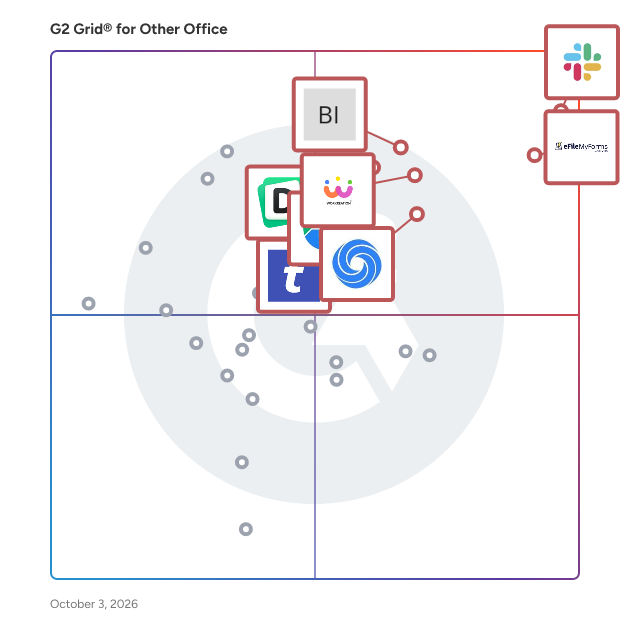
G2 Grid® for Other Office Software

G2 Grid® for Other Office Software plotting products by satisfaction and market presence

Highlighted products: Slack Connector for Jira, Google Drive & Docs for Confluence, Workreation®, NoteGPT, Drive Uploader, Diffchecker, TransferNow, and DocsAutomator.

Underlying data: [Grid® JSON](https://www.g2.com/categories/other-office/grids.json?focus%5B%5D=slack-connector-for-jira&focus%5B%5D=google-drive-docs-for-confluence&focus%5B%5D=workreation&focus%5B%5D=notegpt&focus%5B%5D=drive-uploader&focus%5B%5D=diffchecker&focus%5B%5D=transfernow&focus%5B%5D=docsautomator)

Markdown Exporter for Confluence

We are Atlassian Top Vendor trusted by customers all over the world. We develop productivity tools & integrations for Atlassian Confluence, Jira & Jira Service Management. Our current offerings include: Jupyter Notebook Viewer, Markdown Exporter for Confluence, Label Manager for Jira, HTML Macro for Confluence, Easy Gantt Charts etc.

Who Is the Company Behind Markdown Exporter for Confluence?

Markdown Extensions for Confluence

Appfire is a global software company with dozens of top-selling apps that help teams with Workflow Automation, Product Portfolio Management, IT Service Management, Document Management, Business Intelligence and Reporting, Administrative Tools, Agile, Developer Tools, and Publishing. After several major acquisitions over the last couple years, we're in the process of merging all our app brands into a single Appfire platform in order to provide a more streamlined experience for all Atlassian customers and partners. Be on the lookout for a growing number of apps in this account as we continue this work into 2022, and please feel follow along with our progress at appfire.com/one-appfire.

Who Is the Company Behind Markdown Extensions for Confluence?

  • Seller: Appfire
  • Year Founded: 2005
  • HQ Location: Boston, Massachusetts
  • Twitter: @Appfire
    1,632 Twitter followers
  • LinkedIn® Page: www.linkedin.com
    727 employees on LinkedIn®

MeetEstim

MeetEstim is a productivity and cost intelligence platform designed to help organizations regain control over how their teams collaborate. By connecting calendar data, employee cost rates, and project structures, MeetEstim reveals the true cost and time impact of meetings—across teams, departments, and entire organizations. While meetings are often seen as a necessary part of teamwork, they frequently become an invisible drain on productivity, budget, and employee energy. MeetEstim transforms this blind spot into actionable data by showing: -How much time teams spend in meetings – broken down by person, team, or project. -The financial cost of these meetings – using role-based hourly rates or real payroll data. -Which employees are overloaded with meetings – helping to prevent burnout and maintain sustainable work patterns.

Who Is the Company Behind MeetEstim?

Mekko Graphics

Mekko Graphics is a specialized charting software designed to help professionals in strategy, marketing, and finance create compelling, data-driven presentations. Seamlessly integrating with Microsoft PowerPoint and Excel, it offers a suite of over 30 unique chart types, including Marimekko, Bar Mekko, Waterfall, and Bubble charts. These tools enable users to transform complex datasets into clear, insightful visualizations, enhancing the effectiveness of their communications. Key Features and Functionality: - Diverse Chart Types: Access to more than 30 chart types, such as Marimekko, Bar Mekko, Waterfall, and Bubble charts, allowing for versatile data representation. - Seamless Integration: Fully integrates with Microsoft PowerPoint and Excel, enabling users to create and edit charts directly within these platforms. - Data Linking: Ability to link charts to Excel PivotTables and PowerPoint tables, ensuring that visualizations update automatically when underlying data changes. - Customization: Offers extensive customization options, including color palettes, labeling, and formatting, to align charts with brand standards and presentation aesthetics. - Productivity Enhancements: Features like Quick Launch for adding complex charts with a single click, and tools for grouping smaller data segments into an "Other" category to improve readability. Primary Value and User Solutions: Mekko Graphics addresses the challenge of presenting complex data in a clear and impactful manner. By providing specialized chart types and seamless integration with familiar software, it streamlines the creation of sophisticated visualizations, saving time and enhancing productivity. This empowers professionals to effectively communicate insights, support strategic decision-making, and deliver presentations that resonate with their audience.

Who Is the Company Behind Mekko Graphics?

MigrateEmails MBOX Migrator Tool

MigrateEmails MBOX Migrator is a trustworthy software that effectively facilitates bulk migration of MBOX files to any distinct format. This tool helps to convert MBOX files to PDF, PST, MSG, EML, EMLX, etc. Furthermore, it also helps to migrate MBOX file data to Gmail, Office 365, Yahoo, AOL, Thunderbird, IMAP, iCloud, etc. The Mail Filter feature is one of this software's unique attributes that help convert selective emails of a specific date range. The MBOX file migratory does not alter any data and maintains data integrity throughout the process. Its user-friendly interface makes it easy to use by both technical and non-technical users. The demo version of this software helps to convert 50 emails per folder. The MBOX Migrator is supported by all major and minor versions of Windows and Mac OS.

Who Is the Company Behind MigrateEmails MBOX Migrator Tool?

  • Seller: MigrateEmails
  • Year Founded: 2010
  • HQ Location: Noida, Uttar Pradesh
  • Twitter: @drssoftech
    2 Twitter followers
  • LinkedIn® Page: www.linkedin.com
    6 employees on LinkedIn®

Miraplacid PostScript Driver

Miraplacid PostScript Driver allows to print any documents to PostScript printers and to inject your content and PostScript commands into print jobs. After installation on your PC, Miraplacid PostScript Driver appears as a new printer in your system. With Add Printer installer feature, you may create several PostScript virtual printers which will produce PostScript output to different printer ports. Each printer has its own settings. These settings could be adjusted with Administration software. Miraplacid PostScript Driver default printer is connected to the FILE: printer port. If needed, you may switch it to use different port with a Printer Properties. Most popular use-case for this tool is to print documents to a PostScript printer on a prepared document form (template) previously designed and saved to the printer memory, with some kind of "run" command. Also, Miraplacid PostScript Driver could be useful to print stampts or watermarks on document pages.

Who Is the Company Behind Miraplacid PostScript Driver?

Miraplacid Text Driver

Miraplacid Text Driver extracts text from any printable documents. After installation on your PC, Miraplacid Text Driver appears as a new printer in your system. When document is printed, Miraplacid Text Driver opens a dialog with Preview Window. You can save resulting text to file, upload to FTP or HTTP server, email it as a message text or attachment, print it to a real printer, or send to Clipboard. You can save the extracted information as plain, formatted text or as XML or RSS / Atom feed for future processing in all installed codepages and Unicode. On Windows 10+, Miraplacid Text Driver 2025 includes OCR capability. It can extract text from image only print jobs or jobs which do not contain text. Miraplacid Text Driver adds an icon to the desktop. All the documents you drag and drop to this icon will be printed behind the scenes and processed by Miraplacid Text Driver. Turn "Auto Save Mode" on to handle text extraction and processing automatically, without waiting for your input, and without User Iterface.

Who Is the Company Behind Miraplacid Text Driver?

MixAudio

Finding the perfect music for your content has always been challenging, but what if AI could streamline this process to be effortless and quick? Introducing MixAudio, awarded in CES 2023 & GDA 2024, a Multimodal AI music generator – your fast and easy solution for music creation. Input your ideas through text, images, and audio to instantly receive four tailored tracks in seconds!

Who Is the Company Behind MixAudio?

  • Seller: MixAudio
  • Year Founded: 2020
  • HQ Location: Seoul, KR
  • Twitter: @mixaudio_
    1,331 Twitter followers
  • LinkedIn® Page: www.linkedin.com
    21 employees on LinkedIn®

Mobility Stream

Mobility Stream is a Gold Marketplace Partner specializing in enhancing Jira's capabilities through a suite of applications designed to improve productivity and data integration. Their flagship product, Mobility for Jira, offers a comprehensive mobile solution compatible with iOS, Android, tablets, and Mac, enabling teams to manage Jira tasks seamlessly across devices. Key Features and Functionality: - Mobility for Jira: Provides a mobile interface for Jira, allowing users to create, view, and manage issues on the go. It supports push notifications, offline access, and integrates with Jira Service Management Portal. - Google Sheets Integration: Enables real-time export of Jira issues to Google Sheets, facilitating advanced data analysis and reporting. - Excel Online Integration for Microsoft Office 365: Allows users to export Jira issues to Microsoft Excel and Office 365 Online, ensuring data is updated in real-time for comprehensive analysis. - Snowflake for Jira: Automates the export of Jira data to Snowflake, with options to select specific fields and maintain real-time synchronization. - Databricks for Jira: Facilitates the automatic export and real-time synchronization of Jira data to Databricks, enhancing data processing capabilities. Primary Value and User Solutions: Mobility Stream's products address the need for enhanced mobility, data integration, and real-time collaboration within Jira environments. By providing mobile access through Mobility for Jira, teams can manage tasks efficiently from any location, ensuring continuous productivity. The integration tools with platforms like Google Sheets, Excel Online, Snowflake, and Databricks empower users to perform in-depth data analysis and reporting, leading to informed decision-making and streamlined workflows. Overall, Mobility Stream's solutions bridge the gap between Jira and essential data platforms, optimizing project management and operational efficiency.

Who Is the Company Behind Mobility Stream?

MouseKey Recorder

MouseKey Recorder Advanced is professional software designed to better manage repetitive jobs and optimize time. Thanks to this program it is possible to automate operations on the computer, recording mouse movements, keystrokes and automatically opening/closing applications used during work. The recorded "macros" can also be scheduled to be started on specific days and times, without the presence of a person in front of the computer.

Who Is the Company Behind MouseKey Recorder?

  • Seller: Globosoft SRL
  • Year Founded: 2012
  • HQ Location: Roma, Italy
  • Twitter: @Globosoft_srl
    291 Twitter followers
  • LinkedIn® Page: www.linkedin.com
    3 employees on LinkedIn®

MultiExcerpt for Confluence

MultiExcerpt is a Confluence add-on developed by Appfire that enhances content management by enabling users to create, update, and share multiple excerpts across pages and spaces. This functionality streamlines document management by eliminating the need for manual copying and pasting, ensuring information consistency and improving productivity. Key Features and Functionality: - Reproduce and Reuse Content Easily: Combine multiple excerpts onto a single Confluence page, facilitating quick reproduction and reuse of content. - Single Source of Truth: Automatically synchronize content through the excerpt's source page, ensuring reliable, consistent, and up-to-date information. - Flexible Content Display: Create variables in the source macro to customize content according to specific needs. - Integration with Various Content Types: Include text, images, informational boxes, flow boards, and JIRA issues within excerpts. - Intuitive Content Search: Utilize the macro editor's automatic completion list to select excerpts without remembering their full names. Primary Value and User Solutions: MultiExcerpt addresses the challenge of maintaining consistent and efficient content management within Confluence. By providing tools to create and manage multiple excerpts, it reduces the time spent on manual content duplication and ensures that information remains consistent across various pages and spaces. This leads to improved productivity, better time management, and a more streamlined documentation process for users.

Who Is the Company Behind MultiExcerpt for Confluence?

  • Seller: Appfire
  • Year Founded: 2005
  • HQ Location: Boston, Massachusetts
  • Twitter: @Appfire
    1,632 Twitter followers
  • LinkedIn® Page: www.linkedin.com
    727 employees on LinkedIn®

Multi-Page TIFF Editor

Multi-Page TIFF Editor is a comprehensive solution for viewing, editing, annotating, and printing multipage TIFF files. Designed for both individual and corporate use, it offers a user-friendly interface combined with a robust set of features, making it an indispensable tool for managing TIFF documents. Key Features and Functionality: - Advanced Page Management: Easily add, delete, reorder, rotate, replace, and extract pages within multipage TIFF documents. Pages can be rearranged effortlessly using drag-and-drop functionality. - Image Editing Capabilities: Utilize the built-in bitmap editor for per-pixel editing, drawing, and adjusting color or contrast. External bitmap editors can also be integrated for enhanced editing options. - Annotations and Comments: Add text, sticky notes, highlight areas, color boxes, freehand remarks, and pre-defined stamps to each page. Annotations support Unicode characters and can be password-protected to restrict visibility. - Metadata Support: Read and write IPTC and XMP metadata, including headlines, descriptions, and keywords. Import custom metadata fields from XMP files and search files by metadata fields within folders and subfolders. - Optical Character Recognition (OCR: Recognize text within images and convert multiple pages or entire multipage TIFF files into single multipage RTF files. - Barcode Recognition and Generation: Generate and insert barcodes into documents and recognize existing barcodes for efficient document management. - File Conversion: Convert between TIFF and PDF formats, including PDF to TIFF raster conversion and raster editing of PDF files. - Batch Processing: Perform batch conversions for "TIFF to PDF," "TIFF to TIFF," and "PDF to TIFF" operations, streamlining workflow processes. - Scanning Integration: Support for multipage scanning using TWAIN or WIA interfaces directly into multipage TIFF or PDF files. - Efficient File Handling: Open and process large TIFF files up to 4 GB quickly using multi-thread technology, enhancing performance for sizable documents. Primary Value and User Solutions: Multi-Page TIFF Editor addresses the challenges associated with managing and editing multipage TIFF documents by providing a comprehensive suite of tools that streamline document workflows. Its advanced features, such as OCR, metadata management, and annotation capabilities, make it particularly valuable for professionals in sectors like government agencies, archives, healthcare facilities, financial institutions, and legal firms. By offering efficient file handling, extensive editing options, and robust security features, it enhances productivity and ensures the effective management of TIFF documents.

Who Is the Company Behind Multi-Page TIFF Editor?

  • Seller: ADEO Imaging
  • Year Founded: 2014
  • HQ Location: Tallinn, EE
  • Twitter: @awscloud
    2,232,483 Twitter followers
  • LinkedIn® Page: www.linkedin.com
    2 employees on LinkedIn®

My Efact: Paperless Office

Welcome to My Efact Paperless Office, My Efact is a paperless office system that gives you scanning, secure email, archiving, and all the other features of a powerful online document management system.

Who Is the Company Behind My Efact: Paperless Office?

Neeraja Prakash
NP
Researched and written by Neeraja Prakash
Updated June 16, 2025