Best Other Office Software - Page 15

How Many Other Office Software Products Does G2 Track?

Total Products under this Category: 523

Category Stats (Sep 2026)

  • Average Rating: 4.4/5 The average rating of products in this category, based on all submitted ratings
  • Top Trending Product: NoteGPT (+0.81%) - Among all products in this category, NoteGPT recorded the largest rating increase compared to last month

Last updated: September 06, 2026

How Does G2 Rank Other Office Software Products?

Why You Can Trust G2's Software Rankings:

  • 30 Analysts and Data Experts
  • 1,100+ Authentic Reviews
  • 523+ Products
  • Unbiased Rankings

G2's software rankings are built on verified user reviews, rigorous moderation, and a consistent research methodology maintained by a team of analysts and data experts. Each product is measured using the same transparent criteria, with no paid placement or vendor influence. While reviews reflect real user experiences, which can be subjective, they offer valuable insight into how software performs in the hands of professionals. Together, these inputs power the G2 Score, a standardized way to compare tools within every category.

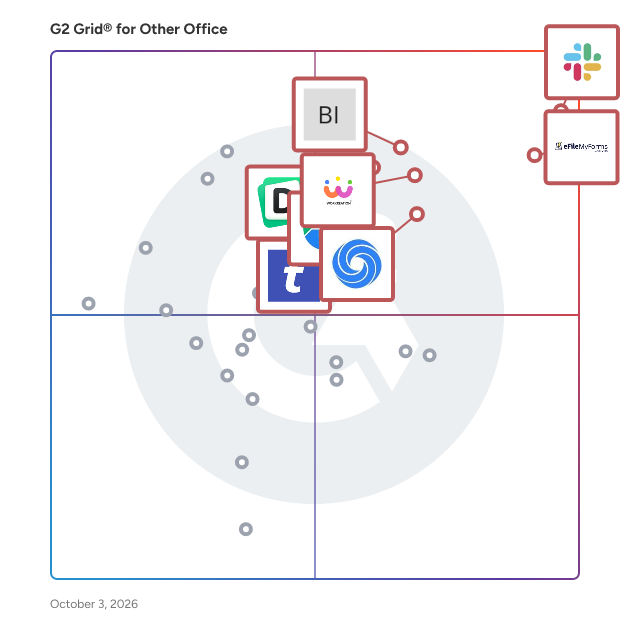
G2 Grid® for Other Office Software

G2 Grid® for Other Office Software plotting products by satisfaction and market presence

Highlighted products: Slack Connector for Jira, Google Drive & Docs for Confluence, Workreation®, NoteGPT, Drive Uploader, Diffchecker, TransferNow, and DocsAutomator.

Underlying data: [Grid® JSON](https://www.g2.com/categories/other-office/grids.json?focus%5B%5D=slack-connector-for-jira&focus%5B%5D=google-drive-docs-for-confluence&focus%5B%5D=workreation&focus%5B%5D=notegpt&focus%5B%5D=drive-uploader&focus%5B%5D=diffchecker&focus%5B%5D=transfernow&focus%5B%5D=docsautomator)

Cisdem PDF Password Remover

Cisdem PDF Password Remover is a professional yet easy-to-use tool designed to help you regain access to password-protected PDFs in no time. Whether you’ve forgotten the password, received a restricted file, or need to edit a secured document, this software efficiently removes both user passwords (required to open the file) and owner passwords (restricting printing, editing, or copying). Key Features: Removes both owner and user passwords Batch processing for multiple files High decryption speed Supports all PDF versions Simple, intuitive interface

Who Is the Company Behind Cisdem PDF Password Remover?

Claras.ai

Claras AI automates time-consuming file notes, freeing financial advisers to focus on clients. Generate high-quality, compliant, file notes and draft client-ready emails in minutes. Reclaim valuable time to enhance client experiences and grow your financial advice practice.

Who Is the Company Behind Claras.ai?

Cloud Ref

Cloud Ref provides rich link previews for AWS console links and ARNs in Slack - you get handy summaries of your AWS resources, as you discuss them, right in your Slack chat. Help your team get up to speed, deploy faster and solve issues sooner.

Who Is the Company Behind Cloud Ref?

CogVoice

CogVoice™ Call Screener is an AI-driven call management solution developed by Norwood Systems, designed to empower and protect mobile operator subscribers. By leveraging advanced natural language processing technology, it revolutionizes the call screening experience, ensuring seamless and intent-driven dialogues for effortless communication. Key Features and Functionality: - AI-Powered Call Screening: Utilizes artificial intelligence to swiftly identify and screen spam and potentially fraudulent calls, offering real-time protection to subscribers. - Real-Time Call Monitoring: Allows subscribers to view conversations on their devices and join calls instantly, providing enhanced control over their communication experience. - In-Call Security Layer: Delivers secure communication through an innovative in-call security layer, filtering out scams and spam to maintain network integrity. - Spam Call Management: Empowers users to mute and auto-redirect calls from identified spammers or scammers to an in-app Spam folder, effectively eliminating unwanted calls. Primary Value and User Solutions: CogVoice™ Call Screener addresses the growing concern of spam and scam calls by providing mobile operators with a robust tool to safeguard their subscribers. By integrating this solution, operators can enhance customer satisfaction through secure and controlled communication experiences. Additionally, the platform offers opportunities for revenue monetization by improving subscriber acquisition and retention, thereby differentiating the operator's voice services in a competitive market.

Who Is the Company Behind CogVoice?

Column View Permission App

BoostSolutions’ Column View Permission App allows you to set columns as hidden or read-only for users or groups in SharePoint Online lists, restricting them from accessing or modifying certain columns while creating or editing an item, or in list views. You can set individual column level permissions based on the values of other columns, make it easy to determine if and when columns should be hidden or read-only. Additionally, you can hide specific views in the list, ensuring they remain inaccessible to users. By disabling the "Create new view" option, users are prevented from creating new views. Furthermore, BoostSolutions’ Column View Permission enables you to disable certain actions to prevent user access. These actions include, but are not limited to: Including: • Edit in grid view • Export • Filter by (on column headers or in the Filter pane) • Gallery view • Format current view • Add or remove fields The Column View Permission App is now available for SharePoint Online! By typing 'Column View Permission,' you can easily find and add it to your site and start a 30-day free trial. To subscribe or learn more, please visit our website at https://www.boostsolutions.com or contact our sales team at sales@boostsolutions.com. For any questions or assistance, please don't hesitate to reach out to our support team at support@boostsolutions.com.

Who Is the Company Behind Column View Permission App?

  • Seller: BoostSolutions
  • Year Founded: 2007
  • HQ Location: Beijing, CN
  • Twitter: @SharePointBoost
    288 Twitter followers
  • LinkedIn® Page: www.linkedin.com
    29 employees on LinkedIn®

Common Surface

The future of work is flexible work. Make sure your company is ready with a platform to boost productivity, to keep your employees happy and to create a more forward-facing dynamic office culture. Common Surface is a platform for managing your office space and employee’s schedules efficiently, allowing them to have a flexible balance between remote and in-person working. We take all factors, preferences and requirements into account to create the best custom working a schedule for each employee every week to maximise productivity, retain employees, save on office space, and have full insight into remote and collaboration trends.

Who Is the Company Behind Common Surface?

Comm Screen

What is Comm Screen? Comm Screen is a sleek, web-and-TV-based digital communication tool designed to display real-time, visual messages and alerts on shop-floor screens from a centralized location. As part of OrcaLean’s lean manufacturing suite, it effortlessly connects smart TVs, monitors, and tablets across your plant—ensuring critical updates reach every operator, shift, and site instantly. 🛠️ Key Features 🔹Multi-screen control: Remotely broadcast messages, videos, images, and alerts to unlimited displays via a single web console . 🔹Real-time updates: Instantly deploy production goals, safety messages, quality alerts, and SOP visuals across all screens—no manual uploads needed. 🔹Role-based access & security: Grant defined permissions to admins, supervisors, and operators to ensure data integrity and visibility controls . 🔹Seamless collaboration: Connect shopfloor communications to suppliers, OEMs, and Tier ­1/2 partners for coordinated, real-time visibility across the value chain. 🔹Industrial-grade deployment: Plug-and-play integration with smart TVs, industrial panels, and desktop monitors—available as AWS-hosted, cloud, hybrid, or on-prem installs. ✅ Key Benefits of Using Comm Screen 🔹 Improve Shop-Floor Communication Comm Screen ensures real-time visibility of critical updates by broadcasting announcements, KPIs, quality alerts, and shift instructions directly to digital screens across the factory. This eliminates miscommunication and ensures every team member stays aligned—without relying on paper memos or word of mouth. 🔹 Accelerate Response Time to Issues By instantly displaying quality alerts, safety concerns, or production deviations, Comm Screen reduces reaction time. Teams can quickly address issues as they occur, leading to faster root-cause resolution, minimized downtime, and improved first-time quality (FTQ) metrics. 🔹 Standardize Visual Management Across Sites Comm Screen enables consistent visual management across multiple plants. Whether it's a safety update, daily SQDC metrics, or a training video, messages are uniform, trackable, and controlled—helping build a lean visual workplace. 🔹 Enhance SOP and Training Delivery Display standard operating procedures (SOPs), quick training videos, or instructional visuals at the point of use. This supports just-in-time learning, reduces onboarding time, and improves operator compliance and work accuracy. 🔹 Engage Teams with Live KPI Dashboards Real-time display of SQDC, OEE, or takt time performance helps drive accountability and engagement. Operators and supervisors stay connected to key production KPIs, supporting a proactive culture of continuous improvement. 🔹 Simplify Communication With Remote & External Teams Share updates with OEM partners, suppliers, or sister plants in real time. Comm Screen acts as a centralized platform to ensure supply chain communication and alignment, especially during changeovers or product launches. 💫 Best For: Manufacturers needing real-time shop floor communication, KPI visibility, and lean visual management. Ideal for plant managers, CI leaders, and quality/safety teams.

Who Is the Company Behind Comm Screen?

Compliance Tracker 365

Compliance Tracker 365 is a SharePoint app that allows documents and pages to be targeted to individual or groups and tracked for reading. Targeting is setup by applying tags to content and people. Where they are the same, content is shown for reading. This approach provides a fast and flexible solution, requiring minimum administration and providing maximum visibility of content.

Who Is the Company Behind Compliance Tracker 365?

Conference Management Software

Conference management, abstract submission, conference websites, project management, polls, and surveys. We handle everything you need for your conference in one software package. And for one price. There is never a question about how much our product costs.

Who Is the Company Behind Conference Management Software?

Connected Software

Connected Software is a leading provider of software for client-side email and address book migration, including solutions for Microsoft Outlook, Gmail, Microsoft Exchange, AOL, and Lotus Notes. Connected Software is credited with a long list of innovations in the industry, including being the first to offer migration support for Microsoft Outlook, Microsoft Outlook Express, Netscape 4, and AOL email and address books.

Who Is the Company Behind Connected Software?

Connector for Google Drive & Confluence

The Connector for Google Drive & Confluence is a powerful integration tool designed to seamlessly embed Google Drive files directly into Confluence pages. This integration enhances collaboration by allowing users to access, preview, and edit Google Drive documents without leaving the Confluence environment. By centralizing document management, teams can reduce context switching and improve productivity. Key Features and Functionality: - Embed Google Drive Files: Directly insert Google Docs, Sheets, Slides, and other file types into Confluence pages, enabling users to view and edit documents within the Confluence interface. - Google File Picker Integration: Utilize the Google file picker to easily select and display files from Google Drive, including support for Team Drives. Users can sort, search, and upload files directly from Confluence. - Folder Embedding: Embed entire Google Drive folders into Confluence pages, providing a comprehensive view of all relevant documents and facilitating efficient document repository management. - Seamless Authentication: Authenticate using standard Google OAuth, allowing for easy client-side authentication and the ability to switch between multiple G Suite accounts. Primary Value and User Benefits: The Connector for Google Drive & Confluence addresses the challenge of managing documents across multiple platforms by integrating Google Drive's robust document storage capabilities with Confluence's collaborative workspace. This integration eliminates the need for users to switch between applications, thereby streamlining workflows and enhancing team productivity. By providing a centralized document management system accessible directly within Confluence, teams can ensure that all members have immediate access to the latest versions of documents, reducing errors and improving collaboration efficiency.

Who Is the Company Behind Connector for Google Drive & Confluence?

  • Seller: ServiceRocket
  • Year Founded: 2001
  • HQ Location: Palo Alto, US
  • Twitter: @ServiceRocket
    2,154 Twitter followers
  • LinkedIn® Page: www.linkedin.com
    250 employees on LinkedIn®

Contactous

Contactous is a platform designed to convert business cards to revenue and uncover quality leads and relationships in organizations by providing clean data from all business cards.

Who Is the Company Behind Contactous?

  • Seller: Contactous Ptd Ltd
  • Year Founded: 2016
  • HQ Location: Singapore, SG
  • Twitter: @contactousapp
    14 Twitter followers
  • LinkedIn® Page: linkedin.com
    4 employees on LinkedIn®

Content Chooser

The Right Content, For Every Task. Your Content Hub for All Your Shared and Organizational Content Across Microsoft 365! Are you struggling to keep track of and access the latest versions of your content across multiple platforms? Do you waste time searching for the most up-to-date product images, sales pitches, or quick responses? The Content Chooser makes it simple for users to access and organize their content no matter where they are working from. With this product, users can quickly insert the latest versions of corporate content like product pictures, sales messages, legal terms, and pre-made responses into their work, whether in documents, emails, presentations or in browser tasks. This product provides a one-stop solution, allowing users to easily manage and access their latest content across various applications. This ensures that everyone in the organization is always using the most up-to-date and consistent content, improving overall productivity, efficiency and branded communication. Key Benefits - Improved Content Management: Get all your latest content in one place, ready to use across any platform. - Save Time: Quickly find and use the latest content without the hassle, letting you focus on more important tasks. - Enhanced Consistency: Improve communication within the organization by using the most up-to-date and standardized content. With the Content Chooser, managing your shared content becomes a simpler, more efficient process. This means less time wasted and more time spent on what's important, with consistent and current content across all your applications.

Who Is the Company Behind Content Chooser?

  • Seller: officeatwork
  • Year Founded: 1975
  • HQ Location: Zug, CH
  • Twitter: @officeatwork365
    62 Twitter followers
  • LinkedIn® Page: www.linkedin.com
    15 employees on LinkedIn®
  • Ownership: Martin S. Seifert
Neeraja Prakash
NP
Researched and written by Neeraja Prakash
Updated June 16, 2025