Best Other Office Software - Page 14

How Many Other Office Software Products Does G2 Track?

Total Products under this Category: 629

Category Stats (Nov 2026)

  • Average Rating: 4.41/5 (↑0.01 vs Oct 2026) The average rating of products in this category, based on all submitted ratings
  • Top Trending Product: Sider (+7.14%) - Among all products in this category, Sider recorded the largest rating increase compared to last month

Last updated: November 01, 2026

How Does G2 Rank Other Office Software Products?

Why You Can Trust G2's Software Rankings:

  • 30 Analysts and Data Experts
  • 1,300+ Authentic Reviews
  • 629+ Products
  • Unbiased Rankings

G2's software rankings are built on verified user reviews, rigorous moderation, and a consistent research methodology maintained by a team of analysts and data experts. Each product is measured using the same transparent criteria, with no paid placement or vendor influence. While reviews reflect real user experiences, which can be subjective, they offer valuable insight into how software performs in the hands of professionals. Together, these inputs power the G2 Score, a standardized way to compare tools within every category.

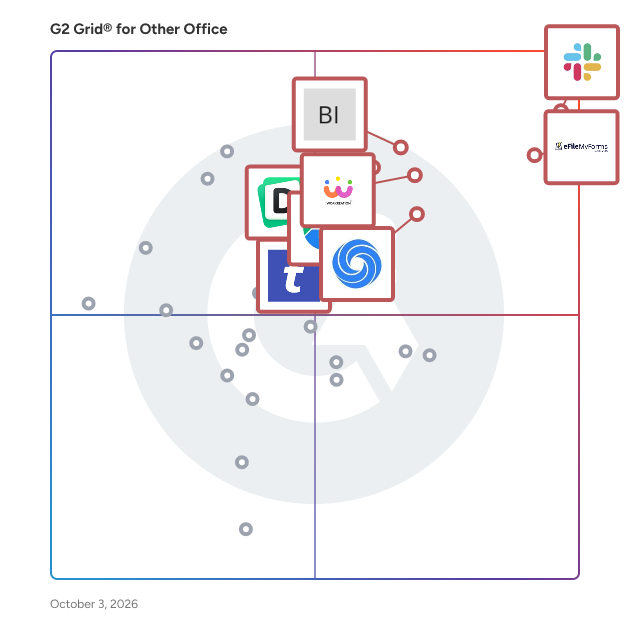
G2 Grid® for Other Office Software

G2 Grid® for Other Office Software plotting products by satisfaction and market presence

Highlighted products: Slack Connector for Jira, Sovos eFileMyForms, Google Drive & Docs for Confluence, Workreation®, Drive Uploader, NoteGPT, TransferNow, and Diffchecker.

Underlying data: [Grid® JSON](https://www.g2.com/categories/other-office/grids.json?focus%5B%5D=slack-connector-for-jira&focus%5B%5D=sovos-efilemyforms&focus%5B%5D=google-drive-docs-for-confluence&focus%5B%5D=workreation&focus%5B%5D=drive-uploader&focus%5B%5D=notegpt&focus%5B%5D=transfernow&focus%5B%5D=diffchecker)

BenchPulse

BenchPulse is a hockey stat-tracking application for teams and clubs. Coaches, team managers and volunteers use it to record games live from the bench and review team, player and goalie statistics afterward. It is designed for competitive rep teams. During a game, users log events on an interactive rink diagram on a phone or tablet, including shots, goals, assists, saves, penalties and face-offs. Plus/minus and offside and icing tracking are optional settings. Each event is recorded with its location on the ice. After a game, BenchPulse generates game summaries with box scores, shot maps, shot share and face-off results by zone and dot. Season statistics include power play and penalty kill percentages, with splits by home and away, opponent and game type. Player and goalie pages show game logs, shot maps and save percentage. A head-to-head preview summarizes past results against an upcoming opponent. Access is invite-only, with separate admin and viewer roles controlled by the team. Teams can export their game data to Excel or CSV. BenchPulse is free to use and runs in a web browser on phones, tablets and laptops.

Who Is the Company Behind BenchPulse?

Black Ice

Black Ice Software’s Impact Product line includes Printer Drivers and Document Converters, Fax Applications, RDP Printing solutions, and Tiff Viewer for viewing documents.

Who Is the Company Behind Black Ice?

  • Seller: Black Ice
  • Year Founded: 1989
  • HQ Location: Boca Raton, US
  • LinkedIn® Page: www.linkedin.com
    19 employees on LinkedIn®

AI can help you find the answers. G2 helps you trust them.

Connect G2 to Claude or ChatGPT for answers grounded in G2's trusted reviews, comparisons, and pricing from real user insights.

How it works

Bodno ID Card Software

Bodno ID Card Software is ID card software for designing and printing photo ID cards, employee badges, student IDs and visitor badges on plastic ID card printers. It runs on Windows (including Windows 11) and macOS. Start from a ready-made template. Add photos from a webcam or scanner, signatures, 1D barcodes and magnetic stripe data, and save every cardholder in the built-in database so you can reprint a card quickly. Higher editions add more: Silver adds QR codes and Excel/CSV import; Gold adds 2D barcodes, automatic face crop and MS Access/SQLite databases; Platinum adds RFID, smart card and DESFire encoding, ODBC SQL databases, and user permissions with audit logs; Diamond adds a network license for up to 16 PCs and a web print server. RFID and smart card encoding, auto-print, the Diamond network license and the web print server are Windows only. You can use it as employee badge software, student ID software, photo ID software or a badge maker for visitor passes. It works with ID card printers from Bodno, Magicard, Zebra, Fargo, Seaory, Matica and Evolis. The free trial has no time limit. Cards print with a Bodno watermark until you enter an activation code. Each license covers one computer and is sold Monthly, Yearly, One-Time (3 years) or Lifetime. Activation codes arrive by email within 15 minutes, every edition includes free updates, and card data stays on your own computer or network.

Who Is the Company Behind Bodno ID Card Software?

  • Seller: Bodno
  • Year Founded: 2017
  • HQ Location: Lakewood, US
  • LinkedIn® Page: www.linkedin.com
    5 employees on LinkedIn®

Boost Reviews

Boost Reviews is a comprehensive platform designed to help businesses actively manage and enhance their online reputation by increasing the number of positive customer reviews. By proactively requesting feedback through automated emails and SMS, businesses can significantly boost their review count, thereby improving their credibility and attracting more customers. Key Features and Functionality: - Automated Review Requests: Send personalized emails or SMS messages to past customers, encouraging them to leave reviews. - AI-Powered Response System: Utilize artificial intelligence to generate prompt and appropriate replies to both positive and negative reviews, streamlining the response process. - Centralized Review Analytics: Monitor and analyze reviews from various platforms through a unified dashboard, providing valuable insights into customer feedback and areas for improvement. - Review Showcasing Tools: Easily display positive reviews on your website and social media channels using customizable widgets, enhancing your brand's online presence. - Negative Review Management: Intercept negative reviews by directing them to private channels, allowing businesses to address issues directly with customers before they become public. Primary Value and Solutions Provided: Boost Reviews empowers businesses to take control of their online reputation by actively soliciting and managing customer feedback. This proactive approach leads to an increased number of positive reviews, which builds trust with potential customers and enhances the company's credibility. By effectively managing negative feedback privately, businesses can resolve issues promptly, preventing potential damage to their reputation. The platform's analytics and showcasing tools further aid in understanding customer sentiments and promoting positive experiences, ultimately driving higher customer engagement and increased revenue.

Who Is the Company Behind Boost Reviews?

Bridges

Who Is the Company Behind Bridges?

  • Seller: Babylon Software Ltd.
  • Year Founded: 1997
  • HQ Location: Tel Aviv-Yafo, IL
  • Twitter: @babylonsoftware
    13 Twitter followers
  • LinkedIn® Page: www.linkedin.com
    330 employees on LinkedIn®

BrightCrowd

BrightCrowd helps organizations build stronger culture through simple digital community books. Companies, schools and non-profits leverage these digital books to welcome new members to their organization and strengthen the connections among their people. BrightCrowd books are frequently used in conjunction with orientations, year-end updates, DE&I groups, team events and alumni networks.

Who Is the Company Behind BrightCrowd?

BriskTool

227 free online tools for PDF, image, code, content, and more. Browser-based processing, no file uploads.

Who Is the Company Behind BriskTool?

Broadridge Welcome Kits and ID Cards

Provide members with the materials they need – in print and digital. By creating customizable packages to go along with the ID card, such as a welcome letter, privacy notice and other onboarding materials, your communications reinforce your connection to members.

Who Is the Company Behind Broadridge Welcome Kits and ID Cards?

BSC - Bank Statement Converter

Bank Statement Converter turns PDF bank statements into Excel (.xlsx) and CSV files, with every transaction on its own row. Dates come out as real dates and amounts as numbers, so the file is ready to sort, total or import into QuickBooks Online or Xero. Before you download, you see the whole table in a preview. The balance check compares each row with the statement's running balance and shows which rows don't add up. Most issues come from a description that wrapped onto two lines, a row lost at a page break, or a credit read as a debit, and you can fix them right there. Some statements have layouts the converter can't read on its own. For those, manual mode lets you draw a box around the transactions, move the dividers between columns, name each column and set its type. Preview and manual mode come with every plan, including the free ones. Bookkeepers, accountants, small business owners, mortgage brokers and real estate investors use it to stop retyping statements by hand. You can convert 5 pages a day without an account, or 10 with a free one. Pro adds OCR for scanned statements and batch conversion. Your statement is deleted after conversion. We never look at it, sell it or use it to train AI. Key features: • PDF bank statement to Excel (.xlsx) and CSV • Table preview before download • Balance check against the running balance • Manual mode: draw a box, adjust column dividers, name columns, set column types • OCR for scanned statements (Pro) • Batch conversion of several statements (Pro) • Files ready for QuickBooks Online and Xero import • Files deleted after conversion, never sold or used to train AI

Who Is the Company Behind BSC - Bank Statement Converter?

BuildPrompt

BuildPrompt is an intelligent and reliable file explorer, capable of navigating through PDF and Word files, comprehending their contents and giving clear explanations in any language the user understands. Simply upload your file, regardless of complexity and BuildPrompt swiftly analyses and interprets the document, then no matter how specific, BuildPrompt uses the power of AI to generate accurate and informative responses.

Who Is the Company Behind BuildPrompt?

Bulk MBOX to PST Converter Software

Bulk MBOX to PST Converter Software is a Windows mbox to pst converter for people moving their mail from Thunderbird to Outlook. Outlook has no way to read an mbox mailbox on its own: the import wizard knows PST and CSV, nothing else. The program takes the mailboxes you exported and writes a standard Unicode PST that Outlook mounts as a regular data file. All of the work happens offline on your PC, and Outlook can stay closed the whole time. 🛠️ How to use 1. Launch the program and load one mbox file or a whole batch. Thunderbird saves every mail folder as a separate file, most often without any extension. 2. Decide on the output. By default you get a separate PST for every mailbox. Tick the merge box to combine them, and each source lands in a top-level folder of its own, so two folders called Inbox stay apart. 3. Choose where the result should go and press start. 4. Back in Outlook, attach the file through the Open Outlook Data File command and browse your mail. ✅ Why IT and office teams pick it - Mail never leaves the workstation. There is no upload step and no third-party server. - Message subjects, both HTML and text versions of the body, sender and recipient fields, dates, the read or unread state and every attachment come across byte for byte. - This mbox to pst converter parses the raw mailbox stream and skips the .msf index that Thunderbird keeps, so an archive with a broken index or a few manual edits still converts. - A dozen mailboxes can go through in a single mbox to pst run instead of one at a time. - The output follows the Unicode PST layout, and we checked it by opening the files in Outlook 2016. 👥 Who uses it - Home users switching from Thunderbird who want ten years of family mail available in Outlook. - Small offices that standardize on Outlook and need a PST for each employee's old mailbox. - Anyone who inherited an archive from Eudora, Pine or mutt, Postbox, or an Apple Mail export and no longer has the original client. - IT staff who want a plain mbox to pst converter for a one-time office migration. ❓ FAQ Is there a way to open an mbox mailbox in Outlook without converting it? No. Outlook reads PST and CSV only, so you convert mbox to pst first and then attach the PST. What is the easiest way to get Thunderbird mail into Outlook? Load the mailbox files from your Thunderbird profile, choose merged or separate output, save the PST and attach it in Outlook. Does the PST open in Outlook for Microsoft 365? It is a Unicode PST, the same kind of data file every desktop Outlook since version 2010 uses. Our own test ran in Outlook 2016. Can several mailboxes be processed together? Yes. Load them all at once and pick a single merged PST or one PST per mailbox. 💻 Free trial, no sign-up or account. Works on Windows 11, 10, 8.1, 8 and 7, both 32 and 64 bit, with 4 GB of RAM.

Who Is the Company Behind Bulk MBOX to PST Converter Software?

Bulk URL Opener

A Bulk URL Opener is a tool designed to open multiple URLs at once, helping users save time and streamline their online workflow. Instead of opening each link individually in separate browser tabs or windows, users can simply paste a list of URLs into the tool, and it will automatically open all the links in different tabs at the same time. This tool is particularly beneficial for tasks such as SEO audits, where professionals need to visit various websites for analysis, or for digital marketers who need to review several landing pages or campaign materials quickly. Content creators and researchers also find it useful for gathering information from multiple online sources at once. Overall, the Bulk URL Opener simplifies the process of browsing numerous websites, making it an essential tool for anyone looking to boost productivity and improve efficiency in their online tasks.

Who Is the Company Behind Bulk URL Opener?

Bulk Zip & Unzip

The Bulk Zip Unzip App by BoostSolutions allows you to easily package multiple documents and folders into a ZIP file directly within a SharePoint Online document library. You can save the ZIP file either in the current location or in an existing folder of your choice. The app also enables you to extract (unzip) files and folders from a ZIP archive while preserving the original folder structure. You can select a destination location—whether it’s the current directory or another folder within the document library. With Bulk Zip Unzip, there’s no need to download documents one by one. Instead, you can download multiple documents, folders, or document sets as a single ZIP file with just one click, streamlining your workflow and saving valuable time. The Bulk Zip Unzip App is now available for SharePoint Online! Simply search for "Bulk Zip Unzip" to find and add it to your site, and start your 30-day free trial today. To subscribe or learn more, visit our website: www.boostsolutions.com For sales inquiries, contact us at sales@boostsolutions.com For support, reach out to support@boostsolutions.com

Who Is the Company Behind Bulk Zip & Unzip?

  • Seller: BoostSolutions
  • Year Founded: 2007
  • HQ Location: Beijing, CN
  • Twitter: @SharePointBoost
    288 Twitter followers
  • LinkedIn® Page: www.linkedin.com
    29 employees on LinkedIn®
Neeraja Prakash
NP
Researched and written by Neeraja Prakash
Updated June 16, 2025