Best Knowledge Base Software - Page 15

How Many Knowledge Base Software Products Does G2 Track?

Total Products under this Category: 316

Category Stats (Oct 2026)

  • Average Rating: 4.49/5 (↑0.01 vs Sep 2026) The average rating of products in this category, based on all submitted ratings
  • Top Trending Product: Fluid Topics (+0.66%) - Among all products in this category, Fluid Topics recorded the largest rating increase compared to last month

Last updated: October 26, 2026

How Does G2 Rank Knowledge Base Software Products?

Why You Can Trust G2's Software Rankings:

  • 30 Analysts and Data Experts
  • 104,900+ Authentic Reviews
  • 316+ Products
  • Unbiased Rankings

G2's software rankings are built on verified user reviews, rigorous moderation, and a consistent research methodology maintained by a team of analysts and data experts. Each product is measured using the same transparent criteria, with no paid placement or vendor influence. While reviews reflect real user experiences, which can be subjective, they offer valuable insight into how software performs in the hands of professionals. Together, these inputs power the G2 Score, a standardized way to compare tools within every category.

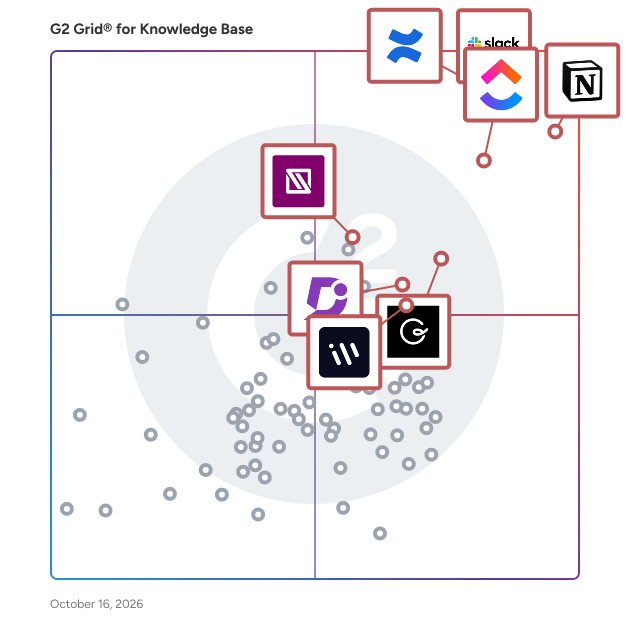
G2 Grid® for Knowledge Base Software

G2 Grid® for Knowledge Base Software plotting products by satisfaction and market presence

Highlighted products: Slack, Notion, Confluence, ClickUp, Guru, Document360, IT Glue, and Workvivo.

Underlying data: [Grid® JSON](https://www.g2.com/categories/knowledge-base-software/grids.json?focus%5B%5D=slack&focus%5B%5D=notion&focus%5B%5D=confluence&focus%5B%5D=clickup&focus%5B%5D=guru&focus%5B%5D=document360&focus%5B%5D=it-glue&focus%5B%5D=workvivo)

FactNexus

FactNexus is an Australian software services provider specializing in knowledge graph technologies to enhance structured knowledge management and generative AI applications. Their suite of tools enables enterprises to capture, formalize, and utilize their internal knowledge effectively, facilitating informed decision-making and the development of AI-driven solutions. Key Features and Functionality: - Knowledge Capture: Tools that allow domain experts to contribute to structured knowledge within the enterprise. - Formalization: Creation of formal knowledge structures to simplify decision-making and address complex problems. - Application Development: Utilization of formalized knowledge to implement AI and traditional applications tailored to enterprise needs. - AI Governance: Applications that provide transparent and understandable controls and guidance for AI usage. Primary Value and Solutions: FactNexus addresses the challenge of managing and leveraging enterprise knowledge by offering tools that transform unstructured data into structured, actionable insights. Their solutions empower organizations to build and maintain knowledge graphs, integrate them with generative AI models like ChatGPT, and implement AI governance frameworks. This approach enhances productivity, reduces biases and inaccuracies in AI outputs, and ensures that AI applications align with organizational goals and compliance requirements.

Who Is the Company Behind FactNexus?

  • Seller: FactNexus
  • Year Founded: 2010
  • HQ Location: Sydney
  • Twitter: @AskKayBot
    5 Twitter followers
  • LinkedIn® Page: www.linkedin.com
    1 employees on LinkedIn®

FAQ Ally

FAQ Ally turns your company’s documents into a practical AI assistant that employees can chat with to get instant, accurate answers. Instead of digging through folders, PDFs, or outdated knowledge bases, teams can simply ask a question and receive a clear response drawn directly from your own policies, handbooks, onboarding guides, and internal files. FAQ Ally is designed to reduce interruptions, eliminate repetitive questions, and make institutional knowledge easy to access across the organization. Many businesses already have the information they need — it’s just scattered, inconsistent, and difficult to search. HR teams answer the same policy questions daily. Operations staff repeat procedures. New employees struggle to find the right documents. FAQ Ally solves this by organizing your knowledge and turning it into a conversational interface employees actually use. Upload documents as they are, assign tags, and train AI agents that specialize in specific topics like HR, compliance, onboarding, or SOPs. The system retrieves relevant sections and generates grounded answers based only on your approved content. Accuracy and trust are central to the platform. Responses are powered by your documents, not the public internet, helping ensure answers stay aligned with company policy. FAQ Ally is built for internal knowledge, where correctness matters more than cleverness. Intelligent caching and document indexing keep answers fast and consistent, even as your content grows. Teams can access the assistant through on-premise chat, a website widget, or API integration with existing tools. The result is a workplace where knowledge is no longer locked in files or trapped in a few people’s heads. Employees become more self-sufficient, onboarding improves, and managers spend less time repeating information. FAQ Ally helps small and growing businesses scale their internal communication without adding complexity, turning everyday documents into a living, searchable assistant that works 24/7. It’s not about replacing people — it’s about freeing them from routine knowledge bottlenecks so they can focus on higher-value work.

Who Is the Company Behind FAQ Ally?

  • Seller: LOB Labs
  • HQ Location: MN, USA
  • Twitter: @loblabsllc
  • LinkedIn® Page: www.linkedin.com
    1 employees on LinkedIn®
  • Ownership: Tony Lein

FAQs Manager v2

Who Is the Company Behind FAQs Manager v2?

  • Seller: DMXReady
  • Year Founded: 2003
  • HQ Location: Toronto, CA
  • Twitter: @DMXReady
    860 Twitter followers
  • LinkedIn® Page: www.linkedin.com
    1 employees on LinkedIn®

AI can help you find the answers. G2 helps you trust them.

Connect G2 to Claude or ChatGPT for answers grounded in G2's trusted reviews, comparisons, and pricing from real user insights.

How it works

Flamekeeper

Flamekeeper is AI-powered employee handover and knowledge transfer software designed for managers and teams when a key employee leaves or changes roles. Instead of relying on a generic template or blank document, Flamekeeper creates a structured handover process based on the employee’s role and real working context. It guides the departing employee, their manager, and relevant colleagues through targeted interviews to capture responsibilities, recurring tasks, stakeholders, in-progress work, risks, workarounds, and tacit knowledge that might otherwise be missed. Flamekeeper turns the captured information into practical handover documents and action items. Managers can monitor coverage, identify knowledge gaps, coordinate reviews and approvals, and export the completed handover pack to PDF, Word, Google Docs, or Markdown. Flamekeeper is EU-hosted and does not require departing employees or colleagues to install software - they can contribute through a simple link. The platform focuses specifically on preserving operational knowledge during employee transitions, rather than managing payroll, employee records, exit surveys, or IT offboarding.

Who Is the Company Behind Flamekeeper?

FlowShare

What is FlowShare? FlowShare is a Windows-native process documentation solution with full data control. It is built for organizations that need to document work inside enterprise systems (SAP GUI, Microsoft Dynamics, custom ERP platforms, document management systems, Citrix environments, and legacy desktop software), as well as virtually any other application running on the local Windows device or in the browser, while keeping process data under their own control. FlowShare runs locally in the background and automatically captures every click and action as you work. Its TrackingEngine reads the actual UI elements at the operating-system level: it knows what each field and button is called because it captured the click event, not because it guessed from a screen recording. Each workflow becomes a clear, branded, step-by-step guide with annotated screenshots in seconds. Record once, export everywhere: no manual screenshotting, no copy-paste into Word, no cloud upload required. Capture and storage happen locally on the user's device by design. FlowShare does offer modern AI and cloud features (the FlowShare Portal, AI-powered search, and auto-translation), but all of them are optional and can be deactivated. For customers with the highest data security requirements, FlowShare can be configured so that documentation never leaves the local environment. That is why FlowShare is used in highly regulated and even air-gapped environments such as government, utilities, and healthcare. Key capabilities ✓ Automatic capture of any Windows or browser application: SAP GUI, Microsoft Dynamics, custom ERP systems, DMS platforms, Citrix environments, legacy desktop software, and modern web tools. If you can click it, FlowShare can document it. ✓ OS-level element recognition: exact field names and transaction codes, not AI guesses from video frames. ✓ Guides generated in seconds, with annotated screenshots and auto-written step descriptions. Customers report documentation up to 10x faster. ✓ Every guide is an editable source file (.flow): when a process changes, update the affected steps and re-export. No re-recording, no rework. ✓ 10 export templates from a single capture, including PDF, Word, PowerPoint, HTML, SCORM, and interactive demos. ✓ Publish where your teams already work: direct integrations with SharePoint and Confluence, plus the FlowShare Portal with a built-in AI assistant so colleagues find answers in seconds without installing FlowShare. ✓ Bulk blur of sensitive data across all screenshots in one action. ✓ Guide content auto-translates into 29+ languages for global rollouts. ✓ Local by design: documentation (texts and screenshots) is managed entirely on the device unless a platform integration is explicitly set up. All AI and cloud features can be deactivated on request. 🔐 Data privacy by architecture, not just by paperwork. Cloud-first tools can be made GDPR-compliant on paper through DPAs and EU data residency, but your process data still transits their servers by design. FlowShare captures and stores locally. Where cloud features are used, they run on EU infrastructure: the hosted Portal runs in Frankfurt, Germany, and AI features run on Azure OpenAI within the EU. A Data Processing Agreement is available and ISO certification is in progress. 👥 Who uses FlowShare IT, Operations, Learning & Development, and Compliance teams in mid-market and enterprise organizations, for process standardization, faster onboarding, audit-ready documentation, and complex software rollouts (SAP, ERP, DMS, and other enterprise systems). FlowShare has passed security reviews at organizations with the strictest IT requirements. 📈 Reported customer results Up to 90% less time spent creating documentation Up to 50% faster new-hire onboarding Up to 70% reduction in training and support costs 100% standardized, consistently branded documentation across teams, tools, and languages 🌍 4.8 average rating, top-rated on Capterra, GetApp, Software Advice, and SourceForge 💬 What customers say "No more excuse for non-existing documentation" (CTO, FetchGoat) "Creates instructions in minutes instead of hours." (IT Manager, Birkengold GmbH) "The AI, which accurately captures how you navigate through an application, is the key feature." (Founder, Augmenticon AG) "I can document one or multiple applications in a single flow, clearly seeing what was clicked or entered." (Lead Architect, IGS GmbH) "Simple and intuitive, my users love it." (CEO, Fernlea Community Care) 🔗 Integrations FlowShare fits your existing IT landscape with 10+ integrations. SharePoint and Confluence are the flagship integrations: publish finished guides directly into the knowledge bases where your teams already work, so documentation lives next to everything else and stays discoverable. HeyGen and Synthesia turn guides into AI-generated training videos. Further integrations include Obsidian, Guru, Avendoo, WordPress, and more. 💶 Pricing & trial Plans start at $44/user/month, with Pro and Enterprise tiers available; contact sales for enterprise pricing. A 7-day free trial is available. 🆚 Why organizations choose FlowShare over the alternatives FlowShare's differentiation is not a single feature; it's a combination no other tool holds in full: Windows-native capture across any application including SAP GUI and Citrix, local-first architecture with optional on-premise deployment, a modern team Portal with AI-powered search, EU infrastructure, and a price point accessible to mid-market teams, not just large enterprises with dedicated IT resources. Browser-extension tools can only capture what happens inside a browser tab and are cloud-dependent by design. The moment SAP, an ERP system, or legacy desktop software is involved, FlowShare is the only modern option at a mid-market price point. Learn more at getflowshare.com _________ ❓ Frequently Asked Questions Does FlowShare work on Mac or Linux? No. FlowShare is Windows-only (64-bit) and there are currently no plans to support Mac or Linux. Is FlowShare safe to install in a regulated IT environment? Yes. FlowShare makes no changes to system directories, and registry changes are confined to FlowShare's own directory. It installs in minutes via MSI and is designed to work under strict IT regulations, and FlowShare has been through security reviews at large regulated organizations. A dedicated technical information document is available for IT departments, and a portable zip-archive install is available for environments where standard installation isn't permitted. Is FlowShare safe from a data-privacy standpoint? Yes. FlowShare captures and stores locally: documentation stays on the user's device unless actively shared or a platform integration is explicitly set up. Cloud and AI features (Portal, AI search, auto-translation) run on EU infrastructure in Frankfurt with AI on Azure OpenAI within the EU, and a Data Processing Agreement is available. For maximum security, all AI functionality and Portal access can be fully deactivated, in which case only license verification data is sent externally. Can the AI and cloud features be switched off? Yes. FlowShare offers a maximum-security configuration in which all AI-related functionality and Portal access are deactivated. In this mode, only license verification information leaves the device: individual license keys are managed via a third-party provider, while enterprise customers use a dedicated license server. Documentation itself remains entirely local. How much time does FlowShare actually save? Customers report reducing documentation creation time by 75 to 90%, depending on their prior process. How is FlowShare different from recording a video and converting it with AI? Video-to-AI pipelines are one-way: video in, document out, with no source file to edit. When the process changes, you re-record and fix whatever the AI got wrong. FlowShare captures a structured, editable source file (.flow), reads exact field names at the OS level instead of inferring them from pixels, and produces ten output formats plus a searchable team Portal from a single capture. 🏢 Built for Enterprise, Ready to Scale FlowShare is built for organizations that care about speed, consistency, and data protection at scale. It installs locally in minutes via MSI, requires no integration to start capturing, and connects to any Windows or browser-based software including SAP GUI, Microsoft Dynamics, and Citrix, with no custom development and no lengthy implementation. Most users create their first guide within an hour of installation. Enterprise customers include DHL, B. Braun, STRABAG, NBCUniversal, Kyocera, and PepsiCo. For large or distributed teams, FlowShare supports enterprise-scale needs directly: guides publish into tools teams already use (SharePoint, Confluence, the FlowShare Portal), the Portal's AI assistant makes the entire guide library searchable for everyone, including colleagues without FlowShare installed, and content auto-translates into 29+ languages for global rollouts. Pro and Enterprise tiers come with dedicated support and, where required, the maximum-security configuration with a dedicated license server in Germany or the USA. Contact sales for enterprise pricing. 🙋 Built for Mid-Market Teams and Individuals, Too FlowShare's enterprise capabilities don't require an enterprise budget or dedicated IT resources. The entry-level plan starts at $44/user/month with no enterprise contract required. Independent consultants, solo business owners, and small teams use FlowShare to document their own workflows and client processes without IT support. No design or scripting skills are needed, and customers report even non-technical users get comfortable within minutes of starting the free trial.

Average Rating: 4.5/5.0

Total Reviews: 3

How Do G2 Users Rate FlowShare?

  • Has the product been a good partner in doing business?: 8.3/10 (Category avg: 9.0/10)
  • Quality of Support: 8.3/10 (Category avg: 8.9/10)
  • Ease of Use: 9.2/10 (Category avg: 8.8/10)

Who Is the Company Behind FlowShare?

  • Seller: Miraminds
  • Year Founded: 2016
  • HQ Location: Hamburg, DE
  • Twitter: @GetFlowShare
    45 Twitter followers
  • LinkedIn® Page: www.linkedin.com
    10 employees on LinkedIn®

Who Uses This Product?

  • Company Size: 75% Small, 25% Large

What Are Recent G2 Reviews of FlowShare?

Freshdesk Omni

Average Rating: 3.7/5.0

Total Reviews: 6

How Do G2 Users Rate Freshdesk Omni?

  • Has the product been a good partner in doing business?: 9.2/10 (Category avg: 9.0/10)
  • Quality of Support: 7.0/10 (Category avg: 8.9/10)
  • Ease of Use: 7.0/10 (Category avg: 8.8/10)

Who Is the Company Behind Freshdesk Omni?

  • Seller: Freshworks
  • Year Founded: 2010
  • HQ Location: San Mateo, CA
  • Twitter: @FreshworksInc
    19,020 Twitter followers
  • LinkedIn® Page: www.linkedin.com
    7,783 employees on LinkedIn®
  • Ownership: NASDAQ: FRSH

Who Uses This Product?

  • Company Size: 71% Small, 14% Large

What Do G2 Reviewers Say About Freshdesk Omni?

AI-generated summary from verified user reviews

Pros
  • Users appreciate the ease of use of Freshworks Customer Service Suite, facilitating quick setup and efficient customer response.
  • Users value the real-time chat interface of Freshworks, enhancing connectivity and customer support efficiency.
  • Users value the real-time connectivity and secure ticket management that Freshworks provides for customer queries.
  • Users value the excellent chat support and the user-friendly design of Freshworks Customer Service Suite.
  • Users find the intuitive dashboards of Freshworks Customer Service Suite helpful for quick data access and management.
Cons
  • Users experience integration issues with third-party vendors, leading to frustration and inefficient workflows during setup.
  • Users note that customer support response quality could be better, leading to frustrating and inefficient issue resolution.
  • Users believe that improvements in user experience and integration are necessary for the Freshworks Customer Service Suite.
  • Users face insufficient support, leading to frustrating communication delays and inefficiencies in resolving issues.
  • Users report limited multitasking capabilities, making it challenging to manage multiple businesses effectively within Freshworks.

What Are Recent G2 Reviews of Freshdesk Omni?

Galisto

Who Is the Company Behind Galisto?

  • Seller: Galisto
  • Year Founded: 2014
  • HQ Location: Lostorf, CH
  • LinkedIn® Page: www.linkedin.com
    1 employees on LinkedIn®

GateAI

Knowledge Workers struggle to leverage GenAI for knowledge generation across vast systems and documents. GateAI transforms your data into actionable insights, creating focused scopes that empower smarter, faster decision-making for knowledge workers. The platform is specifically designed for knowledge workers, to enable them to make faster decisions with trusted AI insights. Through our pioneering Human-in-the-loop framework, GateAI enables knowledge workers to efficiently manage, integrate, and analyse their data across various document formats and systems. Emphasising innovation, accuracy and compliance, GateAI is committed to empowering knowledge workers to achieve faster and more accurate decision-making. GateAI transforms unstructured data from multiple company sources into actionable insights, simplifying AI adoption for organisations across all industries. By offering personalised knowledge graphs, GateAI tailors information to individual roles, projects, and departments, significantly enhancing productivity and decision-making capabilities. GateAI Benefits Across Industries: GateAI enables knowledge workers in a variety of ways. These benefits can be classified along a spectrum of use cases. Some of these advantages are listed herewith Data Integration and Analysis: Quickly gather and analyse data from multiple sources, driving informed decision-making and efficient problem-solving. GateAI's AI-powered solutions provide a centralised platform for accessing and analysing information, ensuring that businesses can make strategic decisions based on comprehensive insights. Cross-Departmental Coordination: Coordinate strategies across departments with real-time updates and automated communications, improving team productivity and alignment. This seamless collaboration allows organisations to maintain cohesion and ensures that all stakeholders are informed and aligned with organisational goals. Document Production and Compliance: Produce accurate reports, presentations, and key documents with human-in-the-loop verification, ensuring compliance and reliability. GateAI maintains comprehensive audit trails and document sourcing, which aids knowledge workers in managing regulatory compliance efficiently. Workflow Optimization: Align goals, prioritise workflows, and centralise resources to complete tasks faster and maintain project alignment. By identifying process improvements and integrating feedback, GateAI supports continuous performance optimization and growth. Collaboration and Innovation: Facilitate real-time teamwork by allowing multiple knowledge workers to engage with shared data and insights. By promoting cohesive and informed decision-making, GateAI enhances organisational innovation and competitiveness. GateAI Features Search and Tag Businesses can search across all their files in SharePoint, OneDrive, Salesforce, and local drives from a single location. New Knowledge Generation GateAI provides businesses with accurate information and context. The knowledge graph allows for the discovery of connections within data, delivering faster and more relevant answers. Teams can collaborate in real-time, enabling multiple members to work together on important decisions. Additionally, businesses can extract information from all company documents for various queries. Verified Answers with Citations Businesses can enhance the quality of AI output by verifying it with citations and highlights from the original documents. A complete audit trail is accessible for all AI-generated answers. Generate New Documents Businesses can generate customized documents specific to their needs by collecting data from multiple sources, feeding it into pre-designed templates, and automatically creating tailored reports. Secure Data and Ensure Compliance Businesses can utilize their own private LLM, powered by insights derived from their unique data, to ensure security and maintain compliance. WOLFF: The AI-Powered Tax Assistant A specialized solution for the UK tax industry, WOLFF is GateAI’s advanced AI-powered Tax Assistant crafted to simplify tax research. By integrating HMRC manuals, UK legislation, and Case Law, WOLFF provides a seamless and efficient tax research experience. With AI-driven research capabilities, a comprehensive knowledge base, and client-specific insights, WOLFF offers precise, accurate information and targeted answers to complex tax-related questions. Wolff Tax ensures tax professionals have accurate, actionable, and up-to-date information at their fingertips all the time. Wolff Tax Features: Save Responses as PDF Save questions and responses with citations as a PDF for future reference, ensuring you have a reliable record of your tax research. Real-Time Search & Chat Interact with Wolff Tax in a conversational interface—get answers in real time and clarify complex issues on the spot. Audit-Ready Citations Generate full audit trails of your research, complete with citations and source documents, for accuracy and transparency. Legislation & Case Law Navigator Stay ahead of the curve with a built-in navigator for the latest updates on tax legislation and case law developments. Uses for Accountants Quickly access the latest UK tax regulations and policies. ‍ Utilize AI-driven capabilities to generate compliance reports automatically. ‍ Get responses to questions about HMRC tax regulations with citations. ‍ Automate the generation of tax filings, invoices, and other necessary documents. Uses for Tax Advisors Expedite tax research through streamlined access to extensive tax data and policy documents. ‍ Receive immediate, accurate and up-to-date responses on all queries from the HMRC database. Effortlessly retrieve and interpret relevant regulation updates. Receive citations for all AI-generated inputs and data. ‍ Manage a diverse client base efficiently through integrations with all your other tools. Real-World Benefits: - AI Document Research: Instantly access data and inputs from all internal documents through GateAI's platform, ensuring comprehensive research capabilities. - Accurate Knowledge Systems:Generate knowledge banks for all roles with information and citations, enabling precise and informed decision-making. - Secure Internal Data Handling: Utilize private LLMs to secure sensitive company data, maintaining confidentiality and control over information without risking exposure to public models. - Enhanced Productivity and Decision Accuracy: Automate routine tasks to allow knowledge workers to focus on high-value activities, increasing overall productivity and decision accuracy. GateAI's commitment to innovation ensures that businesses can continuously improve their knowledge assets with a system that learns and adapts with feedback. By providing a secure, compliant, and user-friendly platform, GateAI empowers knowledge workers to unlock their full potential, driving innovation and growth across industries. Manoj Ganapathy brings a wealth of expertise and experience to GateAI. Manoj has founded two startups, with his first product being acquired by Salesforce, showcasing his ability to create market-responsive technological solutions.

Who Is the Company Behind GateAI?

  • Seller: GateAI
  • Year Founded: 2023
  • HQ Location: N/A
  • Twitter: @gateaiai
    2 Twitter followers
  • LinkedIn® Page: www.linkedin.com
    2 employees on LinkedIn®

Granite

Granite is an encrypted second brain and AI knowledge base for individuals and teams. Write in plain Markdown with wikilinks, tags, backlinks and a graph view; everything is encrypted with a separate key for every vault, synced across phone, tablet, desktop and web, and available offline. A built-in MCP server (local and remote) lets Claude, ChatGPT, Cursor and other AI agents search, read and update your notes, only in the vaults you allow, with answers that cite the exact note and heading. Teams get live co-editing, comments and @mentions, shared vaults, publishing to the web, and on Business: SSO (SAML, OpenID Connect), SCIM, audit logs and security policies. Notes are never used to train AI. Free forever for one vault; Pro $3.99 per month; Business $14.99 per seat per month.

Who Is the Company Behind Granite?

Guides

Guides helps people, organisations, and industires reimagine how they publish and share practical information to create a better future for everyone.

Who Is the Company Behind Guides?

Hatch OS

In a restaurant franchise network, the information exists but never reaches the floor. The operations manual sits in a Drive nobody opens during service. Head office sends updates by email or WhatsApp groups with no way of knowing who read them. Every time a team member leaves, training starts over. And head office spends its days answering the same questions. Hatch OS hands this work to seven AI agents, each with its own job. Staff install nothing: they message on WhatsApp or ask the restaurant tablet, and the answer comes from your own documents, with the source cited. When an agent does not know, it does not make things up: the question goes to head office. Peep answers staff on WhatsApp in their own language and sends your announcements while tracking who read them. Owl answers on the restaurant tablet, by voice or text. Pecker sends training through a simple WhatsApp link, with no app or password, and follows up with anyone who drops off. Jay connects your documents and helps keep the manual up to date. Finch runs your audits on mobile and tracks every action plan until the fix is proven. Sparrow pre-qualifies franchise candidates and manages each opening. Lark brings together everything the agents do and answers your questions about the state of the network. Hatch OS connects to what you already use (Google Drive, Notion, Airtable, OneDrive / SharePoint, PDF, spreadsheets, videos), with no migration. Setup takes two to three hours on your side. Data is hosted in Europe, encrypted in transit and at rest, isolated per customer, and no model is ever trained on your data: it is in the contract. One price per location, with all seven agents and unlimited users included, so everyone in the network can use it, from head office to the kitchen.

Average Rating: 5.0/5.0

Total Reviews: 1

How Do G2 Users Rate Hatch OS?

  • Has the product been a good partner in doing business?: 10.0/10 (Category avg: 9.0/10)
  • Quality of Support: 10.0/10 (Category avg: 8.9/10)
  • Ease of Use: 10.0/10 (Category avg: 8.8/10)

Who Is the Company Behind Hatch OS?

Who Uses This Product?

  • Company Size: 100% Small

What Are Recent G2 Reviews of Hatch OS?

Help.center

Help.center is an AI-powered knowledge base platform that gives your customers instant, accurate answers. You can host a fully branded help site (yourcompany.help.center) to share product or service articles, complete with AI search and a contact form that turns inquiries into support tickets. It also comes with an interactive AI chat widget for your website, offering three key sections: quick links and articles, conversational “Ask” for instant answers, and organized help categories. Behind the scenes, a shared inbox makes it easy for your team to manage tickets, reply directly, or assign them to teammates — keeping customer support fast, efficient, and personal.

Who Is the Company Behind Help.center?

  • Seller: Micro.company
  • Year Founded: 2021
  • HQ Location: Newark, DE
  • Twitter: @microdotcompany
    333 Twitter followers
  • LinkedIn® Page: www.linkedin.com
    13 employees on LinkedIn®

HelpGuides

HelpGuides is a modern knowledge management platform built for AI-powered digital experiences.

Who Is the Company Behind HelpGuides?

Neeraja Prakash
NP
Researched and written by Neeraja Prakash
Updated April 9, 2026