Top Free Invoice Management Software - Page 8

How Many Invoice Management Software Products Does G2 Track?

Total Products under this Category: 796

Category Stats (Oct 2026)

  • Average Rating: 4.47/5 The average rating of products in this category, based on all submitted ratings
  • Top Trending Product: Esker (+4.9%) - Among all products in this category, Esker recorded the largest rating increase compared to last month

Last updated: October 01, 2026

How Does G2 Rank Invoice Management Software Products?

Why You Can Trust G2's Software Rankings:

  • 30 Analysts and Data Experts
  • 38,300+ Authentic Reviews
  • 796+ Products
  • Unbiased Rankings

G2's software rankings are built on verified user reviews, rigorous moderation, and a consistent research methodology maintained by a team of analysts and data experts. Each product is measured using the same transparent criteria, with no paid placement or vendor influence. While reviews reflect real user experiences, which can be subjective, they offer valuable insight into how software performs in the hands of professionals. Together, these inputs power the G2 Score, a standardized way to compare tools within every category.

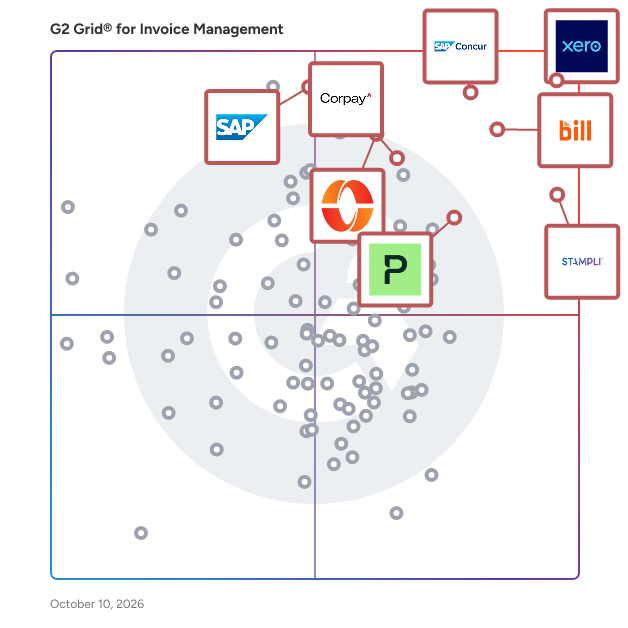
G2 Grid® for Invoice Management Software

G2 Grid® for Invoice Management Software plotting products by satisfaction and market presence

Highlighted products: Xero, SAP Concur, Stampli, BILL AP/AR, Paylocity, Corpay Cross-Border, Payhawk, and SAP Cloud ERP (SAP S/4HANA Cloud).

Underlying data: [Grid® JSON](https://www.g2.com/categories/invoice-management/grids.json?focus%5B%5D=xero&focus%5B%5D=sap-concur&focus%5B%5D=stampli&focus%5B%5D=bill-ap-ar&focus%5B%5D=paylocity&focus%5B%5D=corpay-cross-border&focus%5B%5D=payhawk&focus%5B%5D=sap-cloud-erp-sap-s-4hana-cloud)

Clearfacts

Clearfacts is a cloud-based accounts payable automation and pre-accounting platform designed for accountants and SMEs. It enables businesses to digitize and automate invoice processing, from document collection to validation and accounting integration. Key benefits: - Save time with automated invoice capture and OCR - Reduce errors with smart data recognition and validation workflows - Centralize all financial documents in one secure platform Clearfacts is ideal for: - Accounting firms managing multiple clients - SMEs looking to streamline invoice processing - Finance teams seeking automation and efficiency Key features include: - Invoice capture and data extraction - Approval workflows - Document management - Accounting software integrations

Who Is the Company Behind Clearfacts?

  • Seller: Wolters Kluwer
  • Year Founded: 1987
  • HQ Location: Alphen Aan Den Rijn, The Netherlands
  • Twitter: @Wolters_Kluwer
    17,786 Twitter followers
  • LinkedIn® Page: www.linkedin.com
    22,401 employees on LinkedIn®
  • Ownership: AMS:WKL

Cobalt

Cobalt is an invoicing and accounting software for small businesses and freelancers in New Zealand. The software enables users to create and send customized invoices, accept online payments, track expenses, generate reports, and manage contacts. Key features include invoice templates, recurring invoices, reminders for overdue invoices, expense tracking with categorization, financial dashboard, and Stripe integration for online payments. Cobalt provides an easy-to-use solution to streamline financial operations for Kiwi businesses.

Who Is the Company Behind Cobalt?

  • Seller: Cobalt
  • Year Founded: 2022
  • HQ Location: Auckland, NZ
  • LinkedIn® Page: www.linkedin.com
    1 employees on LinkedIn®

Denario

Denario provides an integrated accounts payable and accounts receivable experience, helping European SMBs and startups to automatically capture bills and receipts from various sources, process payments using a number of different methods and modalities, and reconcile the accounting entry across all their bank accounts and financial tools. Teams can use Denario to set up custom roles and approvals and automate their workflows

Who Is the Company Behind Denario?

AI can help you find the answers. G2 helps you trust them.

Connect G2 to Claude or ChatGPT for answers grounded in G2's trusted reviews, comparisons, and pricing from real user insights.

How it works

DizzyData

Automatic online invoice recognition and processing for every accounting package

Who Is the Company Behind DizzyData?

  • Seller: DizzyData
  • HQ Location: N/A
  • Twitter: @dizzydata
    1,334 Twitter followers
  • LinkedIn® Page: www.linkedin.com
    1 employees on LinkedIn®

docDigitales en Linea

docDigitales is a cloud-based invoicing and business management platform built specifically for Mexican small and medium-sized businesses (SMBs), entrepreneurs, and freelancers. It simplifies every step of the billing process — from issuing SAT-compliant CFDI invoices to tracking payments and managing cash flow — all from a single, easy-to-use dashboard. Invoicing made simple, compliance built in. Mexican tax compliance can be complex. docDigitales connects directly with the SAT so your invoices are always valid, your CFDIs are automatically validated, and your platform updates itself with every regulatory change — including CFDI 4.0. You stay compliant without hiring an accountant or chasing updates manually. Everything your business needs in one place. Beyond invoicing, docDigitales gives business owners full visibility and control over their finances. Create and send professional quotes with your logo, convert them to invoices in one click, automate payment reminders to collect faster, and accept online payments via credit card, debit, or PayPal. The platform automatically marks invoices as paid when payment is received. Built for founders, not accountants. docDigitales is designed for business owners who need to move fast. Onboarding takes minutes, the interface is intuitive, and you can start issuing invoices on day one — no training required. With 35+ financial reports, you always know who owes you, how much, and when to follow up. Support that actually responds. Unlike larger platforms with ticket queues and bots, docDigitales offers real human support via phone, chat, and email — with no wait times. Whether you're setting up your account or navigating a SAT requirement, the team is available and responsive. Flexible plans for every stage. docDigitales offers five pricing tiers starting at $300 MXN/month, with a 30-day free trial that includes full Premium features — no credit card required. Upgrade, downgrade, or cancel anytime as your business grows. Trusted by 10,000+ businesses across Mexico, docDigitales is the invoicing and admin platform that grows with you — from your first invoice to full business control.

Who Is the Company Behind docDigitales en Linea?

ecm.online

German Version: Optimieren Sie die Zusammenarbeit mit ELO und Ihrem DATEV Steuerberater. Wir bieten die führende cloudbasierte digitale Rechnungslösung mit ELO for DATEV und DATEVconnect Online zum besten Preis-Leistungs-Verhältnis für KMU. Die Vorteile eines ELO Enterprise-Content-Management: - Die Überführung (Informationserfassung) von Dokumenten und Informationen ins elektronische ELO Archiv, ermöglicht die zentrale und schnelle Verfügbarkeit von Informationen. - Vorgangsbezogen lassen sich unterschiedlichste Dokumente (Verträge, E-Mails, Rechnungen etc.) in ELO zu einer elektronischen Akte zusammenführen. Geschäftsvorfälle sind rasch nachvollziehbar und übersichtlich. - Digitale Workflows steuern abteilungsübergreifend Unternehmensprozesse und sorgen für die zeitnahe und sichere Bearbeitung von Geschäftsvorfällen. - Die Änderungshistorie der einzelnen Dokumente wird im ELO dokumentiert und verwaltet. Sicherheit und Transparenz sind dadurch vor allem in der Teamarbeit gegeben. - Ein DMS-Archiv ist der ideale Ort, um alle geschäftsrelevanten Informationen rechtskonform aufzubewahren. - ELO lässt sich flexibel in eine Vielzahl von Geschäftsanwendungen sowie in Microsoft Office-Produkte integrieren. Dadurch erhalten Sie eine zentrale Informationsplattform anstatt vieler Informationsinseln. ecm.online bietet Ihnen ELO DMS im Full-Service-Paket für eine günstige monatliche Rate. Lassen Sie sich unverbindlich beraten oder testen Sie unsere Lösung 14 Tage kostenfrei und ohne Risiko.

Who Is the Company Behind ecm.online?

Excel Invoice Manager

Invoice Manager for Excel by Uniform Software Limited turns Microsoft Excel into a powerful, flexible invoicing system. It combines the familiarity and customization of Excel with structured data management for customers, products, invoices, payments, quotations, and purchase orders. If your business already relies on Excel and you want more than a simple invoice template, Invoice Manager provides a practical way to manage your invoicing workflow without moving to a completely separate accounting or invoicing application. Your invoice remains a genuine Excel worksheet. You can customize its layout, formulas, fields, branding, and business logic using the Excel features you already know. Professional Invoicing Inside Microsoft Excel Invoice Manager combines three key components: • Excel invoice templates — Create invoices using real, editable Excel workbooks. • Invoice Manager for Excel — An Excel add-in that adds invoicing tools and an Invoice ribbon to Excel. • Structured database — Keep customers, products, invoices, payments, and related information in organized records. This approach gives you the flexibility of Excel while providing much more structure than using a standalone invoice template. 400+ Ready-Made Excel Invoice Templates Get started quickly with a library of more than 400 professionally designed invoice templates. Templates include: • Standard invoices • Sales invoices • Service invoices • Consulting invoices • Commercial invoices • Proforma invoices • Receipts • Quotations • Multi-page invoices • Other business forms The templates are genuine Excel workbooks rather than files locked into a proprietary invoice designer. You can open them in Excel, modify them, add your logo and branding, and adapt them to your business requirements. The template library is available free of charge, with no registration required. Customize Your Invoice with Excel One of the major advantages of Invoice Manager is that you are not restricted to a fixed invoice design. Because the invoice is a real Excel worksheet, you can use Excel's familiar tools to customize it: • Fonts and text formatting • Colors and borders • Logos and images • Column widths • Merged cells • Page layout and printing settings • Excel formulas • Drop-down lists • Checkboxes and other form controls • Custom fields and columns • VBA macros You can create an invoice that matches your company's branding and business processes instead of adapting your business to a rigid invoicing interface. Invoice Manager also supports multiple invoice templates. This can be useful when different businesses, departments, customers, or currencies require different invoice layouts. Custom Fields and Flexible Business Logic Invoice Manager is designed for businesses that need more flexibility than a basic invoice template can provide. You can add custom fields and columns for information such as: • Project codes • Contract numbers • Department names • Product-specific discounts • Additional customer information • Other business-specific data Excel formulas can be used for discounts, taxes, line totals, subtotals, and other calculations. This allows your invoice logic to remain visible and editable rather than being hidden inside a proprietary application. For advanced Excel users, VBA macros can also be used to extend the functionality of customized invoice templates. Invoices, Quotations, and Purchase Orders Invoice Manager is not limited to invoices. The same Excel template and database workflow can also be used for: • Invoices • Quotations • Purchase orders You can reuse your existing invoice design and business data rather than creating completely separate documents for each type of transaction. A built-in conversion workflow can help turn an invoice form into a quotation or purchase order, making it easier to maintain a consistent look and workflow. Smart Picker for Faster Data Entry Invoice Manager includes an In-Cell Smart Picker that helps you select information directly from the Excel cell you are working with. The Smart Picker can be used for information such as: • Bill To customers • Ship To addresses • Products and items • Sales representatives • Shipping options • Invoice numbers • Other supported data-selection fields Instead of repeatedly typing long customer names, product names, addresses, or other information, you can select existing records from your database. For large lists, built-in search controls make it easier to find records without scrolling through hundreds or thousands of entries. You can search using available fields to quickly locate the information you need. This can help reduce repetitive typing and minimize data-entry errors. Search Customers, Products, and Invoices Invoice Manager provides search functionality for data lists such as Customers, Products, and Invoices. You can search using available fields and operators such as Equals and Contains, making it easier to locate specific records in a large database. Frequently used search criteria can also be saved as defaults, helping speed up repetitive tasks. Designed for Businesses That Want Excel Flexibility Invoice Manager can be particularly useful for businesses that: • Already use Microsoft Excel extensively • Want customizable invoice forms • Need more than a basic invoice template • Have specialized invoicing requirements • Need custom fields and calculations • Want to maintain control over invoice layouts • Need to manage customers, products, invoices, and payments • Want invoices, quotations, and purchase orders in one workflow • Prefer working with familiar Excel formulas and features • Need multiple invoice templates for different businesses or purposes Rather than replacing Excel, Invoice Manager extends Excel with dedicated invoicing capabilities. Microsoft Marketplace Invoice Manager for Excel is available through Microsoft Marketplace, providing a convenient purchasing and subscription option for organizations that use Microsoft work or school accounts. Organizations can subscribe through Microsoft Marketplace and manage subscriptions through the Microsoft 365 administration environment. This can be particularly convenient for businesses that already manage their software and user licenses through Microsoft. Invoice Manager also has a Traditional Installation option for customers who prefer a desktop installation and a lifetime-license model. The availability of different installation and licensing options makes it easier to choose the deployment model that fits your organization. Windows and Microsoft Excel Invoice Manager for Excel is designed for Windows and requires a locally installed desktop version of Microsoft Excel. Supported environments include: • Windows 10 • Windows 11 • Microsoft Excel 2013 through Microsoft 365 • 32-bit or 64-bit Excel The desktop version requires locally installed Excel and is not intended for environments where Excel is available only through a web browser. For users who need basic invoice-template functionality in browser-based Excel, Invoice Manager Lite is also available as a free Excel web add-in through Microsoft Marketplace. Invoice Manager Lite Invoice Manager Lite provides a simpler, free option for users who mainly need basic invoice-template operations. It works with the same library of 400+ Excel invoice templates and can be used with both Excel for the web and desktop Excel. With Invoice Manager Lite, you can quickly: • Clear named cells in an invoice • Enter the current date • Generate a new invoice number It is useful when you want a lightweight way to work with Excel invoice templates without the full Invoice Manager system. A Flexible Alternative to Fixed Invoice Software Many invoicing applications provide predefined forms and workflows. Invoice Manager takes a different approach by making Excel itself the invoice form. This means you can start with a ready-made professional template and then modify it using the Excel features you already understand. You can control the appearance of the invoice, add your own fields, create formulas, define calculations, incorporate Excel controls, and adapt the document to your own business processes. At the same time, Invoice Manager provides structured records and database-backed management for the information behind those documents. Key Benefits • Turn Microsoft Excel into a complete invoicing system • Create professional invoices directly in Excel • Use more than 400 ready-made invoice templates • Customize invoice layouts with standard Excel tools • Add your own branding, logos, fields, and calculations • Use Excel formulas for taxes, discounts, totals, and other calculations • Add custom fields for business-specific information • Use Excel form controls and VBA for advanced customization • Manage customers, products, invoices, and payments in structured records • Create quotations and purchase orders using the same workflow • Select customers, products, addresses, and other information with the In-Cell Smart Picker • Search large customer, product, and invoice lists efficiently • Reduce repetitive typing and data-entry errors • Support multiple invoice templates • Use Microsoft Marketplace for convenient subscription-based deployment • Keep using the Excel skills and tools your team already knows Who Is Invoice Manager For? Invoice Manager for Excel is ideal for small and medium-sized businesses, consultants, contractors, service providers, sales teams, and other organizations that want a customizable invoicing solution built around Microsoft Excel. It is especially suitable for users who find basic Excel invoice templates too limited but do not want to give up the flexibility of Excel for a rigid, closed invoicing system. With Invoice Manager, your invoice is still an Excel worksheet — but with the data management, automation, and invoicing features needed to turn that worksheet into a practical business tool.

Who Is the Company Behind Excel Invoice Manager?
FactuGen

FactuGen is an online invoicing software for freelancers (autónomos) and small businesses in Spain, ready for VERI*FACTU, the Spanish Tax Agency's (AEAT) new e-invoicing regulation. Every invoice is automatically registered with the AEAT and carries its tax QR code. Create invoices, corrective invoices and quotes in PDF, Excel or XML (Facturae) in seconds, with several VAT rates, discounts, income tax withholding (IRPF) and equivalence surcharge. FactuGen also manages clients, recurring invoices, payments with reminders and expenses, calculates the quarterly tax returns (forms 303 and 130) and prepares a package for your accountant. Works in any browser on computer, tablet or phone, in 7 languages. 15-day free trial, no card required; then €9.95 + VAT per month or €99 + VAT per year, no commitment.

Who Is the Company Behind FactuGen?

Facturwise

Facturwise is a cloud-based invoicing and billing platform built for freelancers, consultants, and small businesses operating in Europe and beyond. It lets you create and send professional invoices, quotes, and credit notes in minutes, with support for over 20 currencies and 8 languages including English, German, and French. Facturwise is built with European compliance in mind, invoices can be generated with embedded e-invoice XML in Factur-X and ZUGFeRD formats, meeting EN 16931 standards required for B2B and B2G transactions across the EU. DATEV Buchungsstapel export is also supported, making it easy to hand off your financial data directly to a German accountant. Beyond invoicing, Facturwise includes expense tracking, time tracking, recurring invoices, client management, and a financial dashboard. It also supports SEPA payment QR codes and automated payment reminders. A free plan is available with no credit card required, with paid plans starting at €13.90/month for unlimited invoicing. Available at https://www.facturwise.com/en

Who Is the Company Behind Facturwise?

Fleane

Do you manage your bookkeeping in Exact Online, Exact Globe or Twinfield and want to stop importing bank statements manually? Fleane offers the perfect solution: a seamless daily integration that automatically transfers bank statements to your administration. Say goodbye to cumbersome MT940 or CSV export files. This integration isn’t limited to a single bank it works with over 1,800 banks across Europe and supports various accounting packages, including Exact Online, Exact Globe and Twinfield.

Who Is the Company Behind Fleane?

  • Seller: Fleane BV
  • Year Founded: 1998
  • HQ Location: Heerenveen, NL
  • LinkedIn® Page: www.linkedin.com
    8 employees on LinkedIn®

Flick

Flick Network is a Peppol-certified B2B eInvoicing and tax compliance SaaS platform that helps businesses meet government eInvoicing mandates without disrupting their existing finance operations. Headquartered in Dubai, Flick connects your ERP to tax authorities and trading partners through a single, secure compliance layer. Built for enterprise ERPs - Flick integrates with Oracle EBS, Oracle Fusion, and other leading ERP, accounting, and POS systems to automate invoice generation, validation, transmission, and archiving. Finance teams keep working in the systems they already use while Flick handles XML/UBL conversion, Peppol network exchange, real-time clearance and reporting, QR code generation, cryptographic stamping, and audit-ready storage. Key capabilities: - Peppol Access Point for compliant B2B and B2G invoice exchange - Real-time invoice validation against local tax authority rules - Accounts payable (AP) and accounts receivable (AR) eInvoicing automation - Multi-entity, multi-country compliance from one dashboard - Secure cloud deployment on Oracle Cloud Infrastructure (OCI), with private cloud options for regulated industries - Dedicated implementation, onboarding, and local support teams

Who Is the Company Behind Flick?

Flowie

Flowie is the ultimate Procurement and Finance Operations platform for modern companies. Flowie centralizes Procure-to-Pay (P2P), Order-to-Cash (O2C) and Cash Flow Management, all with a consumer-grade user experience. Flowie has global coverage : the platform allows you to manage invoices from and to more than 60 countries, while being 100% tax compliant (e-invoicing). Flowie synchronizes natively in a few minutes with all of the company's tools, without the need for an integrator.

Who Is the Company Behind Flowie?

  • Seller: Flowie
  • Year Founded: 2022
  • HQ Location: Paris, FR
  • LinkedIn® Page: www.linkedin.com
    36 employees on LinkedIn®

Flowpulse

FlowPulse is invoicing and financial management software for freelancers, contractors, and small service businesses. Send invoices, track time and expenses, bill by project milestone, and collect card payments directly into your own Stripe account.

Who Is the Company Behind Flowpulse?

Free Invoice Generator

"Free Invoice Generator is ZATCA-compliant invoicing software built for Saudi businesses. Create tax and proforma invoices with automatic VAT calculation and gapless sequential numbering, export as PDF, and manage customers and products from one catalog. Track VAT summaries, outstanding balances, and top customers with built-in reports. Supports multi-company accounts, role-based access, and 2FA security, with a bilingual Arabic/English interface."

Who Is the Company Behind Free Invoice Generator?

GetFactur-X

Get Factur-X: e-invoicing compliance for France, without the enterprise price tag Get Factur-X is a browser-based e-invoicing platform built for freelancers, small businesses, and accounting professionals who need to comply with the French e-invoicing reform without deploying a heavyweight enterprise system. Create, convert, and validate compliant invoices in Factur-X, CII, and UBL formats, then send and receive them across the PDP network directly from the app. E-reporting is built in, so B2C sales, international transactions, and reverse-charge purchases are transmitted to the tax authority alongside your invoicing, from one place instead of two vendors. Core capabilities Create invoices through a deliberately minimal form. Rather than exposing all 250+ fields in the e-invoicing standard, Get Factur-X keeps the interface focused and adds fields as customers actually need them. Convert existing invoices by uploading a PDF. Invoice data is extracted automatically, you review and correct it, and you get a compliant Factur-X file with the XML embedded in your original PDF. Bidirectional CII and UBL conversion is included, along with a human-readable PDF renderer. Validate anything against official schematron rules. The validator accepts Factur-X, CII, UBL, and ZUGFeRD files regardless of where they were produced, and tells you exactly which fields are missing or invalid. Send and receive through the PDP network without leaving the app, so you are not exporting files and re-uploading them into a separate platform. Why teams choose it Every invoice is validated automatically before it leaves the platform, so nothing reaches a recipient or a PDP that would fail on arrival. Regulations change frequently, and format updates are shipped continuously, so compliance stays current without any action on your side. Nothing is installed, and invoice data is not stored on our servers. Files are processed for the conversion and then discarded. Free usage is available without an account for occasional conversions, with unlimited access on a paid plan that can be cancelled at any time.

Who Is the Company Behind GetFactur-X?

Nathan Calabrese
NC
Researched and written by Nathan Calabrese
Updated April 9, 2026