Best Google Workspace Administration Software - Page 4

How Many Google Workspace Administration Software Products Does G2 Track?

Total Products under this Category: 59

Category Stats (Sep 2026)

  • Average Rating: 4.41/5 The average rating of products in this category, based on all submitted ratings
  • Top Trending Product: CloudM (+0.24%) - Among all products in this category, CloudM recorded the largest rating increase compared to last month

Last updated: September 05, 2026

How Does G2 Rank Google Workspace Administration Software Products?

Why You Can Trust G2's Software Rankings:

  • 30 Analysts and Data Experts
  • 700+ Authentic Reviews
  • 59+ Products
  • Unbiased Rankings

G2's software rankings are built on verified user reviews, rigorous moderation, and a consistent research methodology maintained by a team of analysts and data experts. Each product is measured using the same transparent criteria, with no paid placement or vendor influence. While reviews reflect real user experiences, which can be subjective, they offer valuable insight into how software performs in the hands of professionals. Together, these inputs power the G2 Score, a standardized way to compare tools within every category.

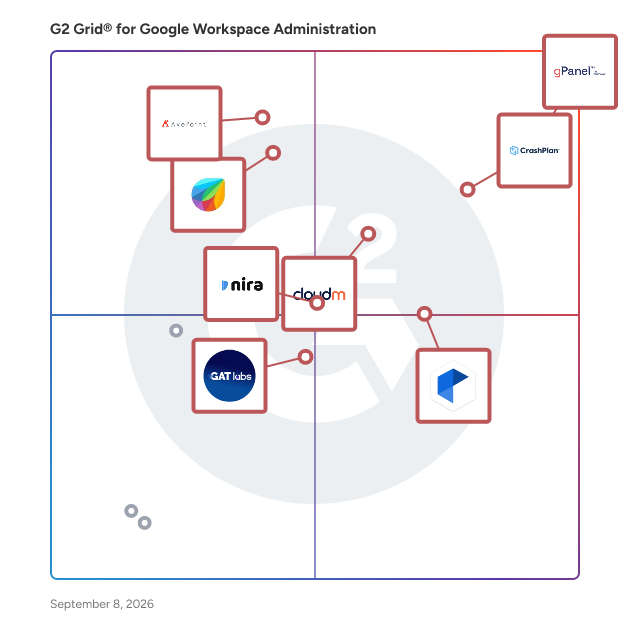
G2 Grid® for Google Workspace Administration Software

G2 Grid® for Google Workspace Administration Software plotting products by satisfaction and market presence

Highlighted products: gPanel, CrashPlan Platform, AvePoint Confidence Platform, CloudM, Freshservice Gmail Gadget for G Suite, Patronum, Nira, and GAT Labs.

Underlying data: [Grid® JSON](https://www.g2.com/categories/google-workspace-administration/grids.json?focus%5B%5D=gpanel&focus%5B%5D=crashplan-platform&focus%5B%5D=avepoint-confidence-platform&focus%5B%5D=cloudm&focus%5B%5D=freshservice-gmail-gadget-for-g-suite&focus%5B%5D=patronum&focus%5B%5D=nira-nira&focus%5B%5D=gat-labs)

itGenius

itGenius offers a comprehensive Google Workspace Professional Setup service designed to seamlessly transition businesses from legacy systems to the Google ecosystem. This service ensures a smooth migration of emails, calendars, and files, complemented by change management support and team training. With a dedicated Project Implementation Manager, itGenius guides organizations through the process, enhancing operational efficiency and team productivity. Key Features and Functionality: - Professional Account Setup: Configuration of Google Workspace accounts tailored to business needs, including user creation, group setups, and permission settings. - Data Migration: Expert migration of emails, contacts, calendars, and business files from existing systems to Google Workspace, ensuring data integrity and minimal disruption. - Team Training: Access to the Genius Academy video training library, providing comprehensive resources to help teams effectively adopt and utilize Google Workspace tools. - Change Management Support: Guidance throughout the transition process to ensure smooth adoption and minimal downtime. - Security Configuration: Implementation of best practices for security, including two-factor authentication and data protection policies. Primary Value and Solutions Provided: The Google Workspace Professional Setup service by itGenius addresses the challenges businesses face when migrating to a new platform. By offering expert-led migration, personalized training, and ongoing support, itGenius ensures a seamless transition with no downtime or data loss. This service empowers businesses to enhance collaboration, streamline operations, and leverage the full potential of Google Workspace, ultimately boosting productivity and operational efficiency.

Who Is the Company Behind itGenius?

LEA!N Power Tools for G Suite

LEA!N Power Tools is a web-based platform that guides users through easy to understand and easy to use Lean tools.

Who Is the Company Behind LEA!N Power Tools for G Suite?

Octopuspro for G Suite

OctopusPro is a professional cloud based mobile service management software with all the features and tools you need to grow your business.

Who Is the Company Behind Octopuspro for G Suite?

Smart Signature for G Suite

Smart Signature is a business tool in the cloud that allows you to create, standardize, manage and monitor email signatures .

Who Is the Company Behind Smart Signature for G Suite?

Soluvery — Audit & Manage

Soluvery Audit & Manage Drive is a Google Workspace add-on for everyone responsible for keeping Google Drive organised, secure, and under control from individuals managing their own files to administrators overseeing an entire organisation. Whether you're cleaning up personal Drive, managing a team, or auditing a Workspace domain, Soluvery gives you the visibility and control to identify security risks, streamline file management, and take action all without leaving Google Drive. Most organizations discover their Drive problem the hard way: an employee leaves and no one knows what they owned, a compliance audit asks for an access review no one can produce, or an internal file turns out to be shared with anyone who has the link. Google's native tools make these questions slow and manual. Soluvery closes that gap. It installs from the Google Workspace Marketplace and runs in the Drive side panel, so your team works where they already are. At its core is Audit Files, which scans at the domain, shared drive, or user level and surfaces permissions, ownership, and sharing risks in color-coded results that export straight to a Google Sheet your access review, compliance evidence, or pre-reorg clarity. With Schedule Audit, scans run automatically at a frequency you choose, with reports delivered to your inbox before risky sharing becomes an incident. Finding issues only helps if you can fix them fast, so Soluvery pairs auditing with direct remediation. Bulk Access Remove revokes multiple users across multiple files in one action. Disable Public Links shuts down files exposed to anyone with the link, closing the exact gap that leads to leaks. Together they tighten access across a messy Drive in minutes. For administrators, Soluvery provides domain-level capabilities. Run a single audit across your entire Workspace to identify every user with externally shared files or public links, then review consolidated reports highlighting the highest-risk users, files, and external domains. When it's time to act, admins can revoke external access or disable public links across selected users or the entire domain in a few clicks making large-scale access reviews, offboarding, and compliance remediation dramatically faster. For operations, a set of bulk tools handles the heavy lifting. Bulk Transfer Ownership moves ownership of many files to another user in one action, simplifying offboarding and reorganizations. Bulk Move to Shared Drive relocates files out of personal My Drive into properly governed Shared Drives at scale. And Bulk Rename applies structured naming rules across many files so conventions stay consistent over time.

Who Is the Company Behind Soluvery — Audit & Manage?

Tricent

Tricent is the #1 file-sharing governance SaaS platform that helps organizations make their file-sharing more secure and compliant without sacrificing collaboration. Tricent enables more secure and compliant file sharing within Microsoft 365 (OneDrives, Teams & Sharepoint), and Google Workspace (MyDrives and Shared Drives) so you can keep collaborating responsibly. Tricent puts the responsibility of proper file-sharing management in the hands of administrators as well as every member of the organization who shares files. Tricent enables administrators to: 🚀 Effortless Onboarding in less than 30 Minutes: Tricent gets you up and running swiftly so you can focus on what matters most. 🔍 Unparalleled Insights: From day one, gain a comprehensive overview of all files shared and permissions granted—across both personal drives and shared drives—no more guesswork, just crystal-clear visibility. ⭕️ Bulk Remediation Made Simple: Our admin-friendly cleanup tools allow you to tackle file sprawl efficiently. Say hello to streamlined compliance without the headache. 😇 Empowering End-Users Responsibly: We use automation to involve your employees in the cleanup process. They can continue collaborating while maintaining compliance. 💪🏼 Customizable Governance Policies: Set different cycles for different user groups. Tricent adapts to your unique needs, ensuring flexibility without compromising control. 🔮 Stay Ahead with Abnormality Detection: Our machine learning feature keeps you informed, detecting anomalies before they escalate *Only Google Workspace. Pricing: €18 per user (yearly)

Average Rating: 3.5/5.0

Total Reviews: 1

Who Is the Company Behind Tricent?

Who Uses This Product?

  • Company Size: 100% Small

UserAuthGuard

UserAuthGuard is a cloud-based Chromebook management platform built for K-12 school districts. It integrates directly with Google Workspace to provide 1:1 device assignment, real-time fleet tracking, instant lost mode, automated check-in/check-out, repair workflow management, and visual OU management — all without installing agents or monitoring student activity. Our patent-pending OU-Lock technology enforces device security at the Google Workspace infrastructure level. Each Chromebook is bound to a dedicated Organizational Unit, ensuring security policies stay applied regardless of who uses the device. No agents to install, no proxies to configure, no surveillance required. Districts using UserAuthGuard report a 75% reduction in device loss and save hours of IT staff time weekly through automated Google Admin sync, bulk operations, and streamlined repair tracking. Key Features: - 1:1 device-to-student assignment with full audit trail - Patent-pending Zero-Trust OU-Lock security - Instant lost/stolen device mode with recovery messaging - Repair ticket workflow with SLA tracking - Visual Google OU Explorer with drag-and-drop management - Role-based dashboards for IT, front office, principals, and teachers - Bulk device operations (assign, move, disable) - Check-in/check-out logging - Chrome extension for content filtering (AI/cheating site blocking) - Fleet analytics and compliance reporting

Who Is the Company Behind UserAuthGuard?

Vizitator for G Suite

Vizitator is an advanced tablet and desktop based visitor management software that enables faster visitor check-in and improves visitors experience.

Who Is the Company Behind Vizitator for G Suite?

  • Seller: Vizitator
  • HQ Location: New Dehli, India
  • Twitter: @VizitatorGlobal
  • LinkedIn® Page: www.linkedin.com
    1 employees on LinkedIn®

WorkspaceForge

WorkspaceForge is the modern admin console for Google Workspace — built for IT admins who want to manage their entire organization from one powerful, beautiful dashboard. The default Google Admin Console is slow, scattered across dozens of pages, and missing the tools that modern IT teams need. WorkspaceForge fixes that by bringing 50+ admin capabilities into a single interface.

Who Is the Company Behind WorkspaceForge?

Xinox Docs for G Suite

Xinox Docs is a Document management software designed for Google Works service ,ensures that all documents in these drive folders have the same owner, are indexed, and cannot be deleted by accident.

Who Is the Company Behind Xinox Docs for G Suite?

Xlenza for G Suite

Xlenza is an integrated Set of Tools to measure and improve business excellence. It also tracks, measures, analyzes, improves and excels in your business

Who Is the Company Behind Xlenza for G Suite?

Neeraja Prakash
NP
Researched and written by Neeraja Prakash
Updated June 16, 2025