Best GIS Software - Page 10

How Many GIS Software Products Does G2 Track?

Total Products under this Category: 353

Category Stats (Aug 2026)

  • Average Rating: 4.28/5 The average rating of products in this category, based on all submitted ratings
  • Top Trending Product: Octave Alto SDKs (Luciad) (+3.41%) - Among all products in this category, Octave Alto SDKs (Luciad) recorded the largest rating increase compared to last month

Last updated: August 06, 2026

How Does G2 Rank GIS Software Products?

Why You Can Trust G2's Software Rankings:

  • 30 Analysts and Data Experts
  • 8,000+ Authentic Reviews
  • 353+ Products
  • Unbiased Rankings

G2's software rankings are built on verified user reviews, rigorous moderation, and a consistent research methodology maintained by a team of analysts and data experts. Each product is measured using the same transparent criteria, with no paid placement or vendor influence. While reviews reflect real user experiences, which can be subjective, they offer valuable insight into how software performs in the hands of professionals. Together, these inputs power the G2 Score, a standardized way to compare tools within every category.

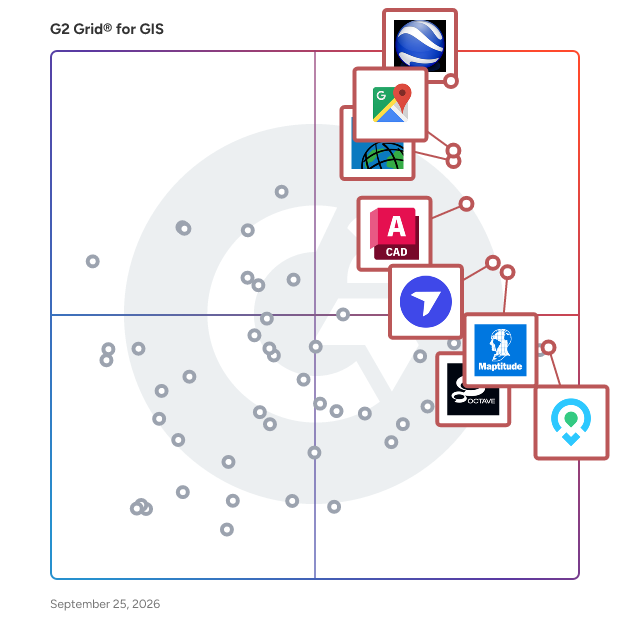
G2 Grid® for GIS Software

G2 Grid® for GIS Software plotting products by satisfaction and market presence

Highlighted products: Google Earth Pro, Google Maps Platform, Esri ArcGIS, AutoCAD, Maptitude, DroneDeploy, Mapme, and BatchGeo.

Underlying data: [Grid® JSON](https://www.g2.com/categories/gis/grids.json?focus%5B%5D=google-earth-pro&focus%5B%5D=google-maps-platform&focus%5B%5D=esri-arcgis&focus%5B%5D=autocad&focus%5B%5D=maptitude&focus%5B%5D=dronedeploy&focus%5B%5D=mapme&focus%5B%5D=batchgeo)

Sponsored

Smarty

Smarty offers global address verification, address validation, and geocoding via API, bulk upload, and a collection of 3rd party integrations that transform how organizations handle address data. With real-time address autocomplete, correction, standardization, and validation, it guarantees the accuracy and reliability of addresses. Smarty's US rooftop geocoding, reverse geocoding, and property data APIs help you enrich and hone your address data. These powerful APIs have far-reaching benefits, from improving the efficiency of your marketing campaigns to enhancing data analysis and operational processes.

Visit website

Simple GIS Software

Easy to use GIS software for Windows desktop, laptop, and tablet computers at the lowest price. Create, analyze, and publish spatial data. Many vector editing features plus data wizards to access freely available data from the USGS, US Census Bureau, and OpenStreetMap. Also supports, GPS tracking, geocoding, routing, and navigation. Easily map your addresses from Excel spreadsheets or csv files. Highly customizable via integrated VB editor with access to hundreds of properties and methods.

Average Rating: 5.0/5.0

Total Reviews: 2

How Do G2 Users Rate Simple GIS Software?

  • Data Capture: 10.0/10 (Category avg: 8.6/10)
  • Data Visualization: 10.0/10 (Category avg: 8.6/10)
  • Ease of Use: 10.0/10 (Category avg: 8.4/10)
  • Spatial Analysis: 10.0/10 (Category avg: 8.4/10)

Who Is the Company Behind Simple GIS Software?

Who Uses This Product?

  • Company Size: 100% Medium

What Are Recent G2 Reviews of Simple GIS Software?

Smappen

Smappen is franchise territory mapping software built for franchise development teams who need to design viable, defensible territories — without GIS expertise. What you can do: - Design territories by postal codes, zip codes, 3-digit FSAs, drive time, walk time, or administrative boundaries (counties, census tracts) - Validate territory viability with demographic layers: population, age brackets, income, POI density - Detect overlap and surface white space across your entire network - Answer broker territory checks instantly — with live population data and availability status - Export branded territory maps and reports for franchise agreements, and candidate presentations - Manage United States, Canada and Australia territories in the same account at no additional cost Smappen is self-serve. You subscribe, log in, and map your first territory the same day. Monthly subscription available, no setup fee, no long-term commitment. 1,100+ Franchises have built their territories with Smappen "Smappen has been a game-changer for our franchise development process! Their intuitive territory mapping software makes it easy to define and optimize franchise territories with precision." - Jon S. "Smappen has been a revelation for our franchise consultancy. Its ease of use and functionality, coupled with the brilliant support provided by the Smappen team, leave their competitors in the dust!" - Brendon McHugh

Average Rating: 3.5/5.0

Total Reviews: 2

How Do G2 Users Rate Smappen?

  • Ease of Use: 8.3/10 (Category avg: 8.4/10)

Who Is the Company Behind Smappen?

  • Seller: Smappen
  • Year Founded: 2018
  • HQ Location: Toulouse, FR
  • LinkedIn® Page: www.linkedin.com
    19 employees on LinkedIn®

Who Uses This Product?

  • Company Size: 100% Small

What Are Recent G2 Reviews of Smappen?

TerraStride Pro

Create interactive maps for your business. Parcel data, flood maps, various satellite imagery available on desktop and mobile platforms.

Average Rating: 4.3/5.0

Total Reviews: 2

How Do G2 Users Rate TerraStride Pro?

  • Data Capture: 6.7/10 (Category avg: 8.6/10)
  • Data Visualization: 10.0/10 (Category avg: 8.6/10)
  • Ease of Use: 8.3/10 (Category avg: 8.4/10)
  • Spatial Analysis: 6.7/10 (Category avg: 8.4/10)

Who Is the Company Behind TerraStride Pro?

  • Seller: TerraStride
  • HQ Location: N/A
  • Twitter: @TerraStride
    640 Twitter followers
  • LinkedIn® Page: www.linkedin.com
    1 employees on LinkedIn®

Who Uses This Product?

  • Company Size: 50% Large, 50% Medium

What Do G2 Reviewers Say About TerraStride Pro?

AI-generated summary from verified user reviews

Pros
  • Users find the image integration feature of TerraStride Pro invaluable for creating detailed and informative property maps.
  • Users love the detailed mapping features of TerraStride Pro, which enhance property information with various data sources.
  • Users value the tool variety in TerraStride Pro, highlighting its diverse databases for detailed property mapping.
Cons
  • Users report the inability to edit maps offline, which can hinder accessibility in areas with poor internet connections.
  • Users face challenges due to the inability to edit maps offline, limiting functionality in areas with poor internet access.

What Are Recent G2 Reviews of TerraStride Pro?

TNTedit

TNTedit software provides professional interactive tools to create, georeference, and edit project materials consisting of vector, image, CAD, TIN, and relational database objects.

Average Rating: 4.3/5.0

Total Reviews: 2

How Do G2 Users Rate TNTedit?

  • Data Capture: 9.2/10 (Category avg: 8.6/10)
  • Data Visualization: 6.7/10 (Category avg: 8.6/10)
  • Ease of Use: 8.3/10 (Category avg: 8.4/10)
  • Spatial Analysis: 6.7/10 (Category avg: 8.4/10)

Who Is the Company Behind TNTedit?

Who Uses This Product?

  • Company Size: 100% Small, 50% Medium

What Are Recent G2 Reviews of TNTedit?

TractBuilder

With TractBuilder Tools for ArcGIS you will be able to use Metes & Bounds, Quartering/Auto Quartering, Well Spotting, and GridMaker without delays.

Average Rating: 4.3/5.0

Total Reviews: 2

How Do G2 Users Rate TractBuilder?

  • Data Capture: 10.0/10 (Category avg: 8.6/10)
  • Ease of Use: 9.2/10 (Category avg: 8.4/10)

Who Is the Company Behind TractBuilder?

  • Seller: TractBuilder
  • Year Founded: 2008
  • HQ Location: N/A
  • Twitter: @TractBuilder
    155 Twitter followers
  • LinkedIn® Page: www.linkedin.com
    1 employees on LinkedIn®

Who Uses This Product?

  • Company Size: 100% Small

What Are Recent G2 Reviews of TractBuilder?

What Are G2 Users Discussing About TractBuilder?

TransCAD

TransCAD is used to model transport networks and travel demand, to analyse expected traffic flows, to plan public transport services and to develop advanced transport strategies and solutions.

Average Rating: 4.8/5.0

Total Reviews: 6

How Do G2 Users Rate TransCAD?

  • Data Capture: 10.0/10 (Category avg: 8.6/10)
  • Data Visualization: 8.3/10 (Category avg: 8.6/10)
  • Ease of Use: 8.6/10 (Category avg: 8.4/10)
  • Spatial Analysis: 10.0/10 (Category avg: 8.4/10)

Who Is the Company Behind TransCAD?

  • Seller: Caliper
  • Year Founded: 1983
  • HQ Location: Newton, MA
  • Twitter: @Maptitude
    1,195 Twitter followers
  • LinkedIn® Page: www.linkedin.com
    41 employees on LinkedIn®

Who Uses This Product?

  • Company Size: 33% Large, 33% Medium

What Are Recent G2 Reviews of TransCAD?

What Are G2 Users Discussing About TransCAD?

Ushahidi

Ushahidi is a map-making tool, built with an open API, that allows you and the world to collaboratively map your world.

Average Rating: 2.3/5.0

Total Reviews: 2

How Do G2 Users Rate Ushahidi?

  • Data Capture: 8.3/10 (Category avg: 8.6/10)
  • Ease of Use: 3.3/10 (Category avg: 8.4/10)

Who Is the Company Behind Ushahidi?

  • Seller: Ushahidi
  • Year Founded: 2008
  • HQ Location: Kenya
  • Twitter: @ushahidi
    78,414 Twitter followers
  • LinkedIn® Page: www.linkedin.com
    38 employees on LinkedIn®

Who Uses This Product?

  • Company Size: 100% Small

What Are Recent G2 Reviews of Ushahidi?

What Are G2 Users Discussing About Ushahidi?

Vectorworks Landmark

Transform your design, modeling, and presentation workflows with Vectorworks Landmark, the industry-leading landscape-focused BIM software solution made specifically for landscape architects and designers. With intelligent objects, powerful databases, and flexible documentation features, Landmark streamlines integrated 2D and 3D landscape-specific sustainable BIM workflows all in one application.

Average Rating: 4.4/5.0

Total Reviews: 55

How Do G2 Users Rate Vectorworks Landmark?

  • Data Capture: 7.9/10 (Category avg: 8.6/10)
  • Data Visualization: 7.5/10 (Category avg: 8.6/10)
  • Ease of Use: 7.3/10 (Category avg: 8.4/10)
  • Spatial Analysis: 6.1/10 (Category avg: 8.4/10)

Who Is the Company Behind Vectorworks Landmark?

  • Seller: Vectorworks, Inc.
  • Company Website:
  • Year Founded: 1985
  • HQ Location: Columbia, Maryland
  • Twitter: @Vectorworks
    10,997 Twitter followers
  • LinkedIn® Page: www.linkedin.com
    322 employees on LinkedIn®

Who Uses This Product?

  • Who Uses This: Landscape Architect, Owner
  • Top Industries: Architecture & Planning, Design
  • Company Size: 69% Small, 18% Medium

What Do G2 Reviewers Say About Vectorworks Landmark?

AI-generated summary from verified user reviews

Pros
  • Users value the ease of use of Vectorworks Landmark, finding it straightforward and beneficial for collaborative projects.
  • Users praise the impressive 3D visualization features of Vectorworks Landmark, enhancing the quality of their presentations.
  • Users love the drawing versatility of Vectorworks Landmark, seamlessly switching between illustrative and construction plans with ease.
  • Users find the parametric/BIM tools in Vectorworks Landmark exceptionally useful for integrated landscape design.
  • Users commend the powerful planting and 3D rendering tools, enhancing workflows and landscape design effectiveness in Vectorworks Landmark.
Cons
  • Users often face a steep learning curve with Vectorworks Landmark, making the initial experience overwhelming for newcomers.
  • Users note the difficult learning curve of Vectorworks Landmark, requiring significant time and training to become proficient.
  • Users find poor usability in Vectorworks Landmark, struggling with unclear information and frustrating support options.
  • Users find the steep learning curve of Vectorworks Landmark overwhelming, complicating initial use for new users.
  • Users express frustration with inadequate tools in Vectorworks Landmark, facing challenges with updates, 3D modeling, and text formatting.

What Are Recent G2 Reviews of Vectorworks Landmark?

What Are G2 Users Discussing About Vectorworks Landmark?

WP Go Maps

The easiest to use Google Map Plugin on WordPress since 2012 with over 20 million downloads.


Add a Google map (or OpenLayers map) to your WordPress website quickly and easily.

Average Rating: 4.8/5.0

Total Reviews: 2

How Do G2 Users Rate WP Go Maps?

  • Data Capture: 10.0/10 (Category avg: 8.6/10)
  • Data Visualization: 10.0/10 (Category avg: 8.6/10)
  • Ease of Use: 9.2/10 (Category avg: 8.4/10)
  • Spatial Analysis: 10.0/10 (Category avg: 8.4/10)

Who Is the Company Behind WP Go Maps?

Who Uses This Product?

  • Company Size: 100% Small

What Do G2 Reviewers Say About WP Go Maps?

AI-generated summary from verified user reviews

Pros
  • Users value the friendly and helpful support of WP Go Maps, especially appreciating Jaden Botha's expertise.
  • Users value the ease of use of WP Go Maps, enhanced by friendly and helpful support from the team.
  • Users commend the excellent service of WP Go Maps, citing helpful support that resolves issues effectively.

What Are Recent G2 Reviews of WP Go Maps?

21stCenturyGIS

21stCenturyGIS gives the power to process and interpret imagery, create map and analyze data in an easy way, understanding geographical relationships and developing decision support system.

Average Rating: 3.5/5.0

Total Reviews: 1

How Do G2 Users Rate 21stCenturyGIS?

  • Data Capture: 8.3/10 (Category avg: 8.6/10)
  • Data Visualization: 8.3/10 (Category avg: 8.6/10)
  • Ease of Use: 8.3/10 (Category avg: 8.4/10)
  • Spatial Analysis: 10.0/10 (Category avg: 8.4/10)

Who Is the Company Behind 21stCenturyGIS?

Who Uses This Product?

  • Company Size: 100% Small

3-GIS | Web

3-GIS offers web-based GIS software for fiber network management. Our solution combines a full-editing GIS with prescriptive design automation, constructible work packets, strand-level asset status, and mobile access in one seamless system. 3-GIS | Web is a web-based network management application which combines full-editing GIS, constructible work packets, strand-level asset status, construction tracking, and browser access in one system. Its architecture connects designers, field crew, project management staff, and other stakeholders across and enterprise, and delivers value at every stage in the life of the network. Users can understand where network assets are located and the way in which those assets interact to bring service to the end customer. By modeling the light path, 3-GIS | Web provides users with a streamlined view of their network utilization and availability, supports faster outage restoration, and facilitates inter-organizational collaboration.

Average Rating: 4.5/5.0

Total Reviews: 1

How Do G2 Users Rate 3-GIS | Web?

  • Ease of Use: 6.7/10 (Category avg: 8.4/10)

Who Is the Company Behind 3-GIS | Web?

  • Seller: 3-GIS
  • Year Founded: 2006
  • HQ Location: Decatur, US
  • Twitter: @3GISglobal
    487 Twitter followers
  • LinkedIn® Page: www.linkedin.com
    126 employees on LinkedIn®

Who Uses This Product?

  • Company Size: 100% Medium

What Are Recent G2 Reviews of 3-GIS | Web?

What Are G2 Users Discussing About 3-GIS | Web?

4DMapper

4DMapper is a comprehensive, web-based geospatial data platform designed to streamline the management, visualization, analysis, and sharing of geospatial information. By leveraging cloud technology, it enables users to upload, process, and interact with various geospatial data types—including orthophotos, terrain models, point clouds, and vector data—directly through a web browser, eliminating the need for specialized software or high-end hardware. This approach facilitates real-time collaboration among teams, allowing for efficient data sharing and decision-making across diverse industries such as agriculture, mining, environmental monitoring, and infrastructure development. Key Features and Functionality: - Data Ingestion and Visualization: Supports uploading and immediate visualization of multiple geospatial data formats, including 3D models, imagery, point clouds, and vector data, all accessible via a web browser. - Photogrammetry Processing: Converts photos from drones or handheld cameras into actionable 3D models and maps within the browser, offering full control over accuracy and quality without the need for high-end computing resources. - Advanced Measurement and Analysis: Provides tools for 3D measurements, volume calculations, contour generation, slope analysis, and change detection over time, enabling comprehensive terrain and asset analysis. - Asset Inspection and Tagging: Allows users to inspect assets in 3D and 4D, place tags with annotations, link images, collaborate with team members, and generate customizable reports. - Feature Extraction and Digitization: Enables extraction of 3D features such as points, lines, and polygons directly within the browser, with options to export in standard vector formats for use in external CAD or GIS software. - Integration and Customization: Offers APIs and SDKs for developers to build custom platforms, integrate with existing workflows, and connect to external databases, CRM systems, and cloud storage solutions. - User and Team Management: Includes robust account and user management features, allowing administrators to manage user accounts, set access controls, and facilitate project-wise collaboration. Primary Value and User Solutions: 4DMapper addresses the challenges associated with handling large geospatial datasets by providing a cloud-based platform that simplifies data management and accessibility. It eliminates the need for specialized software and hardware, reducing costs and technical barriers. The platform's real-time collaboration capabilities enhance team efficiency, enabling multiple users to access, analyze, and share geospatial data seamlessly. By offering tools for data visualization, analysis, and integration, 4DMapper empowers organizations to make informed decisions, improve operational workflows, and effectively monitor and manage assets and projects across various sectors.

Average Rating: 3.0/5.0

Total Reviews: 1

How Do G2 Users Rate 4DMapper?

  • Data Capture: 6.7/10 (Category avg: 8.6/10)
  • Data Visualization: 10.0/10 (Category avg: 8.6/10)
  • Ease of Use: 6.7/10 (Category avg: 8.4/10)
  • Spatial Analysis: 8.3/10 (Category avg: 8.4/10)

Who Is the Company Behind 4DMapper?
  • Seller: 4DMapper
  • Year Founded: 2014
  • HQ Location: Sydney, US
  • LinkedIn® Page: www.linkedin.com
    2 employees on LinkedIn®

Who Uses This Product?

  • Company Size: 100% Small

5Maps

5Maps is a powerful mapping tool that generates business insights quickly and efficiently using Google Maps technology.

Average Rating: 5.0/5.0

Total Reviews: 1

How Do G2 Users Rate 5Maps?

  • Data Capture: 10.0/10 (Category avg: 8.6/10)
  • Data Visualization: 8.3/10 (Category avg: 8.6/10)
  • Ease of Use: 10.0/10 (Category avg: 8.4/10)
  • Spatial Analysis: 10.0/10 (Category avg: 8.4/10)

Who Is the Company Behind 5Maps?

  • Seller: 5Maps
  • Year Founded: 2012
  • HQ Location: Naperville, US
  • LinkedIn® Page: www.linkedin.com
    23 employees on LinkedIn®

Who Uses This Product?

  • Company Size: 100% Large

What Are Recent G2 Reviews of 5Maps?

What Are G2 Users Discussing About 5Maps?

AfriGIS

AfriGIS offers mappingand analytics software platform that provideslocation information and insights.

Average Rating: 0.5/5.0

Total Reviews: 1

How Do G2 Users Rate AfriGIS?

  • Data Capture: 0.0/10 (Category avg: 8.6/10)
  • Data Visualization: 0.0/10 (Category avg: 8.6/10)
  • Ease of Use: 0.0/10 (Category avg: 8.4/10)
  • Spatial Analysis: 0.0/10 (Category avg: 8.4/10)

Who Is the Company Behind AfriGIS?

  • Seller: AfriGIS
  • Year Founded: 1997
  • HQ Location: Pretoria, ZA
  • LinkedIn® Page: www.linkedin.com
    119 employees on LinkedIn®

Who Uses This Product?

  • Company Size: 100% Small

Agile GIS

Agile GIS is a GIS software that promotes self-service and guides Non-expert users through geospatial datasets.

Average Rating: 4.5/5.0

Total Reviews: 1

How Do G2 Users Rate Agile GIS?

  • Ease of Use: 8.3/10 (Category avg: 8.4/10)

Who Is the Company Behind Agile GIS?

Who Uses This Product?

  • Company Size: 200% Medium

What Do G2 Reviewers Say About Agile GIS?

AI-generated summary from verified user reviews

Pros
  • Users value the ease of use in Agile GIS, facilitating access to geographic data for all skill levels.
  • Users find Agile GIS to be user-friendly and easy to use, making GIS accessible for everyone in their team.
  • Users appreciate the easy learning interface of Agile GIS, allowing diverse team members to analyze data independently.
  • Users value the self-service GIS tools in Agile GIS, empowering non-specialists to easily access and analyze data.
  • Users highlight the versatile usage of Agile GIS, benefiting from its compatibility with various data formats for multiple applications.
Cons
  • Users face challenges with offline data processing, affecting access in areas with poor connectivity and high costs.
  • Users face limited offline capabilities with Agile GIS, making it challenging for field personnel in poor connectivity areas.
  • Users feel the high cost of Agile GIS is burdensome for small businesses, limiting accessibility and affordability.

What Are Recent G2 Reviews of Agile GIS?

Daniel Rivera
DR
Researched and written by Daniel Rivera
Updated March 4, 2025