Best General-Purpose CAD Software - Page 4

How Many General-Purpose CAD Software Products Does G2 Track?

Total Products under this Category: 151

Category Stats (Oct 2026)

  • Average Rating: 4.35/5 The average rating of products in this category, based on all submitted ratings
  • Top Trending Product: GstarCAD (+2.02%) - Among all products in this category, GstarCAD recorded the largest rating increase compared to last month

Last updated: October 26, 2026

How Does G2 Rank General-Purpose CAD Software Products?

Why You Can Trust G2's Software Rankings:

  • 30 Analysts and Data Experts
  • 12,800+ Authentic Reviews
  • 151+ Products
  • Unbiased Rankings

G2's software rankings are built on verified user reviews, rigorous moderation, and a consistent research methodology maintained by a team of analysts and data experts. Each product is measured using the same transparent criteria, with no paid placement or vendor influence. While reviews reflect real user experiences, which can be subjective, they offer valuable insight into how software performs in the hands of professionals. Together, these inputs power the G2 Score, a standardized way to compare tools within every category.

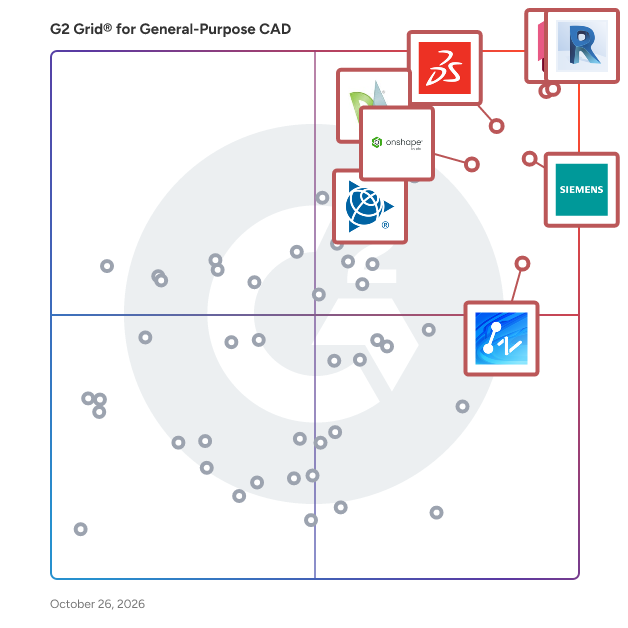
G2 Grid® for General-Purpose CAD Software

G2 Grid® for General-Purpose CAD Software plotting products by satisfaction and market presence

Highlighted products: Revit, AutoCAD, Designcenter Solid Edge, SOLIDWORKS, Onshape, SketchUp, ZWCAD, and DraftSight.

Underlying data: [Grid® JSON](https://www.g2.com/categories/general-purpose-cad/grids.json?focus%5B%5D=revit&focus%5B%5D=autocad&focus%5B%5D=designcenter-solid-edge&focus%5B%5D=solidworks&focus%5B%5D=onshape&focus%5B%5D=sketchup&focus%5B%5D=zwcad&focus%5B%5D=draftsight)

nanoCAD Free

nanoCAD Free - easy-to-use free CAD software delivering great user experience by providing classic interface and native .dwg support. Being the ultimate in 2D design tools, nanoCAD Free has been built to deliver design and project documentation regardless of the industry or enterprise. And above all, nanoCAD is free to use and share.

Average Rating: 4.2/5.0

Total Reviews: 23

How Do G2 Users Rate nanoCAD Free?

  • Has the product been a good partner in doing business?: 5.0/10 (Category avg: 8.5/10)
  • Drawing: 9.0/10 (Category avg: 8.9/10)
  • File Import : 9.2/10 (Category avg: 8.3/10)
  • Views: 7.4/10 (Category avg: 8.6/10)

Who Is the Company Behind nanoCAD Free?

  • Seller: Nanosoft AS
  • HQ Location: Norway
  • Twitter: @nanocad
    577 Twitter followers
  • LinkedIn® Page: www.linkedin.com
    47 employees on LinkedIn®

Who Uses This Product?

  • Company Size: 57% Medium, 35% Small

What Are Recent G2 Reviews of nanoCAD Free?

What Are G2 Users Discussing About nanoCAD Free?

DesignCAD

Easy to Learn & Use 2D/3D CAD - DesignCAD 3D Max combines easy to learn and use 2D drafting with powerful and precise 3D modeling Easily design anything from complex drawings requiring precision metrics, to simple everyday projects and hobbies including furniture, decks, floor plans, architectural drawings to toys and 3D models. • Precision 2D Drafting Tools • 3D Solid Modeling Tools • Mechanical Design Tools • Architectural Design Tools • Realistic Rendering and GPU-Accelerated Drawing • Intuitive User Interface • Extensive Online Help

Average Rating: 4.0/5.0

Total Reviews: 22

How Do G2 Users Rate DesignCAD?

  • Has the product been a good partner in doing business?: 8.3/10 (Category avg: 8.5/10)
  • Drawing: 9.0/10 (Category avg: 8.9/10)
  • File Import : 8.8/10 (Category avg: 8.3/10)
  • Views: 8.9/10 (Category avg: 8.6/10)

Who Is the Company Behind DesignCAD?

  • Seller: TurboCAD
  • Year Founded: 1983
  • HQ Location: Novato, CA
  • Twitter: @imsidesign
    110 Twitter followers
  • LinkedIn® Page: www.linkedin.com
    126 employees on LinkedIn®

Who Uses This Product?

  • Top Industries: Construction
  • Company Size: 50% Small, 38% Medium

What Are Recent G2 Reviews of DesignCAD?

What Are G2 Users Discussing About DesignCAD?

OpenSCAD

OpenSCAD is a software for creating solid 3D CAD objects.

Average Rating: 4.3/5.0

Total Reviews: 31

How Do G2 Users Rate OpenSCAD?

  • Drawing: 10.0/10 (Category avg: 8.9/10)
  • File Import : 7.5/10 (Category avg: 8.3/10)
  • Views: 10.0/10 (Category avg: 8.6/10)

Who Is the Company Behind OpenSCAD?

  • Seller: FreeCAD
  • Year Founded: 2021
  • HQ Location: Brussels
  • LinkedIn® Page: www.linkedin.com
    12 employees on LinkedIn®

Who Uses This Product?

  • Top Industries: Entertainment
  • Company Size: 55% Small, 26% Large

What Are Recent G2 Reviews of OpenSCAD?

What Are G2 Users Discussing About OpenSCAD?

AI can help you find the answers. G2 helps you trust them.

Connect G2 to Claude or ChatGPT for answers grounded in G2's trusted reviews, comparisons, and pricing from real user insights.

How it works

LibreCAD

LibreCAD is a free Open Source CAD application for Windows, Apple and Linux.

Average Rating: 3.8/5.0

Total Reviews: 25

How Do G2 Users Rate LibreCAD?

  • Has the product been a good partner in doing business?: 5.0/10 (Category avg: 8.5/10)
  • Drawing: 8.1/10 (Category avg: 8.9/10)
  • File Import : 8.1/10 (Category avg: 8.3/10)
  • Views: 8.3/10 (Category avg: 8.6/10)

Who Is the Company Behind LibreCAD?

  • Seller: FreeCAD
  • Year Founded: 2021
  • HQ Location: Brussels
  • LinkedIn® Page: www.linkedin.com
    12 employees on LinkedIn®

Who Uses This Product?

  • Top Industries: Architecture & Planning
  • Company Size: 60% Small, 40% Medium

What Are Recent G2 Reviews of LibreCAD?

What Are G2 Users Discussing About LibreCAD?

FreeCAD

FreeCAD is a parametric 3D modeler made primarily to design real-life objects of any size.

Average Rating: 4.1/5.0

Total Reviews: 56

How Do G2 Users Rate FreeCAD?

  • Has the product been a good partner in doing business?: 7.8/10 (Category avg: 8.5/10)
  • Drawing: 8.4/10 (Category avg: 8.9/10)
  • File Import : 8.4/10 (Category avg: 8.3/10)
  • Views: 8.0/10 (Category avg: 8.6/10)

Who Is the Company Behind FreeCAD?

  • Seller: FreeCAD
  • Year Founded: 2021
  • HQ Location: Brussels
  • LinkedIn® Page: www.linkedin.com
    12 employees on LinkedIn®

Who Uses This Product?

  • Top Industries: Design, Mechanical or Industrial Engineering
  • Company Size: 72% Small, 15% Large

What Are Recent G2 Reviews of FreeCAD?

What Are G2 Users Discussing About FreeCAD?

Gmsh

Gmsh is a free 3D finite element mesh generator with a built-in CAD engine and post-processor. Its design goal is to provide a fast, light and user-friendly meshing tool with parametric input and advanced visualization capabilities. Gmsh is built around four modules: geometry, mesh, solver and post-processing. The specification of any input to these modules is done either interactively using the graphical user interface, in ASCII text files using Gmsh's own scripting language (.geo files), or using the C++, Python or C API.

Average Rating: 4.4/5.0

Total Reviews: 10

How Do G2 Users Rate Gmsh?

  • Drawing: 7.9/10 (Category avg: 8.9/10)
  • File Import : 5.7/10 (Category avg: 8.3/10)
  • Views: 7.1/10 (Category avg: 8.6/10)

Who Is the Company Behind Gmsh?

  • Seller: Gmsh
  • Year Founded: 1999
  • HQ Location: Kiel, Schleswig-Holstein
  • LinkedIn® Page: www.linkedin.com
    388 employees on LinkedIn®

Who Uses This Product?

  • Company Size: 70% Small, 20% Medium

What Are Recent G2 Reviews of Gmsh?

What Are G2 Users Discussing About Gmsh?

PowerCADD

PowerCADD is a computer-aided design and drafting software program.

Average Rating: 4.3/5.0

Total Reviews: 12

How Do G2 Users Rate PowerCADD?

  • Has the product been a good partner in doing business?: 8.3/10 (Category avg: 8.5/10)
  • Drawing: 8.9/10 (Category avg: 8.9/10)
  • File Import : 8.1/10 (Category avg: 8.3/10)
  • Views: 7.3/10 (Category avg: 8.6/10)

Who Is the Company Behind PowerCADD?

Who Uses This Product?

  • Top Industries: Architecture & Planning
  • Company Size: 69% Small, 15% Medium

What Are Recent G2 Reviews of PowerCADD?

What Are G2 Users Discussing About PowerCADD?

Creo Elements/Direct Drafting

Creo Elements/Direct Drafting is a comprehensive 2D CAD system tailored for product designers and mechanical engineers. It offers an intuitive interface that facilitates the creation of detailed engineering drawings and technical illustrations. The software's robust assembly management capabilities allow users to visualize and manage complex assembly structures efficiently, streamlining the design and modification of parts and assemblies. Additionally, its strong multi-CAD collaboration features ensure seamless integration and reuse of existing 2D designs from various CAD systems. By automating development processes and providing customization options, Creo Elements/Direct Drafting enhances productivity and ensures design accuracy throughout the product development lifecycle. Key Features and Functionality: - Intuitive User Interface: Enables easy creation and modification of 2D designs, catering to both novice and experienced users. - Assembly Management: Provides a clear parts, assembly, and sub-assembly structure, simplifying the design and modification of complex assemblies. - Multi-CAD Collaboration: Supports importing and exporting files in formats like Autodesk DWG, DXF, and 2D IGES, facilitating seamless collaboration across different CAD platforms. - Customization and Automation: Allows users to tailor the software to specific needs and automate repetitive design tasks, enhancing efficiency. - Parametric Design Capabilities: Enables parameterization of drawings, allowing for easy creation of part or drawing families and efficient reuse of existing designs. Primary Value and User Solutions: Creo Elements/Direct Drafting addresses the need for a powerful yet user-friendly 2D CAD solution in the product development process. By offering robust assembly management and multi-CAD collaboration capabilities, it simplifies the design and modification of complex assemblies and ensures seamless integration with existing designs. The software's customization and automation features streamline development processes, reducing time-to-market and enhancing productivity. Ultimately, it empowers designers and engineers to produce accurate and professional technical documentation efficiently.

Average Rating: 4.7/5.0

Total Reviews: 9

How Do G2 Users Rate Creo Elements/Direct Drafting?

  • Has the product been a good partner in doing business?: 10.0/10 (Category avg: 8.5/10)
  • Drawing: 9.6/10 (Category avg: 8.9/10)
  • File Import : 8.8/10 (Category avg: 8.3/10)
  • Views: 8.5/10 (Category avg: 8.6/10)

Who Is the Company Behind Creo Elements/Direct Drafting?

  • Seller: PTC
  • Year Founded: 1985
  • HQ Location: Boston, Massachusetts
  • Twitter: @PTC
    37,560 Twitter followers
  • LinkedIn® Page: www.linkedin.com
    8,226 employees on LinkedIn®
  • Ownership: NASDAQ: PTC

Who Uses This Product?

  • Company Size: 67% Large, 22% Medium

What Do G2 Reviewers Say About Creo Elements/Direct Drafting?

AI-generated summary from verified user reviews

Pros
  • Users value the ease of use of Creo Elements/Direct Drafting, facilitating quick 2D and 3D rendering.
  • Users find the import functionality beneficial, streamlining the creation of detailed production drawings directly within the software.
  • Users appreciate the user-friendly interface of Creo Elements/Direct Drafting, enabling efficient 3D visualization and accessibility.
  • Users find the CAD compatibility of Creo Elements/Direct Drafting invaluable for seamless 3D model imports and efficient production drawings.
  • Users find the ease of creation in Creo Elements/Direct Drafting invaluable for seamless production drawing development.
Cons
  • Users report assembly issues with Creo Elements/Direct Drafting, particularly in complex and large projects affecting performance.
  • Users find some commands, like sweep, to be lengthy and complex, impacting ease of use.
  • Users report significant performance decline when handling complex or large assemblies in Creo Elements/Direct Drafting.
  • Users encounter slow simulation due to high processing power requirements, causing delays in loading 3D models and assemblies.

What Are Recent G2 Reviews of Creo Elements/Direct Drafting?

Arcadium

Arcadium 3D is a free 3D house design tool. It runs in the browser and uses AI to generate 3D furniture and rendered scenes. Unlike traditional 3D software, Arcadium is fastest and intuitive to use. It comes pre-bundled with a 3D object library and dynamic window, door and stair generation tools. It's ideal for 3D house design, room layout, landscape design, floor plans and interior design. It's also great for professionals as designs and ideas can be shared and discussed instantly online by sharing a URL (no file management or download needed)

Average Rating: 4.9/5.0

Total Reviews: 34

How Do G2 Users Rate Arcadium?

  • Has the product been a good partner in doing business?: 7.5/10 (Category avg: 8.5/10)
  • Drawing: 9.6/10 (Category avg: 8.9/10)
  • File Import : 7.8/10 (Category avg: 8.3/10)
  • Views: 10.0/10 (Category avg: 8.6/10)

Who Is the Company Behind Arcadium?

Who Uses This Product?

  • Top Industries: Architecture & Planning, Design
  • Company Size: 92% Small, 8% Medium

What Do G2 Reviewers Say About Arcadium?

AI-generated summary from verified user reviews

Pros
  • Users appreciate the ease of use in Arcadium, allowing for quick learning and efficient design creation.
  • Users find Arcadium intuitive and easy to use, enabling quick design with impressive results right from the start.
  • Users find the ease of learning Arcadium remarkable, quickly creating designs and enjoying its intuitive interface.
  • Users value the easy customization options in Arcadium, enabling precise and detailed project planning effortlessly.
  • Users appreciate the abundance of helpful tools in Arcadium, enhancing their project planning experience.
Cons
  • Users find that the sidebar design elements often interfere with the overall designing process, causing frustration.
  • Users find the sidebar intrusive, hindering their design experience and workflow efficiency in Arcadium.
  • Users desire more lighting options in Arcadium for creative designs, expressing frustration with current limitations.
  • Users wish for a larger library of items and more realistic graphics to enhance their experience.
  • Users desire enhanced modeling capabilities in Arcadium, wishing for advanced features like diverse water elements and improved terrain tools.

What Are Recent G2 Reviews of Arcadium?

Creo Elements/Direct Modeling

Creo Elements/Direct Modeling (formerly CoCreate Modeling) provides robust, comprehensive direct modeling capabilities.

Average Rating: 4.0/5.0

Total Reviews: 21

How Do G2 Users Rate Creo Elements/Direct Modeling?

  • Has the product been a good partner in doing business?: 5.0/10 (Category avg: 8.5/10)
  • Drawing: 8.9/10 (Category avg: 8.9/10)
  • File Import : 8.9/10 (Category avg: 8.3/10)
  • Views: 8.9/10 (Category avg: 8.6/10)

Who Is the Company Behind Creo Elements/Direct Modeling?

  • Seller: PTC
  • Year Founded: 1985
  • HQ Location: Boston, Massachusetts
  • Twitter: @PTC
    37,560 Twitter followers
  • LinkedIn® Page: www.linkedin.com
    8,226 employees on LinkedIn®
  • Ownership: NASDAQ: PTC

Who Uses This Product?

  • Top Industries: Mechanical or Industrial Engineering
  • Company Size: 55% Small, 32% Large

What Are Recent G2 Reviews of Creo Elements/Direct Modeling?

BeeGraphy

BeeGraphy offers a tech infrastructure and extensive tools and services for 3D artists, custom product manufacturers, and sellers. BeeGraphy offers cloud-based computational design software, allowing users to create parametric 3D models directly in the browser with real-time collaboration and the ability to share models with others via URL. BeeGraphy leverages computational design for e-commerce by integrating with the API. This allows for the use of parametric 3D models created on the platform as product configurators on e-commerce sites, enhancing the shopper experience through visually interactive product displays. Additionally, the platform auto-generates production-ready CAD files, streamlining the custom order manufacturing process.

Average Rating: 4.1/5.0

Total Reviews: 5

How Do G2 Users Rate BeeGraphy?

  • Has the product been a good partner in doing business?: 8.3/10 (Category avg: 8.5/10)
  • Drawing: 8.3/10 (Category avg: 8.9/10)
  • File Import : 8.3/10 (Category avg: 8.3/10)
  • Views: 7.9/10 (Category avg: 8.6/10)

Who Is the Company Behind BeeGraphy?

  • Seller: BeeGraphy
  • Year Founded: 2021
  • HQ Location: Sheridan, US
  • Twitter: @bee_graphy
    565 Twitter followers
  • LinkedIn® Page: www.linkedin.com
    32 employees on LinkedIn®

Who Uses This Product?

  • Company Size: 60% Small, 20% Large

What Are Recent G2 Reviews of BeeGraphy?

Alibre Design

Alibre Design is an engineering CAD software provides tools for engineers to project and manufacture anything they want.

Average Rating: 4.8/5.0

Total Reviews: 13

How Do G2 Users Rate Alibre Design?

  • Has the product been a good partner in doing business?: 8.3/10 (Category avg: 8.5/10)

Who Is the Company Behind Alibre Design?

  • Seller: Alibre
  • Year Founded: 2017
  • HQ Location: N/A
  • LinkedIn® Page: www.linkedin.com
    13 employees on LinkedIn®

Who Uses This Product?

  • Company Size: 85% Small, 15% Medium

What Do G2 Reviewers Say About Alibre Design?

AI-generated summary from verified user reviews

Pros
  • Users commend the ease of use of Alibre Design, noting its intuitive interface for efficient task completion.
  • Users find the intuitive interface of Alibre Design easy to navigate, streamlining their design processes.
  • Users love the intuitive interface of Alibre Design, which simplifies tasks and enhances ease of use.
  • Users value the simple and intuitive interface of Alibre Design, which enhances their overall experience with fewer parameters.
  • Users love the intuitive interface of Alibre Design, making basic tasks easier and more accessible.
Cons
  • Users are disappointed by the missing features such as the inability to open STL files in current versions.
  • Users are disappointed that STL file support is not currently available in Alibre Design.

What Are Recent G2 Reviews of Alibre Design?

What Are G2 Users Discussing About Alibre Design?

CorelCAD

CorelCAD is CAD for drawing the detailed elements required in the technical design.

Average Rating: 4.8/5.0

Total Reviews: 4

How Do G2 Users Rate CorelCAD?

  • Has the product been a good partner in doing business?: 8.3/10 (Category avg: 8.5/10)
  • Drawing: 10.0/10 (Category avg: 8.9/10)
  • File Import : 6.7/10 (Category avg: 8.3/10)
  • Views: 10.0/10 (Category avg: 8.6/10)

Who Is the Company Behind CorelCAD?

  • Seller: Corel Corporation
  • Year Founded: 2006
  • HQ Location: Bellevue, WA
  • Twitter: @corelsoftware
    83 Twitter followers
  • LinkedIn® Page: www.linkedin.com
    1 employees on LinkedIn®

Who Uses This Product?

  • Company Size: 50% Large, 50% Medium

What Are Recent G2 Reviews of CorelCAD?

What Are G2 Users Discussing About CorelCAD?

MicroSurvey Software

MicroSurvey CAD is a Complete Desktop Survey and Design Program Created for Surveyors, Contractors and Engineers.

Average Rating: 4.4/5.0

Total Reviews: 4

How Do G2 Users Rate MicroSurvey Software?

  • Drawing: 10.0/10 (Category avg: 8.9/10)
  • File Import : 9.4/10 (Category avg: 8.3/10)
  • Views: 8.9/10 (Category avg: 8.6/10)

Who Is the Company Behind MicroSurvey Software?

  • Seller: MicroSurvey Software
  • Year Founded: 1986
  • HQ Location: West Kelowna, CA
  • Twitter: @MicroSurvey
    404 Twitter followers
  • LinkedIn® Page: www.linkedin.com
    33 employees on LinkedIn®

Who Uses This Product?

  • Company Size: 75% Medium, 25% Large

What Are Recent G2 Reviews of MicroSurvey Software?

What Are G2 Users Discussing About MicroSurvey Software?

progeCAD Professional

progeCAD Professional is a full-featured 2D drafting and 3D modeling CAD software built as a cost-effective, AutoCAD-compatible alternative. It offers native DWG file compatibility, PDF import, photorealistic rendering, and LISP customization, all backed by a one-time perpetual license with no subscription required. Trusted by architecture, engineering, construction, and manufacturing professionals worldwide.

Average Rating: 3.9/5.0

Total Reviews: 4

How Do G2 Users Rate progeCAD Professional?

  • Drawing: 10.0/10 (Category avg: 8.9/10)

Who Is the Company Behind progeCAD Professional?

Who Uses This Product?

  • Company Size: 75% Small, 25% Medium

What Are Recent G2 Reviews of progeCAD Professional?

What Are G2 Users Discussing About progeCAD Professional?

Daniel Rivera
DR
Researched and written by Daniel Rivera
Updated October 3, 2024