# Best Financial Close Software

*By [Nathan Calabrese](https://research.g2.com/insights/author/nathan-calabrese)*


Financial close software provides tools to help businesses complete the financial close cycle, enabling accountants to ensure books are accurate, track task completion via checklists, manage reconciliations, and monitor individual progress and deadlines across each close period.

### Core Capabilities of Financial Close Software

To qualify for inclusion in the Financial Close category, a product must:

- Allow users to create checklists and individual tasks related to closing accounting books
- Track the financial close process so users can view progress, timelines, and approvals
- Provide tools such as reconciliation repositories or reconciliation management to help users compare financial data
- Integrate with or import spreadsheets from other database or accounting software products

### Common Use Cases for Financial Close Software

Accounting teams use financial close software to streamline the end-of-period close process and reduce errors. Common use cases include:

- Managing month-end and year-end close checklists with task assignment and deadline tracking
- Reconciling accounts and comparing financial data sets to identify inconsistencies
- Maintaining a historical database of past close periods organized by month and transaction type

### How Financial Close Software Differs from Other Tools

Financial close software is purpose-built for the accounting close cycle, distinguishing it from broader financial platforms. These tools typically integrate with spreadsheets and accounting software to document relevant data, and may also integrate with or come packaged with [corporate performance management (CPM)](https://www.g2.com/categories/corporate-performance-management-cpm) features such as financial consolidation or [budgeting and forecasting](https://www.g2.com/categories/budgeting-and-forecasting) tools.

### Insights from G2 on Financial Close Software

Based on category trends on G2, task-level tracking and reconciliation management stand out as the most valued capabilities. These platforms deliver reductions in close cycle time and improved auditability as primary outcomes of adoption.
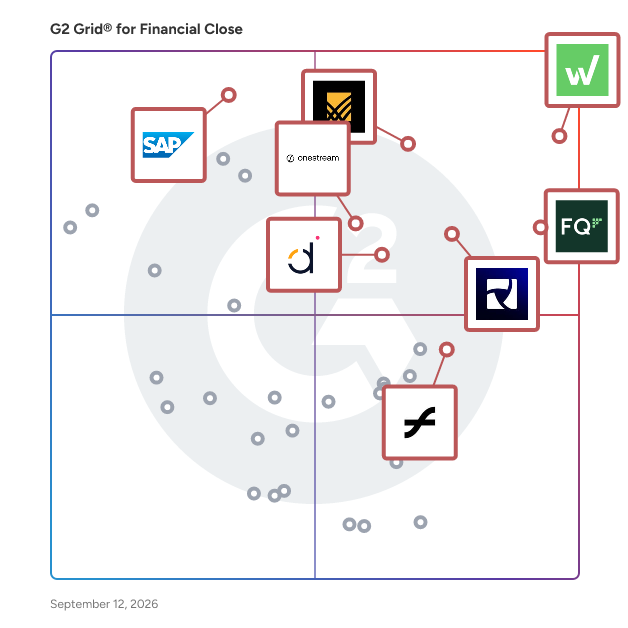


## Top Financial Close Software at a Glance
| # | Product | Rating | Best For | What Users Say |
|---|---------|--------|----------|----------------|
| 1 | [Workiva](https://www.g2.com/products/workiva-workiva/reviews) | 4.5/5.0 (2,131 reviews) | SEC reporting with linked financial statements | "[Streamlined Reporting with Excel Integration](https://www.g2.com/survey_responses/workiva-review-12603376)" |
| 2 | [FloQast](https://www.g2.com/products/floqast/reviews) | 4.6/5.0 (1,393 reviews) | Accounting close orchestration with ERP-native reconciliations | "[Streamlined Compliance with Powerful Audit Trails](https://www.g2.com/survey_responses/floqast-review-12969781)" |
| 3 | [Trintech](https://www.g2.com/products/trintech-trintech/reviews) | 4.5/5.0 (536 reviews) | Multi-ERP balance sheet reconciliation and journal control | "[Trintech Streamlines Financial Close with Powerful Automation and Compliance](https://www.g2.com/survey_responses/trintech-review-12932152)" |
| 4 | [BlackLine Financial Close Management](https://www.g2.com/products/blackline-blackline-financial-close-management/reviews) | 4.5/5.0 (1,050 reviews) | Automated reconciliations and close task orchestration | "[User-Friendly Task Management and account reconciliations](https://www.g2.com/survey_responses/blackline-financial-close-management-review-12598772)" |
| 5 | [OneStream - Unified EPM](https://www.g2.com/products/onestream-unified-epm/reviews) | 4.6/5.0 (149 reviews) | Multi-ERP consolidation with extensible dimensionality | "[AVP, Engineering](https://www.g2.com/survey_responses/onestream-unified-epm-review-12716812)" |
| 6 | [SAP Cloud ERP (SAP S/4HANA Cloud)](https://www.g2.com/products/sap-cloud-erp-sap-s-4hana-cloud/reviews) | 4.4/5.0 (939 reviews) | In-memory cross-module financial close acceleration | "[SAP S/4HANA Cloud: Instant Processing, Centralized Data, and Seamless Integration](https://www.g2.com/survey_responses/sap-cloud-erp-sap-s-4hana-cloud-review-12772371)" |
| 7 | [LiveFlow](https://www.g2.com/products/liveflow/reviews) | 4.9/5.0 (332 reviews) | QuickBooks-to-Sheets automated close and consolidation | "[Reliable, Fast, and Supportive – Liveflow Is a Game-Changer for Financial Reporting](https://www.g2.com/survey_responses/liveflow-review-11110255)" |
| 8 | [Datarails](https://www.g2.com/products/datarails/reviews) | 4.6/5.0 (355 reviews) | — | "[Intuitive, High-Performing Tool with Easy NetSuite Integration and Great Support](https://www.g2.com/survey_responses/datarails-review-12876184)" |
| 9 | [CCH Tagetik](https://www.g2.com/products/cch-tagetik/reviews) | 4.3/5.0 (71 reviews) | Multi-entity consolidation with integrated planning workflows | "[CCH Tagetik – Personal Feedback](https://www.g2.com/survey_responses/cch-tagetik-review-12761012)" |
| 10 | [SAP Advanced Financial Closing](https://www.g2.com/products/sap-advanced-financial-closing/reviews) | 4.3/5.0 (46 reviews) | — | "[Structured, Automated Financial Close with Real-Time Visibility](https://www.g2.com/survey_responses/sap-advanced-financial-closing-review-12737275)" |


## How Many Financial Close Software Products Does G2 Track?
**Total Products under this Category:** 114

### Category Stats (Jul 2026)
- **Average Rating**: 4.52/5 (↓0.02 vs Jun 2026) The average rating of products in this category, based on all submitted ratings
- **Top Trending Product**: Cube (+0.29%) - Among all products in this category, Cube recorded the largest rating increase compared to last month
*Last updated: July 01, 2026*


## How Does G2 Rank Financial Close Software Products?

**Why You Can Trust G2's Software Rankings:**

- 30 Analysts and Data Experts
- 11,600+ Authentic Reviews
- 114+ Products
- Unbiased Rankings

G2's software rankings are built on verified user reviews, rigorous moderation, and a consistent research methodology maintained by a team of analysts and data experts. Each product is measured using the same transparent criteria, with no paid placement or vendor influence. While reviews reflect real user experiences, which can be subjective, they offer valuable insight into how software performs in the hands of professionals. Together, these inputs power the G2 Score, a standardized way to compare tools within every category.


## Which Financial Close Software Is Best for Your Use Case?

- **Leader:** [Workiva](https://www.g2.com/products/workiva-workiva/reviews)
- **Highest Performer:** [LiveFlow](https://www.g2.com/products/liveflow/reviews)
- **Easiest to Use:** [FloQast](https://www.g2.com/products/floqast/reviews)
- **Top Trending:** [Aleph](https://www.g2.com/products/getaleph/reviews)
- **Best Free Software:** [SAP Cloud ERP (SAP S/4HANA Cloud)](https://www.g2.com/products/sap-cloud-erp-sap-s-4hana-cloud/reviews)


---

**Sponsored**

### SAP Cloud ERP (SAP S/4HANA Cloud)

SAP Cloud ERP (SAP S/4HANA Cloud) is a modular ERP designed for every business need, powered by AI and analytics. SAP Cloud ERP enables users to run mission-critical operations in real time from anywhere, introduce new business models in any industry, and expand globally. SAP Cloud ERP is a SaaS product and can also be deployed in a hybrid landscape for quicker time to value.​ SAP Cloud ERP is the foundational component of the SAP Business Suite, a seamlessly integrated system of applications, data, and AI that connects and optimizes every part of your business, enabling smarter decisions, real-time insights, and intelligent automation.​


[Visit website](https://www.g2.com/external_clickthroughs/record?secure%5Bad_program%5D=paid_promo&amp;secure%5Bad_slot%5D=category_product_list&amp;secure%5Bcategory_id%5D=1108&amp;secure%5Bchosen_at%5D=2026-07-01T23%3A51%3A36Z&amp;secure%5Bmedium%5D=sponsored&amp;secure%5Bprioritized%5D=false&amp;secure%5Bproduct_id%5D=19175&amp;secure%5Bresource_id%5D=1108&amp;secure%5Bresource_type%5D=Category&amp;secure%5Bsource_type%5D=category_page&amp;secure%5Bsource_url%5D=https%3A%2F%2Fwww.g2.com%2Fcategories%2Ffinancial-close%3Fpage%3D8&amp;secure%5Btoken%5D=ec2a4be081fa91c8c4a78332e1e52b601c110b8211703ce83c5f44c42c8c50a9&amp;secure%5Burl%5D=https%3A%2F%2Fwww.sap.com%2Fproducts%2Ferp%2Fs4hana.html&amp;secure%5Burl_type%5D=paid_promos)

---

## What Are the Top-Rated Financial Close Software Products in 2026?
### 1. [Workiva](https://www.g2.com/products/workiva-workiva/reviews)
Workiva (NYSE:WK) is a software designed to power transparent regulatory, financial, and ESG reporting for organizations worldwide. The software provides data connectivity and streamlined disclosure workflows by leveraging a cloud-based platform that unifies teams and processes. It automates complex reporting tasks and reduces inconsistencies across financial and non-financial data. Workiva (NYSE:WK) addresses stakeholder demands for transparency and accountability by connecting data sources and standardizing reporting outputs. The software supports regulatory compliance, ESG disclosure, and financial close reporting across enterprise and mid-market organizations.


**Average Rating:** 4.5/5.0
**Total Reviews:** 2,131
**How Do G2 Users Rate Workiva?**

- **Has the product been a good partner in doing business?:** 8.9/10 (Category avg: 9.2/10)
- **Accounting:** 8.5/10 (Category avg: 8.6/10)
- **Management:** 8.6/10 (Category avg: 8.9/10)
- **Distribution:** 8.5/10 (Category avg: 8.3/10)

**Who Is the Company Behind Workiva?**

- **Seller:** [Workiva](https://www.g2.com/sellers/workiva)
- **Company Website:** https://www.workiva.com
- **Year Founded:** 2008
- **HQ Location:** Ames, Iowa
- **Twitter:** @Workiva (5,277 Twitter followers)
- **LinkedIn® Page:** https://www.linkedin.com/company/732400/ (3,300 employees on LinkedIn®)

**Who Uses This Product?**
- **Who Uses This:** Financial Reporting Manager, Senior Accountant
- **Top Industries:** Accounting, Financial Services
- **Company Size:** 57% Enterprise, 28% Mid-Market


#### What Are Workiva's Pros and Cons?

**Pros:**

- Ease of Use (364 reviews)
- Collaboration (196 reviews)
- Features (181 reviews)
- Team Collaboration (178 reviews)
- Reporting (151 reviews)

**Cons:**

- Missing Features (113 reviews)
- Learning Curve (85 reviews)
- Learning Difficulty (81 reviews)
- Limited Functionality (80 reviews)
- Limitations (70 reviews)


### What Do G2 Reviewers Say About Workiva?
*AI-generated summary from verified user reviews*

**Pros:**

- Users appreciate the **user-friendly interface** of Workiva, facilitating daily tasks with ease and efficiency.
- Users value the **collaborative features** of Workiva, promoting real-time teamwork and streamlined, compliant reporting processes.
- Users appreciate the **intuitive UI and strong integration features** of Workiva, enhancing control testing and documentation storage.
- Users value the **real-time collaboration** features of Workiva, significantly enhancing efficiency and teamwork in report creation.
- Users value the **strong integration of reporting** features in Workiva, enhancing efficiency and ease of use.

**Cons:**

- Users feel that Workiva lacks **important features** like automated approvals and better integration options, hindering efficiency.
- Users find the **learning curve steep** , requiring significant time and experience to effectively use Workiva, especially for novices.
- Users find the **learning difficulty** with Workiva notable, especially for those not familiar with tech systems.
- Users find Workiva&#39;s **limited functionality** lacking compared to Excel, with some features still evolving and immature.
- Users find Workiva&#39;s **workflow management capabilities immature** compared to Excel or Word, indicating a need for improvement.

#### What Are Recent G2 Reviews of Workiva?

**"[Streamlined Reporting with Excel Integration](https://www.g2.com/survey_responses/workiva-review-12603376)"**

**Rating:** 4.5/5.0 stars
*— Michelle L.*

[Read full review](https://www.g2.com/survey_responses/workiva-review-12603376)

---

**"[Streamlined Reporting with Room for Improvement](https://www.g2.com/survey_responses/workiva-review-4678942)"**

**Rating:** 4.0/5.0 stars
*— Chad B.*

[Read full review](https://www.g2.com/survey_responses/workiva-review-4678942)

---


### 2. [FloQast](https://www.g2.com/products/floqast/reviews)
FloQast is a software designed to automate accounting operations including close management, account reconciliations, and compliance activities for finance teams. The software provides AI-driven workflow orchestration and audit readiness by leveraging an Accounting Transformation Platform built by accountants for accountants. It automates the financial close process and reduces the compliance burden on accounting teams. FloQast addresses accuracy and visibility challenges by centralizing accounting operations and enabling real-time collaboration across teams. The software supports over 3,000 global accounting teams and integrates with existing systems to deliver faster closes and improved organizational performance.


**Average Rating:** 4.6/5.0
**Total Reviews:** 1,393
**How Do G2 Users Rate FloQast?**

- **Has the product been a good partner in doing business?:** 9.6/10 (Category avg: 9.2/10)
- **Accounting:** 8.6/10 (Category avg: 8.6/10)
- **Management:** 8.8/10 (Category avg: 8.9/10)
- **Distribution:** 7.8/10 (Category avg: 8.3/10)

**Who Is the Company Behind FloQast?**

- **Seller:** [FloQast](https://www.g2.com/sellers/floqast)
- **Company Website:** https://www.floqast.com
- **Year Founded:** 2013
- **HQ Location:** Los Angeles, CA
- **Twitter:** @FloQast (1,578 Twitter followers)
- **LinkedIn® Page:** https://www.linkedin.com/company/3059072/ (867 employees on LinkedIn®)

**Who Uses This Product?**
- **Who Uses This:** Senior Accountant, Accounting Manager
- **Top Industries:** Accounting, Computer Software
- **Company Size:** 58% Mid-Market, 22% Enterprise


#### What Are FloQast's Pros and Cons?

**Pros:**

- Ease of Use (169 reviews)
- Organization (98 reviews)
- Task Management (98 reviews)
- Reconciliation (71 reviews)
- Efficiency (69 reviews)

**Cons:**

- Missing Features (48 reviews)
- Limitations (29 reviews)
- Limited Functionality (26 reviews)
- Slow Loading (25 reviews)
- Reconciliation Issues (20 reviews)


### What Do G2 Reviewers Say About FloQast?
*AI-generated summary from verified user reviews*

**Pros:**

- Users value the **ease of use** of FloQast, appreciating its seamless setup and user-friendly interface for efficient management.
- Users value the **organization** of FloQast, appreciating its ability to track tasks and keep data well-structured.
- Users appreciate the **intuitive task management** features, enhancing month-end close tracking and signoff clarity.
- Users value the **efficient reconciliation notifications** from FloQast, enhancing their month-end closing processes significantly.
- Users value FloQast for its **efficiency in managing month-end close processes** , enhancing workflow and tracking effortlessly.

**Cons:**

- Users note a **lack of automation features** and integration options in FloQast, limiting its effectiveness for diverse needs.
- Users face **limitations** with FloQast, including manual task updates, lack of client service support, and data inflexibility.
- Users find the **limited functionality** of FloQast hampers effective management, especially for client advisory services and customization.
- Users experience **slow loading times** which can hinder efficiency and disrupt workflow during critical tasks.
- Users face **reconciliation issues** with file attachments and syncing, impacting their workflow and efficiency.

#### What Are Recent G2 Reviews of FloQast?

**"[FloQast Streamlines Close with Intuitive Onboarding, Automation, and ERP Integrations](https://www.g2.com/survey_responses/floqast-review-12817485)"**

**Rating:** 4.5/5.0 stars
*— Rinalon E.*

[Read full review](https://www.g2.com/survey_responses/floqast-review-12817485)

---

**"[Streamlined Compliance with Powerful Audit Trails](https://www.g2.com/survey_responses/floqast-review-12969781)"**

**Rating:** 4.0/5.0 stars
*— Reena s.*

[Read full review](https://www.g2.com/survey_responses/floqast-review-12969781)

---


#### What Are G2 Users Discussing About FloQast?

- [What is FloQast used for?](https://www.g2.com/discussions/what-is-floqast-used-for) - 1 comment

### 3. [Trintech](https://www.g2.com/products/trintech-trintech/reviews)
Trintech is a software designed to execute financial close and reconciliation processes through a single, unified AI platform rather than merely managing them. The software provides transaction matching, account reconciliation, journal entry, and close management by leveraging native AI embedded across every solution to orchestrate end-to-end workflows. It automates variance analysis, exception handling, and accrual creation and reduces reliance on manual execution across ERP and financial systems. Trintech addresses the challenge of fragmented financial operations by connecting data, workflows, and controls into one system with human-in-the-loop governance built in. The software supports audit-ready outputs, continuous intelligent operations, and seamless integration with existing ERP environments without requiring system replacement.


**Average Rating:** 4.5/5.0
**Total Reviews:** 536
**How Do G2 Users Rate Trintech?**

- **Has the product been a good partner in doing business?:** 8.8/10 (Category avg: 9.2/10)
- **Accounting:** 8.2/10 (Category avg: 8.6/10)
- **Management:** 7.9/10 (Category avg: 8.9/10)
- **Distribution:** 7.4/10 (Category avg: 8.3/10)

**Who Is the Company Behind Trintech?**

- **Seller:** [Trintech](https://www.g2.com/sellers/trintech)
- **Company Website:** https://www.trintech.com/
- **Year Founded:** 1987
- **HQ Location:** Plano, TX
- **Twitter:** @TrintechInc (1,765 Twitter followers)
- **LinkedIn® Page:** https://www.linkedin.com/company/trintech/ (650 employees on LinkedIn®)

**Who Uses This Product?**
- **Who Uses This:** Accountant, Redovisningsekonom
- **Top Industries:** Accounting, Financial Services
- **Company Size:** 41% Mid-Market, 39% Enterprise


#### What Are Trintech's Pros and Cons?

**Pros:**

- Ease of Use (33 reviews)
- Task Management (18 reviews)
- Time-Saving (16 reviews)
- Organization (15 reviews)
- Time-saving (15 reviews)

**Cons:**

- Limited Functionality (6 reviews)
- Inefficient Task Management (5 reviews)
- Limitations (4 reviews)
- Poor Navigation (4 reviews)
- Delays (3 reviews)


### What Do G2 Reviewers Say About Trintech?
*AI-generated summary from verified user reviews*

**Pros:**

- Users appreciate the **ease of use** of Trintech, simplifying balance reconciliation and saving valuable time.
- Users value the **Task Management** features of Trintech for their visibility and client-focused improvements.
- Users value the **time-saving efficiency** of Trintech, finding it easy and quick to use in their workflow.
- Users value the **secure and efficient documentation management** of Trintech, which streamlines balance reconciliation processes.
- Users appreciate the **time-saving** benefits of Trintech, enhancing efficiency and simplifying their financial processes.

**Cons:**

- Users note the **limited functionality** of Trintech, particularly in dashboard customization and document preview options.
- Users face **inefficient task management** , requiring admin assistance and experiencing delays in job launches and exports.
- Users find the **lack of document preview** in Trintech frustrating, requiring too many steps to access information.
- Users struggle with **poor navigation** in Trintech, finding it difficult to locate tools and essential information.
- Users report **delays** in task completions and issues with saving changes, affecting overall efficiency with Trintech.

#### What Are Recent G2 Reviews of Trintech?

**"[Trintech Streamlines Financial Close with Powerful Automation and Compliance](https://www.g2.com/survey_responses/trintech-review-12932152)"**

**Rating:** 5.0/5.0 stars
*— Cem U.*

[Read full review](https://www.g2.com/survey_responses/trintech-review-12932152)

---

**"[Cadency - Solution for Financial Close](https://www.g2.com/survey_responses/trintech-review-7241613)"**

**Rating:** 5.0/5.0 stars
*— Reetinder S.*

[Read full review](https://www.g2.com/survey_responses/trintech-review-7241613)

---


### 4. [BlackLine Financial Close Management](https://www.g2.com/products/blackline-blackline-financial-close-management/reviews)
BlackLine Financial Close Management is a software designed to replace unsustainable manual accounting processes with a unified, cloud-based financial operations management platform. The software provides solutions for financial close, accounts receivable, and intercompany accounting by leveraging automation and real-time data visibility across business units. It automates repetitive accounting tasks and reduces the risk of errors and process bottlenecks. BlackLine Financial Close Management addresses digital transformation challenges by unifying data and workflows to enhance accountability and control across the organization. The software supports large enterprises and midsize companies across industries seeking to streamline operations with speed and accuracy.


**Average Rating:** 4.5/5.0
**Total Reviews:** 1,050
**How Do G2 Users Rate BlackLine Financial Close Management?**

- **Has the product been a good partner in doing business?:** 8.8/10 (Category avg: 9.2/10)
- **Accounting:** 8.6/10 (Category avg: 8.6/10)
- **Management:** 8.5/10 (Category avg: 8.9/10)
- **Distribution:** 7.9/10 (Category avg: 8.3/10)

**Who Is the Company Behind BlackLine Financial Close Management?**

- **Seller:** [BlackLine](https://www.g2.com/sellers/blackline)
- **Company Website:** https://www.blackline.com
- **Year Founded:** 2001
- **HQ Location:** Woodland Hills, CA
- **Twitter:** @BlackLine (3,813 Twitter followers)
- **LinkedIn® Page:** https://www.linkedin.com/company/362833/ (2,092 employees on LinkedIn®)

**Who Uses This Product?**
- **Who Uses This:** Senior Accountant, Accounting Manager
- **Top Industries:** Accounting, Oil &amp; Energy
- **Company Size:** 59% Enterprise, 32% Mid-Market


#### What Are BlackLine Financial Close Management's Pros and Cons?

**Pros:**

- Ease of Use (29 reviews)
- Automation (23 reviews)
- Reconciliation (22 reviews)
- Close Process (21 reviews)
- Automation Efficiency (20 reviews)

**Cons:**

- Learning Difficulty (11 reviews)
- Complexity (10 reviews)
- Insufficient Information (9 reviews)
- Implementation Difficulties (8 reviews)
- Limited Functionality (8 reviews)


### What Do G2 Reviewers Say About BlackLine Financial Close Management?
*AI-generated summary from verified user reviews*

**Pros:**

- Users praise the **ease of use** of BlackLine Financial Close Management, enhancing the efficiency and accuracy of financial processes.
- Users value the **automation capabilities** of BlackLine, significantly enhancing efficiency and streamlining the financial close process.
- Users value the **ease of account reconciliation** with BlackLine, enhancing transparency and standardization in financial processes.
- Users value the **integrated modules** of BlackLine, enhancing end-to-end support for a streamlined financial close process.
- Users value the **automation efficiency** of BlackLine, appreciating its time-saving capabilities and seamless integrations.

**Cons:**

- Users find the **learning difficulty** of BlackLine challenging due to its complexity and steep setup requirements.
- Users find BlackLine&#39;s **initial complexity** challenging, requiring significant time and training to navigate effectively.
- Users face **insufficient information** in support communications, making problem-solving and understanding updates challenging.
- Users face **implementation difficulties** with BlackLine, citing complexity, steep learning curves, and integration challenges.
- Users find BlackLine Financial Close Management to have **limited functionality** , impacting usability and access to community feedback.

#### What Are Recent G2 Reviews of BlackLine Financial Close Management?

**"[Streamlines Financial Closing with Clear Structure](https://www.g2.com/survey_responses/blackline-financial-close-management-review-7385641)"**

**Rating:** 4.0/5.0 stars
*— Verified User in Accounting*

[Read full review](https://www.g2.com/survey_responses/blackline-financial-close-management-review-7385641)

---

**"[User-Friendly Task Management and account reconciliations](https://www.g2.com/survey_responses/blackline-financial-close-management-review-12598772)"**

**Rating:** 4.0/5.0 stars
*— Jesse G.*

[Read full review](https://www.g2.com/survey_responses/blackline-financial-close-management-review-12598772)

---


#### What Are G2 Users Discussing About BlackLine Financial Close Management?

- [What is BlackLine used for?](https://www.g2.com/discussions/what-is-blackline-used-for)
- [What is the easiest CRM to use?](https://www.g2.com/discussions/what-is-the-easiest-crm-to-use)
- [What is BlackLine in accounting?](https://www.g2.com/discussions/what-is-blackline-in-accounting) - 1 comment
- [What is SAP BlackLine?](https://www.g2.com/discussions/what-is-sap-blackline)
- [What does BlackLine software do?](https://www.g2.com/discussions/what-does-blackline-software-do)

### 5. [OneStream - Unified EPM](https://www.g2.com/products/onestream-unified-epm/reviews)
OneStream - Unified EPM is a software designed to empower CFOs, Controllers, and finance executives with a comprehensive Enterprise Performance Management and Corporate Performance Management platform. The software provides financial consolidation, close management, AI-driven planning, compliance reporting, and profitability analysis by leveraging a single extensible platform that unifies all financial and operational data. It automates consolidation workflows and reduces technical debt by adapting to evolving business needs without requiring multiple point solutions. OneStream - Unified EPM addresses the complexity of multi-source financial data by delivering a unified trial balance, intercompany eliminations, foreign exchange calculations, and ESG reporting within one governed system. The software supports over 1,700 customers including 15% of the Fortune 500, and integrates with Microsoft Excel, PowerPoint, and Power BI for reporting and analytics.


**Average Rating:** 4.6/5.0
**Total Reviews:** 149
**How Do G2 Users Rate OneStream - Unified EPM?**

- **Has the product been a good partner in doing business?:** 9.2/10 (Category avg: 9.2/10)
- **Accounting:** 8.7/10 (Category avg: 8.6/10)
- **Management:** 8.8/10 (Category avg: 8.9/10)
- **Distribution:** 8.5/10 (Category avg: 8.3/10)

**Who Is the Company Behind OneStream - Unified EPM?**

- **Seller:** [OneStream Software](https://www.g2.com/sellers/onestream-software)
- **Company Website:** https://www.onestream.com/
- **HQ Location:** Birmingham, MI
- **Twitter:** @OneStream_Soft (2,189 Twitter followers)
- **LinkedIn® Page:** https://www.linkedin.com/company/1244326/ (1,658 employees on LinkedIn®)

**Who Uses This Product?**
- **Top Industries:** Manufacturing, Financial Services
- **Company Size:** 63% Enterprise, 28% Mid-Market


#### What Are OneStream - Unified EPM's Pros and Cons?

**Pros:**

- Ease of Use (22 reviews)
- Data Management (15 reviews)
- Flexibility (13 reviews)
- Reporting (13 reviews)
- Capabilities (11 reviews)

**Cons:**

- Learning Difficulty (11 reviews)
- Steep Learning Curve (9 reviews)
- Learning Curve (8 reviews)
- Complexity (7 reviews)
- Dashboard Limitations (6 reviews)


### What Do G2 Reviewers Say About OneStream - Unified EPM?
*AI-generated summary from verified user reviews*

**Pros:**

- Users value the **ease of use** of OneStream, enjoying a unified platform that streamlines finance processes.
- Users value the **unified data management** in OneStream, ensuring seamless communication and consolidation of financial information.
- Users value the **flexibility** of OneStream, allowing customization to meet evolving finance needs seamlessly.
- Users value the **unified reporting capabilities** of OneStream, enhancing efficiency and collaboration across departments.
- Users value the **integrated platform** of OneStream for combining consolidation, planning, and reporting in a single place.

**Cons:**

- Users face a steep **learning difficulty** with OneStream, recommending training due to its complex features and customization.
- Users face a **steep learning curve** , finding the interface intimidating and needing extensive training for effective usage.
- Users find the **learning curve steep** , recommending training due to an unintuitive interface and time-consuming customization.
- Users find the **complexity** of OneStream challenging, particularly in dashboarding and writing Business Rules.
- Users find the **dashboard limitations** hinder overall performance, making it difficult to create appealing visualizations.

#### What Are Recent G2 Reviews of OneStream - Unified EPM?

**"[AVP, Engineering](https://www.g2.com/survey_responses/onestream-unified-epm-review-12716812)"**

**Rating:** 4.0/5.0 stars
*— Damaris D.*

[Read full review](https://www.g2.com/survey_responses/onestream-unified-epm-review-12716812)

---

**"[OneStream Review](https://www.g2.com/survey_responses/onestream-unified-epm-review-7860983)"**

**Rating:** 5.0/5.0 stars
*— Tahir H.*

[Read full review](https://www.g2.com/survey_responses/onestream-unified-epm-review-7860983)

---


#### What Are G2 Users Discussing About OneStream - Unified EPM?

- [What does OneStream XF stand for?](https://www.g2.com/discussions/what-does-onestream-xf-stand-for) - 2 comments
- [What is OneStream Excel add in?](https://www.g2.com/discussions/what-is-onestream-excel-add-in) - 1 comment
- [Is OneStream an ERP?](https://www.g2.com/discussions/is-onestream-an-erp) - 2 comments
- [What type of system is OneStream?](https://www.g2.com/discussions/what-type-of-system-is-onestream) - 2 comments

### 6. [SAP Cloud ERP (SAP S/4HANA Cloud)](https://www.g2.com/products/sap-cloud-erp-sap-s-4hana-cloud/reviews)
SAP Cloud ERP (SAP S/4HANA Cloud) is a software designed to support mission-critical business operations in real time through a modular, AI-powered ERP platform. The software provides embedded analytics, intelligent automation, and cross-functional process management by leveraging a SaaS architecture that can also be deployed in hybrid environments. It automates core business workflows and reduces latency in decision-making through real-time data processing and the Fiori user interface. SAP Cloud ERP (SAP S/4HANA Cloud) addresses the need for global scalability and business model flexibility by serving as the foundational component of the SAP Business Suite, connecting applications, data, and AI. The software supports enterprises and mid-market organizations across industries seeking faster time to value and seamless integration across finance, operations, and supply chain.


**Average Rating:** 4.4/5.0
**Total Reviews:** 939
**How Do G2 Users Rate SAP Cloud ERP (SAP S/4HANA Cloud)?**

- **Has the product been a good partner in doing business?:** 8.7/10 (Category avg: 9.2/10)
- **Accounting:** 9.0/10 (Category avg: 8.6/10)
- **Management:** 8.8/10 (Category avg: 8.9/10)
- **Distribution:** 8.7/10 (Category avg: 8.3/10)

**Who Is the Company Behind SAP Cloud ERP (SAP S/4HANA Cloud)?**

- **Seller:** [SAP](https://www.g2.com/sellers/sap)
- **Company Website:** https://www.sap.com/
- **Year Founded:** 1972
- **HQ Location:** Walldorf
- **Twitter:** @SAP (297,052 Twitter followers)
- **LinkedIn® Page:** https://www.linkedin.com/company/sap/ (141,955 employees on LinkedIn®)

**Who Uses This Product?**
- **Who Uses This:** Consultant, Senior Consultant
- **Top Industries:** Information Technology and Services, Accounting
- **Company Size:** 48% Enterprise, 36% Mid-Market


#### What Are SAP Cloud ERP (SAP S/4HANA Cloud)'s Pros and Cons?

**Pros:**

- Ease of Use (97 reviews)
- Cloud-Based (76 reviews)
- Functionality (73 reviews)
- Efficiency (70 reviews)
- Real-Time Data (68 reviews)

**Cons:**

- Complexity (67 reviews)
- Learning Curve (62 reviews)
- Learning Difficulty (58 reviews)
- Complex Setup (52 reviews)
- Limited Customization (47 reviews)


### What Do G2 Reviewers Say About SAP Cloud ERP (SAP S/4HANA Cloud)?
*AI-generated summary from verified user reviews*

**Pros:**

- Users find SAP Cloud ERP to be **easy to use** , enabling efficient access and customization for finance tasks.
- Users appreciate the **cloud-based architecture** of SAP S/4HANA Cloud, enhancing efficiency and reducing system downtime significantly.
- Users appreciate the **robust predefined industry-specific functionalities** of SAP S/4HANA Cloud, enhancing efficiency and real-time insights.
- Users appreciate the **real-time processing efficiency** of SAP S/4HANA Cloud, significantly enhancing decision-making and reducing manual efforts.
- Users appreciate the **real-time data capabilities** of SAP S/4HANA Cloud, enhancing decision-making and operational efficiency.

**Cons:**

- Users find the **complexity** of SAP Cloud ERP challenging, especially due to limitations on customization and high implementation costs.
- Users face a **steep learning curve** with SAP Cloud ERP, making onboarding challenging for new users and consultants.
- Users report a **steep learning curve** with SAP Cloud ERP, complicating initial usage and requiring significant adjustment.
- Users report a **complex setup** process requiring significant consulting support, making initial implementation challenging.
- Users find **limited customization** in SAP S/4HANA Cloud restrictive, especially for specific business needs and local compliance.

#### What Are Recent G2 Reviews of SAP Cloud ERP (SAP S/4HANA Cloud)?

**"[SAP S/4HANA Cloud: Instant Processing, Centralized Data, and Seamless Integration](https://www.g2.com/survey_responses/sap-cloud-erp-sap-s-4hana-cloud-review-12772371)"**

**Rating:** 5.0/5.0 stars
*— Yonis A.*

[Read full review](https://www.g2.com/survey_responses/sap-cloud-erp-sap-s-4hana-cloud-review-12772371)

---

**"[Unified SAP Fiori Launchpad Makes Workflows Fast and Frictionless](https://www.g2.com/survey_responses/sap-cloud-erp-sap-s-4hana-cloud-review-12865064)"**

**Rating:** 4.5/5.0 stars
*— Akansha C.*

[Read full review](https://www.g2.com/survey_responses/sap-cloud-erp-sap-s-4hana-cloud-review-12865064)

---


#### What Are G2 Users Discussing About SAP Cloud ERP (SAP S/4HANA Cloud)?

- [What is SAP S/4HANA Cloud used for?](https://www.g2.com/discussions/what-is-sap-s-4hana-cloud-used-for) - 2 comments, 3 upvotes
- [What is SAP S/4HANA Asset Management for resource scheduling used for?](https://www.g2.com/discussions/what-is-sap-s-4hana-asset-management-for-resource-scheduling-used-for) - 2 comments
- [What is SAP S/4HANA for receivables management used for?](https://www.g2.com/discussions/what-is-sap-s-4hana-for-receivables-management-used-for) - 1 comment
- [What is SAP S/4HANA Manufacturing solutions used for?](https://www.g2.com/discussions/what-is-sap-s-4hana-manufacturing-solutions-used-for) - 1 comment
- [What are the benefits of SAP HANA?](https://www.g2.com/discussions/what-are-the-benefits-of-sap-hana) - 1 comment

### 7. [LiveFlow](https://www.g2.com/products/liveflow/reviews)
LiveFlow is a software designed to serve as an AI-native ERP and FP&amp;A platform for multi-entity accounting and finance teams. The software provides intercompany workflow management, real-time reporting, and financial consolidation by leveraging built-in AI alongside native integrations with Excel, Google Sheets, and QuickBooks. It automates routine financial tasks and reduces the time required to consolidate multi-entity financials to under three minutes. LiveFlow addresses the complexity of managing shared accounts, eliminations, and reporting across entities by bringing Accounting, AP/AR, and FP&amp;A together in one connected platform. The software supports over 100 pre-built report templates, customizable dashboards, and drill-down visualizations for small businesses and mid-market finance teams.


**Average Rating:** 4.9/5.0
**Total Reviews:** 332
**How Do G2 Users Rate LiveFlow?**

- **Has the product been a good partner in doing business?:** 9.6/10 (Category avg: 9.2/10)
- **Accounting:** 9.5/10 (Category avg: 8.6/10)
- **Management:** 9.1/10 (Category avg: 8.9/10)
- **Distribution:** 8.6/10 (Category avg: 8.3/10)

**Who Is the Company Behind LiveFlow?**

- **Seller:** [LiveFlow](https://www.g2.com/sellers/liveflow)
- **Company Website:** https://www.liveflow.com
- **Year Founded:** 2021
- **HQ Location:** New York, US
- **LinkedIn® Page:** https://www.linkedin.com/company/liveflow (62 employees on LinkedIn®)

**Who Uses This Product?**
- **Who Uses This:** Accounting Manager, CEO
- **Top Industries:** Accounting, Financial Services
- **Company Size:** 75% Small-Business, 20% Mid-Market


#### What Are LiveFlow's Pros and Cons?

**Pros:**

- Ease of Use (80 reviews)
- Time-Saving (72 reviews)
- Time-saving (70 reviews)
- Reporting Efficiency (66 reviews)
- Efficiency (57 reviews)

**Cons:**

- Missing Features (22 reviews)
- Inefficient Reporting (11 reviews)
- Limited Customization (11 reviews)
- Refresh Issues (11 reviews)
- Expensive (10 reviews)


### What Do G2 Reviewers Say About LiveFlow?
*AI-generated summary from verified user reviews*

**Pros:**

- Users highlight the **ease of use** of LiveFlow, finding it intuitive and efficient for ongoing financial management.
- Users value the **time-saving efficiency** of LiveFlow, simplifying report generation and data management effortlessly.
- Users value the **time-saving features** of LiveFlow, enabling quicker financial reviews and efficient project management.
- Users are impressed by the **reporting efficiency** of LiveFlow, significantly saving time and enhancing report quality.
- Users find LiveFlow to enhance **efficiency** , significantly reducing time spent on financial reporting processes.

**Cons:**

- Users express a desire for **missing features** , particularly in reporting capabilities that hinder efficiency and usability.
- Users find the **inefficient reporting** process cumbersome, especially for year-over-year comparisons, requiring extra time and effort.
- Users desire more **customization options** in LiveFlow, wishing for easier report adjustments and dashboard modifications.
- Users struggle with **refresh issues** in LiveFlow, making version history challenging to navigate over time.
- Users feel that LiveFlow&#39;s pricing is **high** , especially when only a few core features are utilized.

#### What Are Recent G2 Reviews of LiveFlow?

**"[Reliable, Fast, and Supportive – Liveflow Is a Game-Changer for Financial Reporting](https://www.g2.com/survey_responses/liveflow-review-11110255)"**

**Rating:** 4.5/5.0 stars
*— Zaid N.*

[Read full review](https://www.g2.com/survey_responses/liveflow-review-11110255)

---

**"[Real-Time Data Sync Revolutionizes Financial Reporting](https://www.g2.com/survey_responses/liveflow-review-12166608)"**

**Rating:** 5.0/5.0 stars
*— Jessica E.*

[Read full review](https://www.g2.com/survey_responses/liveflow-review-12166608)

---


#### What Are G2 Users Discussing About LiveFlow?

- [What is LiveFlow Google Sheets Add-On used for?](https://www.g2.com/discussions/what-is-liveflow-google-sheets-add-on-used-for)

### 8. [Datarails](https://www.g2.com/products/datarails/reviews)
Datarails is a software designed to bring FP&amp;A, cash management, spend control, and month-end close into one flexible, scalable workspace for finance teams. The software provides financial reporting, real-time insights, and consolidated data management by leveraging an AI-powered, Excel-native platform with over 600 integrations across accounting, ERP, CRM, banking, and HRIS systems. It automates manual data collection tasks and reduces the time finance teams spend gathering information by consolidating inputs into a single source of truth. Datarails addresses the challenge of fragmented financial operations by unifying workflows and strengthening visibility and controls for the CFO&#39;s office. The software supports faster reporting, more accurate insights, and data-driven decision-making for mid-market and small-business finance teams.


**Average Rating:** 4.6/5.0
**Total Reviews:** 355
**How Do G2 Users Rate Datarails?**

- **Has the product been a good partner in doing business?:** 9.2/10 (Category avg: 9.2/10)
- **Accounting:** 8.9/10 (Category avg: 8.6/10)
- **Management:** 8.8/10 (Category avg: 8.9/10)
- **Distribution:** 7.9/10 (Category avg: 8.3/10)

**Who Is the Company Behind Datarails?**

- **Seller:** [Datarails](https://www.g2.com/sellers/datarails)
- **Company Website:** https://www.Datarails.com
- **Year Founded:** 2015
- **HQ Location:** New York
- **Twitter:** @datarails (1,139 Twitter followers)
- **LinkedIn® Page:** https://www.linkedin.com/company/10519133/ (423 employees on LinkedIn®)

**Who Uses This Product?**
- **Who Uses This:** CFO, Chief Financial Officer
- **Top Industries:** Financial Services, Hospital &amp; Health Care
- **Company Size:** 71% Mid-Market, 21% Small-Business


#### What Are Datarails's Pros and Cons?

**Pros:**

- Ease of Use (92 reviews)
- Reporting Efficiency (53 reviews)
- Excel Integration (51 reviews)
- Data Management (49 reviews)
- Efficiency (46 reviews)

**Cons:**

- Learning Difficulty (36 reviews)
- Learning Curve (26 reviews)
- Missing Features (24 reviews)
- Steep Learning Curve (23 reviews)
- Complexity (21 reviews)


### What Do G2 Reviewers Say About Datarails?
*AI-generated summary from verified user reviews*

**Pros:**

- Users praise the **ease of use** of Datarails, finding it intuitive and straightforward for generating reports and insights.
- Users value the **reporting efficiency** of Datarails, greatly enhancing their data aggregation and analysis capabilities.
- Users value the **native Excel integration** of Datarails, enhancing workflows while ensuring robust data governance and ease of use.
- Users value the **robust data management features** of Datarails, enhancing workflows and ensuring accuracy across reporting.
- Users value the **efficiency** of Datarails, simplifying monthly processes and enhancing financial reporting significantly.

**Cons:**

- Users find the **learning difficulty** of Datarails challenging, requiring time and experience to navigate effectively.
- Users face a **steep learning curve** with Datarails, though support and updates help ease the transition over time.
- Users express frustration over **missing features** in Datarails, especially limitations in plans and drill down capabilities.
- Users face a **steep learning curve** with Datarails, but support and updates help ease the onboarding process.
- Users find Datarails to have **complex backend navigation** , complicating data tracing and link troubleshooting in models.

#### What Are Recent G2 Reviews of Datarails?

**"[Datarails -- Now an AI-Ready FinanceOS, Still On the Rails of Your FP&amp;A](https://www.g2.com/survey_responses/datarails-review-8920294)"**

**Rating:** 5.0/5.0 stars
*— Skip K.*

[Read full review](https://www.g2.com/survey_responses/datarails-review-8920294)

---

**"[Intuitive, High-Performing Tool with Easy NetSuite Integration and Great Support](https://www.g2.com/survey_responses/datarails-review-12876184)"**

**Rating:** 5.0/5.0 stars
*— Elizabeth W.*

[Read full review](https://www.g2.com/survey_responses/datarails-review-12876184)

---


#### What Are G2 Users Discussing About Datarails?

- [What do you like most about Datarails for financial planning, and what features do you find most valuable?](https://www.g2.com/discussions/what-do-you-like-most-about-datarails-for-financial-planning-and-what-features-do-you-find-most-valuable)

### 9. [CCH Tagetik](https://www.g2.com/products/cch-tagetik/reviews)
CCH Tagetik is a software designed to empower enterprise-sized companies with a strategic and financial intelligence platform for faster, better-informed decision-making. The software provides financial close and consolidation, extended planning, ESG reporting, and corporate tax management including Global Minimum Tax by leveraging embedded AI and a data-powered Corporate Performance Management architecture. It automates complex accounting processes and reduces the effort required to consolidate budgeting, forecasting, and reporting into a single platform. CCH Tagetik addresses the challenge of fragmented financial and operational data by connecting seamlessly with leading enterprise systems through an open, extendable architecture. The software supports enterprise-wide insights, regulatory compliance, and growth initiatives for organizations in banking, insurance, and other complex industries.


**Average Rating:** 4.3/5.0
**Total Reviews:** 71
**How Do G2 Users Rate CCH Tagetik?**

- **Has the product been a good partner in doing business?:** 8.7/10 (Category avg: 9.2/10)
- **Accounting:** 8.9/10 (Category avg: 8.6/10)
- **Management:** 9.0/10 (Category avg: 8.9/10)
- **Distribution:** 8.6/10 (Category avg: 8.3/10)

**Who Is the Company Behind CCH Tagetik?**

- **Seller:** [Wolters Kluwer](https://www.g2.com/sellers/wolters-kluwer-0ec90624-3c0b-49b8-a8df-2bb1756379c1)
- **Company Website:** https://www.wolterskluwer.com/en
- **Year Founded:** 1987
- **HQ Location:** Alphen aan den Rijn, NL
- **Twitter:** @Wolters_Kluwer (17,786 Twitter followers)
- **LinkedIn® Page:** https://www.linkedin.com/company/wolters-kluwer/ (22,177 employees on LinkedIn®)

**Who Uses This Product?**
- **Top Industries:** Banking, Insurance
- **Company Size:** 56% Enterprise, 28% Mid-Market


#### What Are CCH Tagetik's Pros and Cons?

**Pros:**

- Ease of Use (6 reviews)
- Efficiency (6 reviews)
- Features (6 reviews)
- Reporting (5 reviews)
- Data Management (4 reviews)

**Cons:**

- Learning Curve (4 reviews)
- Learning Difficulty (4 reviews)
- Complexity (3 reviews)
- Complex Usability (3 reviews)
- Complex Setup (2 reviews)


### What Do G2 Reviewers Say About CCH Tagetik?
*AI-generated summary from verified user reviews*

**Pros:**

- Users praise the **ease of use** of CCH Tagetik, highlighting its intuitive interface and straightforward functionality.
- Users praise the **efficiency** of CCH Tagetik, enhancing productivity in budgeting and financial tasks effortlessly.
- Users praise CCH Tagetik for its **robust and user-friendly features** , enhancing efficiency in financial processes and budgeting.
- Users value the **powerful reporting features** of CCH Tagetik, enabling efficient and collaborative corporate reporting.
- Users appreciate the **robust data management** capabilities of CCH Tagetik, enhancing efficiency and accuracy in financial processes.

**Cons:**

- Users find the **learning curve steep** due to initial complexity, but training can help in mastering the software.
- Users find CCH Tagetik **difficult to navigate initially** , requiring substantial effort and training for effective use.
- Users find the **complex setup** of CCH Tagetik challenging, leading to a steep learning curve for effective usage.
- Users find the **usability complex** in CCH Tagetik, requiring significant effort and training for effective implementation.
- Users find the **setup process complex** , requiring extensive effort and training to effectively implement CCH Tagetik.

#### What Are Recent G2 Reviews of CCH Tagetik?

**"[Streamlined Financial Planning with Robust Features, Steep Learning Curve](https://www.g2.com/survey_responses/cch-tagetik-review-12017652)"**

**Rating:** 4.5/5.0 stars
*— Charles M.*

[Read full review](https://www.g2.com/survey_responses/cch-tagetik-review-12017652)

---

**"[CCH Tagetik – Personal Feedback](https://www.g2.com/survey_responses/cch-tagetik-review-12761012)"**

**Rating:** 5.0/5.0 stars
*— Dawid N.*

[Read full review](https://www.g2.com/survey_responses/cch-tagetik-review-12761012)

---


#### What Are G2 Users Discussing About CCH Tagetik?

- [What is Wolters Kluwer CCH® Tagetik Supply Chain Planning used for?](https://www.g2.com/discussions/what-is-wolters-kluwer-cch-tagetik-supply-chain-planning-used-for)

### 10. [SAP Advanced Financial Closing](https://www.g2.com/products/sap-advanced-financial-closing/reviews)
SAP Advanced Financial Closing is a software designed to plan, execute, and monitor the complex tasks involved in financial period-end closing within SAP S/4HANA and ERP environments. The software provides centralized task orchestration, real-time closing status visibility, and audit trail management by leveraging automated task lists that coordinate activities across modules and entities. It automates background jobs and reduces the time required to complete period-end close by replacing manual checklists and spreadsheets. SAP Advanced Financial Closing addresses bottlenecks in the financial close cycle by surfacing issues instantly through intuitive dashboards available to management. The software supports enterprise and mid-market organizations in accounting and information technology industries seeking greater control and transparency over their closing processes.


**Average Rating:** 4.3/5.0
**Total Reviews:** 46
**How Do G2 Users Rate SAP Advanced Financial Closing?**

- **Has the product been a good partner in doing business?:** 8.8/10 (Category avg: 9.2/10)
- **Accounting:** 8.9/10 (Category avg: 8.6/10)
- **Management:** 8.3/10 (Category avg: 8.9/10)
- **Distribution:** 7.8/10 (Category avg: 8.3/10)

**Who Is the Company Behind SAP Advanced Financial Closing?**

- **Seller:** [SAP](https://www.g2.com/sellers/sap)
- **Company Website:** https://www.sap.com/
- **Year Founded:** 1972
- **HQ Location:** Walldorf
- **Twitter:** @SAP (297,052 Twitter followers)
- **LinkedIn® Page:** https://www.linkedin.com/company/sap/ (141,955 employees on LinkedIn®)

**Who Uses This Product?**
- **Top Industries:** Accounting, Information Technology and Services
- **Company Size:** 39% Enterprise, 39% Mid-Market


#### What Are SAP Advanced Financial Closing's Pros and Cons?

**Pros:**

- Ease of Use (2 reviews)
- Organization (2 reviews)
- Automation (1 reviews)
- Consistency (1 reviews)
- Financial Closing (1 reviews)

**Cons:**

- Difficult Setup (1 reviews)
- Excel Integration Issues (1 reviews)
- Inefficient Reporting (1 reviews)
- Slow Performance (1 reviews)
- UX Improvement (1 reviews)


### What Do G2 Reviewers Say About SAP Advanced Financial Closing?
*AI-generated summary from verified user reviews*

**Pros:**

- Users value the **ease of use** of SAP Advanced Financial Closing, enhancing visibility and streamlining financial close processes.
- Users value the **organized centralized closing calendar** of SAP Advanced Financial Closing, enhancing visibility and consistency across financial processes.
- Users value the **automation capabilities** of SAP Advanced Financial Closing, making workflows more organized and user-friendly.
- Users appreciate the **enhanced consistency** in financial closing processes, allowing for a standardized and controlled workflow.
- Users value the **enhanced visibility and consistency** of SAP Advanced Financial Closing, streamlining the financial closing process effectively.

**Cons:**

- Users face challenges with the **difficult setup** of SAP Advanced Financial Closing, leading to frustration and inefficiencies.
- Users face **Excel integration issues** that hinder analysis and reporting, impacting overall efficiency with SAP Advanced Financial Closing.
- Users find the **inefficient reporting** capabilities frustrating, as they hinder analysis and integration with Excel.
- Users experience **slow performance** due to dependency on the ABAP team, affecting setup, analysis, and reporting capabilities.
- Users find the **usability harsh for new users** , suggesting a simplified interface for better navigation and experience.

#### What Are Recent G2 Reviews of SAP Advanced Financial Closing?

**"[Structured, Automated Financial Close with Real-Time Visibility](https://www.g2.com/survey_responses/sap-advanced-financial-closing-review-12737275)"**

**Rating:** 4.5/5.0 stars
*— Dharamveer p.*

[Read full review](https://www.g2.com/survey_responses/sap-advanced-financial-closing-review-12737275)

---

**"[Centralized, Automated Financial Close with Strong Visibility and Control](https://www.g2.com/survey_responses/sap-advanced-financial-closing-review-12544856)"**

**Rating:** 4.5/5.0 stars
*— Akhil S.*

[Read full review](https://www.g2.com/survey_responses/sap-advanced-financial-closing-review-12544856)

---


#### What Are G2 Users Discussing About SAP Advanced Financial Closing?

- [What is SAP Financial Closing Cockpit used for?](https://www.g2.com/discussions/what-is-sap-financial-closing-cockpit-used-for)

### 11. [Aleph](https://www.g2.com/products/getaleph/reviews)
Aleph is a software designed to enhance real-time data access and automation for finance teams through an AI-native Financial Planning and Analysis platform. The software provides data consolidation, customizable reporting, and financial analytics by leveraging over 150 data connectors and bi-directional integrations with Excel, Google Sheets, and web-based dashboards. It automates repetitive financial reporting tasks and reduces error-prone busywork by up to 90% using no-code tools accessible to finance professionals without technical expertise. Aleph addresses the challenge of fragmented financial data by consolidating information from multiple systems into a single source of truth that supports faster and more accurate decision-making. The software supports forecasting, budgeting, and performance analysis for hundreds of mid-market and enterprise businesses seeking to optimize their financial operations.


**Average Rating:** 4.9/5.0
**Total Reviews:** 98
**How Do G2 Users Rate Aleph?**

- **Has the product been a good partner in doing business?:** 9.9/10 (Category avg: 9.2/10)
- **Accounting:** 7.9/10 (Category avg: 8.6/10)
- **Management:** 9.3/10 (Category avg: 8.9/10)
- **Distribution:** 9.1/10 (Category avg: 8.3/10)

**Who Is the Company Behind Aleph?**

- **Seller:** [Aleph](https://www.g2.com/sellers/aleph)
- **Company Website:** https://www.getaleph.com
- **Year Founded:** 2020
- **HQ Location:** New York, US
- **Twitter:** @getaleph (698 Twitter followers)
- **LinkedIn® Page:** https://www.linkedin.com/company/getaleph/ (96 employees on LinkedIn®)

**Who Uses This Product?**
- **Who Uses This:** Senior Financial Analyst, Finance Manager
- **Top Industries:** Computer Software, Financial Services
- **Company Size:** 83% Mid-Market, 9% Small-Business


#### What Are Aleph's Pros and Cons?

**Pros:**

- Ease of Use (21 reviews)
- Ease of Implementation (19 reviews)
- Customer Support (18 reviews)
- Implementation Ease (18 reviews)
- Excel Integration (15 reviews)

**Cons:**

- Missing Features (5 reviews)
- Slow Performance (5 reviews)
- Bugs (4 reviews)
- Excel Integration Issues (4 reviews)
- Refresh Issues (4 reviews)


### What Do G2 Reviewers Say About Aleph?
*AI-generated summary from verified user reviews*

**Pros:**

- Users highlight Aleph&#39;s **ease of use** , appreciating its intuitive design and seamless integration with existing tools.
- Users value the **ease of implementation** of Aleph, facilitating quick integration and maximizing efficiency with minimal effort.
- Users commend Aleph&#39;s **excellent customer support** , highlighting the team&#39;s responsiveness and robust training resources.
- Users value the **implementation ease** of Aleph, appreciating its intuitive setup and seamless integration with existing processes.
- Users value the **Excel integration** of Aleph, praising its intuitive and user-friendly setup for streamlined data management.

**Cons:**

- Users note a **lack of comprehensive planning features** in Aleph, limiting its utility for some financial tasks.
- Users experience **slow performance** with complex dashboards and long refresh times, indicating a need for optimization.
- Users encounter **glitches and bugs** in Aleph, impacting usability and requiring frequent workarounds to function properly.
- Users face **Excel integration issues** with slow performance and complex dashboards that hinder efficient data management.
- Users report **long refresh times** that hinder data extraction, though improvements are expected as the product evolves.

#### What Are Recent G2 Reviews of Aleph?

**"[Replaced Colossal Excel Files and Pivot Tables with Easy-to-Use Templates](https://www.g2.com/survey_responses/aleph-review-12658189)"**

**Rating:** 5.0/5.0 stars
*— Richard A.*

[Read full review](https://www.g2.com/survey_responses/aleph-review-12658189)

---

**"[Effortless &amp; Quick Data Automation](https://www.g2.com/survey_responses/aleph-review-12673821)"**

**Rating:** 5.0/5.0 stars
*— Michele Z.*

[Read full review](https://www.g2.com/survey_responses/aleph-review-12673821)

---


### 12. [Planful](https://www.g2.com/products/planful/reviews)
Planful is a software designed to help businesses drive peak financial performance through a cloud-based financial performance management platform. The software provides planning, budgeting, consolidations, reporting, and analytics by leveraging award-winning AI capabilities that accelerate decision-making and improve accuracy. It automates financial close and planning cycle workflows and reduces cycle times for finance teams across more than 100 countries. Planful addresses productivity and accuracy challenges in financial operations by unifying business-wide data and enabling faster reporting through a single, scalable platform. The software supports over 1,500 customers across enterprise and mid-market segments, including organizations in computer software and hospital and health care industries.


**Average Rating:** 4.3/5.0
**Total Reviews:** 492
**How Do G2 Users Rate Planful?**

- **Has the product been a good partner in doing business?:** 8.8/10 (Category avg: 9.2/10)
- **Accounting:** 7.7/10 (Category avg: 8.6/10)
- **Management:** 8.5/10 (Category avg: 8.9/10)
- **Distribution:** 8.1/10 (Category avg: 8.3/10)

**Who Is the Company Behind Planful?**

- **Seller:** [Planful](https://www.g2.com/sellers/planful)
- **Company Website:** https://www.planful.com
- **Year Founded:** 2000
- **HQ Location:** San Francisco, CA
- **Twitter:** @Planful (7,546 Twitter followers)
- **LinkedIn® Page:** https://www.linkedin.com/company/planful-inc/ (558 employees on LinkedIn®)

**Who Uses This Product?**
- **Who Uses This:** Financial Analyst, Senior Financial Analyst
- **Top Industries:** Computer Software, Hospital &amp; Health Care
- **Company Size:** 48% Mid-Market, 45% Enterprise


#### What Are Planful's Pros and Cons?

**Pros:**

- Ease of Use (44 reviews)
- Reporting (26 reviews)
- Reporting Efficiency (20 reviews)
- Automation (18 reviews)
- Features (17 reviews)

**Cons:**

- Learning Curve (16 reviews)
- Learning Difficulty (16 reviews)
- Not Intuitive (12 reviews)
- Missing Features (10 reviews)
- Slow Performance (10 reviews)


### What Do G2 Reviewers Say About Planful?
*AI-generated summary from verified user reviews*

**Pros:**

- Users find Planful&#39;s **ease of use** remarkable, especially with its intuitive setup and user-friendly features for planning.
- Users value the **powerful reporting capabilities** of Planful, enhancing workflow and team productivity significantly.
- Users value the **reporting efficiency** of Planful, enhancing workflow and delivering quick, accurate insights effortlessly.
- Users value the **automation capabilities** of Planful, streamlining reporting and enhancing efficiency across financial processes.
- Users value Planful for its **intuitive UI/UX** , seamless integrations, and powerful automation capabilities that enhance productivity.

**Cons:**

- Users find the **steep learning curve** for advanced functions in Planful challenging, particularly for beginners.
- Users struggle with the **steep learning curve** for advanced functions, finding it challenging to understand core features initially.
- Users find Planful&#39;s interface **not intuitive** , wishing for easier report edits and more customizable options.
- Users find that Planful lacks **expanded formatting options** and limitations in dashboard visibility and archiving features.
- Users find the **slow performance** of Planful frustrating, impacting their ability to efficiently manage complex tasks and reports.

#### What Are Recent G2 Reviews of Planful?

**"[Effortless Budgeting with Stellar Support](https://www.g2.com/survey_responses/planful-review-12981881)"**

**Rating:** 4.5/5.0 stars
*— Karthik S.*

[Read full review](https://www.g2.com/survey_responses/planful-review-12981881)

---

**"[Planful Streamlines Financial Planning with Automation, Centralized Data, and Reporting](https://www.g2.com/survey_responses/planful-review-12927148)"**

**Rating:** 4.5/5.0 stars
*— Luciana S.*

[Read full review](https://www.g2.com/survey_responses/planful-review-12927148)

---


#### What Are G2 Users Discussing About Planful?

- [What is Planful used for?](https://www.g2.com/discussions/what-is-planful-used-for)

### 13. [Anaplan](https://www.g2.com/products/anaplan/reviews)
Anaplan is a software designed to optimize decision-making for enterprises through a scenario planning and analysis platform built for complex business environments. The software provides cross-functional collaboration, intelligent insight surfacing, and connected planning by leveraging a flexible architecture that breaks down organizational silos. It automates planning workflows and reduces the friction of disconnected data across corporate performance management, budgeting, forecasting, and supply chain planning. Anaplan addresses the challenge of fragmented organizational decision-making by unifying data and collaboration across finance, sales, operations, and workforce functions. The software supports over 2,400 global brands across enterprise and mid-market segments, spanning information technology, financial services, and multiple G2 planning categories.


**Average Rating:** 4.6/5.0
**Total Reviews:** 396
**How Do G2 Users Rate Anaplan?**

- **Has the product been a good partner in doing business?:** 8.6/10 (Category avg: 9.2/10)
- **Accounting:** 8.3/10 (Category avg: 8.6/10)
- **Management:** 9.2/10 (Category avg: 8.9/10)
- **Distribution:** 7.5/10 (Category avg: 8.3/10)

**Who Is the Company Behind Anaplan?**

- **Seller:** [Anaplan](https://www.g2.com/sellers/anaplan)
- **Company Website:** https://www.anaplan.com
- **Year Founded:** 2006
- **HQ Location:** Miami, FL
- **Twitter:** @anaplan (21,768 Twitter followers)
- **LinkedIn® Page:** https://www.linkedin.com/company/anaplan/ (2,836 employees on LinkedIn®)

**Who Uses This Product?**
- **Who Uses This:** Manager, Senior Consultant
- **Top Industries:** Information Technology and Services, Financial Services
- **Company Size:** 52% Enterprise, 34% Mid-Market


#### What Are Anaplan's Pros and Cons?

**Pros:**

- Ease of Use (84 reviews)
- Features (70 reviews)
- Flexibility (70 reviews)
- Efficiency (55 reviews)
- Planning (53 reviews)

**Cons:**

- Limitations (34 reviews)
- Missing Features (34 reviews)
- Learning Curve (28 reviews)
- Performance Issues (27 reviews)
- Expensive (24 reviews)


### What Do G2 Reviewers Say About Anaplan?
*AI-generated summary from verified user reviews*

**Pros:**

- Users value the **ease of use** in Anaplan, making it suitable for diverse applications while enhancing collaboration.
- Users appreciate the **user-friendly modeling interface** of Anaplan, making it easy for both developers and end users.
- Users value the **impressive flexibility** of Anaplan, enabling tailored solutions for diverse business needs and planning activities.
- Users admire the **efficiency** of Anaplan, enhancing processes and promoting seamless planning across various industries.
- Users value Anaplan for its **ease of use and collaboration** , facilitating streamlined enterprise-wide planning across teams.

**Cons:**

- Users highlight the **expensive licensing and performance limitations** of Anaplan, affecting scalability and usability.
- Users feel the **missing essential features** in Anaplan hinder effective usage and overall experience.
- Users find the **steep learning curve** of Anaplan challenging, making initial setup and usability complex for new users.
- Users often face **performance issues** with Anaplan, including slow calculations and cumbersome initial setup.
- Users find Anaplan to be **expensive** , often deterred by added costs for advanced functionalities and features.

#### What Are Recent G2 Reviews of Anaplan?

**"[Real-Time, Flexible Modeling That Speeds Up Decision-Making](https://www.g2.com/survey_responses/anaplan-review-12715706)"**

**Rating:** 4.0/5.0 stars
*— Alex P.*

[Read full review](https://www.g2.com/survey_responses/anaplan-review-12715706)

---

**"[Fast Real-Time Reporting and Scalable Multidimensional Modeling in Anaplan](https://www.g2.com/survey_responses/anaplan-review-12927992)"**

**Rating:** 4.5/5.0 stars
*— Kumar S.*

[Read full review](https://www.g2.com/survey_responses/anaplan-review-12927992)

---


#### What Are G2 Users Discussing About Anaplan?

- [What is Fluence Technologies used for?](https://www.g2.com/discussions/what-is-fluence-technologies-used-for) - 1 comment
- [How is anaplan different?](https://www.g2.com/discussions/how-is-anaplan-different) - 6 comments
- [Is anaplan any good?](https://www.g2.com/discussions/is-anaplan-any-good) - 1 comment
- [What database does anaplan use?](https://www.g2.com/discussions/what-database-does-anaplan-use) - 3 comments
- [What is anaplan software?](https://www.g2.com/discussions/what-is-anaplan-software) - 4 comments

### 14. [Prophix Software](https://www.g2.com/products/prophix-software/reviews)
Prophix Software is a software designed to empower finance teams with clarity, capacity, and confidence through a cloud-based Financial Performance Platform. The software provides budgeting, forecasting, reporting, and financial close and consolidation by leveraging Prophix One Intelligence AI to automate data preparation, identify anomalies, and deliver actionable insights. It automates complex financial workflows and reduces time to value through built-in workflows, configurable templates, and a user interface tailored for finance professionals. Prophix Software addresses the challenge of managing complex financial processes at scale by delivering enterprise-grade security, controls, and adoption without requiring extensive technical expertise. The software supports over 3,000 customers across more than 100 countries in industries including insurance and construction, spanning mid-market and enterprise segments.


**Average Rating:** 4.4/5.0
**Total Reviews:** 218
**How Do G2 Users Rate Prophix Software?**

- **Has the product been a good partner in doing business?:** 9.2/10 (Category avg: 9.2/10)
- **Accounting:** 7.9/10 (Category avg: 8.6/10)
- **Management:** 9.0/10 (Category avg: 8.9/10)
- **Distribution:** 8.8/10 (Category avg: 8.3/10)

**Who Is the Company Behind Prophix Software?**

- **Seller:** [Prophix](https://www.g2.com/sellers/prophix)
- **Company Website:** https://www.prophix.com
- **Year Founded:** 1987
- **HQ Location:** Ontario, Canada
- **Twitter:** @prophix (1,990 Twitter followers)
- **LinkedIn® Page:** https://www.linkedin.com/company/45052/ (573 employees on LinkedIn®)

**Who Uses This Product?**
- **Who Uses This:** Senior Financial Analyst, Financial Analyst
- **Top Industries:** Insurance, Construction
- **Company Size:** 56% Mid-Market, 37% Enterprise


#### What Are Prophix Software's Pros and Cons?

**Pros:**

- Ease of Use (20 reviews)
- Reporting (17 reviews)
- Financial Management (15 reviews)
- Time-saving (13 reviews)
- Automation (12 reviews)

**Cons:**

- Steep Learning Curve (8 reviews)
- Learning Curve (7 reviews)
- Learning Difficulty (7 reviews)
- Slow Performance (7 reviews)
- Limited Functionality (6 reviews)


### What Do G2 Reviewers Say About Prophix Software?
*AI-generated summary from verified user reviews*

**Pros:**

- Users value the **ease of use** of Prophix Software, appreciating its user-friendly interface and self-service reporting capabilities.
- Users commend the **reporting capabilities** of Prophix Software, enhancing efficiency and enabling easy configuration and distribution.
- Users value the **efficiency in financial statement planning** provided by Prophix, enhancing reporting and onboarding processes.
- Users find Prophix Software to be **time-saving** , streamlining report building and reducing closing times effectively.
- Users appreciate the **automation capabilities** of Prophix, enhancing data consolidation and reporting efficiency across the board.

**Cons:**

- Users face a **steep learning curve** with Prophix Software, requiring significant time and training for effective usage.
- Users note a **steep learning curve** with Prophix, requiring significant time for effective mastery and onboarding.
- Users find the **steep learning curve** in Prophix Software requires extensive time and training for effective use.
- Users experience **slow performance** with Prophix, requiring workarounds to improve loading times for reports and forecasts.
- Users find the **limited functionality** of Prophix Software challenging, expressing a desire for more advanced features and customization.

#### What Are Recent G2 Reviews of Prophix Software?

**"[Automated Workflows and Clear, Timely Reporting Insights](https://www.g2.com/survey_responses/prophix-software-review-12835971)"**

**Rating:** 4.5/5.0 stars
*— Graham L.*

[Read full review](https://www.g2.com/survey_responses/prophix-software-review-12835971)

---

**"[Effortless Financial Management with Prophix](https://www.g2.com/survey_responses/prophix-software-review-12781305)"**

**Rating:** 5.0/5.0 stars
*— James W.*

[Read full review](https://www.g2.com/survey_responses/prophix-software-review-12781305)

---


#### What Are G2 Users Discussing About Prophix Software?

- [What is Prophix Software used for?](https://www.g2.com/discussions/what-is-prophix-software-used-for) - 1 comment

### 15. [Vena](https://www.g2.com/products/vena/reviews)
Vena is a software designed to give finance and accounting teams independent access to FP&amp;A capabilities, expertise, and insights through an agentic AI-powered Complete FP&amp;A platform. The software provides budgeting, forecasting, financial close, and business-wide reporting by leveraging native integrations with the Microsoft technology ecosystem and an Excel-based interface built for rapid implementation. It automates budget cycles and planning processes and reduces the time required to complete financial reporting within the natural flow of work. Vena addresses the challenge of complex FP&amp;A adoption by delivering a flexible, user-friendly platform that requires minimal technical expertise and supports quick deployment. The software supports over 2,000 companies of all sizes and integrates across Corporate Performance Management, Budgeting and Forecasting, and Sales Performance Management use cases.


**Average Rating:** 4.5/5.0
**Total Reviews:** 469
**How Do G2 Users Rate Vena?**

- **Has the product been a good partner in doing business?:** 9.1/10 (Category avg: 9.2/10)
- **Accounting:** 8.7/10 (Category avg: 8.6/10)
- **Management:** 9.1/10 (Category avg: 8.9/10)
- **Distribution:** 8.9/10 (Category avg: 8.3/10)

**Who Is the Company Behind Vena?**

- **Seller:** [Vena Solutions](https://www.g2.com/sellers/vena-solutions)
- **Company Website:** https://www.venasolutions.com
- **Year Founded:** 2011
- **HQ Location:** Toronto
- **Twitter:** @venasolutions (1,347 Twitter followers)
- **LinkedIn® Page:** https://www.linkedin.com/company/2281490/ (687 employees on LinkedIn®)

**Who Uses This Product?**
- **Who Uses This:** Senior Financial Analyst, Financial Analyst
- **Top Industries:** Information Technology and Services, Accounting
- **Company Size:** 64% Mid-Market, 20% Enterprise


#### What Are Vena's Pros and Cons?

**Pros:**

- Ease of Use (113 reviews)
- Excel Integration (60 reviews)
- Features (52 reviews)
- User Interface (50 reviews)
- Reporting (49 reviews)

**Cons:**

- Learning Difficulty (29 reviews)
- Learning Curve (27 reviews)
- Steep Learning Curve (25 reviews)
- Difficult Learning (18 reviews)
- Setup Difficulty (18 reviews)


### What Do G2 Reviewers Say About Vena?
*AI-generated summary from verified user reviews*

**Pros:**

- Users appreciate the **user-friendly interface** of Vena, making planning and forecasting streamlined and efficient.
- Users appreciate the **seamless Excel integration** of Vena, enabling efficient reporting and real-time data consolidation.
- Users appreciate the **seamless integration with Microsoft Excel** , enhancing financial planning and data management efficiency.
- Users value the **familiar Microsoft Excel interface** of Vena, enhancing their experience in accounts and finance tasks.
- Users value the **easy-to-use reporting tools** in Vena, facilitating efficient report creation and integration with various systems.

**Cons:**

- Users find Vena to have a **steep learning curve** , making it challenging for new users to navigate effectively.
- Users find the **learning curve challenging** , as initial setup can be complex and unintuitive for newcomers.
- Users find a **steep learning curve** with Vena, making initial setup and customization challenging for new users.
- Users find that there is a **difficult learning** curve with Vena, especially for new users and advanced settings.
- Users find the **setup difficulty** of Vena challenging, often requiring additional support and extended implementation times.

#### What Are Recent G2 Reviews of Vena?

**"[Revolutionized Budgeting and Reporting with Vena](https://www.g2.com/survey_responses/vena-review-12854573)"**

**Rating:** 4.5/5.0 stars
*— Akshit M.*

[Read full review](https://www.g2.com/survey_responses/vena-review-12854573)

---

**"[Endless Solution for Finance professionals](https://www.g2.com/survey_responses/vena-review-9663699)"**

**Rating:** 5.0/5.0 stars
*— Mohamed S.*

[Read full review](https://www.g2.com/survey_responses/vena-review-9663699)

---


### 16. [Double](https://www.g2.com/products/double-double/reviews)
Double is a practice management and close management solution that helps accountants, bookkeepers, and internal accounting teams catch and correct errors, communicate with clients and stakeholders, deliver stunning financial reports, and manage the entire month-end close from start to finish. Double serves as a centralized operational hub, designed to sit on top of the existing accounting ledger to streamline both internal workflows and external client communication. By utilizing a two-way sync with major accounting software—including QuickBooks Online, Xero, Sage Intacct, and NetSuite—Double identifies missing information and potential errors in real-time. Instead of manual exports for transaction questions or fragmented email threads, Double allows teams to address uncategorized transactions, missing receipts, and coding inconsistencies directly through a secure, custom-branded portal. The bidirectional sync ensures that any updates made within Double, such as reclassifying a transaction or attaching a document, are instantly reflected in the client’s ledger, maintaining a single source of truth. The platform is built specifically for accounting professionals who want to automate repetitive tasks and standardize their workflows. It replaces the need for separate task managers, document storage tools, and countless email threads by consolidating these functions into a unified interface. By automating routine administrative tasks and providing intuitive AI-assisted features, teams can increase their processing capacity and improve the accuracy of their financial reporting overall. 2-way sync with the ledger: Features a live sync to the GL/ERP that flags errors and allows users to update transaction coding, attachments, and statuses across both platforms simultaneously. AI-assisted reconciliation and journal entries: Leverages AI to convert complex source documents, such as payroll reports or settlement statements, into balanced journal entries while pinpointing specific discrepancies when bank feeds do not tie to the ledger. Practice management dashboard: Provides high-level visibility into the status of all closes, team assignments, and outstanding questions through a centralized control center. Integrated receipt management: Uses AI to extract data from uploaded receipts and offers coding suggestions that can be posted directly to the ledger with human approval. Through this combination of workflow automation and integrated communication, Double helps accounting and finance teams reduce the manual labor associated with the close, allowing staff to focus on higher-level advisory services and data integrity.


**Average Rating:** 5.0/5.0
**Total Reviews:** 79
**How Do G2 Users Rate Double?**

- **Has the product been a good partner in doing business?:** 9.9/10 (Category avg: 9.2/10)
- **Accounting:** 9.2/10 (Category avg: 8.6/10)
- **Management:** 9.4/10 (Category avg: 8.9/10)
- **Distribution:** 8.9/10 (Category avg: 8.3/10)

**Who Is the Company Behind Double?**

- **Seller:** [Double](https://www.g2.com/sellers/double-052b6191-dd0d-4334-8f60-99591df73878)
- **Year Founded:** 2020
- **HQ Location:** NYC, US
- **LinkedIn® Page:** https://www.linkedin.com/company/79906704 (83 employees on LinkedIn®)

**Who Uses This Product?**
- **Who Uses This:** Owner, Bookkeeper
- **Top Industries:** Accounting
- **Company Size:** 96% Small-Business, 3% Mid-Market


#### What Are Double's Pros and Cons?

**Pros:**

- Ease of Use (13 reviews)
- Collaboration (7 reviews)
- Customer Support (6 reviews)
- Improvement (6 reviews)
- Communication (5 reviews)

**Cons:**

- Limitations (3 reviews)
- Poor Reporting (3 reviews)
- Email Integration (2 reviews)
- Poor Usability (2 reviews)
- Task Management (2 reviews)


### What Do G2 Reviewers Say About Double?
*AI-generated summary from verified user reviews*

**Pros:**

- Users appreciate the **ease of use** of Double, finding it efficient and time-saving for managing financial data.
- Users value the **seamless collaboration** features of Double, enhancing client communication and team efficiency.
- Users appreciate the **excellent customer support** from Keeper, enhancing communication and overall satisfaction with the software.
- Users applaud the **continuous feature improvements** of Double, enhancing efficiency and client satisfaction without raising prices.
- Users appreciate the **effective communication** features of Keeper, facilitating quick responses and collaboration with clients and team.

**Cons:**

- Users find **limitations in reporting and customization** , which hinders project management and overall efficiency in Double.
- Users find **poor reporting** in Double limits their ability to create custom metrics for unique client needs.
- Users note that **email integration is lacking** , making it difficult to centralize communication effectively with Double.
- Users find the **poor usability** of Double frustrating, especially with clunky design and synchronization issues disrupting workflows.
- Users find the inability to perform **batch updates for tasks** and journal entries cumbersome and time-consuming.

#### What Are Recent G2 Reviews of Double?

**"[User-Friendly, Modern, and Efficient Client Management](https://www.g2.com/survey_responses/double-review-12644019)"**

**Rating:** 5.0/5.0 stars
*— Lika S.*

[Read full review](https://www.g2.com/survey_responses/double-review-12644019)

---

**"[Indispensable Tool for my Firm](https://www.g2.com/survey_responses/double-review-12640581)"**

**Rating:** 5.0/5.0 stars
*— Verified User in Financial Services*

[Read full review](https://www.g2.com/survey_responses/double-review-12640581)

---


### 17. [Numeric](https://www.g2.com/products/numeric/reviews)
Numeric is the simplest, fastest, most intuitive way of managing your month-end close.


**Average Rating:** 4.8/5.0
**Total Reviews:** 65
**How Do G2 Users Rate Numeric?**

- **Has the product been a good partner in doing business?:** 9.7/10 (Category avg: 9.2/10)
- **Accounting:** 9.6/10 (Category avg: 8.6/10)
- **Management:** 9.5/10 (Category avg: 8.9/10)
- **Distribution:** 8.7/10 (Category avg: 8.3/10)

**Who Is the Company Behind Numeric?**

- **Seller:** [Numeric](https://www.g2.com/sellers/numeric)
- **HQ Location:** San Francisco, US
- **Twitter:** @numeric_io (84 Twitter followers)
- **LinkedIn® Page:** https://www.linkedin.com/company/numeric-io/ (118 employees on LinkedIn®)

**Who Uses This Product?**
- **Who Uses This:** Accounting Manager
- **Top Industries:** Computer Software, Accounting
- **Company Size:** 65% Mid-Market, 22% Small-Business


#### What Are Numeric's Pros and Cons?

**Pros:**

- Ease of Use (19 reviews)
- Organization (14 reviews)
- Close Process (10 reviews)
- Financial Closing (10 reviews)
- Task Management (10 reviews)

**Cons:**

- Limited Functionality (7 reviews)
- Limitations (5 reviews)
- Bugs (2 reviews)
- Inefficient Task Management (2 reviews)
- Linking Issues (2 reviews)


### What Do G2 Reviewers Say About Numeric?
*AI-generated summary from verified user reviews*

**Pros:**

- Users appreciate the **ease of use** of Numeric, enjoying organized tasks and a smooth month-end closing process.
- Users appreciate the **effective organization** of tasks in Numeric, enhancing their productivity during month-end closes.
- Users admire the **efficiency and transparency** of Numeric&#39;s close process, streamlining workflows and enhancing financial analysis.
- Users appreciate the **clarity and momentum** Numeric brings to financial closings, improving collaboration and accountability within teams.
- Users love Numeric for its **Task Management** , providing easy checklists and smooth processes for efficient monthly closes.

**Cons:**

- Users note the **limited functionality** of Numeric, particularly with features like OOO calendars and financial comparisons.
- Users face **limitations in category management** and lack flexibility in custom comparisons and task dates in Numeric.
- Users report **bugs and slow performance** in Numeric, especially during busy MEC refresh periods, leading to frustration.
- Users experience **inefficient task management** due to mandatory sign-offs and limitations in recurring date support in Numeric.
- Users desire better **linking functionality** with NetSuite to simplify navigation and improve clarity in flux analysis.

#### What Are Recent G2 Reviews of Numeric?

**"[Centralized Month-End Close Processes Automated via Numeric](https://www.g2.com/survey_responses/numeric-review-8869639)"**

**Rating:** 5.0/5.0 stars
*— Andrew Z.*

[Read full review](https://www.g2.com/survey_responses/numeric-review-8869639)

---

**"[Superior Variance Analytics and Seamless NetSuite Integration](https://www.g2.com/survey_responses/numeric-review-12129745)"**

**Rating:** 5.0/5.0 stars
*— Eric H.*

[Read full review](https://www.g2.com/survey_responses/numeric-review-12129745)

---


### 18. [RunMyJobs](https://www.g2.com/products/runmyjobs/reviews)
RunMyJobs by Redwood is the #1 recommended job scheduler, modern SaaS workload automation solution for SAP customers and only one that is an SAP Endorsed App and included in the RISE reference architecture through SAP ECS managed services, eliminating custom workarounds to fully support clean core principles. It is designed for automating end-to-end processes in complex environments, particularly within SAP and non-SAP tech stacks that have a lot of dependencies and strict service level agreements. RunMyJobs is SAP premium certified, offers the deepest integration with SAP systems that integrates seamlessly with S/4HANA, SAP BTP, SAP IBP, SAP IS-U and more—delivering less risk, faster time-to-value, and long-term reliability for customers. RunMyJobs is a workload automation solution trusted by enterprises across various industries—including manufacturing, utilities, telecommunications, retail, financials, oil and minerals, media and internet and more. It is particularly beneficial for organizations that rely on intricate ERP ecosystems. The platform supports you through your cloud transformation journey, providing tools and resources before, during, and after the transition. With over 1,000 pre-built templates and unlimited connectors, it simplifies the integration process, allowing businesses to automate critical business processes, enhance operational efficiency, scalability and streamline their workflows. Key features of RunMyJobs include its library of pre-built templates, low-code workflow designer, and workload automation, data orchestration and DevOps functionalities. The platform&#39;s low-code approach enables you to design and implement event-driven automation workflows without extensive programming knowledge, making it accessible to more users within your organization. Additionally, RunMyJobs allows for the orchestration, management, and monitoring of workflows across applications, services, and servers, whether in the cloud, on-premises or in hybrid environments. This single point of control provides the flexibility that ensures you can adapt your automation strategies to meet evolving needs. Redwood is the leading orchestration platform for the autonomous enterprise. We empower customers to drive business transformation at the lowest TCO, intelligently automating critical business and IT processes across complex ERP, hybrid cloud, data management and agentic AI systems.


**Average Rating:** 4.8/5.0
**Total Reviews:** 308
**How Do G2 Users Rate RunMyJobs?**

- **Has the product been a good partner in doing business?:** 9.5/10 (Category avg: 9.2/10)
- **Accounting:** 9.2/10 (Category avg: 8.6/10)
- **Management:** 9.2/10 (Category avg: 8.9/10)
- **Distribution:** 9.0/10 (Category avg: 8.3/10)

**Who Is the Company Behind RunMyJobs?**

- **Seller:** [Redwood Software](https://www.g2.com/sellers/redwood-software)
- **Company Website:** https://www.redwood.com/
- **Year Founded:** 1993
- **HQ Location:** Frisco, US
- **Twitter:** @RedwoodSoftware (826 Twitter followers)
- **LinkedIn® Page:** https://www.linkedin.com/company/9372/ (775 employees on LinkedIn®)

**Who Uses This Product?**
- **Who Uses This:** Consultant, Software Engineer
- **Top Industries:** Information Technology and Services, Computer Software
- **Company Size:** 73% Enterprise, 17% Mid-Market


#### What Are RunMyJobs's Pros and Cons?

**Pros:**

- Ease of Use (146 reviews)
- Reliability (94 reviews)
- Automation (93 reviews)
- Efficiency (54 reviews)
- Visibility (52 reviews)

**Cons:**

- Difficult Learning (72 reviews)
- Learning Curve (56 reviews)
- Learning Difficulty (51 reviews)
- Beginner Unfriendliness (43 reviews)
- Steep Learning Curve (39 reviews)


### What Do G2 Reviewers Say About RunMyJobs?
*AI-generated summary from verified user reviews*

**Pros:**

- Users value the **ease of use** of RunMyJobs, making job scheduling and management a seamless experience.
- Users appreciate the **reliability** of RunMyJobs, benefiting from 99.99% uptime and seamless job management.
- Users appreciate the **automation capabilities** of RunMyJobs, drastically reducing stress and enhancing operational efficiency.
- Users value the **efficiency** of RunMyJobs, experiencing seamless automation and proactive alerts that optimize operations.
- Users value the **end-to-end visibility** of RunMyJobs, enhancing transparency and responsiveness in job management.

**Cons:**

- Users struggle with the **difficult learning** curve and complex features, hindering initial setup and usage of the UI.
- Users face a challenging **learning curve** , with a complex UI and advanced workflows being initially overwhelming.
- Users find the **learning difficulty** significant, especially due to complex workflows and overwhelming terminology for newcomers.
- Users find **RunMyJobs beginner-unfriendly** , with a steep learning curve and an unintuitive user interface for new admins.
- Users find the **steep learning curve** challenging, especially for new members navigating complex workflows and terminology.

#### What Are Recent G2 Reviews of RunMyJobs?

**"[RMJ- One of the best Job scheduling Tool](https://www.g2.com/survey_responses/runmyjobs-review-11563461)"**

**Rating:** 5.0/5.0 stars
*— Vandana S.*

[Read full review](https://www.g2.com/survey_responses/runmyjobs-review-11563461)

---

**"[RunMyJobs Made Candidate Updates Easier to Follow](https://www.g2.com/survey_responses/runmyjobs-review-12418109)"**

**Rating:** 4.5/5.0 stars
*— Mamta N.*

[Read full review](https://www.g2.com/survey_responses/runmyjobs-review-12418109)

---


#### What Are G2 Users Discussing About RunMyJobs?

- [What improvements would you suggest for Redwood Software to better support your automation needs?](https://www.g2.com/discussions/what-improvements-would-you-suggest-for-redwood-software-to-better-support-your-automation-needs)
- [What is Redwood Software used for?](https://www.g2.com/discussions/what-is-redwood-software-used-for)
- [What is Redwood RunMyJobs?](https://www.g2.com/discussions/what-is-redwood-runmyjobs)
- [What is Redwood RPA?](https://www.g2.com/discussions/what-is-redwood-rpa)
- [What is Redwood application?](https://www.g2.com/discussions/what-is-redwood-application)

### 19. [Joiin](https://www.g2.com/products/joiin/reviews)
Smarter Financial Reporting &amp; Consolidation Across Leading Accounting Platforms and Spreadsheets Joiin is a financial reporting and consolidation platform built for businesses and accountants that need fast, accurate, and scalable reporting across single entities and complex multi-entity groups. By connecting to platforms like QuickBooks, Xero, Sage, and more, Joiin replaces spreadsheet-heavy processes with structured, automated reporting. Finance teams can move from delayed, manual workflows to real-time, decision-ready insight. Smarter Financial Reporting Automate management reports, dashboards, and board packs in one platform. Standardise reporting across entities and systems, reduce manual effort, and reuse reporting structures every cycle. Multi-Entity Consolidation, Built for Scale Consolidate multiple entities, currencies, and charts of accounts with precision. Handle intercompany eliminations, multi-currency reporting, and complex group structures without the need for an ERP. Board-Ready Report Packs Create professional, branded report packs with custom layouts, visuals, and automated delivery. Tailor reports for leadership teams, investors, lenders, or clients. AI-Powered Insight and Agents (Joiin Intelligence) Go beyond static reporting with AI-driven analysis. Surface key trends, variances, and performance signals automatically, and generate commentary directly within your reports using Joiin Intelligence. Connect Claude, GPT and leading AI platforms with Joiin&#39;s MCP. Live Dashboards &amp; Drill-Down Track performance in real time with live dashboards and KPIs. Drill down from consolidated results to underlying transactions across entities and data sources. Flexible Integrations &amp; Data Access Connect to QuickBooks, Xero, Sage, spreadsheets, and more. Extend reporting into Excel, Power BI, and other tools using Joiin Connect (API) and integrations like Zapier. Transparent, Scalable Pricing All features included on every plan. Unlimited users, no reporting limits, and pricing that scales with your organisation. Security &amp; Governance Enterprise-grade security with encrypted connections, role-based access, audit trails, and strict data controls, ensuring reliable, governed reporting.


**Average Rating:** 4.7/5.0
**Total Reviews:** 83
**How Do G2 Users Rate Joiin?**

- **Has the product been a good partner in doing business?:** 9.5/10 (Category avg: 9.2/10)
- **Accounting:** 7.1/10 (Category avg: 8.6/10)
- **Management:** 8.2/10 (Category avg: 8.9/10)
- **Distribution:** 7.5/10 (Category avg: 8.3/10)

**Who Is the Company Behind Joiin?**

- **Seller:** [Joiin](https://www.g2.com/sellers/joiin)
- **Company Website:** https://www.joiin.co/
- **Year Founded:** 2018
- **HQ Location:** Exeter, UK
- **Twitter:** @joiinreporting (199 Twitter followers)
- **LinkedIn® Page:** https://www.linkedin.com/company/joiin (15 employees on LinkedIn®)

**Who Uses This Product?**
- **Who Uses This:** CFO, Finance Director
- **Top Industries:** Accounting, Computer Software
- **Company Size:** 62% Small-Business, 36% Mid-Market


#### What Are Joiin's Pros and Cons?

**Pros:**

- Ease of Use (22 reviews)
- Reporting (15 reviews)
- Reporting Efficiency (15 reviews)
- Customer Support (11 reviews)
- Report Creation (11 reviews)

**Cons:**

- Inefficient Reporting (9 reviews)
- Reporting Issues (9 reviews)
- Limited Reporting (8 reviews)
- Missing Features (8 reviews)
- Formatting Issues (5 reviews)


### What Do G2 Reviewers Say About Joiin?
*AI-generated summary from verified user reviews*

**Pros:**

- Users find Joiin to be **extremely easy to use** , simplifying complex financial reporting tasks effortlessly.
- Users value the **efficient and visually appealing reporting** capabilities of Joiin for multiple currencies and entities.
- Users value the **reporting efficiency** of Joiin, noting its speed and simplicity compared to Excel reporting.
- Users commend the **responsive customer support** of Joiin, which understands and incorporates feedback effectively.
- Users value the **easy report creation** feature, significantly saving time and simplifying the consolidation process.

**Cons:**

- Users find the **reporting functionality inefficient** and often resort to exporting data for better formatting.
- Users find the **reporting issues** in Joiin lacking, often needing to export data for proper formatting.
- Users find the **limited reporting capabilities** of Joiin frustrating, often needing to export data for better management.
- Users are disappointed by the **missing features** in Joiin, such as insufficient report formatting and sorting options.
- Users have noted **formatting issues** in reports and exports, requiring additional cleanup before sharing.

#### What Are Recent G2 Reviews of Joiin?

**"[Excellent Value for Xero Consolidation with Fast, Responsive Support](https://www.g2.com/survey_responses/joiin-review-12620997)"**

**Rating:** 4.5/5.0 stars
*— Verified User in Financial Services*

[Read full review](https://www.g2.com/survey_responses/joiin-review-12620997)

---

**"[Outstanding support experience with Joiin (especially Kyle)](https://www.g2.com/survey_responses/joiin-review-13053349)"**

**Rating:** 5.0/5.0 stars
*— Richa J.*

[Read full review](https://www.g2.com/survey_responses/joiin-review-13053349)

---


#### What Are G2 Users Discussing About Joiin?

- [What is Joiin used for?](https://www.g2.com/discussions/what-is-joiin-used-for) - 1 comment

### 20. [Bluecopa](https://www.g2.com/products/bluecopa-02c10543-16b8-4e39-92bd-bb02cede7a17/reviews)
Most enterprise finance stacks are a fragmented collection of point solutions — AR, AP, reconciliation, and close all managed in separate tools that don&#39;t talk to each other. Bluecopa is a unified, AI-native finance operations platform that connects Order-to-Cash, Procure-to-Pay, and Record-to-Report in one system. Powered by SamyxAI, the platform automates cash application, collections, deduction management, AP workflows, reconciliation, and financial close — so enterprise finance teams stay accurate, audit-ready, and fast at scale. Bluecopa integrates with 200+ ERP and business systems, is deployed on GCP, and is SOC 2 Type 2 and ISO 27001 certified. Finance leaders at Flipkart, Diversey, Purplle, Yatra, Porter, and Curefoods run on Bluecopa.


**Average Rating:** 4.8/5.0
**Total Reviews:** 26
**How Do G2 Users Rate Bluecopa?**

- **Has the product been a good partner in doing business?:** 9.8/10 (Category avg: 9.2/10)
- **Accounting:** 9.8/10 (Category avg: 8.6/10)
- **Management:** 10.0/10 (Category avg: 8.9/10)
- **Distribution:** 9.5/10 (Category avg: 8.3/10)

**Who Is the Company Behind Bluecopa?**

- **Seller:** [Bluecopa](https://www.g2.com/sellers/bluecopa)
- **Year Founded:** 2021
- **HQ Location:** Hyderabad, IN
- **LinkedIn® Page:** https://www.linkedin.com/company/bluecopa (145 employees on LinkedIn®)

**Who Uses This Product?**
- **Top Industries:** Computer Software, Information Technology and Services
- **Company Size:** 42% Enterprise, 38% Small-Business


#### What Are Bluecopa's Pros and Cons?

**Pros:**

- Time-saving (11 reviews)
- Automation (9 reviews)
- Customer Support (9 reviews)
- Ease of Use (9 reviews)
- Collaboration (8 reviews)

**Cons:**

- Slow Performance (5 reviews)
- Learning Curve (3 reviews)
- Limited Functionality (3 reviews)
- Bugs (2 reviews)
- Dashboard Issues (2 reviews)


### What Do G2 Reviewers Say About Bluecopa?
*AI-generated summary from verified user reviews*

**Pros:**

- Users value the **time-saving capabilities** of Bluecopa, simplifying multiple finance tasks across various teams efficiently.
- Users benefit from **automation** in Bluecopa, significantly speeding up reconciliation and allowing more strategic focus.
- Users commend Bluecopa for its **excellent customer support** , making integration and setup a seamless experience.
- Users appreciate the **ease of use** of Bluecopa, streamlining finance operations across multiple teams efficiently.
- Users value the **enhanced collaboration** of Bluecopa, simplifying tasks across various finance teams with effective reporting.

**Cons:**

- Users often experience **slow performance** on Bluecopa, which can affect task visibility and overall efficiency.
- Users face a **learning curve** with Bluecopa, as it takes time to become familiar with the software&#39;s features.
- Users face **limited functionality** with Bluecopa, citing basic dashboards and a need for more automated workflows.
- Users report experiencing **glitches and slow performance** in Bluecopa, necessitating support intervention occasionally.
- Users find the **dashboard issues** frustrating, citing a lack of innovation and limited reporting capabilities.

#### What Are Recent G2 Reviews of Bluecopa?

**"[Bluecopa feels like a premium refresh of the old legacy tools](https://www.g2.com/survey_responses/bluecopa-review-10719106)"**

**Rating:** 5.0/5.0 stars
*— Verified User in Information Technology and Services*

[Read full review](https://www.g2.com/survey_responses/bluecopa-review-10719106)

---

**"[Bluecopa is a breeze for cumbersome Finance operations](https://www.g2.com/survey_responses/bluecopa-review-10684701)"**

**Rating:** 5.0/5.0 stars
*— Ankit G.*

[Read full review](https://www.g2.com/survey_responses/bluecopa-review-10684701)

---


### 21. [Board](https://www.g2.com/products/board/reviews)
Board is the Enterprise Planning Platform built to accelerate business performance and enable continuous planning with greater forecast accuracy to drive confident, aligned decisions. Its fully integrated planning solution spans the entire enterprise, delivering value for financial and operational planning in one unified platform. Using internal data and expert-curated external indicators, Board provides real-time visibility into your business. Board offers the most flexible, collaborative and adaptive user experience, powering executive dashboards and analytic capabilities that allows clear explanation and interpretation delivered through generative AI. This allows organizations to respond in an agile manner: capitalize on opportunities, optimize resources and mitigate risks.


**Average Rating:** 4.4/5.0
**Total Reviews:** 300
**How Do G2 Users Rate Board?**

- **Has the product been a good partner in doing business?:** 8.8/10 (Category avg: 9.2/10)
- **Accounting:** 7.5/10 (Category avg: 8.6/10)
- **Management:** 8.3/10 (Category avg: 8.9/10)
- **Distribution:** 8.2/10 (Category avg: 8.3/10)

**Who Is the Company Behind Board?**

- **Seller:** [Board International](https://www.g2.com/sellers/board-international)
- **Company Website:** https://www.board.com
- **Year Founded:** 1994
- **HQ Location:** Chiasso, Ticino
- **Twitter:** @BoardSoftware (27,073 Twitter followers)
- **LinkedIn® Page:** https://www.linkedin.com/company/98246/ (932 employees on LinkedIn®)

**Who Uses This Product?**
- **Who Uses This:** Software Engineer, Software Developer
- **Top Industries:** Information Technology and Services, Computer Software
- **Company Size:** 57% Mid-Market, 40% Enterprise


#### What Are Board's Pros and Cons?

**Pros:**

- Ease of Use (26 reviews)
- Flexibility (21 reviews)
- Features (20 reviews)
- Efficiency (18 reviews)
- Customization (16 reviews)

**Cons:**

- Slow Performance (9 reviews)
- Learning Curve (8 reviews)
- Missing Features (8 reviews)
- Poor Visualization (8 reviews)
- Complexity (7 reviews)


### What Do G2 Reviewers Say About Board?
*AI-generated summary from verified user reviews*

**Pros:**

- Users appreciate the **ease of use** of Board, thanks to its intuitive interface and low-code approach.
- Users value the **flexibility** of Board, as it easily adapts to diverse business needs and workflows.
- Users value the **centralized access to information** of Board, streamlining collaboration and enhancing decision-making efficiency.
- Users value the **efficiency** of Board, significantly reducing time wasted on administrative tasks and improving focus on decisions.
- Users appreciate the **customization flexibility** of Board, enabling tailored solutions for diverse business needs and projects.

**Cons:**

- Users experience **slow performance** with large datasets and complexity in setup, affecting their overall efficiency with Board.
- Users find the **learning curve steep** with Board, complicating initial setup and advanced feature utilization.
- Users note the **missing features** in Board, such as inadequate layout selections and limited computation options.
- Users find the **poor visualization** of Board less effective, especially compared to other tools for dashboard design.
- Users find the **complexity of configuration** in Board challenging, especially for newcomers needing training for advanced features.

#### What Are Recent G2 Reviews of Board?

**"[Quick, Very Flexibly and Ease-to-use Planning Tool](https://www.g2.com/survey_responses/board-review-7273494)"**

**Rating:** 5.0/5.0 stars
*— Verified User in Glass, Ceramics &amp; Concrete*

[Read full review](https://www.g2.com/survey_responses/board-review-7273494)

---

**"[Almost Unlimited Flexibility Across Data Models, Workflows, and Reports](https://www.g2.com/survey_responses/board-review-12625234)"**

**Rating:** 4.5/5.0 stars
*— Peter T.*

[Read full review](https://www.g2.com/survey_responses/board-review-12625234)

---


#### What Are G2 Users Discussing About Board?

- [What is Board used for?](https://www.g2.com/discussions/what-is-board-used-for) - 1 upvote

### 22. [ZoneReconcile](https://www.g2.com/products/zonereconcile/reviews)
ZoneReconcile is a powerful reconciliation solution built inside NetSuite to help finance teams automate transaction matching across banks, credit cards, and payment service providers—reducing close time and improving accuracy. &amp;nbsp; ZoneReconcile supports high-volume reconciliation with bulk clearing, exception flagging, and configurable logic to match your business rules. It handles multi-currency, multi-entity, and multi-source data with ease—streamlining the entire reconciliation process in one unified workflow. &amp;nbsp; With support for CSV, MT940, CAMT, and SFTP connections, and optional add-ons for credit card feeds and PSP data, ZoneReconcile brings all your financial sources into NetSuite for faster, cleaner, and smarter reconciliation. &amp;nbsp; Key features: Auto-matching with configurable rules Bulk clear transactions in NetSuite Reconcile data from banks, credit cards, PSPs Unlimited file uploads and statement processing Built-in exception handling and audit visibility Optional add-ons: credit card feed, SFTP, PSP sync &amp;nbsp; ZoneReconcile helps companies reduce reconciliation errors by 99%, close books 95% faster, and eliminate spreadsheet chaos—all while staying inside NetSuite. &amp;nbsp; How We Compete: ZoneReconcile is NetSuite-native and requires no external data prep or platform switching. Unlike legacy tools or manual processes, we support unlimited transaction volumes, multi-source data, and custom logic—built specifically for high-growth finance teams inside NetSuite.


**Average Rating:** 4.5/5.0
**Total Reviews:** 30
**How Do G2 Users Rate ZoneReconcile?**

- **Has the product been a good partner in doing business?:** 8.7/10 (Category avg: 9.2/10)
- **Accounting:** 9.1/10 (Category avg: 8.6/10)
- **Management:** 8.8/10 (Category avg: 8.9/10)
- **Distribution:** 8.1/10 (Category avg: 8.3/10)

**Who Is the Company Behind ZoneReconcile?**

- **Seller:** [Zone &amp; Co](https://www.g2.com/sellers/zone-co)
- **Year Founded:** 2013
- **HQ Location:** Boston, MA
- **Twitter:** @ZoneandCo (84 Twitter followers)
- **LinkedIn® Page:** https://in.linkedin.com/company/zone-&amp;-company-software-consulting-llc (301 employees on LinkedIn®)

**Who Uses This Product?**
- **Top Industries:** Marketing and Advertising
- **Company Size:** 77% Mid-Market, 17% Small-Business


#### What Are ZoneReconcile's Pros and Cons?

**Pros:**

- Ease of Use (13 reviews)
- Time-Saving (9 reviews)
- Automation (7 reviews)
- Customer Support (4 reviews)
- Real-Time Data (4 reviews)

**Cons:**

- Difficult Setup (4 reviews)
- Slow Loading (4 reviews)
- Change Management (2 reviews)
- Customization Difficulty (2 reviews)
- Limitations (2 reviews)


### What Do G2 Reviewers Say About ZoneReconcile?
*AI-generated summary from verified user reviews*

**Pros:**

- Users find the **ease of use** in ZoneReconcile enhances efficiency with seamless integration and intuitive features.
- Users value the **time-saving automation** of ZoneReconcile, significantly reducing manual efforts and enhancing efficiency.
- Users love the **automation features** of ZoneReconcile, dramatically simplifying transaction matching and saving valuable time.
- Users commend the **responsive customer support** of ZoneReconcile, appreciating 24/7 assistance and effective training for staff.
- Users love the **real-time data** capabilities of ZoneReconcile, significantly reducing reconciliation time and boosting accuracy.

**Cons:**

- Users find the **difficult setup** process challenging initially, requiring time to overcome the learning curve.
- Users find the **slow loading times** frustrating, especially when managing large accounts and month-end reports.
- Users find that **limited change management options** hinder workflow integration, complicating analyses across different processes.
- Users find the **customization difficulty** in ZoneReconcile can hinder document formatting and rule creation efficiency.
- Users criticize the **lack of integration for analyses** , making it challenging to obtain a comprehensive overview across processes.

#### What Are Recent G2 Reviews of ZoneReconcile?

**"[Reconcile 90% of our transactions from bank and PSP](https://www.g2.com/survey_responses/zonereconcile-review-11687327)"**

**Rating:** 4.5/5.0 stars
*— Sandeep k.*

[Read full review](https://www.g2.com/survey_responses/zonereconcile-review-11687327)

---

**"[Faster reconciliations inside NetSuite without manual effort](https://www.g2.com/survey_responses/zonereconcile-review-12743306)"**

**Rating:** 4.5/5.0 stars
*— Jonas  E.*

[Read full review](https://www.g2.com/survey_responses/zonereconcile-review-12743306)

---


### 23. [SAP Business Planning and Consolidation (BPC)](https://www.g2.com/products/sap-business-planning-and-consolidation-bpc/reviews)
Streamline planning and achieve a faster, more accurate close with our BPC software Spend more time growing your business and less time closing the books – with SAP Business Planning and Consolidation. The SAP BPC software delivers planning, budgeting, forecasting, and financial consolidation capabilities in a single application. Easily adjust plans and forecasts, speed up budget and closing cycles, and ensure compliance with financial reporting standards.


**Average Rating:** 4.3/5.0
**Total Reviews:** 84
**How Do G2 Users Rate SAP Business Planning and Consolidation (BPC)?**

- **Has the product been a good partner in doing business?:** 8.3/10 (Category avg: 9.2/10)
- **Accounting:** 8.8/10 (Category avg: 8.6/10)
- **Management:** 9.0/10 (Category avg: 8.9/10)
- **Distribution:** 8.6/10 (Category avg: 8.3/10)

**Who Is the Company Behind SAP Business Planning and Consolidation (BPC)?**

- **Seller:** [SAP](https://www.g2.com/sellers/sap)
- **Year Founded:** 1972
- **HQ Location:** Walldorf
- **Twitter:** @SAP (297,052 Twitter followers)
- **LinkedIn® Page:** https://www.linkedin.com/company/sap/ (141,955 employees on LinkedIn®)
- **Ownership:** NYSE:SAP

**Who Uses This Product?**
- **Who Uses This:** Senior Consultant
- **Top Industries:** Information Technology and Services, Computer Software
- **Company Size:** 58% Enterprise, 26% Mid-Market


#### What Are Recent G2 Reviews of SAP Business Planning and Consolidation (BPC)?

**"[Review of SAP BPC](https://www.g2.com/survey_responses/sap-business-planning-and-consolidation-bpc-review-7771853)"**

**Rating:** 4.0/5.0 stars
*— Sindhu Prasanthi D.*

[Read full review](https://www.g2.com/survey_responses/sap-business-planning-and-consolidation-bpc-review-7771853)

---

**"[Boosting Efficiency and Collaboration:  Experience with SAP BPC](https://www.g2.com/survey_responses/sap-business-planning-and-consolidation-bpc-review-9735606)"**

**Rating:** 4.0/5.0 stars
*— Bhargavi  D.*

[Read full review](https://www.g2.com/survey_responses/sap-business-planning-and-consolidation-bpc-review-9735606)

---


#### What Are G2 Users Discussing About SAP Business Planning and Consolidation (BPC)?

- [What are the benefits and drawbacks of using SAP BPC for financial planning?](https://www.g2.com/discussions/what-are-the-benefits-and-drawbacks-of-using-sap-bpc-for-financial-planning)
- [What is SAP Business Planning and Consolidation (BPC) used for?](https://www.g2.com/discussions/what-is-sap-business-planning-and-consolidation-bpc-used-for)
- [What is the future of SAP BPC?](https://www.g2.com/discussions/what-is-the-future-of-sap-bpc)
- [What is SAP BPC model?](https://www.g2.com/discussions/sap-business-planning-and-consolidation-bpc-what-is-sap-bpc-model)
- [What is consolidation in SAP BPC?](https://www.g2.com/discussions/what-is-consolidation-in-sap-bpc)

### 24. [IBM Cognos Controller](https://www.g2.com/products/ibm-cognos-controller/reviews)
IBM Cognos Controller is a comprehensive, web-based solution designed to automate and manage the financial close, consolidation, and reporting processes for organizations of all sizes. It enables finance teams to streamline their workflows, reduce reliance on IT support, and ensure compliance with global and local accounting standards. By providing real-time access to financial data and robust audit trails, Cognos Controller enhances accuracy, transparency, and control in financial reporting. Key Features and Functionality: - Automated Financial Consolidation: Facilitates the consolidation of financial data across various entities, including intercompany eliminations and currency conversions. - Comprehensive Reporting: Offers over 260 pre-built reports and supports both statutory and management reporting requirements. - Real-Time Data Access: Provides immediate access to financial data for analytical reporting and decision-making. - Audit and Compliance: Ensures compliance with standards such as IFRS, FASB, Basel II, and Sarbanes-Oxley, with full audit trails to satisfy external and internal auditors. - User-Friendly Interface: Designed for finance professionals, allowing them to manage the system independently without extensive IT involvement. - Integration Capabilities: Seamlessly integrates with other IBM solutions, including IBM Planning Analytics, to support forward-looking performance management. Primary Value and User Benefits: IBM Cognos Controller addresses the challenges of financial consolidation by automating complex processes, thereby reducing manual errors and accelerating the financial close cycle. It empowers finance teams to focus on strategic analysis rather than time-consuming data collection and reconciliation tasks. The solution&#39;s compliance with various accounting standards and its robust audit capabilities provide organizations with confidence in their financial reporting, enhancing credibility with stakeholders and regulatory bodies. By offering a centralized, controlled, and compliant environment, Cognos Controller enables organizations to achieve greater efficiency, accuracy, and insight in their financial operations.


**Average Rating:** 3.9/5.0
**Total Reviews:** 33
**How Do G2 Users Rate IBM Cognos Controller?**

- **Has the product been a good partner in doing business?:** 8.1/10 (Category avg: 9.2/10)
- **Accounting:** 8.3/10 (Category avg: 8.6/10)
- **Management:** 8.3/10 (Category avg: 8.9/10)
- **Distribution:** 8.3/10 (Category avg: 8.3/10)

**Who Is the Company Behind IBM Cognos Controller?**

- **Seller:** [IBM](https://www.g2.com/sellers/ibm)
- **Year Founded:** 1911
- **HQ Location:** Armonk, New York, United States
- **Twitter:** @IBMSecurity (74,660 Twitter followers)
- **LinkedIn® Page:** https://www.linkedin.com/company/1009/ (328,202 employees on LinkedIn®)
- **Ownership:** SWX:IBM

**Who Uses This Product?**
- **Top Industries:** Financial Services
- **Company Size:** 72% Enterprise, 17% Mid-Market


#### What Are Recent G2 Reviews of IBM Cognos Controller?

**"[Consolidation gets easier](https://www.g2.com/survey_responses/ibm-cognos-controller-review-8128345)"**

**Rating:** 4.0/5.0 stars
*— Rajesh J.*

[Read full review](https://www.g2.com/survey_responses/ibm-cognos-controller-review-8128345)

---

**"[CC defines a new way to control the close, consolidated reporting process, its a must have](https://www.g2.com/survey_responses/ibm-cognos-controller-review-8169858)"**

**Rating:** 4.5/5.0 stars
*— Brijendra C.*

[Read full review](https://www.g2.com/survey_responses/ibm-cognos-controller-review-8169858)

---


#### What Are G2 Users Discussing About IBM Cognos Controller?

- [What is IBM Cognos Controller used for?](https://www.g2.com/discussions/what-is-ibm-cognos-controller-used-for)

### 25. [Maxima](https://www.g2.com/products/maxima/reviews)
Maxima is the most advanced AI platform for enterprise accounting. Trusted by companies like Rippling, Scale AI, SpotOn, Glean, Pressed Juicery and Bilt Rewards, Maxima&#39;s AI agents do more than just coordinate the work - they pull data from your finance stack, detect anomalies and generate variance explanations, post journal entries with source data, reconcile to the general ledger, and integrate with your ERP to deliver SOX compliant, real-time close Our team brings together top fintech engineers from Google, Apple, Robinhood, Bolt, and Meta with former accountants and auditors from EY, PwC to solve a decades-old problem with agent prepared, human reviewed accounting.


**Average Rating:** 4.8/5.0
**Total Reviews:** 12
**How Do G2 Users Rate Maxima?**

- **Has the product been a good partner in doing business?:** 10.0/10 (Category avg: 9.2/10)
- **Accounting:** 10.0/10 (Category avg: 8.6/10)
- **Management:** 10.0/10 (Category avg: 8.9/10)

**Who Is the Company Behind Maxima?**

- **Seller:** [Maxima](https://www.g2.com/sellers/maxima)
- **Year Founded:** 2024
- **HQ Location:** San Mateo, US
- **LinkedIn® Page:** https://www.linkedin.com/company/maximaai/ (101 employees on LinkedIn®)

**Who Uses This Product?**
- **Company Size:** 58% Enterprise, 33% Mid-Market


#### What Are Maxima's Pros and Cons?

**Pros:**

- Automation (8 reviews)
- Customer Support (8 reviews)
- Ease of Use (8 reviews)
- Productivity Improvement (5 reviews)
- Efficiency Improvement (4 reviews)

**Cons:**

- Bugs (1 reviews)
- Limited Customization (1 reviews)
- Reconciliation Issues (1 reviews)


### What Do G2 Reviewers Say About Maxima?
*AI-generated summary from verified user reviews*

**Pros:**

- Users praise Maxima for its **powerful automation capabilities** , significantly enhancing efficiency and accuracy in complex workflows.
- Users praise Maxima&#39;s **excellent customer support** , appreciating responsive and knowledgeable assistance during implementation and ongoing use.
- Users rave about the **ease of use** of Maxima, highlighting its straightforward onboarding and exceptional support.
- Users praise Maxima for its **enhanced productivity** , maximizing efficiency and minimizing errors through powerful automation features.
- Users appreciate the **efficiency improvement** with Maxima, enhancing productivity and minimizing errors through seamless automation.

**Cons:**

- Users experience some **minor bugs** as Maxima rolls out new features, though issues are promptly addressed by the team.
- Users note the **limited customization** options in Maxima, though alternatives helped mitigate the impact on usability.
- Users struggle with **reconciliation issues** that require better guidance and adjustments for smoother operations.

#### What Are Recent G2 Reviews of Maxima?

**"[Easy Implementation, Excellent Support, and Big Time Savings with Maxima](https://www.g2.com/survey_responses/maxima-review-12245488)"**

**Rating:** 5.0/5.0 stars
*— Eimear C.*

[Read full review](https://www.g2.com/survey_responses/maxima-review-12245488)

---

**"[Maxima is redefining modern accounting with fast-moving, next-generation tools](https://www.g2.com/survey_responses/maxima-review-12252885)"**

**Rating:** 5.0/5.0 stars
*— Mervyn H.*

[Read full review](https://www.g2.com/survey_responses/maxima-review-12252885)

---


## What Is Financial Close Software?

[Accounting &amp; Finance Software](https://www.g2.com/categories/accounting-finance)

## What Software Categories Are Similar to Financial Close Software?

- [FP&amp;A Software](https://www.g2.com/categories/fp-a-financial-planning-analysis)
- [Budgeting and Forecasting Software](https://www.g2.com/categories/budgeting-and-forecasting)
- [Financial Analysis Software](https://www.g2.com/categories/financial-analysis)


---

## How Do You Choose the Right Financial Close Software?

### What You Should Know About Financial Close Software

### Financial close software buying insights at a glance

[Financial close software](https://www.g2.com/categories/financial-close) helps accounting and finance teams manage the period-end close with more structure, visibility, and control by bringing reconciliations, task management, journal entry workflows, and close monitoring into one system. Instead of coordinating the process through disconnected spreadsheets, email follow-ups, and manual checklists, teams use Financial close software and broader Financial close solutions to standardize recurring close activities, reduce process risk, and create a clearer path from transaction review to final [reporting](https://www.g2.com/software/financial-reporting). In practice, these platforms act as the operational layer behind the close, helping teams move faster from “what still needs to be done?” to “what is ready to report?” with fewer manual handoffs.

As reporting timelines tighten and audit expectations continue to rise, Financial close automation software has become increasingly important for finance organizations that need consistency, accountability, and real-time insight into close progress. Buyers typically adopt Financial close tools to solve issues such as spreadsheet-driven coordination, delayed reconciliations, and limited visibility across distributed accounting teams.&amp;nbsp;

Based on G2 reviews, products in the category perform strongly overall, with an average star rating of 4.59/5 and an average likelihood to recommend of 9.18/10. The strongest buying pattern I see is that teams evaluating the best Financial close software are usually looking for two things at once: tighter process control and less manual effort. That is why the best Financial close software is often judged not just on automation, but on how well it supports collaboration, integrates with ERP systems, and gives finance leaders confidence in the close process every day.

Organizations use Financial close software to automate journal entry workflows, manage [account reconciliations,](https://www.g2.com/categories/financial-reconciliation) coordinate close task checklists, and accelerate reporting timelines. Many reviewers highlight the ability of Financial close solutions to centralize financial workflows and improve collaboration between [accounting](https://www.g2.com/best-software-companies/top-accounting-and-finance), FP&amp;A, and finance leadership teams. With Financial close automation software, teams gain better visibility into the status of close activities and can reduce bottlenecks that delay reporting cycles. As finance operations mature, many organizations expand their use of Financial close tools to support audit readiness, compliance documentation, and cross-system integrations.

Pricing for Financial close solutions typically follows a subscription model and varies based on the number of entities, users, and required integrations. Entry-level deployments may start with smaller accounting teams automating reconciliations and close task management, while enterprise implementations scale to support multi-entity reporting, [ERP](https://www.g2.com/categories/erp-systems) integrations, and advanced automation capabilities.

### Top 5 FAQs from software buyers

- What is the best Financial close software for mid-size finance teams?
- How does Financial close automation software reduce month-end close time?
- What features should I look for in Financial close tools?
- How do Financial close solutions integrate with ERP systems?
- What is the average implementation time for Financial close software?

G2’s top-rated financial close software, based on verified reviews, includes [Workiva](https://www.g2.com/products/workiva-workiva/reviews) **,** [FloQast](https://www.g2.com/products/floqast/reviews) **,** [BlackLine Financial Close Management](https://www.g2.com/products/blackline-blackline-financial-close-management/reviews) **, and** [Adra by Trintech](https://www.g2.com/products/adra-by-trintech/reviews)

### What are the top-reviewed Financial Close Software on G2?

[Workiva](https://www.g2.com/products/workiva-workiva/reviews)

- Number of Reviews: 702
- Satisfaction: 99
- Market Presence: 94
- G2 Score: 97

[FloQast](https://www.g2.com/products/floqast/reviews)

- Number of Reviews: 1321
- Satisfaction: 99
- Market Presence: 80
- G2 Score: 90

[BlackLine Financial Close Management](https://www.g2.com/products/blackline-blackline-financial-close-management/reviews)

- Number of Reviews: 810
- Satisfaction: 72
- Market Presence: 90
- G2 Score: 81

[Adra by Trintech](https://www.g2.com/products/adra-by-trintech/reviews)

- Number of Reviews: 305
- Satisfaction: 66
- Market Presence: 66
- G2 Score: 66

[OneStream - Unified EPM](https://www.g2.com/products/onestream-unified-epm/reviews)

- Number of Reviews: 108
- Satisfaction: 55
- Market Presence: 72
- G2 Score: 64

**Satisfaction score** reflects how positively users rate and feel about a product based on review-driven signals (beyond just a star average). ([Source 2](https://www.g2.com/reports))&amp;nbsp;

**Market Presence score** reflects a product’s reach and strength in the market using signals like market share, seller size, and broader visibility/impact indicators. ([Source 2](https://www.g2.com/reports))

**G2 Score** is calculated as a proprietary composite that (in simplified terms) averages Satisfaction and Market Presence to rank products within a category. ([Source 2](https://www.g2.com/reports))

Learn how G2 scores products. ([Source 1](https://documentation.g2.com/docs/research-scoring-methodologies?_gl=1*5vlk6s*_gcl_au*MTAwMzU5MzUxLjE3NjM0MTg0NzYuNjY0NTIxMTY0LjE3NjQ2MTc0NzcuMTc2NDYxNzQ3Nw..*_ga*NzY1MDU0NjE3LjE3NjM0NzQ3ODM.*_ga_MFZ5NDXZ5F*czE3NjYwODk1MTMkbzY3JGcxJHQxNzY2MDkyMjQyJGo1NyRsMCRoMA..))

### What I Often See in Financial Close Tools

#### Feedback Pros: What Users Consistently Appreciate

- **Real-time visibility into month-end close progress and task tracking across teams**

_“I really like how Adra by Trintech streamlines and automates our month-end close processes, including account reconciliations, transaction matching, and task management. The platform is user-friendly and has significantly improved our accuracy and visibility across the close cycle. It reduces manual work and helps our team stay organized and compliant. It saves a lot of time during the month-end close and makes the entire process much smoother. Its efficiency and reliability are commendable, and it has enabled our financial close to be faster, more efficient, and easier to manage. The combination with our accounting/ERP system improves accuracy, visibility, and overall workflow efficiency. The initial setup was fairly straightforward, and the benefits in automation and consistency quickly became apparent.”_

_-_ [_Cem U._](https://www.g2.com/products/adra-by-trintech/reviews/adra-by-trintech-review-11840316)_, Adra by Trintech Review_

- **User-friendly workflows simplifying journal entries, reconciliations, and financial reporting processes**

**“** _I love how easy Floqast is to use. It is extremely user-friendly and has an abundance of features. Each day that I use Floqast, I am introduced to a feature I did not know. Floqast also sends email updates and trainings that I can take advantage of to learn more about their tools. The platform keeps everything organized, transparent, and easy to track, and it works so well with Excel! The automated reminders and checklists make sure nothing slips through the cracks, which helps reduce stress during month-end.”_

_-_ [_Sadonia S._](https://www.g2.com/products/floqast/reviews/floqast-review-11864773)_, Floqast Review_

- **Automated close process coordination reducing manual spreadsheets and repetitive accounting tasks**

_“Blackline helps to automate much of the reconciliation, manual entry process, and matching.”_

_-_ [_Gerred B._](https://www.g2.com/products/blackline-blackline-financial-close-management/reviews/blackline-financial-close-management-review-11654781)_, BlackLine Financial Close Management Review_

#### Cons: Where Many Platforms Fall Short

- **Steep learning curve for new users during initial setup and configuration**

_“Big learning curve to set up the system and to train new users. While it is very customizable, it is time-consuming and can be complex to set up customizations.”_

_-_ [_Jessica H.,_](https://www.g2.com/products/onestream-unified-epm/reviews/onestream-unified-epm-review-11103790)_OneStream - Unified EPM Review_

- **Complex reporting or variance analysis workflows requiring advanced technical knowledge**

_“Workiva is a powerful platform best suited for complex reporting. For smaller teams or simpler needs, however, it can be over-engineered. Implementation requires significant time and training to map data, set permissions, and build templates. Its flexibility demands strong governance to avoid redundant workflows, and integrations with other systems could be smoother. As an enterprise-level solution, its cost scales significantly with usage, making it a substantial investment that requires committed resources to realize its full value.”_

_-_ [_Melinda B_](https://www.g2.com/products/workiva-workiva/reviews/workiva-review-11801175)_., Workiva Review_

- **Time-consuming configuration for integrations with ERP or financial data systems**

_“We ran into a few challenges during implementation, and setting up the framework was fairly complex and time-consuming. That said, none of these issues had any negative impact on its functionality.”&amp;nbsp;_

_-_ [_Leopoldo B._](https://www.g2.com/products/workiva-workiva/reviews/workiva-review-12336828)_, Workiva Review_

### My Expert Takeaway on Financial Close Software in 2026

After analyzing the G2 review data, a few clear patterns emerge about how finance teams successfully adopt Financial close platforms. Overall satisfaction across reviews is strong, with an average star rating of 4.59, indicating widespread approval among finance professionals. Users also report high performance in usability, with an average ease-of-use score of 5.77, suggesting that most modern platforms prioritize intuitive workflows for accounting teams.

High-performing finance organizations tend to use Financial close tools as part of a broader finance transformation strategy rather than simply replacing spreadsheets. These teams often standardize close checklists, automate reconciliations, and integrate their Financial close software with ERP systems to create a single operational workflow for accounting activities. Power users—particularly those in SaaS, technology, and large enterprise environments report the greatest benefits when they combine Financial close automation software with automated reporting and [audit documentation.](https://www.g2.com/categories/audit-management)

Another important indicator of product value is advocacy among users. In this dataset, reviewers reported an average likelihood-to-recommend score of 9.18 out of 10, reflecting strong confidence among finance professionals implementing these platforms. The quality of support also remains an important factor, with many reviewers highlighting vendor support teams as a critical element during onboarding and initial setup.

From my perspective, the best Financial close software balances automation with transparency. The most effective platforms provide real-time insights into close progress while enabling finance leaders to standardize processes across distributed teams. Organizations evaluating Financial close solutions should prioritize strong ERP integrations, scalable automation capabilities, and collaborative [workflow management](https://www.g2.com/categories/workflow-management) to fully realize the benefits of modern Financial close automation.

### Financial Close Software FAQs

#### **What is financial consolidation and close?**

Financial consolidation and close is the process finance teams use to collect, reconcile, and finalize financial data across entities before reporting results. It typically includes account reconciliations, journal entries, intercompany matching, task management, and final reporting, all designed to help organizations close the books accurately and on time.

#### **What is the difference between commercial close and financial close?**

Commercial close usually refers to finalizing the business terms of a deal or transaction, while financial close refers to completing the accounting process required to report financial results for a period. In practice, financial close is an internal finance and accounting workflow, whereas commercial close is more often tied to contracts, sales, or transaction execution.

#### **How long does financial close take?**

Financial close timelines vary based on company size, system complexity, and how much of the process is automated, but many organizations still spend several days to multiple weeks completing month-end or quarter-end close. Teams using financial close automation software often reduce delays by standardizing workflows, automating reconciliations, and improving visibility into close status.

#### **Which financial close software offers the most customizable workflows?**

Among the products discussed earlier, [BlackLine Financial Close Management](https://www.g2.com/products/blackline-blackline-financial-close-management/reviews), [OneStream - Unified EPM](https://www.g2.com/products/onestream-unified-epm/reviews), and [Workiva](https://www.g2.com/products/workiva-workiva/reviews) are often the strongest fits for teams that need more customizable workflows. Blackline is well known for structured close-process controls, OneStream is better suited for organizations with broader finance process complexity, and Workiva is a strong option when workflow flexibility needs to connect closely with reporting and collaborative documentation.

#### **Which financial close tool integrates with ERP systems?**

Several leading financial close tools integrate with ERP systems, but [BlackLine Financial Close Management](https://www.g2.com/products/blackline-blackline-financial-close-management/reviews), [OneStream - Unified EPM](https://www.g2.com/products/onestream-unified-epm/reviews), and [Adra by Trintech](https://www.g2.com/products/adra-by-trintech/reviews) are the most relevant options. These platforms are commonly evaluated by buyers who want to connect close workflows with ERP data, improve reconciliation accuracy, and reduce manual handoffs across finance systems.

#### Sources

- [G2 Research Hub](https://research.g2.com/insights/demo-automation)
- [G2 Research Scoring Methodologies](https://documentation.g2.com/docs/research-scoring-methodologies)
- [G2 Market Presence Score Overview](https://www.g2.com/reports)

Researched and written by[](https://research.g2.com/insights/author/gauri-pawsey)[Nathan Calabrese](https://research.g2.com/insights/author/nathan-calabrese)

Last updated on: March 16, 2026


---
## What Are the Most Common Questions About Financial Close Software?
*AI-generated · Last updated: June  3, 2026*
### Best tools for managing intercompany reconciliations
Based on G2 reviews, these products are most often associated with reconciliation visibility, automation, and close control.

- [FloQast](https://www.g2.com/products/floqast) — close dashboard and reconciliation tracking.
- [BlackLine Financial Close Management](https://www.g2.com/products/blackline-blackline-financial-close-management) — intercompany matching and account reconciliations.
- [Trintech](https://www.g2.com/products/trintech-trintech) — centralized reconciliations across multiple entities.


### Which platform offers AI-powered close process optimization
Based on G2 reviews, these platforms are the clearest examples of AI-supported close automation and review workflows.

- [FloQast](https://www.g2.com/products/floqast) — AI variance analysis and reminders.
- [BlackLine Financial Close Management](https://www.g2.com/products/blackline-blackline-financial-close-management) — AI matching and close visibility.
- [Workiva](https://www.g2.com/products/workiva-workiva) — AI-assisted document and reporting updates.
- [SAP Advanced Financial Closing](https://www.g2.com/products/sap-advanced-financial-closing) — AI-assisted close workflows and monitoring.


### Top tools for automating the month-end close process
Based on G2 reviews, these products are most often linked to faster month-end close workflows.

- [FloQast](https://www.g2.com/products/floqast) — checklist-driven month-end close management.
- [BlackLine Financial Close Management](https://www.g2.com/products/blackline-blackline-financial-close-management) — automated reconciliations and task visibility.
- [Trintech](https://www.g2.com/products/trintech-trintech) — close task management and reconciliations.
- [SAP Advanced Financial Closing](https://www.g2.com/products/sap-advanced-financial-closing) — close orchestration and deadline tracking.


### What are the most important features in financial close software
According to verified users, the most important features in financial close software are task visibility, reconciliation support, workflow standardization, and a clear audit trail. Recent reviewers repeatedly mention centralized dashboards, checklist management, role ownership, and alerts that reduce follow-up work during period end. Many also value integrations with ERP or accounting systems so balances, journal activity, and supporting documents stay connected. Automation is another recurring theme, especially for reconciliations, recurring close tasks, and variance review. Across products in this category, buyers also look for collaboration tools, documentation storage, and reporting views that make it easier to spot bottlenecks and keep teams aligned during month-end close.


### How do teams use Financial Close for month-end close
G2 reviewers mention that teams use financial close tools to organize the full month-end close workflow in one place. Common use cases include assigning close tasks, tracking dependencies, monitoring reconciliation status, and storing review evidence for auditors or managers. Reviews also highlight using these platforms to automate recurring journal or reconciliation work, reduce spreadsheet handoffs, and surface bottlenecks before deadlines are missed. For multi-entity teams, users often value a shared view of ownership, timing, and supporting documentation across departments. Overall, recent feedback shows teams rely on financial close software to make the close process more visible, consistent, and easier to manage under tight reporting timelines.


