Valore24 Bilancio Cloud
Who Is the Company Behind Valore24 Bilancio Cloud?
- Seller: Il Sole 24 Ore
- HQ Location: Milan, IT
-
LinkedIn® Page: www.linkedin.com
3,332 employees on LinkedIn®
Last updated: October 3, 2024
Total Products under this Category: 261
Last updated: November 01, 2026
Why You Can Trust G2's Software Rankings:
G2's software rankings are built on verified user reviews, rigorous moderation, and a consistent research methodology maintained by a team of analysts and data experts. Each product is measured using the same transparent criteria, with no paid placement or vendor influence. While reviews reflect real user experiences, which can be subjective, they offer valuable insight into how software performs in the hands of professionals. Together, these inputs power the G2 Score, a standardized way to compare tools within every category.
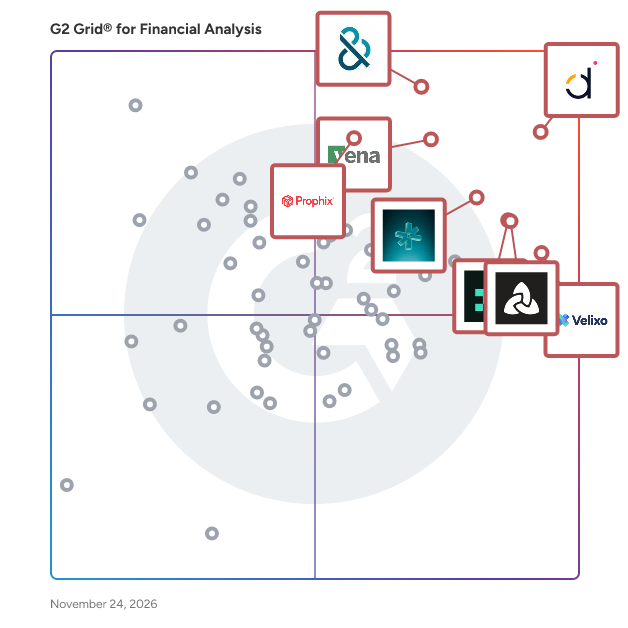
Highlighted products: Datarails, D&B Finance Analytics, Vena, Aleph, Velixo, Fathom, DualEntry, and Prophix Software.
Underlying data: [Grid® JSON](https://www.g2.com/categories/financial-analysis/grids.json?focus%5B%5D=datarails&focus%5B%5D=d-b-finance-analytics&focus%5B%5D=vena&focus%5B%5D=getaleph&focus%5B%5D=velixo&focus%5B%5D=fathom&focus%5B%5D=dualentry&focus%5B%5D=prophix-software)
What is Veltrix? Veltrix helps accountants find where each client needs attention and where the business could improve, without spending hours pulling reports and piecing the story together themselves. Veltrix reviews the client’s books alongside sales, payments, customer data, and files. Its Business Health Check gives you a first look across the business and helps uncover issues, unusual items, strengths, opportunities, and questions worth bringing to the client. Because it looks across more than the ledger, it can surface patterns that may not be visible in QuickBooks or Xero alone. You can then investigate anything it finds, ask your own questions, and trace the answer back to the reports, records, and transactions behind it. Veltrix is designed specifically for financial and business analysis, rather than as another general-purpose AI assistant. It can surface things worth looking at without waiting for you to know exactly what to ask, while keeping the accountant in control of the judgment. Find more ways to help each client. Look for problems, opportunities, and areas where the business could perform better. See beyond the books. Review accounting together with sales, payments, customer data, and client files. Check the work before you use it. Every answer shows the source behind it. Connections are read-only, and Veltrix never changes the books. Keep each client separate. Work in dedicated client workspaces with controlled access. Bring the analysis to the client. Share reports and dashboards, or invite clients to explore the numbers and ask questions themselves. Veltrix does more of the searching and analysis across the client’s data, so you can spend your time deciding what matters, what needs a closer look, and how you can help the client improve the business.
Connect G2 to Claude or ChatGPT for answers grounded in G2's trusted reviews, comparisons, and pricing from real user insights.
XLReporting is an online Reporting and Budgeting Platform to create reports, budgets, and forecasts the way you want. As a controller or accountant, you want to automate your budget process by connecting your data sources and consolidating budget submissions by users. You can control the workflow, manage user permissions, and see the process status and history of changes at all times. - Design your own budget models in a built-in spreadsheet editor that is compatible with Excel. A familiar environment with the power of a database. - Define your own business structure - Import your data with 30+ connectors (QuickBooks, Xero, Sage, Exact, Excel). - Analyze your numbers. Choose from over 30 different visualisations and create automated reports. Publish or share your reports in a dashboard. Connect to your source. Consolidate automatically. Make decisions with confidence.
XO Report brings your Xero numbers into the spreadsheet you already use, so you build your month-end reports once and refresh them instead of exporting from Xero. It is made for finance teams and accountants who report on one Xero company or a whole group. Pull every company side by side: one report can cover several organisations, with each row tagged by company, and formulas such as =XO.BALANCE fill across your entities for a group P&L or Balance Sheet. Your consolidation, intercompany adjustments and currency rates stay in your own workbook. In Excel you get live formulas and ready-made reports and tables. In Google Sheets you insert and refresh the reports and tables from a sidebar. The connection is read-only through Xero's official sign-in. Every plan includes every feature and unlimited users; the price depends on the number of Xero organisations. Key features: - Live formulas in Excel (=XO.BALANCE, =XO.PROFIT, =XO.BUDGET and more) - Reports: Profit & Loss with period comparison, Balance Sheet, Trial Balance, aged receivables and payables, Bank Summary, Budget Summary - Tables: invoices, bills, payments, quotes, contacts, chart of accounts and more - Several Xero organisations in one workbook, each row tagged by company - Google Sheets add-on: reports and tables from a sidebar - Read-only connection, unlimited users on every plan Pricing: from US$9.90 per month, billed monthly, priced by number of Xero organisations; 14-day free trial; 30-day money-back guarantee.
Yupana is controlling software for German small and mid-sized businesses. It turns the monthly business report (BWA) and trial balance (SuSa) that the tax accountant already delivers into a management cockpit: BWA with drill-down to the individual booking, balance sheet according to Section 266 HGB, cash flow statement, 41 key figures with industry benchmarks from Deutsche Bundesbank data, budgeting and liquidity forecasts up to ten years. Yupana also names the next step that currently brings the most for the business. The import reads DATEV BWA and SuSa in all common accountant formats as well as Excel, Simba, Sage, Scopevisio and Agenda exports. Bank statements (CAMT), contracts and software licences (Microsoft 365) can be added to see where the money goes between two reports. One price per company with unlimited users: from 59 EUR per month (billed annually) or 79 EUR monthly, net. Every additional company 19 EUR per month. 14-day free trial with your own figures, no credit card. Hosted in Germany. Operated by frag.hugo Informationssicherheit GmbH, Hamburg.
