# Best Enterprise Information Archiving Software - Page 4

*By [Shalaka Joshi](https://research.g2.com/insights/author/shalaka-joshi)*


Enterprise information archiving (EIA) software is designed to assist in storing a company’s structured and unstructured original historical data. EIA software provides complete archives of business data across the board by incorporating unstructured data (for example, email messages and media files). Data can be stored on premises with local data servers, on cloud servers, or by using a hybrid of the two. These solutions are used throughout a business by any employee since all teams should be archiving their data for, at minimum, auditing purposes. EIA solutions are typically implemented and maintained by a company’s data team, and they can be used by companies of any size.

The main difference between EIA software and [backup software](https://www.g2.com/categories/backup) is that EIA handles the original, historical data as opposed to a copy of that data.

To qualify for inclusion in the Enterprise Information Archiving category, a product must:

- Store both structured and unstructured original, historical data
- Provide data management options for archived data
- Protect access to archived data


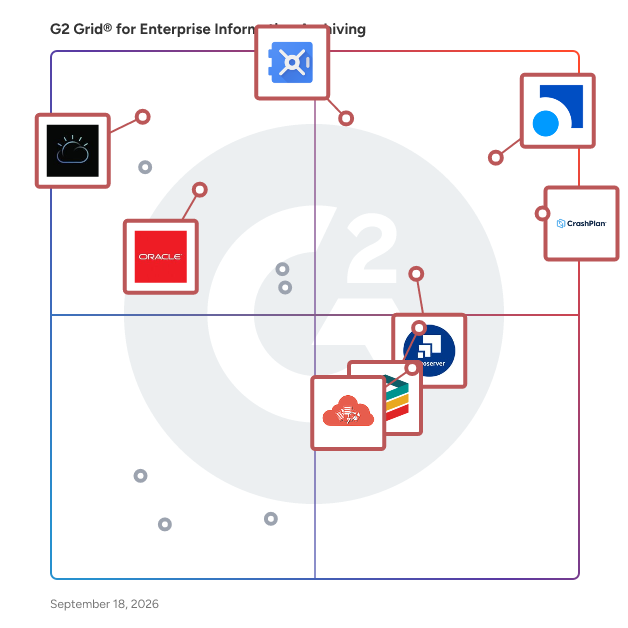
## G2 Grid® for Enterprise Information Archiving Software
![G2 Grid® for Enterprise Information Archiving Software plotting products by satisfaction and market presence](https://www.g2.com/categories/enterprise-information-archiving/grids.png?focus%5B%5D=70696&focus%5B%5D=15132&focus%5B%5D=42813&focus%5B%5D=2324&focus%5B%5D=115886&focus%5B%5D=48081&focus%5B%5D=42814&focus%5B%5D=3078)
Highlighted products: Smarsh, CrashPlan Platform, Google Vault, Cryoserver, Microsoft Teams Analytics Tool, Mimecast Cloud Archive, IBM Information Lifecycle Governance, and Odaseva.
Underlying data: [Grid® JSON](https://www.g2.com/categories/enterprise-information-archiving/grids.json?focus%5B%5D=smarsh-smarsh&amp;focus%5B%5D=crashplan-platform&amp;focus%5B%5D=google-vault&amp;focus%5B%5D=cryoserver&amp;focus%5B%5D=microsoft-teams-analytics-tool&amp;focus%5B%5D=mimecast-mimecast-cloud-archive&amp;focus%5B%5D=ibm-information-lifecycle-governance&amp;focus%5B%5D=odaseva)


## How Many Enterprise Information Archiving Software Products Does G2 Track?
**Total Products under this Category:** 81

### Category Stats (Jul 2026)
- **Average Rating**: 4.31/5 (↑0.01 vs Jun 2026) The average rating of products in this category, based on all submitted ratings
- **Top Trending Product**: MirrorWeb (+3.17%) - Among all products in this category, MirrorWeb recorded the largest rating increase compared to last month
*Last updated: July 19, 2026*


## How Does G2 Rank Enterprise Information Archiving Software Products?

**Why You Can Trust G2's Software Rankings:**

- 30 Analysts and Data Experts
- 900+ Authentic Reviews
- 81+ Products
- Unbiased Rankings

G2's software rankings are built on verified user reviews, rigorous moderation, and a consistent research methodology maintained by a team of analysts and data experts. Each product is measured using the same transparent criteria, with no paid placement or vendor influence. While reviews reflect real user experiences, which can be subjective, they offer valuable insight into how software performs in the hands of professionals. Together, these inputs power the G2 Score, a standardized way to compare tools within every category.


## Which Enterprise Information Archiving Software Is Best for Your Use Case?

- **Leader:** [Smarsh](https://www.g2.com/products/smarsh-smarsh/reviews)
- **Highest Performer:** [Microsoft Teams Analytics Tool](https://www.g2.com/products/microsoft-teams-analytics-tool/reviews)
- **Easiest to Use:** [Cryoserver](https://www.g2.com/products/cryoserver/reviews)
- **Top Trending:** [Global Relay](https://www.g2.com/products/global-relay/reviews)
- **Best Free Software:** [Cryoserver](https://www.g2.com/products/cryoserver/reviews)


---

**Sponsored**

### CyberSentriq

CyberSentriq is an integrated cybersecurity and data protection platform, leveraging solutions from two best-of breed vendors in the MSP space. Partnering with over 3,000 MSPs and protecting over 150,000 SMBs globally, CyberSentriq provides an unmatched combination of proactive AI-driven email and web security, advanced data protection, and operational resilience. The CyberSentriq platform offers: - Data backup &amp; recovery for Microsoft M365 &amp; Entra ID, Azure, Google workspace and more - AI-driven threat intelligence and detection - Advanced email security at both the Mail Exchange (MX) and Integrated Cloud Email Security (ICES) layers. - Security awareness services - Phishing simulation - Email archiving and encryption


[Visit website](https://www.g2.com/external_clickthroughs/record?secure%5Bad_program%5D=ppc&amp;secure%5Bad_slot%5D=category_product_list&amp;secure%5Bcategory_id%5D=1149&amp;secure%5Bchosen_at%5D=2026-07-19T21%3A47%3A59Z&amp;secure%5Bdisplayable_resource_id%5D=1672&amp;secure%5Bdisplayable_resource_type%5D=Category&amp;secure%5Bmedium%5D=sponsored&amp;secure%5Bplacement_reason%5D=neighbor_category&amp;secure%5Bplacement_resource_ids%5D%5B%5D=1672&amp;secure%5Bprioritized%5D=false&amp;secure%5Bproduct_id%5D=150577&amp;secure%5Bresource_id%5D=1149&amp;secure%5Bresource_type%5D=Category&amp;secure%5Bsource_type%5D=category_page&amp;secure%5Bsource_url%5D=https%3A%2F%2Fwww.g2.com%2Fcategories%2Fenterprise-information-archiving%3Fpage%3D4&amp;secure%5Btoken%5D=00887124fb55b678dce164ab22a64f0033dca82abdae308a4d7f542340b50da7&amp;secure%5Burl%5D=https%3A%2F%2Fwww.cybersentriq.com%2Frequest-a-demo%2F%3Futm_source%3DG2%26utm_campaign%3DG2PPC%26utm_medium%3Dppc&amp;secure%5Burl_type%5D=custom_url)

---

## What Are the Top-Rated Enterprise Information Archiving Software Products in 2026?
### 1. [Quest Archive Manager](https://www.g2.com/products/quest-archive-manager/reviews)
Archive Manager is a complete email and messaging content archiving software solution. It enables you to capture, retain, discover and explore your email system using advanced search capabilities. Archive Manager allows a single instance of each message to be captured and granular retention and disposition policies to be applied, ensuring efficient and effective email and message archiving.


**Average Rating:** 3.8/5.0
**Total Reviews:** 2
**How Do G2 Users Rate Quest Archive Manager?**

- **Quality of Support:** 10.0/10 (Category avg: 8.7/10)

**Who Is the Company Behind Quest Archive Manager?**

- **Seller:** [Quest Software](https://www.g2.com/sellers/quest-software)
- **Year Founded:** 1987
- **HQ Location:** Austin, TX
- **Twitter:** @Quest (17,109 Twitter followers)
- **LinkedIn® Page:** https://www.linkedin.com/company/2880/ (3,569 employees on LinkedIn®)
- **Ownership:** NYSE: DGX

**Who Uses This Product?**
- **Company Size:** 100% Mid-Market


#### What Are Recent G2 Reviews of Quest Archive Manager?

**"[Using as a email archive and have mixed experience](https://www.g2.com/survey_responses/quest-archive-manager-review-5053597)"**

**Rating:** 4.0/5.0 stars
*— Shubham T.*

[Read full review](https://www.g2.com/survey_responses/quest-archive-manager-review-5053597)

---


#### What Are G2 Users Discussing About Quest Archive Manager?

- [What is Metalogix Archive Manager?](https://www.g2.com/discussions/what-is-metalogix-archive-manager)
- [How does Archive Manager work?](https://www.g2.com/discussions/how-does-archive-manager-work)
- [What is quest Archive Manager?](https://www.g2.com/discussions/what-is-quest-archive-manager)

### 2. [smartarchivS](https://www.g2.com/products/smartarchivs/reviews)
SmartArchivS is an advanced document management system designed to securely store, organize, and retrieve digital files efficiently. It offers robust search capabilities, automated workflows, and compliance with regulatory standards.


**Who Is the Company Behind smartarchivS?**

- **Seller:** [SBL Knowledge Services](https://www.g2.com/sellers/sbl-knowledge-services)
- **Year Founded:** 2005
- **HQ Location:** Bengaluru, IN
- **LinkedIn® Page:** https://www.linkedin.com/company/sblcorpsolutions (1,695 employees on LinkedIn®)


### 3. [SteelEye](https://www.g2.com/products/steeleye/reviews)
1. Data Consolidation &amp; Archiving SteelEye ingests structured data (trades, orders, market/reference feeds) along with unstructured data (emails, chats, voice recordings, Zoom, WhatsApp, etc.), consolidating everything into a single platform. Data is stored in immutable, tamper-proof format (e.g. WORM) to meet global record‑keeping regulations such as MiFID II, SEC, FINRA, MAR, IIROC, and others. 2. Integrated Surveillance: Communications &amp; Trade The platform natively integrates trade and communications surveillance, enabling comprehensive detection of misconduct, market abuse, and insider trading — all from the same data repository. It includes advanced monitoring for voice, chat, email, calls and translations, enriched with machine‑learning driven alerts, behaviour signals, and Compliance CoPilot triaging to reduce false positives and streamline workflows. 3. Regulatory Reporting &amp; Best Execution SteelEye automates MiFID II and MiFIR transaction reporting, best execution monitoring and Transaction Cost Analysis (TCA), reducing manual effort and improving accuracy in regulatory reporting and governance workflows. 4. Trade Reconstruction and eDiscovery In preparation for regulatory demands (e.g. within 72 hours), the platform supports rapid trade reconstruction and eDiscovery, overlaying trades with communications and reference data, all searchable at a granular level.


**Who Is the Company Behind SteelEye?**

- **Seller:** [SteelEye](https://www.g2.com/sellers/steeleye)
- **Year Founded:** 2017
- **HQ Location:** London, England, United Kingdom
- **LinkedIn® Page:** https://www.linkedin.com/company/steeleye (105 employees on LinkedIn®)


### 4. [storsafe](https://www.g2.com/products/storsafe/reviews)
StorSafe FalconStor® StorSafe® is a data protection optimization solution that can run in the cloud, on physical servers, or on virtual machines. The solution works with any leading backup software on single or mixed heterogeneous operating systems, virtualizing any storage while shrinking backup images with advanced compression and patented block-level deduplication to optimize backup and recovery operations and simplify cloud migrations. The solution utilizes leading security technology to keep data safe in transit and at rest to protect and to help quickly restore against cyber and ransomware attacks. StorGuard StorGuard was designed as a massively scalable, highly available storage virtualization solution. Supporting existing third-party disk arrays, it eliminates data boundaries and vendor lock-in, providing fast and easy data provisioning, mirroring, migration, snapshots, and replication enabling business continuity and easy migration to the cloud, OS upgrades, ransomware protection, and more. StorSight FalconStor StorSight® is an advanced console for managing all instances of StorSafe and StorGuard, whether they are in an on-premises, hybrid cloud or multicloud environment, with a scalable repository to provide predictive analytics, alert rules, reporting, and historical data. FalconStor StorSight manages licenses and provides clear visibility to help optimize data protection, disaster recovery, high availability, and business continuity operations offered through FalconStor StorSafe and FalconStor StorGuard.


**Who Is the Company Behind storsafe?**

- **Seller:** [FalconStor Software](https://www.g2.com/sellers/falconstor-software)
- **Year Founded:** 2000
- **HQ Location:** Austin, Texas
- **Twitter:** @FalconStor (2,090 Twitter followers)
- **LinkedIn® Page:** https://www.linkedin.com/company/12774/ (290 employees on LinkedIn®)
- **Ownership:** OTCMKTS: FALC


### 5. [Vaultastic](https://www.g2.com/products/vaultastic/reviews)
Vaultastic can ingest your business data stored from a wide range of active and legacy data sources into a central, unified cloud repository. Vaultastic’s cross-platform architecture integrates easily with various data sources such as M365, Google Workspace, Google Drive, MS Exchange, Zimbra, SalesForce, SendGrid, and many more. On-demand SaaS tools for fast ediscovery, governance, and flexible data extraction increase the visibility and availability of business-critical data.


**Average Rating:** 4.0/5.0
**Total Reviews:** 4
**How Do G2 Users Rate Vaultastic?**

- **Quality of Support:** 7.8/10 (Category avg: 8.7/10)

**Who Is the Company Behind Vaultastic?**

- **Seller:** [Mithi Software Technologies](https://www.g2.com/sellers/mithi-software-technologies)
- **Year Founded:** 2000
- **HQ Location:** Pune, IN
- **Twitter:** @connect2mithi (58 Twitter followers)
- **LinkedIn® Page:** https://www.linkedin.com/company/mithi (78 employees on LinkedIn®)

**Who Uses This Product?**
- **Company Size:** 50% Mid-Market, 50% Small-Business


#### What Are Recent G2 Reviews of Vaultastic?

**"[Excellant Product with great Services !!](https://www.g2.com/survey_responses/vaultastic-review-5425410)"**

**Rating:** 4.5/5.0 stars
*— Rohit C.*

[Read full review](https://www.g2.com/survey_responses/vaultastic-review-5425410)

---

**"[Vaultastic: A safe copy of your email](https://www.g2.com/survey_responses/vaultastic-review-5398011)"**

**Rating:** 4.5/5.0 stars
*— Shristi S.*

[Read full review](https://www.g2.com/survey_responses/vaultastic-review-5398011)

---


#### What Are G2 Users Discussing About Vaultastic?

- [What is Vaultastic used for?](https://www.g2.com/discussions/what-is-vaultastic-used-for)

### 6. [ZL Platform](https://www.g2.com/products/zl-platform/reviews)
The ZL Platform delivers unified information governance and curation, enabling enterprises to manage unstructured data at scale and leverage it for analytics and artificial intelligence. ZL Platform combines In-Place Data Management with selective archiving, facilitating compliance, privacy, eDiscovery, and records functions. In-Place Data is managed “virtually,” meaning that data for each file and message is extracted from the source servers without being copied into the archive, enhancing performance and minimizing storage requirements. It also offers Single-Instance Storage along with powerful lexical capabilities and complex searches, eliminating data silos and unifying all enterprise unstructured data under one repository. The ZL Platform’s modularized deployment offers the following options, all hosted on one centralized platform that is trusted by 4 of the top 5 U.S. banks, and Fortune 500 companies: • ZL Discovery Manager redefines eDiscovery with a governance-first approach, enabling global searches across the enterprise before custodians have been identified. By consolidating data in one platform, users can produce more relevant findings while reducing total documents reviewed by 40%. Advanced analytics, visualization, and hit term reports support early case assessment, allowing legal teams to identify key facts and streamline legal strategy early on. • ZL Compliance Manager helps enterprises meet regulatory and internal policy requirements. Certified for regulatory standards like SEC 17a-4, GDPR, HIPAA, and more, ZL Compliance Manager enables full compliance workflows with advanced lexical search. Organizations gain control over unstructured data and can confidently meet industry-specific obligations through unified governance and analytics. • ZL Records Manager delivers cradle-to-grave records control, meeting stringent records standards such as DoD 5015.02. Users can apply retention policies via time, event, or metadata triggers. With automated workflows and deep classification options, records managers defensibly reduce ROT (Redundant, Obsolete, and Trivial) data. Legal hold integration delivers synchronized governance across legal, compliance, and records domains. • ZL Enterprise Analytics enables granular analysis of archived and In-Place email, IMs, and files. ZL Enterprise Analytics enables granular analysis of archived and In-Place email, IMs, and files. Users can create flexible workspaces by grouping search results across criteria like users, timeframes, or keywords, allowing for targeted filtering, analysis, and export of data. The module supports rich search capabilities and provides powerful insights into communication patterns and content trends, helping organizations quickly surface relevant information and respond to compliance, legal, or investigative needs. • ZL Enterprise Files Management (EFM) is provided for unstructured file data management. This includes searching files, viewing file content, viewing graphs and charts that represent file data, applying tags to files, managing file record categories and lifecycles via the Disposition Workflow, viewing audit trail data, and more. The module enables centralized control over file shares, Office 365, and SharePoint, offering analytics, retention, and deletion in real time. For more information, please visit www.zlti.com.


**Average Rating:** 3.8/5.0
**Total Reviews:** 2
**How Do G2 Users Rate ZL Platform?**

- **Quality of Support:** 8.3/10 (Category avg: 8.7/10)

**Who Is the Company Behind ZL Platform?**

- **Seller:** [ZL Technologies](https://www.g2.com/sellers/zl-technologies)
- **Year Founded:** 1999
- **HQ Location:** Milpitas, US
- **Twitter:** @zltechnologies (772 Twitter followers)
- **LinkedIn® Page:** https://www.linkedin.com/company/zl-technologies (286 employees on LinkedIn®)

**Who Uses This Product?**
- **Company Size:** 50% Enterprise, 50% Small-Business


#### What Are ZL Platform's Pros and Cons?

**Pros:**

- Analytics (1 reviews)
- Data Analytics (1 reviews)
- Features (1 reviews)
- Search Efficiency (1 reviews)
- Search Functionality (1 reviews)

**Cons:**

- Performance Issues (1 reviews)
- Poor Customer Support (1 reviews)
- Poor Support Services (1 reviews)
- Slow Performance (1 reviews)


### What Do G2 Reviewers Say About ZL Platform?
*AI-generated summary from verified user reviews*

**Pros:**

- Users highly value the **powerful search and analytics capabilities** of ZL Platform for effective data insights.
- Users admire the **powerful search and analytics capabilities** of ZL Platform, especially in social media analysis.
- Users highly value the **powerful search and analytics capabilities** of the ZL Platform, enhancing their data insights.
- Users highly value the **powerful search and analytics capabilities** of ZL Platform for its efficiency in data retrieval.
- Users value the **powerful search and analytics capabilities** of ZL Platform, enhancing their data insights and social media analysis.

**Cons:**

- Users report **performance issues** with ZL Platform, citing concerns about quality and speed of technical support.
- Users express frustration over **poor customer support** , citing slow responses and inadequate assistance from ZL Platform&#39;s support team.
- Users express dissatisfaction with the **poor support services** of ZL Platform, impacting their overall experience and efficiency.
- Users have noted **slow performance** with ZL Platform, which hampers productivity and overall user satisfaction.

#### What Are Recent G2 Reviews of ZL Platform?

**"[Excellent Platform](https://www.g2.com/survey_responses/zl-platform-review-11493841)"**

**Rating:** 5.0/5.0 stars
*— chandra sekhar M.*

[Read full review](https://www.g2.com/survey_responses/zl-platform-review-11493841)

---


#### What Are G2 Users Discussing About ZL Platform?

- [What is ZL Discovery Manager used for?](https://www.g2.com/discussions/what-is-zl-discovery-manager-used-for)


## What Is Enterprise Information Archiving Software?

[IT Management Software](https://www.g2.com/categories/it-management)

## What Software Categories Are Similar to Enterprise Information Archiving Software?

- [Email Archiving Software](https://www.g2.com/categories/email-archiving)
- [Digital Communications Governance Software](https://www.g2.com/categories/digital-communications-governance)


---

## How Do You Choose the Right Enterprise Information Archiving Software?

### What You Should Know About Enterprise Information Archiving Software

### What is Enterprise Information Archiving Software?

Enterprise information archiving (EIA) software is primarily used to store structured and unstructured data of a business. Traditionally, companies primarily focused on storing structured data since it was easier to handle and integrate with various workflows and improved overall data management capabilities. This data would be stored on-premises. However, with the rise of unstructured data, it became increasingly difficult to store huge amounts of data without the right storage environment. This is where EIA steps in. EIA solutions ensure that companies have an option to store their unstructured data, along with other key features along with storage such as data retrieval and data archiving. The data can be stored in the public cloud, private cloud, or even hybrid cloud environments. Data is stored across multiple data centers owned by the likes of AWS, Microsoft Azure, Google Cloud among several others.&amp;nbsp;

The internet boom along with the smartphone generation created a large amount of unstructured data in the form of short message service (SMS), video, chats, social media, and numerous other sources. These forms did not have any particular schema which made it very difficult to store such data files. Enterprises now had a large amount of unstructured data in the form of different content types such as files, website content, call recordings, file sharing, email retention but no proper way to store it. It is important to note that enterprise information archiving deals with the storage of historical, original, real-time data of a company. When original data is replicated and stored, it is called a data backup.

When people view storage, they usually picture servers and storage boxes hidden away in the back of an enterprise—not anymore. With the advent of cloud storage, companies can now store their data off-premises and in the cloud (public, private, or hybrid). What this translates for firms is that there is now a single place to store and save emails, files, instant messaging chats, and content types and ensure a smooth and simplified management process. What this means for customers is that their data is always available, safe, and ready to use as and when required. Data protection is one of the key focuses for EIA solutions.

As the amount of data keeps increasing, every enterprise needs to focus on strict regulatory compliance. Enterprise information archiving software helps firms to manage their information more easily, and ensure that all compliance standards are being met. EIA solutions also focus on retention management, to ensure against data loss issues, security breaches, and data corruption.

### What are the Common Features of Enterprise Information Archiving Software?

The following are some core features within enterprise information archiving solutions that can help users in archiving data securely:

**Archiving:** Archiving is the most important and needed feature that this software provides. As companies expand their footprint across the globe, there is a growing need to have archive storage solutions for these enterprises that will ensure data safety. By using EIA software, companies have a single solution to manage archiving user communications, IMs, emails, videos, content, SMS, and several other data types. In addition, the software ensures emails of employees/externals are compliant. Email retention forms the core for several businesses as well.

**Performance and accessibility:** Users need access to their content. Ideally this data/content type needs to be found quickly without any possible lags. EIA software ensures that unstructured and structured data is not just continually stored, but can also be retrieved as per the user requirements. This helps increase performance efficiency, user satisfaction, and ensures that teams have access to quick, clean, and original real-time data. Especially when the users can cross tens of thousands of employees, the EIA software must ensure top-notch performance.

**Electronic discovery:** Also known as eDiscovery, this feature of EIA products focuses on delivering content on request. Content is requested across different teams such as legal firms, financial audit teams, and others. eDiscovery focuses on identifying, gathering, and presenting electronically stored information (such as enterprise information and archive storage) for legal proceedings. eDiscovery cannot be taken lightly and is one of the main reasons for the birth of enterprise information archive storage. It has significant ramifications as to how enterprises store and organize their data. For any enterprise, there will be litigation matters, lawsuits, or types of legal action where eDiscovery will play a major role. eDiscovery has a huge impact on content archival, content searching, storage system management, and even risk management.

**Data retention:** Another key benefit of EIA products is data retention. A data retention policy is defined as the policy that controls how the data is being saved for regulatory purposes. Companies can have simple or complex data retention policies because these policies would clarify how data is stored. Other information such as what data can be stored, or formatted, or even what kind of system holds this data is provided with data retention. EIA software has the feature of data retention since it works so closely with data.

**Automation:** Some enterprise archive solutions have built-in automation features to increase productivity and efficiency. Tasks such as setting timelines after which data needs to be archived, sending into the correct location, the need to create replicas, and several other features can be automated. Bringing in the element of automation into EIA software will help reduce any user errors and ensure all the data is compliant.

### What are the Benefits of Enterprise Information Archiving Software?

**Compliance with civil procedures and litigations:** With data being available over numerous geographies, the law of the land will apply to several enterprises that wish to do business there. It gets extremely difficult to manage large amounts of data spread across different geographies that have different data retention laws, and this is where EIA solutions come in. EIA solutions ensure that consumer data is stored safely and securely and can only be accessed as per the users defined. It ensures that the laws are being followed and therefore the company can continue operations knowing their archived data is safe, secure, and compliant.

**Increased operational efficiency:** One of the key benefits of the software is that it increases operational efficiency across the entire organization. Having message and content compliance makes it easier for eDiscovery, data retention, regulatory compliance, and other statutory processes. Since all the original, real-time data is archived and can be retrieved via the software, it focuses on improving efficiency significantly. Users can have a single point source where they will be able to access their content and data that is archived. In addition, the software also ensures user access—which means making sure the original, historical data does not fall into the wrong hands.

**Better data control:** EIA software has the added benefit of policy controls. What this means is that the user of the software can ideally control which messages need to be live, which messages need to be archived, and for how long they need to be archived before automatic deletion.

**Relevance classification:** Storing data in the cloud does not mean dumping all data into a “cold storage” and forgetting about it. Rather, some EIA software have additional benefits such as message relevance classification. The benefit of relevance classification is that it allows users to archive their data as per their preference and relevance, and therefore these are extremely helpful in litigation matters, management requests, case analysis, and several other situations that might arise.

### Who Uses Enterprise Information Archiving Software?

The end users of the enterprise information archiving solution will depend on the functionality that is required—whether it is IT-specific, legal, audit purposes, among several others.

**IT teams:** The IT team of any organization will be the key users of this software. The IT team will use the software for several purposes which include storage and retrieval of files, content, email, and chats. As the requests from different functions in the organization come to the IT team to process, they will deep dive into the software and ensure that all files are not just readily accessible, but also safe and secure.

**Legal teams:** One of the biggest users of EIA solutions are company legal teams. Legal teams will focus on compliance and statutory rules for the company and therefore the team would use the software to answer any requests that might come up.

**Employees:** Employees can also use the software as per their access since they would need to have access to their content on their mobile devices. Being able to access archived emails and chats as required is a huge help for employees across any organization.

**Senior leadership teams (SLT):** Since this software works closely with confidential company data, senior leaders and team members can use this software to identify who can or cannot have access to different sections of the data. SLTs will also be able to convey to the rest of the organization in regards to information security to define it for company employees.

### What are the Alternatives to Enterprise Information Archiving Software?

Alternatives to enterprise information archiving solutions can replace this type of software, either partially or completely:

[Email archiving software](https://www.g2.com/categories/email-archiving): Email archiving is a key part of the enterprise information archiving, focusing specifically on emails. This software ensures that complete email transactions are archived carefully. Email archiving software primarily focuses on compressing and storing emails older than a predetermined date. The aim of this is to reference these emails at a later date as and when required. One of the main benefits is that it does not need much storage since it is specifically for emails. Tons of conversations within an organization happen primarily over email—employee conversations, sales conversations, company conversations, among others. Email history can be preserved. For companies that only want to archive their emails, this is a great option over enterprise information archiving.

[Online backup software:](https://www.g2.com/categories/online-backup) Backup and archiving are different in terms of the data being stored. Backup is a very secure method to store data over the internet. The biggest advantage of this software over EIA solutions is that the former deals with copies of the data and can be replicated to ensure complete backup. EIA however, deals with original, real-time, and historical data, and if lost could be very hard to recover.

[SaaS backup software](https://www.g2.com/categories/saas-backup): SaaS backup helps to back up data within the SaaS solution itself. These tools work with CRMs, email, and instant messaging to backup any type of SaaS application. This software too primarily aims at ensuring no data loss and keeping the data secure in case of any business interruption or calamity.

### Challenges with Enterprise Information Archiving Software

Enterprise information archiving solutions can come with their own set of challenges.&amp;nbsp;

**Growing number of data types:** Data is continuously growing and new formats are being added to the data world quite frequently. As the types of data increase, it becomes harder for enterprises to manage and control all this data. In addition, the EIA software may not be well equipped to handle new types of data which could be a big challenge for software usage. **&amp;nbsp;**

**Storage capacity:** In unstructured data, it’s important to consider millions of data points that could be created even in a single day. Storing such large amounts of data is no easy task and can potentially be a huge challenge for the software. The sheer volume of the data of enterprises from daily activities, numerous emails, constant slacks, and IM pings could cause the software to slow down and have archival issues. It is necessary to ensure that the backup or hardware solution/cloud offering can handle such enormous amounts of original data.

**Employee resistance:** Knowing that every single ping, IM, email, message, video content, and text message is being stored is quite scary. Companies can expect to face some backlash from their employees who might agree to store some data, but not all of it. The software might not have a general acceptance across the company since privacy lines might be crossed, and hence this could pose a challenge to software implementation.

**Archiving speed:** When data is being stored in its format over the cloud (which would need good internet connectivity), the huge volume of data could easily slow down the software causing severe lags. Software crashes could even cause loss of data, which defeats the purpose of installing this software. Archiving data is a time-intensive process, and IT teams would need to work closely to set standard procedures and settings to ensure that this is done continuously without any faults.

### How to Buy Enterprise Information Archiving Software

#### Requirements Gathering (RFI/RFP) for Enterprise Information Archiving Software

When choosing an enterprise information archiving solution, the first and key thing to focus on is to ensure that the software helps manage information archives and improves productivity and retention support. These are the basic and most important features that almost all products need to have. Some of the important questions to be asked as a buyer include:

- Is cloud storage safe and secure? Does it have encryption capabilities?
- Are copies of my data available, and are these replicates being used as a backup of my data?
- Can my team and all employees (with user access) to the software access data archives when required?
- Is there support provided by the vendor? What are the package options available?
- Does the software ensure that my data is compliant with the laws of the land, and follows statutory rules and regulations?
- Features vs affordability—which one is more important for my organization?
- Is the enterprise information archiving software that I am choosing compatible with my other systems?

Answering these questions might be difficult, however, they provide a strong base to build the long list. Customers can use reviews here at G2.com as a guide to move forward with the selection of enterprise information archiving software.

#### Compare Enterprise Information Archiving Software Products

**Create a long list**

In this step, buyers should keep their options open to consider the full range of products. Buyers have the freedom to explore numerous offerings that the EIA software market has. In addition, this is the main step to evaluate the answers to the above questions. The long list can be made much more concise and smaller by addressing the questions above.

**Create a short list**

Buyers can make much more granular comparisons on this step. In addition to this, buyers can use the G2 reviews to further narrow this list down. G2’s comparison feature where buyers can compare between two products is a useful tool to create the short list.

**Conduct demos**

Once the list has been reduced to a couple of vendors, buyers may begin to request a demo. During the demo, buyers should seek out information related to their non-negotiable terms. This is the best stage where the buyer can delve more deeply into understanding how secure their archived information will be, the various features that the software provides, different complaint requests, and security concerns can be addressed here as well. Other queries such as after-service support, staff training, and other additional features can be asked here.

#### Selection of Enterprise Information Archiving Software

**Choose a selection team**

Choosing the right team to work together to decide the best software is a critical part of the process. This team will be in charge of overseeing the entire process—from selection to implementation, as well as after implementation feedback. The team should include a mix of different personas who have the required skills, interests, and time. Some roles include IT admins (who would work on the software), cloud engineers (who would assess the cloud storage requirements), legal team executives, and key leads from different teams.

**Negotiation**

Enquiring about pricing is the key decision that could make or break a deal. Identifying how the pricing is done is a good start. For example, it can focus on the number of mailboxes or email data volume, the number of IMs being sent, or the number of users using the IM. Having a good understanding of how pricing would work is key for negotiation. A buyer can choose to negotiate to trim costs. The buyer needs to note that if in the future there is a requirement for scaling cloud archive storage as the company grows, there would be additional costs. Keeping such factors in mind will help the buyer put forward better negotiation tactics and ensure the features that matter are part of the deal.

**Final decision**

Once all the steps are complete, the final decision is made weighing all factors and scenarios. Having a trial run of the software is a good place to start. A small group of IT admins can use the software to see if there are viable benefits and pass on their views to the team making the final decision.


